Flutter 框架跨平台鸿蒙开发 ——三棵树的协同工作机制
/ 自定义Widget - 演示三棵树协作@override@override@override// 绘制背景圆// 绘制进度圆false,@override= progress;// 使用示例@override});});
·
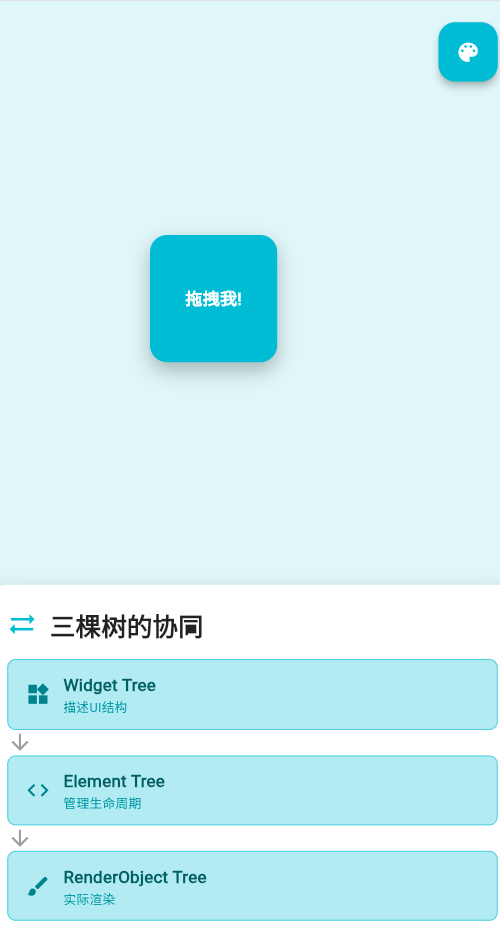
一、三棵树的层次关系
Flutter的渲染系统由三棵树组成,它们紧密协作实现高效的UI渲染:
三棵树的职责
| 树 | 职责 | 特点 |
|---|---|---|
| Widget Tree | 描述UI结构 | 不可变、轻量级、频繁重建 |
| Element Tree | 管理生命周期 | 持有Widget、连接RenderObject、处理更新 |
| RenderObject Tree | 实际渲染 | 负责布局、绘制、命中测试 |
Widget到RenderObject的转换流程
1. Widget Tree创建
// 用户代码
Widget build(BuildContext context) {
return Container(
padding: EdgeInsets.all(16),
child: Text('Hello, Flutter!'),
);
}
2. Element Tree生成
// 框架自动处理
Container Widget
  → RenderObjectElement (Container)
    → createRenderObject()
    → RenderPadding

Text Widget
  → RenderObjectElement (Text)
    → createRenderObject()
    → RenderParagraph
3. RenderObject Tree构建
三棵树的更新流程
1. 更新触发
// 用户调用setState()
setState(() {
  counter++;
});
2. 更新传播
3. Diff优化
// Widget Diff示例
class DiffExample extends StatefulWidget {
_DiffExampleState createState() => _DiffExampleState();
}
class _DiffExampleState extends State<DiffExample> {
final List<String> _items = ['Item 1', 'Item 2', 'Item 3'];
void _updateItem() {
setState(() {
// 只修改一个元素
_items[1] = 'Item 2 (Updated)';
});
}
Widget build(BuildContext context) {
return Column(
children: [
ElevatedButton(
onPressed: _updateItem,
child: Text('Update Item 2'),
),
...List.generate(_items.length, (index) {
return ListTile(
key: ValueKey(_items[index]), // 使用Key优化Diff
title: Text(_items[index]),
);
}),
],
);
}
}
三棵树的协同示例
1. 简单计数器
// Widget Tree - 描述UI
class CounterApp extends StatefulWidget {
_CounterAppState createState() => _CounterAppState();
}
// State - 管理状态
class _CounterAppState extends State<CounterApp> {
int _counter = 0;
void _increment() {
setState(() {
_counter++;
});
}
// Widget Tree重建
Widget build(BuildContext context) {
return Scaffold(
appBar: AppBar(title: Text('Counter')),
body: Center(
child: Column(
mainAxisAlignment: MainAxisAlignment.center,
children: [
Text('Counter: $_counter'),
ElevatedButton(
onPressed: _increment,
child: Text('Increment'),
),
],
),
),
);
}
}
2. 自定义Widget演示
// 自定义Widget - 演示三棵树协作
class CustomProgress extends StatefulWidget {
final double progress;
const CustomProgress({required this.progress});
_CustomProgressState createState() => _CustomProgressState();
}
class _CustomProgressState extends State<CustomProgress> {
Widget build(BuildContext context) {
return CustomPaint(
painter: _ProgressPainter(widget.progress),
size: Size(200, 200),
);
}
}
class _ProgressPainter extends CustomPainter {
final double progress;
_ProgressPainter(this.progress);
void paint(Canvas canvas, Size size) {
final center = Offset(size.width / 2, size.height / 2);
final radius = math.min(size.width, size.height) / 2 - 10;
// 绘制背景圆
final backgroundPaint = Paint()
..color = Colors.grey[300]!
..strokeWidth = 10
..style = PaintingStyle.stroke;
canvas.drawCircle(center, radius, backgroundPaint);
// 绘制进度圆
final progressPaint = Paint()
..color = Colors.blue
..strokeWidth = 10
..style = PaintingStyle.stroke
..strokeCap = StrokeCap.round;
final sweepAngle = 2 * math.pi * progress;
canvas.drawArc(
Rect.fromCircle(center: center, radius: radius),
-math.pi / 2,
sweepAngle,
false,
progressPaint,
);
}
bool shouldRepaint(_ProgressPainter oldDelegate) {
return oldDelegate.progress != progress;
}
}
// 使用示例
class ProgressDemo extends StatefulWidget {
_ProgressDemoState createState() => _ProgressDemoState();
}
class _ProgressDemoState extends State<ProgressDemo> {
double _progress = 0.0;
void _startProgress() {
const duration = Duration(seconds: 3);
const totalSteps = 60;
const stepDuration = duration ~/ totalSteps;
int currentStep = 0;
Timer.periodic(stepDuration, (timer) {
setState(() {
_progress = (currentStep + 1) / totalSteps;
currentStep++;
if (currentStep >= totalSteps) {
timer.cancel();
}
});
});
}
Widget build(BuildContext context) {
return Column(
mainAxisAlignment: MainAxisAlignment.center,
children: [
CustomProgress(progress: _progress),
SizedBox(height: 20),
ElevatedButton(
onPressed: _startProgress,
child: Text('Start Progress'),
),
],
);
}
}
3. 复杂交互示例
// 可拖拽的方块 - 演示三棵树的完整协作
class DraggableSquare extends StatefulWidget {
_DraggableSquareState createState() => _DraggableSquareState();
}
class _DraggableSquareState extends State<DraggableSquare> {
Offset _position = Offset(100, 100);
Size _size = Size(100, 100);
Color _color = Colors.blue;
void _updatePosition(Offset newPosition) {
setState(() {
_position = newPosition;
});
}
void _changeColor() {
setState(() {
_color = _color == Colors.blue ? Colors.red : Colors.blue;
});
}
Widget build(BuildContext context) {
return Stack(
children: [
Positioned(
left: _position.dx,
top: _position.dy,
child: GestureDetector(
onPanUpdate: (details) {
_updatePosition(_position + details.delta);
},
child: Container(
width: _size.width,
height: _size.height,
decoration: BoxDecoration(
color: _color,
borderRadius: BorderRadius.circular(10),
boxShadow: [
BoxShadow(
color: Colors.black26,
blurRadius: 10,
offset: Offset(0, 5),
),
],
),
child: Center(
child: Text(
'Drag me!',
style: TextStyle(color: Colors.white),
),
),
),
),
),
Positioned(
bottom: 20,
right: 20,
child: ElevatedButton(
onPressed: _changeColor,
child: Text('Change Color'),
),
),
],
);
}
}
三棵树协作的性能优化
1. 减少重建范围
// 不好 - 整个Column都重建
class BadPerformance extends StatefulWidget {
_BadPerformanceState createState() => _BadPerformanceState();
}
class _BadPerformanceState extends State<BadPerformance> {
int counter = 0;
Widget build(BuildContext context) {
return Column(
children: [
Text('Counter: $counter'), // 重建
HeavyWidget(), // 重建 - 浪费性能
],
);
}
}
// 好 - 只重建需要更新的部分
class GoodPerformance extends StatefulWidget {
_GoodPerformanceState createState() => _GoodPerformanceState();
}
class _GoodPerformanceState extends State<GoodPerformance> {
int counter = 0;
Widget build(BuildContext context) {
return Column(
children: [
CounterDisplay(counter: counter), // const
const HeavyWidget(), // const - 不重建
],
);
}
}
class CounterDisplay extends StatelessWidget {
final int counter;
const CounterDisplay({required this.counter});
Widget build(BuildContext context) {
return Text('Counter: $counter');
}
}
2. 使用const Widget
// 使用const避免不必要的重建
class ConstOptimized extends StatelessWidget {
Widget build(BuildContext context) {
return Column(
children: const [
Text('Static Text'), // const - 不重建
Icon(Icons.star), // const - 不重建
SizedBox(height: 16), // const - 不重建
],
);
}
}
3. RepaintBoundary优化
// 使用RepaintBoundary隔离重绘区域
class RepaintBoundaryOptimized extends StatelessWidget {
Widget build(BuildContext context) {
return Column(
children: [
RepaintBoundary(
child: ExpensiveWidget(), // 独立重绘
),
Text('Other content'), // 不受ExpensiveWidget影响
],
);
}
}
三棵树协作的调试
1. 性能分析
// 使用Flutter DevTools分析三棵树
// 1. 运行应用
// 2. 打开Flutter DevTools
// 3. 查看Performance、Widget Tree、Timeline
2. 打印树结构
// 打印Widget Tree
debugDumpApp();

// 打印Element Tree
debugDumpRenderTree();

// 打印RenderObject Tree
debugDumpLayerTree();
3. 标记渲染帧
// 在Debug模式下标记渲染帧
class FrameMarker extends StatelessWidget {
Widget build(BuildContext context) {
// 标记当前帧
debugDumpApp();
return YourWidget();
}
}
三棵树在HarmonyOS上的适配
1. 平台特定优化
// HarmonyOS特定的渲染优化
class HarmonyOSOptimized extends StatelessWidget {
Widget build(BuildContext context) {
final bool isHarmonyOS = Theme.of(context).platform == TargetPlatform.android;
if (isHarmonyOS) {
// HarmonyOS优化
return const HarmonyOSSpecificWidget();
} else {
// 通用实现
return const GenericWidget();
}
}
}
2. 屏幕适配
// 适配不同屏幕尺寸
class ResponsiveWidget extends StatelessWidget {
Widget build(BuildContext context) {
final double screenWidth = MediaQuery.of(context).size.width;
if (screenWidth > 600) {
return WideLayout();
} else {
return NarrowLayout();
}
}
}
欢迎加入开源鸿蒙跨平台社区:https://openharmonycrossplatform.csdn.net

腾讯云面向开发者汇聚海量精品云计算使用和开发经验,营造开放的云计算技术生态圈。
更多推荐
 20
20 0
0- 0



 已为社区贡献8条内容

所有评论(0)