Flutter框架开发鸿蒙项目——Image Widget占位符动画效果
精心设计的动画效果能够让等待过程变得更加愉悦,提升整体的用户体验。通过合理选择动画类型、控制动画时长和保持性能流畅,可以创建出生动有趣的占位符效果。记住要平衡视觉效果和性能,在吸引用户注意力的同时避免过度设计。
·
Image Widget占位符动画效果
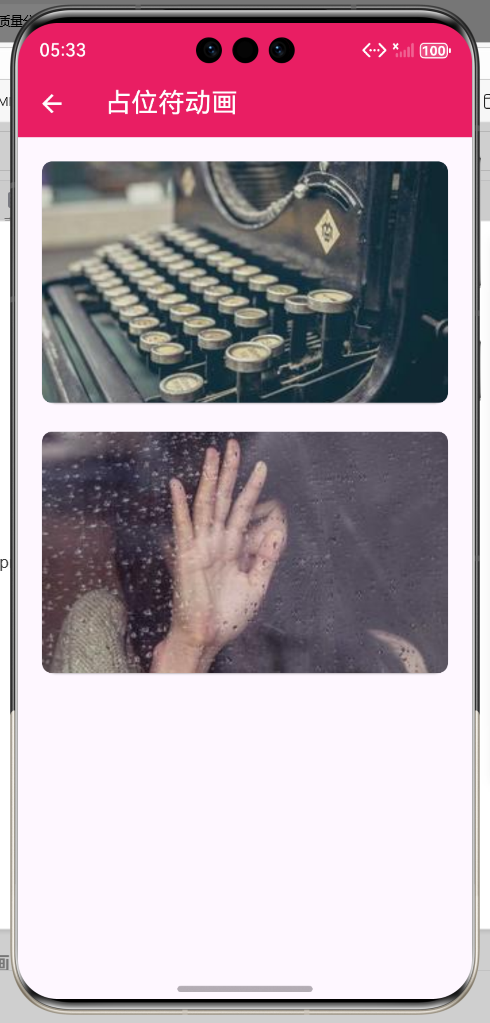
概述
为占位符添加动画效果可以增强用户的等待体验,使加载过程更加生动有趣。动画效果不仅能够吸引用户注意力,还能缓解等待的焦虑感,提升整体的用户体验。
占位符动画类型
| 动画类型 | 效果 | 适用场景 | 实现难度 |
|---|---|---|---|
| 脉冲动画 | 背景色周期性变化 | 简单占位符 | 简单 |
| 骨架屏动画 | 模拟内容加载效果 | 列表、卡片 | 中等 |
| 旋转加载器 | 经典的加载指示器 | 通用场景 | 简单 |
| 进度条动画 | 显示加载进度 | 需要进度的场景 | 中等 |
| 弹跳动画 | 图标或元素的跳动 | 品牌化场景 | 简单 |
| 淡入淡出 | 平滑的切换效果 | 渐进式加载 | 简单 |
| 缩放动画 | 图标缩放效果 | 强调状态 | 简单 |
| 旋转渐变 | 渐变色旋转效果 | 现代化设计 | 中等 |
基础动画实现
1. 脉冲动画
class PulsePlaceholder extends StatefulWidget {
final Widget child;
const PulsePlaceholder({super.key, required this.child});
State<PulsePlaceholder> createState() => _PulsePlaceholderState();
}
class _PulsePlaceholderState extends State<PulsePlaceholder>
with SingleTickerProviderStateMixin {
late AnimationController _controller;
late Animation<double> _animation;
void initState() {
super.initState();
_controller = AnimationController(
duration: const Duration(seconds: 2),
vsync: this,
)..repeat();
_animation = Tween<double>(begin: 0.3, end: 1.0).animate(
CurvedAnimation(parent: _controller, curve: Curves.easeInOut),
);
}
void dispose() {
_controller.dispose();
super.dispose();
}
Widget build(BuildContext context) {
return AnimatedBuilder(
animation: _animation,
builder: (context, child) {
return Container(
color: Colors.grey.shade200.withOpacity(_animation.value),
child: child,
);
},
child: widget.child,
);
}
}
2. 脉冲图标动画
class PulseIconPlaceholder extends StatefulWidget {
final IconData icon;
final double size;
final Color? color;
const PulseIconPlaceholder({
super.key,
required this.icon,
this.size = 64,
this.color,
});
State<PulseIconPlaceholder> createState() => _PulseIconPlaceholderState();
}
class _PulseIconPlaceholderState extends State<PulseIconPlaceholder>
with SingleTickerProviderStateMixin {
late AnimationController _controller;
late Animation<double> _scaleAnimation;
late Animation<double> _opacityAnimation;
void initState() {
super.initState();
_controller = AnimationController(
duration: const Duration(milliseconds: 1500),
vsync: this,
)..repeat(reverse: true);
_scaleAnimation = Tween<double>(begin: 0.8, end: 1.2).animate(
CurvedAnimation(parent: _controller, curve: Curves.easeInOut),
);
_opacityAnimation = Tween<double>(begin: 0.3, end: 1.0).animate(
CurvedAnimation(parent: _controller, curve: Curves.easeInOut),
);
}
void dispose() {
_controller.dispose();
super.dispose();
}
Widget build(BuildContext context) {
return AnimatedBuilder(
animation: _controller,
builder: (context, child) {
return Transform.scale(
scale: _scaleAnimation.value,
child: Opacity(
opacity: _opacityAnimation.value,
child: Icon(
widget.icon,
size: widget.size,
color: widget.color ?? Colors.grey.shade400,
),
),
);
},
);
}
}
3. 骨架屏动画
class SkeletonPlaceholder extends StatefulWidget {
final Widget child;
const SkeletonPlaceholder({super.key, required this.child});
State<SkeletonPlaceholder> createState() => _SkeletonPlaceholderState();
}
class _SkeletonPlaceholderState extends State<SkeletonPlaceholder>
with SingleTickerProviderStateMixin {
late AnimationController _controller;
late Animation<double> _animation;
void initState() {
super.initState();
_controller = AnimationController(
duration: const Duration(milliseconds: 1500),
vsync: this,
)..repeat();
_animation = Tween<double>(begin: -2, end: 2).animate(
CurvedAnimation(parent: _controller, curve: Curves.easeInOut),
);
}
void dispose() {
_controller.dispose();
super.dispose();
}
Widget build(BuildContext context) {
return AnimatedBuilder(
animation: _animation,
builder: (context, child) {
return ShaderMask(
shaderCallback: (bounds) {
return LinearGradient(
colors: [
Colors.grey.shade100,
Colors.grey.shade200,
Colors.grey.shade100,
],
begin: Alignment.centerLeft,
end: Alignment.centerRight,
stops: const [
0.0,
_animation.value.abs() / 2,
1.0,
],
).createShader(bounds);
},
child: widget.child,
);
},
);
}
}
4. 旋转加载器动画
class RotatingLoader extends StatefulWidget {
final double size;
final Color color;
final double strokeWidth;
const RotatingLoader({
super.key,
this.size = 48,
this.color = Colors.blue,
this.strokeWidth = 4,
});
State<RotatingLoader> createState() => _RotatingLoaderState();
}
class _RotatingLoaderState extends State<RotatingLoader>
with SingleTickerProviderStateMixin {
late AnimationController _controller;
void initState() {
super.initState();
_controller = AnimationController(
duration: const Duration(milliseconds: 1000),
vsync: this,
)..repeat();
}
void dispose() {
_controller.dispose();
super.dispose();
}
Widget build(BuildContext context) {
return SizedBox(
width: widget.size,
height: widget.size,
child: AnimatedBuilder(
animation: _controller,
builder: (context, child) {
return Transform.rotate(
angle: _controller.value * 2 * pi,
child: CustomPaint(
size: Size(widget.size, widget.size),
painter: _CircleLoaderPainter(
color: widget.color,
strokeWidth: widget.strokeWidth,
progress: _controller.value,
),
),
);
},
),
);
}
}
class _CircleLoaderPainter extends CustomPainter {
final Color color;
final double strokeWidth;
final double progress;
_CircleLoaderPainter({
required this.color,
required this.strokeWidth,
required this.progress,
});
void paint(Canvas canvas, Size size) {
final center = Offset(size.width / 2, size.height / 2);
final radius = (size.width - strokeWidth) / 2;
// 背景圆环
final backgroundPaint = Paint()
..color = color.withOpacity(0.2)
..style = PaintingStyle.stroke
..strokeWidth = strokeWidth;
canvas.drawCircle(center, radius, backgroundPaint);
// 进度圆弧
final progressPaint = Paint()
..color = color
..style = PaintingStyle.stroke
..strokeWidth = strokeWidth
..strokeCap = StrokeCap.round;
final startAngle = -pi / 2;
final sweepAngle = 2 * pi * progress;
final rect = Rect.fromCircle(center: center, radius: radius);
canvas.drawArc(rect, startAngle, sweepAngle, false, progressPaint);
}
bool shouldRepaint(_CircleLoaderPainter oldDelegate) {
return oldDelegate.progress != progress;
}
}
5. 渐变旋转动画
class GradientRotatingPlaceholder extends StatefulWidget {
final double size;
final List<Color> colors;
const GradientRotatingPlaceholder({
super.key,
this.size = 200,
this.colors = const [
Colors.blue,
Colors.purple,
Colors.pink,
],
});
State<GradientRotatingPlaceholder> createState() =>
_GradientRotatingPlaceholderState();
}
class _GradientRotatingPlaceholderState
extends State<GradientRotatingPlaceholder>
with SingleTickerProviderStateMixin {
late AnimationController _controller;
late Animation<double> _animation;
void initState() {
super.initState();
_controller = AnimationController(
duration: const Duration(seconds: 3),
vsync: this,
)..repeat();
_animation = Tween<double>(begin: 0, end: 2 * pi).animate(_controller);
}
void dispose() {
_controller.dispose();
super.dispose();
}
Widget build(BuildContext context) {
return AnimatedBuilder(
animation: _animation,
builder: (context, child) {
return Transform.rotate(
angle: _animation.value,
child: Container(
width: widget.size,
height: widget.size,
decoration: BoxDecoration(
gradient: LinearGradient(
colors: widget.colors,
begin: Alignment.centerLeft,
end: Alignment.centerRight,
),
shape: BoxShape.circle,
),
child: Center(
child: Icon(
Icons.image,
size: widget.size * 0.3,
color: Colors.white54,
),
),
),
);
},
);
}
}
6. 波浪动画
class WavePlaceholder extends StatefulWidget {
final double height;
final Color color;
const WavePlaceholder({
super.key,
this.height = 200,
this.color = Colors.blue,
});
State<WavePlaceholder> createState() => _WavePlaceholderState();
}
class _WavePlaceholderState extends State<WavePlaceholder>
with SingleTickerProviderStateMixin {
late AnimationController _controller;
late Animation<double> _animation;
void initState() {
super.initState();
_controller = AnimationController(
duration: const Duration(milliseconds: 2000),
vsync: this,
)..repeat();
_animation = Tween<double>(begin: 0, end: 2 * pi).animate(_controller);
}
void dispose() {
_controller.dispose();
super.dispose();
}
Widget build(BuildContext context) {
return AnimatedBuilder(
animation: _animation,
builder: (context, child) {
return CustomPaint(
size: Size(double.infinity, widget.height),
painter: _WavePainter(
color: widget.color,
animationValue: _animation.value,
),
);
},
);
}
}
class _WavePainter extends CustomPainter {
final Color color;
final double animationValue;
_WavePainter({
required this.color,
required this.animationValue,
});
void paint(Canvas canvas, Size size) {
final paint = Paint()
..color = color.withOpacity(0.3)
..style = PaintingStyle.fill;
final path = Path();
for (int i = 0; i < 3; i++) {
final waveHeight = 20.0 * (i + 1);
final waveLength = size.width;
final phase = animationValue + i * 0.5;
path.reset();
path.moveTo(0, size.height);
for (double x = 0; x <= waveLength; x += 5) {
final y = size.height / 2 +
sin((x / waveLength) * 2 * pi + phase) * waveHeight;
path.lineTo(x, y);
}
path.lineTo(size.width, size.height);
path.lineTo(0, size.height);
path.close();
canvas.drawPath(path, paint);
}
}
bool shouldRepaint(_WavePainter oldDelegate) {
return oldDelegate.animationValue != animationValue;
}
}
综合应用
7. 图片加载动画组件
class ImageWithAnimatedPlaceholder extends StatelessWidget {
final String imageUrl;
final PlaceholderAnimationType animationType;
final double height;
final double? width;
const ImageWithAnimatedPlaceholder({
super.key,
required this.imageUrl,
this.animationType = PlaceholderAnimationType.pulse,
this.height = 200,
this.width,
});
Widget build(BuildContext context) {
return Container(
height: height,
width: width,
child: Image.network(
imageUrl,
loadingBuilder: (context, child, loadingProgress) {
if (loadingProgress == null) {
return ClipRRect(
borderRadius: BorderRadius.circular(8),
child: child,
);
}
return _buildAnimatedPlaceholder();
},
errorBuilder: (context, error, stackTrace) {
return _buildErrorWidget();
},
fit: BoxFit.cover,
),
);
}
Widget _buildAnimatedPlaceholder() {
switch (animationType) {
case PlaceholderAnimationType.pulse:
return PulsePlaceholder(
child: Center(
child: CircularProgressIndicator(),
),
);
case PlaceholderAnimationType.pulseIcon:
return PulseIconPlaceholder(icon: Icons.image);
case PlaceholderAnimationType.skeleton:
return SkeletonPlaceholder(
child: _buildSkeletonContent(),
);
case PlaceholderAnimationType.rotating:
return Container(
color: Colors.grey.shade200,
child: Center(
child: RotatingLoader(),
),
);
case PlaceholderAnimationType.gradient:
return Container(
color: Colors.grey.shade200,
child: Center(
child: GradientRotatingPlaceholder(size: 100),
),
);
case PlaceholderAnimationType.wave:
return WavePlaceholder(height: height);
}
}
Widget _buildSkeletonContent() {
return Column(
crossAxisAlignment: CrossAxisAlignment.start,
children: [
Expanded(
child: Container(
margin: const EdgeInsets.all(16),
decoration: BoxDecoration(
color: Colors.grey.shade200,
borderRadius: BorderRadius.circular(8),
),
),
),
Padding(
padding: const EdgeInsets.symmetric(horizontal: 16),
child: Container(
height: 16,
width: double.infinity,
decoration: BoxDecoration(
color: Colors.grey.shade200,
borderRadius: BorderRadius.circular(4),
),
),
),
const SizedBox(height: 8),
Padding(
padding: const EdgeInsets.symmetric(horizontal: 16),
child: Container(
height: 16,
width: double.infinity * 0.6,
decoration: BoxDecoration(
color: Colors.grey.shade200,
borderRadius: BorderRadius.circular(4),
),
),
),
],
);
}
Widget _buildErrorWidget() {
return Container(
color: Colors.grey.shade300,
child: const Center(
child: Column(
mainAxisAlignment: MainAxisAlignment.center,
children: [
Icon(Icons.error_outline, size: 48, color: Colors.grey),
SizedBox(height: 8),
Text('加载失败', style: TextStyle(color: Colors.grey)),
],
),
),
);
}
}
enum PlaceholderAnimationType {
pulse,
pulseIcon,
skeleton,
rotating,
gradient,
wave,
}
使用示例
class MyPage extends StatelessWidget {
Widget build(BuildContext context) {
return ListView(
padding: const EdgeInsets.all(16),
children: [
const Text('脉冲动画', style: TextStyle(fontSize: 18)),
const SizedBox(height: 8),
ImageWithAnimatedPlaceholder(
imageUrl: 'https://picsum.photos/400/300',
animationType: PlaceholderAnimationType.pulse,
),
const SizedBox(height: 24),
const Text('脉冲图标', style: TextStyle(fontSize: 18)),
const SizedBox(height: 8),
ImageWithAnimatedPlaceholder(
imageUrl: 'https://picsum.photos/400/300',
animationType: PlaceholderAnimationType.pulseIcon,
),
const SizedBox(height: 24),
const Text('骨架屏', style: TextStyle(fontSize: 18)),
const SizedBox(height: 8),
ImageWithAnimatedPlaceholder(
imageUrl: 'https://picsum.photos/400/300',
animationType: PlaceholderAnimationType.skeleton,
),
const SizedBox(height: 24),
const Text('旋转加载器', style: TextStyle(fontSize: 18)),
const SizedBox(height: 8),
ImageWithAnimatedPlaceholder(
imageUrl: 'https://picsum.photos/400/300',
animationType: PlaceholderAnimationType.rotating,
),
const SizedBox(height: 24),
const Text('渐变旋转', style: TextStyle(fontSize: 18)),
const SizedBox(height: 8),
ImageWithAnimatedPlaceholder(
imageUrl: 'https://picsum.photos/400/300',
animationType: PlaceholderAnimationType.gradient,
),
],
);
}
}
最佳实践
- 性能优化:避免过于复杂的动画,保持流畅性
- 视觉一致性:动画风格与应用整体设计保持一致
- 品牌化设计:使用品牌色和设计语言
- 适度使用:不要过度使用动画,避免分散用户注意力
- 动画时长:通常1-3秒的循环动画效果最佳
- 可访问性:考虑偏好设置,允许用户关闭动画
- 错误降级:动画失败时提供简单的静态占位符
总结
精心设计的动画效果能够让等待过程变得更加愉悦,提升整体的用户体验。通过合理选择动画类型、控制动画时长和保持性能流畅,可以创建出生动有趣的占位符效果。记住要平衡视觉效果和性能,在吸引用户注意力的同时避免过度设计。

腾讯云面向开发者汇聚海量精品云计算使用和开发经验,营造开放的云计算技术生态圈。
更多推荐
 12
12 0
0- 0



 已为社区贡献12条内容

所有评论(0)