Flutter 框架跨平台鸿蒙开发 - 习惯养成塔
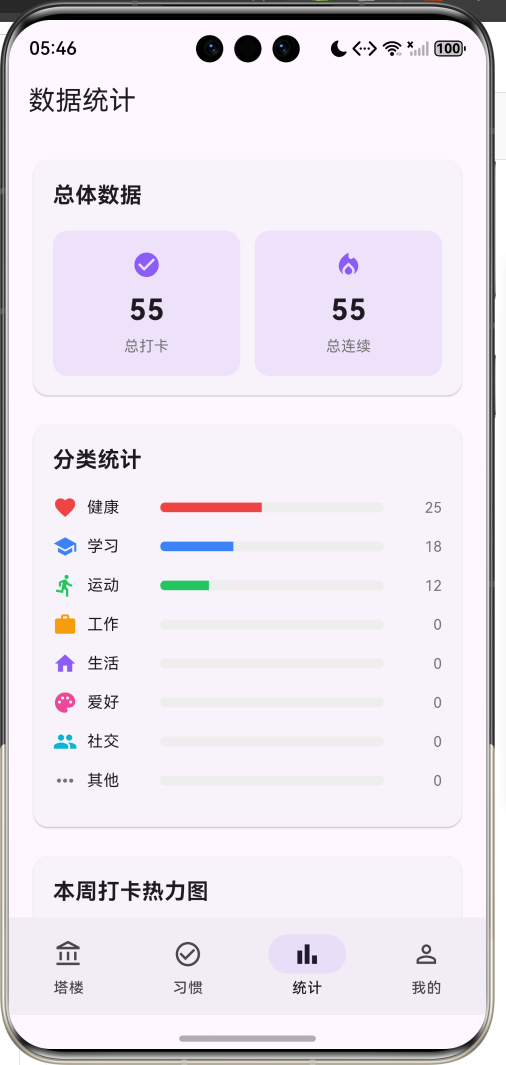
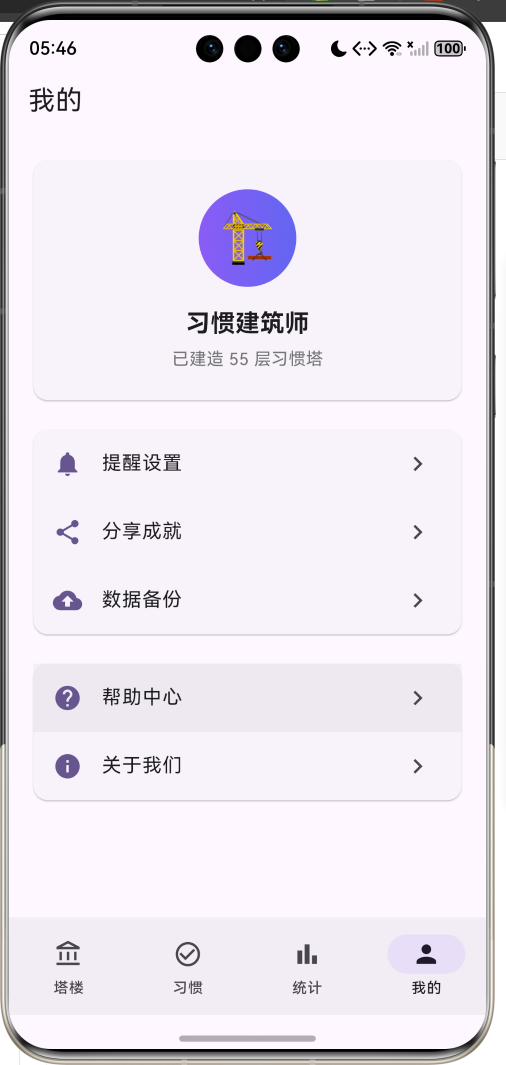
运行效果图"习惯养成塔"是一款游戏化的习惯养成应用,核心理念是每坚持一天,塔就盖高一层。通过将习惯养成与建造塔楼相结合,让用户在坚持习惯的过程中获得视觉成就感和持续动力。应用以紫色为主色调,传递神秘、梦幻、成长的游戏氛围。用户创建习惯后,每完成一天打卡,就会为对应的塔楼添加一层。塔楼越高,代表习惯坚持得越久,用户可以看到自己"建造"的成果,增强坚持的动力。"习惯养成塔"应用通过游戏化的方式,让习惯
·
习惯养成塔应用
欢迎加入开源鸿蒙跨平台社区:
https://openharmonycrossplatform.csdn.net
一、项目概述
运行效果图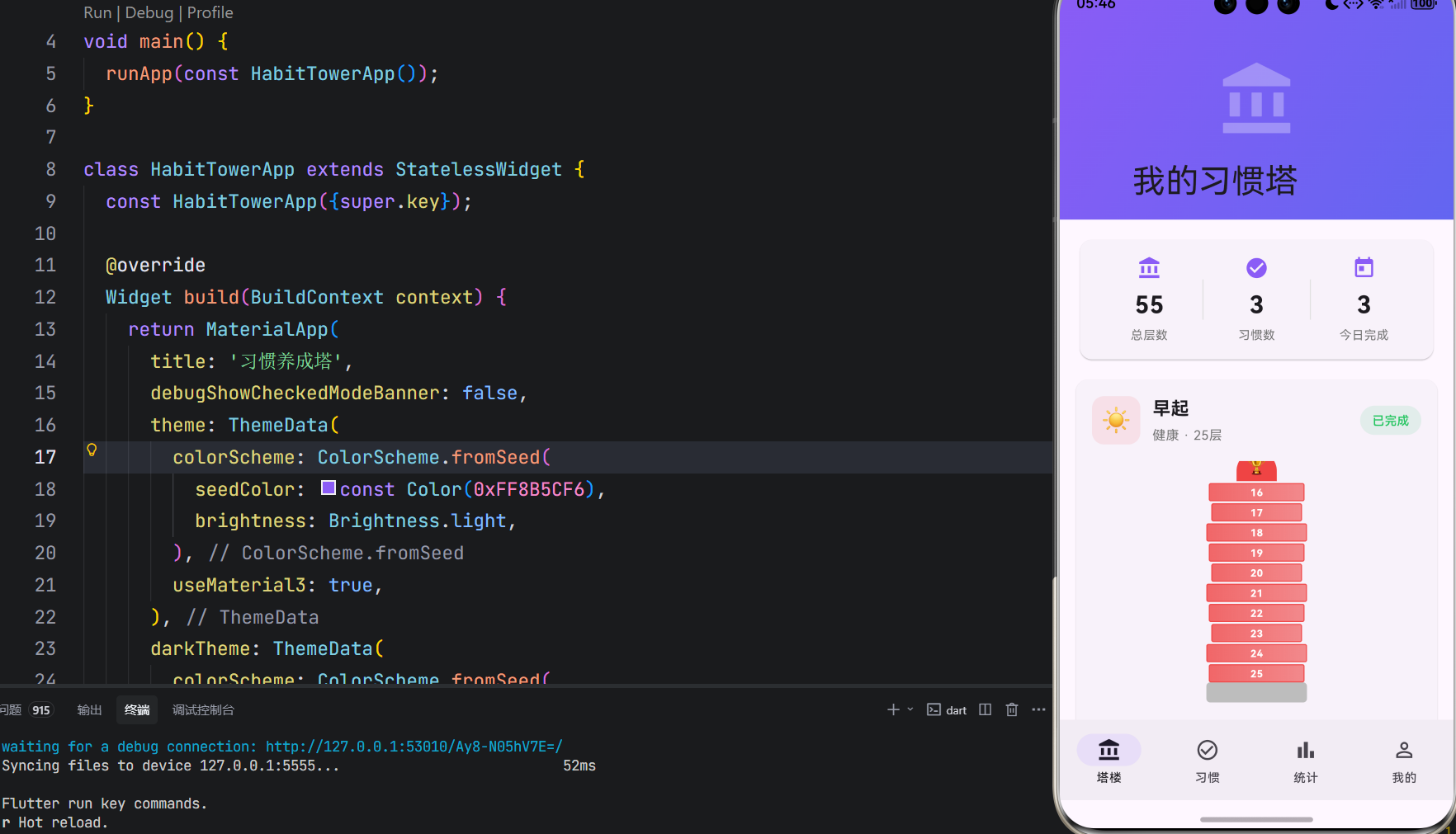
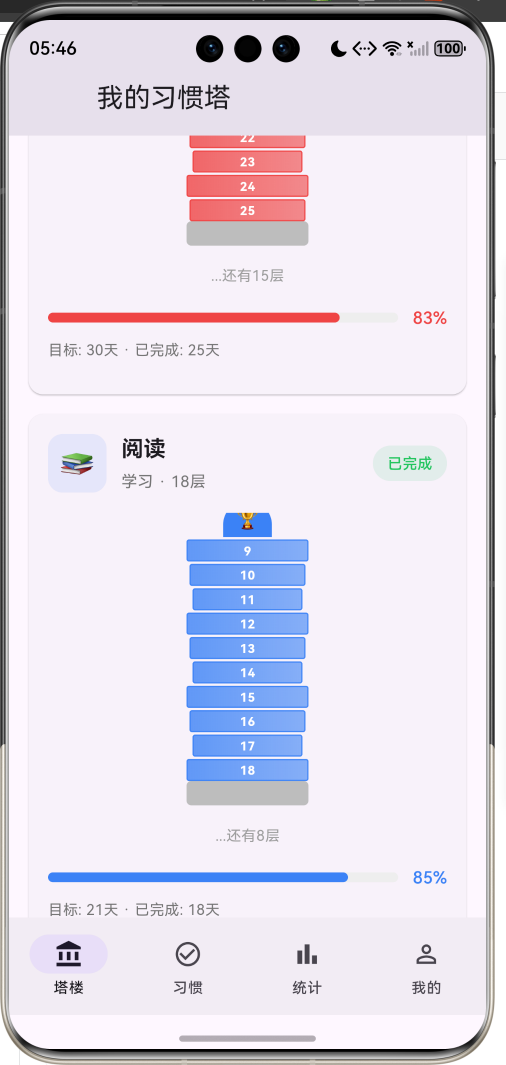
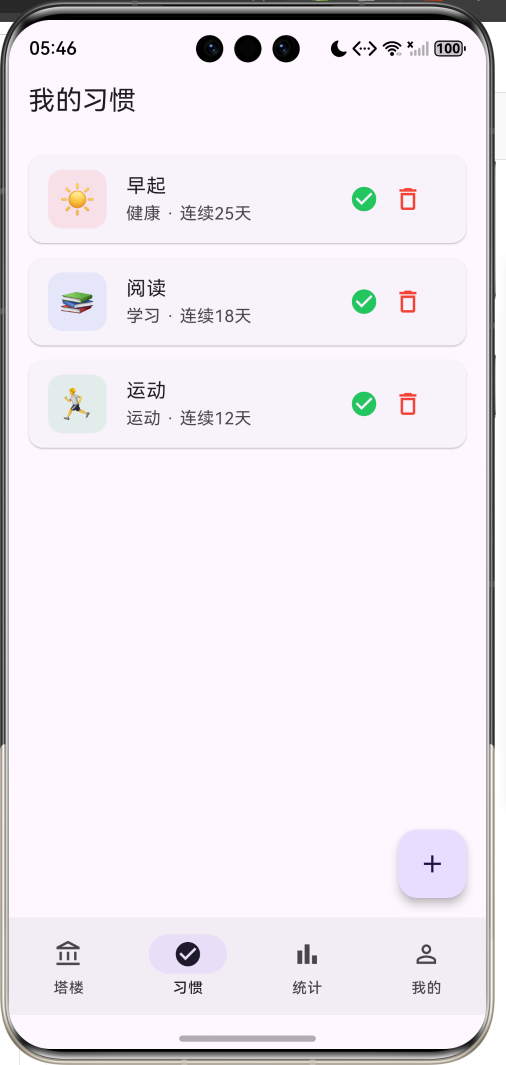
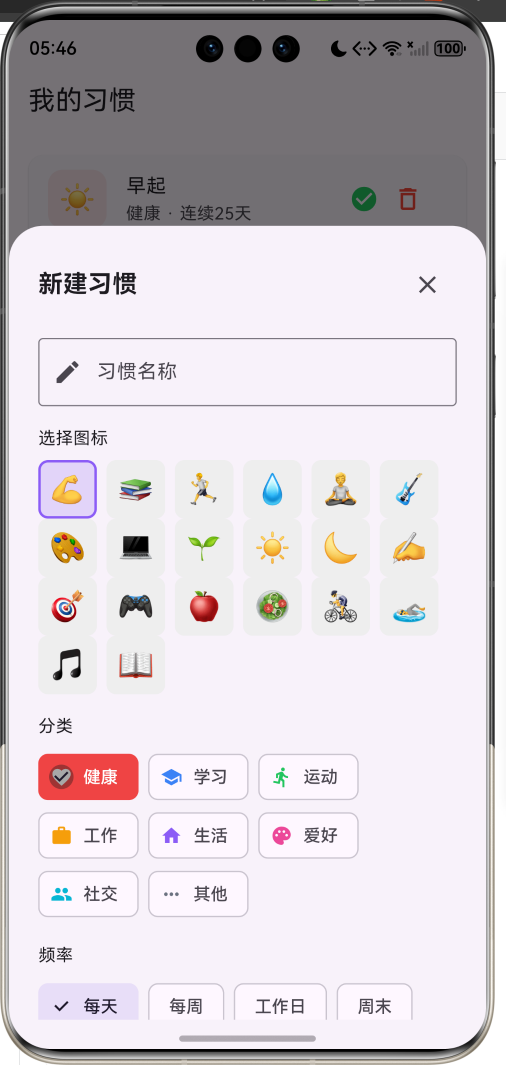
1.1 应用简介
"习惯养成塔"是一款游戏化的习惯养成应用,核心理念是每坚持一天,塔就盖高一层。通过将习惯养成与建造塔楼相结合,让用户在坚持习惯的过程中获得视觉成就感和持续动力。
应用以紫色为主色调,传递神秘、梦幻、成长的游戏氛围。用户创建习惯后,每完成一天打卡,就会为对应的塔楼添加一层。塔楼越高,代表习惯坚持得越久,用户可以看到自己"建造"的成果,增强坚持的动力。
1.2 核心功能
| 功能模块 | 功能描述 | 实现方式 |
|---|---|---|
| 习惯创建 | 创建新的习惯目标 | 底部弹窗表单 |
| 每日打卡 | 完成习惯后打卡 | 按钮点击 + 状态更新 |
| 塔楼建造 | 每打卡一天塔楼增高一层 | Stack + Positioned |
| 习惯管理 | 查看和管理所有习惯 | ListView列表 |
| 数据统计 | 查看打卡统计和分类图表 | 卡片 + 进度条 |
| 热力图 | 本周打卡可视化 | GridView |
1.3 习惯分类
| 序号 | 分类名称 | 图标 | 颜色 | 示例习惯 |
|---|---|---|---|---|
| 1 | 健康 | favorite | 红色 #EF4444 | 早起、喝水、冥想 |
| 2 | 学习 | school | 蓝色 #3B82F6 | 阅读、背单词、写作 |
| 3 | 运动 | directions_run | 绿色 #22C55E | 跑步、健身、游泳 |
| 4 | 工作 | work | 橙色 #F59E0B | 专注工作、复盘 |
| 5 | 生活 | home | 紫色 #8B5CF6 | 整理房间、做饭 |
| 6 | 爱好 | palette | 粉色 #EC4899 | 画画、弹吉他 |
| 7 | 社交 | people | 青色 #06B6D4 | 联系朋友、社交 |
| 8 | 其他 | more_horiz | 灰色 #6B7280 | 自定义习惯 |
1.4 习惯频率
| 频率 | 说明 | 每周天数 |
|---|---|---|
| 每天 | 每天都需要完成 | 7天 |
| 每周 | 每周完成一次 | 1天 |
| 工作日 | 周一至周五 | 5天 |
| 周末 | 周六周日 | 2天 |
1.5 技术栈
| 技术领域 | 技术选型 | 版本要求 |
|---|---|---|
| 开发框架 | Flutter | >= 3.0.0 |
| 编程语言 | Dart | >= 2.17.0 |
| 设计规范 | Material Design 3 | - |
| 状态管理 | setState | - |
| 目标平台 | 鸿蒙OS / Android / iOS | API 21+ |
二、系统架构
2.1 整体架构图
2.2 类图设计
2.3 页面导航流程
2.4 打卡流程图
三、核心模块设计
3.1 数据模型设计
3.1.1 习惯分类枚举 (HabitCategory)
enum HabitCategory {
  health('健康', Icons.favorite, Color(0xFFEF4444)),
  study('学习', Icons.school, Color(0xFF3B82F6)),
  exercise('运动', Icons.directions_run, Color(0xFF22C55E)),
  work('工作', Icons.work, Color(0xFFF59E0B)),
  life('生活', Icons.home, Color(0xFF8B5CF6)),
  hobby('爱好', Icons.palette, Color(0xFFEC4899)),
  social('社交', Icons.people, Color(0xFF06B6D4)),
  other('其他', Icons.more_horiz, Color(0xFF6B7280));

  final String label;
  final IconData icon;
  final Color color;
  const HabitCategory(this.label, this.icon, this.color);
}
3.1.2 习惯频率枚举 (HabitFrequency)
enum HabitFrequency {
  daily('每天', 1),
  weekly('每周', 7),
  weekdays('工作日', 5),
  weekends('周末', 2);

  final String label;
  final int daysPerWeek;
  const HabitFrequency(this.label, this.daysPerWeek);
}
3.1.3 习惯模型 (Habit)
class Habit {
  final String id;
  final String name;
  final HabitCategory category;
  final HabitFrequency frequency;
  final String emoji;
  final DateTime createdAt;
  final List<DateTime> completedDates;
  final int targetDays;

  Habit({
    required this.id,
    required this.name,
    required this.category,
    required this.frequency,
    required this.emoji,
    required this.createdAt,
    this.completedDates = const [],
    this.targetDays = 21,
  });

  int get currentStreak {
    if (completedDates.isEmpty) return 0;

    final sorted = completedDates.toList()..sort((a, b) => b.compareTo(a));
    int streak = 0;
    DateTime checkDate = DateTime.now();

    for (final date in sorted) {
      if (_isSameDay(date, checkDate) ||
          (_isSameDay(date, checkDate.subtract(const Duration(days: 1))))) {
        streak++;
        checkDate = date.subtract(const Duration(days: 1));
      } else {
        break;
      }
    }
    return streak;
  }

  int get totalCompleted => completedDates.length;
  double get progress => totalCompleted / targetDays;
  bool get isCompletedToday => completedDates.any((d) => _isSameDay(d, DateTime.now()));
}
3.1.4 塔楼层模型 (TowerFloor)
class TowerFloor {
  final int floorNumber;
  final String habitId;
  final DateTime builtAt;
  final String? note;

  TowerFloor({
    required this.floorNumber,
    required this.habitId,
    required this.builtAt,
    this.note,
  });
}
3.1.5 习惯塔模型 (HabitTower)
class HabitTower {
  final String id;
  final String name;
  final List<TowerFloor> floors;
  final DateTime createdAt;

  HabitTower({
    required this.id,
    required this.name,
    this.floors = const [],
    required this.createdAt,
  });

  int get height => floors.length;
  double get maxHeight => 100.0;
  double get progress => height / maxHeight;
}
3.2 页面结构设计
3.2.1 塔楼页面布局
3.2.2 塔楼可视化结构
3.3 连续天数计算
四、UI设计规范
4.1 配色方案
应用采用紫色为主色调,传递神秘、梦幻、成长的游戏氛围:
| 颜色类型 | 色值 | 用途 |
|---|---|---|
| 主色 | #8B5CF6 (Purple) | 导航、强调元素 |
| 辅色 | #6366F1 (Indigo) | 渐变背景 |
| 健康 | #EF4444 (Red) | 健康类习惯 |
| 学习 | #3B82F6 (Blue) | 学习类习惯 |
| 运动 | #22C55E (Green) | 运动类习惯 |
| 完成 | #22C55E (Green) | 完成状态 |
| 待打卡 | #F59E0B (Amber) | 待打卡状态 |
4.2 字体规范
| 元素 | 字号 | 字重 | 颜色 |
|---|---|---|---|
| 应用标题 | 20px | Bold | #FFFFFF |
| 习惯名称 | 18px | Bold | #000000 |
| 分类标签 | 13px | Regular | #666666 |
| 楼层编号 | 10px | Bold | #FFFFFF |
| 统计数据 | 24px | Bold | #000000 |
| 进度百分比 | 14px | Medium | 分类色 |
4.3 组件规范
4.3.1 塔楼卡片
┌─────────────────────────────────────────┐
│  ┌────┐                                 │
│  │ ☀️ │  早起                            │
│  └────┘  健康 · 25层                     │
│                                         │
│         ┌─────────┐                    │
│         │   🏆    │  顶部奖杯           │
│         ├─────────┤                    │
│         │   25    │  第25层             │
│         ├─────────┤                    │
│         │   24    │                     │
│         ├─────────┤                    │
│         │  ...    │  中间楼层           │
│         ├─────────┤                    │
│         │    1    │  第1层              │
│         ├─────────┤                    │
│         │  地基   │                     │
│         └─────────┘                    │
│                                         │
│  [==========>    ]  83%                │
│  目标: 30天 · 已完成: 25天              │
│                                         │
│  [    打卡盖楼    ]                     │
└─────────────────────────────────────────┘
4.3.2 楼层组件
┌─────────────────┐
│      25         │  楼层编号居中
│                 │
└─────────────────┘
  渐变色背景
  边框高亮
五、核心功能实现
5.1 打卡功能
void _completeHabit(Habit habit) {
  final now = DateTime.now();

  if (habit.isCompletedToday) {
    ScaffoldMessenger.of(context).showSnackBar(
      const SnackBar(content: Text('今天已经完成这个习惯啦!')),
    );
    return;
  }

  setState(() {
    final index = _habits.indexWhere((h) => h.id == habit.id);
    if (index != -1) {
      final updatedDates = [..._habits[index].completedDates, now];
      _habits[index] = _habits[index].copyWith(completedDates: updatedDates);

      // 添加塔楼层
      final towerIndex = _towers.indexWhere((t) => t.id == 'tower_${habit.id}');
      if (towerIndex != -1) {
        final newFloor = TowerFloor(
          floorNumber: _towers[towerIndex].height + 1,
          habitId: habit.id,
          builtAt: now,
        );
        _towers[towerIndex] = HabitTower(
          id: _towers[towerIndex].id,
          name: _towers[towerIndex].name,
          floors: [..._towers[towerIndex].floors, newFloor],
          createdAt: _towers[towerIndex].createdAt,
        );
      }
    }
  });

  ScaffoldMessenger.of(context).showSnackBar(
    SnackBar(content: Text('太棒了!${habit.name}习惯塔又盖高了一层!')),
  );
}
5.2 连续天数计算
int get currentStreak {
  if (completedDates.isEmpty) return 0;

  final sorted = completedDates.toList()..sort((a, b) => b.compareTo(a));
  int streak = 0;
  DateTime checkDate = DateTime.now();

  for (final date in sorted) {
    if (_isSameDay(date, checkDate) ||
        (_isSameDay(date, checkDate.subtract(const Duration(days: 1))))) {
      streak++;
      checkDate = date.subtract(const Duration(days: 1));
    } else {
      break;
    }
  }
  return streak;
}

bool _isSameDay(DateTime a, DateTime b) {
  return a.year == b.year && a.month == b.month && a.day == b.day;
}
5.3 塔楼可视化
Widget _buildTowerCard(HabitTower tower) {
  final habit = _habits.firstWhere((h) => h.id == tower.id.replaceFirst('tower_', ''));
  final height = tower.height;
  final maxVisibleFloors = 10;
  final displayFloors = height > maxVisibleFloors ? maxVisibleFloors : height;

  return Stack(
    alignment: Alignment.bottomCenter,
    children: [
      // 地基
      Container(
        width: 100,
        height: 20,
        decoration: BoxDecoration(
          color: Colors.grey[400],
          borderRadius: BorderRadius.circular(4),
        ),
      ),
      // 楼层
      ...List.generate(displayFloors, (index) {
        final floorIndex = displayFloors - index - 1;
        final actualFloor = height - displayFloors + floorIndex + 1;
        return Positioned(
          bottom: 20 + index * 20,
          child: _buildFloor(actualFloor, habit.category.color),
        );
      }),
      // 顶部装饰
      if (height > 0)
        Positioned(
          bottom: 20 + displayFloors * 20,
          child: Container(
            width: 40,
            height: 30,
            decoration: BoxDecoration(
              color: habit.category.color,
              borderRadius: const BorderRadius.only(
                topLeft: Radius.circular(20),
                topRight: Radius.circular(20),
              ),
            ),
            child: const Center(
              child: Text('🏆', style: TextStyle(fontSize: 16)),
            ),
          ),
        ),
    ],
  );
}

Widget _buildFloor(int floorNumber, Color color) {
  return Container(
    width: 100 - (floorNumber % 3) * 5,
    height: 18,
    decoration: BoxDecoration(
      gradient: LinearGradient(
        colors: [
          color.withValues(alpha: 0.8),
          color.withValues(alpha: 0.6),
        ],
      ),
      borderRadius: BorderRadius.circular(2),
      border: Border.all(color: color.withValues(alpha: 0.9), width: 1),
    ),
    child: Center(
      child: Text(
        '$floorNumber',
        style: const TextStyle(
          fontSize: 10,
          color: Colors.white,
          fontWeight: FontWeight.bold,
        ),
      ),
    ),
  );
}
5.4 新建习惯弹窗
void _showAddHabitDialog() {
  final nameController = TextEditingController();
  HabitCategory selectedCategory = HabitCategory.health;
  HabitFrequency selectedFrequency = HabitFrequency.daily;
  String selectedEmoji = '💪';

  showModalBottomSheet(
    context: context,
    isScrollControlled: true,
    builder: (context) => StatefulBuilder(
      builder: (context, setModalState) => DraggableScrollableSheet(
        initialChildSize: 0.8,
        maxChildSize: 0.95,
        minChildSize: 0.5,
        expand: false,
        builder: (context, scrollController) => Container(
          padding: const EdgeInsets.all(24),
          child: ListView(
            controller: scrollController,
            children: [
              TextField(
                controller: nameController,
                decoration: const InputDecoration(
                  labelText: '习惯名称',
                  border: OutlineInputBorder(),
                ),
              ),
              const Text('选择图标'),
              Wrap(
                children: _emojis.map((emoji) {
                  return GestureDetector(
                    onTap: () => setModalState(() => selectedEmoji = emoji),
                    child: Container(
                      width: 48,
                      height: 48,
                      decoration: BoxDecoration(
                        color: selectedEmoji == emoji
                            ? const Color(0xFF8B5CF6).withValues(alpha: 0.2)
                            : Colors.grey[200],
                        border: selectedEmoji == emoji
                            ? Border.all(color: const Color(0xFF8B5CF6), width: 2)
                            : null,
                      ),
                      child: Center(child: Text(emoji)),
                    ),
                  );
                }).toList(),
              ),
              const Text('分类'),
              Wrap(
                children: HabitCategory.values.map((category) {
                  return ChoiceChip(
                    label: Text(category.label),
                    selected: selectedCategory == category,
                    selectedColor: category.color,
                    onSelected: (selected) {
                      if (selected) setModalState(() => selectedCategory = category);
                    },
                  );
                }).toList(),
              ),
              FilledButton(
                onPressed: () {
                  if (nameController.text.isNotEmpty) {
                    final habit = Habit(
                      id: DateTime.now().millisecondsSinceEpoch.toString(),
                      name: nameController.text,
                      category: selectedCategory,
                      frequency: selectedFrequency,
                      emoji: selectedEmoji,
                      createdAt: DateTime.now(),
                    );
                    _addHabit(habit);
                    Navigator.pop(context);
                  }
                },
                child: const Text('创建习惯'),
              ),
            ],
          ),
        ),
      ),
    ),
  );
}
六、状态管理流程
6.1 习惯状态流转
6.2 塔楼建造流程
七、扩展功能规划
7.1 后续版本规划
7.2 功能扩展建议
7.2.1 成就系统
- 连续打卡成就(7天、30天、100天)
- 塔楼高度成就(10层、50层、100层)
- 分类成就(健康达人、学习之星)
7.2.2 好友PK
- 查看好友塔楼
- 排行榜功能
- 互相点赞鼓励
7.2.3 3D塔楼
- 使用Flutter 3D渲染
- 可旋转查看塔楼
- 楼层点击交互
八、注意事项
8.1 开发注意事项
- 日期比较:使用
_isSameDay方法比较日期,忽略时间部分 - 状态更新:打卡后需要同时更新习惯和塔楼数据
- 楼层显示:最多显示10层,超出显示省略提示
- 连续计算:考虑跨天情况,今天打卡也算连续
8.2 常见问题
| 问题 | 原因 | 解决方案 |
|---|---|---|
| 连续天数计算错误 | 日期比较包含时间 | 使用 _isSameDay 方法 |
| 塔楼不更新 | 状态未刷新 | 检查 setState 调用 |
| 楼层重叠 | Stack 定位错误 | 检查 bottom 计算 |
九、运行说明
9.1 环境要求
| 环境 | 版本要求 |
|---|---|
| Flutter SDK | >= 3.0.0 |
| Dart SDK | >= 2.17.0 |
| 鸿蒙OS | API 21+ |
9.2 运行命令
# 查看可用设备
flutter devices

# 运行到Web服务器
flutter run -d web-server -t lib/main_habit_tower.dart --web-port 8098

# 运行到鸿蒙设备
flutter run -d 127.0.0.1:5555 lib/main_habit_tower.dart

# 运行到Windows
flutter run -d windows -t lib/main_habit_tower.dart

# 代码分析
flutter analyze lib/main_habit_tower.dart
十、总结
"习惯养成塔"应用通过游戏化的方式,让习惯养成变得有趣。每坚持一天,塔楼就增高一层,给用户带来即时的视觉反馈和成就感。应用采用 Flutter + Material Design 3 技术栈,具有精美的塔楼可视化效果和流畅的交互体验。
技术亮点
- 游戏化设计:塔楼建造机制增强用户动力
- 精美的可视化:Stack + Positioned 实现楼层堆叠
- 智能计算:连续天数算法准确计算打卡记录
- 丰富的分类:8大分类,20个图标可选
- 完整的数据:统计图表、热力图、进度追踪
核心代码文件
- [main_habit_tower.dart](file:///f:/Flutter/flutter_harmonyos/lib/main_habit_tower.dart) - 完整应用代码
每天打卡,建造属于你的习惯塔

腾讯云面向开发者汇聚海量精品云计算使用和开发经验,营造开放的云计算技术生态圈。
更多推荐
 12
12 0
0- 0


 已为社区贡献20条内容

所有评论(0)