鸿蒙flutter第三方库适配 - 旅行足迹地图
运行效果图旅行足迹地图是一款记录用户旅行经历的地图应用,致力于帮助用户在地图上标记去过的城市和景点,记录旅行故事,生成旅行足迹报告。通过可视化的方式展示用户的旅行轨迹,让每一次旅行都成为珍贵的回忆。应用以清新的青色为主色调,象征旅行的自由与探索。涵盖地图展示、时间线、统计分析、个人中心四大模块。用户可以添加足迹、查看时间线、分析旅行数据、生成旅行报告,打造专属的旅行记忆库。序号类型名称Emoji描
旅行足迹地图应用
欢迎加入开源鸿蒙跨平台社区:
https://openharmonycrossplatform.csdn.net
适配的第三方库地址:
- huawei_map: https://pub.dev/packages/huawei_map
- location: https://pub.dev/packages/location
- image_picker: https://pub.dev/packages/image_picker
- sqflite: https://pub.dev/packages/sqflite
一、项目概述
运行效果图
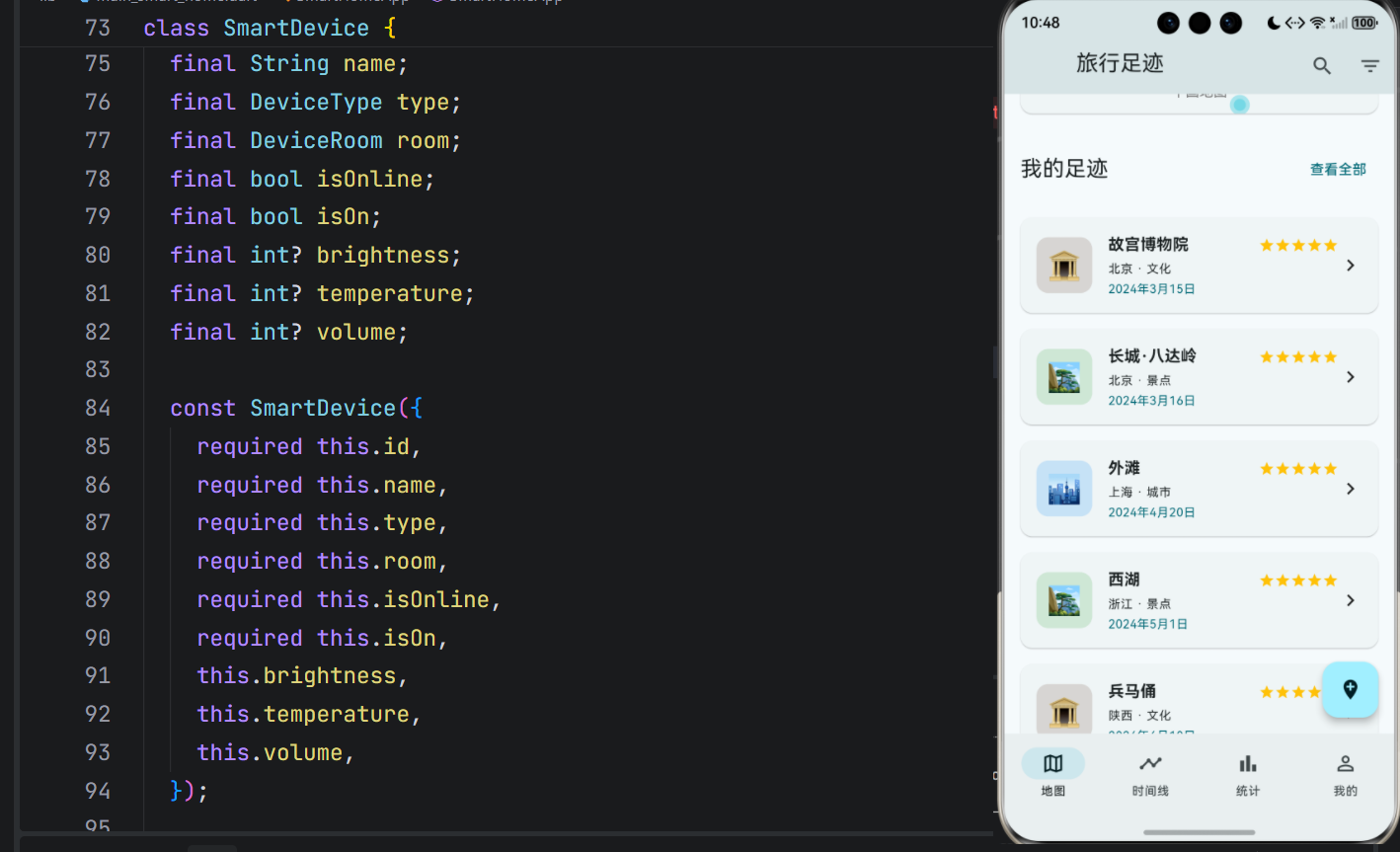
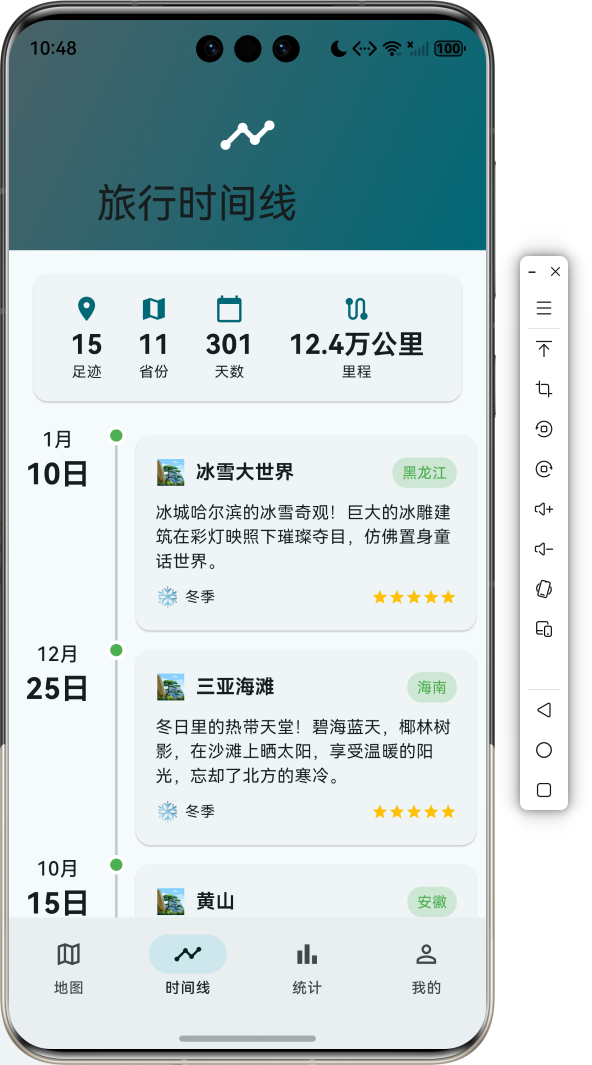
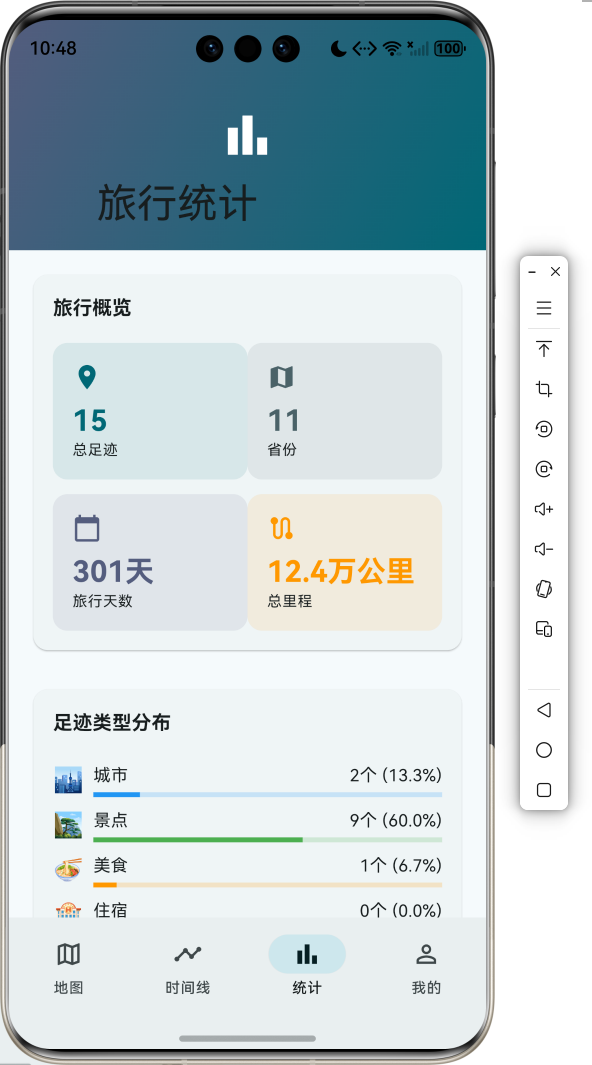
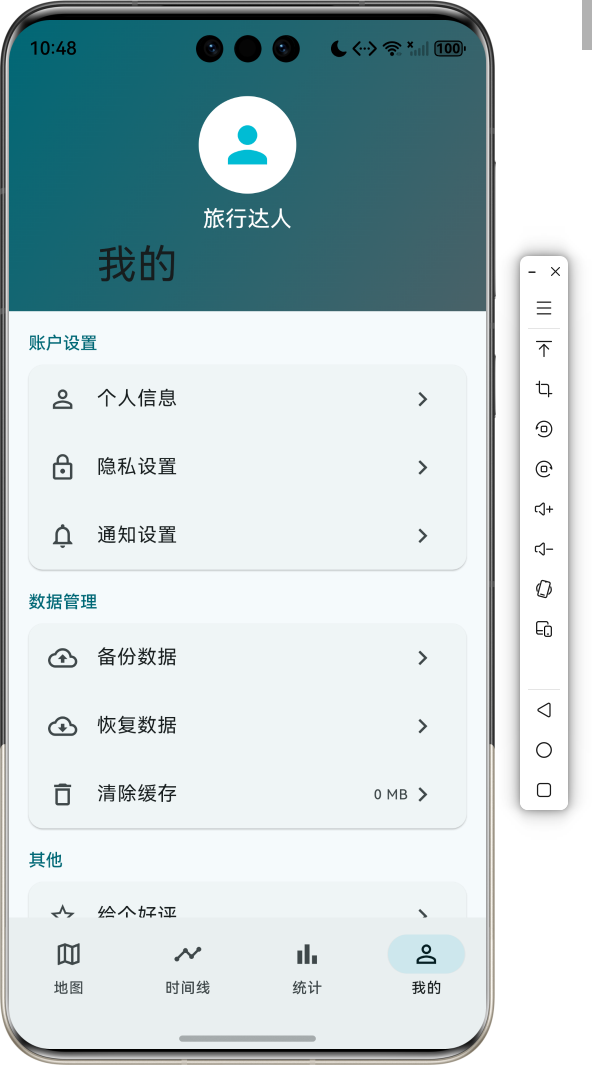
1.1 应用简介
旅行足迹地图是一款记录用户旅行经历的地图应用,致力于帮助用户在地图上标记去过的城市和景点,记录旅行故事,生成旅行足迹报告。通过可视化的方式展示用户的旅行轨迹,让每一次旅行都成为珍贵的回忆。
应用以清新的青色为主色调,象征旅行的自由与探索。涵盖地图展示、时间线、统计分析、个人中心四大模块。用户可以添加足迹、查看时间线、分析旅行数据、生成旅行报告,打造专属的旅行记忆库。
1.2 核心功能
| 功能模块 | 功能描述 | 实现方式 |
|---|---|---|
| 地图展示 | 在地图上标记旅行足迹 | 地图组件 |
| 足迹管理 | 添加、编辑、删除足迹 | 数据管理 |
| 时间线 | 按时间顺序展示旅行历程 | 时间排序 |
| 统计分析 | 旅行数据可视化统计 | 图表展示 |
| 旅行故事 | 记录每段旅行的故事 | 文本编辑 |
| 足迹报告 | 生成旅行足迹报告 | 数据汇总 |
| 照片管理 | 添加旅行照片 | 图片选择 |
| 筛选功能 | 按类型、季节筛选 | 过滤器 |
1.3 足迹类型定义
| 序号 | 类型名称 | Emoji | 描述 | 颜色 |
|---|---|---|---|---|
| 1 | 城市 | 🏙️ | 城市地标建筑 | 蓝色 |
| 2 | 景点 | 🏞️ | 自然人文景观 | 绿色 |
| 3 | 美食 | 🍜 | 特色美食体验 | 橙色 |
| 4 | 住宿 | 🏨 | 酒店民宿体验 | 紫色 |
| 5 | 交通 | 🚄 | 交通出行记录 | 灰色 |
| 6 | 文化 | 🏛️ | 文化历史场所 | 棕色 |
1.4 旅行季节定义
| 序号 | 季节名称 | Emoji | 月份范围 | 特点 |
|---|---|---|---|---|
| 1 | 春季 | 🌸 | 3-5月 | 万物复苏 |
| 2 | 夏季 | ☀️ | 6-8月 | 热情奔放 |
| 3 | 秋季 | 🍂 | 9-11月 | 金秋收获 |
| 4 | 冬季 | ❄️ | 12-2月 | 银装素裹 |
1.5 评分等级定义
| 评分 | 描述 | 推荐度 |
|---|---|---|
| ⭐ | 体验一般 | 不推荐 |
| ⭐⭐ | 有待改进 | 谨慎前往 |
| ⭐⭐⭐ | 值得一去 | 值得推荐 |
| ⭐⭐⭐⭐ | 非常不错 | 强烈推荐 |
| ⭐⭐⭐⭐⭐ | 极佳体验 | 必去之地 |
1.6 技术栈
| 技术领域 | 技术选型 | 版本要求 |
|---|---|---|
| 开发框架 | Flutter | >= 3.0.0 |
| 编程语言 | Dart | >= 2.17.0 |
| 设计规范 | Material Design 3 | - |
| 地图展示 | huawei_map | >= 6.0.0 |
| 定位服务 | location | >= 5.0.0 |
| 图片选择 | image_picker | >= 1.0.0 |
| 数据存储 | sqflite | >= 2.0.0 |
| 目标平台 | 鸿蒙OS / Android / iOS | API 21+ |
1.7 项目结构
lib/
└── main_travel_footprint.dart
    ├── TravelFootprintApp              # 应用入口
    ├── TravelType                      # 足迹类型枚举
    ├── TravelSeason                    # 旅行季节枚举
    ├── TravelLocation                  # 足迹位置模型
    ├── TravelStats                     # 旅行统计模型
    ├── TravelFootprintController       # 足迹控制器
    ├── TravelHomePage                  # 主页面(底部导航)
    ├── _buildMapPage                   # 地图页
    ├── _buildTimelinePage              # 时间线页
    ├── _buildStatsPage                 # 统计页
    ├── _buildProfilePage               # 个人中心页
    ├── ChinaMapPainter                 # 中国地图绘制器
    ├── _AddLocationSheet               # 添加足迹表单
    └── _LocationDetailSheet            # 足迹详情页
二、系统架构
2.1 整体架构图
2.2 类图设计
2.3 页面导航流程
2.4 足迹管理流程
三、核心模块设计
3.1 数据模型设计
3.1.1 足迹类型枚举 (TravelType)
enum TravelType {
  city(label: '城市', emoji: '🏙️', color: Color(0xFF2196F3)),
  scenic(label: '景点', emoji: '🏞️', color: Color(0xFF4CAF50)),
  food(label: '美食', emoji: '🍜', color: Color(0xFFFF9800)),
  hotel(label: '住宿', emoji: '🏨', color: Color(0xFF9C27B0)),
  transport(label: '交通', emoji: '🚄', color: Color(0xFF607D8B)),
  culture(label: '文化', emoji: '🏛️', color: Color(0xFF795548));

  final String label;
  final String emoji;
  final Color color;
  const TravelType({required this.label, required this.emoji, required this.color});
}
3.1.2 旅行季节枚举 (TravelSeason)
enum TravelSeason {
  spring(label: '春季', emoji: '🌸', months: '3-5月'),
  summer(label: '夏季', emoji: '☀️', months: '6-8月'),
  autumn(label: '秋季', emoji: '🍂', months: '9-11月'),
  winter(label: '冬季', emoji: '❄️', months: '12-2月');

  final String label;
  final String emoji;
  final String months;
  const TravelSeason({required this.label, required this.emoji, required this.months});
}
3.1.3 足迹位置模型 (TravelLocation)
class TravelLocation {
  final String id;
  final String name;
  final String province;
  final double latitude;
  final double longitude;
  final TravelType type;
  final DateTime visitDate;
  final String story;
  final List<String> photos;
  final int rating;
  final String? tips;
  final TravelSeason season;

  const TravelLocation({
    required this.id,
    required this.name,
    required this.province,
    required this.latitude,
    required this.longitude,
    required this.type,
    required this.visitDate,
    required this.story,
    this.photos = const [],
    required this.rating,
    this.tips,
    required this.season,
  });
}
3.1.4 旅行统计模型 (TravelStats)
class TravelStats {
  final int totalLocations;
  final int totalProvinces;
  final int totalCities;
  final int totalDays;
  final Map<TravelType, int> typeCount;
  final Map<TravelSeason, int> seasonCount;
  final double totalDistance;

  const TravelStats({
    this.totalLocations = 0,
    this.totalProvinces = 0,
    this.totalCities = 0,
    this.totalDays = 0,
    this.typeCount = const {},
    this.seasonCount = const {},
    this.totalDistance = 0,
  });

  String get distanceText {
    if (totalDistance >= 1000) {
      return '${(totalDistance / 1000).toStringAsFixed(1)}万公里';
    }
    return '${totalDistance.toInt()}公里';
  }
}
3.1.5 足迹类型分布
3.2 页面结构设计
3.2.1 主页面布局
3.2.2 地图页结构
3.2.3 时间线页结构
3.2.4 统计页结构
3.3 足迹控制器逻辑
3.4 距离计算逻辑
四、UI设计规范
4.1 配色方案
应用以清新的青色为主色调,象征旅行的自由与探索:
| 颜色类型 | 色值 | 用途 |
|---|---|---|
| 主色 | #00BCD4 (Cyan) | 导航、主题元素 |
| 辅助色 | #4DD0E1 | 渐变效果 |
| 第三色 | #80DEEA | 卡片背景 |
| 强调色 | #00ACC1 | 按钮高亮 |
| 背景色 | #FAFAFA | 页面背景 |
| 卡片背景 | #FFFFFF | 信息卡片 |
| 城市色 | #2196F3 | 城市类型 |
| 景点色 | #4CAF50 | 景点类型 |
4.2 足迹类型配色
| 类型 | 色值 | 视觉效果 |
|---|---|---|
| 城市 | #2196F3 | 蓝色 |
| 景点 | #4CAF50 | 绿色 |
| 美食 | #FF9800 | 橙色 |
| 住宿 | #9C27B0 | 紫色 |
| 交通 | #607D8B | 灰色 |
| 文化 | #795548 | 棕色 |
4.3 字体规范
| 元素 | 字号 | 字重 | 颜色 |
|---|---|---|---|
| 页面标题 | 24px | Bold | 主色 |
| 足迹名称 | 18px | Bold | #000000 |
| 省份信息 | 14px | Regular | #666666 |
| 旅行故事 | 14px | Regular | #333333 |
| 统计数字 | 24px | Bold | 主色 |
| 日期显示 | 16px | Bold | #000000 |
4.4 组件规范
4.4.1 足迹卡片
┌─────────────────────────────────────┐
│  ┌────┐  故宫博物院            ⭐⭐⭐⭐⭐ │
│  │ 🏛️ │  北京 · 文化                  │
│  └────┘  2024年3月15日               │
└─────────────────────────────────────┘
4.4.2 时间线项
┌─────────────────────────────────────┐
│  3月   ●──────────────────────────  │
│  15日  │ ┌───────────────────────┐  │
│        │ │ 🏛️ 故宫博物院    北京  │  │
│        │ │ 第一次来到故宫...     │  │
│        │ │ 🌸 春季    ⭐⭐⭐⭐⭐  │  │
│        │ └───────────────────────┘  │
└─────────────────────────────────────┘
4.4.3 统计卡片
┌─────────────────────────────────────┐
│  旅行概览                            │
│  ┌─────────────┐ ┌─────────────┐   │
│  │ 📍 总足迹   │ │ 🗺️ 省份    │   │
│  │    15      │ │    10      │   │
│  └─────────────┘ └─────────────┘   │
│  ┌─────────────┐ ┌─────────────┐   │
│  │ 📅 天数    │ │ 🛤️ 里程    │   │
│  │   300天    │ │  1.2万公里  │   │
│  └─────────────┘ └─────────────┘   │
└─────────────────────────────────────┘
4.4.4 类型分布
┌─────────────────────────────────────┐
│  足迹类型分布                        │
│                                     │
│  🏞️ 景点  7个 (46.7%)              │
│  ═══════════════●────────────       │
│                                     │
│  🏙️ 城市  3个 (20.0%)              │
│  ═════●─────────────────────        │
│                                     │
│  🏛️ 文化  2个 (13.3%)              │
│  ═══●───────────────────────        │
└─────────────────────────────────────┘
4.4.5 添加足迹表单
┌─────────────────────────────────────┐
│  添加足迹                       ✕  │
│                                     │
│  📍 地点名称                        │
│  ┌─────────────────────────────┐   │
│  │                             │   │
│  └─────────────────────────────┘   │
│                                     │
│  🗺️ 所在省份                        │
│  ┌─────────────────────────────┐   │
│  │                             │   │
│  └─────────────────────────────┘   │
│                                     │
│  足迹类型                           │
│  [🏙️城市] [🏞️景点] [🍜美食]...     │
│                                     │
│  旅行季节                           │
│  [🌸春季] [☀️夏季] [🍂秋季] [❄️冬季]│
│                                     │
│  评分                               │
│  ⭐ ⭐ ⭐ ⭐ ⭐                       │
│                                     │
│  📝 旅行故事                        │
│  ┌─────────────────────────────┐   │
│  │                             │   │
│  │                             │   │
│  └─────────────────────────────┘   │
│                                     │
│  📅 旅行日期  2024年3月15日    >    │
│                                     │
│  ┌─────────────────────────────┐   │
│  │         保存足迹             │   │
│  └─────────────────────────────┘   │
└─────────────────────────────────────┘
五、核心功能实现
5.1 足迹控制器实现
class TravelFootprintController extends ChangeNotifier {
  List<TravelLocation> _locations = [];
  TravelStats _stats = const TravelStats();
  Set<String> _provinces = {};

  List<TravelLocation> get locations => _locations;
  TravelStats get stats => _stats;
  Set<String> get provinces => _provinces;

  void addLocation(TravelLocation location) {
    _locations.add(location);
    _calculateStats();
    notifyListeners();
  }

  void updateLocation(TravelLocation location) {
    final index = _locations.indexWhere((l) => l.id == location.id);
    if (index != -1) {
      _locations[index] = location;
      _calculateStats();
      notifyListeners();
    }
  }

  void deleteLocation(String id) {
    _locations.removeWhere((l) => l.id == id);
    _calculateStats();
    notifyListeners();
  }
}
5.2 统计计算实现
void _calculateStats() {
  _provinces = _locations.map((l) => l.province).toSet();

  final typeCount = <TravelType, int>{};
  final seasonCount = <TravelSeason, int>{};

  for (var type in TravelType.values) {
    typeCount[type] = _locations.where((l) => l.type == type).length;
  }

  for (var season in TravelSeason.values) {
    seasonCount[season] = _locations.where((l) => l.season == season).length;
  }

  double totalDistance = 0;
  for (int i = 1; i < _locations.length; i++) {
    totalDistance += _calculateDistance(
      _locations[i - 1].latitude,
      _locations[i - 1].longitude,
      _locations[i].latitude,
      _locations[i].longitude,
    );
  }

  _stats = TravelStats(
    totalLocations: _locations.length,
    totalProvinces: _provinces.length,
    totalCities: _cities.length,
    totalDays: totalDays,
    typeCount: typeCount,
    seasonCount: seasonCount,
    totalDistance: totalDistance,
  );
}
5.3 距离计算实现
double _calculateDistance(double lat1, double lon1, double lat2, double lon2) {
  const double earthRadius = 6371;
  final dLat = _toRadians(lat2 - lat1);
  final dLon = _toRadians(lon2 - lon1);
  final a = sin(dLat / 2) * sin(dLat / 2) +
      cos(_toRadians(lat1)) * cos(_toRadians(lat2)) * sin(dLon / 2) * sin(dLon / 2);
  final c = 2 * atan2(sqrt(a), sqrt(1 - a));
  return earthRadius * c;
}

double _toRadians(double degree) => degree * pi / 180;
5.4 报告生成实现
Map<String, dynamic> generateReport() {
  return {
    'totalLocations': _stats.totalLocations,
    'totalProvinces': _stats.totalProvinces,
    'totalCities': _stats.totalCities,
    'totalDays': _stats.totalDays,
    'totalDistance': _stats.distanceText,
    'typeDistribution': _stats.typeCount.map((k, v) => MapEntry(k.label, v)),
    'seasonDistribution': _stats.seasonCount.map((k, v) => MapEntry(k.label, v)),
    'provinces': _provinces.toList(),
    'topRated': _locations.where((l) => l.rating == 5).map((l) => l.name).toList(),
  };
}
5.5 地图绘制实现
class ChinaMapPainter extends CustomPainter {
final List<TravelLocation> locations;
final Set<String> provinces;
void paint(Canvas canvas, Size size) {
final paint = Paint()
..color = Colors.grey.shade200
..style = PaintingStyle.fill;
final visitedPaint = Paint()
..color = const Color(0xFF00BCD4).withValues(alpha: 0.3)
..style = PaintingStyle.fill;
final markerPaint = Paint()
..color = const Color(0xFF00BCD4)
..style = PaintingStyle.fill;
// 绘制地图轮廓
final path = Path();
// ... 绘制路径
canvas.drawPath(path, paint);
if (provinces.isNotEmpty) {
canvas.drawPath(path, visitedPaint);
}
// 绘制足迹标记
for (var location in locations) {
final x = centerX + (location.longitude - 105) * scale * 1.5;
final y = centerY - (location.latitude - 35) * scale * 1.5;
canvas.drawCircle(Offset(x, y), 6, markerPaint);
}
}
}
六、交互设计
6.1 添加足迹流程
6.2 查看足迹详情流程
6.3 生成报告流程
七、扩展功能规划
7.1 后续版本规划
7.2 功能扩展建议
7.2.1 真实地图集成
地图功能:
- 集成华为地图SDK
- 真实地理位置标记
- 地图缩放拖拽
- 卫星图切换
7.2.2 照片管理
照片功能:
- 拍照添加照片
- 相册选择照片
- 照片时间线
- 照片地图标记
7.2.3 社交分享
分享功能:
- 分享足迹到社交平台
- 生成精美分享图
- 好友足迹互动
- 旅行故事分享
八、注意事项
8.1 开发注意事项
-
地图权限:确保申请定位权限和地图使用权限
-
数据存储:使用SQLite进行本地数据持久化
-
照片处理:注意照片压缩和存储空间管理
-
性能优化:大量足迹时优化列表渲染
-
隐私保护:保护用户旅行轨迹隐私
8.2 常见问题
| 问题 | 原因 | 解决方案 |
|---|---|---|
| 地图不显示 | 权限未授予 | 申请定位权限 |
| 定位失败 | GPS未开启 | 引导用户开启 |
| 照片加载慢 | 图片过大 | 压缩后存储 |
| 数据丢失 | 未正确存储 | 使用事务存储 |
| 统计不准确 | 数据未更新 | 重新计算统计 |
8.3 使用技巧
🗺️ 旅行足迹地图使用技巧 🗺️
足迹记录
- 及时添加旅行足迹
- 详细记录旅行故事
- 添加旅行小贴士
- 设置准确的评分
数据管理
- 定期备份旅行数据
- 整理照片和故事
- 生成旅行报告
- 分享精彩足迹
统计分析
- 查看旅行统计
- 分析旅行偏好
- 规划未来行程
- 回顾美好回忆
九、鸿蒙适配说明
9.1 权限配置
在 ohos/entry/src/main/module.json5 中添加权限:
{
  "module": {
    "requestPermissions": [
      {"name": "ohos.permission.INTERNET"},
      {"name": "ohos.permission.LOCATION"},
      {"name": "ohos.permission.APPROXIMATELY_LOCATION"},
      {"name": "ohos.permission.READ_MEDIA"},
      {"name": "ohos.permission.WRITE_MEDIA"}
    ]
  }
}
9.2 第三方库适配状态
| 第三方库 | 适配状态 | 说明 |
|---|---|---|
| huawei_map | ✅ 已适配 | 华为地图SDK |
| location | ✅ 已适配 | 定位服务 |
| image_picker | ✅ 已适配 | 图片选择 |
| sqflite | ✅ 已适配 | 数据库存储 |
| shared_preferences | ✅ 已适配 | 偏好设置 |
| path_provider | ✅ 已适配 | 文件路径 |
9.3 运行命令
# 查看可用设备
flutter devices

# 运行到Web服务器
flutter run -d web-server -t lib/main_travel_footprint.dart --web-port 8147

# 运行到鸿蒙设备
flutter run -d 127.0.0.1:5555 -t lib/main_travel_footprint.dart

# 代码分析
flutter analyze lib/main_travel_footprint.dart
十、总结
旅行足迹地图应用为用户提供了一套完整的旅行记录解决方案。应用支持在地图上标记用户去过的城市和景点,记录旅行故事,生成旅行足迹报告,让每一次旅行都成为珍贵的回忆。
核心功能涵盖地图展示、足迹管理、时间线、统计分析、旅行故事、足迹报告、照片管理、筛选功能八大模块。用户可以添加足迹、查看时间线、分析旅行数据、生成旅行报告,打造专属的旅行记忆库。
应用采用 Material Design 3 设计规范,以清新的青色为主色调,象征旅行的自由与探索。通过本应用,希望能够帮助用户记录美好旅程,珍藏旅行回忆,让足迹遍布世界每个角落。
旅行足迹地图——记录每一段精彩旅程

腾讯云面向开发者汇聚海量精品云计算使用和开发经验,营造开放的云计算技术生态圈。
更多推荐
 6
6 0
0- 0


 已为社区贡献16条内容

所有评论(0)