Flutter for OpenHarmony 商城App实战 - 结算实现
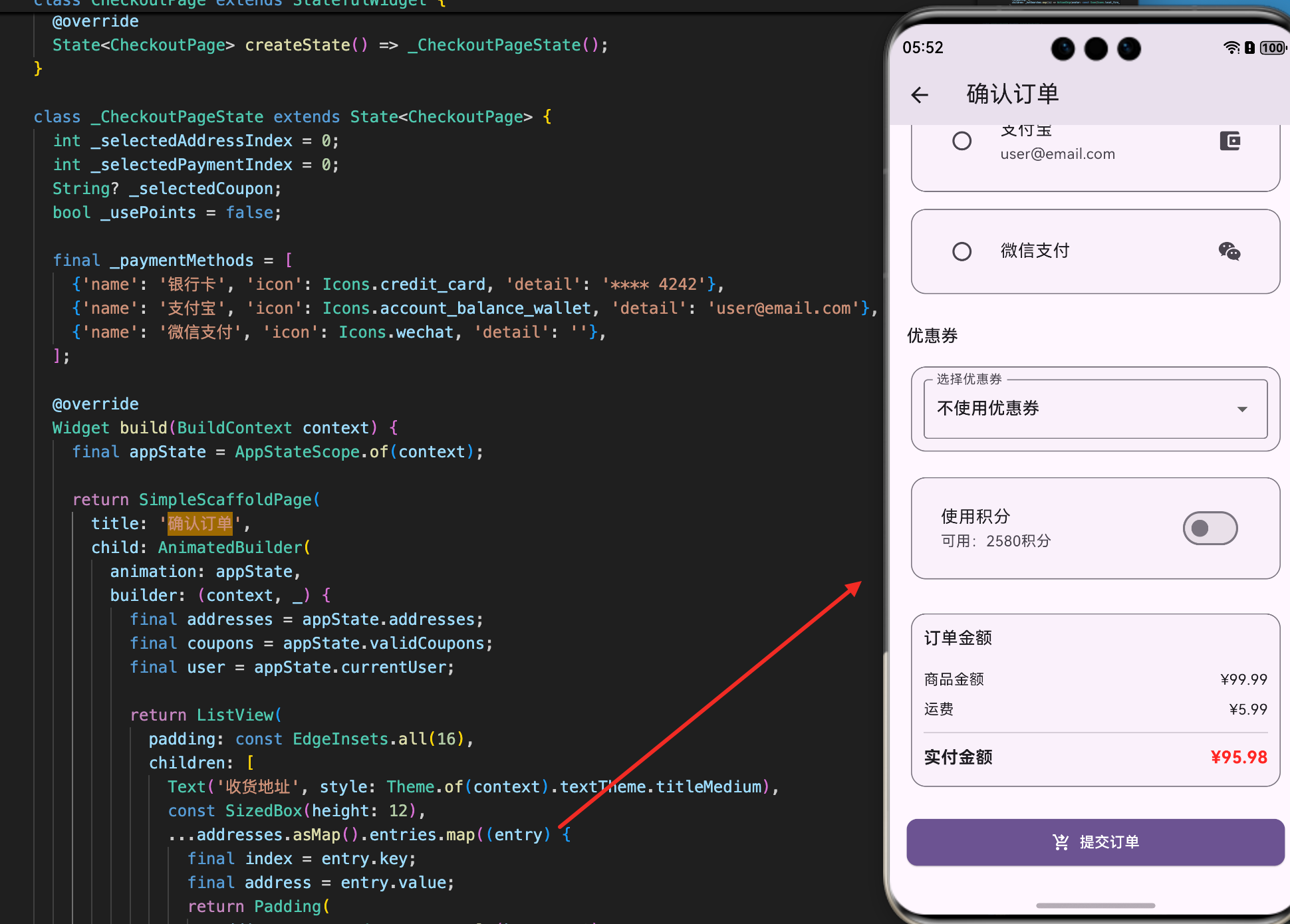
结算是电商应用的关键流程,用户在这里选择收货地址、应用优惠券、选择支付方式、计算最终价格。一个好的结算实现需要清晰的流程、准确的金额计算和多种支付选项。本文将详细讲解如何在 Flutter for OpenHarmony 项目中实现一个功能完整的结算页面,包括地址管理、优惠券应用、积分抵扣和订单创建等功能。
地址数据模型
地址是结算过程中的重要信息。Address 类包含了收货地址的所有必要信息。
class Address {
  const Address({
    required this.id,        // 地址唯一标识
    required this.name,      // 收货人姓名
    required this.phone,     // 收货人电话
    required this.province,  // 省份
    required this.city,      // 城市
    required this.district,  // 区县
    required this.detail,    // 详细地址
    this.isDefault = false,  // 是否为默认地址
    this.tag,                // 地址标签(如"家"、"公司")
  });

  final String id;
  final String name;
  final String phone;
  final String province;
  final String city;
  final String district;
  final String detail;
  final bool isDefault;
  final String? tag;

  // 获取完整地址字符串
  String get fullAddress => '$province $city $district $detail';

  // 复制并修改地址
  Address copyWith({
    String? id,
    String? name,
    String? phone,
    String? province,
    String? city,
    String? district,
    String? detail,
    bool? isDefault,
    String? tag,
  }) {
    return Address(
      id: id ?? this.id,
      name: name ?? this.name,
      phone: phone ?? this.phone,
      province: province ?? this.province,
      city: city ?? this.city,
      district: district ?? this.district,
      detail: detail ?? this.detail,
      isDefault: isDefault ?? this.isDefault,
      tag: tag ?? this.tag,
    );
  }
}
这个地址模型展示了如何管理收货地址:
数据结构:
- 包含收货人信息(姓名、电话)
- 包含地址信息(省、市、区、详细地址)
- 支持地址标签(如"家"、“公司”)
- 支持默认地址标记
便利方法:
fullAddress属性组合完整地址字符串copyWith方法用于创建修改后的副本- 支持不可变数据模式
优惠券数据模型
优惠券是结算中的重要优惠方式。Coupon 类定义了优惠券的结构。
// 优惠券类型枚举
enum CouponType {
  percentage,    // 百分比折扣
  fixed,         // 固定金额折扣
  freeShipping,  // 免运费
}

class Coupon {
  const Coupon({
    required this.id,              // 优惠券ID
    required this.code,            // 优惠券代码
    required this.type,            // 优惠券类型
    required this.value,           // 优惠券值
    required this.minOrderAmount,  // 最小订单金额
    required this.expiresAt,       // 过期时间
    this.isUsed = false,           // 是否已使用
    this.description,              // 优惠券描述
  });

  final String id;
  final String code;
  final CouponType type;
  final double value;
  final double minOrderAmount;
  final DateTime expiresAt;
  final bool isUsed;
  final String? description;

  // 获取优惠券的显示文本
  String get displayValue {
    switch (type) {
      case CouponType.percentage:
        return '${value.toInt()}折';
      case CouponType.fixed:
        return '减¥${value.toStringAsFixed(0)}';
      case CouponType.freeShipping:
        return '包邮';
    }
  }

  // 检查优惠券是否已过期
  bool get isExpired => DateTime.now().isAfter(expiresAt);

  // 检查优惠券是否有效
  bool get isValid => !isUsed && !isExpired;
}
这个优惠券模型展示了如何管理优惠券:
优惠券类型:
- 百分比折扣:如10折、8折等
- 固定金额:如减20元、减50元等
- 免运费:包邮优惠
状态管理:
isUsed标记优惠券是否已使用isExpired检查优惠券是否过期isValid综合判断优惠券是否可用
显示优化:
displayValue属性返回用户友好的显示文本- 不同类型的优惠券显示不同的文本
订单数据模型
订单是结算的最终产物。Order 类定义了订单的结构。
// 订单状态枚举
enum OrderStatus {
  pending,    // 待付款
  paid,       // 待发货
  shipped,    // 待收货
  delivered,  // 已完成
  cancelled,  // 已取消
  refunding,  // 退款中
  refunded,   // 已退款
}

// 订单项
class OrderItem {
  const OrderItem({
    required this.product,    // 商品
    required this.quantity,   // 数量
    required this.priceUsd,   // 购买时的美元价格
  });

  final Product product;
  final int quantity;
  final double priceUsd;

  // 计算该订单项的小计
  double get subtotalUsd => priceUsd * quantity;
}

// 订单类
class Order {
  const Order({
    required this.id,              // 订单ID
    required this.items,           // 订单项列表
    required this.status,          // 订单状态
    required this.createdAt,       // 创建时间
    required this.totalUsd,        // 订单总价(美元)
    this.shippingAddress,          // 收货地址
    this.trackingNumber,           // 快递单号
    this.paidAt,                   // 支付时间
    this.shippedAt,                // 发货时间
    this.deliveredAt,              // 收货时间
  });

  final String id;
  final List<OrderItem> items;
  final OrderStatus status;
  final DateTime createdAt;
  final double totalUsd;
  final String? shippingAddress;
  final String? trackingNumber;
  final DateTime? paidAt;
  final DateTime? shippedAt;
  final DateTime? deliveredAt;

  // 获取订单状态的显示文本
  String get statusText {
    switch (status) {
      case OrderStatus.pending:
        return '待付款';
      case OrderStatus.paid:
        return '待发货';
      case OrderStatus.shipped:
        return '待收货';
      case OrderStatus.delivered:
        return '已完成';
      case OrderStatus.cancelled:
        return '已取消';
      case OrderStatus.refunding:
        return '退款中';
      case OrderStatus.refunded:
        return '已退款';
    }
  }
}
这个订单模型展示了如何管理订单:
订单状态流程:
- 待付款 → 待发货 → 待收货 → 已完成
- 支持取消、退款等异常状态
- 每个状态都有对应的中文显示文本
订单信息:
- 包含订单项列表
- 记录订单的各个时间点
- 包含快递单号用于物流追踪
订单项:
- 记录购买时的价格(防止商品价格变化)
- 计算订单项的小计
结算流程设计
结算流程包括多个步骤:选择地址、选择优惠券、计算价格、提交订单。
// 结算流程的关键步骤
class CheckoutFlow {
  // 1. 选择收货地址
  Address? selectedAddress;

  // 2. 选择优惠券
  Coupon? selectedCoupon;

  // 3. 使用积分
  int usedPoints = 0;

  // 4. 计算最终价格
  double calculateTotal(
    double subtotalUsd,
    double usdToCurrencyRate,
  ) {
    double total = subtotalUsd;

    // 应用优惠券
    if (selectedCoupon != null) {
      final coupon = selectedCoupon!;
      switch (coupon.type) {
        case CouponType.percentage:
          // 百分比折扣
          total *= (100 - coupon.value) / 100;
          break;
        case CouponType.fixed:
          // 固定金额折扣
          total -= coupon.value;
          break;
        case CouponType.freeShipping:
          // 免运费(这里假设运费为10)
          total -= 10;
          break;
      }
    }

    // 应用积分抵扣(假设1积分=0.01元)
    total -= usedPoints * 0.01;

    // 确保总价不为负
    total = total.clamp(0, double.infinity);

    return total;
  }
}
这个结算流程展示了如何计算最终价格:
优惠券应用:
- 百分比折扣:直接乘以折扣系数
- 固定金额:从总价中减去
- 免运费:减去运费金额
积分抵扣:
- 用户可以使用积分抵扣部分金额
- 1积分通常等于0.01元
- 需要检查用户是否有足够的积分
价格保护:
- 使用
clamp确保总价不为负 - 防止因为优惠过多导致的负数
地址选择UI
结算页面需要显示可用的地址列表,让用户选择。
// 地址选择列表
ListView.builder(
  itemCount: addresses.length,
  itemBuilder: (context, index) {
    final address = addresses[index];
    final isSelected = selectedAddress?.id == address.id;

    return Card(
      child: ListTile(
        // 显示地址标签
        title: Text(
          address.tag ?? '地址',
          style: const TextStyle(fontWeight: FontWeight.bold),
        ),
        // 显示收货人信息
        subtitle: Column(
          crossAxisAlignment: CrossAxisAlignment.start,
          children: [
            Text('${address.name} ${address.phone}'),
            Text(address.fullAddress),
          ],
        ),
        // 显示选择状态
        trailing: Radio<String>(
          value: address.id,
          groupValue: isSelected ? address.id : null,
          onChanged: (value) {
            // 更新选择的地址
            setState(() {
              selectedAddress = address;
            });
          },
        ),
        // 点击卡片也可以选择
        onTap: () {
          setState(() {
            selectedAddress = address;
          });
        },
      ),
    );
  },
)
这个地址选择UI展示了如何让用户选择地址:
地址显示:
- 显示地址标签(如"家"、“公司”)
- 显示收货人信息(姓名、电话)
- 显示完整地址
选择交互:
- 使用
Radio按钮表示选择状态 - 点击卡片或单选按钮都可以选择
- 实时更新选择状态
优惠券选择UI
结算页面需要显示可用的优惠券列表,让用户选择。
// 优惠券选择列表
ListView.builder(
  itemCount: validCoupons.length,
  itemBuilder: (context, index) {
    final coupon = validCoupons[index];
    final isSelected = selectedCoupon?.id == coupon.id;

    return Card(
      child: ListTile(
        // 显示优惠券值
        title: Text(
          coupon.displayValue,
          style: const TextStyle(
            fontWeight: FontWeight.bold,
            fontSize: 16,
          ),
        ),
        // 显示优惠券描述
        subtitle: Text(coupon.description ?? ''),
        // 显示最小订单金额
        trailing: Column(
          mainAxisAlignment: MainAxisAlignment.center,
          children: [
            Text('满¥${coupon.minOrderAmount.toInt()}'),
            Checkbox(
              value: isSelected,
              onChanged: (value) {
                setState(() {
                  selectedCoupon = value! ? coupon : null;
                });
              },
            ),
          ],
        ),
      ),
    );
  },
)
这个优惠券选择UI展示了如何让用户选择优惠券:
优惠券显示:
- 显示优惠券的优惠值(如"8折"、“减20元”)
- 显示优惠券的描述
- 显示最小订单金额要求
选择交互:
- 使用
Checkbox表示选择状态 - 用户可以选择一张优惠券
- 实时更新选择状态
价格计算显示
结算页面需要清晰地显示价格的各个组成部分。
// 价格明细卡片
Card(
  child: Padding(
    padding: const EdgeInsets.all(16),
    child: Column(
      children: [
        // 商品小计
        Row(
          mainAxisAlignment: MainAxisAlignment.spaceBetween,
          children: [
            const Text('商品小计'),
            Text('¥${subtotal.toStringAsFixed(2)}'),
          ],
        ),
        const SizedBox(height: 8),

        // 优惠券折扣
        if (selectedCoupon != null)
          Row(
            mainAxisAlignment: MainAxisAlignment.spaceBetween,
            children: [
              Text('优惠券 (${selectedCoupon!.code})'),
              Text(
                '-¥${couponDiscount.toStringAsFixed(2)}',
                style: const TextStyle(color: Colors.red),
              ),
            ],
          ),
        const SizedBox(height: 8),

        // 积分抵扣
        if (usedPoints > 0)
          Row(
            mainAxisAlignment: MainAxisAlignment.spaceBetween,
            children: [
              Text('积分抵扣 ($usedPoints积分)'),
              Text(
                '-¥${(usedPoints * 0.01).toStringAsFixed(2)}',
                style: const TextStyle(color: Colors.red),
              ),
            ],
          ),
        const Divider(),

        // 最终价格
        Row(
          mainAxisAlignment: MainAxisAlignment.spaceBetween,
          children: [
            const Text(
              '应付金额',
              style: TextStyle(fontWeight: FontWeight.bold),
            ),
            Text(
              '¥${finalTotal.toStringAsFixed(2)}',
              style: const TextStyle(
                fontWeight: FontWeight.bold,
                fontSize: 18,
                color: Colors.red,
              ),
            ),
          ],
        ),
      ],
    ),
  ),
)
这个价格计算显示展示了如何清晰地展示价格明细:
价格组成:
- 商品小计:所有商品的总价
- 优惠券折扣:应用优惠券后的折扣金额
- 积分抵扣:使用积分抵扣的金额
- 应付金额:最终需要支付的金额
视觉设计:
- 使用分隔线分隔不同部分
- 折扣金额显示为红色,表示优惠
- 最终价格加粗并放大,突出重要性
总结
结算的实现涉及多个重要的技术点。首先是数据模型的设计,包括地址、优惠券和订单等。其次是结算流程的实现,包括地址选择、优惠券应用和价格计算。再次是UI的设计,清晰地展示各个选项和价格明细。最后是状态管理,确保用户的选择能够正确地影响最终价格。
这种设计确保了结算流程的完整性和用户体验的流畅性。用户可以轻松选择地址、应用优惠券、查看价格明细,整个流程自然而直观。
欢迎加入开源鸿蒙跨平台社区:https://openharmonycrossplatform.csdn.net

腾讯云面向开发者汇聚海量精品云计算使用和开发经验,营造开放的云计算技术生态圈。
更多推荐
 13
13 0
0- 0


 已为社区贡献18条内容

所有评论(0)