Tongweb708各类脚本整理说明(by lqw)
·
文章目录
deploy_tongweb_708.sh
用途
部署tongweb708和配置各个用户的密码,信任ip
流程图
📋 TongWeb 7.0.8 自动部署流程
┌─────────────────────────────────────────────────────────────────┐
│ Step 1: 检查旧安装                                               │
│ 检查 TARGET_DIR 目录是否已存在                                   │
└─────────────────────────────────────────────────────────────────┘
 │
 ┌─────────────────┴─────────────────┐
 ▼                                   ▼
 ┌───────────────────┐               ┌───────────────────┐
 │ 已存在            │               │ 不存在            │
 │                   │               │                   │
 │ ⚠️ 警告提示       │               │ 继续 Step 2       │
 │ 退出脚本          │               │                   │
 └───────────────────┘               └───────────────────┘
 │
 ▼
┌─────────────────────────────────────────────────────────────────┐
│ Step 2: 检查 JDK 环境                                            │
│ java -version 检测版本 (要求 1.8-21)                             │
└─────────────────────────────────────────────────────────────────┘
 │
 ┌─────────────────┴─────────────────┐
 ▼                                   ▼
 ┌───────────────────┐               ┌───────────────────┐
 │ 版本不兼容        │               │ 版本兼容          │
 │ 或 Java 未找到    │               │                   │
 │                   │               │ 继续 Step 3       │
 │ ❌ 退出           │               │                   │
 └───────────────────┘               └───────────────────┘
 │
 ▼
┌─────────────────────────────────────────────────────────────────┐
│ Step 3: 检查文件属主一致性                                       │
│ 检查安装包/授权文件/脚本的属主是否一致                           │
└─────────────────────────────────────────────────────────────────┘
 │
 ┌─────────────────┴─────────────────┐
 ▼                                   ▼
 ┌───────────────────┐               ┌───────────────────┐
 │ 属主不一致        │               │ 属主一致          │
 │                   │               │                   │
 │ ❌ 退出           │               │ 继续 Step 4       │
 │ 提示 chown 修正   │               │                   │
 └───────────────────┘               └───────────────────┘
 │
 ▼
┌─────────────────────────────────────────────────────────────────┐
│ Step 4: 配置 JDK 路径                                            │
│ 自动探测或手动输入 JDK 安装路径                                  │
│ 写入 JAVA_HOME.txt                                               │
└─────────────────────────────────────────────────────────────────┘
 │
 ▼
┌─────────────────────────────────────────────────────────────────┐
│ Step 5: 解压安装包                                               │
│ tar -zxvf TongWeb7.0.8.909.tar.gz -C $TARGET_DIR                │
└─────────────────────────────────────────────────────────────────┘
 │
 ┌─────────────────┴─────────────────┐
 ▼                                   ▼
 ┌───────────────────┐               ┌───────────────────┐
 │ 解压失败          │               │ 解压成功          │
 │                   │               │                   │
 │ ❌ 退出           │               │ 继续 Step 6       │
 └───────────────────┘               └───────────────────┘
 │
 ▼
┌─────────────────────────────────────────────────────────────────┐
│ Step 6: 部署授权文件                                             │
│ cp license.dat $TARGET_DIR/$INSTALL_NAME/                       │
└─────────────────────────────────────────────────────────────────┘
 │
 ▼
┌─────────────────────────────────────────────────────────────────┐
│ Step 7: 端口冲突检查                                             │
│ netstat -tuln 检查 9060/8088 端口                                │
└─────────────────────────────────────────────────────────────────┘
 │
 ┌─────────────────┴─────────────────┐
 ▼                                   ▼
 ┌───────────────────┐               ┌───────────────────┐
 │ 端口被占用        │               │ 端口可用          │
 │                   │               │                   │
 │ 用户输入新端口    │               │ 继续 Step 8       │
 │ sed 替换配置      │               │                   │
 └───────────────────┘               └───────────────────┘
 │
 ▼
┌─────────────────────────────────────────────────────────────────┐
│ Step 8: 配置信任 IP                                              │
│ 修改 console.xml 的 trustedIP 属性                               │
│ 支持单 IP/IP 段/范围/多个 IP                                     │
└─────────────────────────────────────────────────────────────────┘
 │
 ▼
┌─────────────────────────────────────────────────────────────────┐
│ Step 9: 启动 TongWeb 服务                                        │
│ ./startd.sh                                                      │
│ 等待日志文件生成 (最长 5 分钟)                                     │
└─────────────────────────────────────────────────────────────────┘
 │
 ┌─────────────────┴─────────────────┐
 ▼                                   ▼
 ┌───────────────────┐               ┌───────────────────┐
 │ 启动失败          │               │ 启动成功          │
 │                   │               │                   │
 │ ❌ 退出           │               │ 继续 Step 10      │
 │ 检查日志          │               │                   │
 └───────────────────┘               └───────────────────┘
 │
 ▼
┌─────────────────────────────────────────────────────────────────┐
│ Step 10: 修改管理员密码                                          │
│ commandstool.sh --model=password --action=update                │
│ 用户:thanos  原密码:thanos123.com                              │
└─────────────────────────────────────────────────────────────────┘
 │
 ▼
┌─────────────────────────────────────────────────────────────────┐
│ Step 11: 修改其他用户密码                                        │
│ security/auditor/monitor 三个用户分别设置密码                    │
└─────────────────────────────────────────────────────────────────┘
 │
 ▼
┌─────────────────────────────────────────────────────────────────┐
│ Step 12: 生成安装摘要                                            │
│ 输出 installation_message.txt                                    │
│ 包含:访问地址/账号密码/路径信息/启停指令                        │
└─────────────────────────────────────────────────────────────────┘
 │
 ▼
 ╔═══════════════════════════════════════════════════════════════╗
 ║                    🎉 部署完成                                 ║
 ║  管理控制台:https://IP:9060/console                          ║
 ║  管理员账号:thanos / 用户设置的密码                           ║
 ╚═══════════════════════════════════════════════════════════════╝
使用说明
将脚本跟安装包,license文件放入到同一目录下,如下图所示:
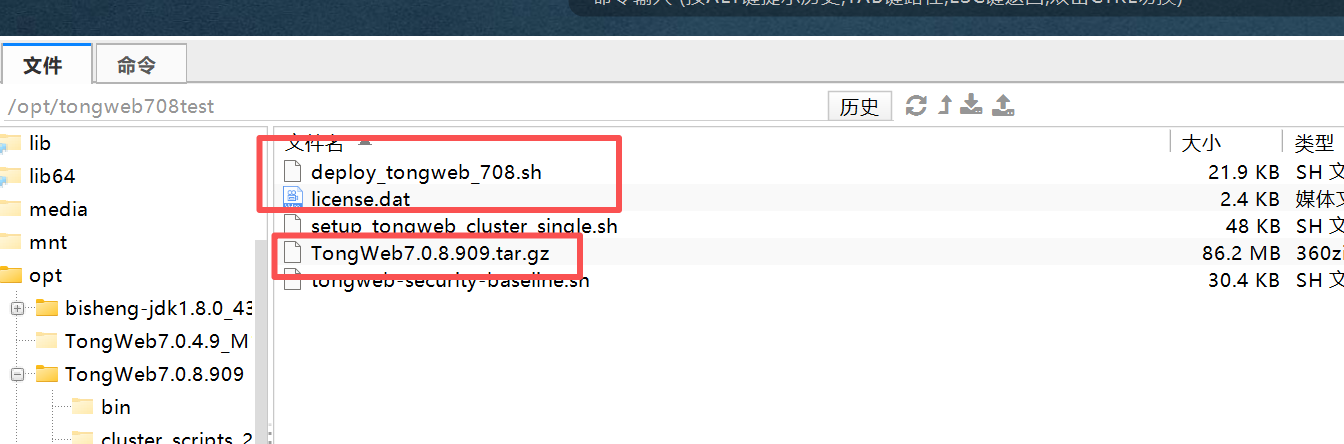
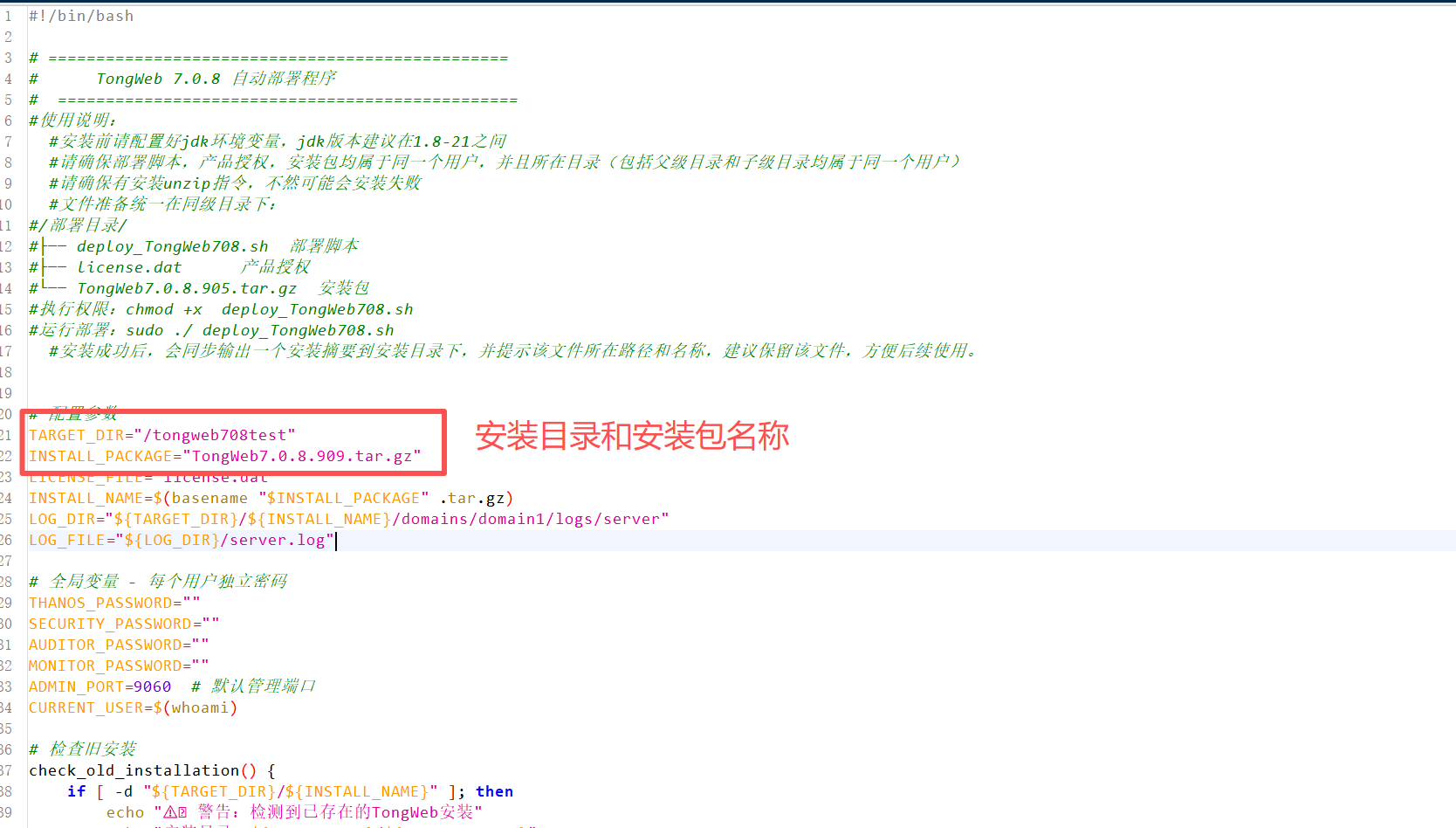
修改deploy_tongweb_708.sh,主要是截图所示的内容:
给该脚本赋予权限:
chmod +x deploy_tongweb_708.sh
之后直接执行该脚本:
./deploy_tongweb_708.sh
然后按照步骤一直输入所需信息和确认即可,安装后会输出txt,请妥善保存,里面有安装信息,账号密码和启停指令。
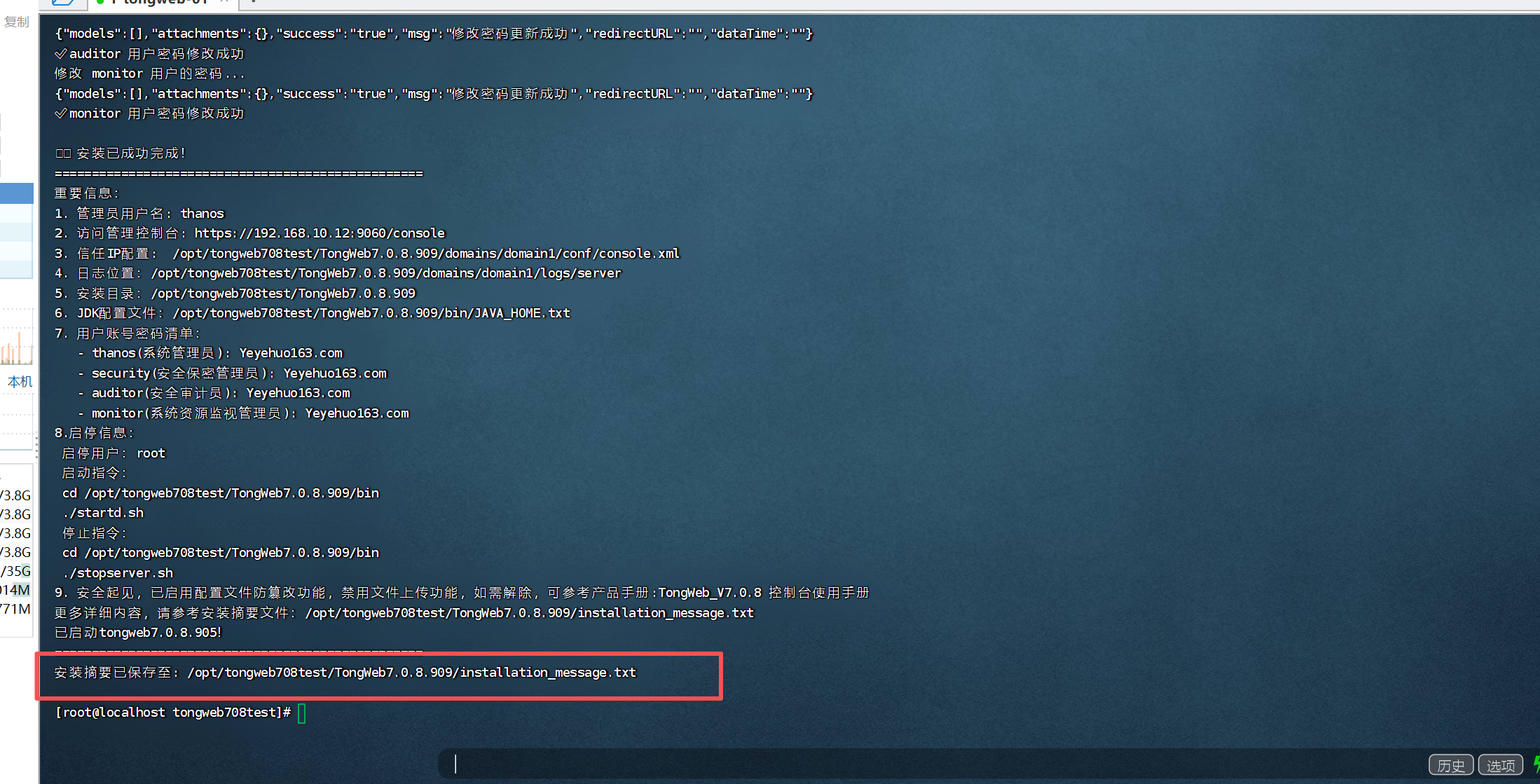
完整脚本内容如下(也可以下载本帖上的资源):
#!/bin/bash

# ================================================
#      TongWeb 7.0.8 自动部署程序
#  ================================================
#使用说明:
  #安装前请配置好jdk环境变量,jdk版本建议在1.8-21之间
  #请确保部署脚本,产品授权,安装包均属于同一个用户,并且所在目录(包括父级目录和子级目录均属于同一个用户)
  #请确保有安装unzip指令,不然可能会安装失败
  #文件准备统一在同级目录下:
#/部署目录/
#├── deploy_TongWeb708.sh  部署脚本
#├── license.dat      产品授权
#└── TongWeb7.0.8.905.tar.gz  安装包
#执行权限:chmod +x  deploy_TongWeb708.sh
#运行部署:sudo ./ deploy_TongWeb708.sh
  #安装成功后,会同步输出一个安装摘要到安装目录下,并提示该文件所在路径和名称,建议保留该文件,方便后续使用。


# 配置参数
TARGET_DIR="/opt/tongweb708test"
INSTALL_PACKAGE="TongWeb7.0.8.909.tar.gz"
LICENSE_FILE="license.dat"
INSTALL_NAME=$(basename "$INSTALL_PACKAGE" .tar.gz)
LOG_DIR="${TARGET_DIR}/${INSTALL_NAME}/domains/domain1/logs/server"
LOG_FILE="${LOG_DIR}/server.log"

# 全局变量 - 每个用户独立密码
THANOS_PASSWORD=""
SECURITY_PASSWORD=""
AUDITOR_PASSWORD=""
MONITOR_PASSWORD=""
ADMIN_PORT=9060  # 默认管理端口
CURRENT_USER=$(whoami)

# 检查旧安装
check_old_installation() {
    if [ -d "${TARGET_DIR}/${INSTALL_NAME}" ]; then
        echo "⚠️ 警告:检测到已存在的TongWeb安装"
        echo "安装目录:${TARGET_DIR}/${INSTALL_NAME}"
        echo "安全建议:修改本脚本安装路径"
        echo "修改本脚本安装路径:"
        echo "  编辑 TARGET_DIR 变量的值"
        echo "本次安装将退出,请修改后重新执行安装脚本"
        exit 1
    fi
    return 0
}

# 检查JDK环境
check_jdk() {
    echo "检查JDK环境..."

    if command -v java &>/dev/null; then
        java_version=$(java -version 2>&1 | head -n 1 | awk -F'"' '{print $2}')
        major_version=$(echo $java_version | cut -d'.' -f1)

        if [ "$major_version" = "1" ]; then
            minor_version=$(echo $java_version | cut -d'.' -f2)
            if [ "$minor_version" -lt 8 ]; then
                echo "❌ 错误:检测到不兼容的JDK版本"
                echo "TongWeb 7.0.8.9要求JDK 8-21版本"
                echo "当前版本: $java_version"
                return 1
            else
                echo "✅ JDK版本兼容: 1.$minor_version.x (JDK 8)"
            fi
        elif [ "$major_version" -lt 8 ] || [ "$major_version" -gt 21 ]; then
            echo "❌ 错误:检测到不兼容的JDK版本"
            echo "TongWeb 7.0.8.9要求JDK 8-21版本"
            echo "当前版本: $java_version"
            return 1
        else
            echo "✅ JDK版本兼容: $major_version"
        fi
    else
        echo "❌ Java命令未找到"
        return 1
    fi

    return 0
}

# 配置JAVA_HOME.txt
setup_java_home_txt() {
    local jdk_path="$1"
    local java_home_txt="${TARGET_DIR}/${INSTALL_NAME}/bin/JAVA_HOME.txt"

    echo "设置JAVA_HOME.txt: $java_home_txt"
    echo "$jdk_path" > "$java_home_txt"

    if [ $? -eq 0 ]; then
        echo "✅ 成功写入JAVA_HOME.txt"
    else
        echo "❌ 错误:写入JAVA_HOME.txt失败"
        return 1
    fi

    return 0
}

# 检查文件属主一致性
check_file_ownership() {
    echo "检查文件属主一致性..."

    # 检查安装包属主
    if [ ! -f "$INSTALL_PACKAGE" ]; then
        echo "❌ 错误:安装包 $INSTALL_PACKAGE 不存在"
        return 1
    fi
    pkg_owner=$(stat -c "%U" "$INSTALL_PACKAGE")
    if [ "$pkg_owner" != "$CURRENT_USER" ]; then
        echo "❌ 错误:安装包属主不一致"
        echo "安装包: $INSTALL_PACKAGE"
        echo "当前用户: $CURRENT_USER"
        echo "文件属主: $pkg_owner"
        echo "请使用正确用户执行脚本或修改文件属主:"
        echo "  sudo chown $CURRENT_USER $INSTALL_PACKAGE"
        return 1
    fi

    # 检查授权文件属主
    if [ ! -f "$LICENSE_FILE" ]; then
        echo "❌ 错误:授权文件 $LICENSE_FILE 不存在"
        return 1
    fi
    license_owner=$(stat -c "%U" "$LICENSE_FILE")
    if [ "$license_owner" != "$CURRENT_USER" ]; then
        echo "❌ 错误:授权文件属主不一致"
        echo "授权文件: $LICENSE_FILE"
        echo "当前用户: $CURRENT_USER"
        echo "文件属主: $license_owner"
        echo "请使用正确用户执行脚本或修改文件属主:"
        echo "  sudo chown $CURRENT_USER $LICENSE_FILE"
        return 1
    fi

    # 检查脚本自身属主
    script_owner=$(stat -c "%U" "$0")
    if [ "$script_owner" != "$CURRENT_USER" ]; then
        echo "❌ 错误:脚本属主不一致"
        echo "脚本文件: $0"
        echo "当前用户: $CURRENT_USER"
        echo "文件属主: $script_owner"
        echo "请使用正确用户执行脚本或修改文件属主:"
        echo "  sudo chown $CURRENT_USER $0"
        return 1
    fi

    echo "✅ 所有文件属主一致: $CURRENT_USER"
    return 0
}

# 端口冲突检查(已移除7200端口)
check_port_conflict() {
    echo "检查端口冲突..."
    local ports=(9060 8088) # 控制台端口、应用端口
    local config_file="${TARGET_DIR}/${INSTALL_NAME}/domains/domain1/conf/tongweb.xml"

    for port in "${ports[@]}"; do
        if netstat -tuln | grep -q ":${port} "; then
            echo "❌ 端口冲突:端口 $port 已被占用!"
            read -p "请输入替换端口号: " new_port
            # 验证端口范围是否符合规范
            if ! [[ $new_port =~ ^[0-9]+$ ]] || [ $new_port -lt 1024 ] || [ $new_port -gt 65535 ]; then
                echo "❌ 错误:无效端口号!端口必须为1024-65535范围内的未占用端口" >&2
                echo "已退出安装,请确认端口后重新执行脚本"
                exit 1
            fi
            # 检查新端口是否已被占用
            if netstat -tuln | grep -q ":${new_port} "; then
                echo "❌ 错误:端口 $new_port 已被占用,请选择其他端口" >&2
                echo "已退出安装,请确认端口后重新执行脚本"
                exit 1
            fi

            # 替换配置文件中的端口
            sed -i "s/$port/$new_port/g" "$config_file"
            echo "✅ 已将配置文件中的端口 $port 替换为 $new_port"

            # 如果是管理端口,更新全局变量
            if [ "$port" == "9060" ]; then
                ADMIN_PORT=$new_port
            fi
        fi
    done
    return 0
}

# 安装流程
install_tongweb() {
    # 解压安装包
    echo "解压安装包到 ${TARGET_DIR}..."
    tar -zxvf "$INSTALL_PACKAGE" -C "$TARGET_DIR"
    if [ $? -ne 0 ]; then
        echo "❌ 解压失败"
        return 1
    fi

    # 验证解压目录
    if [ ! -d "${TARGET_DIR}/${INSTALL_NAME}" ]; then
        echo "❌ 错误:安装包解压后未创建预期目录 ${TARGET_DIR}/${INSTALL_NAME}"
        echo "请检查安装包内容:"
        tar -ztvf "$INSTALL_PACKAGE" | head
        echo "或者修改脚本开头的TARGET_DIR参数,本次即将退出"
        return 1
    fi

    # 部署授权文件
    echo "部署授权文件到 ${TARGET_DIR}/${INSTALL_NAME}..."
    cp -v "$LICENSE_FILE" "${TARGET_DIR}/${INSTALL_NAME}/"
    if [ $? -ne 0 ]; then
        echo "❌ 授权文件部署失败"
        return 1
    fi

    # 设置执行权限
    #echo "设置执行权限..."
    #chmod -R 755 "${TARGET_DIR}/${INSTALL_NAME}/bin"

    return 0
}

# 配置信任IP
configure_trusted_ip() {
    echo ""
    echo "=== 配置信任IP ==="
    echo "请设置允许访问TongWeb控制台的信任IP"
    echo "格式说明:"
    echo "1. 单个IP: 192.168.1.100"
    echo "2. IP段: 192.168.1.*"
    echo "3. IP范围: 192.168.1.50-192.168.1.100"
    echo "4. 多个IP用逗号分隔: 192.168.1.100,10.0.0.50"
    echo "5. 输入 '*' 表示信任所有IP(不推荐)"
    echo ""

    read -p "请输入信任IP(直接回车使用默认值 '*'): " trusted_ip

    # 设置默认值
    if [ -z "$trusted_ip" ]; then
        trusted_ip="*"
        echo "⚠️ 警告:已设置为信任所有IP,存在安全风险"
    fi

    # 更新配置文件
    local console_xml="${TARGET_DIR}/${INSTALL_NAME}/domains/domain1/conf/console.xml"
    if [ -f "$console_xml" ]; then
        # 检查是否已有trustedIP属性
        if grep -q "trustedIP=" "$console_xml"; then
            sed -i "s/trustedIP=\"[^\"]*\"/trustedIP=\"$trusted_ip\"/" "$console_xml"
        else
            sed -i "s/<console /<console trustedIP=\"$trusted_ip\" /" "$console_xml"
        fi
        echo "✅ 已更新信任IP配置: $trusted_ip"
    else
        echo "❌ 错误:未找到console.xml配置文件"
        return 1
    fi

    return 0
}

# 启动服务
start_server() {
    echo "启动TongWeb服务..."
    cd "${TARGET_DIR}/${INSTALL_NAME}/bin" || { echo "❌ 无法进入bin目录"; return 1; }

    ./startd.sh

    # 等待日志文件生成(增加到5分钟)
    local timeout=300
    local start_time=$(date +%s)
    local log_found=false

    echo "等待服务初始化(最长等待5分钟)..."
    while [ $(($(date +%s) - start_time)) -lt $timeout ]; do
        if [ -f "$LOG_FILE" ]; then
            log_found=true
            break
        fi
        sleep 10
        elapsed=$(($(date +%s) - start_time))
        echo "已等待 ${elapsed} 秒..."
    done

    if ! $log_found; then
        echo ""
        echo "❌ 错误:未能在 ${timeout} 秒内检测到日志文件"
        echo "可能原因:"
        echo "1. 服务启动时间过长"
        echo "2. JDK环境配置问题"
        echo "3. 端口冲突(默认管理端口9060)"
        echo ""

        # 检查进程状态
        echo "正在检查TongWeb进程状态..."
        tongweb_process=$(ps -ef | grep "tongweb" | grep -v "grep")

        if [ -n "$tongweb_process" ]; then
            echo "✅ TongWeb进程已运行:"
            echo "$tongweb_process"
            echo "说明:请检查日志配置是否正常加载"
        else
            echo "❌ 未检测到TongWeb进程"
            echo "请检查以下日志获取详细信息:"
            echo "tail -f ${TARGET_DIR}/${INSTALL_NAME}/logs/server.log"
        fi
        return 1
    fi

    # 检查启动状态
    echo ""
    if tail -n 50 "$LOG_FILE" | grep -q "Server startup in"; then
        echo "✅ TongWeb 启动成功"
    else
        echo "⚠️ 警告:启动日志未检测到成功标识"
        echo "请检查日志文件获取详细信息:$LOG_FILE"
    fi

    return 0
}

# 修改管理员密码 - 优化版
change_admin_password() {
    echo ""
    echo "=== 修改管理员密码 ==="
    echo "根据安全要求,您需要修改默认管理员密码"
    echo ""
    echo "密码要求:"
    echo "1. 长度必须在10-20个字符之间"
    echo "2. 不能包含单引号(')或双引号(\")"
    echo "3. 不能使用最近5次使用过的旧密码"
    echo "4. 建议包含大小写字母、数字和特殊字符"
    echo ""

    # 设置默认密码
    DEFAULT_PASSWORD="thanos123.com"

    # 获取新密码
    while true; do
        read -s -p "请输入管理员(thanos)的新密码: " THANOS_PASSWORD
        echo
        read -s -p "请确认管理员(thanos)的新密码: " confirm
        echo

        # 检查密码长度
        if [ ${#THANOS_PASSWORD} -lt 10 ] || [ ${#THANOS_PASSWORD} -gt 20 ]; then
            echo "❌ 错误:密码长度必须在10-20个字符之间"
            continue
        fi

        # 检查密码是否包含引号
        if [[ "$THANOS_PASSWORD" == *"'"* ]] || [[ "$THANOS_PASSWORD" == *"\""* ]]; then
            echo "❌ 错误:密码不能包含引号('或\")"
            continue
        fi

        # 检查两次输入是否一致
        if [ "$THANOS_PASSWORD" != "$confirm" ]; then
            echo "❌ 错误:两次输入的密码不一致"
            continue
        fi

        # 检查是否与旧密码相同
        if [ "$THANOS_PASSWORD" == "$DEFAULT_PASSWORD" ]; then
            echo "❌ 错误:新密码不能与默认密码相同"
            continue
        fi

        break
    done

    echo "正在修改管理员密码..."

    # 执行密码修改命令 - 添加端口参数
    cd "${TARGET_DIR}/${INSTALL_NAME}/bin" || { echo "❌ 无法进入bin目录"; return; }

    ./commandstool.sh --model=password --action=update \
         --username=thanos --password="$DEFAULT_PASSWORD" \
         --port=$ADMIN_PORT \
         --acceptAgreement=true \
         originalPassword="$DEFAULT_PASSWORD" \
         newPassword="$THANOS_PASSWORD" \
         confirmPassword="$THANOS_PASSWORD"

    # 检查命令执行结果
    if [ $? -eq 0 ]; then
        echo "✅ 管理员密码修改成功"
    else
        echo "⚠️ 管理员密码修改失败,请手动修改"
        echo "手动修改步骤:"
        echo "1.访问管理控制台: http://$(hostname -I | cut -d' ' -f1):${ADMIN_PORT}"
        echo "2. 使用用户名 thanos 和默认密码:thanos123.com 登录"
        echo "3. 进入安全管理 > 用户管理 > thanos"
        echo "4. 修改密码"
        echo ""
        echo "或执行以下命令修改:"
        echo "sudo -u ${CURRENT_USER} ${TARGET_DIR}/${INSTALL_NAME}/bin/commandstool.sh --model=password --action=update --username=thanos --port=${ADMIN_PORT} --acceptAgreement=true originalPassword=\"${DEFAULT_PASSWORD}\" newPassword=\"$THANOS_PASSWORD\" confirmPassword=\"$THANOS_PASSWORD\""
    fi
    return 0
}

# 修改其他用户密码
change_other_users_password() {
    echo ""
    echo "=== 修改其他用户密码 ==="

    # 用户列表
    users=("security" "auditor" "monitor")
    default_passwords=("security123.com" "auditor123.com" "monitor123.com")

    # 提示用户输入每个用户的新密码
    read -sp "请输入安全保密管理员(security)的新密码: " SECURITY_PASSWORD
    echo
    read -sp "请确认安全保密管理员(security)的新密码: " confirm
    echo
    if [ "$SECURITY_PASSWORD" != "$confirm" ]; then
        echo "❌ 错误:两次输入的密码不一致"
        return 1
    fi

    read -sp "请输入安全审计员(auditor)的新密码: " AUDITOR_PASSWORD
    echo
    read -sp "请确认安全审计员(auditor)的新密码: " confirm
    echo
    if [ "$AUDITOR_PASSWORD" != "$confirm" ]; then
        echo "❌ 错误:两次输入的密码不一致"
        return 1
    fi

    read -sp "请输入系统资源监视管理员(monitor)的新密码: " MONITOR_PASSWORD
    echo
    read -sp "请确认系统资源监视管理员(monitor)的新密码: " confirm
    echo
    if [ "$MONITOR_PASSWORD" != "$confirm" ]; then
        echo "❌ 错误:两次输入的密码不一致"
        return 1
    fi

    # 为每个用户设置独立密码
    passwords=("$SECURITY_PASSWORD" "$AUDITOR_PASSWORD" "$MONITOR_PASSWORD")

    for i in "${!users[@]}"; do
        echo "修改 ${users[$i]} 用户的密码..."
        cd "${TARGET_DIR}/${INSTALL_NAME}/bin" || { echo "❌ 无法进入bin目录"; return; }

        ./commandstool.sh --model=password --action=update \
             --username=${users[$i]} --password=${default_passwords[$i]} \
             --port=$ADMIN_PORT \
             --acceptAgreement=true \
             originalPassword="${default_passwords[$i]}" \
             newPassword="${passwords[$i]}" \
             confirmPassword="${passwords[$i]}"

        if [ $? -eq 0 ]; then
            echo "✅ ${users[$i]} 用户密码修改成功"
        else
            echo "⚠️ ${users[$i]} 用户密码修改失败,请手动修改"
            echo "手动修改步骤:"
            echo "1.访问管理控制台: https://$(hostname -I | cut -d' ' -f1):${ADMIN_PORT}"
            echo "2. 使用用户名 ${users[$i]} 和默认密码:${default_passwords[$i]} 登录"
            echo "3. 进入安全管理 > 用户管理 > ${users[$i]}"
            echo "4. 修改密码"
        fi
    done

    return 0
}

# --= 主流程 =--
echo " ================================================="
echo "      TongWeb 7.0.8.9 自动部署程序 (支持JDK 8-21)"
echo "  ================================================="

# 1. 检查旧安装
if ! check_old_installation; then
    exit 1
fi

# 2. 检查JDK兼容性
if ! check_jdk; then
    echo "❌ 错误:未检测到兼容的JDK环境"
    echo "解决方案:"
    echo "1. 安装JDK 8-21版本"
    echo "2. 创建JAVA_HOME.txt文件并配置JDK路径"
    echo "   在${TARGET_DIR}/${INSTALL_NAME}/bin目录创建JAVA_HOME.txt"
    echo "   写入JDK安装路径,例如:/usr/lib/jvm/jdk-11.0.15"
    exit 1
fi

# 3. 检查文件属主
if ! check_file_ownership; then
    exit 1
fi

# 4. JDK路径配置
echo ""
echo "=== JDK路径配置 ==="
echo "TongWeb需要Java环境运行"
echo "请提供JDK安装路径(该路径将被写入JAVA_HOME.txt)"
echo "示例: /usr/lib/jvm/jdk-1.8.0_371"
echo ""

# 尝试从环境变量获取
if [ -n "$JAVA_HOME" ]; then
    echo "✅ 检测到环境变量 JAVA_HOME:$JAVA_HOME"
    jdk_path="$JAVA_HOME"
else
    # 自动探测可能的JDK路径
    echo "正在尝试自动探测JDK安装路径..."
    possible_paths=(
        "/usr/lib/jvm"
        "/usr/java"
        "/opt/jdk"
        "/usr/local/jdk"
    )

    found=false
    for path in "${possible_paths[@]}"; do
        if [ -d "$path" ]; then
            # 查找第一个JDK目录
            for jdk_dir in $(ls -d "$path"/* 2>/dev/null); do
                if [ -d "$jdk_dir/bin" ] && [ -f "$jdk_dir/bin/java" ]; then
                    jdk_path="$jdk_dir"
                    found=true
                    echo "✅ 自动检测到JDK路径:$jdk_path"
                    break
                fi
            done
            if $found; then break; fi
        fi
    done

    if ! $found; then
        echo "⚠️ 未能自动检测到JDK安装路径"
        read -p "请输入JDK安装目录的完整路径: " jdk_path
    fi
fi

# 验证JDK路径有效性
if [ ! -d "$jdk_path" ] || [ ! -f "$jdk_path/bin/java" ]; then
    echo "❌ 错误:提供的JDK路径无效"
    echo "请确保提供的目录包含有效的JDK安装(有bin/java可执行文件)"
    exit 1
fi

# 5. 执行安装
echo ""
echo "=== 开始安装 TongWeb ==="
if ! install_tongweb; then
    exit 1
fi

# 6. 配置JAVA_HOME.txt
setup_java_home_txt "$jdk_path"

# 7. 端口冲突检查
check_port_conflict

# 8. 配置信任IP
configure_trusted_ip

# 9. 启动服务
start_server

# 10. 修改管理员密码
change_admin_password

# 11. 修改其他用户密码
change_other_users_password

# 12. 完成信息
echo ""
echo "🎉 安装已成功完成!"
echo "=================================================="
echo "重要信息:"
echo "1. 管理员用户名: thanos"
echo "2. 访问管理控制台: https://$(hostname -I | cut -d' ' -f1):${ADMIN_PORT}/console"
echo "3. 信任IP配置:  ${TARGET_DIR}/${INSTALL_NAME}/domains/domain1/conf/console.xml "
echo "4. 日志位置:${LOG_DIR}"
echo "5. 安装目录:${TARGET_DIR}/${INSTALL_NAME}"
echo "6. JDK配置文件:${TARGET_DIR}/${INSTALL_NAME}/bin/JAVA_HOME.txt"
echo "7. 用户账号密码清单:"
echo "   - thanos(系统管理员): $THANOS_PASSWORD"
echo "   - security(安全保密管理员): $SECURITY_PASSWORD"
echo "   - auditor(安全审计员): $AUDITOR_PASSWORD"
echo "   - monitor(系统资源监视管理员): $MONITOR_PASSWORD"
echo "8.启停信息:"
echo " 启停用户:$CURRENT_USER"
echo " 启动指令:"
echo " cd ${TARGET_DIR}/${INSTALL_NAME}/bin"
echo " ./startd.sh"
echo " 停止指令:"
echo " cd ${TARGET_DIR}/${INSTALL_NAME}/bin"
echo " ./stopserver.sh"
echo "9. 安全起见,已启用配置文件防篡改功能,禁用文件上传功能,如需解除,可参考产品手册:TongWeb_V7.0.8 控制台使用手册"
echo "更多详细内容,请参考安装摘要文件:${TARGET_DIR}/${INSTALL_NAME}/installation_message.txt"
echo "已启动tongweb7.0.8.905!"
echo "=================================================="

# 13. 生成安装摘要文件
SUMMARY_FILE="${TARGET_DIR}/${INSTALL_NAME}/installation_message.txt"
cat > "$SUMMARY_FILE" <<EOF
=============== TongWeb 安装摘要 ================
安装日期: $(date)
安装版本: TongWeb 7.0.8.9

=== 访问信息 ===
管理控制台: https://$(hostname -I | cut -d' ' -f1):${ADMIN_PORT}/console
访问账号:
thanos(系统管理员): ${THANOS_PASSWORD}

=== 用户信息 ===
用户账号密码清单:
   thanos(系统管理员): ${THANOS_PASSWORD}
   security(安全保密管理员): ${SECURITY_PASSWORD}
   auditor(安全审计员): ${AUDITOR_PASSWORD}
   monitor(系统资源监视管理员): ${MONITOR_PASSWORD}

正常情况下,登录控制台,建议使用thanos用户。
如需配置监控(例如jmx),建议使用monitor。

关于各用户的介绍,可参考:

TongWeb_V7.0.8产品介绍手册第6章节:权限管理
TongWeb_V7.0.8 控制台使用手册第4.4章节:安全配置

=== 产品手册 ===
存放路径:${TARGET_DIR}/${INSTALL_NAME}/version7.0.8.905/docs

=== 安全配置 ===
信任IP配置文件: ${TARGET_DIR}/${INSTALL_NAME}/domains/domain1/conf/console.xml

=== 路径信息 ===
安装目录: ${TARGET_DIR}/${INSTALL_NAME}
日志路径: ${LOG_DIR}
JDK配置: ${TARGET_DIR}/${INSTALL_NAME}/bin/JAVA_HOME.txt
授权文件:${TARGET_DIR}/${INSTALL_NAME}/license.dat

=============== 重要指令 ================
启停用户:$CURRENT_USER

启动指令:
cd ${TARGET_DIR}/${INSTALL_NAME}/bin
./startd.sh

停止指令:
cd ${TARGET_DIR}/${INSTALL_NAME}/bin
./stopserver.sh

查看进程:
ps -ef |grep tongweb


查看授权到期时间:
cd ${TARGET_DIR}/${INSTALL_NAME}/bin
./version.sh

=============================================
EOF

echo "安装摘要已保存至: $SUMMARY_FILE"
echo ""
tongweb-security-baseline.sh(可选)
用途
安全基线整改(按需决定是否使用)
流程图
┌─────────────────────────────────────────────────────────────┐
│                      脚本启动                               │
└─────────────────────────────────────────────────────────────┘
                              │
                              ▼
┌─────────────────────────────────────────────────────────────┐
│  前置检查 (check_prerequisites)                             │
│  - 检查安装目录是否存在                                      │
│  - 确认已备份 (交互式)                                       │
│  - 输入 Thanos 密码、Security 密码                            │
│  - 检查当前用户与安装目录属主一致性                           │
│  - 检查必要文件 (forcestop.sh, startd.sh, commandstool.sh)   │
│  - 确认管理主机 IP                                          │
└─────────────────────────────────────────────────────────────┘
                              │
                              ▼
┌─────────────────────────────────────────────────────────────┐
│  步骤 1: 设置管理端口 (set_management_port)                  │
│  - 从 tongweb.xml 解析当前端口                               │
│  - 询问是否修改端口                                         │
│  - 如修改:停止服务 → 修改配置 → 启动服务                    │
└─────────────────────────────────────────────────────────────┘
                              │
                              ▼
┌─────────────────────────────────────────────────────────────┐
│  步骤 2: 用户管理 (manage_users)                            │
│  - 查询当前用户列表                                         │
│  - 询问是否新建用户                                         │
│    → 是:输入用户名 → 密码复杂度校验 → 创建用户 → 赋予 role  │
│    → 否:选择使用 thanos 或其他用户                          │
└─────────────────────────────────────────────────────────────┘
                              │
                              ▼
┌─────────────────────────────────────────────────────────────┐
│  步骤 3: 修改实例通道端口 (modify_connector_port)            │
│  - 查询 domain1 实例的 server 通道当前端口                     │
│  - 询问是否调整端口                                         │
│  - 端口校验(不能是 9060/8080,不能冲突)                    │
│  - 更新通道配置                                             │
└─────────────────────────────────────────────────────────────┘
                              │
                              ▼
┌─────────────────────────────────────────────────────────────┐
│  步骤 4: 设置控制台信任 IP (set_console_trusted_ips)         │
│  - 输入信任 IP(支持单 IP、IP 段、范围、多个 IP)              │
│  - 调用 commandstool.sh 更新配置                              │
└─────────────────────────────────────────────────────────────┘
                              │
                              ▼
┌─────────────────────────────────────────────────────────────┐
│  步骤 5: 配置自定义异常页面 (configure_custom_error_pages)   │
│  - 查询 domain1 实例的虚拟主机列表                            │
│  - 对每个虚拟主机询问是否配置                               │
│  - 输入错误码 + 页面路径 → 加密 → 更新配置                   │
└─────────────────────────────────────────────────────────────┘
                              │
                              ▼
┌─────────────────────────────────────────────────────────────┐
│  步骤 6: 配置远程 JMX (configure_remote_jmx)                │
│  - 输入 JMX 通信端口                                        │
│  - 输入 JMX 绑定 IP                                          │
│  - 更新 JMX 配置                                            │
│  - 添加 JMX 启动参数到 tongweb.xml                           │
│  - 询问是否立即重启                                         │
└─────────────────────────────────────────────────────────────┘
                              │
                              ▼
┌─────────────────────────────────────────────────────────────┐
│  脚本结束                                                   │
│  - 输出日志文件路径                                         │
└─────────────────────────────────────────────────────────────┘
使用说明
先赋予执行权限
chmod +x tongweb-security-baseline.sh
赋权后可以执行指令看看说明:
./tongweb-security-baseline.sh --help
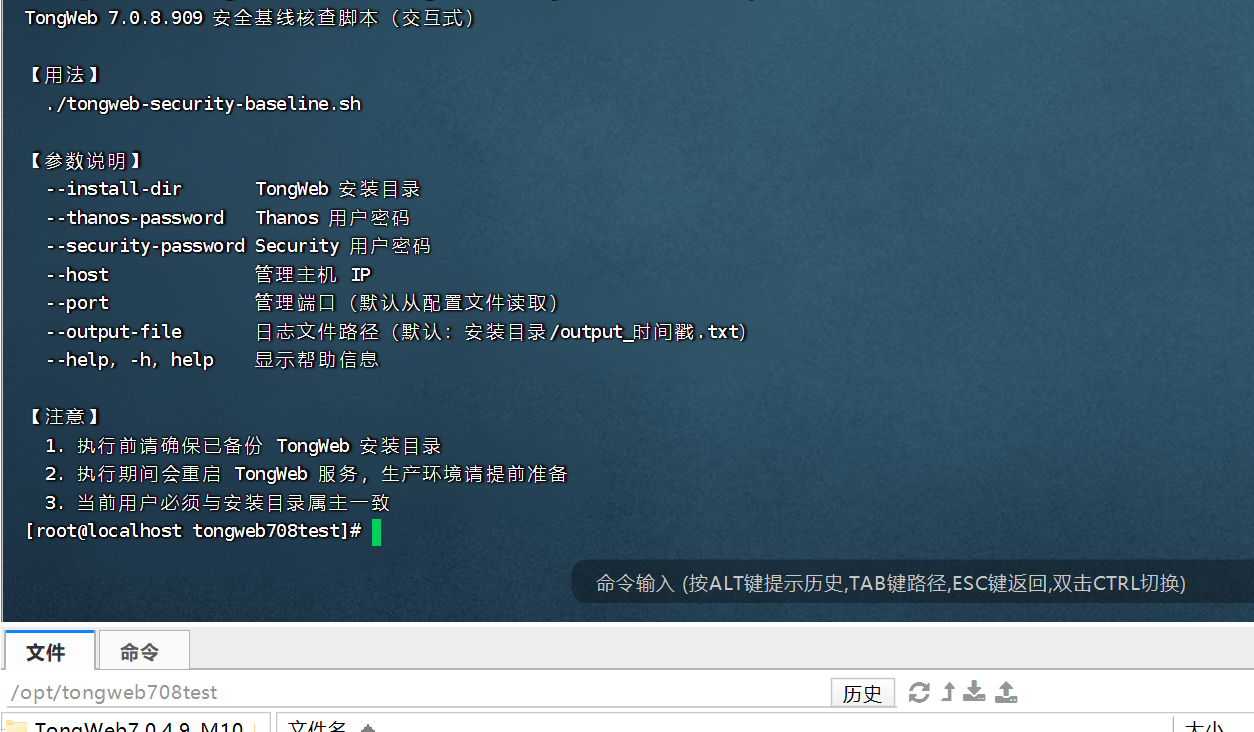
可以直接执行进入到交互页面,然后根据要求进行操作:
./tongweb-security-baseline.sh
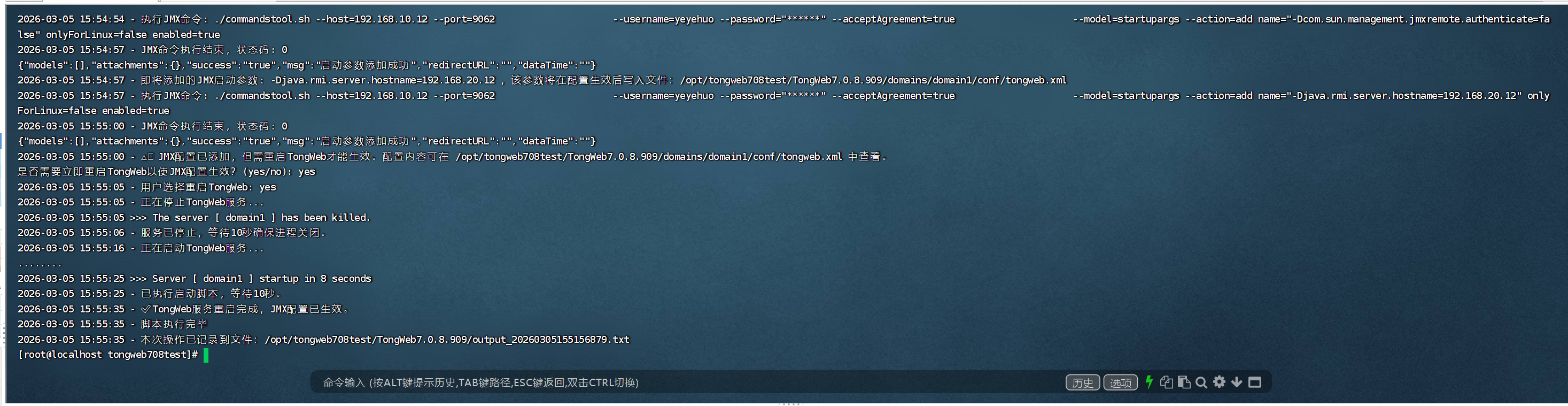
脚本内容如下:
#!/bin/bash
# ==================== 全局变量定义 ====================
install_dir=""
output_file=""
timestamp=$(date "+%Y%m%d%H%M%S%3N")
host=""
current_user=""
install_owner=""
thanos_username="thanos"
security_username="security"
thanos_password=""
security_password=""
new_username=""
new_user_password=""
port=""
instance="domain1"
connector_name="server"
SCRIPT_DIR="$(cd "$(dirname "${BASH_SOURCE[0]}")" && pwd)"
CLUSTER_SCRIPT="$SCRIPT_DIR/create_tongweb_cluster2.sh"
#tongweb自带脚本
required_files=("forcestop.sh" "startd.sh" "commandstool.sh")
# ==================== 日志输出函数 ====================
log_with_timestamp(){
echo "$(date '+%Y-%m-%d %H:%M:%S') - $*" | tee -a "$output_file"
}
mask_password_in_cmd(){
local cmd="$1"
# 匹配 --password="任意内容" 并替换为 --password="******"
echo "$cmd" | sed -E 's/(--password=")[^"]*/\1******/g'
}
# ==================== 通用命令执行函数(修复版) ====================
# 参数1: 要执行的命令
# 参数2(可选): 是否在函数内删除临时文件,默认 true(删除)
execute_and_log(){
local cmd="$1"
local cleanup=${2:-true}
local masked_cmd
masked_cmd=$(mask_password_in_cmd "$cmd")
log_with_timestamp "执行命令: $masked_cmd"
eval "$cmd" > temp_output.txt 2>&1
local status=$?
log_with_timestamp "命令执行结束,状态码: $status"
cat temp_output.txt | tee -a "$output_file"
if $cleanup; then
rm -f temp_output.txt
fi
return $status
}
# ==================== JMX专用执行函数(带脱敏) ====================
execute_and_log_jmx(){
local cmd="$1"
local masked_cmd
masked_cmd=$(mask_password_in_cmd "$cmd")
log_with_timestamp "执行JMX命令: $masked_cmd"
eval "$cmd" > temp_jmx_output.txt 2>&1
local status=$?
log_with_timestamp "JMX命令执行结束,状态码: $status"
cat temp_jmx_output.txt | tee -a "$output_file"
rm -f temp_jmx_output.txt
return $status
}
# ==================== 使用说明 ====================
show_usage() {
cat <<'EOF'
TongWeb 7.0.8.909 安全基线核查脚本(交互式)
【用法】
./tongweb-security-baseline.sh
【参数说明】
--install-dir TongWeb 安装目录
--thanos-password Thanos 用户密码
--security-password Security 用户密码
--host 管理主机 IP
--port 管理端口(默认从配置文件读取)
--output-file 日志文件路径(默认:安装目录/output_时间戳.txt)
--help, -h, help 显示帮助信息
【注意】
1. 执行前请确保已备份 TongWeb 安装目录
2. 执行期间会重启 TongWeb 服务,生产环境请提前准备
3. 当前用户必须与安装目录属主一致
EOF
}
# ==================== 命令行参数解析 ====================
parse_args() {
while [[ $# -gt 0 ]]; do
case "$1" in
--help|-h|help) show_usage; exit 0 ;;
*) echo "未知参数:$1"; show_usage; exit 1 ;;
esac
done
}
# ==================== 前置检查 ====================
check_prerequisites(){
echo " ================================================="
echo " TongWeb 7.0.8.909安全基线核查清单执行脚本 "
echo " ================================================="
read -p "请输入Tongweb安装目录: " install_dir
if [ ! -d "$install_dir" ]; then
log_with_timestamp "目录不存在或无法访问。"
exit 1
fi
output_file="$install_dir/output_$timestamp.txt"
log_with_timestamp "本次操作记录到文件:$output_file"
echo "Tongweb中间件安全基线核查清单操作日志" > "$output_file"
log_with_timestamp "重要提示:在继续操作之前,请确保Tongweb已启动,操作期间需要重启Tongweb,生产环境请提前做好准备!!! 如需退出,按ctrl+c"
log_with_timestamp "提示:在继续操作之前,请确保已对Tongweb的安装目录进行了备份。"
read -p "是否已备份?(输入 'yes' 确认继续,或 'no' 退出脚本): " backup_confirm
log_with_timestamp "用户确认备份状态: $backup_confirm"
if [ "$backup_confirm" != "yes" ]; then
log_with_timestamp "请先备份Tongweb的安装目录,然后重新运行脚本。"
exit 1
fi
log_with_timestamp "开始执行:Tongweb中间件安全基线核查清单,请根据提示,输入相关信息,并回车确认。"
read -sp "请输入Thanos用户的密码,用于后续新建用户和其他配置项操作: " thanos_password
echo
log_with_timestamp "Thanos密码已输入(不显示)"
read -sp "请输入Security用户的密码,用于后续配置用户角色: " security_password
echo
log_with_timestamp "Security用户的密码已输入(不显示)"
install_owner=$(stat -c '%U' "$install_dir" 2>/dev/null)
current_user=$(whoami)
if [ "$current_user" != "$install_owner" ]; then
log_with_timestamp "当前用户 ($current_user) 和安装目录属主 ($install_owner) 不一致。请切换到属主用户并重新执行脚本。"
exit 1
fi
for file in "${required_files[@]}"; do
if [ ! -f "$install_dir/bin/$file" ]; then
log_with_timestamp "$file文件不存在或无法访问。"
exit 1
fi
done
host=$(hostname -I | awk '{print $1}')
log_with_timestamp "检测到的当前主机IP地址为:$host"
read -p "请确认IP地址是否正确(输入 'yes' 确认或 'no' 修改): " ip_confirm
log_with_timestamp "用户确认IP地址: $ip_confirm"
if [ "$ip_confirm" != "yes" ]; then
read -p "请输入正确的IP地址: " host
log_with_timestamp "修改后的IP地址: $host"
fi
}
# ==================== 步骤1:设置管理端口 ====================
set_management_port(){
log_with_timestamp "步骤1:设置Tongweb管理端口"
local config_file="$install_dir/domains/domain1/conf/tongweb.xml"
port=""
if [ -f "$config_file" ]; then
port=$(grep -A5 'service systemManaged="true"' "$config_file" | grep -oE 'port="[^"]+"' | sed -E 's/port="([^"]+)"/\1/' | head -n1)
[ -n "$port" ] && log_with_timestamp "当前的Tongweb管理端口为: $port"
fi
if [ -z "$port" ]; then
log_with_timestamp "未找到Tongweb的管理端口号,请通过 $config_file 文件进行确认。"
read -p "请输入Tongweb的管理端口号: " port
log_with_timestamp "用户输入的端口号: $port"
fi
read -p "当前Tongweb的管理端口号为 $port,您需要修改端口号吗?(y/n) " answer
log_with_timestamp "用户选择修改端口号: $answer"
if [[ "$answer" =~ ^[Yy]$ ]]; then
while true; do
read -p "请输入新的端口号: " new_port
if [[ "$new_port" =~ ^[0-9]+$ ]] && (( new_port > 0 && new_port < 65536 )); then
if ! lsof -i :"$new_port" &>/dev/null; then
log_with_timestamp "新端口号 $new_port 可用。"
log_with_timestamp "正在停止服务..."
"$install_dir/bin/forcestop.sh"
log_with_timestamp "服务已停止,正在等待10秒以确保所有进程关闭。"
sleep 10
awk -v old_port="$port" -v new_port="$new_port" '{gsub("port=\"" old_port "\"", "port=\"" new_port "\""); print}' "$config_file" > "$config_file.tmp" && mv "$config_file.tmp" "$config_file"
log_with_timestamp "配置文件已更新为新的端口号: $new_port"
port="$new_port"
log_with_timestamp "正在启动服务..."
"$install_dir/bin/startd.sh"
log_with_timestamp "已执行启动脚本,请等待10秒。"
sleep 10
log_with_timestamp "服务器启动完成。"
break
else
log_with_timestamp "端口号 $new_port 已被占用,请选择其他端口号。"
fi
else
log_with_timestamp "请输入有效的端口号(1-65535)。"
fi
done
else
log_with_timestamp "端口号保持不变。"
fi
}
# ==================== 步骤2:用户管理 ====================
manage_users(){
log_with_timestamp "步骤2:查询当前已有的用户列表"
cd "$install_dir/bin" || { log_with_timestamp "目录不存在或无法访问"; exit 1; }
local query_users_command="./commandstool.sh --host=\"$host\" --port=\"$port\" --model=user --action=list --acceptAgreement=true --username=\"$thanos_username\" --password=\"$thanos_password\""
local masked_query_cmd
masked_query_cmd=$(mask_password_in_cmd "$query_users_command")
log_with_timestamp "执行命令: $masked_query_cmd"
user_list_output=$(eval "$query_users_command")
if [[ $? -ne 0 ]]; then
log_with_timestamp "❌ 查询用户列表失败,请检查命令或环境配置。"
exit 1
fi
log_with_timestamp "当前用户列表查询结果:"
echo "$user_list_output" | tee -a "$output_file"
user_info=$(echo "$user_list_output" | grep -oP '"name":"[^"]+",?"info":"[^"]+"' | sed -E 's/"name":"([^"]+)","info":"([^"]+)"/名称:\1 信息:\2/')
log_with_timestamp "当前用户信息列表(提取后的):"
echo "$user_info" | tee -a "$output_file"
if [ -z "$user_info" ]; then
log_with_timestamp "⚠️ 无法提取用户信息,可能JSON格式有误或解析失败,请检查原始输出。"
else
log_with_timestamp "✅ 用户信息提取完毕,已输出至日志文件。"
fi
read -p "是否需要新增用户?(输入 'yes' 进入新建用户流程,或 'no' 跳过): " create_user_confirm
log_with_timestamp "用户选择是否新增用户: $create_user_confirm"
new_username=""
new_user_password=""
if [ "$create_user_confirm" == "yes" ]; then
log_with_timestamp "步骤2:新建用户"
while true; do
read -p "从客户处输入需要新建的用户名(仅限英文字符): " new_username
if [[ "$new_username" =~ ^[a-zA-Z]+$ ]]; then
log_with_timestamp "新建用户名: $new_username"
break
else
log_with_timestamp "用户名不合法,请仅使用英文字符。"
fi
done
change_decision="yes"
if [ "$change_decision" == "yes" ]; then
while true; do
read -sp "请输入新的密码(长度至少为8位以上,口令必须从字符(a-z,A-Z)、数字(0-9)、符号(~!@#$%^&*()_<>-)中至少选择两种进行组合,由非纯数字或字母组成): " new_user_password
echo
read -sp "请确认新的密码: " confirm_password
echo
if [ ${#new_user_password} -lt 8 ]; then
log_with_timestamp "❌ 错误:密码长度必须至少为8位。"
continue
fi
contains_letter=false
[[ "$new_user_password" =~ [a-zA-Z] ]] && contains_letter=true
contains_number=false
[[ "$new_user_password" =~ [0-9] ]] && contains_number=true
contains_special=false
[[ "$new_user_password" =~ [~!@#$%^\&\*\(\)_\<\>\-] ]] && contains_special=true
if ! ( $contains_letter && $contains_number ) && ! ( $contains_letter && $contains_special ) && ! ( $contains_number && $contains_special ); then
log_with_timestamp "❌ 错误:密码必须包含字母、数字和特殊符号中的两种。"
continue
fi
if [ "$new_user_password" != "$confirm_password" ]; then
log_with_timestamp "❌ 错误:两次输入的密码不一致。"
continue
fi
break
done
fi
log_with_timestamp "通过Thanos新建用户账号。"
add_cmd="./commandstool.sh --host=\"$host\" --port=\"$port\" --model=user --action=add --username=\"$thanos_username\" --password=\"$thanos_password\" --acceptAgreement=true digestAlg=SHA-256 active=true saltLength=4 limitRepeats=5 iterations=5 enablePasswordAge=true password=\"$new_user_password\" confirmPassword=\"$new_user_password\" name=\"$new_username\" passwordMinAge=0 minLen=8 changeInitPwd=false passwordMaxAge=90 info=\"业务使用账号\""
masked_add_cmd=$(mask_password_in_cmd "$add_cmd")
log_with_timestamp "执行命令: $masked_add_cmd"
eval "$add_cmd"
log_with_timestamp "新用户账号已创建."
log_with_timestamp "正在通过Security赋予新用户管理者角色system..."
role_cmd="./commandstool.sh --host=\"$host\" --port=\"$port\" --model=userrole --action=update --username=\"$security_username\" --password=\"$security_password\" --acceptAgreement=true name=\"$new_username\" roles=system nodes=default"
masked_role_cmd=$(mask_password_in_cmd "$role_cmd")
log_with_timestamp "执行命令: $masked_role_cmd"
eval "$role_cmd"
log_with_timestamp "已赋予新用户管理者角色system."
else
log_with_timestamp "用户选择不创建新用户。"
read -p "后续操作是否使用 thanos 用户执行?(yes 使用 thanos / no 输入其他用户): " use_thanos_confirm
if [ "$use_thanos_confirm" == "yes" ]; then
log_with_timestamp "后续操作将使用 thanos 用户执行。"
new_username="$thanos_username"
new_user_password="$thanos_password"
else
read -p "请输入要使用的用户名: " new_username
read -sp "请输入该用户的密码: " new_user_password
echo
log_with_timestamp "后续操作将使用用户 $new_username 执行。"
fi
fi
}
# ==================== 步骤3:修改实例通道端口号 ====================
modify_connector_port(){
log_with_timestamp "步骤3:修改实例通道端口号(仅默认实例 domain1 的 server 通道)"
log_with_timestamp "当前用户名: $new_username"
read -p "是否执行步骤3?请输入 'yes' 执行或 'no' 跳过: " step3_confirm
log_with_timestamp "用户选择执行步骤3: $step3_confirm"
if [ "$step3_confirm" = "yes" ]; then
if [ ! -d "$install_dir/bin" ] || [ "$current_user" != "$install_owner" ]; then
log_with_timestamp "目录检查失败或当前用户与目录属主不一致,请检查。"
exit 1
fi
cd "$install_dir/bin" || { log_with_timestamp "目录不存在或无法访问"; exit 1; }
instance="domain1"
connector_name="server"
log_with_timestamp "=== 检查实例: $instance 的通道 '$connector_name' 配置 ==="
cmd="./commandstool.sh --host=\"$host\" --port=\"$port\" \
--username=\"$new_username\" --password=\"$new_user_password\" --acceptAgreement=true \
--model=connector --action=list --targetType=instance --targetName=\"$instance\" name=\"$connector_name\""
execute_and_log "$cmd" false # 不自动删除,后续要读取
connector_output=$(<temp_output.txt)
rm -f temp_output.txt # 读取后立即删除
if [[ $? -eq 0 ]] && echo "$connector_output" | grep -q '"success":"true"'; then
current_port=$(echo "$connector_output" | awk -v name="$connector_name" '
/"name":"'"$connector_name"'"/ {found=1}
found && /"port":"[0-9]+"/ {
match($0,/"port":"([0-9]+)"/,arr);
if(arr[1]!=""){print arr[1]; found=0}
}')
if [ -z "$current_port" ]; then
log_with_timestamp "❌ 未能在实例 '$instance' 中找到通道 '$connector_name' 的端口信息。"
exit 1
fi
log_with_timestamp "实例 '$instance' 的通道 '$connector_name' 当前端口为: $current_port"
if [ "$current_port" = "9060" ] && [ "$connector_name" = "admin" ]; then
log_with_timestamp "⚠️ 检测到控制台端口(admin 9060),根据TongWeb安全规范,控制台端口不允许修改,已跳过。"
exit 0
elif [ "$current_port" = "8080" ]; then
log_with_timestamp "⚠️ 检测到应用默认端口8080,根据安全规范必须修改。"
adjust_confirm="yes"
else
read -p "是否调整实例 '$instance' 的通道 '$connector_name' 的端口号(当前端口 $current_port)?请输入 'yes' 或 'no': " adjust_confirm
log_with_timestamp "用户选择调整实例 '$instance' 的通道 '$connector_name' 的端口: $adjust_confirm"
fi
if [ "$adjust_confirm" = "yes" ]; then
while true; do
if [ "$current_port" = "8080" ]; then
read -p "请输入实例 '$instance' 的通道 '$connector_name' 的新端口号(当前为默认端口8080,必须修改。输入1-65535的数字,不得使用9060或8080): " new_port
else
read -p "请输入实例 '$instance' 的通道 '$connector_name' 的新端口号(当前端口 $current_port,输入1-65535的数字,不得使用9060或8080): " new_port
fi
log_with_timestamp "用户为实例 '$instance' 的通道 '$connector_name' 输入新的端口号: $new_port"
if ! [[ "$new_port" =~ ^[0-9]+$ ]] || [ "$new_port" -lt 1 ] || [ "$new_port" -gt 65535 ] || [ "$new_port" -eq 9060 ] || [ "$new_port" -eq 8080 ]; then
log_with_timestamp "无效端口: $new_port,请输入1到65535的数字,且不能为9060或8080。"
continue
fi
if ss -tuln | awk '{print $5}' | grep -q ":$new_port$"; then
log_with_timestamp "⚠️ 端口 $new_port 已被占用,请选择其他未使用的端口。"
continue
fi
cmd="./commandstool.sh --host=\"$host\" --port=\"$port\" \
--username=\"$new_username\" --password=\"$new_user_password\" --acceptAgreement=true \
--model=connector --action=update \
name=\"$connector_name\" port=\"$new_port\""
execute_and_log "$cmd"
if [[ $? -eq 0 ]] && ! grep -q '"success":"false"' temp_output.txt; then
log_with_timestamp "✅ 实例 '$instance' 的通道 '$connector_name' 的端口已更新为 $new_port."
break
else
log_with_timestamp "❌ 实例 '$instance' 的通道 '$connector_name' 端口更新失败!请检查日志。"
cat temp_output.txt | tee -a "$output_file"
fi
done
else
if [ "$current_port" = "8080" ]; then
log_with_timestamp "⚠️ 警告:应用默认端口8080未修改,不符合安全规范!"
else
log_with_timestamp "跳过实例 '$instance' 的通道 '$connector_name' 的端口更改。"
fi
fi
else
log_with_timestamp "❌ 获取实例 '$instance' 的通道信息失败!原始输出:"
cat temp_output.txt | tee -a "$output_file"
fi
else
log_with_timestamp "步骤3已被用户跳过。"
fi
}
# ==================== 步骤4:设置控制台信任IP ====================
set_console_trusted_ips(){
log_with_timestamp "步骤4:设置Tongweb控制台信任IP"
read -p "是否执行步骤4?请输入 'yes' 执行或 'no' 跳过: " step4_confirm
log_with_timestamp "用户选择执行步骤4: $step4_confirm"
if [ "$step4_confirm" == "yes" ]; then
if [ ! -d "$install_dir/bin" ] || [ "$current_user" != "$install_owner" ]; then
log_with_timestamp "目录检查失败或当前用户与目录属主不一致,请检查。"
exit 1
fi
cd "$install_dir/bin" || { log_with_timestamp "目录不存在或无法访问"; exit 1; }
log_with_timestamp "=== 配置信任IP ==="
log_with_timestamp "请设置允许访问TongWeb控制台的信任IP"
log_with_timestamp "格式说明:"
log_with_timestamp "1. 单个IP: 192.168.1.100"
log_with_timestamp "2. IP段: 192.168.1.*"
log_with_timestamp "3. IP范围: 192.168.1.50-192.168.1.100"
log_with_timestamp "4. 多个IP用逗号分隔: 192.168.1.100,10.0.0.50"
log_with_timestamp "5. 输入 '*' 表示信任所有IP(不推荐)"
read -p "请输入需要信任的IP地址(用逗号分隔多个IP): " trusted_ips
log_with_timestamp "用户输入的信任IP: $trusted_ips"
set_trusted_output=$(
./commandstool.sh --model=consolesecurity --action=update \
--username="$new_username" --password="$new_user_password" --host="$host" --port="$port" \
--acceptAgreement=true serverVendor=TongAuth trustedIP="$trusted_ips")
masked_set_trusted=$(mask_password_in_cmd "./commandstool.sh --model=consolesecurity --action=update --username=$new_username --password=****** --host=$host --port=$port --acceptAgreement=true serverVendor=TongAuth trustedIP=$trusted_ips")
log_with_timestamp "执行命令: $masked_set_trusted"
if [ $? -eq 0 ]; then
log_with_timestamp "✅ 信任IP设置成功: $trusted_ips"
else
log_with_timestamp "⚠️ 信任IP设置失败,请检查输入格式和相关权限。"
fi
fi
}
# ==================== 步骤5:配置虚拟主机自定义异常页面 ====================
configure_custom_error_pages(){
log_with_timestamp "步骤5:配置虚拟主机自定义异常页面(仅默认实例 domain1)"
read -p "是否执行步骤5?请输入 'yes' 执行或 'no' 跳过: " step5_confirm
log_with_timestamp "用户选择执行步骤5: $step5_confirm"
if [ "$step5_confirm" == "yes" ]; then
if [ ! -d "$install_dir/bin" ] || [ "$current_user" != "$install_owner" ]; then
log_with_timestamp "目录检查失败或当前用户与目录属主不一致,请检查。"
exit 1
fi
cd "$install_dir/bin" || { log_with_timestamp "目录不存在或无法访问"; exit 1; }
instance="domain1"
log_with_timestamp "=== 配置实例 '$instance' 的虚拟主机自定义异常页面 ==="
host_output=$(
./commandstool.sh --host="$host" --port="$port" \
--username="$new_username" --password="$new_user_password" --acceptAgreement=true \
--model=host --action=list --targetType=instance --targetName="$instance")
if [[ $? -eq 0 ]] && echo "$host_output" | grep -q '"success":"true"'; then
host_names=$(echo "$host_output" | grep -oE '"name":"[^"]+"' | sed -E 's/"name":"([^"]+)"/\1/')
if [ -n "$host_names" ]; then
log_with_timestamp "虚拟主机列表:"
echo "$host_names" | tr ' ' '\n' | tee -a "$output_file"
for host_name in $host_names; do
read -p "是否需要为虚拟主机 '$host_name' 配置自定义异常页面?请输入 'yes' 或 'no': " host_confirm
log_with_timestamp "用户选择配置虚拟主机 '$host_name': $host_confirm"
if [ "$host_confirm" == "yes" ]; then
plain_entries=""
while true; do
read -p "请输入要设置自定义页面的HTTP错误码: " error_code
read -p "请输入异常码 '$error_code' 的自定义页面路径: " error_page_path
if [[ "$error_page_path" != /* ]]; then
log_with_timestamp "⚠️ 请提供绝对路径。"
continue
fi
entry="${error_code}=${error_page_path}"
if [ -n "$plain_entries" ]; then
plain_entries="$plain_entries,$entry"
else
plain_entries="$entry"
fi
read -p "是否继续配置虚拟主机 '$host_name' 的其他异常页面?请输入 'yes' 或 'no': " config_continue
log_with_timestamp "用户选择继续配置虚拟主机 '$host_name': $config_continue"
if [ "$config_continue" != "yes" ]; then
break
fi
done
encrypted_block=$(./admin.sh encrypt id "$plain_entries" | awk '{print $NF}')
command="./commandstool.sh --host=$host --port=$port --model=host --action=update \
--password=\"$new_user_password\" --acceptAgreement=true --username=$new_username \
customErrorPage=\"$encrypted_block\" name=$host_name"
masked_command=$(mask_password_in_cmd "$command")
log_with_timestamp "执行指令:$masked_command"
command_output=$(eval "$command")
log_with_timestamp "执行结果:$command_output"
if [[ $? -eq 0 ]] && ! echo "$command_output" | grep -q '"success": "false"'; then
log_with_timestamp "✅ 虚拟主机 '$host_name' 的异常页面已成功配置。"
else
log_with_timestamp "⚠️ 配置虚拟主机 '$host_name' 的异常页面失败,请检查输入或权限。"
fi
else
log_with_timestamp "跳过虚拟主机 '$host_name' 的配置。"
fi
done
else
log_with_timestamp "实例 '$instance' 无虚拟主机可配置。"
fi
else
log_with_timestamp "获取实例 '$instance' 的虚拟主机列表失败,请检查权限或连接状态。"
fi
fi
}
# ==================== 步骤6:配置远程JMX ====================
configure_remote_jmx(){
log_with_timestamp "步骤6:配置远程 JMX"
read -p "是否执行步骤6(配置远程JMX)?请输入 'yes' 执行或 'no' 跳过: " step6_confirm
log_with_timestamp "用户选择执行步骤6: $step6_confirm"
if [ "$step6_confirm" = "yes" ]; then
if [ ! -d "$install_dir/bin" ] || [ "$current_user" != "$install_owner" ]; then
log_with_timestamp "目录检查失败或当前用户与目录属主不一致,请检查。"
exit 1
fi
cd "$install_dir/bin" || { log_with_timestamp "目录不存在或无法访问"; exit 1; }
log_with_timestamp "步骤6将使用用户 $new_username 执行JMX配置(来自步骤2的选择)"
while true; do
read -p "请输入JMX通信端口(用于RMI注册,范围1-65535): " jmx_comm_port
if ! [[ "$jmx_comm_port" =~ ^[0-9]+$ ]]; then
log_with_timestamp "❌ 错误:JMX通信端口必须为数字。"
continue
fi
if (( jmx_comm_port < 1 || jmx_comm_port > 65535 )); then
log_with_timestamp "❌ 错误:JMX通信端口必须在1-65535之间。"
continue
fi
if lsof -i :"$jmx_comm_port" &>/dev/null; then
log_with_timestamp "⚠️ 端口 $jmx_comm_port 已被占用,请选择其他端口。"
continue
fi
log_with_timestamp "✅ JMX通信端口设置为: $jmx_comm_port"
break
done
while true; do
read -p "请输入JMX绑定的IP地址(用于RMI server hostname,建议使用本机IP): " jmx_ip
if [ -z "$jmx_ip" ]; then
log_with_timestamp "❌ 错误:JMX绑定IP不能为空。"
continue
fi
if ! [[ "$jmx_ip" =~ ^[0-9]+\.[0-9]+\.[0-9]+\.[0-9]+$ ]]; then
log_with_timestamp "⚠️ 警告:IP格式可能不正确(需为IPv4格式,如192.168.1.100)。"
read -p "是否继续使用该IP?(yes/no): " ip_continue
if [ "$ip_continue" != "yes" ]; then
continue
fi
fi
log_with_timestamp "✅ JMX绑定IP设置为: $jmx_ip"
break
done
log_with_timestamp "开始配置远程JMX参数(使用用户 $new_username)..."
cmd_jmx_update="./commandstool.sh --host=$host --port=$port \
--username=$new_username --password=\"$new_user_password\" --acceptAgreement=true \
--model=jmx --action=update \
supportJConsole=true sslNeedClientAuth=false port=$jmx_comm_port ip=$jmx_ip enabled=true useSsl=false"
execute_and_log_jmx "$cmd_jmx_update"
if [[ $? -ne 0 ]]; then
log_with_timestamp "⚠️ JMX基础参数配置失败,请检查权限或命令格式。"
fi
jmx_startup_args=(
"-Dcom.sun.management.jmxremote=true"
"-Dcom.sun.management.jmxremote.ssl=false"
"-Dcom.sun.management.jmxremote.authenticate=false"
"-Djava.rmi.server.hostname=$jmx_ip"
)
config_path="$install_dir/domains/domain1/conf/tongweb.xml"
for arg in "${jmx_startup_args[@]}"; do
log_with_timestamp "即将添加的JMX启动参数: $arg ,该参数将在配置生效后写入文件:$config_path"
cmd_arg="./commandstool.sh --host=$host --port=$port \
--username=$new_username --password=\"$new_user_password\" --acceptAgreement=true \
--model=startupargs --action=add name=\"$arg\" onlyForLinux=false enabled=true"
execute_and_log_jmx "$cmd_arg"
if [[ $? -ne 0 ]]; then
log_with_timestamp "⚠️ 添加JMX启动参数($arg)失败。"
fi
done
log_with_timestamp "⚠️ JMX配置已添加,但需重启TongWeb才能生效。配置内容可在 $config_path 中查看。"
read -p "是否需要立即重启TongWeb以使JMX配置生效?(yes/no): " restart_confirm
log_with_timestamp "用户选择重启TongWeb: $restart_confirm"
if [ "$restart_confirm" = "yes" ]; then
log_with_timestamp "正在停止TongWeb服务..."
"$install_dir/bin/forcestop.sh"
log_with_timestamp "服务已停止,等待10秒确保进程关闭。"
sleep 10
log_with_timestamp "正在启动TongWeb服务..."
"$install_dir/bin/startd.sh"
log_with_timestamp "已执行启动脚本,等待10秒。"
sleep 10
log_with_timestamp "✅ TongWeb服务重启完成,JMX配置已生效。"
else
log_with_timestamp "⚠️ 未重启TongWeb,JMX配置需重启后才会生效。"
fi
else
log_with_timestamp "步骤6已被用户跳过。"
fi
}
# ==================== 主流程 ====================
main(){
parse_args "$@"
check_prerequisites
set_management_port
manage_users
modify_connector_port
set_console_trusted_ips
configure_custom_error_pages
configure_remote_jmx
log_with_timestamp "脚本执行完毕"
log_with_timestamp "本次操作已记录到文件:$output_file"
}
main "$@"
setup_tongweb_cluster_single.sh
用途
通过脚本创建本机服务器的集群(非本机服务器,需通过控制台执行)
流程图
┌─────────────────────────────────────────────────────────────┐
│                      脚本启动                               │
└─────────────────────────────────────────────────────────────┘
                              │
                              ▼
┌─────────────────────────────────────────────────────────────┐
│  前置检查 (check_prerequisites)                             │
│  - 检查安装目录是否存在                                      │
│  - 确认已备份 (交互式)                                       │
│  - 输入 Thanos 密码、Security 密码                            │
│  - 检查当前用户与安装目录属主一致性                           │
│  - 检查必要文件 (forcestop.sh, startd.sh, commandstool.sh)   │
│  - 确认管理主机 IP                                          │
└─────────────────────────────────────────────────────────────┘
                              │
                              ▼
┌─────────────────────────────────────────────────────────────┐
│  步骤 1: 设置管理端口 (set_management_port)                  │
│  - 从 tongweb.xml 解析当前端口                               │
│  - 询问是否修改端口                                         │
│  - 如修改:停止服务 → 修改配置 → 启动服务                    │
└─────────────────────────────────────────────────────────────┘
                              │
                              ▼
┌─────────────────────────────────────────────────────────────┐
│  步骤 2: 用户管理 (manage_users)                            │
│  - 查询当前用户列表                                         │
│  - 询问是否新建用户                                         │
│    → 是:输入用户名 → 密码复杂度校验 → 创建用户 → 赋予 role  │
│    → 否:选择使用 thanos 或其他用户                          │
└─────────────────────────────────────────────────────────────┘
                              │
                              ▼
┌─────────────────────────────────────────────────────────────┐
│  步骤 3: 修改实例通道端口 (modify_connector_port)            │
│  - 查询 domain1 实例的 server 通道当前端口                     │
│  - 询问是否调整端口                                         │
│  - 端口校验(不能是 9060/8080,不能冲突)                    │
│  - 更新通道配置                                             │
└─────────────────────────────────────────────────────────────┘
                              │
                              ▼
┌─────────────────────────────────────────────────────────────┐
│  步骤 4: 设置控制台信任 IP (set_console_trusted_ips)         │
│  - 输入信任 IP(支持单 IP、IP 段、范围、多个 IP)              │
│  - 调用 commandstool.sh 更新配置                              │
└─────────────────────────────────────────────────────────────┘
                              │
                              ▼
┌─────────────────────────────────────────────────────────────┐
│  步骤 5: 配置自定义异常页面 (configure_custom_error_pages)   │
│  - 查询 domain1 实例的虚拟主机列表                            │
│  - 对每个虚拟主机询问是否配置                               │
│  - 输入错误码 + 页面路径 → 加密 → 更新配置                   │
└─────────────────────────────────────────────────────────────┘
                              │
                              ▼
┌─────────────────────────────────────────────────────────────┐
│  步骤 6: 配置远程 JMX (configure_remote_jmx)                │
│  - 输入 JMX 通信端口                                        │
│  - 输入 JMX 绑定 IP                                          │
│  - 更新 JMX 配置                                            │
│  - 添加 JMX 启动参数到 tongweb.xml                           │
│  - 询问是否立即重启                                         │
└─────────────────────────────────────────────────────────────┘
                              │
                              ▼
┌─────────────────────────────────────────────────────────────┐
│  脚本结束                                                   │
│  - 输出日志文件路径                                         │
└─────────────────────────────────────────────────────────────┘
使用说明
先给脚本赋权
chmod +x setup_tongweb_cluster_single.sh
可以执行以下指令,看看帮助说明:
./setup_tongweb_cluster_single.sh --help
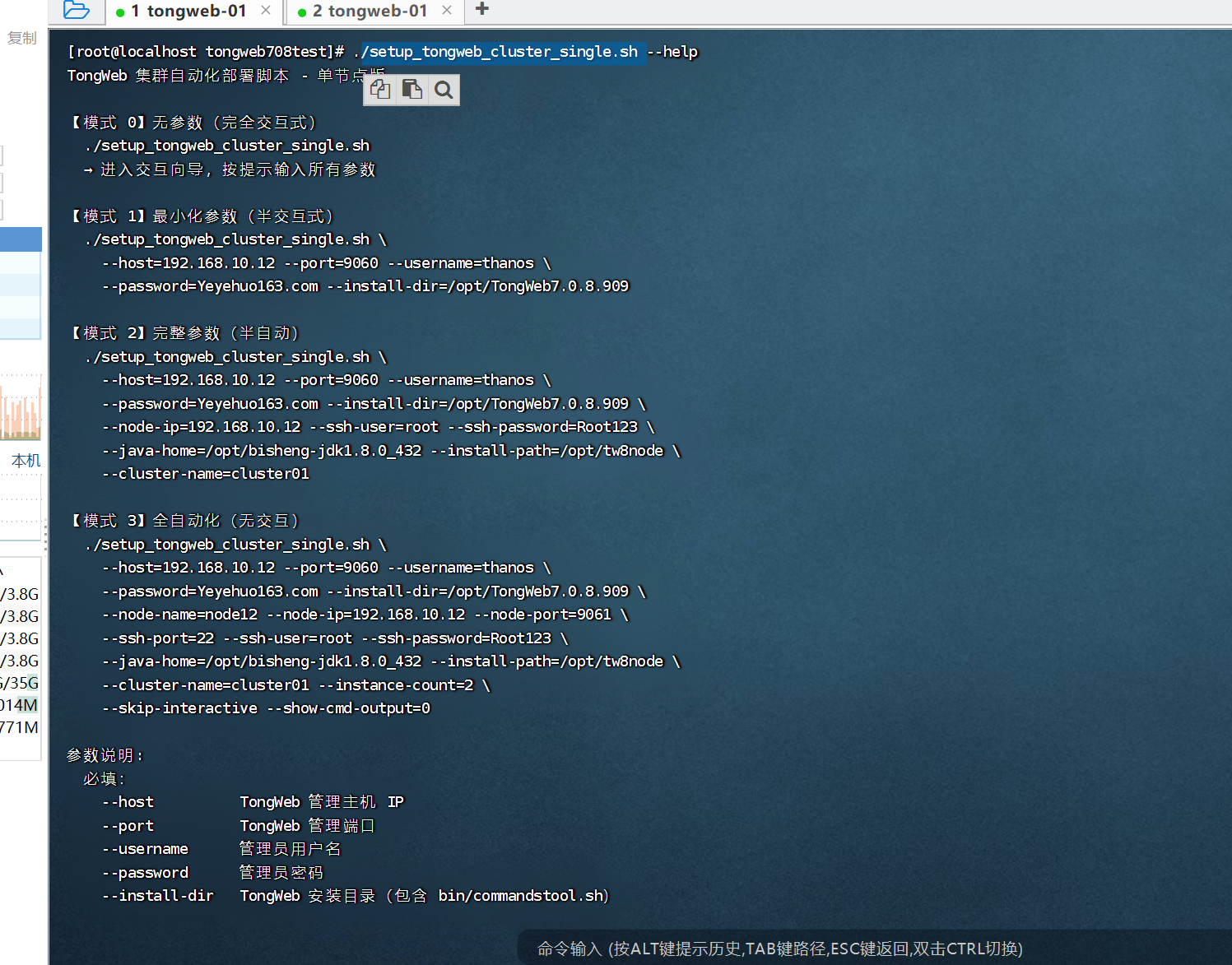
执行的话,可以根据自身需求来,刚开始使用,建议使用完全交互:
./setup_tongweb_cluster_single.sh
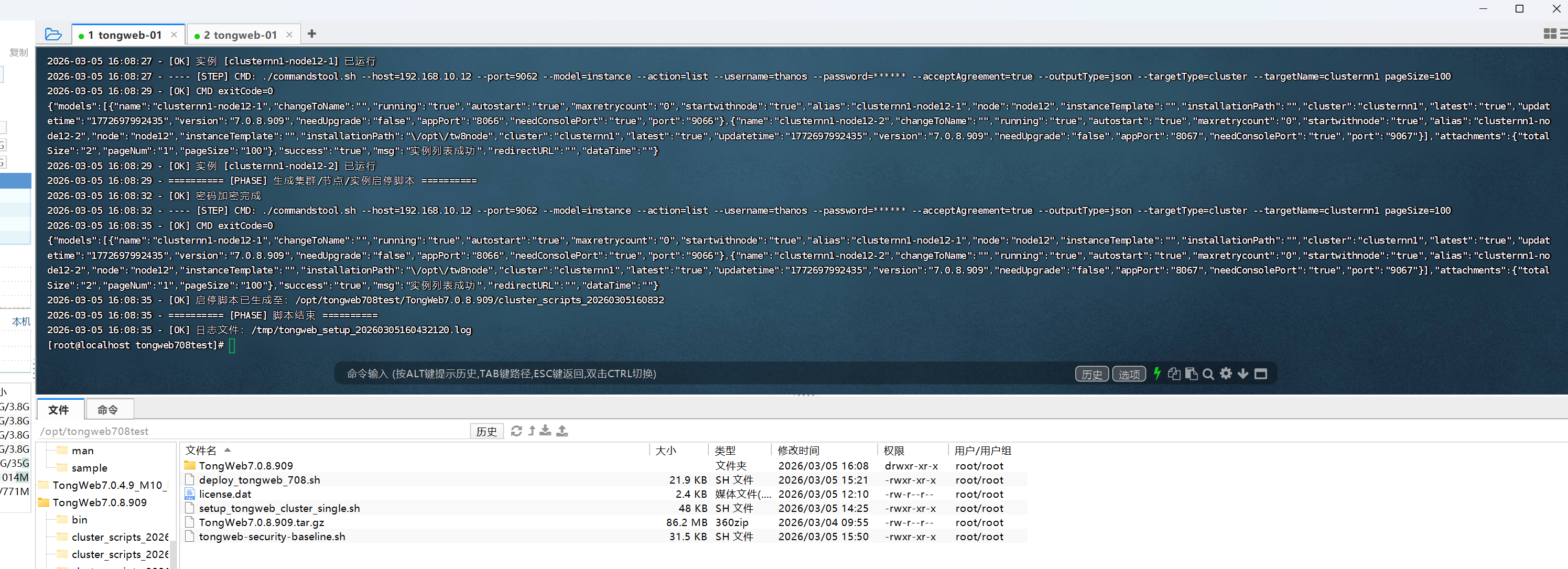
脚本内容如下:
#!/bin/bash
set -u

# =============================================================================
# TongWeb 集群自动化部署脚本 - 单节点版
# 功能:检查集群→检查/创建单节点→创建集群→管理实例→生成启停脚本
# 版本:2.0-Single
# =============================================================================

# =============================================================================
# 使用说明
# =============================================================================
#
# 【模式 0】无参数(完全交互式)- 适合首次使用、不熟悉参数
#   ./setup_tongweb_cluster_single.sh
#   → 按提示逐步输入所有参数
#
# 【模式 1】最小化参数(半交互式)- 适合首次部署、调试
#   ./setup_tongweb_cluster_single.sh \
#     --host=192.168.10.12 --port=9060 --username=thanos \
#     --password=Yeyehuo163.com --install-dir=/opt/TongWeb7.0.8.909
#
# ----------------------------------------------------------------------------
#
# 【模式 2】完整参数(半自动)- 适合生产部署
#   ./setup_tongweb_cluster_single.sh \
#     --host=192.168.10.12 --port=9060 --username=thanos \
#     --password=Yeyehuo163.com --install-dir=/opt/TongWeb7.0.8.909 \
#     --node-ip=192.168.10.12 --ssh-user=root --ssh-password=Root123 \
#     --java-home=/opt/bisheng-jdk1.8.0_432 --install-path=/opt/tw8node \
#     --cluster-name=cluster01
#
# ----------------------------------------------------------------------------
#
# 【模式 3】全自动化(无交互)- 适合批量部署、CI/CD
#   ./setup_tongweb_cluster_single.sh \
#     --host=192.168.10.12 --port=9060 --username=thanos \
#     --password=Yeyehuo163.com --install-dir=/opt/TongWeb7.0.8.909 \
#     --node-name=node12 --node-ip=192.168.10.12 --node-port=9061 \
#     --ssh-port=22 --ssh-user=root --ssh-password=Root123 \
#     --java-home=/opt/bisheng-jdk1.8.0_432 --install-path=/opt/tw8node \
#     --cluster-name=cluster01 --instance-count=2 \
#     --skip-interactive --show-cmd-output=0
#
# =============================================================================
# 参数格式:支持 --param value 或 --param=value 两种格式
# =============================================================================
#
# 必填参数:
#   --host          TongWeb 管理主机 IP
#   --port          TongWeb 管理端口
#   --username      管理员用户名
#   --password      管理员密码(明文传入,日志自动脱敏)
#   --install-dir   TongWeb 安装目录(包含 bin/commandstool.sh)
#
# 可选参数:
#   --node-name       节点名称
#   --node-ip         节点 IP(默认自动获取当前服务器 IP)
#   --node-port       节点管理端口(交互式不传会提示输入,自动化模式必填)
#   --ssh-port        SSH 端口(交互式不传会提示输入,自动化模式必填)
#   --ssh-user        SSH 用户名(必填,无默认值)
#   --ssh-password    SSH 密码
#   --java-home       JDK 路径
#   --install-path    实例安装路径(必须是空目录)
#   --cluster-name    集群名称(默认:cluster01)
#   --instance-count  每节点实例数上限(默认:2)
#   --output-file     日志文件路径
#   --skip-interactive 跳过交互,全自动化
#   --show-cmd-output 命令输出开关(0/1,默认:1)
#   --help, help      显示帮助信息
#
# =============================================================================

# ==================== 输出开关 ====================
SHOW_CMD_OUTPUT="${SHOW_CMD_OUTPUT:-1}"

# ==================== 全局变量定义 ====================
install_dir=""
timestamp=$(date "+%Y%m%d%H%M%S%3N")
output_file="/tmp/tongweb_setup_${timestamp}.log"
host=""
port=""
new_username=""
new_user_password=""
required_files=("forcestop.sh" "startd.sh" "commandstool.sh")

# ==================== 配置参数 ====================
PAGE_SIZE=100
MAX_INSTANCES_PER_NODE=2
INSTANCE_NEED_CONSOLE_PORT="true"
DEFAULT_STARTWITHNODE="true"
DEFAULT_AUTOSTART="true"
DEFAULT_MAXRETRYCOUNT="0"
DEFAULT_INSTALLATION_PATH="${DEFAULT_INSTALLATION_PATH:-/opt/tw8node}"

# 全局变量
cluster_name=""
nodes_str=""

# 命令行参数变量
ARG_NODE_NAME=""
ARG_NODE_IP=""
ARG_NODE_PORT=""
ARG_SSH_PORT=""
ARG_SSH_USER=""
ARG_SSH_PASSWORD=""
ARG_JAVA_HOME=""
ARG_INSTALL_PATH=""
ARG_CLUSTER_NAME=""
ARG_INSTANCE_COUNT=""
ARG_SKIP_INTERACTIVE="false"

# ==================== 日志函数 ====================
log_with_timestamp() {
 local msg="$*"
 local line
 line="$(date '+%Y-%m-%d %H:%M:%S') - ${msg}"
 echo "$line" >&2
 echo "$line" >>"$output_file"
}

log_phase() { log_with_timestamp "========== [PHASE] $* =========="; }
log_step() { log_with_timestamp "---- [STEP] $*"; }
log_ok() { log_with_timestamp "[OK] $*"; }
log_warn() { log_with_timestamp "[WARN] $*"; }
log_error() { log_with_timestamp "[ERROR] $*"; }

# ==================== 密码掩码函数 ====================
mask_password_in_cmd() {
 local cmd="$1"
 echo "$cmd" | sed -E \
   -e 's/(--password=)"[^"]*"/\1"******"/g' \
   -e 's/(--password=)[^ ]+/\1******/g' \
   -e 's/(sshPassword=)[^ ]+/\1******/g' \
   -e 's/(password=)[^ ]+/\1******/g'
}

# ==================== 密码加密函数 ====================
encrypt_password_if_needed() {
 local raw_password="$1"
 local __outvar="${2:-}"

 if [[ "$raw_password" =~ ^Tw80EncodedPrefixFlag ]]; then
   if [[ -n "$__outvar" ]]; then
     printf -v "$__outvar" '%s' "$raw_password"
   fi
   return 0
 fi

 local admin_sh="$install_dir/bin/admin.sh"
 if [[ ! -x "$admin_sh" ]]; then
   log_error "未找到加密工具:$admin_sh"
   return 1
 fi

 local enc_out
 enc_out="$(cd "$install_dir/bin" && ./admin.sh encrypt id "$raw_password" 2>/dev/null | tr -d '\r\n')"
 if [[ $? -ne 0 || -z "$enc_out" ]]; then
   log_error "密码加密失败"
   return 1
 fi

 local encrypted_part
 encrypted_part="$(echo "$enc_out" | grep -o 'Tw80EncodedPrefixFlag[^[:space:]]*' | head -n1)"
 if [[ -z "$encrypted_part" ]]; then
   encrypted_part="$(echo "$enc_out" | awk '{print $NF}')"
 fi
 if [[ -z "$encrypted_part" ]]; then
   log_error "无法从加密输出中提取密码:$enc_out"
   return 1
 fi

 log_ok "密码加密完成"
 if [[ -n "$__outvar" ]]; then
   printf -v "$__outvar" '%s' "$encrypted_part"
 fi
 return 0
}

# ==================== 通用命令执行 ====================
execute_and_log() {
 local cmd="$1"
 local __outvar="${2:-}"

 local masked_cmd
 masked_cmd=$(mask_password_in_cmd "$cmd")

 local tmp
 tmp="$(mktemp /tmp/tongweb_cmd_XXXXXX.log)"

 log_step "CMD: $masked_cmd"

 eval "$cmd" >"$tmp" 2>&1
 local status=$?

 if [[ $status -eq 0 ]]; then
   log_ok "CMD exitCode=0"
 else
   log_error "CMD exitCode=$status"
 fi

 {
   echo "----- RAW CMD: $masked_cmd"
   cat "$tmp"
   echo "----- RAW END"
 } >>"$output_file"

 if [[ "$SHOW_CMD_OUTPUT" == "1" ]]; then
   cat "$tmp" >&2
 fi

 if [[ -n "$__outvar" ]]; then
   printf -v "$__outvar" '%s' "$(cat "$tmp")"
 fi

 rm -f "$tmp"
 return $status
}

# ==================== 命令行参数解析 ====================
parse_args() {
 while [[ $# -gt 0 ]]; do
   case "$1" in
     --host=*) host="${1#*=}"; shift ;;
     --host) host="$2"; shift 2 ;;
     --port=*) port="${1#*=}"; shift ;;
     --port) port="$2"; shift 2 ;;
     --username=*) new_username="${1#*=}"; shift ;;
     --username) new_username="$2"; shift 2 ;;
     --password=*) new_user_password="${1#*=}"; shift ;;
     --password) new_user_password="$2"; shift 2 ;;
     --install-dir=*) install_dir="${1#*=}"; shift ;;
     --install-dir) install_dir="$2"; shift 2 ;;
     --node-name=*) ARG_NODE_NAME="${1#*=}"; shift ;;
     --node-name) ARG_NODE_NAME="$2"; shift 2 ;;
     --node-ip=*) ARG_NODE_IP="${1#*=}"; shift ;;
     --node-ip) ARG_NODE_IP="$2"; shift 2 ;;
     --node-port=*) ARG_NODE_PORT="${1#*=}"; shift ;;
     --node-port) ARG_NODE_PORT="$2"; shift 2 ;;
     --ssh-port=*) ARG_SSH_PORT="${1#*=}"; shift ;;
     --ssh-port) ARG_SSH_PORT="$2"; shift 2 ;;
     --ssh-user=*) ARG_SSH_USER="${1#*=}"; shift ;;
     --ssh-user) ARG_SSH_USER="$2"; shift 2 ;;
     --ssh-password=*) ARG_SSH_PASSWORD="${1#*=}"; shift ;;
     --ssh-password) ARG_SSH_PASSWORD="$2"; shift 2 ;;
     --java-home=*) ARG_JAVA_HOME="${1#*=}"; shift ;;
     --java-home) ARG_JAVA_HOME="$2"; shift 2 ;;
     --install-path=*) ARG_INSTALL_PATH="${1#*=}"; shift ;;
     --install-path) ARG_INSTALL_PATH="$2"; shift 2 ;;
     --cluster-name=*) ARG_CLUSTER_NAME="${1#*=}"; shift ;;
     --cluster-name) ARG_CLUSTER_NAME="$2"; shift 2 ;;
     --instance-count=*) ARG_INSTANCE_COUNT="${1#*=}"; shift ;;
     --instance-count) ARG_INSTANCE_COUNT="$2"; shift 2 ;;
     --output-file=*) output_file="${1#*=}"; shift ;;
     --output-file) output_file="$2"; shift 2 ;;
     --skip-interactive) ARG_SKIP_INTERACTIVE="true"; shift ;;
     --show-cmd-output=*) SHOW_CMD_OUTPUT="${1#*=}"; shift ;;
     --show-cmd-output) SHOW_CMD_OUTPUT="$2"; shift 2 ;;
     --help|-h|help) show_usage; exit 0 ;;
     *) log_error "未知参数:$1"; show_usage; exit 1 ;;
   esac
 done
}

show_usage() {
 cat <<'EOF'
TongWeb 集群自动化部署脚本 - 单节点版

【模式 0】无参数(完全交互式)
  ./setup_tongweb_cluster_single.sh
  → 进入交互向导,按提示输入所有参数

【模式 1】最小化参数(半交互式)
  ./setup_tongweb_cluster_single.sh \
    --host=192.168.10.12 --port=9060 --username=thanos \
    --password=Yeyehuo163.com --install-dir=/opt/TongWeb7.0.8.909

【模式 2】完整参数(半自动)
  ./setup_tongweb_cluster_single.sh \
    --host=192.168.10.12 --port=9060 --username=thanos \
    --password=Yeyehuo163.com --install-dir=/opt/TongWeb7.0.8.909 \
    --node-ip=192.168.10.12 --ssh-user=root --ssh-password=Root123 \
    --java-home=/opt/bisheng-jdk1.8.0_432 --install-path=/opt/tw8node \
    --cluster-name=cluster01

【模式 3】全自动化(无交互)
  ./setup_tongweb_cluster_single.sh \
    --host=192.168.10.12 --port=9060 --username=thanos \
    --password=Yeyehuo163.com --install-dir=/opt/TongWeb7.0.8.909 \
    --node-name=node12 --node-ip=192.168.10.12 --node-port=9061 \
    --ssh-port=22 --ssh-user=root --ssh-password=Root123 \
    --java-home=/opt/bisheng-jdk1.8.0_432 --install-path=/opt/tw8node \
    --cluster-name=cluster01 --instance-count=2 \
    --skip-interactive --show-cmd-output=0

参数说明:
  必填:
    --host          TongWeb 管理主机 IP
    --port          TongWeb 管理端口
    --username      管理员用户名
    --password      管理员密码
    --install-dir   TongWeb 安装目录(包含 bin/commandstool.sh)

  可选:
    --node-name       节点名称(交互式可省略,自动提示输入)
    --node-ip         节点 IP(交互式可省略,自动获取当前服务器 IP)
    --node-port       节点管理端口(交互式不传会提示输入,自动化模式必填)
    --ssh-port        SSH 端口(交互式不传会提示输入,自动化模式必填)
    --ssh-user        SSH 用户名(必填,无默认值)
    --ssh-password    SSH 密码
    --java-home       JDK 路径
    --install-path    实例安装路径(必须是空目录)
    --cluster-name    集群名称(默认:cluster01)
    --instance-count  每节点实例数上限(默认:2)
    --skip-interactive 跳过交互,全自动化模式
    --show-cmd-output 命令输出开关(0=隐藏,1=显示,默认:1)
    --output-file     日志文件路径

注意:
  1. SSH 用户名(--ssh-user)必填,无默认值
  2. --node-port 和 --ssh-port 在交互模式下会提示输入,自动化模式必须传入
  3. --instance-count 控制每节点最多创建的实例数(上限 2)
  4. --show-cmd-output=0 可隐藏命令执行输出,保持日志简洁
  5. --install-path 必须是空目录
  6. 支持 --param=value 或 --param value 两种格式
EOF
}

# ==================== 获取服务器 IP ====================
get_server_ip() {
  local ip=""
  ip="$(ip route get 1.1.1.1 2>/dev/null | grep -oP 'src \K[0-9.]+' | head -n1)"
  if [[ -n "$ip" ]]; then echo "$ip"; return 0; fi
  ip="$(hostname -I 2>/dev/null | awk '{print $1}')"
  if [[ -n "$ip" ]]; then echo "$ip"; return 0; fi
  ip="$(hostname -i 2>/dev/null | awk '{print $1}')"
  if [[ -n "$ip" ]]; then echo "$ip"; return 0; fi
  log_error "无法自动获取服务器 IP"
  return 1
}

# ==================== 基础检查 ====================
precheck() {
  # 如果没有任何参数传入,进入完全交互模式
  if [[ -z "$host" && -z "$port" && -z "$new_username" && -z "$new_user_password" && -z "$install_dir" ]]; then
    echo " ================================================="
    echo " TongWeb 集群自动化部署脚本 - 单节点版(交互模式)"
    echo " ================================================="
    echo ""
    echo "未检测到命令行参数,将进入交互式配置向导"
    echo "请按提示输入所需参数"
    echo ""

    # 交互式输入必填参数
    read -p "请输入 TongWeb 管理主机 IP (host): " host
    read -p "请输入 TongWeb 管理端口 (port,默认 9060): " port_input
    port="${port_input:-9060}"
    read -p "请输入管理员用户名 (username,默认 thanos): " username_input
    new_username="${username_input:-thanos}"
    read -sp "请输入管理员密码 (password): " new_user_password
    echo
    read -p "请输入 TongWeb 安装目录 (install-dir): " install_dir

    # 验证必填参数
    if [[ -z "$host" || -z "$new_user_password" || -z "$install_dir" ]]; then
      log_error "必填参数不能为空,已退出"
      exit 1
    fi
  fi

  # 单独检查每个必填参数(针对非交互模式)
  if [[ -z "$host" ]]; then
    log_error "缺少必填参数:--host"
    exit 1
  fi
  if [[ -z "$port" ]]; then
    log_error "缺少必填参数:--port"
    exit 1
  fi
  if [[ -z "$new_username" ]]; then
    log_error "缺少必填参数:--username"
    exit 1
  fi
  if [[ -z "$new_user_password" ]]; then
    log_error "缺少必填参数:--password"
    exit 1
  fi
  if [[ -z "$install_dir" ]]; then
    log_error "缺少必填参数:--install-dir"
    exit 1
  fi

  if [[ ! -d "$install_dir" ]]; then
    log_warn "install_dir 不存在:$install_dir"
    if [[ "$ARG_SKIP_INTERACTIVE" != "true" ]]; then
      while [[ ! -d "$install_dir" ]]; do
        read -r -p "请输入正确的 TongWeb 安装目录:" install_dir
      done
    else
      log_error "自动化模式下 install_dir 必须存在:$install_dir"
      exit 1
    fi
  fi

  for f in "${required_files[@]}"; do
    if [[ ! -f "$install_dir/bin/$f" ]]; then
      log_error "缺少文件:$install_dir/bin/$f"
      exit 1
    fi
  done

  if ! command -v jq >/dev/null 2>&1; then
    log_error "未找到 jq,请安装后重试(yum install -y jq)"
    exit 1
  fi

  if [[ -n "$ARG_INSTALL_PATH" ]]; then
    DEFAULT_INSTALLATION_PATH="$ARG_INSTALL_PATH"
  fi

  if [[ -n "$ARG_INSTANCE_COUNT" ]]; then
    MAX_INSTANCES_PER_NODE="$ARG_INSTANCE_COUNT"
  fi

  log_ok "前置检查通过"
}

cd_bin() {
  cd "$install_dir/bin" || { log_error "无法进入 $install_dir/bin"; return 1; }
}

is_int() { [[ "${1:-}" =~ ^[0-9]+$ ]]; }

prompt_nonempty() {
  local prompt="$1"
  local v=""
  while [[ -z "$v" ]]; do
    read -r -p "$prompt: " v || true
    v="${v//[[:space:]]/}"
  done
  echo "$v"
}

prompt_yn() {
  local prompt="$1"
  local default="${2:-N}"
  local ans=""
  read -r -p "$prompt (Y/N) [default:$default]: " ans || true
  ans="${ans:-$default}"
  [[ "$ans" == "Y" || "$ans" == "y" ]]
}

# ==================== Step 1: 检查是否已有集群 ====================
check_existing_cluster() {
  log_phase "Step 1: 检查是否已有集群"
  cd_bin || return 1

  local cmd json_output
  cmd="./commandstool.sh --host=$host --port=$port --model=cluster --action=list \
--username=$new_username --password=\"$new_user_password\" --acceptAgreement=true \
--outputType=json pageSize=$PAGE_SIZE"

  execute_and_log "$cmd" json_output || return 1

  local total_size
  total_size="$(echo "$json_output" | jq -r '.attachments.totalSize // "0"' 2>/dev/null)"

  if [[ -z "$total_size" || ! "$total_size" =~ ^[0-9]+$ ]]; then
    log_error "无法解析集群列表 totalSize"
    return 1
  fi

  if [[ "$total_size" -gt 0 ]]; then
    log_warn "检测到已有 $total_size 个集群存在"
    log_warn "请使用 TongWeb 控制台进行管理和创建"
    log_warn "脚本退出"
    exit 0
  fi

  log_ok "未检测到现有集群,继续执行"
  return 0
}

# ==================== 检查节点是否存在 ====================
get_node_info_by_ip() {
  local check_ip="$1"

  if [[ -z "${check_ip:-}" ]]; then
    log_error "get_node_info_by_ip 缺少 IP 参数"
    echo "NOT_FOUND"
    return 1
  fi
  if ! [[ "$check_ip" =~ ^[0-9]+\.[0-9]+\.[0-9]+\.[0-9]+$ ]]; then
    log_error "IP 格式不正确:$check_ip"
    echo "NOT_FOUND"
    return 1
  fi

  cd_bin || { echo "NOT_FOUND"; return 1; }

  log_step "检查 IP [$check_ip] 是否已存在 TongWeb 节点"

  local cmd json_output
  cmd="./commandstool.sh --host=$host --port=$port --model=node --action=list \
--username=$new_username --password=\"$new_user_password\" --acceptAgreement=true \
--outputType=json ip=$check_ip"

  execute_and_log "$cmd" json_output || { echo "NOT_FOUND"; return 1; }

  local total_size
  total_size="$(echo "$json_output" | jq -r '.attachments.totalSize // "0"' 2>/dev/null)"
  if [[ -z "$total_size" ]]; then
    log_error "无法解析 totalSize"
    echo "NOT_FOUND"
    return 1
  fi

  if [[ "$total_size" -ne 1 ]]; then
    log_ok "IP [$check_ip] 未安装 TongWeb 节点(totalSize=$total_size)"
    echo "NOT_FOUND"
    return 1
  fi

  local node_name node_ip node_port node_running
  node_name="$(echo "$json_output" | jq -r '.models[0].name // empty' 2>/dev/null)"
  node_ip="$(echo "$json_output" | jq -r '.models[0].ip // empty' 2>/dev/null)"
  node_port="$(echo "$json_output" | jq -r '.models[0].port // empty' 2>/dev/null)"
  node_running="$(echo "$json_output" | jq -r '.models[0].running // empty' 2>/dev/null)"

  if [[ -z "$node_name" || -z "$node_ip" || -z "$node_port" || -z "$node_running" ]]; then
    log_error "totalSize=1 但未提取到必要字段"
    echo "NOT_FOUND"
    return 1
  fi

  log_ok "IP [$check_ip] 已存在节点:$node_name (running=$node_running)"
  echo "$node_name"
  echo "$node_ip"
  echo "$node_port"
  echo "$node_running"
  return 0
}

check_node_in_cluster() {
  local node_name="$1"
  if [[ -z "${node_name:-}" ]]; then
    echo "NOT_IN_CLUSTER"
    return 1
  fi

  cd_bin || { echo "NOT_IN_CLUSTER"; return 1; }

  local cmd json_output
  cmd="./commandstool.sh --host=$host --port=$port --model=cluster --action=list \
--username=$new_username --password=\"$new_user_password\" --acceptAgreement=true \
--outputType=json --targetType=node --targetName=$node_name"

  execute_and_log "$cmd" json_output || { echo "NOT_IN_CLUSTER"; return 1; }

  local total_size
  total_size="$(echo "$json_output" | jq -r '.attachments.totalSize // "0"' 2>/dev/null)"

  if [[ "$total_size" -gt 0 ]]; then
    echo "IN_CLUSTER"
    return 0
  fi

  echo "NOT_IN_CLUSTER"
  return 1
}

# ==================== Step 2: 检查是否已有节点 ====================
check_existing_node() {
  log_phase "Step 2: 检查是否已有节点"

  local node_ip=""
  if [[ -n "$ARG_NODE_IP" ]]; then
    node_ip="$ARG_NODE_IP"
    log_step "使用传入的节点 IP: $node_ip"
  else
    node_ip="$(get_server_ip)" || return 1
    log_step "自动获取服务器 IP: $node_ip"
  fi

  # 用户确认 IP
  if [[ "$ARG_SKIP_INTERACTIVE" != "true" ]]; then
    local confirm_ip=""
    read -r -p "当前服务器 IP 为 [$node_ip],是否正确?(Y/N) [default:Y]: " confirm_ip || true
    confirm_ip="${confirm_ip:-Y}"
    if [[ "$confirm_ip" != "Y" && "$confirm_ip" != "y" ]]; then
      node_ip="$(prompt_nonempty "请输入正确的节点 IP")"
    fi
  fi

  # 检查该 IP 是否已有节点
  local info=()
  if mapfile -t info < <(get_node_info_by_ip "$node_ip"); then
    :
  else
    info=("NOT_FOUND")
  fi

  if [[ "${info[0]}" != "NOT_FOUND" ]]; then
    local node_name="${info[0]}"
    log_ok "检测到已有节点:$node_name"

    local in_cluster
    in_cluster="$(check_node_in_cluster "$node_name")" || true
    if [[ "$in_cluster" == "IN_CLUSTER" ]]; then
      log_warn "节点 [$node_name] 已属于某个集群,跳过"
      return 1
    fi

    ARG_NODE_NAME="$node_name"
    ARG_NODE_IP="${info[1]}"
    ARG_NODE_PORT="${info[2]}"

    log_ok "使用已有节点:name=$ARG_NODE_NAME ip=$ARG_NODE_IP port=$ARG_NODE_PORT"
    return 0
  fi

  log_warn "该 IP 未检测到节点,需要创建节点"
  ARG_NODE_IP="$node_ip"
  return 1
}

# ==================== 创建节点 ====================
create_tongweb_node() {
  log_phase "创建 TongWeb 远程节点(SSH 方式)"

  local name="" ip="" node_port="" ssh_port="" ssh_user="" ssh_pass="" java_home="" install_path="" autostart=""

  if [[ -n "$ARG_NODE_NAME" ]]; then
    name="$ARG_NODE_NAME"
    log_step "使用传入的节点名称:$name"
  else
    name="$(prompt_nonempty "节点名称(唯一标识,如 node12)")"
  fi

  ip="${ARG_NODE_IP:-}"
  if [[ -z "$ip" ]]; then
    log_error "节点 IP 不能为空"
    return 1
  fi

  # 节点端口处理
  if [[ -n "$ARG_NODE_PORT" ]]; then
    node_port="$ARG_NODE_PORT"
    log_step "使用传入的节点端口:$node_port"
  elif [[ "$ARG_SKIP_INTERACTIVE" == "true" ]]; then
    log_error "自动化模式需传入 --node-port"
    return 1
  else
    node_port="$(prompt_nonempty "节点管理端口(默认 9061)")"
    [[ -z "$node_port" ]] && node_port="9061"
    log_step "使用节点端口:$node_port"
  fi

  # SSH 端口处理
  if [[ -n "$ARG_SSH_PORT" ]]; then
    ssh_port="$ARG_SSH_PORT"
    log_step "使用传入的 SSH 端口:$ssh_port"
  elif [[ "$ARG_SKIP_INTERACTIVE" == "true" ]]; then
    log_error "自动化模式需传入 --ssh-port"
    return 1
  else
    ssh_port="$(prompt_nonempty "SSH 端口(默认 22)")"
    [[ -z "$ssh_port" ]] && ssh_port="22"
    log_step "使用 SSH 端口:$ssh_port"
  fi

  ssh_user="${ARG_SSH_USER:-}"
  ssh_pass="${ARG_SSH_PASSWORD:-}"

  if [[ -z "$ssh_user" ]]; then
    if [[ "$ARG_SKIP_INTERACTIVE" == "true" ]]; then
      log_error "SSH 用户名不能为空(自动化模式需传入 --ssh-user)"
      return 1
    fi
    ssh_user="$(prompt_nonempty "SSH 用户名")"
  fi

  if [[ -z "$ssh_pass" ]]; then
    if [[ "$ARG_SKIP_INTERACTIVE" == "true" ]]; then
      log_error "SSH 密码不能为空(自动化模式需传入 --ssh-password)"
      return 1
    fi
    read -r -s -p "SSH 密码:" ssh_pass
    echo
  fi

  if [[ -n "$ARG_JAVA_HOME" ]]; then
    java_home="$ARG_JAVA_HOME"
    log_step "使用传入的 Java Home: $java_home"
  elif [[ "$ARG_SKIP_INTERACTIVE" == "true" ]]; then
    log_error "自动化模式需传入 --java-home"
    return 1
  else
    java_home="$(prompt_nonempty "Java Home 绝对路径(如 /opt/bisheng-jdk1.8.0_432)")"
  fi

  if [[ -n "$ARG_INSTALL_PATH" ]]; then
    install_path="$ARG_INSTALL_PATH"
    log_step "使用传入的安装路径:$install_path"
    if [[ -d "$install_path" ]]; then
      local file_count
      file_count="$(ls -A "$install_path" 2>/dev/null | wc -l)"
      if [[ "$file_count" -gt 0 ]]; then
        log_error "安装路径不是空目录:$install_path(当前有 $file_count 个文件/目录)"
        if [[ "$ARG_SKIP_INTERACTIVE" == "true" ]]; then
          return 1
        fi
        while [[ -d "$install_path" && "$file_count" -gt 0 ]]; do
          read -r -p "请输入一个空目录作为安装路径:" install_path
          if [[ -d "$install_path" ]]; then
            file_count="$(ls -A "$install_path" 2>/dev/null | wc -l)"
          fi
        done
      fi
    fi
  elif [[ "$ARG_SKIP_INTERACTIVE" == "true" ]]; then
    log_error "自动化模式需传入 --install-path"
    return 1
  else
    while true; do
      install_path="$(prompt_nonempty "TongWeb 实例安装路径(必须是空目录,如 /opt/tw8node)")"
      if [[ -d "$install_path" ]]; then
        local file_count
        file_count="$(ls -A "$install_path" 2>/dev/null | wc -l)"
        if [[ "$file_count" -gt 0 ]]; then
          log_warn "该目录不是空目录(当前有 $file_count 个文件/目录),请重新输入"
          continue
        fi
      fi
      break
    done
  fi

  if [[ "$ARG_SKIP_INTERACTIVE" == "true" ]]; then
    autostart="false"
  else
    while true; do
      read -r -p "是否开机自启?(true/false) [default:false]: " autostart
      autostart="${autostart:-false}"
      [[ "$autostart" == "true" || "$autostart" == "false" ]] && break
      log_warn "必须输入 true 或 false"
    done
  fi

  cd_bin || return 1

  local cmd json_output
  cmd="./commandstool.sh --host=$host --port=$port --model=node --action=add \
--username=$new_username --password=\"$new_user_password\" --acceptAgreement=true --outputType=json \
name=$name ip=$ip port=$node_port sshPort=$ssh_port sshUserName=$ssh_user sshPassword=$ssh_pass \
javaHome=$java_home installationPath=$install_path autostart=$autostart keyPairType=ssh-rsa \
passwordType=PASSWORD maxretrycount=0 synchronizeData=false nodeCreationType=SSH"

  execute_and_log "$cmd" json_output || { log_error "节点创建命令执行失败"; return 1; }

  local success_flag msg_text
  success_flag="$(echo "$json_output" | jq -r '.success // "false"' 2>/dev/null)"
  msg_text="$(echo "$json_output" | jq -r '.msg // empty' 2>/dev/null)"

  if [[ "$success_flag" == "true" ]]; then
    log_ok "节点 [$name] 创建成功"
    ARG_NODE_NAME="$name"
    return 0
  fi

  log_error "节点 [$name] 创建失败:${msg_text:-}"
  return 1
}

# ==================== 创建集群 ====================
create_tongweb_cluster() {
  local nodes_preset="${1:-}"

  log_phase "创建 TongWeb 集群"

  local name="" node=""

  if [[ -n "$ARG_CLUSTER_NAME" ]]; then
    name="$ARG_CLUSTER_NAME"
  else
    name="$(prompt_nonempty "集群名称(如 cluster01)")"
  fi

  if [[ -n "$nodes_preset" ]]; then
    node="$nodes_preset"
  elif [[ -n "$ARG_NODE_NAME" ]]; then
    node="$ARG_NODE_NAME"
  else
    log_error "节点名称不能为空"
    return 1
  fi

  cd_bin || return 1

  local cmd json_output
  cmd="./commandstool.sh --host=$host --port=$port --model=cluster --action=add \
--username=$new_username --password=\"$new_user_password\" --acceptAgreement=true --outputType=json \
name=$name node=$node autoUpdateLbConf=true startwithnode=false \
accessLogPath=logs/access.log maxretrycount=0 accessLogEnabled=false \
autostart=false ipHash=true rollingUpdate=false"

  execute_and_log "$cmd" json_output || { log_error "集群创建命令执行失败"; return 1; }

  local success_flag msg_text
  success_flag="$(echo "$json_output" | jq -r '.success // "false"' 2>/dev/null)"
  msg_text="$(echo "$json_output" | jq -r '.msg // empty' 2>/dev/null)"

  if [[ "$success_flag" == "true" ]]; then
    log_ok "集群 [$name] 创建成功"
    cluster_name="$name"
    nodes_str="$node"
    return 0
  fi

  log_error "集群 [$name] 创建失败:${msg_text:-}"
  return 1
}

# ==================== 实例查询 ====================
list_instances_by_cluster() {
  local cluster="$1"
  cd_bin || return 1

  local cmd json_output
  cmd="./commandstool.sh --host=$host --port=$port --model=instance --action=list \
--username=$new_username --password=\"$new_user_password\" --acceptAgreement=true --outputType=json \
--targetType=cluster --targetName=$cluster pageSize=$PAGE_SIZE"

  execute_and_log "$cmd" json_output || return 1
  printf '%s' "$json_output"
}

list_instances_by_node() {
  local node="$1"
  cd_bin || return 1

  local cmd json_output
  cmd="./commandstool.sh --host=$host --port=$port --model=instance --action=list \
--username=$new_username --password=\"$new_user_password\" --acceptAgreement=true --outputType=json \
node=$node pageSize=$PAGE_SIZE"

  execute_and_log "$cmd" json_output || return 1
  printf '%s' "$json_output"
}

add_instance() {
  local node="$1"
  local cluster="$2"
  local name="$3"
  local appPort="$4"
  local inst_port="$5"
  local installationPath="$6"

  cd_bin || return 1

  local cmd json_output
  cmd="./commandstool.sh --host=$host --port=$port --model=instance --action=add \
--username=$new_username --password=\"$new_user_password\" --acceptAgreement=true --outputType=json \
node=$node cluster=$cluster needConsolePort=$INSTANCE_NEED_CONSOLE_PORT name=$name \
startwithnode=$DEFAULT_STARTWITHNODE appPort=$appPort port=$inst_port maxretrycount=$DEFAULT_MAXRETRYCOUNT \
installationPath=$installationPath autostart=$DEFAULT_AUTOSTART"

  execute_and_log "$cmd" json_output || return 1

  local success_flag msg_text
  success_flag="$(echo "$json_output" | jq -r '.success // "false"' 2>/dev/null)"
  msg_text="$(echo "$json_output" | jq -r '.msg // empty' 2>/dev/null)"

  if [[ "$success_flag" == "true" ]]; then
    log_ok "实例 [$name] 新增成功"
    return 0
  fi

  log_error "实例 [$name] 新增失败:${msg_text:-}"
  return 1
}

node_instance_count() {
  local node="$1"
  local json
  json="$(list_instances_by_node "$node")" || { echo 0; return 0; }
  echo "$json" | jq -r '.models | length' 2>/dev/null || echo 0
}

node_has_port() {
  local node="$1" p="$2"
  local json
  json="$(list_instances_by_node "$node")" || return 1
  echo "$json" | jq -e --arg p "$p" '.models[]? | select(.port==$p)' >/dev/null 2>&1
}

node_has_app_port() {
  local node="$1" ap="$2"
  local json
  json="$(list_instances_by_node "$node")" || return 1
  echo "$json" | jq -e --arg ap "$ap" '.models[]? | select(.appPort==$ap)' >/dev/null 2>&1
}

node_max_index_for_prefix() {
  local node="$1"
  local prefix="$2"
  local json
  json="$(list_instances_by_node "$node")" || { echo 0; return 0; }
  echo "$json" | jq -r '.models[].name' 2>/dev/null | awk -v pfx="$prefix" '
  index($0,pfx)==1 {
    if (match($0, /-([0-9]+)$/, a)) {
      n=a[1]+0
      if (n>max) max=n
    }
  }
  END{ if (max=="") max=0; print max }'
}

# ==================== Step 4: 查询实例并检查上限 ====================
check_and_add_instances() {
  log_phase "Step 4: 查询实例并检查上限"

  if [[ -z "$cluster_name" || -z "$nodes_str" ]]; then
    log_error "集群名称或节点列表为空"
    return 1
  fi

  local json
  json="$(list_instances_by_cluster "$cluster_name")" || {
    log_warn "无法查询实例列表"
    return 1
  }

  local current_count
  current_count="$(echo "$json" | jq -r '.models | length' 2>/dev/null || echo 0)"

  log_step "当前集群实例数:$current_count / $MAX_INSTANCES_PER_NODE"

  if (( current_count >= MAX_INSTANCES_PER_NODE )); then
    log_ok "实例数已达上限 ($MAX_INSTANCES_PER_NODE),跳过添加"
    return 0
  fi

  local remaining=$((MAX_INSTANCES_PER_NODE - current_count))

  log_phase "当前实例列表"
  echo "$json" | jq -r '
    if (.models|type)=="array" then
      .models[] | "  instance=\(.name) node=\(.node) port=\(.port) appPort=\(.appPort) running=\(.running)"
    else
      "  无实例"
    end
  ' 2>/dev/null | while read -r line; do
    [[ -n "$line" ]] && log_step "$line"
  done

  if [[ "$ARG_SKIP_INTERACTIVE" == "true" ]]; then
    log_step "自动化模式:自动补齐实例至上限"
  else
    if ! prompt_yn "是否需要新增 $remaining 个实例?" "Y"; then
      log_warn "用户选择不添加实例"
      return 0
    fi
  fi

  local node
  IFS=',' read -r -a nodes <<<"$nodes_str"
  node="${nodes[0]}"

  local prefix="${cluster_name}-${node}-"
  local max_idx
  max_idx="$(node_max_index_for_prefix "$node" "$prefix")"

  local i
  for ((i=1; i<=remaining; i++)); do
    local idx=$((max_idx + i))
    local inst_name="${prefix}${idx}"

    local base_port="${ARG_NODE_PORT:-9061}"
    local inst_port=$((base_port + i * 10))
    local inst_app_port=$((8080 + i))

    while node_has_port "$node" "$inst_port"; do
      ((inst_port++))
    done
    while node_has_app_port "$node" "$inst_app_port"; do
      ((inst_app_port++))
    done

    log_step "新增实例:name=$inst_name port=$inst_port appPort=$inst_app_port"
    add_instance "$node" "$cluster_name" "$inst_name" "$inst_app_port" "$inst_port" "$DEFAULT_INSTALLATION_PATH" || {
      log_error "实例添加失败:$inst_name"
      continue
    }
  done

  log_ok "实例添加完成"
  return 0
}

# ==================== 端口展示 ====================
print_cluster_nodes_ports() {
  local cluster="$1"
  cd_bin || return 1

  local cmd json_output
  cmd="./commandstool.sh --host=$host --port=$port --model=node --action=list \
--username=$new_username --password=\"$new_user_password\" --acceptAgreement=true \
--outputType=json --targetType=cluster --targetName=$cluster pageSize=$PAGE_SIZE"

  execute_and_log "$cmd" json_output || return 1

  log_phase "集群 [$cluster] 节点管理端口清单"
  echo "$json_output" | jq -r '
    if (.models|type)=="array" then
      .models[] | "node=\(.name) ip=\(.ip) nodePort=\(.port) running=\(.running)"
    else
      "NO_MODELS"
    end
  ' 2>/dev/null | while read -r line; do
    [[ -n "$line" && "$line" != "NO_MODELS" ]] && log_step "$line"
  done
}

print_cluster_instances_ports() {
  local cluster="$1"
  local json
  json="$(list_instances_by_cluster "$cluster")" || { log_warn "无法查询集群实例信息"; return 1; }

  log_phase "集群 [$cluster] 实例端口清单"
  echo "$json" | jq -r '
    if (.models|type)=="array" then
      .models[] | "instance=\(.name) node=\(.node) port=\(.port) appPort=\(.appPort) running=\(.running)"
    else
      "NO_MODELS"
    end
  ' 2>/dev/null | while read -r line; do
    [[ -n "$line" && "$line" != "NO_MODELS" ]] && log_step "$line"
  done
}

# ==================== 实例启停 ====================
stop_instance() {
  local inst_name="$1"
  cd_bin || return 1

  local cmd json_output
  cmd="./commandstool.sh --host=$host --port=$port --model=instance --action=stop \
--username=$new_username --password=\"$new_user_password\" --acceptAgreement=true --outputType=json \
name=$inst_name"

  execute_and_log "$cmd" json_output || return 1

  local success_flag
  success_flag="$(echo "$json_output" | jq -r '.success // "false"' 2>/dev/null)"

  [[ "$success_flag" == "true" ]] && { log_ok "实例 [$inst_name] stop 成功"; return 0; }
  log_error "实例 [$inst_name] stop 失败"
  return 1
}

start_instance() {
  local inst_name="$1"
  cd_bin || return 1

  local cmd json_output
  cmd="./commandstool.sh --host=$host --port=$port --model=instance --action=start \
--username=$new_username --password=\"$new_user_password\" --acceptAgreement=true --outputType=json \
name=$inst_name"

  execute_and_log "$cmd" json_output || return 1

  local success_flag
  success_flag="$(echo "$json_output" | jq -r '.success // "false"' 2>/dev/null)"

  [[ "$success_flag" == "true" ]] && { log_ok "实例 [$inst_name] start 成功"; return 0; }
  log_error "实例 [$inst_name] start 失败"
  return 1
}

update_instance_ports() {
  local inst_name="$1"
  local new_port="$2"
  local new_app_port="$3"

  cd_bin || return 1

  local cmd json_output
  cmd="./commandstool.sh --host=$host --port=$port --model=instance --action=update \
--username=$new_username --password=\"$new_user_password\" --acceptAgreement=true --outputType=json \
port=$new_port needConsolePort=$INSTANCE_NEED_CONSOLE_PORT name=$inst_name startwithnode=$DEFAULT_STARTWITHNODE \
alias=$inst_name appPort=$new_app_port maxretrycount=$DEFAULT_MAXRETRYCOUNT autostart=$DEFAULT_AUTOSTART"

  execute_and_log "$cmd" json_output || return 1

  local success_flag
  success_flag="$(echo "$json_output" | jq -r '.success // "false"' 2>/dev/null)"

  [[ "$success_flag" == "true" ]] && { log_ok "实例 [$inst_name] update 成功"; return 0; }
  log_error "实例 [$inst_name] update 失败"
  return 1
}

update_instances_ports_flow_interactive() {
  local cluster="$1"

  log_phase "实例端口更新(优化版:合并查询)"

  local json
  json="$(list_instances_by_cluster "$cluster")" || return 1

  local inst_count
  inst_count="$(echo "$json" | jq -r '.models|length' 2>/dev/null || echo 0)"
  if ! is_int "$inst_count" || (( inst_count <= 0 )); then
    log_warn "集群 [$cluster] 未查询到实例,跳过"
    return 0
  fi

  local i
  for ((i=0; i<inst_count; i++)); do
    local inst_name inst_node inst_port inst_app_port inst_running
    inst_name="$(echo "$json" | jq -r ".models[$i].name // empty" 2>/dev/null)"
    inst_node="$(echo "$json" | jq -r ".models[$i].node // empty" 2>/dev/null)"
    inst_port="$(echo "$json" | jq -r ".models[$i].port // empty" 2>/dev/null)"
    inst_app_port="$(echo "$json" | jq -r ".models[$i].appPort // empty" 2>/dev/null)"
    inst_running="$(echo "$json" | jq -r ".models[$i].running // empty" 2>/dev/null)"

    [[ -z "$inst_name" ]] && continue

    log_step "实例:name=$inst_name node=$inst_node port=$inst_port appPort=$inst_app_port running=$inst_running"

    if [[ "$ARG_SKIP_INTERACTIVE" == "true" ]]; then
      continue
    fi

    if ! prompt_yn "是否需要更新该实例 [$inst_name] 的 port/appPort?" "N"; then
      continue
    fi

    local new_port new_app
    while true; do
      new_port="$(prompt_nonempty "请输入新 port(实例管理端口)")"
      is_int "$new_port" || { log_warn "port 必须为整数"; continue; }
      break
    done
    while true; do
      new_app="$(prompt_nonempty "请输入新 appPort(业务端口)")"
      is_int "$new_app" || { log_warn "appPort 必须为整数"; continue; }
      break
    done

    # 合并端口检查(只查询 1 次)
    local has_conflict="false"
    local conflict_msg=""
    if [[ -n "$inst_node" ]]; then
      local node_json
      node_json="$(list_instances_by_node "$inst_node")"

      local port_owner
      port_owner="$(echo "$node_json" | jq -r --arg p "$new_port" '.models[]? | select(.port==$p and .name!=$inst_name) | .name' 2>/dev/null | head -n1)"
      if [[ -n "$port_owner" ]]; then
        has_conflict="true"
        conflict_msg="新 port=$new_port 已被实例 [$port_owner] 占用"
      fi

      local appport_owner
      appport_owner="$(echo "$node_json" | jq -r --arg ap "$new_app" '.models[]? | select(.appPort==$ap and .name!=$inst_name) | .name' 2>/dev/null | head -n1)"
      if [[ -n "$appport_owner" ]]; then
        has_conflict="true"
        conflict_msg="${conflict_msg:+$conflict_msg; }新 appPort=$new_app 已被实例 [$appport_owner] 占用"
      fi

      if [[ "$has_conflict" == "true" ]]; then
        log_error "端口冲突:$conflict_msg,跳过:$inst_name"
        continue
      fi
    fi

    log_step "端口检查通过:port=$new_port appPort=$new_app"

    if ! prompt_yn "确认更新实例 [$inst_name] 为 port=$new_port appPort=$new_app,并自动 start?" "Y"; then
      log_warn "已取消更新:$inst_name"
      continue
    fi

    if [[ "$inst_running" == "true" ]]; then
      stop_instance "$inst_name" || continue
    fi

    update_instance_ports "$inst_name" "$new_port" "$new_app" || continue
    start_instance "$inst_name" || { log_warn "start 失败,请人工检查:$inst_name"; continue; }

    log_ok "实例 [$inst_name] 端口更新完成:port=$new_port appPort=$new_app"
  done

  log_phase "实例端口更新环节结束"
}

# ==================== 生成启停脚本 ====================
generate_start_stop_scripts() {
  log_phase "生成集群/节点/实例启停脚本"

  local encrypted_password=""
  encrypt_password_if_needed "$new_user_password" encrypted_password || {
    log_error "密码加密失败,无法生成脚本"
    return 1
  }

  local timestamp_dir
  timestamp_dir=$(date "+%Y%m%d%H%M%S")
  local script_root_dir="$install_dir/cluster_scripts_${timestamp_dir}"
  local cluster_dir="$script_root_dir/cluster"
  local node_dir="$script_root_dir/node"
  local instance_dir="$script_root_dir/instance"

  mkdir -p "$cluster_dir" "$node_dir" "$instance_dir"

  cat > "$cluster_dir/start_cluster_$cluster_name.sh" <<EOF
#!/bin/bash
cd "$install_dir/bin" || exit 1
./commandstool.sh --host=$host --port=$port --model=cluster --action=start \
--username=$new_username --password="$encrypted_password" --acceptAgreement=true name=$cluster_name
EOF
  cat > "$cluster_dir/stop_cluster_$cluster_name.sh" <<EOF
#!/bin/bash
cd "$install_dir/bin" || exit 1
./commandstool.sh --host=$host --port=$port --model=cluster --action=stop \
--username=$new_username --password="$encrypted_password" --acceptAgreement=true name=$cluster_name
EOF

  IFS=',' read -r -a nodes <<<"$nodes_str"
  for node in "${nodes[@]}"; do
    cat > "$node_dir/start_node_$node.sh" <<EOF
#!/bin/bash
cd "$install_dir/bin" || exit 1
./commandstool.sh --host=$host --port=$port --model=node --action=start \
--username=$new_username --password="$encrypted_password" --acceptAgreement=true name=$node
EOF
    cat > "$node_dir/stop_node_$node.sh" <<EOF
#!/bin/bash
cd "$install_dir/bin" || exit 1
./commandstool.sh --host=$host --port=$port --model=node --action=stop \
--username=$new_username --password="$encrypted_password" --acceptAgreement=true name=$node
EOF
  done

  local json
  json="$(list_instances_by_cluster "$cluster_name")" || return 0

  local inst_count
  inst_count="$(echo "$json" | jq -r '.models | length' 2>/dev/null || echo 0)"

  local i
  for ((i=0; i<inst_count; i++)); do
    local inst_name
    inst_name="$(echo "$json" | jq -r ".models[$i].name // empty" 2>/dev/null)"
    [[ -z "$inst_name" ]] && continue

    cat > "$instance_dir/start_instance_$inst_name.sh" <<EOF
#!/bin/bash
cd "$install_dir/bin" || exit 1
./commandstool.sh --host=$host --port=$port --model=instance --action=start \
--username=$new_username --password="$encrypted_password" --acceptAgreement=true name=$inst_name
EOF
    cat > "$instance_dir/stop_instance_$inst_name.sh" <<EOF
#!/bin/bash
cd "$install_dir/bin" || exit 1
./commandstool.sh --host=$host --port=$port --model=instance --action=stop \
--username=$new_username --password="$encrypted_password" --acceptAgreement=true name=$inst_name
EOF
  done

  chmod +x "$cluster_dir"/*.sh "$node_dir"/*.sh "$instance_dir"/*.sh 2>/dev/null || true
  log_ok "启停脚本已生成至:$script_root_dir"
}

# ==================== 检查并启动集群/节点/实例 ====================
check_and_start_all_interactive(){
  log_phase "检查并启动集群/节点/实例"

  if [[ "$ARG_SKIP_INTERACTIVE" != "true" ]]; then
    if ! prompt_yn "是否需要检查集群、节点、实例的运行状态?" "Y"; then
      log_warn "跳过状态检查与启动环节"
      return 0
    fi
  fi

  local encrypted_password=""
  encrypt_password_if_needed "$new_user_password" encrypted_password || return 1

  if [[ -z "$cluster_name" ]]; then
    if [[ -n "$ARG_CLUSTER_NAME" ]]; then
      cluster_name="$ARG_CLUSTER_NAME"
    elif [[ "$ARG_SKIP_INTERACTIVE" == "true" ]]; then
      log_error "自动化模式需传入 --cluster-name"
      return 1
    else
      cluster_name="$(prompt_nonempty "请输入要检查的集群名称")"
    fi
  fi

  log_phase "查询集群 [$cluster_name] 信息"
  cd_bin || return 1

  local cluster_list_json
  local cmd
  cmd="./commandstool.sh --host=$host --port=$port --model=cluster --action=list \
--username=$new_username --password=\"$encrypted_password\" --acceptAgreement=true \
--outputType=json pageSize=100"

  execute_and_log "$cmd" cluster_list_json || return 1
  cluster_list_json="${cluster_list_json//$'\r'/}"

  if [[ ${#cluster_list_json} -eq 0 ]]; then
    log_error "cluster_list_json 为空"
    return 1
  fi

  local found_count
  found_count="$(echo "$cluster_list_json" | jq --arg cn "$cluster_name" '[.models[]? | select(.name == $cn)] | length')"
  if [[ "$found_count" -eq 0 ]]; then
    log_error "未找到集群 [$cluster_name]"
    return 1
  fi

  log_ok "找到集群:$cluster_name"

  local cluster_node_csv
  cluster_node_csv="$(echo "$cluster_list_json" | jq -r --arg cn "$cluster_name" '.models[]? | select(.name == $cn) | .node // empty')"
  local nodes=()
  if [[ -n "$cluster_node_csv" ]]; then
    IFS=',' read -ra nodes <<< "$cluster_node_csv"
    log_ok "集群节点:${nodes[*]}"
  fi

  local cluster_instances_csv instance_count
  cluster_instances_csv="$(echo "$cluster_list_json" | jq -r --arg cn "$cluster_name" '.models[]? | select(.name == $cn) | .instances // empty')"
  instance_count="$(echo "$cluster_list_json" | jq -r --arg cn "$cluster_name" '.models[]? | select(.name == $cn) | .instanceCount // "0"')"
  local instances=()
  if [[ -n "$cluster_instances_csv" ]]; then
    IFS=',' read -ra instances <<< "$cluster_instances_csv"
    log_ok "集群实例 ($instance_count 个): ${instances[*]}"
  fi

  # 启动集群
  local cluster_running
  cluster_running="$(echo "$cluster_list_json" | jq -r --arg cn "$cluster_name" '.models[]? | select(.name == $cn) | .running // "false"')"
  if [[ "$cluster_running" != "true" ]]; then
    if [[ "$ARG_SKIP_INTERACTIVE" == "true" ]] || prompt_yn "集群 [$cluster_name] 未运行,是否启动?" "Y"; then
      local retry=0 max_retry=3
      while (( retry < max_retry )); do
        local cmd="./commandstool.sh --host=$host --port=$port --model=cluster --action=start \
--username=$new_username --password=\"$encrypted_password\" --acceptAgreement=true --outputType=json name=$cluster_name"
        execute_and_log "$cmd" && { log_ok "集群启动成功"; break; }
        log_error "集群启动失败 (尝试 $((retry+1))/$max_retry)"
        ((retry++)); sleep 2
      done
    fi
  else
    log_ok "集群已运行"
  fi

  # 启动节点
  for node in "${nodes[@]}"; do
    local nodes_json node_running
    nodes_json="$(list_instances_by_cluster "$cluster_name")"
    node_running="$(echo "$nodes_json" | jq -r --arg n "$node" '.models[]? | select(.name==$n) | .running // "false"')"

    if [[ "$node_running" != "true" ]]; then
      if [[ "$ARG_SKIP_INTERACTIVE" == "true" ]] || prompt_yn "节点 [$node] 未运行,是否启动?" "Y"; then
        local retry=0 max_retry=3
        while (( retry < max_retry )); do
          local cmd="./commandstool.sh --host=$host --port=$port --model=node --action=start \
--username=$new_username --password=\"$encrypted_password\" --acceptAgreement=true --outputType=json name=$node"
          execute_and_log "$cmd" && { log_ok "节点 [$node] 启动成功"; break; }
          log_error "节点启动失败 (尝试 $((retry+1))/$max_retry)"
          ((retry++)); sleep 2
        done
      fi
    else
      log_ok "节点 [$node] 已运行"
    fi
  done

  # 启动实例
  for inst in "${instances[@]}"; do
    local inst_json inst_running
    inst_json="$(list_instances_by_cluster "$cluster_name")"
    inst_running="$(echo "$inst_json" | jq -r --arg i "$inst" '.models[]? | select(.name==$i) | .running // "false"')"

    if [[ "$inst_running" != "true" ]]; then
      if [[ "$ARG_SKIP_INTERACTIVE" == "true" ]] || prompt_yn "实例 [$inst] 未运行,是否启动?" "Y"; then
        local retry=0 max_retry=3
        while (( retry < max_retry )); do
          local cmd="./commandstool.sh --host=$host --port=$port --model=instance --action=start \
--username=$new_username --password=\"$encrypted_password\" --acceptAgreement=true --outputType=json name=$inst"
          execute_and_log "$cmd" && { log_ok "实例 [$inst] 启动成功"; break; }
          log_error "实例启动失败 (尝试 $((retry+1))/$max_retry)"
          ((retry++)); sleep 2
        done
      fi
    else
      log_ok "实例 [$inst] 已运行"
    fi
  done

  generate_start_stop_scripts || true
}

# ==================== 主流程 ====================
main() {
  parse_args "$@"
  precheck

  log_phase "TongWeb 集群自动化部署开始(单节点版)"
  log_ok "日志文件:$output_file"

  check_existing_cluster || exit 1

  local node_exists="false"
  check_existing_node && node_exists="true"

  if [[ "$node_exists" == "false" ]]; then
    create_tongweb_node || exit 1
  fi

  if [[ -n "$ARG_NODE_NAME" ]]; then
    create_tongweb_cluster "$ARG_NODE_NAME" || exit 1
  else
    log_error "节点名称为空,无法创建集群"
    exit 1
  fi

  check_and_add_instances || true

  print_cluster_nodes_ports "$cluster_name" || true
  print_cluster_instances_ports "$cluster_name" || true

  if [[ "$ARG_SKIP_INTERACTIVE" != "true" ]]; then
    if prompt_yn "是否进入【实例端口更新】环节?" "N"; then
      update_instances_ports_flow_interactive "$cluster_name" || true
      print_cluster_instances_ports "$cluster_name" || true
    fi
  fi

  check_and_start_all_interactive

  log_phase "脚本结束"
  log_ok "日志文件:$output_file"
}

main "$@"

腾讯云面向开发者汇聚海量精品云计算使用和开发经验,营造开放的云计算技术生态圈。
更多推荐
 9
9 0
0- 0


 已为社区贡献6条内容

所有评论(0)