Flutter 框架跨平台鸿蒙开发 - 简易海拔测量仪:打造户外探险必备工具
·
Flutter简易海拔测量仪:打造户外探险必备工具
项目简介
简易海拔测量仪是一款基于气压传感器原理的海拔高度测量应用。通过模拟气压变化,实时计算并显示当前海拔高度,支持数据监测、统计分析和历史记录功能,适合登山、徒步等户外活动使用。
运行效果图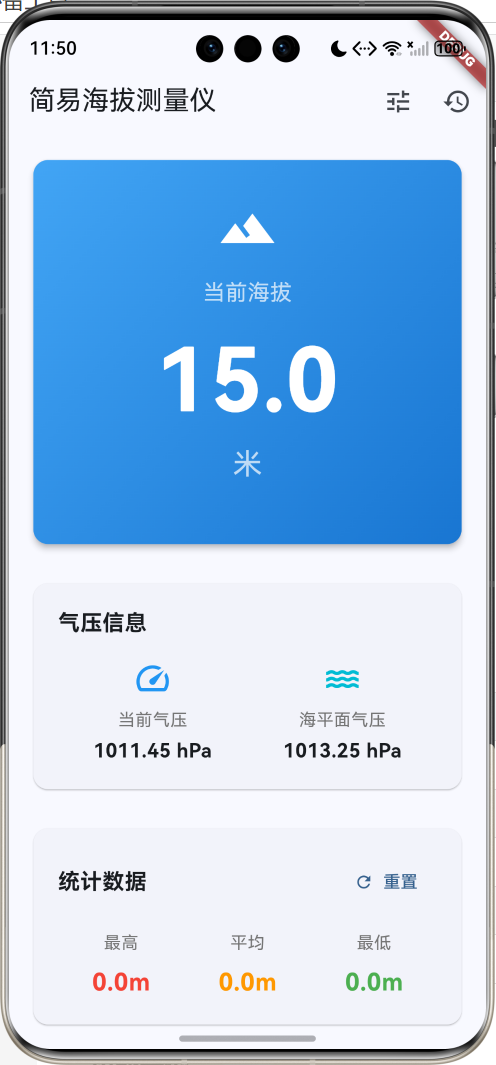
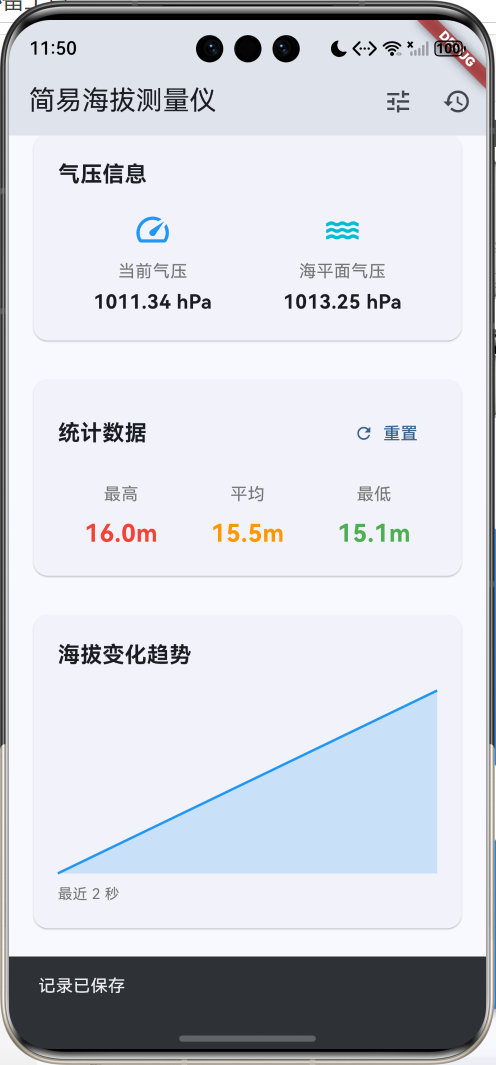
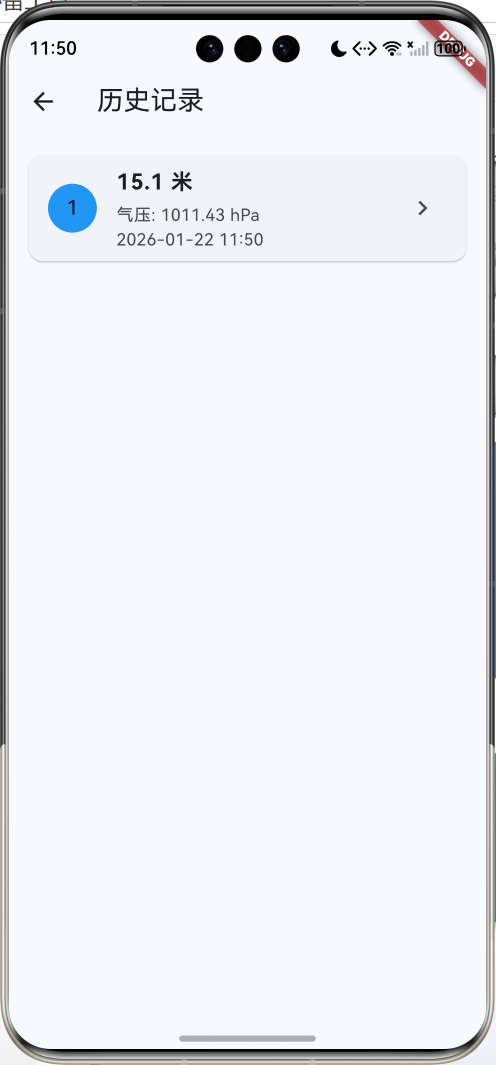
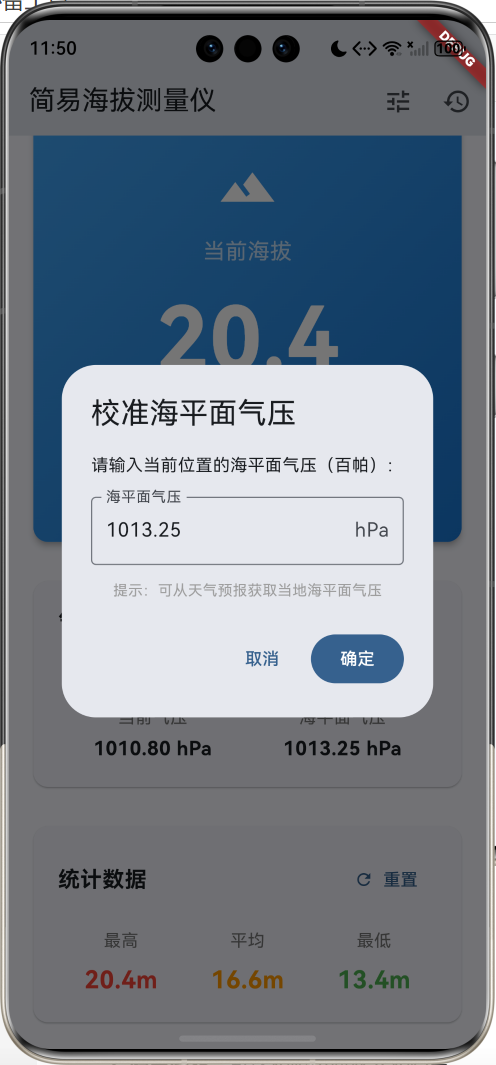
核心功能
- 实时测量:基于气压计算海拔高度
- 数据监测:持续监测海拔变化
- 趋势图表:可视化展示海拔变化趋势
- 统计分析:最高、最低、平均海拔统计
- 历史记录:保存测量记录
应用特色
| 特色 | 说明 |
|---|---|
| 气压测量 | 基于大气压力计算海拔 |
| 实时监测 | 每秒更新数据 |
| 趋势可视化 | 自定义图表绘制 |
| 数据统计 | 多维度统计分析 |
| 校准功能 | 支持海平面气压校准 |
功能架构
核心功能详解
1. 海拔计算原理
海拔测量基于大气压力与高度的关系。
气压高度公式:
h = 44330 × (1 - (P/P₀)^0.1903)

其中:
h  = 海拔高度(米)
P  = 当前气压(百帕)
P₀ = 海平面气压(百帕)
代码实现:
double _calculateAltitude(double pressure, double seaLevelPressure) {
  // 使用气压高度公式计算海拔
  // h = 44330 * (1 - (P/P0)^0.1903)
  return (44330 * (1 - pow(pressure / seaLevelPressure, 0.1903)))
    .toDouble();
}
气压与海拔关系:
- 海拔每升高100米,气压约下降12百帕
- 标准大气压:1013.25 hPa(海平面)
- 海拔1000米:约898 hPa
- 海拔2000米:约795 hPa
2. 实时监测功能
持续监测海拔变化,每秒更新一次数据。
监测实现:
void _startMonitoring() {
  setState(() => _isMonitoring = true);

  _timer = Timer.periodic(const Duration(seconds: 1), (timer) {
    setState(() {
      // 模拟气压变化
      _currentPressure += (Random().nextDouble() - 0.5) * 0.5;
      _currentAltitude = _calculateAltitude(
        _currentPressure,
        _seaLevelPressure
      );

      // 记录历史数据
      _altitudeHistory.add(_currentAltitude);
      if (_altitudeHistory.length > 60) {
        _altitudeHistory.removeAt(0);
      }

      // 更新统计数据
      _updateStatistics();
    });
  });
}

void _stopMonitoring() {
  setState(() => _isMonitoring = false);
  _timer?.cancel();
}
数据更新流程:
- 读取当前气压
- 计算海拔高度
- 添加到历史记录
- 更新统计数据
- 刷新UI显示
3. 统计分析功能
实时计算最高、最低和平均海拔。
统计计算:
void _updateStatistics() {
  if (_altitudeHistory.isEmpty) return;

  _maxAltitude = _altitudeHistory.reduce(max);
  _minAltitude = _altitudeHistory.reduce(min);
  _avgAltitude = _altitudeHistory.reduce((a, b) => a + b)
    / _altitudeHistory.length;
}
统计展示:
Widget _buildStatItem(String label, double value, Color color) {
  return Column(
    children: [
      Text(label,
        style: TextStyle(
          fontSize: 14,
          color: Colors.grey[600]
        )),
      const SizedBox(height: 8),
      Text(
        '${value.toStringAsFixed(1)}m',
        style: TextStyle(
          fontSize: 20,
          fontWeight: FontWeight.bold,
          color: color
        ),
      ),
    ],
  );
}
4. 趋势图表绘制
使用CustomPainter绘制海拔变化趋势图。
图表绘制:
class ChartPainter extends CustomPainter {
final List<double> data;
ChartPainter(this.data);
void paint(Canvas canvas, Size size) {
if (data.isEmpty) return;
final paint = Paint()
..color = Colors.blue
..strokeWidth = 2
..style = PaintingStyle.stroke;
final fillPaint = Paint()
..color = Colors.blue.withOpacity(0.2)
..style = PaintingStyle.fill;
final maxValue = data.reduce(max);
final minValue = data.reduce(min);
final range = maxValue - minValue;
if (range == 0) return;
final path = Path();
final fillPath = Path();
for (int i = 0; i < data.length; i++) {
final x = (i / (data.length - 1)) * size.width;
final y = size.height -
((data[i] - minValue) / range) * size.height;
if (i == 0) {
path.moveTo(x, y);
fillPath.moveTo(x, size.height);
fillPath.lineTo(x, y);
} else {
path.lineTo(x, y);
fillPath.lineTo(x, y);
}
}
fillPath.lineTo(size.width, size.height);
fillPath.close();
canvas.drawPath(fillPath, fillPaint);
canvas.drawPath(path, paint);
}
bool shouldRepaint(ChartPainter oldDelegate) => true;
}
图表特点:
- 折线图显示趋势
- 填充区域增强视觉效果
- 自动缩放适应数据范围
- 最多显示60秒数据
5. 校准功能
支持手动设置海平面气压以提高精度。
校准对话框:
void _calibrate() {
  showDialog(
    context: context,
    builder: (context) {
      final controller = TextEditingController(
        text: _seaLevelPressure.toStringAsFixed(2)
      );
      return AlertDialog(
        title: const Text('校准海平面气压'),
        content: Column(
          mainAxisSize: MainAxisSize.min,
          children: [
            const Text('请输入当前位置的海平面气压(百帕):'),
            const SizedBox(height: 16),
            TextField(
              controller: controller,
              keyboardType: TextInputType.number,
              decoration: const InputDecoration(
                labelText: '海平面气压',
                suffixText: 'hPa',
                border: OutlineInputBorder(),
              ),
            ),
            const SizedBox(height: 12),
            const Text(
              '提示:可从天气预报获取当地海平面气压',
              style: TextStyle(fontSize: 12, color: Colors.grey),
            ),
          ],
        ),
        actions: [
          TextButton(
            onPressed: () => Navigator.pop(context),
            child: const Text('取消'),
          ),
          FilledButton(
            onPressed: () {
              final value = double.tryParse(controller.text);
              if (value != null && value > 900 && value < 1100) {
                setState(() {
                  _seaLevelPressure = value;
                  _currentAltitude = _calculateAltitude(
                    _currentPressure,
                    _seaLevelPressure
                  );
                });
                Navigator.pop(context);
              }
            },
            child: const Text('确定'),
          ),
        ],
      );
    },
  );
}
校准说明:
- 海平面气压范围:900-1100 hPa
- 可从天气预报获取准确值
- 校准后立即重新计算海拔
6. 历史记录功能
保存和查看测量记录。
记录模型:
class AltitudeRecord {
  final double altitude;
  final double pressure;
  final DateTime time;
  final String location;

  AltitudeRecord({
    required this.altitude,
    required this.pressure,
    required this.time,
    this.location = '未知位置',
  });
}
保存记录:
void _saveRecord() {
  setState(() {
    _records.insert(0, AltitudeRecord(
      altitude: _currentAltitude,
      pressure: _currentPressure,
      time: DateTime.now(),
    ));
  });

  ScaffoldMessenger.of(context).showSnackBar(
    const SnackBar(content: Text('记录已保存')),
  );
}
记录列表:
ListView.builder(
  itemCount: records.length,
  itemBuilder: (context, index) {
    final record = records[index];
    return Card(
      child: ListTile(
        leading: CircleAvatar(
          backgroundColor: Colors.blue,
          child: Text('${index + 1}'),
        ),
        title: Text(
          '${record.altitude.toStringAsFixed(1)} 米',
          style: const TextStyle(
            fontSize: 18,
            fontWeight: FontWeight.bold
          ),
        ),
        subtitle: Column(
          crossAxisAlignment: CrossAxisAlignment.start,
          children: [
            Text('气压: ${record.pressure.toStringAsFixed(2)} hPa'),
            Text(_formatTime(record.time)),
          ],
        ),
      ),
    );
  },
)
界面设计要点
1. 主显示卡片
渐变背景突出显示当前海拔:
Container(
  decoration: BoxDecoration(
    gradient: LinearGradient(
      begin: Alignment.topLeft,
      end: Alignment.bottomRight,
      colors: [Colors.blue[400]!, Colors.blue[700]!],
    ),
    borderRadius: BorderRadius.circular(12),
  ),
  child: Column(
    children: [
      const Icon(Icons.terrain, size: 48, color: Colors.white),
      const Text('当前海拔',
        style: TextStyle(fontSize: 18, color: Colors.white70)),
      Text(
        '${_currentAltitude.toStringAsFixed(1)}',
        style: const TextStyle(
          fontSize: 72,
          fontWeight: FontWeight.bold,
          color: Colors.white,
        ),
      ),
      const Text('米',
        style: TextStyle(fontSize: 24, color: Colors.white70)),
    ],
  ),
)
2. 信息卡片布局
统一的卡片样式:
Card(
  child: Padding(
    padding: const EdgeInsets.all(20),
    child: Column(
      crossAxisAlignment: CrossAxisAlignment.start,
      children: [
        const Text(
          '标题',
          style: TextStyle(
            fontSize: 18,
            fontWeight: FontWeight.bold
          ),
        ),
        const SizedBox(height: 16),
        // 内容
      ],
    ),
  ),
)
3. 颜色方案
| 用途 | 颜色 | 说明 |
|---|---|---|
| 主色调 | Blue | 天空、高度感 |
| 最高值 | Red | 警示、峰值 |
| 平均值 | Orange | 中性 |
| 最低值 | Green | 安全、谷底 |
| 气压 | Cyan | 清新 |
数据模型设计
海拔记录模型
class AltitudeRecord {
  final double altitude;      // 海拔(米)
  final double pressure;      // 气压(百帕)
  final DateTime time;        // 时间
  final String location;      // 位置

  AltitudeRecord({
    required this.altitude,
    required this.pressure,
    required this.time,
    this.location = '未知位置',
  });
}
核心代码实现
Timer管理
Timer? _timer;
void dispose() {
_timer?.cancel();
super.dispose();
}
void _startMonitoring() {
_timer = Timer.periodic(
const Duration(seconds: 1),
(timer) {
// 更新数据
}
);
}
void _stopMonitoring() {
_timer?.cancel();
}
数据历史管理
final List<double> _altitudeHistory = [];

// 添加数据,保持最多60个
_altitudeHistory.add(_currentAltitude);
if (_altitudeHistory.length > 60) {
  _altitudeHistory.removeAt(0);
}
功能扩展建议
1. 真实传感器集成
使用sensors_plus插件读取真实气压:
import 'package:sensors_plus/sensors_plus.dart';
class PressureSensorService {
Stream<double>? pressureStream;
void startListening() {
// 注意:并非所有设备都有气压传感器
// 需要检查设备支持情况
pressureStream = barometricPressureEvents.map((event) {
// event.pressure 单位为百帕
return event.pressure;
});
}
void stopListening() {
pressureStream = null;
}
}
// 使用
class _AltimeterPageState extends State<AltimeterPage> {
final PressureSensorService _sensorService =
PressureSensorService();
StreamSubscription? _subscription;
void _startMonitoring() {
_sensorService.startListening();
_subscription = _sensorService.pressureStream?.listen((pressure) {
setState(() {
_currentPressure = pressure;
_currentAltitude = _calculateAltitude(
pressure,
_seaLevelPressure
);
});
});
}
void dispose() {
_subscription?.cancel();
super.dispose();
}
}
2. GPS定位集成
使用geolocator获取位置和GPS海拔:
import 'package:geolocator/geolocator.dart';

class LocationService {
  Future<Position?> getCurrentPosition() async {
    final permission = await Geolocator.requestPermission();
    if (permission == LocationPermission.denied) {
      return null;
    }

    return await Geolocator.getCurrentPosition(
      desiredAccuracy: LocationAccuracy.high,
    );
  }

  Future<String> getLocationName(double lat, double lon) async {
    // 使用geocoding获取地名
    return '位置名称';
  }
}

// 使用
void _saveRecordWithLocation() async {
  final position = await LocationService().getCurrentPosition();
  if (position != null) {
    final location = await LocationService().getLocationName(
      position.latitude,
      position.longitude,
    );

    _records.insert(0, AltitudeRecord(
      altitude: _currentAltitude,
      pressure: _currentPressure,
      time: DateTime.now(),
      location: location,
    ));
  }
}
3. 数据持久化
使用SharedPreferences保存记录:
import 'package:shared_preferences/shared_preferences.dart';
import 'dart:convert';

class DataService {
  Future<void> saveRecords(List<AltitudeRecord> records) async {
    final prefs = await SharedPreferences.getInstance();
    final jsonList = records.map((r) => {
      'altitude': r.altitude,
      'pressure': r.pressure,
      'time': r.time.toIso8601String(),
      'location': r.location,
    }).toList();
    await prefs.setString('altitude_records', jsonEncode(jsonList));
  }

  Future<List<AltitudeRecord>> loadRecords() async {
    final prefs = await SharedPreferences.getInstance();
    final jsonStr = prefs.getString('altitude_records');
    if (jsonStr == null) return [];

    final jsonList = jsonDecode(jsonStr) as List;
    return jsonList.map((json) => AltitudeRecord(
      altitude: json['altitude'],
      pressure: json['pressure'],
      time: DateTime.parse(json['time']),
      location: json['location'],
    )).toList();
  }
}
4. 导出数据
支持导出CSV格式:
import 'package:share_plus/share_plus.dart';
import 'dart:io';
import 'package:path_provider/path_provider.dart';

class ExportService {
  Future<void> exportToCSV(List<AltitudeRecord> records) async {
    final buffer = StringBuffer();
    buffer.writeln('时间,海拔(米),气压(hPa),位置');

    for (var record in records) {
      buffer.writeln(
        '${record.time},'
        '${record.altitude.toStringAsFixed(2)},'
        '${record.pressure.toStringAsFixed(2)},'
        '${record.location}'
      );
    }

    final directory = await getTemporaryDirectory();
    final file = File('${directory.path}/altitude_records.csv');
    await file.writeAsString(buffer.toString());

    await Share.shareXFiles([XFile(file.path)]);
  }
}
5. 海拔预警
设置海拔阈值预警:
class AltitudeAlert {
  final double maxAltitude;
  final double minAltitude;
  bool isEnabled;

  AltitudeAlert({
    required this.maxAltitude,
    required this.minAltitude,
    this.isEnabled = true,
  });
}

class AlertService {
  AltitudeAlert? alert;

  void checkAlert(double currentAltitude, BuildContext context) {
    if (alert == null || !alert!.isEnabled) return;

    if (currentAltitude > alert!.maxAltitude) {
      _showAlert(context, '海拔过高',
        '当前海拔${currentAltitude.toStringAsFixed(0)}米,'
        '超过设定上限${alert!.maxAltitude.toStringAsFixed(0)}米');
    } else if (currentAltitude < alert!.minAltitude) {
      _showAlert(context, '海拔过低',
        '当前海拔${currentAltitude.toStringAsFixed(0)}米,'
        '低于设定下限${alert!.minAltitude.toStringAsFixed(0)}米');
    }
  }

  void _showAlert(BuildContext context, String title, String message) {
    showDialog(
      context: context,
      builder: (context) => AlertDialog(
        title: Row(
          children: [
            const Icon(Icons.warning, color: Colors.orange),
            const SizedBox(width: 8),
            Text(title),
          ],
        ),
        content: Text(message),
        actions: [
          FilledButton(
            onPressed: () => Navigator.pop(context),
            child: const Text('知道了'),
          ),
        ],
      ),
    );
  }
}
6. 天气信息集成
获取天气和气压信息:
import 'package:http/http.dart' as http;
import 'dart:convert';
class WeatherService {
final String apiKey = 'YOUR_API_KEY';
Future<Map<String, dynamic>> getWeather(
double lat,
double lon
) async {
final url = 'https://api.openweathermap.org/data/2.5/weather'
'?lat=$lat&lon=$lon&appid=$apiKey&units=metric';
final response = await http.get(Uri.parse(url));
if (response.statusCode == 200) {
final data = jsonDecode(response.body);
return {
'temperature': data['main']['temp'],
'pressure': data['main']['pressure'],
'humidity': data['main']['humidity'],
'weather': data['weather'][0]['description'],
};
}
throw Exception('获取天气失败');
}
}
// 使用
class WeatherCard extends StatelessWidget {
final Map<String, dynamic> weather;
Widget build(BuildContext context) {
return Card(
child: Padding(
padding: const EdgeInsets.all(16),
child: Column(
children: [
Text('温度: ${weather['temperature']}°C'),
Text('气压: ${weather['pressure']} hPa'),
Text('湿度: ${weather['humidity']}%'),
Text('天气: ${weather['weather']}'),
],
),
),
);
}
}
7. 海拔等高线地图
显示等高线地图:
import 'package:google_maps_flutter/google_maps_flutter.dart';
class TopographicMap extends StatefulWidget {
State<TopographicMap> createState() => _TopographicMapState();
}
class _TopographicMapState extends State<TopographicMap> {
GoogleMapController? _controller;
Widget build(BuildContext context) {
return GoogleMap(
initialCameraPosition: const CameraPosition(
target: LatLng(39.9042, 116.4074),
zoom: 12,
),
mapType: MapType.terrain, // 地形图显示等高线
onMapCreated: (controller) {
_controller = controller;
},
);
}
}
8. 登山轨迹记录
记录登山路线和海拔变化:
class TrackPoint {
  final double latitude;
  final double longitude;
  final double altitude;
  final DateTime time;

  TrackPoint({
    required this.latitude,
    required this.longitude,
    required this.altitude,
    required this.time,
  });
}

class TrackRecorder {
  final List<TrackPoint> points = [];
  Timer? _timer;

  void startRecording() {
    _timer = Timer.periodic(const Duration(seconds: 10), (timer) async {
      final position = await Geolocator.getCurrentPosition();
      points.add(TrackPoint(
        latitude: position.latitude,
        longitude: position.longitude,
        altitude: position.altitude,
        time: DateTime.now(),
      ));
    });
  }

  void stopRecording() {
    _timer?.cancel();
  }

  double getTotalDistance() {
    double total = 0;
    for (int i = 0; i < points.length - 1; i++) {
      total += Geolocator.distanceBetween(
        points[i].latitude,
        points[i].longitude,
        points[i + 1].latitude,
        points[i + 1].longitude,
      );
    }
    return total;
  }

  double getTotalAscent() {
    double ascent = 0;
    for (int i = 0; i < points.length - 1; i++) {
      final diff = points[i + 1].altitude - points[i].altitude;
      if (diff > 0) ascent += diff;
    }
    return ascent;
  }
}
项目结构
lib/
├── main.dart                    # 应用入口
├── models/                      # 数据模型
│   ├── altitude_record.dart    # 海拔记录
│   ├── altitude_alert.dart     # 海拔预警
│   └── track_point.dart        # 轨迹点
├── pages/                       # 页面
│   ├── altimeter_page.dart     # 主测量页面
│   ├── records_page.dart       # 历史记录
│   ├── map_page.dart           # 地图页面
│   └── settings_page.dart      # 设置页面
├── services/                    # 服务
│   ├── pressure_sensor.dart    # 气压传感器
│   ├── location_service.dart   # 定位服务
│   ├── weather_service.dart    # 天气服务
│   ├── data_service.dart       # 数据持久化
│   ├── export_service.dart     # 数据导出
│   └── alert_service.dart      # 预警服务
└── widgets/                     # 组件
    ├── chart_painter.dart      # 图表绘制
    ├── altitude_display.dart   # 海拔显示
    └── stat_card.dart          # 统计卡片
使用指南
基本操作
-
查看当前海拔
- 打开应用即可看到当前海拔
- 基于模拟气压计算
-
开始监测
- 点击"开始监测"按钮
- 每秒更新一次数据
- 查看趋势图表
-
保存记录
- 监测过程中点击"保存记录"
- 记录当前海拔和气压
- 在历史记录中查看
-
校准气压
- 点击右上角校准图标
- 输入当地海平面气压
- 提高测量精度
提高精度
-
获取准确气压
- 查看当地天气预报
- 获取海平面气压值
- 进行校准
-
稳定测量
- 保持设备静止
- 避免快速移动
- 等待数据稳定
-
环境因素
- 避免密闭空间
- 注意温度影响
- 考虑天气变化
常见问题
Q1: 为什么测量不准确?
主要原因:
- 未校准海平面气压
- 天气变化影响
- 设备传感器精度
解决方法:
- 定期校准
- 参考天气预报
- 多次测量取平均
Q2: 如何获取真实气压数据?
// 检查设备是否支持气压传感器
import 'package:sensors_plus/sensors_plus.dart';

void checkPressureSensor() async {
  try {
    final stream = barometricPressureEvents;
    final hasData = await stream.first
      .timeout(const Duration(seconds: 1));
    print('设备支持气压传感器');
  } catch (e) {
    print('设备不支持气压传感器');
  }
}
Q3: 海拔计算公式的来源?
国际标准大气模型(ISA):
- 基于理想气体定律
- 考虑重力加速度
- 适用于对流层(0-11km)
Q4: 如何提高测量精度?
- 多点校准
class MultiPointCalibration {
  final Map<double, double> calibrationPoints = {};

  void addPoint(double knownAltitude, double measuredPressure) {
    calibrationPoints[knownAltitude] = measuredPressure;
  }

  double getSeaLevelPressure(double altitude, double pressure) {
    // 使用插值法计算
    return pressure * pow(1 - altitude / 44330, -5.255);
  }
}
- 温度补偿
double calculateAltitudeWithTemp(
  double pressure,
  double seaLevelPressure,
  double temperature,  // 摄氏度
) {
  final tempK = temperature + 273.15;
  return (tempK / 0.0065) *
    (1 - pow(pressure / seaLevelPressure, 0.1903));
}
Q5: 如何导出数据?
Future<void> exportData() async {
  final records = await DataService().loadRecords();
  await ExportService().exportToCSV(records);
}
性能优化
1. 图表优化
// 使用RepaintBoundary减少重绘
RepaintBoundary(
  child: CustomPaint(
    painter: ChartPainter(_altitudeHistory),
  ),
)

// 限制数据点数量
if (_altitudeHistory.length > 60) {
  _altitudeHistory.removeAt(0);
}
2. Timer优化
// 及时取消Timer
void dispose() {
_timer?.cancel();
super.dispose();
}
// 使用mounted检查
_timer = Timer.periodic(const Duration(seconds: 1), (timer) {
if (mounted) {
setState(() {
// 更新数据
});
}
});
3. 数据处理优化
// 使用compute进行耗时计算
import 'package:flutter/foundation.dart';

Future<double> calculateAltitudeAsync(
  double pressure,
  double seaLevelPressure
) async {
  return await compute(_calculateAltitude, {
    'pressure': pressure,
    'seaLevelPressure': seaLevelPressure,
  });
}

double _calculateAltitude(Map<String, double> params) {
  return (44330 * (1 - pow(
    params['pressure']! / params['seaLevelPressure']!,
    0.1903
  ))).toDouble();
}
总结
简易海拔测量仪是一款实用的户外工具应用,具有以下特点:
核心优势
- 科学原理:基于气压高度公式
- 实时监测:持续更新海拔数据
- 可视化展示:趋势图表直观
- 数据统计:多维度分析
技术亮点
- 自定义绘图:CustomPainter绘制图表
- 数学计算:气压高度公式实现
- 数据管理:历史记录和统计
- 扩展性强:易于集成真实传感器
应用价值
- 登山徒步辅助工具
- 海拔高度快速测量
- 气压变化监测
- 户外探险必备
通过集成真实传感器和GPS定位,这款应用可以成为专业的户外测量工具,为登山爱好者提供准确的海拔信息。
欢迎加入开源鸿蒙跨平台社区:https://openharmonycrossplatform.csdn.net

腾讯云面向开发者汇聚海量精品云计算使用和开发经验,营造开放的云计算技术生态圈。
更多推荐
 13
13 0
0- 0


 已为社区贡献19条内容

所有评论(0)