flutter_for_openharmony小区门禁管理app实战+社区信息实现
·
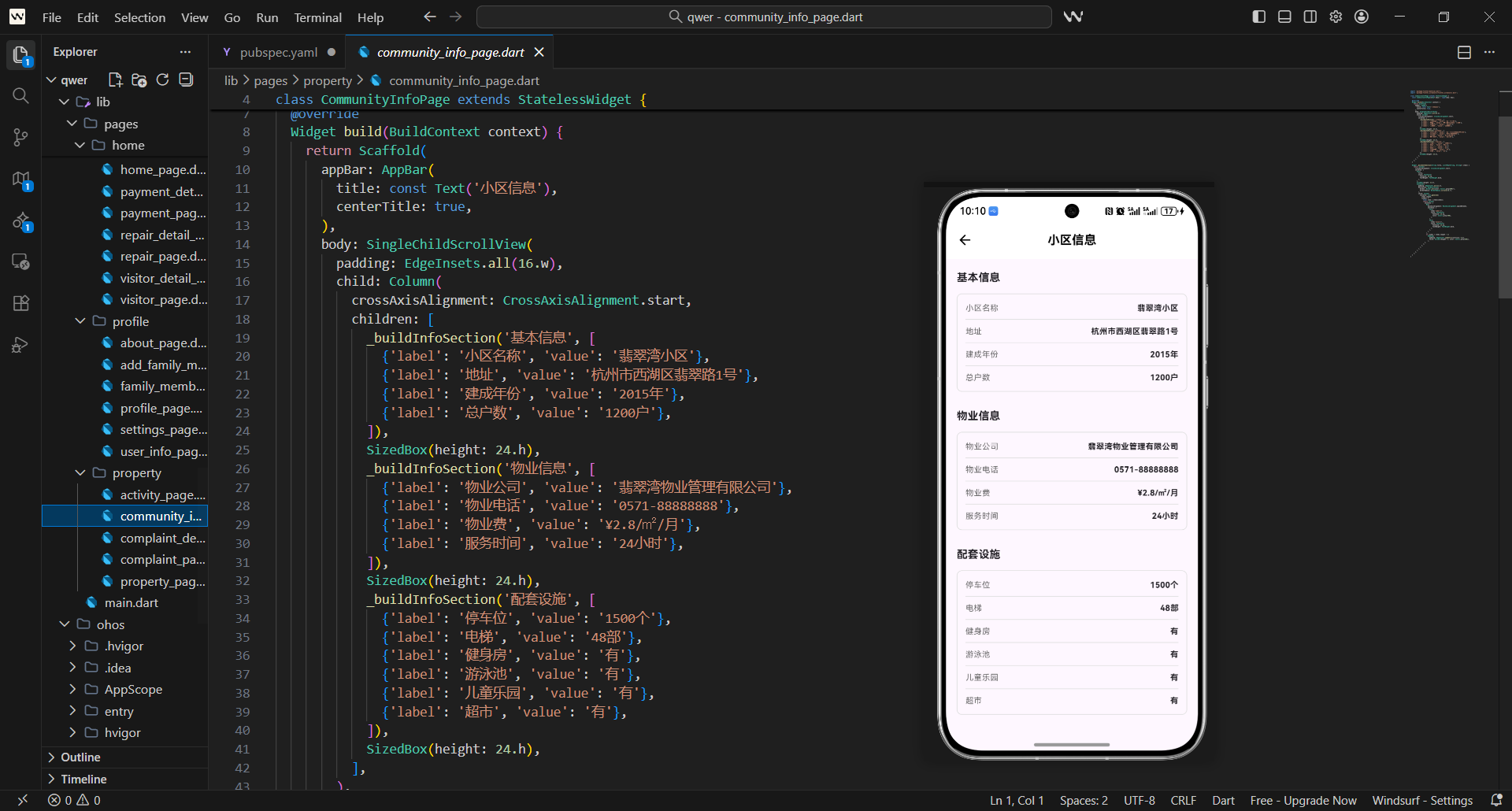
社区信息是小区门禁管理系统中的重要功能,它为住户提供了了解小区基本情况、服务设施、联系方式等重要信息的便捷渠道。
在实际项目中,社区信息页面需要解决几个关键问题:
- 如何清晰展示小区的基本信息和服务设施
- 如何支持多种信息类型的分类展示
- 如何提供便捷的联系和服务入口
- 如何保持信息的实时更新和准确性
这篇讲社区信息页面的实现,重点是如何让社区信息展示既全面又易于查找。
对应源码
lib/pages/property/community_info_page.dart
社区信息页面的设计思路是:分类展示 + 信息完整 + 便捷联系。
import 'package:flutter/material.dart';
import 'package:flutter_screenutil/flutter_screenutil.dart';
import 'package:get/get.dart';
import 'package:url_launcher/url_launcher.dart';
class CommunityInfoPage extends StatefulWidget {
const CommunityInfoPage({Key? key}) : super(key: key);
State<CommunityInfoPage> createState() => _CommunityInfoPageState();
}
class _CommunityInfoPageState extends State<CommunityInfoPage> {
bool _isLoading = true;
Map<String, dynamic> _communityInfo = {};
List<Map<String, dynamic>> _facilities = [];
List<Map<String, dynamic>> _services = [];
基础结构说明:
- 社区信息页面需要维护多种数据状态,所以用
StatefulWidget。 - 导入
url_launcher支持电话拨打和网页跳转。 _communityInfo存储小区基本信息。_facilities和_services存储设施和服务信息。
void initState() {
super.initState();
_loadCommunityInfo();
}
Widget build(BuildContext context) {
return Scaffold(
appBar: AppBar(
title: const Text('社区信息'),
centerTitle: true,
),
body: _isLoading
? const Center(child: CircularProgressIndicator())
: SingleChildScrollView(
padding: EdgeInsets.all(16.w),
child: Column(
children: [
// 小区基本信息
_buildBasicInfoSection(),
SizedBox(height: 24.h),
// 服务设施
_buildFacilitiesSection(),
SizedBox(height: 24.h),
// 社区服务
_buildServicesSection(),
SizedBox(height: 24.h),
// 联系方式
_buildContactSection(),
],
),
),
);
}
页面布局设计:
- 使用
SingleChildScrollView确保内容可滚动。 - 页面分为四个主要部分:基本信息、服务设施、社区服务、联系方式。
- 加载状态显示进度器,提升用户体验。
- 各部分之间有适当间距,布局清晰。
  Widget _buildBasicInfoSection() {
    return Container(
      width: double.infinity,
      padding: EdgeInsets.all(20.w),
      decoration: BoxDecoration(
        gradient: const LinearGradient(
          colors: [Color(0xFF4CAF50), Color(0xFF45A049)],
          begin: Alignment.topLeft,
          end: Alignment.bottomRight,
        ),
        borderRadius: BorderRadius.circular(16.r),
        boxShadow: [
          BoxShadow(
            color: Colors.green.withOpacity(0.3),
            blurRadius: 12.r,
            offset: Offset(0, 6.h),
          ),
        ],
      ),
      child: Column(
        crossAxisAlignment: CrossAxisAlignment.start,
        children: [
          Text(
            '小区基本信息',
            style: TextStyle(
              color: Colors.white70,
              fontSize: 12.sp,
            ),
          ),
          SizedBox(height: 12.h),

          Text(
            _communityInfo['name'] ?? '翡翠湾小区',
            style: TextStyle(
              color: Colors.white,
              fontSize: 24.sp,
              fontWeight: FontWeight.bold,
            ),
          ),
          SizedBox(height: 16.h),

          _buildInfoRow(
            icon: Icons.location_on,
            label: '地址',
            value: _communityInfo['address'] ?? '城市中心区翡翠湾路88号',
          ),
          SizedBox(height: 12.h),

          _buildInfoRow(
            icon: Icons.business,
            label: '开发商',
            value: _communityInfo['developer'] ?? '翡翠湾地产开发有限公司',
          ),
          SizedBox(height: 12.h),

          _buildInfoRow(
            icon: Icons.apartment,
            label: '物业公司',
            value: _communityInfo['property'] ?? '翡翠湾物业服务有限公司',
          ),
          SizedBox(height: 12.h),

          _buildInfoRow(
            icon: Icons.people,
            label: '户数',
            value: '${_communityInfo['households'] ?? 1200}户',
          ),
          SizedBox(height: 12.h),

          _buildInfoRow(
            icon: Icons.calendar_today,
            label: '建成时间',
            value: _communityInfo['buildDate'] ?? '2020年6月',
          ),
        ],
      ),
    );
  }
基本信息区域:
- 绿色渐变背景突出小区信息的重要性。
- 显示小区名称、地址、开发商、物业公司等关键信息。
- 使用
_buildInfoRow统一信息行的样式。 - 每项信息都有对应的图标,增强可读性。
  Widget _buildInfoRow({
    required IconData icon,
    required String label,
    required String value,
  }) {
    return Row(
      children: [
        Icon(
          icon,
          color: Colors.white70,
          size: 16.sp,
        ),
        SizedBox(width: 8.w),
        Text(
          '$label:',
          style: TextStyle(
            color: Colors.white70,
            fontSize: 12.sp,
          ),
        ),
        Expanded(
          child: Text(
            value,
            style: TextStyle(
              color: Colors.white,
              fontSize: 12.sp,
              fontWeight: FontWeight.w500,
            ),
          ),
        ),
      ],
    );
  }
信息行组件:
- 统一的信息行样式和布局。
- 图标、标签、值的标准排列。
- 标签使用半透明白色,值使用纯白色。
- 值使用
Expanded确保完整显示。
  Widget _buildFacilitiesSection() {
    return Container(
      width: double.infinity,
      padding: EdgeInsets.all(20.w),
      decoration: BoxDecoration(
        color: Colors.white,
        borderRadius: BorderRadius.circular(12.r),
        boxShadow: [
          BoxShadow(
            color: Colors.grey.withOpacity(0.1),
            blurRadius: 8.r,
            offset: Offset(0, 2.h),
          ),
        ],
      ),
      child: Column(
        crossAxisAlignment: CrossAxisAlignment.start,
        children: [
          Text(
            '服务设施',
            style: TextStyle(
              fontSize: 16.sp,
              fontWeight: FontWeight.bold,
            ),
          ),
          SizedBox(height: 16.h),

          GridView.builder(
            shrinkWrap: true,
            physics: const NeverScrollableScrollPhysics(),
            gridDelegate: SliverGridDelegateWithFixedCrossAxisCount(
              crossAxisCount: 2,
              crossAxisSpacing: 12.w,
              mainAxisSpacing: 12.h,
              childAspectRatio: 1.2,
            ),
            itemCount: _facilities.length,
            itemBuilder: (context, index) {
              final facility = _facilities[index];
              return _buildFacilityCard(facility);
            },
          ),
        ],
      ),
    );
  }
服务设施区域:
- 使用网格布局展示设施信息。
- 2列网格,每个设施卡片宽高比固定。
- 使用
_buildFacilityCard统一设施卡片样式。 - 网格布局充分利用屏幕空间。
  Widget _buildFacilityCard(Map<String, dynamic> facility) {
    return Container(
      padding: EdgeInsets.all(16.w),
      decoration: BoxDecoration(
        color: Colors.grey[50],
        borderRadius: BorderRadius.circular(8.r),
        border: Border.all(color: Colors.grey[200]!),
      ),
      child: Column(
        mainAxisAlignment: MainAxisAlignment.center,
        children: [
          Icon(
            _getFacilityIcon(facility['type']),
            color: Colors.blue,
            size: 32.sp,
          ),
          SizedBox(height: 8.h),
          Text(
            facility['name'],
            style: TextStyle(
              fontSize: 12.sp,
              fontWeight: FontWeight.bold,
            ),
            textAlign: TextAlign.center,
          ),
          SizedBox(height: 4.h),
          Text(
            facility['location'] ?? '园区内',
            style: TextStyle(
              fontSize: 10.sp,
              color: Colors.grey[600],
            ),
            textAlign: TextAlign.center,
          ),
        ],
      ),
    );
  }
设施卡片组件:
- 灰色背景的简洁卡片设计。
- 图标、名称、位置的标准布局。
- 图标使用蓝色,视觉统一。
- 支持不同类型的设施图标。
  IconData _getFacilityIcon(String type) {
    switch (type) {
      case 'gym':
        return Icons.fitness_center;
      case 'pool':
        return Icons.pool;
      case 'parking':
        return Icons.local_parking;
      case 'garden':
        return Icons.park;
      case 'playground':
        return Icons.child_care;
      case 'shop':
        return Icons.store;
      case 'security':
        return Icons.security;
      case 'mailbox':
        return Icons.mail;
      default:
        return Icons.location_on;
    }
  }
设施图标映射:
- 根据设施类型返回对应图标。
- 支持多种设施类型:健身房、游泳池、停车场等。
- 使用 switch 语句确保图标映射的完整性。
- 默认图标为位置图标。
  Widget _buildServicesSection() {
    return Container(
      width: double.infinity,
      padding: EdgeInsets.all(20.w),
      decoration: BoxDecoration(
        color: Colors.white,
        borderRadius: BorderRadius.circular(12.r),
        boxShadow: [
          BoxShadow(
            color: Colors.grey.withOpacity(0.1),
            blurRadius: 8.r,
            offset: Offset(0, 2.h),
          ),
        ],
      ),
      child: Column(
        crossAxisAlignment: CrossAxisAlignment.start,
        children: [
          Text(
            '社区服务',
            style: TextStyle(
              fontSize: 16.sp,
              fontWeight: FontWeight.bold,
            ),
          ),
          SizedBox(height: 16.h),

          ..._services.map((service) => _buildServiceItem(service)).toList(),
        ],
      ),
    );
  }
社区服务区域:
- 白色背景容器,带圆角和阴影。
- 使用展开操作符将服务列表转换为组件列表。
- 每个服务项使用
_buildServiceItem构建。 - 服务信息垂直排列,便于阅读。
  Widget _buildServiceItem(Map<String, dynamic> service) {
    return Container(
      margin: EdgeInsets.only(bottom: 16.h),
      padding: EdgeInsets.all(16.w),
      decoration: BoxDecoration(
        color: Colors.blue[50],
        borderRadius: BorderRadius.circular(8.r),
        border: Border.all(color: Colors.blue[200]!),
      ),
      child: Column(
        crossAxisAlignment: CrossAxisAlignment.start,
        children: [
          Row(
            children: [
              Icon(
                _getServiceIcon(service['type']),
                color: Colors.blue,
                size: 20.sp,
              ),
              SizedBox(width: 8.w),
              Expanded(
                child: Text(
                  service['name'],
                  style: TextStyle(
                    fontSize: 14.sp,
                    fontWeight: FontWeight.bold,
                    color: Colors.blue[700],
                  ),
                ),
              ),
            ],
          ),
          SizedBox(height: 8.h),
          Text(
            service['description'],
            style: TextStyle(
              fontSize: 12.sp,
              color: Colors.grey[700],
            ),
          ),
          if (service['phone'] != null) ...[
            SizedBox(height: 8.h),
            Row(
              children: [
                Icon(
                  Icons.phone,
                  size: 14.sp,
                  color: Colors.grey[600],
                ),
                SizedBox(width: 4.w),
                GestureDetector(
                  onTap: () => _launchPhone(service['phone']),
                  child: Text(
                    service['phone'],
                    style: TextStyle(
                      fontSize: 12.sp,
                      color: Colors.blue,
                      decoration: TextDecoration.underline,
                    ),
                  ),
                ),
              ],
            ),
          ],
        ],
      ),
    );
  }
服务项组件:
- 蓝色背景的服务卡片,与设施卡片区分。
- 显示服务名称、描述和联系电话。
- 电话号码可点击拨打,使用下划线提示。
- 图标和文字信息层次分明。
  IconData _getServiceIcon(String type) {
    switch (type) {
      case 'repair':
        return Icons.build;
      case 'cleaning':
        return Icons.cleaning_services;
      case 'security':
        return Icons.security;
      case 'delivery':
        return Icons.local_shipping;
      case 'maintenance':
        return Icons.hardware;
      case 'consulting':
        return Icons.support_agent;
      default:
        return Icons.miscellaneous_services;
    }
  }
服务图标映射:
- 根据服务类型返回对应图标。
- 支持多种服务类型:维修、清洁、安保等。
- 图标选择符合服务特征。
- 默认图标为通用服务图标。
  Widget _buildContactSection() {
    return Container(
      width: double.infinity,
      padding: EdgeInsets.all(20.w),
      decoration: BoxDecoration(
        color: Colors.white,
        borderRadius: BorderRadius.circular(12.r),
        boxShadow: [
          BoxShadow(
            color: Colors.grey.withOpacity(0.1),
            blurRadius: 8.r,
            offset: Offset(0, 2.h),
          ),
        ],
      ),
      child: Column(
        crossAxisAlignment: CrossAxisAlignment.start,
        children: [
          Text(
            '联系方式',
            style: TextStyle(
              fontSize: 16.sp,
              fontWeight: FontWeight.bold,
            ),
          ),
          SizedBox(height: 16.h),

          _buildContactItem(
            icon: Icons.phone,
            title: '物业服务中心',
            value: '400-123-4567',
            subtitle: '24小时服务热线',
            onTap: () => _launchPhone('4001234567'),
          ),
          _buildContactItem(
            icon: Icons.phone,
            title: '安保中心',
            value: '400-123-4568',
            subtitle: '紧急情况请拨打',
            onTap: () => _launchPhone('4001234568'),
          ),
          _buildContactItem(
            icon: Icons.email,
            title: '邮箱',
            value: 'property@example.com',
            subtitle: '意见建议和投诉',
            onTap: () => _launchEmail('property@example.com'),
          ),
          _buildContactItem(
            icon: Icons.language,
            title: '官方网站',
            value: 'www.community.com',
            subtitle: '了解更多信息',
            onTap: () => _launchUrl('https://www.community.com'),
          ),
        ],
      ),
    );
  }
联系方式区域:
- 提供物业服务中心、安保中心、邮箱、官网等联系方式。
- 每个联系方式都有图标、标题、值、副标题和操作。
- 支持电话拨打、邮件发送、网页跳转等操作。
- 重要联系方式有说明文字。
  Widget _buildContactItem({
    required IconData icon,
    required String title,
    required String value,
    required String subtitle,
    required VoidCallback onTap,
  }) {
    return InkWell(
      onTap: onTap,
      borderRadius: BorderRadius.circular(8.r),
      child: Padding(
        padding: EdgeInsets.symmetric(vertical: 12.h),
        child: Row(
          children: [
            Container(
              width: 40.w,
              height: 40.w,
              decoration: BoxDecoration(
                color: Colors.orange[50],
                borderRadius: BorderRadius.circular(8.r),
              ),
              child: Icon(
                icon,
                color: Colors.orange,
                size: 20.sp,
              ),
            ),
            SizedBox(width: 12.w),
            Expanded(
              child: Column(
                crossAxisAlignment: CrossAxisAlignment.start,
                children: [
                  Text(
                    title,
                    style: TextStyle(
                      fontSize: 14.sp,
                      fontWeight: FontWeight.w500,
                    ),
                  ),
                  Text(
                    value,
                    style: TextStyle(
                      fontSize: 12.sp,
                      color: Colors.blue,
                      decoration: TextDecoration.underline,
                    ),
                  ),
                  Text(
                    subtitle,
                    style: TextStyle(
                      fontSize: 10.sp,
                      color: Colors.grey[600],
                    ),
                  ),
                ],
              ),
            ),
            Icon(
              Icons.chevron_right,
              color: Colors.grey[400],
              size: 16.sp,
            ),
          ],
        ),
      ),
    );
  }
联系方式组件:
- 橙色图标容器,与前面区域形成视觉区别。
- 标题、值、副标题的垂直布局。
- 值使用蓝色下划线,提示可点击。
- 整体设计专业,信息层次清晰。
  Future<void> _loadCommunityInfo() async {
    setState(() {
      _isLoading = true;
    });

    // 模拟加载社区信息
    await Future.delayed(const Duration(seconds: 1));

    final mockCommunityInfo = {
      'name': '翡翠湾小区',
      'address': '城市中心区翡翠湾路88号',
      'developer': '翡翠湾地产开发有限公司',
      'property': '翡翠湾物业服务有限公司',
      'households': 1200,
      'buildDate': '2020年6月',
    };

    final mockFacilities = [
      {'type': 'gym', 'name': '健身房', 'location': '会所一楼'},
      {'type': 'pool', 'name': '游泳池', 'location': '会所二楼'},
      {'type': 'parking', 'name': '停车场', 'location': '地下1-3层'},
      {'type': 'garden', 'name': '中心花园', 'location': '园区中心'},
      {'type': 'playground', 'name': '儿童乐园', 'location': '园区东侧'},
      {'type': 'shop', 'name': '便利店', 'location': '园区南门'},
    ];

    final mockServices = [
      {
        'type': 'repair',
        'name': '维修服务',
        'description': '提供家电、水电等维修服务,专业师傅上门服务',
        'phone': '400-123-4569',
      },
      {
        'type': 'cleaning',
        'name': '清洁服务',
        'description': '定期公共区域清洁,保持环境整洁',
        'phone': '400-123-4570',
      },
      {
        'type': 'security',
        'name': '安保服务',
        'description': '24小时安保巡逻,确保小区安全',
        'phone': '400-123-4568',
      },
    ];

    setState(() {
      _communityInfo = mockCommunityInfo;
      _facilities = mockFacilities;
      _services = mockServices;
      _isLoading = false;
    });
  }
数据加载逻辑:
- 模拟异步加载社区信息数据。
- 包含完整的小区基本信息、设施列表、服务列表。
- 设施和服务都有详细的类型、名称、位置、描述等信息。
- 加载完成后更新UI状态。
  Future<void> _launchPhone(String phone) async {
    final Uri phoneUri = Uri(scheme: 'tel', path: phone);
    if (await canLaunchUrl(phoneUri)) {
      await launchUrl(phoneUri);
    } else {
      ScaffoldMessenger.of(context).showSnackBar(
        const SnackBar(content: Text('无法拨打电话')),
      );
    }
  }

  Future<void> _launchEmail(String email) async {
    final Uri emailUri = Uri(
      scheme: 'mailto',
      path: email,
      query: 'subject=翡翠湾小区咨询',
    );
    if (await canLaunchUrl(emailUri)) {
      await launchUrl(emailUri);
    } else {
      ScaffoldMessenger.of(context).showSnackBar(
        const SnackBar(content: Text('无法发送邮件')),
      );
    }
  }

  Future<void> _launchUrl(String url) async {
    final Uri uri = Uri.parse(url);
    if (await canLaunchUrl(uri)) {
      await launchUrl(uri);
    } else {
      ScaffoldMessenger.of(context).showSnackBar(
        const SnackBar(content: Text('无法打开链接')),
      );
    }
  }
}
外部链接功能:
_launchPhone拨打电话功能。_launchEmail发送邮件功能。_launchUrl打开网页链接。- 使用
url_launcher实现跨平台兼容。 - 错误处理确保功能的可靠性。
用户体验设计
社区信息页面的用户体验重点:
- 信息分类:按类型组织信息,便于查找
- 视觉层次:重要信息突出,次要信息弱化
- 便捷联系:一键拨打电话、发送邮件
- 信息完整:提供全面的社区信息
这些设计让社区信息获取变得简单高效。
信息管理策略
社区信息的管理考虑:
- 数据结构化:使用结构化数据存储信息
- 图标映射:为不同类型分配合适的图标
- 联系集成:集成电话、邮件等联系方式
- 实时更新:支持信息的实时更新和同步
这些策略确保信息的准确性和实用性。
欢迎加入开源鸿蒙跨平台社区:https://openharmonycrossplatform.csdn.net

腾讯云面向开发者汇聚海量精品云计算使用和开发经验,营造开放的云计算技术生态圈。
更多推荐
 3
3 0
0- 0


 已为社区贡献39条内容

所有评论(0)