企业微信Webhook开发
Prometheus Alertmanager:监控告警集成。CI/CD通知:Jenkins构建状态、Git提交通知。工作流触发:与n8n、Zapier等自动化平台集成。数据同步:数据库同步结果、ETL任务完成通知。Python SDK:封装完整的消息发送类。监控告警:服务器监控、业务异常报警。Jenkins插件:自动化构建通知。Java SDK:企业级集成方案。1、企业微信PC端查看人员ID。n
·
一、创建群聊机器人
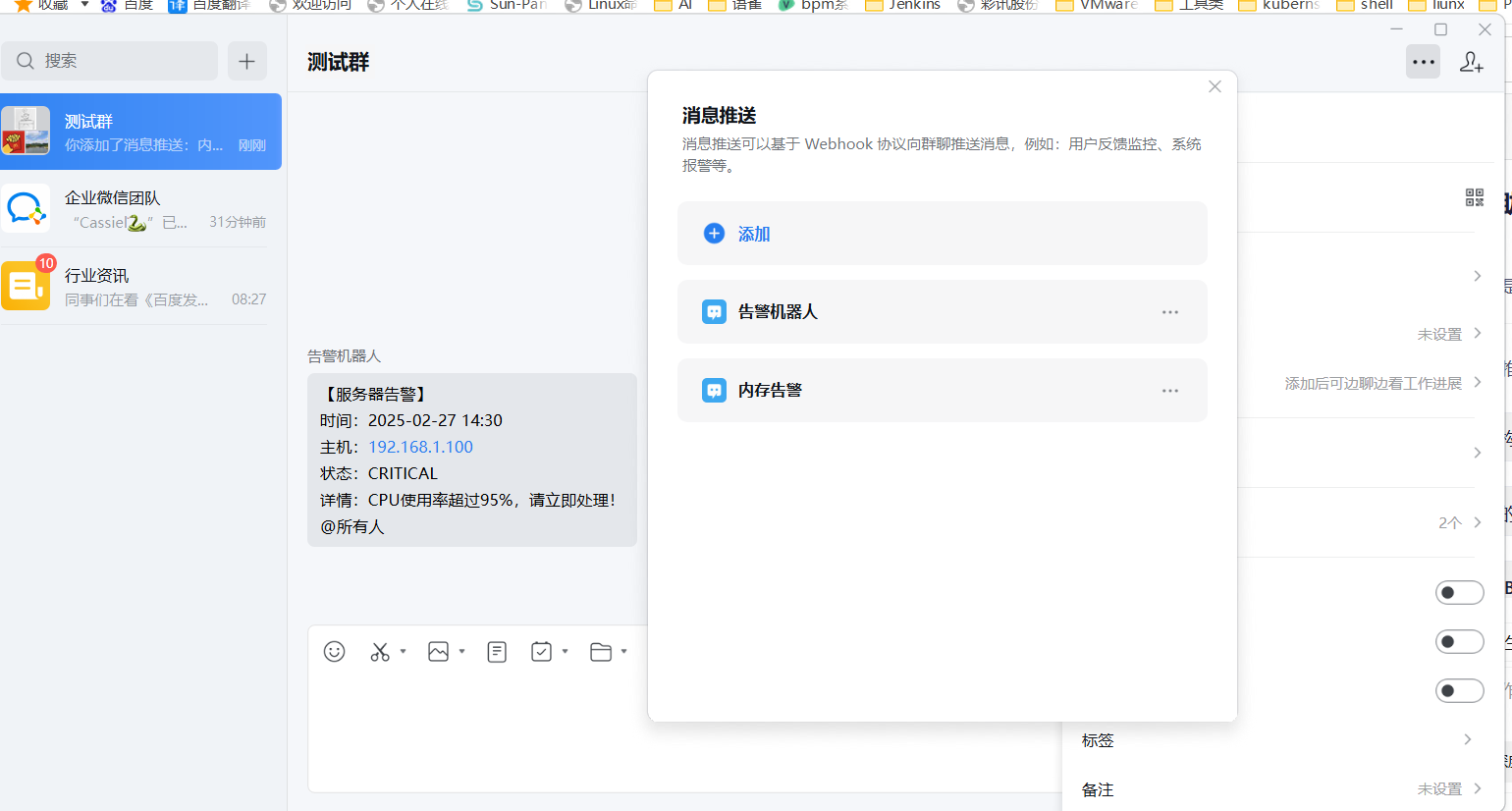
- 1、只能是内部人员群才可以进行发送
- 2、获取Webhook地址:点击 “添加机器人”,创建成功后系统会立即显示一个Webhook地址,格式如下
https://qyapi.weixin.qq.com/cgi-bin/webhook/send?key=*******
1、做一个简单的测试
curl 'https://qyapi.weixin.qq.com/cgi-bin/webhook/send?key=你的KEY' \
  -H 'Content-Type: application/json' \
  -d '{
    "msgtype": "text",
    "text": {
        "content": "【服务器告警】\n时间:2025-02-27 14:30\n主机:192.168.1.100\n状态:CRITICAL\n详情:CPU使用率超过95%,请立即处理!",
        "mentioned_list": ["@all"]
    }
}'
1、根据不同的告警内容发送给不同的同事

-
1、企业微信PC端查看人员ID
-
2、根据不同的Id@不同的人
-
3、简单示例
- 测试同事示例
# 先获取当前时间,再发送消息
current_time=$(date "+%Y-%m-%d %H:%M:%S")

curl 'https://qyapi.weixin.qq.com/cgi-bin/webhook/send?key=******************' \
  -H 'Content-Type: application/json' \
  -d "{
    \"msgtype\": \"text\",
    \"text\": {
        \"content\": \"【内存告警】\\n时间:${current_time}\\n主机:192.168.1.100\\n状态:WARNING\\n详情:内存使用率超过85%,请检查!\",
        \"mentioned_list\": [\"测试同事userid\"]
    }
}"
- 开发同事示例
# 1. 定义关键变量
WEBHOOK_KEY="*************" # 请替换为您的真实Key
DEV_USER_ID="***" # 请替换为开发同事的真实userid
CURRENT_TIME=$(date "+%Y-%m-%d %H:%M:%S")
HOST_IP="192.168.10.101"
CPU_USAGE="96"
THRESHOLD="80"

# 2. 发送告警
curl "https://qyapi.weixin.qq.com/cgi-bin/webhook/send?key=${WEBHOOK_KEY}" \
  -H 'Content-Type: application/json' \
  -d "{
    \"msgtype\": \"markdown\",
    \"markdown\": {
        \"content\": \"**🚨 服务器CPU紧急告警**\\n> **告警时间**:${CURRENT_TIME}\\n> **服务器IP**:${HOST_IP}\\n> **当前使用率**:<font color=\\\"warning\\\">${CPU_USAGE}%</font>\\n> **告警阈值**:${THRESHOLD}%\\n> **问题描述**:CPU使用率持续过高,可能影响服务响应。\\n\\n<@${DEV_USER_ID}> 请立即介入排查!\"
    }
}"
二、 webhook支持的数据类型
| 消息类型 | 格式 | 主要用途 | 关键限制 |
|---|---|---|---|
| 文本消息 | text |
基础文本通知,支持@成员 | 最长 2048 字节 |
| Markdown 消息 | markdown / markdown_v2 |
格式化文本,适合技术报告、代码片段 | 最长 4096 字节 |
| 图片消息 | image |
发送图片、截图、图表 | Base64 编码,最大 2MB |
| 文件消息 | file |
发送文档、日志、压缩包 | 5B ~ 20MB |
| 图文消息 | news |
带标题、描述、图片和链接的富媒体 | 支持 1-8 条图文 |
| 语音消息 | voice |
发送音频文件 | - |
| 模板卡片 | template_card |
交互式卡片,支持按钮、输入框 | 增强用户交互体验 |
1、 简单示例
curl 'https://qyapi.weixin.qq.com/cgi-bin/webhook/send?key=5ae60f1d-297c-4268-b4b4-72991e4cd6ed' \
  -H 'Content-Type: application/json' \
  -d '{
    "msgtype": "template_card",
    "template_card": {
        "card_type": "text_notice",
        "source": {
            "icon_url": "https://res.mail.qq.com/node/ww/wwopenmng/images/independent/doc/test_pic_msg1.png",
            "desc": "系统监控",
            "desc_color": 1
        },
        "main_title": {
            "title": "多指标告警",
            "desc": "CPU:95% | 内存:85% | 磁盘:90%"
        },
        "horizontal_content_list": [
            {
                "keyname": "告警时间",
                "value": "2024-01-15 14:30:00"
            },
            {
                "keyname": "告警级别",
                "value": "严重"
            }
        ],
        "card_action": {
            "type": 1,
            "url": "https://www.work.weixin.qq.com"
        }
    }
}'
curl 'https://qyapi.weixin.qq.com/cgi-bin/webhook/send?key=5ae60f1d-297c-4268-b4b4-72991e4cd6ed'   -H 'Content-Type: application/json'   -d '{
    "msgtype": "news",
    "news": {
        "articles": [
            {
                "title": "多指标告警",
                "description": "CPU:95% | 内存:85% | 磁盘:90%\n告警时间:2024-01-15 14:30:00",
                "url": "https://www.work.weixin.qq.com/",
                "picurl": "https://res.mail.qq.com/node/ww/wwopenmng/images/independent/doc/test_pic_msg1.png"
            }
        ]
    }
}'
2、webhook其他的使用注意事项
- 1、图片建议尺寸:大图1068×455,小图150×150 图片格式:JPG、PNG
- 2、只能单向通讯,只能发送,不能接收,如需双向交互,需使用自建应用或智能机器人(API模式)
3、高级应用场景
CI/CD通知:Jenkins构建状态、Git提交通知
监控告警:服务器监控、业务异常报警
数据同步:数据库同步结果、ETL任务完成通知
工作流触发:与n8n、Zapier等自动化平台集成
4、扩展能力
1、与第三方工具集成
Jenkins插件:自动化构建通知
n8n工作流:可视化自动化流程
Prometheus Alertmanager:监控告警集成
Zabbix:IT监控告警通知
2、开发SDK支持
Python SDK:封装完整的消息发送类
Java SDK:企业级集成方案
3、命令行工具:
如x-cmd的qywx模块
三、python-falst 客户端和服务端采集告警
[内网数据源: 192.168.1.200]
    --(1) 采集数据/告警-->
    [客户端(Client)]
    --(2) HTTP POST 上报-->
[网关/服务端: 192.168.1.100:5000]
    --(3) 接收、处理请求-->
    [服务端(Server)]
    --(4) 调用公网API-->
[企业微信(Webhook)]
    --(5) 推送消息-->
[企业微信群聊]
1、 测试webhook是否可用
# 在 192.168.1.100 上执行
curl 'https://qyapi.weixin.qq.com/cgi-bin/webhook/send?key=**************** \
  -H 'Content-Type: application/json' \
  -d '{
    "msgtype": "text",
    "text": {
        "content": "直接测试消息:如果收到此消息,说明Webhook配置正确"
    }
}'
# 在客户端容器中执行
python3 -c "import requests; r=requests.post('http://192.168.1.100:5000/report', json={'metric':'test','value':99,'threshold':80,'status':'firing','message':'测试告警'}); print(r.status_code, r.text)"
2、192.168.1.200
cat   << EOF  monitor_client.py
#!/usr/bin/env python3
# -*- coding: utf-8 -*-
"""
内网监控客户端
部署于:192.168.1.200 (及未来其他内网机器)
功能:采集本地数据,并上报到网关服务器(192.168.1.100)
"""
import requests
import json
import time
import logging
import socket
import psutil  # 需要安装: pip install psutil
import os

# ========== 配置区域 ==========
# 网关服务器的地址
GATEWAY_SERVER = "http://192.168.1.100:5000"
# 宿主机IP(通过环境变量传入,运行容器时使用 -e HOST_IP=192.168.1.200)
HOST_IP = os.getenv('HOST_IP', '')
REPORT_ENDPOINT = f"{GATEWAY_SERVER}/report"
# =============================

# 配置日志
logging.basicConfig(level=logging.INFO, format='%(asctime)s - %(levelname)s - %(message)s')
logger = logging.getLogger(__name__)

def get_host_ip():
    """
    获取主机IP地址(优先使用环境变量传入的宿主机IP)
    返回:(宿主机IP, 容器内IP)
    """
    # 1. 首选从环境变量获取宿主机IP(由运行Docker时传入)
    if HOST_IP:
        logger.info(f"从环境变量获取到宿主机IP: {HOST_IP}")
    else:
        logger.warning("未设置 HOST_IP 环境变量,将尝试自动检测,但可能不准确。")

    # 2. 获取容器内IP(用于参考和调试)
    container_ip = "未知"
    try:
        s = socket.socket(socket.AF_INET, socket.SOCK_DGRAM)
        s.connect(('8.8.8.8', 80))  # 不实际发送数据,仅用于获取本机IP
        container_ip = s.getsockname()[0]
        s.close()
    except Exception:
        pass

    return HOST_IP, container_ip

def collect_system_metrics():
    """采集本机系统指标(示例:CPU和内存)"""
    metrics = []
    # 采集CPU使用率
    cpu_percent = psutil.cpu_percent(interval=1)
    metrics.append({
        "metric": "cpu_usage_percent",
        "value": cpu_percent,
        "threshold": 80.0,
        "status": "firing" if cpu_percent > 80.0 else "normal",
        "message": f"CPU使用率: {cpu_percent:.1f}%"
    })

    # 采集内存使用率
    mem = psutil.virtual_memory()
    metrics.append({
        "metric": "memory_usage_percent",
        "value": mem.percent,
        "threshold": 85.0,
        "status": "firing" if mem.percent > 85.0 else "normal",
        "message": f"内存使用率: {mem.percent:.1f}%,可用: {mem.available / (1024**3):.2f} GB"
    })
    return metrics

def report_to_gateway(alert_data, host_ip, container_ip):
    """将告警数据上报到网关服务器"""
    # 在告警数据中增加IP信息
    alert_data_with_ip = {
        **alert_data,
        "host_ip": host_ip,        # 宿主机真实IP
        "container_ip": container_ip  # 容器内部IP(供调试参考)
    }

    try:
        headers = {'Content-Type': 'application/json'}
        response = requests.post(REPORT_ENDPOINT, json=alert_data_with_ip, headers=headers, timeout=10)
        response.raise_for_status()
        result = response.json()
        if result.get('status') == 'success':
            logger.info(f"✅ 告警上报成功: {alert_data.get('metric')} (宿主机: {host_ip})")
            return True
        else:
            logger.warning(f"⚠️ 网关处理告警未返回成功状态: {result}")
            return False
    except requests.exceptions.ConnectionError:
        logger.error(f"❌ 无法连接到网关服务器 {GATEWAY_SERVER},请检查网络或服务状态。")
        return False
    except requests.exceptions.Timeout:
        logger.error("⏱️ 连接网关服务器超时。")
        return False
    except Exception as e:
        logger.error(f"❌ 上报告警时发生错误: {e}")
        return False

def main_loop(interval_seconds=60):
    """主循环,定期采集并上报数据"""
    # 获取IP信息
    host_ip, container_ip = get_host_ip()
    local_ip = host_ip if host_ip else container_ip

    logger.info(f"内网监控客户端启动。")
    logger.info(f"  宿主机IP(上报用): {host_ip if host_ip else '(未设置,请检查环境变量HOST_IP)'}")
    logger.info(f"  容器内部IP: {container_ip}")
    logger.info(f"  数据将上报至网关: {GATEWAY_SERVER}")
    logger.info(f"  采集间隔: {interval_seconds} 秒")

    while True:
        try:
            logger.info("开始新一轮数据采集...")
            metrics = collect_system_metrics()

            for item in metrics:
                # 只上报触发阈值的告警
                if item['status'] == 'firing':
                    report_to_gateway(item, host_ip, container_ip)
                # 如果想上报所有状态(包括normal),可以去掉if判断
                # report_to_gateway(item, host_ip, container_ip)

        except Exception as e:
            logger.error(f"在主循环中发生未预期错误: {e}")

        logger.info(f"本次采集上报完成,等待 {interval_seconds} 秒后继续...")
        time.sleep(interval_seconds)

if __name__ == '__main__':
    # 在运行主循环前,可以先测试一次连通性
    try:
        test_resp = requests.get(f"{GATEWAY_SERVER}/health", timeout=5)
        if test_resp.status_code == 200:
            logger.info(f"网关服务连接测试成功: {test_resp.json()}")
        else:
            logger.warning(f"网关服务健康检查返回非200状态: {test_resp.status_code}")
    except Exception as e:
        logger.error(f"无法连接到网关服务,请确认 {GATEWAY_SERVER} 可访问: {e}")
        exit(1)

    # 启动主循环
    main_loop(interval_seconds=60)  # 每60秒采集上报一次


EOF
3、192.168.1.100
cat   << EOF gateway_server.py
#!/usr/bin/env python3
# -*- coding: utf-8 -*-
"""
告警网关服务端
部署于:192.168.1.100
功能:接收内网客户端上报的告警,并转发至企业微信
启动命令:python3 gateway_server.py
"""
from flask import Flask, request, jsonify
import requests
import logging
import json
from datetime import datetime

app = Flask(__name__)

# ========== 配置区域 ==========
# 企业微信机器人Webhook地址 (在 192.168.1.100 上配置)
# !!! 请替换为您自己的Webhook Key !!!
WECHAT_WEBHOOK_URL = "https://qyapi.weixin.qq.com/cgi-bin/webhook/send?key=5ae60f1d-297c-4268-b4b4-72991e4cd6ed"


# 服务端监听配置。由于需要被内网机器访问,host 应设为 '0.0.0.0'
SERVER_HOST = '0.0.0.0'
SERVER_PORT = 5000
# =============================

# 配置日志
logging.basicConfig(level=logging.INFO, format='%(asctime)s - %(name)s - %(levelname)s - %(message)s')
logger = logging.getLogger(__name__)

def forward_to_wechat(alert_data):
    """将告警数据转发到企业微信"""
    # 优先使用客户端上报的 host_ip(宿主机IP),如果没有则使用请求来源IP(容器IP)
    # 这是实现“告警显示宿主机IP”的关键修改
    display_ip = alert_data.get('host_ip', alert_data.get('source_ip', '未知'))

    markdown_content = f"""**🚨 收到来自内网机器的告警**

**主机(物理机/宿主机)**: `{display_ip}`
**指标**: {alert_data.get('metric', '未知')}
**当前值**: {alert_data.get('value', '未知')}
**阈值**: {alert_data.get('threshold', 'N/A')}
**状态**: {alert_data.get('status', 'firing')}
**时间**: {alert_data.get('timestamp', datetime.now().strftime('%Y-%m-%d %H:%M:%S'))}

**详情**: {alert_data.get('message', '')}
"""
    payload = {
        "msgtype": "markdown",
        "markdown": {
            "content": markdown_content
        }
    }
    try:
        resp = requests.post(WECHAT_WEBHOOK_URL, json=payload, timeout=10)
        resp.raise_for_status()  # 如果状态码不是200,抛出异常
        result = resp.json()
        if result.get('errcode') == 0:
            logger.info(f"消息成功转发至企业微信。来源IP(宿主机): {display_ip}")
            return True
        else:
            logger.error(f"企业微信接口返回错误: {result}")
            return False
    except Exception as e:
        logger.error(f"转发消息到企业微信时失败: {e}")
        return False

@app.route('/health', methods=['GET'])
def health_check():
    """健康检查端点"""
    return jsonify({"status": "ok", "service": "alert-gateway", "host": "192.168.1.100"})

@app.route('/report', methods=['POST'])
def report_alert():
    """
    接收客户端上报告警的主要接口。
    期望的JSON格式(客户端修改后会增加 host_ip 和 container_ip 字段):
    {
        "metric": "cpu_usage",
        "value": 95.5,
        "threshold": 80,
        "status": "firing",
        "message": "CPU使用率超过阈值",
        "host_ip": "192.168.1.200",      # <- 新增:宿主机IP
        "container_ip": "172.17.0.2"     # <- 新增:容器IP(供调试)
    }
    """
    client_ip = request.remote_addr  # 这是客户端的容器IP
    logger.info(f"收到来自 {client_ip} 的上报请求")

    try:
        data = request.get_json()
        if not data:
            return jsonify({"error": "请求体必须为JSON格式"}), 400

        # 为告警数据补充来源IP(容器IP)和时间戳
        alert_data = {
            "source_ip": client_ip,
            "timestamp": datetime.now().isoformat(),
            **data  # 合并上传的数据(其中应包含 host_ip 和 container_ip)
        }

        logger.info(f"处理告警数据: {json.dumps(alert_data, indent=2, ensure_ascii=False)}")

        # 转发到企业微信
        if forward_to_wechat(alert_data):
            return jsonify({
                "status": "success",
                "message": "告警��接收并转发",
                "received_from": client_ip
            }), 200
        else:
            return jsonify({
                "status": "error",
                "message": "告警转发至企业微信失败"
            }), 500

    except Exception as e:
        logger.exception(f"处理上报请求时发生异常: {e}")
        return jsonify({"error": f"服务器内部错误: {str(e)}"}), 500

if __name__ == '__main__':
    logger.info(f"告警网关服务端启动,监听 {SERVER_HOST}:{SERVER_PORT}")
    logger.info(f"健康检查地址: http://192.168.1.100:{SERVER_PORT}/health")
    logger.info(f"告警上报地址: http://192.168.1.100:{SERVER_PORT}/report")
    app.run(host=SERVER_HOST, port=SERVER_PORT, debug=False)

EOF
4、 测试脚本
cat  << EOF simulate_fault.py
#!/usr/bin/env python3
# -*- coding: utf-8 -*-
"""
模拟故障告警客户端
部署于:192.168.1.200 (或其他内网机器)
功能:手动发送模拟的故障告警,用于测试告警系统
使用方式:
1. python3 simulate_fault.py --type cpu --value 95
2. python3 simulate_fault.py --list
3. python3 simulate_fault.py --auto
"""

import requests
import json
import time
import logging
import argparse
import random
import os
import socket
from datetime import datetime

# ========== 配置区域 ==========
GATEWAY_SERVER = "http://192.168.1.100:5000"
REPORT_ENDPOINT = f"{GATEWAY_SERVER}/report"

# 从环境变量获取宿主机IP(关键修改)
HOST_IP = os.getenv('HOST_IP', '')
# =============================

# 配置日志
logging.basicConfig(
    level=logging.INFO,
    format='%(asctime)s - %(levelname)s - %(message)s',
    datefmt='%Y-%m-%d %H:%M:%S'
)
logger = logging.getLogger(__name__)

def get_container_ip():
    """获取容器内部IP(用于调试和参考)"""
    try:
        s = socket.socket(socket.AF_INET, socket.SOCK_DGRAM)
        s.connect(('8.8.8.8', 80))
        ip = s.getsockname()[0]
        s.close()
        return ip
    except Exception:
        return "unknown"

def get_ip_info():
    """获取IP信息:宿主机IP和容器IP"""
    host_ip = HOST_IP
    container_ip = get_container_ip()

    if host_ip:
        logger.info(f"使用环境变量中的宿主机IP: {host_ip}")
    else:
        logger.warning("未设置 HOST_IP 环境变量,将使用容器IP作为主机IP")
        host_ip = container_ip

    logger.info(f"容器内部IP: {container_ip}")
    return host_ip, container_ip

class FaultSimulator:
    def __init__(self, gateway_url=GATEWAY_SERVER):
        self.gateway_url = gateway_url
        self.host_ip, self.container_ip = get_ip_info()

    def send_alert(self, alert_data):
        """发送告警到网关(增加宿主机IP信息)"""
        # 在告警数据中添加IP信息
        alert_data_with_ip = {
            **alert_data,
            "host_ip": self.host_ip,           # 宿主机真实IP
            "container_ip": self.container_ip,  # 容器内部IP
            "timestamp": datetime.now().isoformat()
        }

        try:
            response = requests.post(
                f"{self.gateway_url}/report",
                json=alert_data_with_ip,
                timeout=10
            )

            if response.status_code == 200:
                result = response.json()
                if result.get('status') == 'success':
                    logger.info(f"✅ 告警发送成功: {alert_data.get('metric')} (来自主机: {self.host_ip})")
                    return True
                else:
                    logger.warning(f"⚠️ 网关处理告警未返回成功: {result}")
                    return False
            else:
                logger.error(f"❌ 网关返回异常状态码: {response.status_code}")
                logger.error(f"响应: {response.text}")
                return False

        except Exception as e:
            logger.error(f"❌ 发送告警时发生错误: {e}")
            return False

    def simulate_cpu_fault(self, value=None, duration_minutes=5):
        """模拟CPU故障告警"""
        if value is None:
            value = random.randint(85, 100)  # 随机生成85-100之间的值

        alert_data = {
            "metric": "cpu_usage_percent",
            "value": float(value),
            "threshold": 80.0,
            "status": "firing",
            "message": f"CPU使用率持续超过阈值,已持续{duration_minutes}分钟。可能原因:1. 应用进程异常 2. 系统负载过高 3. 配置不足"
        }

        logger.info(f"模拟CPU故障: 使用率{value}%,阈值80%,持续时间{duration_minutes}分钟")
        return self.send_alert(alert_data)

    def simulate_memory_fault(self, value=None, leak_rate="2GB/小时"):
        """模拟内存故障告警"""
        if value is None:
            value = random.randint(88, 99)

        alert_data = {
            "metric": "memory_usage_percent",
            "value": float(value),
            "threshold": 85.0,
            "status": "firing",
            "message": f"内存使用率过高,疑似内存泄漏,泄漏率约{leak_rate}。建议:1. 检查应用内存使用 2. 重启相关服务 3. 扩容内存"
        }

        logger.info(f"模拟内存故障: 使用率{value}%,阈值85%,泄漏率{leak_rate}")
        return self.send_alert(alert_data)

    def simulate_disk_fault(self, value=None, partition="/var"):
        """模拟磁盘故障告警"""
        if value is None:
            value = random.randint(88, 98)

        alert_data = {
            "metric": "disk_usage_percent",
            "value": float(value),
            "threshold": 85.0,
            "status": "firing",
            "message": f"{partition}分区空间不足,仅剩{100 - value}%可用空间。建议:1. 清理日志文件 2. 归档历史数据 3. 扩容磁盘"
        }

        logger.info(f"模拟磁盘故障: {partition}分区使用率{value}%,阈值85%")
        return self.send_alert(alert_data)

    def simulate_network_fault(self, latency_ms=500, packet_loss=15):
        """模拟网络故障告警"""
        alert_data = {
            "metric": "network_latency",
            "value": float(latency_ms),
            "threshold": 100.0,
            "status": "firing",
            "message": f"网络延迟过高: {latency_ms}ms,丢包率: {packet_loss}%。可能原因:1. 网络拥塞 2. 防火墙策略 3. 带宽不足"
        }

        logger.info(f"模拟网络故障: 延迟{latency_ms}ms,丢包率{packet_loss}%")
        return self.send_alert(alert_data)

    def simulate_service_down(self, service_name="nginx", downtime_minutes=10):
        """模拟服务宕机告警"""
        alert_data = {
            "metric": "service_status",
            "value": 0.0,  # 0表示服务停止
            "threshold": 1.0,  # 期望值1表示服务正常
            "status": "firing",
            "message": f"{service_name}服务已停止响应,宕机时间约{downtime_minutes}分钟。建议:1. 检查服务进程 2. 查看服务日志 3. 重启服务"
        }

        logger.info(f"模拟服务宕机: {service_name}服务停止{downtime_minutes}分钟")
        return self.send_alert(alert_data)

    def simulate_database_fault(self, connections=950, max_connections=1000):
        """模拟数据库故障告警"""
        connection_percent = (connections / max_connections) * 100

        alert_data = {
            "metric": "database_connections",
            "value": float(connection_percent),
            "threshold": 90.0,
            "status": "firing",
            "message": f"数据库连接数接近上限: {connections}/{max_connections} ({connection_percent:.1f}%)。建议:1. 优化查询语句 2. 增加连接池大小 3. 扩容数据库"
        }

        logger.info(f"模拟数据库故障: 连接数{connections}/{max_connections} ({connection_percent:.1f}%)")
        return self.send_alert(alert_data)

    def simulate_high_traffic(self, requests_per_second=1500, normal_capacity=1000):
        """模拟高流量告警"""
        traffic_percent = (requests_per_second / normal_capacity) * 100

        alert_data = {
            "metric": "request_rate",
            "value": float(traffic_percent),
            "threshold": 120.0,
            "status": "firing",
            "message": f"请求量异常增高: {requests_per_second}请求/秒,超出正常容量{normal_capacity}。建议:1. 自动扩容 2. 限流降级 3. 检查是否被攻击"
        }

        logger.info(f"模拟高流量: {requests_per_second}请求/秒,正常容量{normal_capacity}")
        return self.send_alert(alert_data)

    def simulate_alert_resolved(self, original_metric="cpu_usage_percent"):
        """模拟告警恢复"""
        alert_data = {
            "metric": original_metric,
            "value": 45.0,  # 恢复正常值
            "threshold": 80.0,
            "status": "resolved",
            "message": f"{original_metric}告警已自动恢复,当前值恢复正常水平"
        }

        logger.info(f"模拟告警恢复: {original_metric}已恢复正常")
        return self.send_alert(alert_data)

    def random_fault_scenario(self):
        """随机选择一个故障场景进行模拟"""
        scenarios = [
            ("cpu", self.simulate_cpu_fault),
            ("memory", self.simulate_memory_fault),
            ("disk", self.simulate_disk_fault),
            ("network", self.simulate_network_fault),
            ("service", self.simulate_service_down),
            ("database", self.simulate_database_fault),
            ("traffic", self.simulate_high_traffic)
        ]

        scenario_name, scenario_func = random.choice(scenarios)
        logger.info(f"随机选择故障场景: {scenario_name}")
        return scenario_func()

def main():
    parser = argparse.ArgumentParser(
        description='模拟故障告警客户端',
        formatter_class=argparse.RawDescriptionHelpFormatter,
        epilog='''
使用示例:
  # 模拟CPU故障
  python3 simulate_fault.py --type cpu --value 95

  # 模拟内存故障
  python3 simulate_fault.py --type memory --value 92

  # 模拟磁盘故障
  python3 simulate_fault.py --type disk --value 95 --partition /var

  # 模拟服务宕机
  python3 simulate_fault.py --type service --service mysql --downtime 15

  # 模拟告警恢复
  python3 simulate_fault.py --type resolve --metric cpu_usage_percent

  # 自动模式:每2分钟发送一个随机故障
  python3 simulate_fault.py --auto --interval 120

  # 批量发送多种故障
  python3 simulate_fault.py --batch cpu memory disk

  # 列出所有支持的故障类型
  python3 simulate_fault.py --list
        '''
    )

    parser.add_argument('--type', '-t',
                       choices=['cpu', 'memory', 'disk', 'network', 'service', 'database', 'traffic', 'resolve', 'random'],
                       help='故障类型')
    parser.add_argument('--value', '-v', type=float, help='故障值(百分比)')
    parser.add_argument('--partition', default='/var', help='磁盘分区(仅disk类型有效)')
    parser.add_argument('--service', default='nginx', help='服务名称(仅service类型有效)')
    parser.add_argument('--downtime', type=int, default=10, help='宕机时间(分钟,仅service类型有效)')
    parser.add_argument('--metric', help='告警恢复的指标名称(仅resolve类型有效)')
    parser.add_argument('--auto', action='store_true', help='自动模式,循环发送随机故障')
    parser.add_argument('--interval', type=int, default=120, help='自动模式间隔(秒)')
    parser.add_argument('--batch', nargs='+', help='批量发送多种故障')
    parser.add_argument('--list', action='store_true', help='列出所有支持的故障类型')
    parser.add_argument('--server', default=GATEWAY_SERVER, help='网关服务器地址')
    parser.add_argument('--host-ip', help='宿主机IP地址(覆盖环境变量HOST_IP)')

    args = parser.parse_args()

    # 如果命令行指定了host-ip,则覆盖环境变量
    if args.host_ip:
        os.environ['HOST_IP'] = args.host_ip
        logger.info(f"使用命令行参数中的宿主机IP: {args.host_ip}")

    simulator = FaultSimulator(args.server)

    if args.list:
        print("支持的故障类型:")
        print("  cpu        - CPU使用率过高")
        print("  memory     - 内存使用率过高/内存泄漏")
        print("  disk       - 磁盘空间不足")
        print("  network    - 网络延迟/丢包")
        print("  service    - 服务宕机")
        print("  database   - 数据库连接数过高")
        print("  traffic    - 高流量冲击")
        print("  resolve    - 告警恢复")
        print("  random     - 随机故障")
        return

    if args.batch:
        logger.info(f"批量发送故障: {args.batch}")
        for fault_type in args.batch:
            if fault_type == 'cpu':
                simulator.simulate_cpu_fault()
            elif fault_type == 'memory':
                simulator.simulate_memory_fault()
            elif fault_type == 'disk':
                simulator.simulate_disk_fault()
            elif fault_type == 'network':
                simulator.simulate_network_fault()
            elif fault_type == 'service':
                simulator.simulate_service_down()
            elif fault_type == 'database':
                simulator.simulate_database_fault()
            elif fault_type == 'traffic':
                simulator.simulate_high_traffic()
            time.sleep(2)  # 每个故障间隔2秒
        return

    if args.auto:
        logger.info(f"启动自动模式,每{args.interval}秒发送一个随机故障")
        try:
            while True:
                simulator.random_fault_scenario()
                logger.info(f"等待{args.interval}秒后发送下一个故障...")
                time.sleep(args.interval)
        except KeyboardInterrupt:
            logger.info("自动模式已停止")
        return

    # 处理单个故障
    if args.type == 'cpu':
        simulator.simulate_cpu_fault(args.value)
    elif args.type == 'memory':
        simulator.simulate_memory_fault(args.value)
    elif args.type == 'disk':
        simulator.simulate_disk_fault(args.value, args.partition)
    elif args.type == 'network':
        simulator.simulate_network_fault()
    elif args.type == 'service':
        simulator.simulate_service_down(args.service, args.downtime)
    elif args.type == 'database':
        simulator.simulate_database_fault()
    elif args.type == 'traffic':
        simulator.simulate_high_traffic()
    elif args.type == 'resolve':
        simulator.simulate_alert_resolved(args.metric or 'cpu_usage_percent')
    elif args.type == 'random':
        simulator.random_fault_scenario()
    else:
        parser.print_help()

if __name__ == '__main__':
    main()


EOF
5、测试方法
# 1. 列出所有支持的故障类型
python3 simulate_fault.py --list

# 2. 模拟CPU故障(使用率95%)
python3 simulate_fault.py --type cpu --value 95

# 3. 模拟内存故障(使用率92%)
python3 simulate_fault.py --type memory --value 92

# 4. 模拟磁盘故障(/var分区使用率95%)
python3 simulate_fault.py --type disk --value 95 --partition /var

# 5. 模拟MySQL服务宕机
python3 simulate_fault.py --type service --service mysql --downtime 15


# 6. 模拟告警恢复
python3 simulate_fault.py --type resolve --metric cpu_usage_percent

# 7. 批量发送多种故障
python3 simulate_fault.py --batch cpu memory disk

# 8. 自动模式:每2分钟发送一个随机故障
python3 simulate_fault.py --auto --interval 120

# 9. 指定网关地址
python3 simulate_fault.py --type cpu --value 90 --server http://192.168.1.100:5000


# 场景1:CPU使用率突增(常见于计算密集型任务)
python3 simulate_fault.py --type cpu --value 98

# 场景2:内存泄漏(内存使用率持续上升)
python3 simulate_fault.py --type memory --value 96

# 场景3:磁盘写满(日志未轮转)
python3 simulate_fault.py --type disk --value 99 --partition /var/log

# 场景4:数据库连接池耗尽
python3 simulate_fault.py --type database

# 场景5:服务雪崩(多个服务同时故障)
python3 simulate_fault.py --batch service service service --service nginx --downtime 5
python3 simulate_fault.py --batch service service --service mysql --downtime 10
python3 simulate_fault.py --batch service --service redis --downtime 8

# 场景6:告警恢复测试
python3 simulate_fault.py --type resolve --metric cpu_usage_percent
python3 simulate_fault.py --type resolve --metric memory_usage_percent

腾讯云面向开发者汇聚海量精品云计算使用和开发经验,营造开放的云计算技术生态圈。
更多推荐
 16
16 0
0- 0


 已为社区贡献5条内容

所有评论(0)