Flutter for OpenHarmony衣橱管家App实战:色彩搭配指南功能实现
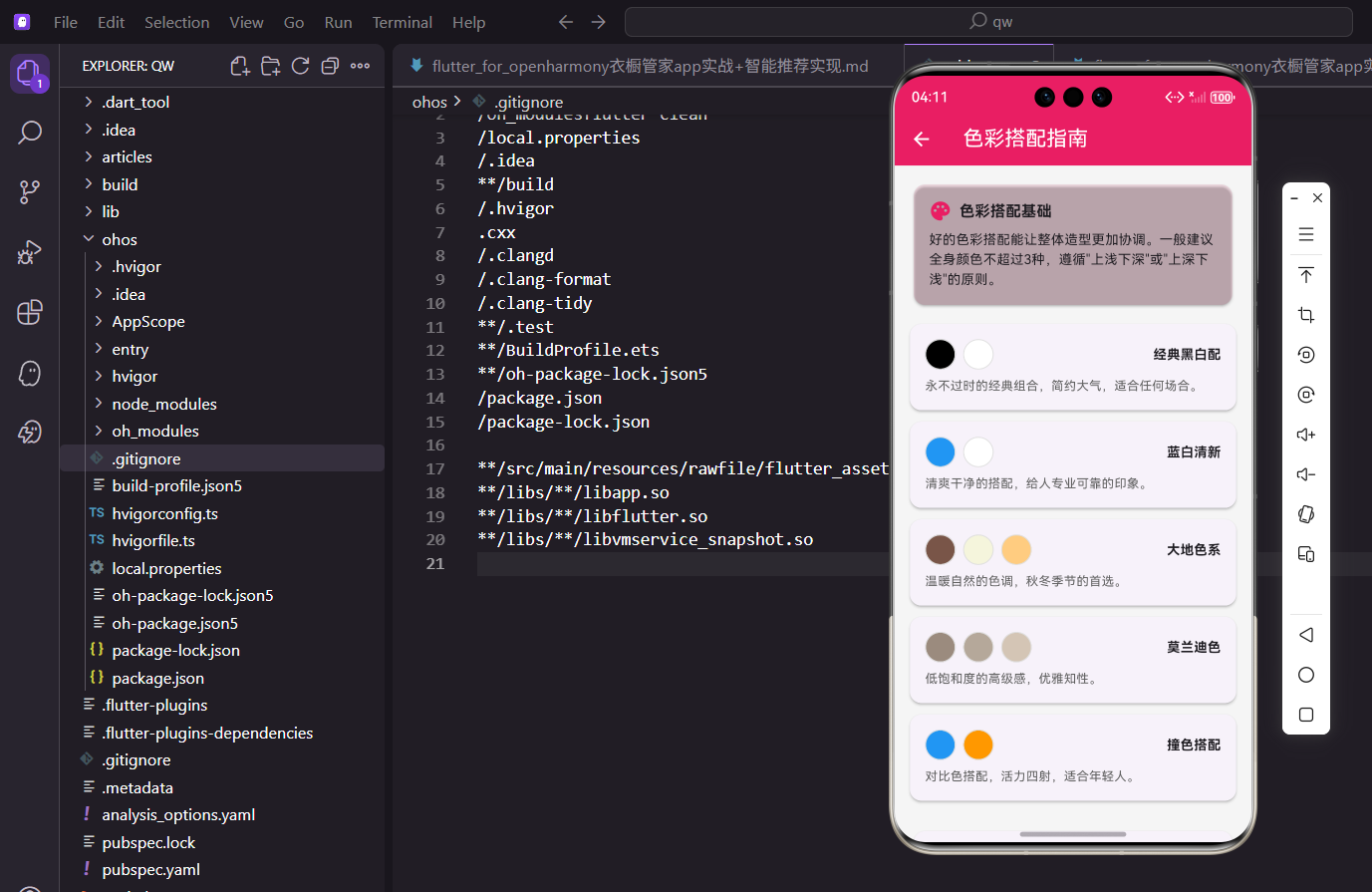
色彩是穿搭的灵魂。一套搭配好不好看,很大程度上取决于颜色搭配是否协调。今天我们来实现衣橱管家App的色彩搭配指南功能,帮助用户掌握基本的配色技巧。
色彩搭配的重要性
很多人买衣服时只看款式,忽略了颜色搭配。结果衣柜里的衣服虽然单件都好看,但放在一起却怎么也搭不出好看的效果。
色彩搭配指南就是要解决这个问题,通过展示经典的配色方案和实用的搭配技巧,帮助用户建立基本的色彩认知。
页面整体结构
页面使用ListView展示色彩搭配的基础知识、经典配色方案和搭配技巧。
import 'package:flutter/material.dart';
import 'package:flutter_screenutil/flutter_screenutil.dart';
class ColorMatchScreen extends StatelessWidget {
const ColorMatchScreen({super.key});
Widget build(BuildContext context) {
return Scaffold(
appBar: AppBar(title: const Text('色彩搭配指南')),
body: ListView(
padding: EdgeInsets.all(16.w),
children: [
_buildIntroCard(),
SizedBox(height: 16.h),
_buildColorSchemeCard('经典黑白配', [Colors.black, Colors.white], '永不过时的经典组合,简约大气,适合任何场合。'),
_buildColorSchemeCard('蓝白清新', [Colors.blue, Colors.white], '清爽干净的搭配,给人专业可靠的印象。'),
// 更多配色方案
SizedBox(height: 16.h),
_buildTipsCard(),
],
),
);
}
}
ListView直接使用children而不是builder,因为内容固定且不多。padding设为16,给内容留出呼吸空间。
页面分为三个部分:基础介绍、配色方案、搭配技巧。每个部分之间用SizedBox隔开。
基础介绍卡片
介绍卡片用品牌色背景突出显示,让用户首先了解色彩搭配的基本原则。
Widget _buildIntroCard() {
  return Card(
    color: const Color(0xFFE91E63).withOpacity(0.1),
    child: Padding(
      padding: EdgeInsets.all(16.w),
      child: Column(
        crossAxisAlignment: CrossAxisAlignment.start,
        children: [
          Row(
            children: [
              Icon(Icons.palette, color: const Color(0xFFE91E63), size: 24.sp),
              SizedBox(width: 8.w),
              Text('色彩搭配基础', style: TextStyle(fontSize: 16.sp, fontWeight: FontWeight.bold)),
            ],
          ),
          SizedBox(height: 8.h),
          Text(
            '好的色彩搭配能让整体造型更加协调。一般建议全身颜色不超过3种,遵循"上浅下深"或"上深下浅"的原则。',
            style: TextStyle(fontSize: 14.sp, height: 1.5),
          ),
        ],
      ),
    ),
  );
}
卡片使用品牌色的10%透明度作为背景,与其他白色卡片形成区分。标题前加调色板图标,呼应色彩主题。
正文使用1.5的行高,让多行文字更易阅读。内容简洁地介绍了两个核心原则:颜色不超过3种,上下深浅搭配。
配色方案卡片
每个配色方案显示为一个卡片,包含颜色圆点、方案名称和说明文字。
Widget _buildColorSchemeCard(String title, List<Color> colors, String description) {
  return Card(
    margin: EdgeInsets.only(bottom: 12.h),
    child: Padding(
      padding: EdgeInsets.all(16.w),
      child: Column(
        crossAxisAlignment: CrossAxisAlignment.start,
        children: [
          Row(
            children: [
              ...colors.map((color) => Container(
                    width: 32.w,
                    height: 32.w,
                    margin: EdgeInsets.only(right: 8.w),
                    decoration: BoxDecoration(
                      color: color,
                      shape: BoxShape.circle,
                      border: Border.all(color: Colors.grey.shade300),
                    ),
                  )),
              const Spacer(),
              Text(title, style: TextStyle(fontSize: 14.sp, fontWeight: FontWeight.bold)),
            ],
          ),
          SizedBox(height: 8.h),
          Text(description, style: TextStyle(fontSize: 13.sp, color: Colors.grey.shade700)),
        ],
      ),
    ),
  );
}
颜色圆点使用BoxShape.circle,边框防止白色圆点与背景融为一体。Spacer把颜色圆点和标题推到两端。
说明文字使用稍深的灰色,比纯灰色更易阅读。这个方法可以复用于所有配色方案,只需传入不同参数。
经典配色方案
展示几种经典的配色方案,每种都有详细的说明和适用场景。
_buildColorSchemeCard(
  '经典黑白配',
  [Colors.black, Colors.white],
  '永不过时的经典组合,简约大气,适合任何场合。',
),
_buildColorSchemeCard(
  '蓝白清新',
  [Colors.blue, Colors.white],
  '清爽干净的搭配,给人专业可靠的印象。',
),
_buildColorSchemeCard(
  '大地色系',
  [Colors.brown, const Color(0xFFF5F5DC), Colors.orange.shade200],
  '温暖自然的色调,秋冬季节的首选。',
),
_buildColorSchemeCard(
  '莫兰迪色',
  [const Color(0xFF9B8B7E), const Color(0xFFB5A89A), const Color(0xFFD4C5B5)],
  '低饱和度的高级感,优雅知性。',
),
_buildColorSchemeCard(
  '撞色搭配',
  [Colors.blue, Colors.orange],
  '对比色搭配,活力四射,适合年轻人。',
),
黑白配是最安全的选择,蓝白适合职场,大地色系适合秋冬,莫兰迪色显高级,撞色适合年轻人。
每种配色方案都有明确的适用场景,帮助用户根据自己的需求选择。
搭配技巧卡片
技巧卡片列出实用的配色小贴士,每条都有编号方便记忆。
Widget _buildTipsCard() {
  final tips = [
    '同色系深浅搭配最安全',
    '黑白灰是百搭色',
    '亮色作为点缀更出彩',
    '肤色偏黄避免土黄色',
    '冷暖色调尽量统一',
  ];

  return Card(
    child: Padding(
      padding: EdgeInsets.all(16.w),
      child: Column(
        crossAxisAlignment: CrossAxisAlignment.start,
        children: [
          Text('搭配小技巧', style: TextStyle(fontSize: 16.sp, fontWeight: FontWeight.bold)),
          SizedBox(height: 12.h),
          ...tips.asMap().entries.map((entry) => Padding(
                padding: EdgeInsets.only(bottom: 8.h),
                child: Row(
                  children: [
                    Container(
                      width: 24.w,
                      height: 24.w,
                      decoration: BoxDecoration(
                        color: const Color(0xFFE91E63),
                        shape: BoxShape.circle,
                      ),
                      child: Center(
                        child: Text('${entry.key + 1}', style: TextStyle(color: Colors.white, fontSize: 12.sp)),
                      ),
                    ),
                    SizedBox(width: 12.w),
                    Text(entry.value, style: TextStyle(fontSize: 14.sp)),
                  ],
                ),
              )),
        ],
      ),
    ),
  );
}
asMap()把列表转换为Map,key是索引,value是内容。这样可以在遍历时获取索引用于显示编号。
编号使用品牌色圆形背景,白色数字,视觉上醒目。每条技巧之间有8的间距,不会太挤。
色轮展示
添加一个色轮图,帮助用户理解颜色之间的关系。
Widget _buildColorWheel() {
return Card(
child: Padding(
padding: EdgeInsets.all(16.w),
child: Column(
children: [
Text('色轮', style: TextStyle(fontSize: 16.sp, fontWeight: FontWeight.bold)),
SizedBox(height: 16.h),
SizedBox(
width: 200.w,
height: 200.w,
child: CustomPaint(
painter: ColorWheelPainter(),
),
),
SizedBox(height: 12.h),
Text(
'相邻色搭配和谐,对角色搭配活泼',
style: TextStyle(fontSize: 12.sp, color: Colors.grey),
),
],
),
),
);
}
class ColorWheelPainter extends CustomPainter {
void paint(Canvas canvas, Size size) {
final center = Offset(size.width / 2, size.height / 2);
final radius = size.width / 2;
final colors = [
Colors.red,
Colors.orange,
Colors.yellow,
Colors.green,
Colors.cyan,
Colors.blue,
Colors.purple,
Colors.pink,
];
final sweepAngle = 2 * 3.14159 / colors.length;
for (var i = 0; i < colors.length; i++) {
final paint = Paint()
..color = colors[i]
..style = PaintingStyle.fill;
canvas.drawArc(
Rect.fromCircle(center: center, radius: radius),
i * sweepAngle - 3.14159 / 2,
sweepAngle,
true,
paint,
);
}
}
bool shouldRepaint(covariant CustomPainter oldDelegate) => false;
}
CustomPaint配合CustomPainter绑制色轮,drawArc方法绘制每个颜色扇区。8种颜色均匀分布在圆周上。
底部说明文字解释色轮的使用方法:相邻色搭配和谐,对角色(互补色)搭配活泼。
个人色彩分析
根据用户的肤色推荐适合的颜色。
Widget _buildPersonalColorSection() {
  return Card(
    child: Padding(
      padding: EdgeInsets.all(16.w),
      child: Column(
        crossAxisAlignment: CrossAxisAlignment.start,
        children: [
          Text('个人色彩分析', style: TextStyle(fontSize: 16.sp, fontWeight: FontWeight.bold)),
          SizedBox(height: 12.h),
          Text('选择你的肤色类型:', style: TextStyle(fontSize: 14.sp)),
          SizedBox(height: 8.h),
          Row(
            mainAxisAlignment: MainAxisAlignment.spaceAround,
            children: [
              _buildSkinTypeButton('冷白皮', Colors.pink.shade100),
              _buildSkinTypeButton('暖黄皮', Colors.orange.shade100),
              _buildSkinTypeButton('小麦色', Colors.brown.shade200),
            ],
          ),
        ],
      ),
    ),
  );
}

Widget _buildSkinTypeButton(String label, Color color) {
  return Column(
    children: [
      Container(
        width: 60.w,
        height: 60.w,
        decoration: BoxDecoration(
          color: color,
          shape: BoxShape.circle,
          border: Border.all(color: Colors.grey.shade300),
        ),
      ),
      SizedBox(height: 4.h),
      Text(label, style: TextStyle(fontSize: 12.sp)),
    ],
  );
}
三种肤色类型:冷白皮、暖黄皮、小麦色,覆盖大部分人群。点击后可以显示该肤色适合的颜色推荐。
肤色按钮使用圆形设计,颜色接近真实肤色,让用户更容易选择。
颜色推荐结果
根据选择的肤色类型显示推荐的颜色。
Widget _buildColorRecommendation(String skinType) {
  Map<String, List<Color>> recommendations = {
    '冷白皮': [Colors.pink, Colors.purple, Colors.blue, Colors.white],
    '暖黄皮': [Colors.orange, Colors.brown, Colors.green, const Color(0xFFF5F5DC)],
    '小麦色': [Colors.white, Colors.black, Colors.red, Colors.blue],
  };

  final colors = recommendations[skinType] ?? [];

  return Column(
    crossAxisAlignment: CrossAxisAlignment.start,
    children: [
      Text('推荐颜色', style: TextStyle(fontSize: 14.sp, fontWeight: FontWeight.bold)),
      SizedBox(height: 8.h),
      Wrap(
        spacing: 12.w,
        runSpacing: 12.h,
        children: colors.map((color) => Container(
          width: 48.w,
          height: 48.w,
          decoration: BoxDecoration(
            color: color,
            borderRadius: BorderRadius.circular(8.r),
            border: Border.all(color: Colors.grey.shade300),
          ),
        )).toList(),
      ),
    ],
  );
}
不同肤色有不同的推荐颜色,冷白皮适合冷色调,暖黄皮适合暖色调,小麦色适合对比强烈的颜色。
Wrap组件让颜色方块自动换行,适应不同屏幕宽度。
避免的颜色
同时展示应该避免的颜色,帮助用户避坑。
Widget _buildColorsToAvoid(String skinType) {
  Map<String, List<Color>> avoidColors = {
    '冷白皮': [Colors.yellow, Colors.orange],
    '暖黄皮': [Colors.pink, Colors.purple],
    '小麦色': [Colors.brown, Colors.grey],
  };

  final colors = avoidColors[skinType] ?? [];

  return Column(
    crossAxisAlignment: CrossAxisAlignment.start,
    children: [
      Text('避免颜色', style: TextStyle(fontSize: 14.sp, fontWeight: FontWeight.bold, color: Colors.red)),
      SizedBox(height: 8.h),
      Wrap(
        spacing: 12.w,
        children: colors.map((color) => Stack(
          children: [
            Container(
              width: 48.w,
              height: 48.w,
              decoration: BoxDecoration(
                color: color,
                borderRadius: BorderRadius.circular(8.r),
              ),
            ),
            Positioned.fill(
              child: Icon(Icons.not_interested, color: Colors.red.withOpacity(0.7), size: 32.sp),
            ),
          ],
        )).toList(),
      ),
    ],
  );
}
避免的颜色上叠加禁止图标,视觉上明确表示这些颜色不推荐。标题使用红色强调警示意味。
Stack配合Positioned.fill让禁止图标居中显示在颜色方块上。
搭配示例展示
展示具体的搭配示例,让用户更直观地理解配色效果。
Widget _buildOutfitExample(String title, List<Color> colors, String description) {
  return Card(
    margin: EdgeInsets.only(bottom: 12.h),
    child: Padding(
      padding: EdgeInsets.all(16.w),
      child: Row(
        children: [
          // 搭配预览
          Container(
            width: 80.w,
            height: 100.h,
            child: Column(
              children: colors.map((color) => Expanded(
                child: Container(
                  width: double.infinity,
                  color: color,
                ),
              )).toList(),
            ),
          ),
          SizedBox(width: 16.w),
          // 说明文字
          Expanded(
            child: Column(
              crossAxisAlignment: CrossAxisAlignment.start,
              children: [
                Text(title, style: TextStyle(fontSize: 14.sp, fontWeight: FontWeight.bold)),
                SizedBox(height: 4.h),
                Text(description, style: TextStyle(fontSize: 12.sp, color: Colors.grey)),
              ],
            ),
          ),
        ],
      ),
    ),
  );
}
左侧是颜色条纹预览,模拟上衣、裤子的颜色搭配。右侧是标题和说明文字。
颜色条纹使用Expanded均分高度,直观展示颜色比例。
收藏配色方案
用户可以收藏喜欢的配色方案,方便以后参考。
class _ColorMatchScreenState extends State<ColorMatchScreen> {
  Set<String> _favorites = {};

  Widget _buildColorSchemeCard(String title, List<Color> colors, String description) {
    final isFavorite = _favorites.contains(title);

    return Card(
      margin: EdgeInsets.only(bottom: 12.h),
      child: Padding(
        padding: EdgeInsets.all(16.w),
        child: Column(
          crossAxisAlignment: CrossAxisAlignment.start,
          children: [
            Row(
              children: [
                ...colors.map((color) => _buildColorDot(color)),
                const Spacer(),
                Text(title, style: TextStyle(fontSize: 14.sp, fontWeight: FontWeight.bold)),
                SizedBox(width: 8.w),
                GestureDetector(
                  onTap: () {
                    setState(() {
                      if (isFavorite) {
                        _favorites.remove(title);
                      } else {
                        _favorites.add(title);
                      }
                    });
                  },
                  child: Icon(
                    isFavorite ? Icons.favorite : Icons.favorite_border,
                    color: isFavorite ? Colors.red : Colors.grey,
                    size: 20.sp,
                  ),
                ),
              ],
            ),
            SizedBox(height: 8.h),
            Text(description, style: TextStyle(fontSize: 13.sp, color: Colors.grey.shade700)),
          ],
        ),
      ),
    );
  }
}
每个配色方案卡片右侧添加收藏按钮,点击切换收藏状态。收藏的方案显示红色实心爱心。
使用Set存储收藏的方案名称,实际项目中应该持久化存储。
完整代码整合
把所有功能整合在一起,形成完整的色彩搭配指南页面。
import 'package:flutter/material.dart';
import 'package:flutter_screenutil/flutter_screenutil.dart';
class ColorMatchScreen extends StatelessWidget {
const ColorMatchScreen({super.key});
Widget build(BuildContext context) {
return Scaffold(
appBar: AppBar(title: const Text('色彩搭配指南')),
body: ListView(
padding: EdgeInsets.all(16.w),
children: [
_buildIntroCard(),
SizedBox(height: 16.h),
_buildColorSchemeCard(
'经典黑白配',
[Colors.black, Colors.white],
'永不过时的经典组合,简约大气,适合任何场合。',
),
_buildColorSchemeCard(
'蓝白清新',
[Colors.blue, Colors.white],
'清爽干净的搭配,给人专业可靠的印象。',
),
_buildColorSchemeCard(
'大地色系',
[Colors.brown, const Color(0xFFF5F5DC), Colors.orange.shade200],
'温暖自然的色调,秋冬季节的首选。',
),
_buildColorSchemeCard(
'莫兰迪色',
[const Color(0xFF9B8B7E), const Color(0xFFB5A89A), const Color(0xFFD4C5B5)],
'低饱和度的高级感,优雅知性。',
),
_buildColorSchemeCard(
'撞色搭配',
[Colors.blue, Colors.orange],
'对比色搭配,活力四射,适合年轻人。',
),
SizedBox(height: 16.h),
_buildTipsCard(),
],
),
);
}
Widget _buildIntroCard() {
return Card(
color: const Color(0xFFE91E63).withOpacity(0.1),
child: Padding(
padding: EdgeInsets.all(16.w),
child: Column(
crossAxisAlignment: CrossAxisAlignment.start,
children: [
Row(
children: [
Icon(Icons.palette, color: const Color(0xFFE91E63), size: 24.sp),
SizedBox(width: 8.w),
Text('色彩搭配基础', style: TextStyle(fontSize: 16.sp, fontWeight: FontWeight.bold)),
],
),
SizedBox(height: 8.h),
Text(
'好的色彩搭配能让整体造型更加协调。一般建议全身颜色不超过3种,遵循"上浅下深"或"上深下浅"的原则。',
style: TextStyle(fontSize: 14.sp, height: 1.5),
),
],
),
),
);
}
Widget _buildColorSchemeCard(String title, List<Color> colors, String description) {
return Card(
margin: EdgeInsets.only(bottom: 12.h),
child: Padding(
padding: EdgeInsets.all(16.w),
child: Column(
crossAxisAlignment: CrossAxisAlignment.start,
children: [
Row(
children: [
...colors.map((color) => Container(
width: 32.w,
height: 32.w,
margin: EdgeInsets.only(right: 8.w),
decoration: BoxDecoration(
color: color,
shape: BoxShape.circle,
border: Border.all(color: Colors.grey.shade300),
),
)),
const Spacer(),
Text(title, style: TextStyle(fontSize: 14.sp, fontWeight: FontWeight.bold)),
],
),
SizedBox(height: 8.h),
Text(description, style: TextStyle(fontSize: 13.sp, color: Colors.grey.shade700)),
],
),
),
);
}
Widget _buildTipsCard() {
final tips = [
'同色系深浅搭配最安全',
'黑白灰是百搭色',
'亮色作为点缀更出彩',
'肤色偏黄避免土黄色',
'冷暖色调尽量统一',
];
return Card(
child: Padding(
padding: EdgeInsets.all(16.w),
child: Column(
crossAxisAlignment: CrossAxisAlignment.start,
children: [
Text('搭配小技巧', style: TextStyle(fontSize: 16.sp, fontWeight: FontWeight.bold)),
SizedBox(height: 12.h),
...tips.asMap().entries.map((entry) => Padding(
padding: EdgeInsets.only(bottom: 8.h),
child: Row(
children: [
Container(
width: 24.w,
height: 24.w,
decoration: BoxDecoration(
color: const Color(0xFFE91E63),
shape: BoxShape.circle,
),
child: Center(
child: Text('${entry.key + 1}', style: TextStyle(color: Colors.white, fontSize: 12.sp)),
),
),
SizedBox(width: 12.w),
Text(entry.value, style: TextStyle(fontSize: 14.sp)),
],
),
)),
],
),
),
);
}
}
代码结构清晰,主build方法组装各个模块,_buildIntroCard、_buildColorSchemeCard、_buildTipsCard分别处理不同的UI模块。
配色方案使用统一的方法渲染,只需传入不同参数,代码复用性好。
写在最后
色彩搭配是穿搭的重要组成部分,掌握基本的配色技巧能让你的穿搭更上一层楼。希望这个功能能帮助用户建立色彩认知,穿出自己的风格。
记住,没有绝对的配色规则,最重要的是穿出自信。这些技巧只是参考,找到适合自己的才是最好的。
欢迎加入开源鸿蒙跨平台社区:https://openharmonycrossplatform.csdn.net

腾讯云面向开发者汇聚海量精品云计算使用和开发经验,营造开放的云计算技术生态圈。
更多推荐
 16
16 0
0- 0


 已为社区贡献22条内容

所有评论(0)