Flutter for OpenHarmony垃圾分类指南App实战:环保资讯实现
前言
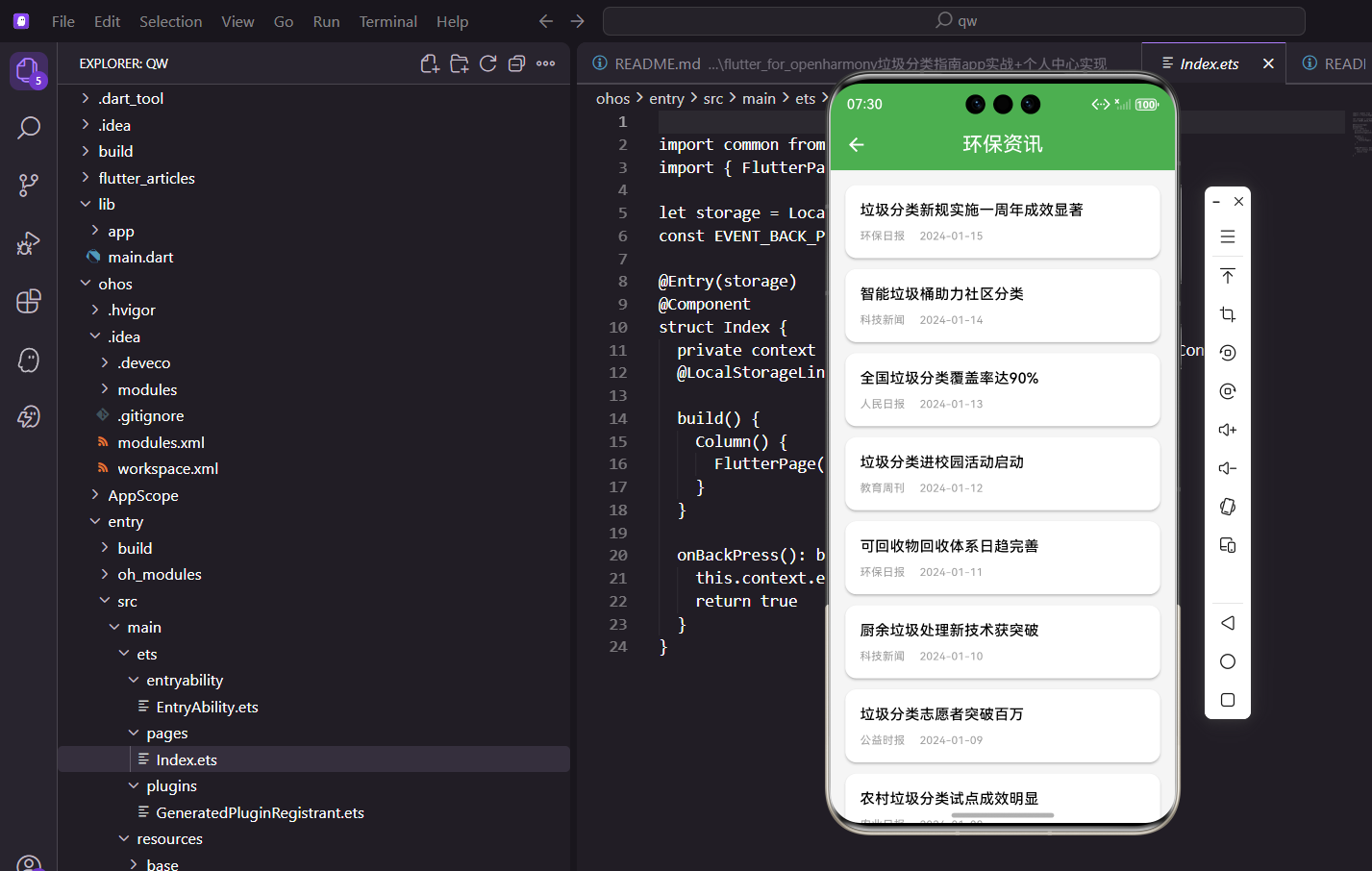
除了工具功能,App还可以提供一些资讯内容,让用户了解垃圾分类的最新动态。环保资讯页面就是展示这类新闻的地方。本文将详细介绍如何在Flutter for OpenHarmony环境下实现一个完整的环保资讯页面。通过资讯功能,用户不仅可以学习垃圾分类知识,还能了解环保领域的最新政策和科技进展,增强环保意识。
技术要点概览
本页面涉及的核心技术点包括以下几个方面:
- ListView.builder:高效的列表渲染,支持大量资讯数据
- Card组件:卡片式布局设计,信息展示清晰
- InkWell组件:点击时的水波纹反馈效果
- 下拉刷新:RefreshIndicator组件实现刷新功能
- 分页加载:上拉加载更多,优化数据加载体验
资讯数据结构
每条资讯包含标题、日期和来源:
class NewsPage extends StatelessWidget {
const NewsPage({super.key});
Widget build(BuildContext context) {
final news = [
{'title': '垃圾分类新规实施一周年成效显著', 'date': '2024-01-15', 'source': '环保日报'},
{'title': '智能垃圾桶助力社区分类', 'date': '2024-01-14', 'source': '科技新闻'},
{'title': '全国垃圾分类覆盖率达90%', 'date': '2024-01-13', 'source': '人民日报'},
{'title': '垃圾分类进校园活动启动', 'date': '2024-01-12', 'source': '教育周刊'},
{'title': '可回收物回收体系日趋完善', 'date': '2024-01-11', 'source': '环保日报'},
{'title': '厨余垃圾处理新技术获突破', 'date': '2024-01-10', 'source': '科技新闻'},
{'title': '垃圾分类志愿者突破百万', 'date': '2024-01-09', 'source': '公益时报'},
{'title': '农村垃圾分类试点成效明显', 'date': '2024-01-08', 'source': '农业日报'},
];
资讯内容涵盖政策、科技、教育、公益等多个角度。
内容来源:实际项目中这些数据应该从后端接口获取。
使用Model类管理数据
class NewsItem {
  final String id;
  final String title;
  final String date;
  final String source;
  final String? imageUrl;
  final String? summary;
  final String? category;

  NewsItem({
    required this.id,
    required this.title,
    required this.date,
    required this.source,
    this.imageUrl,
    this.summary,
    this.category,
  });

  factory NewsItem.fromJson(Map<String, dynamic> json) {
    return NewsItem(
      id: json['id'],
      title: json['title'],
      date: json['date'],
      source: json['source'],
      imageUrl: json['imageUrl'],
      summary: json['summary'],
      category: json['category'],
    );
  }
}
页面布局
用列表展示所有资讯:
    return Scaffold(
      appBar: AppBar(title: const Text('环保资讯')),
      body: ListView.builder(
        padding: EdgeInsets.all(16.w),
        itemCount: news.length,
        itemBuilder: (context, index) {
          final item = news[index];
          return Card(
            margin: EdgeInsets.only(bottom: 12.h),
            child: InkWell(
              onTap: () => Get.toNamed(Routes.newsDetail, arguments: item['title']),
每条资讯用Card包裹,点击后跳转到详情页。InkWell提供点击时的水波纹效果。
资讯卡片内容
卡片内容包含标题和元信息(来源、日期):
              child: Padding(
                padding: EdgeInsets.all(16.w),
                child: Column(
                  crossAxisAlignment: CrossAxisAlignment.start,
                  children: [
                    Text(
                      item['title']!,
                      style: TextStyle(fontSize: 16.sp, fontWeight: FontWeight.w500),
                    ),
                    SizedBox(height: 8.h),
                    Row(
                      children: [
                        Text(
                          item['source']!,
                          style: TextStyle(fontSize: 12.sp, color: Colors.grey),
                        ),
                        SizedBox(width: 16.w),
                        Text(
                          item['date']!,
                          style: TextStyle(fontSize: 12.sp, color: Colors.grey),
                        ),
                      ],
                    ),
                  ],
                ),
              ),
            ),
          );
        },
      ),
    );
  }
}
标题用较大字号,是卡片的视觉焦点。来源和日期用灰色小字,作为辅助信息。
带图片的资讯卡片
资讯配上图片会更吸引人:
Widget _buildNewsCardWithImage(NewsItem item) {
  return Card(
    margin: EdgeInsets.only(bottom: 12.h),
    child: InkWell(
      onTap: () => Get.toNamed(Routes.newsDetail, arguments: item),
      child: Padding(
        padding: EdgeInsets.all(12.w),
        child: Row(
          children: [
            // 图片
            ClipRRect(
              borderRadius: BorderRadius.circular(8.r),
              child: item.imageUrl != null
                  ? CachedNetworkImage(
                      imageUrl: item.imageUrl!,
                      width: 100.w,
                      height: 70.h,
                      fit: BoxFit.cover,
                      placeholder: (context, url) => Container(
                        color: Colors.grey.shade200,
                        child: Icon(Icons.image, color: Colors.grey),
                      ),
                      errorWidget: (context, url, error) => Container(
                        color: Colors.grey.shade200,
                        child: Icon(Icons.broken_image, color: Colors.grey),
                      ),
                    )
                  : Container(
                      width: 100.w,
                      height: 70.h,
                      color: Colors.grey.shade200,
                      child: Icon(Icons.article, color: Colors.grey),
                    ),
            ),
            SizedBox(width: 12.w),
            // 内容
            Expanded(
              child: Column(
                crossAxisAlignment: CrossAxisAlignment.start,
                children: [
                  Text(
                    item.title,
                    style: TextStyle(fontSize: 15.sp, fontWeight: FontWeight.w500),
                    maxLines: 2,
                    overflow: TextOverflow.ellipsis,
                  ),
                  SizedBox(height: 8.h),
                  Row(
                    children: [
                      Text(item.source, style: TextStyle(fontSize: 12.sp, color: Colors.grey)),
                      SizedBox(width: 8.w),
                      Text(item.date, style: TextStyle(fontSize: 12.sp, color: Colors.grey)),
                    ],
                  ),
                ],
              ),
            ),
          ],
        ),
      ),
    ),
  );
}
下拉刷新
用户下拉时加载最新资讯:
class NewsPageWithRefresh extends StatelessWidget {
final controller = Get.find<NewsController>();
Widget build(BuildContext context) {
return Scaffold(
appBar: AppBar(title: const Text('环保资讯')),
body: RefreshIndicator(
onRefresh: () async {
await controller.refreshNews();
},
child: Obx(() => ListView.builder(
padding: EdgeInsets.all(16.w),
itemCount: controller.newsList.length,
itemBuilder: (context, index) => _buildNewsCard(controller.newsList[index]),
)),
),
);
}
}
上拉加载更多
滚动到底部时加载更多资讯:
class NewsController extends GetxController {
  final newsList = <NewsItem>[].obs;
  final isLoading = false.obs;
  final hasMore = true.obs;
  int _page = 1;

  Future<void> loadMore() async {
    if (isLoading.value || !hasMore.value) return;

    isLoading.value = true;
    try {
      final items = await _fetchNews(_page);
      if (items.length < 20) {
        hasMore.value = false;
      }
      newsList.addAll(items);
      _page++;
    } finally {
      isLoading.value = false;
    }
  }

  Future<void> refreshNews() async {
    _page = 1;
    hasMore.value = true;
    final items = await _fetchNews(_page);
    newsList.value = items;
    _page++;
  }
}

// 在ListView中使用
NotificationListener<ScrollNotification>(
  onNotification: (notification) {
    if (notification is ScrollEndNotification) {
      if (notification.metrics.pixels >= notification.metrics.maxScrollExtent - 100) {
        controller.loadMore();
      }
    }
    return false;
  },
  child: ListView.builder(
    itemCount: controller.newsList.length + 1,
    itemBuilder: (context, index) {
      if (index == controller.newsList.length) {
        return _buildLoadMoreIndicator();
      }
      return _buildNewsCard(controller.newsList[index]);
    },
  ),
)

Widget _buildLoadMoreIndicator() {
  return Obx(() {
    if (controller.isLoading.value) {
      return Padding(
        padding: EdgeInsets.all(16.h),
        child: Center(child: CircularProgressIndicator()),
      );
    }
    if (!controller.hasMore.value) {
      return Padding(
        padding: EdgeInsets.all(16.h),
        child: Center(child: Text('没有更多了', style: TextStyle(color: Colors.grey))),
      );
    }
    return SizedBox.shrink();
  });
}
分类筛选
按资讯类型筛选:
final categories = ['全部', '政策', '科技', '教育', '公益'];
final selectedCategory = '全部'.obs;

Widget _buildCategoryFilter() {
  return SizedBox(
    height: 40.h,
    child: ListView.builder(
      scrollDirection: Axis.horizontal,
      padding: EdgeInsets.symmetric(horizontal: 16.w),
      itemCount: categories.length,
      itemBuilder: (context, index) {
        final category = categories[index];
        return Obx(() => Padding(
          padding: EdgeInsets.only(right: 8.w),
          child: ChoiceChip(
            label: Text(category),
            selected: selectedCategory.value == category,
            onSelected: (selected) {
              if (selected) {
                selectedCategory.value = category;
                _filterByCategory(category);
              }
            },
          ),
        ));
      },
    ),
  );
}
搜索功能
用户可以搜索特定主题的资讯:
Widget _buildSearchBar() {
  return Padding(
    padding: EdgeInsets.all(16.w),
    child: TextField(
      decoration: InputDecoration(
        hintText: '搜索资讯',
        prefixIcon: Icon(Icons.search),
        filled: true,
        fillColor: Colors.grey.shade100,
        border: OutlineInputBorder(
          borderRadius: BorderRadius.circular(12.r),
          borderSide: BorderSide.none,
        ),
      ),
      onChanged: (value) => controller.searchNews(value),
    ),
  );
}
缓存策略
资讯数据可以做本地缓存:
class NewsCache {
  static Future<void> saveNews(List<NewsItem> news) async {
    final data = news.map((n) => n.toJson()).toList();
    await storage.write('cached_news', jsonEncode(data));
    await storage.write('news_cache_time', DateTime.now().toIso8601String());
  }

  static Future<List<NewsItem>?> loadNews() async {
    final cacheTime = storage.read('news_cache_time');
    if (cacheTime != null) {
      final time = DateTime.parse(cacheTime);
      // 缓存超过1小时则失效
      if (DateTime.now().difference(time).inHours > 1) {
        return null;
      }
    }

    final data = storage.read('cached_news');
    if (data != null) {
      final list = jsonDecode(data) as List;
      return list.map((json) => NewsItem.fromJson(json)).toList();
    }
    return null;
  }
}

// 使用缓存
Future<void> loadNews() async {
  // 先显示缓存数据
  final cached = await NewsCache.loadNews();
  if (cached != null) {
    newsList.value = cached;
  }

  // 后台请求最新数据
  try {
    final fresh = await _fetchNews(1);
    newsList.value = fresh;
    await NewsCache.saveNews(fresh);
  } catch (e) {
    // 网络错误时使用缓存
    if (cached == null) {
      Get.snackbar('错误', '加载失败,请检查网络');
    }
  }
}
阅读状态
可以记录用户已读的资讯:
final readNewsIds = <String>{}.obs;

void markAsRead(String newsId) {
  readNewsIds.add(newsId);
  _saveReadStatus();
}

Widget _buildNewsCard(NewsItem item) {
  final isRead = readNewsIds.contains(item.id);
  return Card(
    color: isRead ? Colors.grey.shade50 : Colors.white,
    child: InkWell(
      onTap: () {
        markAsRead(item.id);
        Get.toNamed(Routes.newsDetail, arguments: item);
      },
      child: // ...
    ),
  );
}
已读的资讯用浅灰色背景,让用户知道哪些是新内容。
性能优化
1. 使用const构造函数
const Text('环保资讯')
const Icon(Icons.search)
2. 列表项使用Key
return Card(
  key: ValueKey(item.id),
  // ...
);
3. 图片懒加载
CachedNetworkImage(
  imageUrl: item.imageUrl!,
  memCacheWidth: 200,  // 限制内存缓存大小
)
总结
环保资讯功能让App不只是个工具,还是个信息平台。用户可以在这里了解垃圾分类的最新动态。本文介绍的实现方案包括:
- 列表布局:卡片式资讯列表
- 下拉刷新:RefreshIndicator组件
- 分页加载:上拉加载更多
- 缓存策略:本地缓存提升体验
通过完善的资讯功能,可以增加用户对环保事业的关注。资讯页面不仅是信息展示的窗口,更是连接用户与环保事业的桥梁,让用户在使用工具的同时也能了解环保领域的最新动态。
总结
本文详细介绍了环保资讯页面的实现方案,从基础的列表展示到进阶的下拉刷新、分页加载等功能都有涉及。一个好的资讯页面应该具备以下特点:内容加载流畅、分类筛选便捷、阅读体验舒适。通过合理的缓存策略和状态管理,可以为用户提供良好的阅读体验。
欢迎加入开源鸿蒙跨平台社区:https://openharmonycrossplatform.csdn.net
资讯详情页优化
优化资讯详情页的阅读体验:
class NewsDetailPage extends StatelessWidget {
final NewsModel news;
const NewsDetailPage({super.key, required this.news});
Widget build(BuildContext context) {
return Scaffold(
body: CustomScrollView(
slivers: [
SliverAppBar(
expandedHeight: 200.h,
pinned: true,
flexibleSpace: FlexibleSpaceBar(
title: Text(
news.title,
style: const TextStyle(
fontSize: 16,
fontWeight: FontWeight.bold,
shadows: [Shadow(color: Colors.black45, blurRadius: 2)],
),
),
background: news.imageUrl != null
? Image.network(news.imageUrl!, fit: BoxFit.cover)
: Container(color: AppTheme.primaryColor),
),
),
SliverToBoxAdapter(
child: Padding(
padding: EdgeInsets.all(16.w),
child: Column(
crossAxisAlignment: CrossAxisAlignment.start,
children: [
Row(
children: [
Icon(Icons.access_time, size: 14.sp, color: Colors.grey),
SizedBox(width: 4.w),
Text(
_formatDate(news.publishTime),
style: TextStyle(fontSize: 12.sp, color: Colors.grey),
),
SizedBox(width: 16.w),
Icon(Icons.visibility, size: 14.sp, color: Colors.grey),
SizedBox(width: 4.w),
Text(
'${news.viewCount}次阅读',
style: TextStyle(fontSize: 12.sp, color: Colors.grey),
),
],
),
SizedBox(height: 16.h),
Text(
news.content,
style: TextStyle(fontSize: 15.sp, height: 1.8),
),
SizedBox(height: 24.h),
_buildRelatedNews(),
],
),
),
),
],
),
bottomNavigationBar: _buildBottomBar(context),
);
}
Widget _buildRelatedNews() {
return Column(
crossAxisAlignment: CrossAxisAlignment.start,
children: [
Text(
'相关资讯',
style: TextStyle(fontSize: 16.sp, fontWeight: FontWeight.bold),
),
SizedBox(height: 12.h),
// 相关资讯列表
],
);
}
Widget _buildBottomBar(BuildContext context) {
return Container(
padding: EdgeInsets.all(12.w),
decoration: BoxDecoration(
color: Colors.white,
boxShadow: [BoxShadow(color: Colors.grey.shade200, blurRadius: 4)],
),
child: Row(
children: [
IconButton(
icon: const Icon(Icons.share),
onPressed: () => _shareNews(),
),
IconButton(
icon: const Icon(Icons.bookmark_border),
onPressed: () => _collectNews(),
),
const Spacer(),
ElevatedButton(
onPressed: () => Navigator.pop(context),
child: const Text('返回'),
),
],
),
);
}
}
详情页使用SliverAppBar实现可折叠的顶部图片,提供沉浸式阅读体验。底部工具栏提供分享、收藏等快捷操作。相关资讯推荐帮助用户发现更多内容。
资讯分享功能
实现资讯分享到社交平台:
Future<void> _shareNews() async {
  final text = '''
${news.title}

${news.summary}

来自垃圾分类指南App
''';

  await Share.share(text, subject: news.title);
}
分享功能让用户可以将有价值的资讯分享给朋友,扩大应用影响力。
资讯收藏功能
支持收藏感兴趣的资讯:
class NewsController extends GetxController {
  final collectedNews = <String>[].obs;

  bool isCollected(String newsId) {
    return collectedNews.contains(newsId);
  }

  void toggleCollect(String newsId) {
    if (isCollected(newsId)) {
      collectedNews.remove(newsId);
      Get.snackbar('提示', '已取消收藏');
    } else {
      collectedNews.add(newsId);
      Get.snackbar('成功', '已收藏');
    }
    _saveCollections();
  }
}
收藏功能让用户可以保存感兴趣的资讯,方便日后查阅。
资讯评论功能
添加评论区让用户交流:
class CommentSection extends StatelessWidget {
final String newsId;
const CommentSection({super.key, required this.newsId});
Widget build(BuildContext context) {
return Column(
crossAxisAlignment: CrossAxisAlignment.start,
children: [
Text(
'评论区',
style: TextStyle(fontSize: 16.sp, fontWeight: FontWeight.bold),
),
SizedBox(height: 12.h),
TextField(
decoration: InputDecoration(
hintText: '说说你的看法...',
border: OutlineInputBorder(
borderRadius: BorderRadius.circular(8.r),
),
suffixIcon: IconButton(
icon: const Icon(Icons.send),
onPressed: () => _submitComment(),
),
),
),
SizedBox(height: 16.h),
// 评论列表
],
);
}
}
评论功能增强用户互动,形成社区氛围。
总结
环保资讯功能通过丰富的内容展示和便捷的交互设计,帮助用户了解环保知识和政策动态。从列表浏览到详情阅读,从分类筛选到搜索查找,从分享传播到收藏管理,我们构建了一个完整的资讯系统,让环保知识触手可及。
欢迎加入开源鸿蒙跨平台社区:https://openharmonycrossplatform.csdn.net

腾讯云面向开发者汇聚海量精品云计算使用和开发经验,营造开放的云计算技术生态圈。
更多推荐
 5
5 0
0- 0


 已为社区贡献17条内容

所有评论(0)