开源鸿蒙跨平台Flutter开发:脑筋急转弯应用开发文档
摘要: "脑筋急转弯"是一款基于Flutter开发的跨平台思维训练应用,提供随机题目、难度/分类筛选、收藏点赞等功能。应用采用Material Design 3设计规范,包含四大模块:题目浏览(支持答案隐藏/显示)、分类管理(5种分类)、收藏夹和设置页。技术架构分为表现层(页面组件)、业务层(题目/收藏管理器)和数据层(题目模型/枚举),通过状态管理实现动态交互。项目结构清晰,
欢迎加入开源鸿蒙跨平台社区:
https://openharmonycrossplatform.csdn.net
一、项目概述
运行效果图
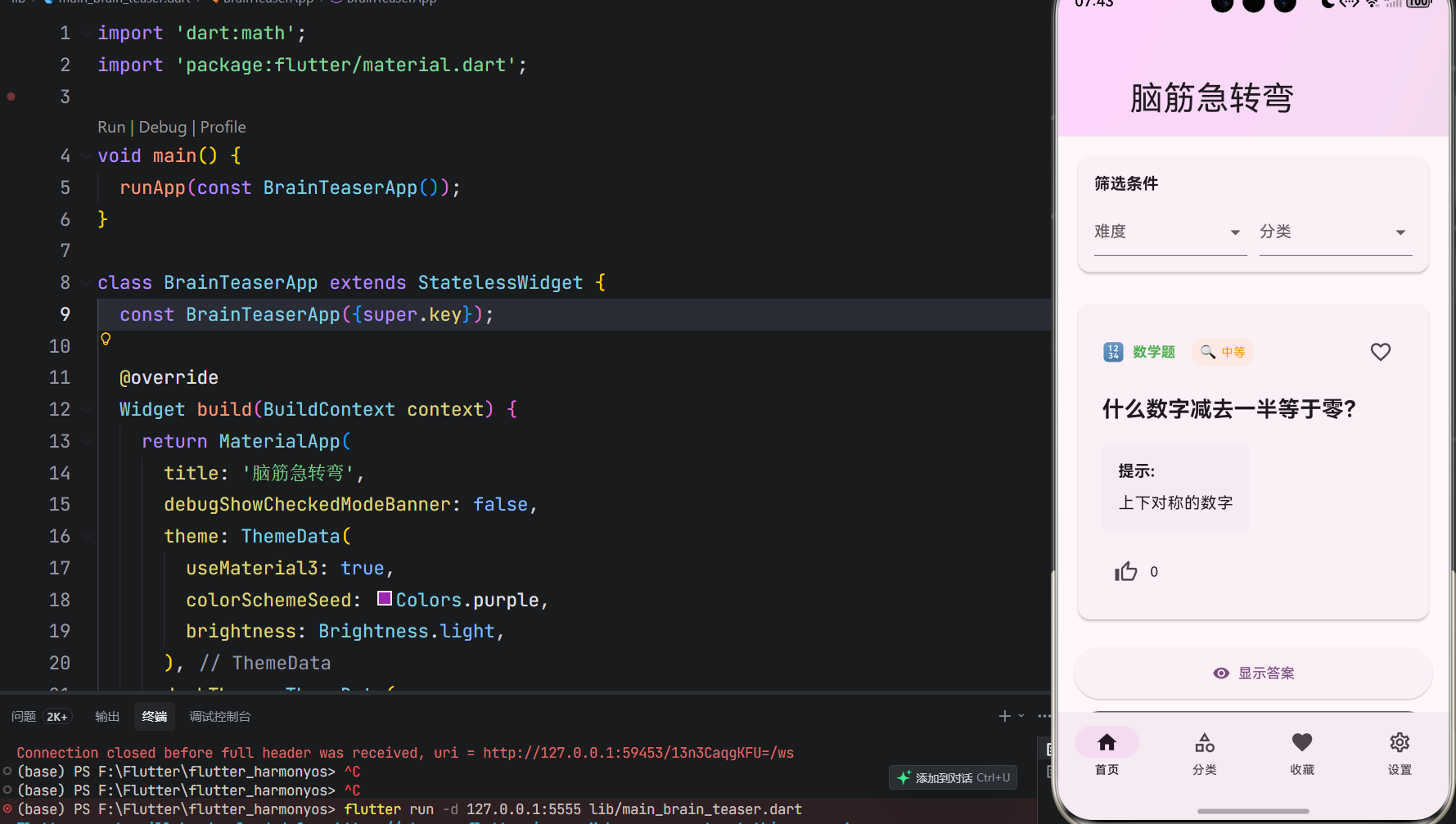
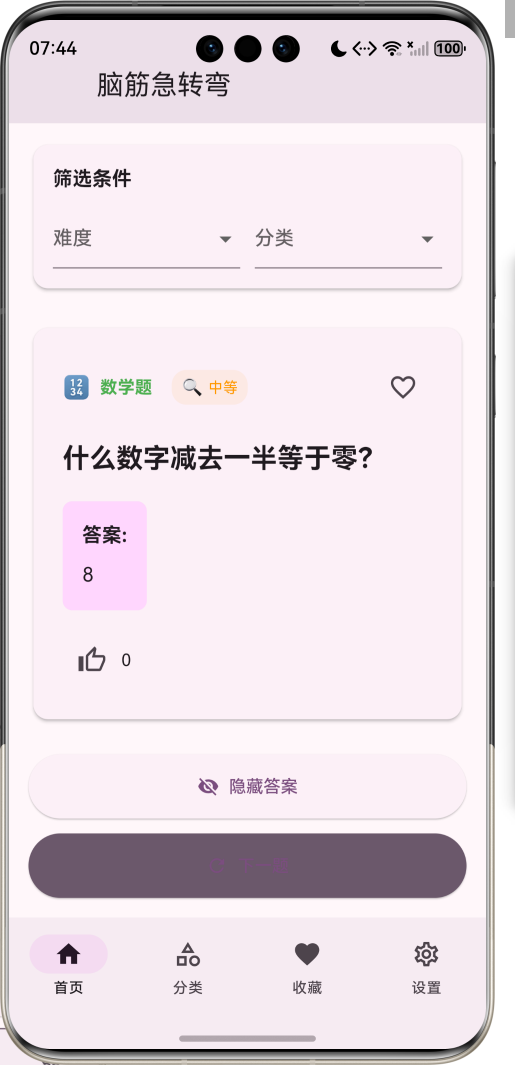
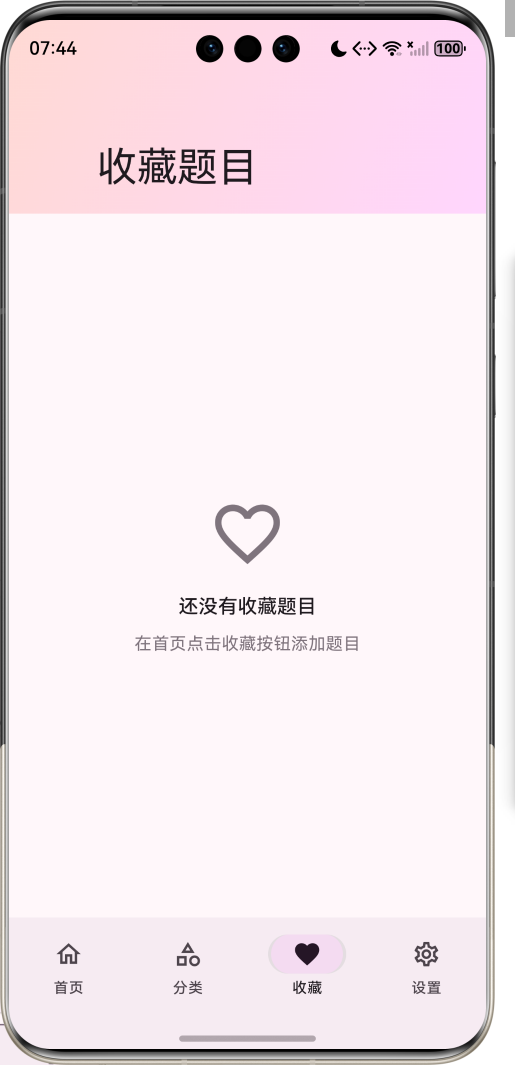
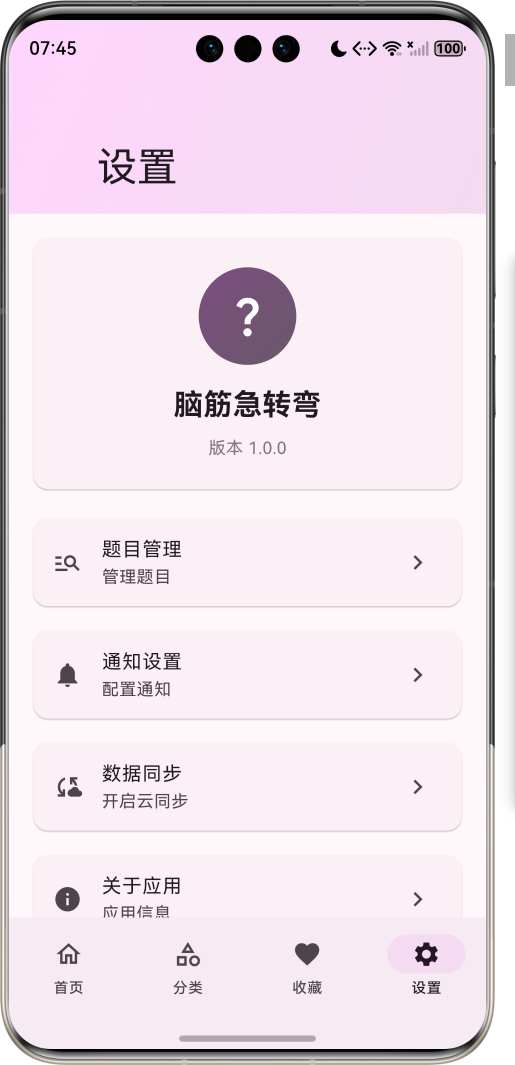
1.1 应用简介
脑筋急转弯是一款有趣的思维训练应用,包含各种类型的题目,适合和朋友一起玩,锻炼思维能力。应用内置多种难度和分类的题目,支持随机获取题目、查看答案、收藏喜欢的题目等功能。
应用以紫色为主色调,象征智慧和创意。涵盖题目浏览、分类管理、收藏夹、设置四大模块。用户可以通过筛选条件选择特定难度和分类的题目,挑战自己的思维能力。
1.2 核心功能
| 功能模块 | 功能描述 | 实现方式 |
|---|---|---|
| 随机题目 | 随机获取题目 | 随机算法 |
| 难度筛选 | 3级难度选择 | 下拉选择 |
| 分类筛选 | 5种题目分类 | 下拉选择 |
| 答案查看 | 显示/隐藏答案 | 按钮切换 |
| 题目收藏 | 收藏喜欢的题目 | 状态管理 |
| 题目点赞 | 为题目点赞 | 计数器 |
| 分类浏览 | 查看各分类题目数量 | 网格展示 |
| 收藏管理 | 管理收藏的题目 | 列表展示 |
1.3 难度等级定义
| 序号 | 难度名称 | Emoji | 描述 |
|---|---|---|---|
| 1 | 简单 | 🧩 | 适合初学者 |
| 2 | 中等 | 🔍 | 有一定挑战 |
| 3 | 困难 | 🧠 | 挑战思维 |
1.4 题目分类定义
| 序号 | 分类名称 | Emoji | 描述 |
|---|---|---|---|
| 1 | 逻辑推理 | 🧩 | 考验逻辑思维 |
| 2 | 数学题 | 🔢 | 数学相关题目 |
| 3 | 文字游戏 | 📝 | 文字类题目 |
| 4 | 生活常识 | 🏠 | 生活相关题目 |
| 5 | 脑筋急转弯 | 🤔 | 经典急转弯 |
1.5 技术栈
| 技术领域 | 技术选型 | 版本要求 |
|---|---|---|
| 开发框架 | Flutter | >= 3.0.0 |
| 编程语言 | Dart | >= 2.17.0 |
| 设计规范 | Material Design 3 | - |
| 随机算法 | Random | - |
| 状态管理 | setState | - |
| 目标平台 | 鸿蒙OS / Web | API 21+ |
1.6 项目结构
lib/
└── main_brain_teaser.dart
    ├── BrainTeaserApp          # 应用入口
    ├── Difficulty              # 难度等级枚举
    ├── Category                # 题目分类枚举
    ├── BrainTeaser             # 题目模型
    ├── BrainTeaserHomePage     # 主页面(底部导航)
    ├── _buildHomePage          # 首页(题目展示)
    ├── _buildCategoriesPage    # 分类页面
    ├── _buildFavoritesPage     # 收藏页面
    ├── _buildSettingsPage      # 设置页面
    ├── _loadRandomTeaser       # 随机获取题目
    ├── _toggleFavorite         # 收藏/取消收藏
    └── _likeTeaser             # 点赞功能
二、系统架构
2.1 整体架构图
2.2 类图设计
2.3 页面导航流程
2.4 题目获取流程
三、核心模块设计
3.1 数据模型设计
3.1.1 难度等级枚举 (Difficulty)
enum Difficulty {
  easy(label: '简单', emoji: '🧩', color: Colors.green),
  medium(label: '中等', emoji: '🔍', color: Colors.orange),
  hard(label: '困难', emoji: '🧠', color: Colors.red);

  final String label;
  final String emoji;
  final Color color;

  const Difficulty({
    required this.label,
    required this.emoji,
    required this.color,
  });
}
3.1.2 题目分类枚举 (Category)
enum Category {
  logic(label: '逻辑推理', emoji: '🧩', color: Colors.blue),
  math(label: '数学题', emoji: '🔢', color: Colors.green),
  word(label: '文字游戏', emoji: '📝', color: Colors.orange),
  life(label: '生活常识', emoji: '🏠', color: Colors.purple),
  trick(label: '脑筋急转弯', emoji: '🤔', color: Colors.red);

  final String label;
  final String emoji;
  final Color color;

  const Category({
    required this.label,
    required this.emoji,
    required this.color,
  });
}
3.1.3 题目模型 (BrainTeaser)
class BrainTeaser {
  final String id;
  final String question;
  final String answer;
  final Difficulty difficulty;
  final Category category;
  final String hint;
  final int likes;
  final bool isFavorite;

  BrainTeaser({
    required this.id,
    required this.question,
    required this.answer,
    required this.difficulty,
    required this.category,
    required this.hint,
    this.likes = 0,
    this.isFavorite = false,
  });

  BrainTeaser copyWith({
    String? id,
    String? question,
    String? answer,
    Difficulty? difficulty,
    Category? category,
    String? hint,
    int? likes,
    bool? isFavorite,
  });
}
3.1.4 题目难度分布
3.1.5 题目分类分布
3.2 页面结构设计
3.2.1 主页面布局
3.2.2 首页结构
3.2.3 分类页面结构
3.2.4 收藏页面结构
3.3 随机题目获取逻辑
3.4 收藏管理逻辑
四、UI设计规范
4.1 配色方案
应用以紫色为主色调,象征智慧和创意:
| 颜色类型 | 色值 | 用途 |
|---|---|---|
| 主色 | #9C27B0 (Purple) | 导航、主题元素 |
| 辅助色 | #BA68C8 | 分类页面 |
| 第三色 | #CE93D8 | 收藏页面 |
| 强调色 | #E1BEE7 | 设置页面 |
| 背景色 | #FAFAFA | 页面背景 |
| 卡片背景 | #FFFFFF | 题目卡片 |
4.2 难度等级颜色
| 难度 | 色值 | 视觉效果 |
|---|---|---|
| 简单 | #4CAF50 | 绿色 |
| 中等 | #FF9800 | 橙色 |
| 困难 | #F44336 | 红色 |
4.3 分类颜色
| 分类 | 色值 | 视觉效果 |
|---|---|---|
| 逻辑推理 | #2196F3 | 蓝色 |
| 数学题 | #4CAF50 | 绿色 |
| 文字游戏 | #FF9800 | 橙色 |
| 生活常识 | #9C27B0 | 紫色 |
| 脑筋急转弯 | #F44336 | 红色 |
4.4 字体规范
| 元素 | 字号 | 字重 | 颜色 |
|---|---|---|---|
| 页面标题 | 24px | Bold | 主色 |
| 题目内容 | 18px | Bold | #000000 |
| 答案内容 | 16px | Regular | #000000 |
| 提示内容 | 14px | Regular | #666666 |
| 分类标签 | 12px | Regular | 分类颜色 |
4.5 组件规范
4.5.1 筛选条件区域
┌─────────────────────────────────────┐
│  筛选条件                            │
│                                     │
│  ┌─────────────────┐ ┌─────────────────┐ │
│  │  难度           │ │  分类           │ │
│  │  🧩 简单 ▼      │ │  🧩 逻辑推理 ▼  │ │
│  └─────────────────┘ └─────────────────┘ │
└─────────────────────────────────────┘
4.5.2 题目展示区域
┌─────────────────────────────────────┐
│  🧩 逻辑推理   🔍 中等              │
│                                     │
│  什么东西早晨四条腿,中午两条腿,晚上三条腿? │
│                                     │
│  ┌──────────────────────────────┐   │
│  │  提示: 这是一个经典的谜语,描  │   │
│  │  述了人的一生                 │   │
│  └──────────────────────────────┘   │
│                                     │
│  👍 0                                │
└─────────────────────────────────────┘
4.5.3 操作按钮区域
┌─────────────────────────────────────┐
│  [👁️ 显示答案]                    │
│  [🔄 下一题]                      │
└─────────────────────────────────────┘
4.5.4 分类网格
┌─────────────────────────────────────┐
│  ┌──────┐ ┌──────┐ ┌──────┐        │
│  │  🧩  │ │  🔢  │ │  📝  │        │
│  │逻辑推理│ │数学题│ │文字游戏│        │
│  │  3题  │ │  2题  │ │  2题  │        │
│  └──────┘ └──────┘ └──────┘        │
│  ┌──────┐ ┌──────┐                  │
│  │  🏠  │ │  🤔  │                  │
│  │生活常识│ │脑筋急转弯│                │
│  │  1题  │ │  2题  │                  │
│  └──────┘ └──────┘                  │
└─────────────────────────────────────┘
五、核心功能实现
5.1 随机题目获取实现
void _loadRandomTeaser() {
  if (_brainTeasers.isEmpty) return;

  List<BrainTeaser> filteredTeasers = _brainTeasers;

  if (_selectedDifficulty != null) {
    filteredTeasers = filteredTeasers.where((teaser) => teaser.difficulty == _selectedDifficulty).toList();
  }

  if (_selectedCategory != null) {
    filteredTeasers = filteredTeasers.where((teaser) => teaser.category == _selectedCategory).toList();
  }

  if (filteredTeasers.isEmpty) {
    ScaffoldMessenger.of(context).showSnackBar(
      const SnackBar(content: Text('没有符合条件的题目')),
    );
    return;
  }

  final random = Random();
  final randomIndex = random.nextInt(filteredTeasers.length);

  setState(() {
    _currentTeaser = filteredTeasers[randomIndex];
    _showAnswer = false;
  });
}
5.2 收藏功能实现
void _toggleFavorite() {
  if (_currentTeaser == null) return;

  setState(() {
    final updatedTeaser = _currentTeaser!.copyWith(
      isFavorite: !_currentTeaser!.isFavorite,
    );

    _currentTeaser = updatedTeaser;

    final index = _brainTeasers.indexWhere((teaser) => teaser.id == updatedTeaser.id);
    if (index != -1) {
      _brainTeasers[index] = updatedTeaser;
    }

    if (updatedTeaser.isFavorite) {
      _favoriteTeasers.add(updatedTeaser);
    } else {
      _favoriteTeasers.removeWhere((teaser) => teaser.id == updatedTeaser.id);
    }
  });
}
5.3 点赞功能实现
void _likeTeaser() {
  if (_currentTeaser == null) return;

  setState(() {
    final updatedTeaser = _currentTeaser!.copyWith(
      likes: _currentTeaser!.likes + 1,
    );

    _currentTeaser = updatedTeaser;

    final index = _brainTeasers.indexWhere((teaser) => teaser.id == updatedTeaser.id);
    if (index != -1) {
      _brainTeasers[index] = updatedTeaser;
    }

    final favIndex = _favoriteTeasers.indexWhere((teaser) => teaser.id == updatedTeaser.id);
    if (favIndex != -1) {
      _favoriteTeasers[favIndex] = updatedTeaser;
    }
  });
}
5.4 题目展示实现
Widget _buildCurrentTeaser() {
  if (_currentTeaser == null) {
    return Card(
      elevation: 2,
      child: Padding(
        padding: const EdgeInsets.all(32),
        child: Column(
          children: [
            Icon(
              Icons.question_mark_outlined,
              size: 64,
              color: Theme.of(context).colorScheme.outline,
            ),
            const SizedBox(height: 16),
            Text(
              '点击下方按钮获取题目',
              style: Theme.of(context).textTheme.titleMedium,
            ),
          ],
        ),
      ),
    );
  }

  return Card(
    elevation: 2,
    child: Padding(
      padding: const EdgeInsets.all(24),
      child: Column(
        crossAxisAlignment: CrossAxisAlignment.start,
        children: [
          // 题目信息
          Row(
            mainAxisAlignment: MainAxisAlignment.spaceBetween,
            children: [
              Row(
                children: [
                  Text(_currentTeaser!.category.emoji),
                  const SizedBox(width: 8),
                  Text(
                    _currentTeaser!.category.label,
                    style: TextStyle(
                      color: _currentTeaser!.category.color,
                      fontWeight: FontWeight.bold,
                    ),
                  ),
                  // 难度标签
                ],
              ),
              // 收藏按钮
            ],
          ),
          // 题目内容
          Text(
            _currentTeaser!.question,
            style: Theme.of(context).textTheme.titleLarge?.copyWith(
                  fontWeight: FontWeight.bold,
                ),
          ),
          // 提示/答案
          if (_showAnswer)
            // 显示答案
          else
            // 显示提示
          // 点赞按钮
        ],
      ),
    ),
  );
}
5.5 分类页面实现
Widget _buildCategoriesPage() {
  return CustomScrollView(
    slivers: [
      SliverAppBar(
        expandedHeight: 120,
        floating: true,
        pinned: true,
        flexibleSpace: FlexibleSpaceBar(
          title: const Text('题目分类'),
          // 背景
        ),
      ),
      SliverPadding(
        padding: const EdgeInsets.all(16),
        sliver: SliverGrid(
          gridDelegate: const SliverGridDelegateWithFixedCrossAxisCount(
            crossAxisCount: 2,
            childAspectRatio: 1.5,
            crossAxisSpacing: 12,
            mainAxisSpacing: 12,
          ),
          delegate: SliverChildBuilderDelegate(
            (context, index) {
              final category = Category.values[index];
              final teaserCount = _brainTeasers.where((teaser) => teaser.category == category).length;

              return Card(
                elevation: 2,
                child: Padding(
                  padding: const EdgeInsets.all(16),
                  child: Column(
                    children: [
                      Text(category.emoji, style: const TextStyle(fontSize: 48)),
                      const SizedBox(height: 12),
                      Text(category.label, style: const TextStyle(fontSize: 16, fontWeight: FontWeight.bold)),
                      const SizedBox(height: 8),
                      Text('$teaserCount 题', style: TextStyle(color: Theme.of(context).colorScheme.outline)),
                    ],
                  ),
                ),
              );
            },
            childCount: Category.values.length,
          ),
        ),
      ),
    ],
  );
}
六、交互设计
6.1 题目浏览流程
6.2 筛选操作流程
6.3 收藏管理流程
七、扩展功能规划
7.1 后续版本规划
7.2 功能扩展建议
7.2.1 题目编辑器
编辑功能:
- 支持用户添加自定义题目
- 题目审核机制
- 社区共享题目
- 题目投票系统
7.2.2 社交分享
分享功能:
- 分享题目到社交平台
- 邀请好友一起玩
- 分享成绩和成就
- 团队挑战模式
7.2.3 多人对战
对战功能:
- 实时对战模式
- 积分系统
- 排行榜
- 成就徽章
八、注意事项
8.1 开发注意事项
-
数据管理:题目数据需合理组织,方便筛选和检索
-
性能优化:随机题目生成需考虑性能,避免卡顿
-
用户体验:界面交互需流畅,反馈及时
-
状态管理:收藏和点赞状态需正确同步
-
错误处理:无符合条件题目时需提供友好提示
8.2 常见问题
| 问题 | 原因 | 解决方案 |
|---|---|---|
| 题目重复 | 随机算法问题 | 记录已显示题目 |
| 筛选无结果 | 条件过严 | 提供默认题目 |
| 收藏不同步 | 状态管理问题 | 统一状态更新 |
| 点赞计数错误 | 并发操作 | 原子操作更新 |
| 界面卡顿 | 重绘频繁 | 优化渲染逻辑 |
8.3 使用技巧
🧠 脑筋急转弯技巧 🧠
解题技巧
- 逻辑推理:从多角度思考,不要局限于常规思维
- 数学题:注意数字的特殊性质和规律
- 文字游戏:关注谐音、多义字和词语组合
- 生活常识:结合日常生活经验
- 脑筋急转弯:打破常规思维,寻找意外答案
游戏建议
- 和朋友一起玩,增加趣味性
- 设置时间限制,提高挑战性
- 记录自己的答题正确率
- 收藏喜欢的题目,反复挑战
- 尝试自己创作题目
九、运行说明
9.1 环境要求
| 环境 | 版本要求 |
|---|---|
| Flutter SDK | >= 3.0.0 |
| Dart SDK | >= 2.17.0 |
| 鸿蒙OS | API 21+ |
| Web浏览器 | Chrome 90+ |
9.2 运行命令
# 查看可用设备
flutter devices

# 运行到Web服务器
flutter run -d web-server -t lib/main_brain_teaser.dart --web-port 8139

# 运行到鸿蒙设备
flutter run -d 127.0.0.1:5555 lib/main_brain_teaser.dart

# 代码分析
flutter analyze lib/main_brain_teaser.dart
十、总结
脑筋急转弯应用通过题目浏览、分类管理、收藏夹、设置四大模块,为用户提供了一个有趣的思维训练平台。应用支持3级难度、5种分类的题目,让用户可以根据自己的喜好选择题目,挑战思维能力。
核心功能涵盖随机题目获取、难度和分类筛选、答案查看、题目收藏、题目点赞等。用户可以通过筛选条件选择特定类型的题目,也可以随机获取题目,挑战自己的思维能力。应用还支持收藏喜欢的题目,方便后续查看和分享。
应用采用 Material Design 3 设计规范,以紫色为主色调,象征智慧和创意。通过本应用,希望能够帮助用户锻炼思维能力,增加生活乐趣,同时也为朋友们提供一个有趣的互动游戏。
脑筋急转弯——挑战你的思维极限

腾讯云面向开发者汇聚海量精品云计算使用和开发经验,营造开放的云计算技术生态圈。
更多推荐
 6
6 0
0- 0


 已为社区贡献30条内容

所有评论(0)