鸿蒙flutter第三方库适配 - 文件加密工具
运行效果图文件加密工具是一款专业可靠的文件安全应用,帮助用户对敏感文件进行加密保护。应用支持AES-256、Salsa20、XOR三种加密算法,用户可设置密码保护,并可选配生物认证(指纹/面容)增强安全性。加密后的文件可安全存储,需要时一键解密,同时支持安全删除功能,确保文件数据不被恢复。应用以稳重的靛蓝色为主色调,象征安全与信任。涵盖加密、文件、历史、设置四大模块。用户可以轻松选择文件、设置密码
文件加密工具应用
欢迎加入开源鸿蒙跨平台社区:
https://openharmonycrossplatform.csdn.net
适配的第三方库地址:
- file_selector - 文件选择
- local_auth - 生物认证
- encrypt - 加密算法
- path_provider - 文件路径
一、项目概述
运行效果图
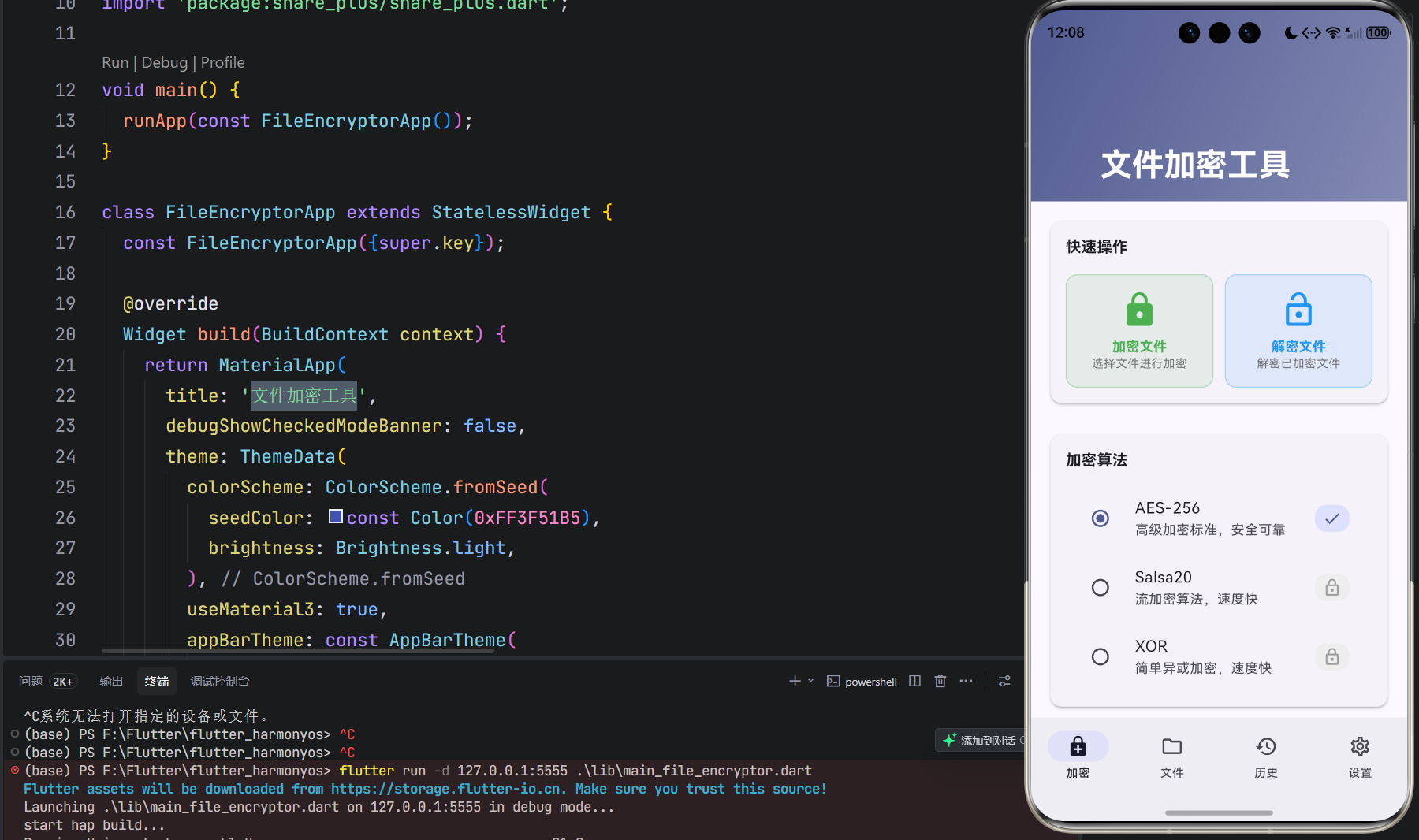
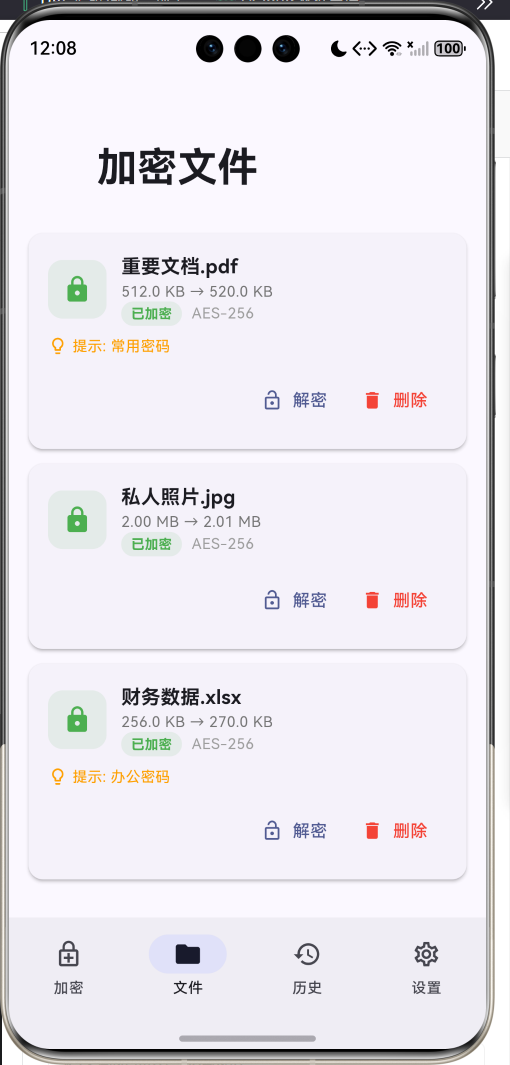
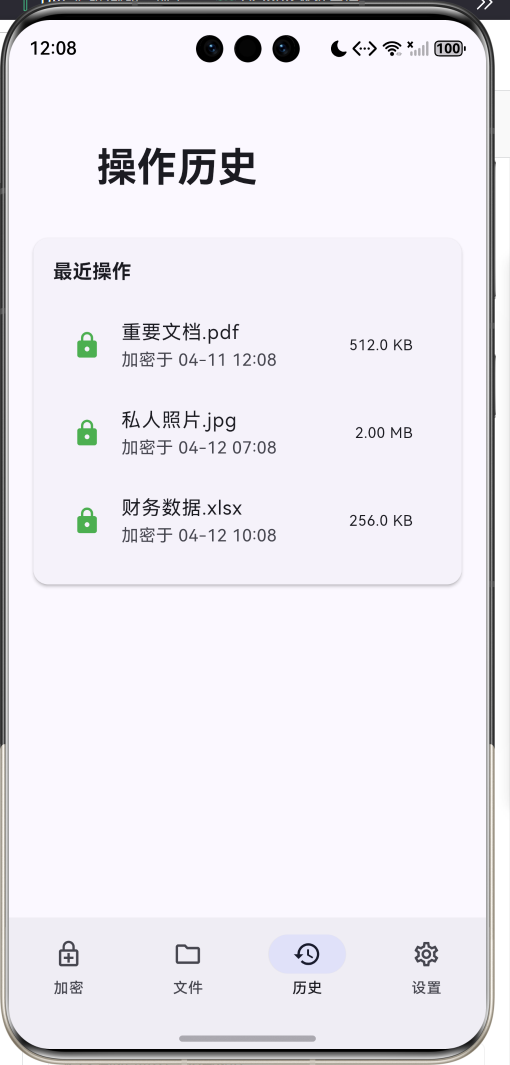
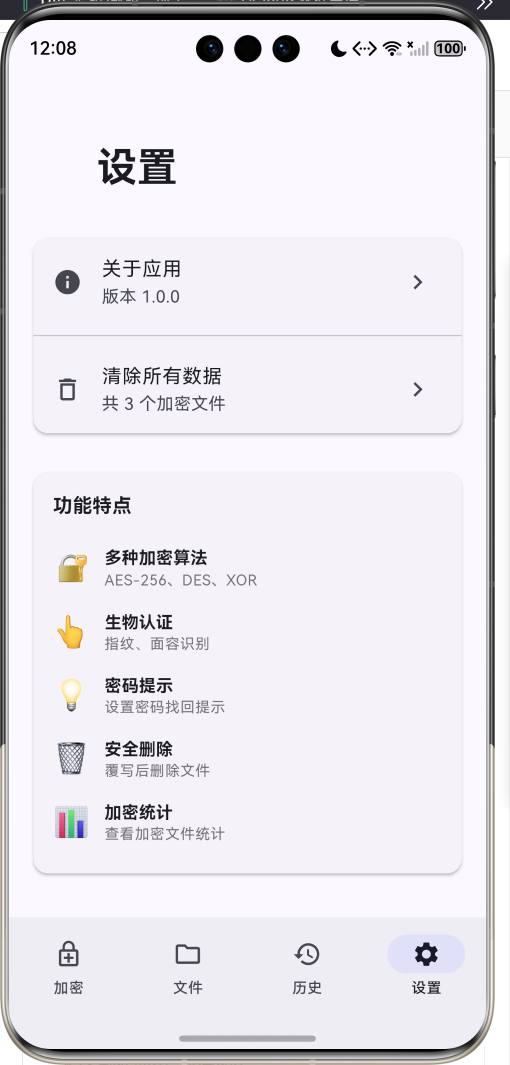
1.1 应用简介
文件加密工具是一款专业可靠的文件安全应用,帮助用户对敏感文件进行加密保护。应用支持AES-256、Salsa20、XOR三种加密算法,用户可设置密码保护,并可选配生物认证(指纹/面容)增强安全性。加密后的文件可安全存储,需要时一键解密,同时支持安全删除功能,确保文件数据不被恢复。
应用以稳重的靛蓝色为主色调,象征安全与信任。涵盖加密、文件、历史、设置四大模块。用户可以轻松选择文件、设置密码、加密保护、管理加密文件,实现文件的安全管理。
1.2 核心功能
| 功能模块 | 功能描述 | 实现方式 |
|---|---|---|
| 文件选择 | 选择需要加密的文件 | file_selector |
| 文件加密 | 使用密码加密文件 | encrypt库 |
| 文件解密 | 输入密码解密文件 | encrypt库 |
| 密码保护 | 设置加密密码 | 密码输入 |
| 密码提示 | 设置密码找回提示 | 提示文字 |
| 生物认证 | 指纹/面容识别验证 | local_auth |
| 加密历史 | 查看加密文件记录 | 本地存储 |
| 安全删除 | 覆写后删除文件 | 安全擦除 |
| 加密统计 | 查看加密文件统计 | 数据聚合 |
1.3 加密算法定义
| 序号 | 算法名称 | 密钥长度 | 描述 | 安全等级 |
|---|---|---|---|---|
| 1 | AES-256 | 256位 | 高级加密标准,安全可靠 | ⭐⭐⭐⭐⭐ |
| 2 | Salsa20 | 256位 | 流加密算法,速度快 | ⭐⭐⭐⭐ |
| 3 | XOR | 可变 | 简单异或加密,速度快 | ⭐⭐ |
1.4 文件状态定义
| 序号 | 状态名称 | 描述 | 颜色 |
|---|---|---|---|
| 1 | 普通 | 未加密状态 | 灰色 |
| 2 | 已加密 | 文件已加密保护 | 绿色 |
| 3 | 已解密 | 文件已解密恢复 | 蓝色 |
1.5 加密文件信息
| 序号 | 字段名称 | 是否必填 | 说明 |
|---|---|---|---|
| 1 | 原始文件名 | ✅ | 加密前文件名 |
| 2 | 加密文件名 | ✅ | 加密后文件名 |
| 3 | 原始路径 | ✅ | 原始文件路径 |
| 4 | 加密路径 | 可选 | 加密文件存储路径 |
| 5 | 原始大小 | ✅ | 原始文件大小 |
| 6 | 加密大小 | 可选 | 加密后文件大小 |
| 7 | 加密算法 | ✅ | 使用的加密算法 |
| 8 | 加密时间 | ✅ | 加密操作时间 |
| 9 | 解密时间 | 可选 | 解密操作时间 |
| 10 | 文件状态 | ✅ | 当前文件状态 |
| 11 | 密码提示 | 可选 | 密码找回提示 |
1.6 技术栈
| 技术领域 | 技术选型 | 版本要求 |
|---|---|---|
| 开发框架 | Flutter | >= 3.0.0 |
| 编程语言 | Dart | >= 2.17.0 |
| 设计规范 | Material Design 3 | - |
| 文件选择 | file_selector | >= 1.0.3 |
| 加密算法 | encrypt | >= 5.0.3 |
| 生物认证 | local_auth | >= 2.3.0 |
| 文件路径 | path_provider | >= 2.1.4 |
| 目标平台 | 鸿蒙OS / Android / iOS | API 21+ |
1.7 项目结构
lib/
└── main_file_encryptor.dart
    ├── FileEncryptorApp               # 应用入口
    ├── EncryptionAlgorithm            # 加密算法枚举
    ├── FileStatus                     # 文件状态枚举
    ├── EncryptedFile                  # 加密文件模型
    ├── FileEncryptorHomePage          # 主页面(底部导航)
    ├── _buildEncryptPage              # 加密页面
    ├── _buildFilesPage                # 文件列表页
    ├── _buildHistoryPage              # 历史记录页
    ├── _buildSettingsPage             # 设置页
    ├── _encryptAES                    # AES加密
    ├── _decryptAES                    # AES解密
    ├── _encryptSalsa20                # Salsa20加密
    ├── _decryptSalsa20                # Salsa20解密
    ├── _encryptXOR                    # XOR加密
    └── _decryptXOR                    # XOR解密
二、系统架构
2.1 整体架构图
2.2 类图设计
2.3 页面导航流程
2.4 文件加密流程
三、核心模块设计
3.1 数据模型设计
3.1.1 加密算法枚举 (EncryptionAlgorithm)
enum EncryptionAlgorithm {
  aes(label: 'AES-256', description: '高级加密标准,安全可靠'),
  salsa20(label: 'Salsa20', description: '流加密算法,速度快'),
  xor(label: 'XOR', description: '简单异或加密,速度快');

  final String label;
  final String description;
  const EncryptionAlgorithm({
    required this.label,
    required this.description,
  });
}
3.1.2 文件状态枚举 (FileStatus)
enum FileStatus {
  normal(label: '普通', color: Colors.grey),
  encrypted(label: '已加密', color: Colors.green),
  decrypted(label: '已解密', color: Colors.blue);

  final String label;
  final Color color;
  const FileStatus({
    required this.label,
    required this.color,
  });
}
3.1.3 加密文件模型 (EncryptedFile)
class EncryptedFile {
  final String id;
  final String originalName;
  final String encryptedName;
  final String originalPath;
  final String? encryptedPath;
  final int originalSize;
  final int? encryptedSize;
  final EncryptionAlgorithm algorithm;
  final DateTime encryptedAt;
  final DateTime? decryptedAt;
  final FileStatus status;
  final String? passwordHint;

  String get formattedOriginalSize => _formatFileSize(originalSize);
  String get formattedEncryptedSize =>
      encryptedSize != null ? _formatFileSize(encryptedSize!) : '';
}
3.1.4 加密算法使用分布
3.2 页面结构设计
3.2.1 主页面布局
3.2.2 加密页结构
3.2.3 文件列表页结构
3.3 加密处理逻辑
3.4 解密处理逻辑
四、UI设计规范
4.1 配色方案
应用以稳重的靛蓝色为主色调,象征安全与信任:
| 颜色类型 | 色值 | 用途 |
|---|---|---|
| 主色 | #3F51B5 (Indigo) | 导航、主题元素 |
| 辅助色 | #7986CB | 次要按钮 |
| 第三色 | #C5CAE9 | 背景装饰 |
| 强调色 | #303F9F | 重要操作 |
| 背景色 | #FAFAFA | 页面背景 |
| 卡片背景 | #FFFFFF | 信息卡片 |
| 加密色 | #4CAF50 | 已加密状态 |
| 解密色 | #2196F3 | 已解密状态 |
| 警告色 | #F44336 | 删除操作 |
4.2 状态配色
| 状态 | 色值 | 视觉效果 |
|---|---|---|
| 普通 | #9E9E9E | 灰色 |
| 已加密 | #4CAF50 | 绿色 |
| 已解密 | #2196F3 | 蓝色 |
4.3 字体规范
| 元素 | 字号 | 字重 | 颜色 |
|---|---|---|---|
| 页面标题 | 24px | Bold | 主色 |
| 文件名 | 16px | Bold | 黑色 |
| 文件大小 | 12px | Regular | 灰色 |
| 状态标签 | 11px | Bold | 状态色 |
| 按钮文字 | 14px | Medium | 白色 |
| 提示文字 | 12px | Regular | 灰色 |
4.4 组件规范
4.4.1 快速操作卡片
┌─────────────────────────────────────┐
│  快速操作                              │
│                                     │
│  ┌─────────────┐  ┌─────────────┐  │
│  │     🔒      │  │     🔓      │  │
│  │  加密文件    │  │  解密文件    │  │
│  │ 选择文件加密 │  │ 解密已加密文件│  │
│  └─────────────┘  └─────────────┘  │
└─────────────────────────────────────┘
4.4.2 算法选择卡片
┌─────────────────────────────────────┐
│  加密算法                              │
│                                     │
│  ◉ AES-256                          │
│    高级加密标准,安全可靠       ✓     │
│                                     │
│  ○ Salsa20                          │
│    流加密算法,速度快                │
│                                     │
│  ○ XOR                              │
│    简单异或加密,速度快              │
└─────────────────────────────────────┘
4.4.3 文件卡片
┌─────────────────────────────────────┐
│  [🔒]  重要文档.pdf                  │
│        512 KB → 530 KB              │
│        [已加密] AES-256             │
│                                     │
│  💡 提示: 常用密码                   │
│                                     │
│              [解密]  [删除]          │
└─────────────────────────────────────┘
4.4.4 密码设置对话框
┌─────────────────────────────────────┐
│  设置加密密码                          │
│                                     │
│  ┌─────────────────────────────┐   │
│  │ 🔒 密码                      │   │
│  └─────────────────────────────┘   │
│                                     │
│  ┌─────────────────────────────┐   │
│  │ 💡 密码提示(可选)           │   │
│  └─────────────────────────────┘   │
│                                     │
│           [取消]    [确定]          │
└─────────────────────────────────────┘
4.4.5 加密统计卡片
┌─────────────────────────────────────┐
│  加密统计                              │
│                                     │
│    🔒        🔓        📊          │
│    3         1        2.8 MB       │
│  已加密    已解密     总大小         │
└─────────────────────────────────────┘
五、核心功能实现
5.1 文件选择实现
Future<void> _selectAndEncryptFile() async {
  try {
    final XFile? file = await openFile();
    if (file == null) return;

    final password = await _showPasswordDialog('设置加密密码');
    if (password == null || password.isEmpty) return;

    final inputFile = File(file.path);
    final bytes = await inputFile.readAsBytes();
    final stat = await inputFile.stat();

    final encryptedBytes = await _encryptData(bytes, password);

    final tempDir = await getApplicationDocumentsDirectory();
    final encryptedDir = Directory('${tempDir.path}/encrypted');
    if (!await encryptedDir.exists()) {
      await encryptedDir.create(recursive: true);
    }

    final encryptedFileName = '${file.name}.enc';
    final encryptedFilePath = '${encryptedDir.path}/$encryptedFileName';
    final encryptedFile = File(encryptedFilePath);
    await encryptedFile.writeAsBytes(encryptedBytes);

    // 保存加密文件信息...
  } catch (e) {
    ScaffoldMessenger.of(context).showSnackBar(
      SnackBar(content: Text('加密失败: $e')),
    );
  }
}
5.2 AES加密实现
Uint8List _encryptAES(Uint8List data, String password) {
  final key = encrypt.Key.fromUtf8(password.padRight(32, '0').substring(0, 32));
  final iv = encrypt.IV.fromLength(16);
  final encrypter = encrypt.Encrypter(encrypt.AES(key));

  final encrypted = encrypter.encryptBytes(data, iv: iv);
  return Uint8List.fromList(iv.bytes + encrypted.bytes);
}

Uint8List _decryptAES(Uint8List data, String password) {
  final key = encrypt.Key.fromUtf8(password.padRight(32, '0').substring(0, 32));
  final iv = encrypt.IV(data.sublist(0, 16));
  final encrypter = encrypt.Encrypter(encrypt.AES(key));

  final encrypted = encrypt.Encrypted(data.sublist(16));
  final decrypted = encrypter.decryptBytes(encrypted, iv: iv);
  return Uint8List.fromList(decrypted);
}
5.3 Salsa20加密实现
Uint8List _encryptSalsa20(Uint8List data, String password) {
  final key = encrypt.Key.fromUtf8(password.padRight(32, '0').substring(0, 32));
  final iv = encrypt.IV.fromLength(8);
  final encrypter = encrypt.Encrypter(encrypt.Salsa20(key));

  final encrypted = encrypter.encryptBytes(data, iv: iv);
  return Uint8List.fromList(iv.bytes + encrypted.bytes);
}

Uint8List _decryptSalsa20(Uint8List data, String password) {
  final key = encrypt.Key.fromUtf8(password.padRight(32, '0').substring(0, 32));
  final iv = encrypt.IV(data.sublist(0, 8));
  final encrypter = encrypt.Encrypter(encrypt.Salsa20(key));

  final encrypted = encrypt.Encrypted(data.sublist(8));
  final decrypted = encrypter.decryptBytes(encrypted, iv: iv);
  return Uint8List.fromList(decrypted);
}
5.4 生物认证实现
Future<bool> _authenticateWithBiometric() async {
  try {
    return await _localAuth.authenticate(
      localizedReason: '请进行生物认证以解密文件',
      options: const AuthenticationOptions(
        stickyAuth: true,
        biometricOnly: true,
      ),
    );
  } catch (e) {
    debugPrint('生物认证失败: $e');
    return false;
  }
}
5.5 安全删除实现
Future<void> _deleteEncryptedFile(EncryptedFile fileInfo) async {
  try {
    if (fileInfo.encryptedPath != null) {
      final file = File(fileInfo.encryptedPath!);
      if (await file.exists()) {
        // 安全删除:先覆写随机数据
        final length = await file.length();
        final random = Uint8List(length);
        for (int i = 0; i < length; i++) {
          random[i] = DateTime.now().millisecondsSinceEpoch % 256;
        }
        await file.writeAsBytes(random);
        // 然后删除文件
        await file.delete();
      }
    }

    setState(() {
      _encryptedFiles.removeWhere((f) => f.id == fileInfo.id);
    });
  } catch (e) {
    ScaffoldMessenger.of(context).showSnackBar(
      SnackBar(content: Text('删除失败: $e')),
    );
  }
}
六、交互设计
6.1 文件加密流程
6.2 文件解密流程
6.3 安全删除流程
七、扩展功能规划
7.1 后续版本规划
7.2 功能扩展建议
7.2.1 云端加密
云加密功能:
- 云存储文件加密
- 端到端加密传输
- 密钥托管服务
- 多设备同步
7.2.2 批量加密
批量功能:
- 多文件选择
- 批量加密处理
- 统一密码设置
- 进度显示
7.2.3 文件夹加密
文件夹功能:
- 整个文件夹加密
- 自动识别文件类型
- 递归加密处理
- 压缩后加密
八、注意事项
8.1 开发注意事项
-
密码安全:不要在内存中明文存储密码
-
密钥管理:使用安全的密钥派生函数
-
文件权限:确保文件读写权限正确
-
错误处理:妥善处理加密解密异常
-
数据完整性:加密后验证数据完整性
8.2 常见问题
| 问题 | 原因 | 解决方案 |
|---|---|---|
| 加密失败 | 文件过大 | 分块处理 |
| 解密失败 | 密码错误 | 提示用户重试 |
| 生物认证失败 | 设备不支持 | 使用密码认证 |
| 文件损坏 | 加密中断 | 添加完整性校验 |
| 内存溢出 | 大文件处理 | 流式加密 |
8.3 使用技巧
🔐 文件加密工具使用技巧 🔐
密码设置技巧
- 使用强密码(字母+数字+符号)
- 设置有意义的密码提示
- 定期更换加密密码
- 不要使用常见密码
加密操作技巧
- 重要文件优先加密
- 选择合适的加密算法
- 记住密码提示信息
- 定期备份加密文件
安全管理技巧
- 启用生物认证增强安全
- 定期清理不需要的加密文件
- 使用安全删除功能
- 不要分享加密密码
九、运行说明
9.1 环境要求
| 环境 | 版本要求 |
|---|---|
| Flutter SDK | >= 3.0.0 |
| Dart SDK | >= 2.17.0 |
| 鸿蒙OS | API 21+ |
| Android | API 21+ |
| iOS | 12.0+ |
9.2 依赖配置
在 pubspec.yaml 中添加以下依赖:
dependencies:
  flutter:
    sdk: flutter
  file_selector: ^1.0.3
  encrypt: ^5.0.3
  local_auth: ^2.3.0
  path_provider: ^2.1.4
  share_plus: ^7.2.2
  intl: ^0.19.0
9.3 运行命令
# 查看可用设备
flutter devices

# 运行到Web服务器
flutter run -d web-server -t lib/main_file_encryptor.dart --web-port 8149

# 运行到鸿蒙设备
flutter run -d 127.0.0.1:5555 lib/main_file_encryptor.dart

# 运行到Android设备
flutter run -d android lib/main_file_encryptor.dart

# 代码分析
flutter analyze lib/main_file_encryptor.dart
9.4 权限配置
Android权限 (android/app/src/main/AndroidManifest.xml)
<uses-permission android:name="android.permission.READ_EXTERNAL_STORAGE" />
<uses-permission android:name="android.permission.WRITE_EXTERNAL_STORAGE" />
<uses-permission android:name="android.permission.USE_BIOMETRIC" />
<uses-permission android:name="android.permission.USE_FINGERPRINT" />
iOS权限 (ios/Runner/Info.plist)
<key>NSFaceIDUsageDescription</key>
<string>需要面容识别权限以解密文件</string>
<key>NSPhotoLibraryUsageDescription</key>
<string>需要相册权限选择文件</string>
十、总结
文件加密工具应用通过整合文件选择、密码加密、生物认证、安全删除等功能,为用户提供了一站式的文件安全解决方案。应用支持AES-256、Salsa20、XOR三种加密算法,满足不同安全等级需求,用户可设置密码保护并选配生物认证增强安全性。
核心功能涵盖文件选择、文件加密、文件解密、密码保护、密码提示、生物认证、加密历史、安全删除、加密统计九大模块。用户可以轻松选择文件、设置密码、加密保护、管理加密文件,实现文件的安全管理。
应用采用 Material Design 3 设计规范,以稳重的靛蓝色为主色调,象征安全与信任。通过本应用,希望能够帮助用户更安全地保护敏感文件,确保数据安全不被泄露。
文件加密工具——守护您的数据安全

腾讯云面向开发者汇聚海量精品云计算使用和开发经验,营造开放的云计算技术生态圈。
更多推荐
 7
7 0
0- 0


 已为社区贡献20条内容

所有评论(0)