鸿蒙flutter第三方库适配 - 动态工作流
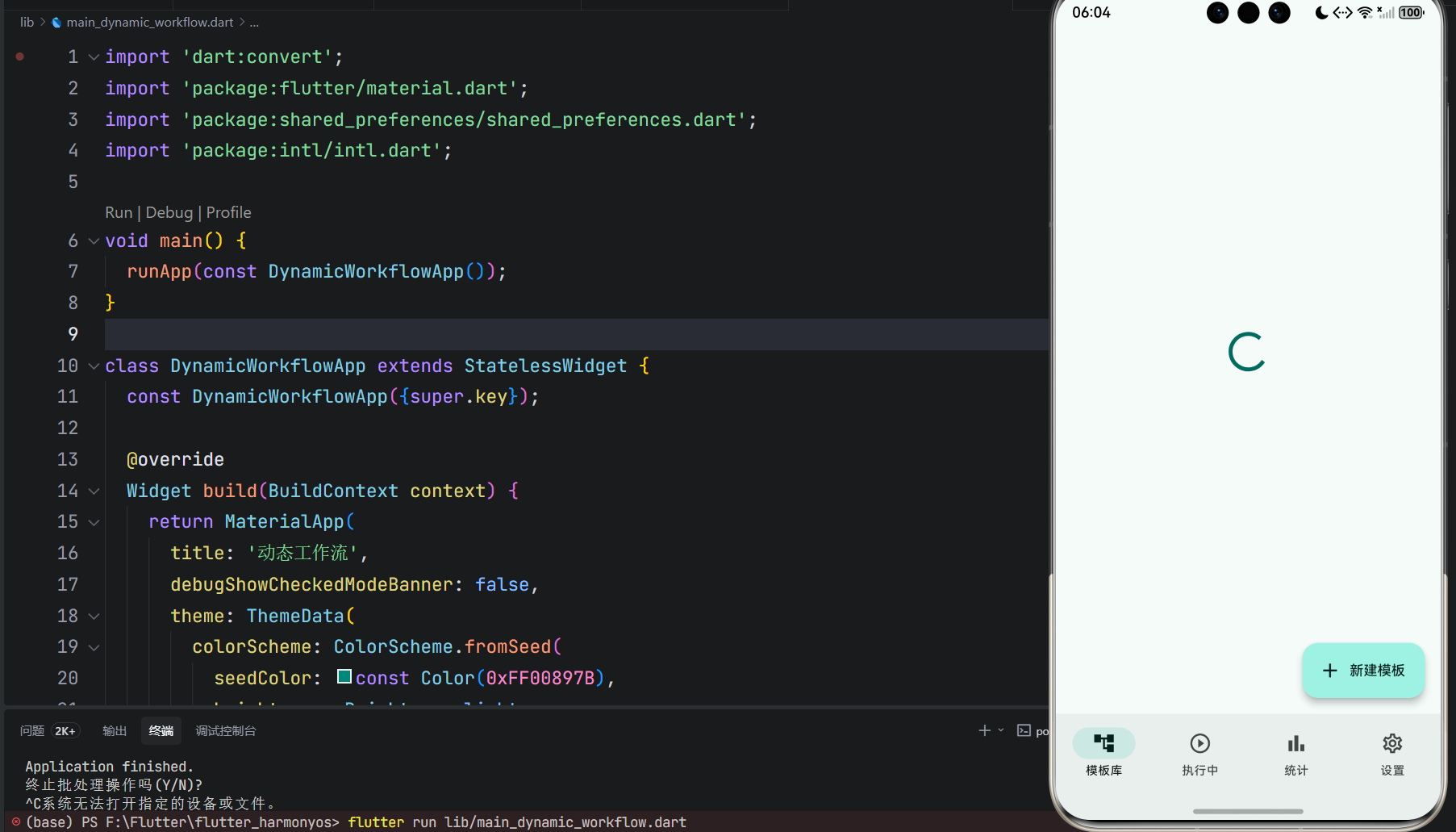
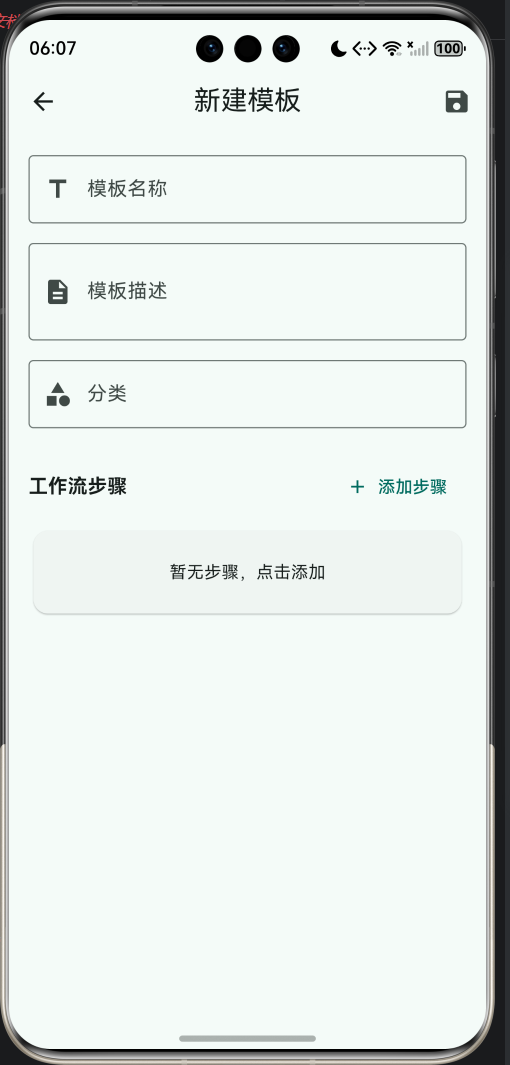
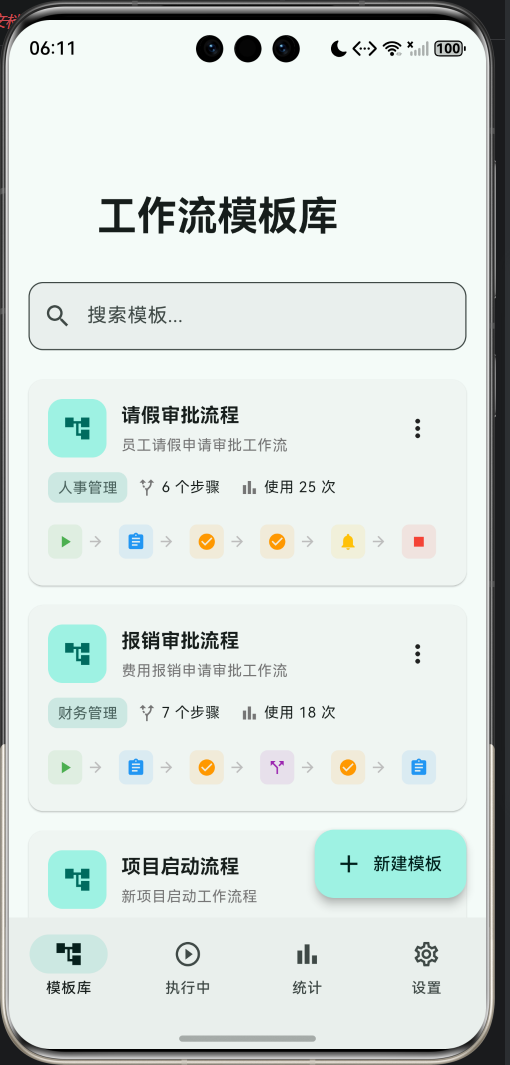
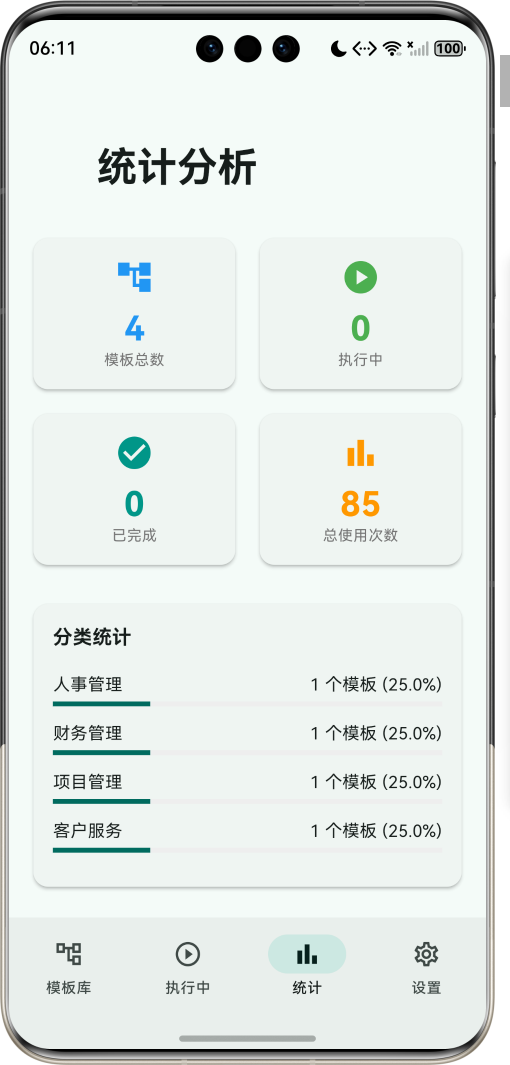
运行效果图动态工作流是一款专业的工作流程管理应用,提供灵活的工作流模板创建、可视化流程配置、实时流程执行跟踪和完善的流程管理功能。用户可以根据业务需求自定义工作流模板,配置流程步骤,实现高效的业务流程自动化管理。应用以清新的青绿色为主色调,象征高效与协作。涵盖模板库、执行中、统计分析、设置四大模块。用户可以创建工作流模板、配置步骤类型、执行流程跟踪、统计分析数据,满足企业办公、项目管理、审批流程等
动态工作流应用
欢迎加入开源鸿蒙跨平台社区:
https://openharmonycrossplatform.csdn.net
适配的第三方库地址:
- rfw - https://pub.dev/packages/rfw
- shared_preferences - https://pub.dev/packages/shared_preferences
- go_router - https://pub.dev/packages/go_router
- animations - https://pub.dev/packages/animations
一、项目概述
运行效果图
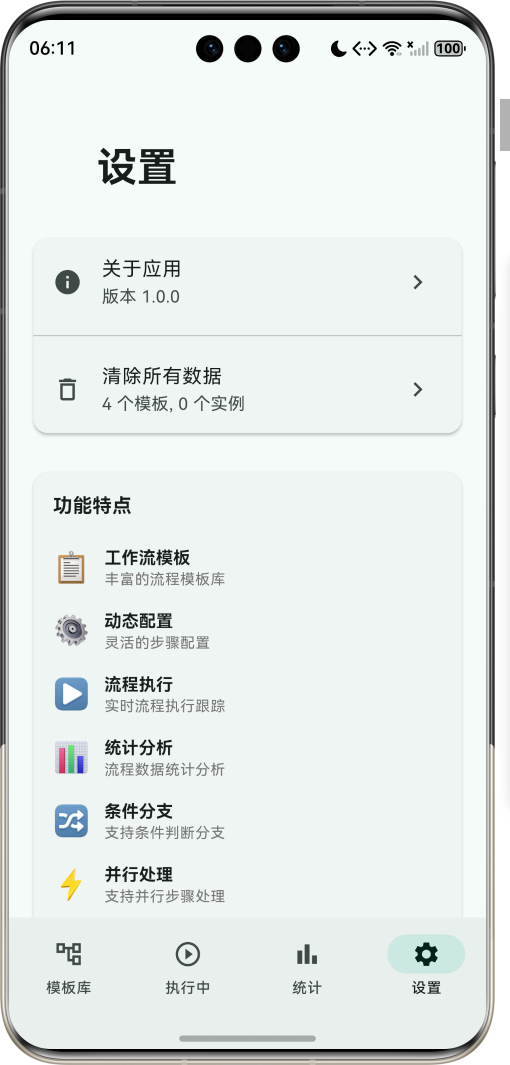
1.1 应用简介
动态工作流是一款专业的工作流程管理应用,提供灵活的工作流模板创建、可视化流程配置、实时流程执行跟踪和完善的流程管理功能。用户可以根据业务需求自定义工作流模板,配置流程步骤,实现高效的业务流程自动化管理。
应用以清新的青绿色为主色调,象征高效与协作。涵盖模板库、执行中、统计分析、设置四大模块。用户可以创建工作流模板、配置步骤类型、执行流程跟踪、统计分析数据,满足企业办公、项目管理、审批流程等多种场景需求。
1.2 核心功能
| 功能模块 | 功能描述 | 实现方式 |
|---|---|---|
| 工作流模板 | 丰富的流程模板资源 | 模板管理 |
| 动态配置 | 灵活的步骤配置 | 可视化编辑 |
| 流程执行 | 实时流程执行跟踪 | 状态管理 |
| 步骤管理 | 多种步骤类型支持 | 类型系统 |
| 条件分支 | 支持条件判断分支 | 分支逻辑 |
| 并行处理 | 支持并行步骤处理 | 并行引擎 |
| 统计分析 | 流程数据统计分析 | 数据分析 |
| 历史记录 | 流程执行历史查看 | 数据存储 |
1.3 步骤类型定义
| 序号 | 类型名称 | Emoji | 图标 | 颜色 | 描述 |
|---|---|---|---|---|---|
| 1 | 开始 | ▶️ | play_arrow | 绿色 | 流程开始节点 |
| 2 | 结束 | ⏹️ | stop | 红色 | 流程结束节点 |
| 3 | 任务 | 📋 | assignment | 蓝色 | 执行任务节点 |
| 4 | 审批 | ✅ | check_circle | 橙色 | 审批确认节点 |
| 5 | 条件 | 🔀 | call_split | 紫色 | 条件判断节点 |
| 6 | 并行 | 🔀 | call_merge | 青色 | 并行处理节点 |
| 7 | 通知 | 🔔 | notifications | 琥珀色 | 消息通知节点 |
| 8 | 延时 | ⏱️ | timer | 靛蓝色 | 延时等待节点 |
1.4 步骤状态定义
| 序号 | 状态名称 | 颜色 | 描述 |
|---|---|---|---|
| 1 | 待执行 | 灰色 | 等待执行的步骤 |
| 2 | 执行中 | 蓝色 | 正在执行的步骤 |
| 3 | 已完成 | 绿色 | 已完成的步骤 |
| 4 | 已跳过 | 橙色 | 被跳过的步骤 |
| 5 | 已失败 | 红色 | 执行失败的步骤 |
1.5 工作流状态定义
| 序号 | 状态名称 | Emoji | 描述 |
|---|---|---|---|
| 1 | 草稿 | 📝 | 模板草稿状态 |
| 2 | 进行中 | ▶️ | 正在执行的工作流 |
| 3 | 已完成 | ✅ | 已完成的工作流 |
| 4 | 已暂停 | ⏸️ | 暂停中的工作流 |
| 5 | 已取消 | ❌ | 已取消的工作流 |
1.6 技术栈
| 技术领域 | 技术选型 | 版本要求 |
|---|---|---|
| 开发框架 | Flutter | >= 3.0.0 |
| 编程语言 | Dart | >= 2.17.0 |
| 设计规范 | Material Design 3 | - |
| 状态管理 | StatefulWidget | - |
| 数据存储 | SharedPreferences | >= 2.0.0 |
| 日期格式 | intl | >= 0.18.0 |
| 目标平台 | 鸿蒙OS / Web | API 21+ |
1.7 项目结构
lib/
└── main_dynamic_workflow.dart
    ├── DynamicWorkflowApp               # 应用入口
    ├── StepType                         # 步骤类型枚举
    ├── StepStatus                       # 步骤状态枚举
    ├── WorkflowStatus                   # 工作流状态枚举
    ├── WorkflowStep                     # 步骤模型
    ├── WorkflowTemplate                 # 工作流模板模型
    ├── WorkflowInstance                 # 工作流实例模型
    ├── DynamicWorkflowHomePage          # 主页面(底部导航)
    ├── _buildTemplatesPage              # 模板库页
    ├── _buildInstancesPage              # 执行中页
    ├── _buildStatisticsPage             # 统计页
    ├── _buildSettingsPage               # 设置页
    ├── TemplateEditorPage               # 模板编辑页
    ├── StepEditorDialog                 # 步骤编辑对话框
    └── WorkflowExecutionPage            # 流程执行页
二、系统架构
2.1 整体架构图
2.2 类图设计
2.3 页面导航流程
2.4 工作流执行流程
三、核心模块设计
3.1 数据模型设计
3.1.1 步骤类型枚举 (StepType)
enum StepType {
  start(label: '开始', icon: Icons.play_arrow, color: Colors.green),
  end(label: '结束', icon: Icons.stop, color: Colors.red),
  task(label: '任务', icon: Icons.assignment, color: Colors.blue),
  approval(label: '审批', icon: Icons.check_circle, color: Colors.orange),
  condition(label: '条件', icon: Icons.call_split, color: Colors.purple),
  parallel(label: '并行', icon: Icons.call_merge, color: Colors.teal),
  notification(label: '通知', icon: Icons.notifications, color: Colors.amber),
  delay(label: '延时', icon: Icons.timer, color: Colors.indigo);

  final String label;
  final IconData icon;
  final Color color;
  const StepType({required this.label, required this.icon, required this.color});
}
3.1.2 步骤状态枚举 (StepStatus)
enum StepStatus {
  pending(label: '待执行', color: Colors.grey),
  running(label: '执行中', color: Colors.blue),
  completed(label: '已完成', color: Colors.green),
  skipped(label: '已跳过', color: Colors.orange),
  failed(label: '已失败', color: Colors.red);

  final String label;
  final Color color;
  const StepStatus({required this.label, required this.color});
}
3.1.3 工作流步骤模型 (WorkflowStep)
class WorkflowStep {
  final String id;
  final String name;
  final StepType type;
  final String description;
  final StepStatus status;
  final List<String> nextSteps;
  final Map<String, dynamic> config;
  final int order;
  final DateTime? startedAt;
  final DateTime? completedAt;

  const WorkflowStep({
    required this.id,
    required this.name,
    required this.type,
    this.description = '',
    this.status = StepStatus.pending,
    this.nextSteps = const [],
    this.config = const {},
    this.order = 0,
    this.startedAt,
    this.completedAt,
  });
}
3.1.4 工作流模板模型 (WorkflowTemplate)
class WorkflowTemplate {
  final String id;
  final String name;
  final String description;
  final String category;
  final List<WorkflowStep> steps;
  final DateTime createdAt;
  final DateTime? updatedAt;
  final int usageCount;

  const WorkflowTemplate({
    required this.id,
    required this.name,
    this.description = '',
    this.category = '通用',
    required this.steps,
    required this.createdAt,
    this.updatedAt,
    this.usageCount = 0,
  });
}
3.1.5 步骤类型分布
3.2 页面结构设计
3.2.1 主页面布局
3.2.2 模板库页结构
3.2.3 模板编辑页结构
3.2.4 流程执行页结构
3.3 流程执行逻辑
3.4 数据存储逻辑
四、UI设计规范
4.1 配色方案
应用以清新的青绿色为主色调,象征高效与协作:
| 颜色类型 | 色值 | 用途 |
|---|---|---|
| 主色 | #00897B (Teal) | 导航、主题元素 |
| 辅助色 | #26A69A | 卡片背景 |
| 第三色 | #4DB6AC | 标签背景 |
| 强调色 | #80CBC4 | 分隔线 |
| 背景色 | #FAFAFA | 页面背景 |
| 卡片背景 | #FFFFFF | 信息卡片 |
| 成功色 | #4CAF50 | 步骤完成 |
| 警告色 | #FF9800 | 步骤跳过 |
4.2 步骤类型配色
| 步骤类型 | 色值 | 视觉效果 |
|---|---|---|
| 开始 | #4CAF50 | 绿色 |
| 结束 | #F44336 | 红色 |
| 任务 | #2196F3 | 蓝色 |
| 审批 | #FF9800 | 橙色 |
| 条件 | #9C27B0 | 紫色 |
| 并行 | #009688 | 青色 |
| 通知 | #FFC107 | 琥珀色 |
| 延时 | #3F51B5 | 靛蓝色 |
4.3 字体规范
| 元素 | 字号 | 字重 | 颜色 |
|---|---|---|---|
| 页面标题 | 24px | Bold | 主色 |
| 模板名称 | 16px | Bold | #000000 |
| 步骤名称 | 14px | Medium | #000000 |
| 提示文字 | 12px | Regular | #666666 |
| 状态标签 | 10px | Regular | 类型色 |
| 进度文字 | 14px | Medium | 主色 |
4.4 组件规范
4.4.1 模板卡片
┌─────────────────────────────────────┐
│  ┌──────┐  请假审批流程             │
│  │  🔀  │  员工请假申请审批工作流   │
│  └──────┘                      ⋮    │
│                                     │
│  [人事管理]  🔀 6个步骤  📊 使用25次 │
│                                     │
│  ┌───┐   ┌───┐   ┌───┐   ┌───┐    │
│  │ ▶ │→ │ 📋│→ │ ✅│→ │ 🔔│→...  │
│  └───┘   └───┘   └───┘   └───┘    │
└─────────────────────────────────────┘
4.4.2 步骤编辑对话框
┌─────────────────────────────────────┐
│  添加步骤                    ×      │
├─────────────────────────────────────┤
│  步骤名称                           │
│  ┌─────────────────────────────┐   │
│  │ 请输入步骤名称               │   │
│  └─────────────────────────────┘   │
│                                     │
│  步骤类型                           │
│  ┌─────────────────────────────┐   │
│  │ 📋 任务                  ▼  │   │
│  └─────────────────────────────┘   │
│                                     │
│  步骤描述                           │
│  ┌─────────────────────────────┐   │
│  │ 请输入步骤描述               │   │
│  └─────────────────────────────┘   │
│                                     │
│  ┌─────────┐     ┌─────────┐       │
│  │  取消   │     │  保存   │       │
│  └─────────┘     └─────────┘       │
└─────────────────────────────────────┘
4.4.3 流程执行页面
┌─────────────────────────────────────┐
│  ← 请假审批流程        ⏸  ❌       │
├─────────────────────────────────────┤
│  ▶ 进行中              进度: 3/6   │
│  ══════════════●░░░░░░░░░░░░░░░░░  │
├─────────────────────────────────────┤
│                                     │
│  ┌────────────────────────────────┐│
│  │  ✓  开始                       ││
│  │     流程开始节点               ││
│  └────────────────────────────────┘│
│                                     │
│  ┌────────────────────────────────┐│
│  │  ✓  填写申请                   ││
│  │     完成于: 10:30              ││
│  └────────────────────────────────┘│
│                                     │
│  ┌────────────────────────────────┐│
│  │  ●  主管审批         ⏭️ [完成] ││
│  │     直属主管审批               ││
│  └────────────────────────────────┘│
│                                     │
└─────────────────────────────────────┘
4.4.4 统计卡片
┌─────────────────────────────────────┐
│  ┌───────────┐  ┌───────────┐      │
│  │     📋    │  │     ▶     │      │
│  │    12     │  │     5     │      │
│  │  模板总数 │  │   执行中  │      │
│  └───────────┘  └───────────┘      │
│                                     │
│  ┌───────────┐  ┌───────────┐      │
│  │     ✅    │  │     📊    │      │
│  │    28     │  │    85     │      │
│  │   已完成  │  │ 总使用次数│      │
│  └───────────┘  └───────────┘      │
└─────────────────────────────────────┘
五、核心功能实现
5.1 模板管理实现
class TemplateManager {
  final List<WorkflowTemplate> _templates = [];

  void addTemplate(WorkflowTemplate template) {
    _templates.insert(0, template);
    _saveTemplates();
  }

  void updateTemplate(WorkflowTemplate template) {
    final index = _templates.indexWhere((t) => t.id == template.id);
    if (index != -1) {
      _templates[index] = template.copyWith(updatedAt: DateTime.now());
      _saveTemplates();
    }
  }

  void deleteTemplate(String id) {
    _templates.removeWhere((t) => t.id == id);
    _saveTemplates();
  }

  List<WorkflowTemplate> search(String query) {
    return _templates.where((t) =>
      t.name.toLowerCase().contains(query.toLowerCase()) ||
      t.description.toLowerCase().contains(query.toLowerCase())
    ).toList();
  }
}
5.2 流程引擎实现
class WorkflowEngine {
  WorkflowInstance createInstance(WorkflowTemplate template) {
    return WorkflowInstance(
      id: DateTime.now().millisecondsSinceEpoch.toString(),
      templateId: template.id,
      templateName: template.name,
      steps: template.steps.map((s) => s.copyWith()).toList(),
      status: WorkflowStatus.active,
      createdAt: DateTime.now(),
    );
  }

  void completeStep(WorkflowInstance instance, int stepIndex) {
    final steps = List<WorkflowStep>.from(instance.steps);
    steps[stepIndex] = steps[stepIndex].copyWith(
      status: StepStatus.completed,
      completedAt: DateTime.now(),
    );

    int nextIndex = stepIndex + 1;
    if (nextIndex < steps.length) {
      steps[nextIndex] = steps[nextIndex].copyWith(
        status: StepStatus.running,
        startedAt: DateTime.now(),
      );
    }

    return instance.copyWith(
      steps: steps,
      currentStepIndex: nextIndex < steps.length ? nextIndex : stepIndex,
      status: nextIndex >= steps.length ? WorkflowStatus.completed : instance.status,
    );
  }
}
5.3 步骤执行器实现
class StepExecutor {
  void execute(WorkflowStep step) {
    switch (step.type) {
      case StepType.task:
        _executeTask(step);
        break;
      case StepType.approval:
        _executeApproval(step);
        break;
      case StepType.notification:
        _executeNotification(step);
        break;
      case StepType.condition:
        _evaluateCondition(step);
        break;
      case StepType.parallel:
        _executeParallel(step);
        break;
      case StepType.delay:
        _executeDelay(step);
        break;
      default:
        break;
    }
  }

  void _executeTask(WorkflowStep step) {
    // 执行任务逻辑
  }

  void _executeApproval(WorkflowStep step) {
    // 执行审批逻辑
  }
}
5.4 数据持久化实现
class DataManager {
  Future<void> saveTemplates(List<WorkflowTemplate> templates) async {
    final prefs = await SharedPreferences.getInstance();
    final json = jsonEncode(templates.map((t) => t.toJson()).toList());
    await prefs.setString('workflow_templates', json);
  }

  Future<List<WorkflowTemplate>> loadTemplates() async {
    final prefs = await SharedPreferences.getInstance();
    final json = prefs.getString('workflow_templates');
    if (json == null) return [];

    final List<dynamic> decoded = jsonDecode(json);
    return decoded.map((t) => WorkflowTemplate.fromJson(t)).toList();
  }

  Future<void> saveInstances(List<WorkflowInstance> instances) async {
    final prefs = await SharedPreferences.getInstance();
    final json = jsonEncode(instances.map((i) => i.toJson()).toList());
    await prefs.setString('workflow_instances', json);
  }
}
5.5 步骤拖拽排序实现
ReorderableListView.builder(
  itemCount: _steps.length,
  onReorder: (oldIndex, newIndex) {
    setState(() {
      if (newIndex > oldIndex) newIndex--;
      final item = _steps.removeAt(oldIndex);
      _steps.insert(newIndex, item);

      for (int i = 0; i < _steps.length; i++) {
        _steps[i] = _steps[i].copyWith(order: i);
      }
    });
  },
  itemBuilder: (context, index) {
    final step = _steps[index];
    return Card(
      key: ValueKey(step.id),
      child: ListTile(
        leading: Icon(step.type.icon, color: step.type.color),
        title: Text(step.name),
        trailing: ReorderableDragStartListener(
          index: index,
          child: Icon(Icons.drag_handle),
        ),
      ),
    );
  },
)
六、交互设计
6.1 模板创建流程
6.2 流程执行流程
6.3 状态转换流程
七、扩展功能规划
7.1 后续版本规划
7.2 功能扩展建议
7.2.1 高级步骤类型
扩展步骤:
- 子流程步骤
- 循环步骤
- Webhook步骤
- 脚本执行步骤
- 数据转换步骤
7.2.2 流程监控
监控功能:
- 实时流程监控
- 超时告警通知
- 性能统计分析
- 异常处理机制
7.2.3 协作功能
协作功能:
- 多人审批流程
- 任务分配管理
- 评论讨论功能
- 操作日志记录
八、注意事项
8.1 开发注意事项
-
流程状态:确保流程状态转换正确,避免状态混乱
-
数据持久化:及时保存流程数据,防止数据丢失
-
性能优化:大量步骤时注意列表渲染性能
-
用户体验:提供清晰的操作提示和状态反馈
-
错误处理:妥善处理流程执行中的异常情况
8.2 常见问题
| 问题 | 原因 | 解决方案 |
|---|---|---|
| 步骤无法完成 | 步骤状态异常 | 检查步骤状态配置 |
| 流程卡住不动 | 条件判断错误 | 检查条件分支配置 |
| 数据保存失败 | 存储空间不足 | 清理缓存数据 |
| 进度显示错误 | 步骤索引错误 | 重新计算步骤索引 |
| 模板加载慢 | 模板数据过大 | 优化模板结构 |
8.3 使用技巧
📋 动态工作流使用技巧 📋
模板创建
- 合理规划流程步骤顺序
- 设置清晰的步骤描述
- 选择合适的步骤类型
- 添加必要的审批节点
流程执行
- 按顺序完成各步骤
- 及时处理待办任务
- 合理使用跳过功能
- 注意流程进度跟踪
流程管理
- 定期清理已完成流程
- 按分类组织模板
- 分析流程执行效率
- 优化流程瓶颈环节
九、运行说明
9.1 环境要求
| 环境 | 版本要求 |
|---|---|
| Flutter SDK | >= 3.0.0 |
| Dart SDK | >= 2.17.0 |
| 鸿蒙OS | API 21+ |
| Web浏览器 | Chrome 90+ |
9.2 运行命令
# 查看可用设备
flutter devices

# 运行到Web服务器
flutter run -d web-server -t lib/main_dynamic_workflow.dart --web-port 8146

# 运行到鸿蒙设备
flutter run -d 127.0.0.1:5555 lib/main_dynamic_workflow.dart

# 代码分析
flutter analyze lib/main_dynamic_workflow.dart
十、总结
动态工作流应用是一款专业的工作流程管理工具,提供灵活的工作流模板创建、可视化流程配置、实时流程执行跟踪和完善的流程管理功能。应用支持8种步骤类型,包括开始、结束、任务、审批、条件、并行、通知、延时,满足各种业务流程需求。
核心功能涵盖工作流模板、动态配置、流程执行、步骤管理、条件分支、并行处理、统计分析、历史记录八大模块。用户可以根据业务需求自定义工作流模板,通过可视化界面配置步骤属性,执行流程跟踪,实现高效的业务流程自动化管理。
应用采用 Material Design 3 设计规范,以清新的青绿色为主色调,象征高效与协作。通过本应用,希望能够为用户提供便捷的工作流管理解决方案,提升业务流程效率。
动态工作流——灵活高效的流程管理解决方案

腾讯云面向开发者汇聚海量精品云计算使用和开发经验,营造开放的云计算技术生态圈。
更多推荐
 10
10 0
0- 0


 已为社区贡献20条内容

所有评论(0)