Flutter for OpenHarmony 剧本杀组队App实战:店铺列表与详情实现
引言
店铺模块是用户寻找线下剧本杀体验馆的重要功能。通过店铺列表,用户可以快速发现附近的店铺,了解店铺的基本信息、评分和价格。店铺详情页面提供了更详细的信息,包括店内剧本、用户评价和预订功能。本篇将详细讲解如何实现一个功能完善的店铺列表和店铺详情页面。
功能需求分析
店铺列表功能
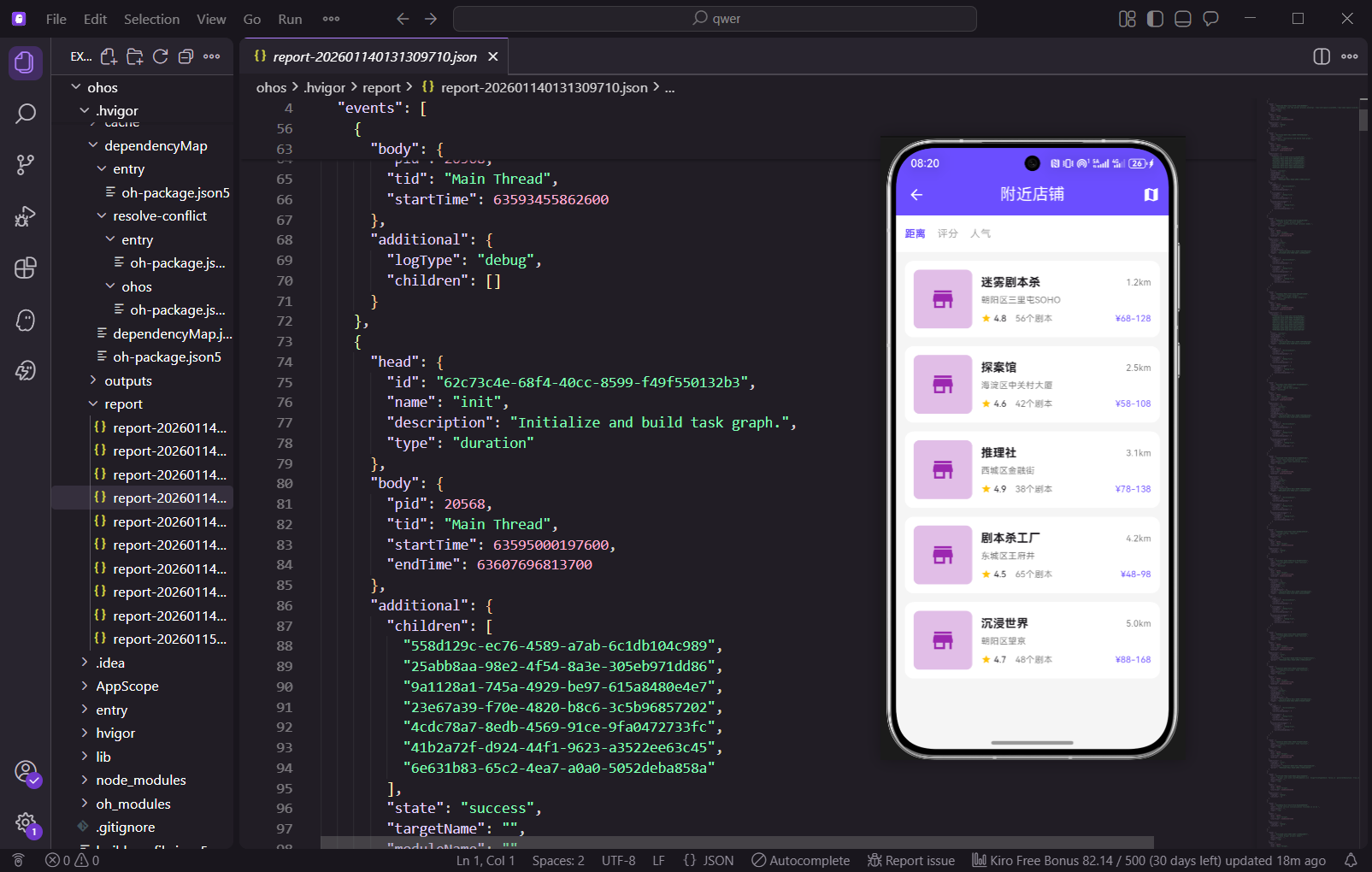
店铺列表页面包含以下核心功能:
- 排序选项:支持按距离、评分、人气等多种方式排序
- 店铺卡片列表:展示店铺的基本信息,包括名称、距离、评分、地址、剧本数量和价格范围
- 地图模式:提供地图视图,用户可以在地图上查看店铺位置
- 搜索功能:用户可以搜索特定的店铺
- 筛选功能:用户可以按照评分、价格等条件筛选店铺
店铺详情功能
店铺详情页面包含以下内容:
- 店铺基本信息:名称、地址、电话、营业时间等
- 店内剧本列表:展示店内所有可预订的剧本
- 用户评价:显示其他用户对店铺的评价和反馈
- 预订功能:用户可以直接预订店铺的剧本
核心代码实现
第一部分:店铺数据模型
import 'package:flutter/material.dart';
import 'package:get/get.dart';

/// 店铺模型
class Store {
  final String id;
  final String name;
  final String address;
  final String phone;
  final double distance;
  final double rating;
  final int reviewCount;
  final int scriptCount;
  final String priceRange;
  final List<String> tags;
  final String? imageUrl;
  final double latitude;
  final double longitude;

  Store({
    required this.id,
    required this.name,
    required this.address,
    required this.phone,
    required this.distance,
    required this.rating,
    required this.reviewCount,
    required this.scriptCount,
    required this.priceRange,
    required this.tags,
    this.imageUrl,
    required this.latitude,
    required this.longitude,
  });
Store类定义了店铺的基本属性。id用于唯一标识店铺,name是店铺名称,address和phone分别是店铺地址和电话。distance表示用户到店铺的距离,rating是店铺的评分,reviewCount是评价数量。scriptCount表示店铺内的剧本数量,priceRange是价格范围。tags用于存储店铺的标签(如"热门"、"新店"等),latitude和longitude用于地图定位。
  /// 获取评分等级
  String getRatingLevel() {
    if (rating >= 4.8) return '优秀';
    if (rating >= 4.5) return '很好';
    if (rating >= 4.0) return '好';
    return '一般';
  }
}

/// 店铺剧本模型
class StoreScript {
  final String id;
  final String name;
  final String type;
  final int players;
  final int duration;
  final double price;
  final double rating;
  final String difficulty;

  StoreScript({
    required this.id,
    required this.name,
    required this.type,
    required this.players,
    required this.duration,
    required this.price,
    required this.rating,
    required this.difficulty,
  });
}
getRatingLevel()方法根据评分返回对应的等级文字。这样可以在UI中直观地显示店铺的评分等级。StoreScript类定义了店铺内剧本的属性。id是剧本的唯一标识,name是剧本名称,type是剧本类型(如"情感本"、"推理本"等)。players表示剧本需要的人数,duration是剧本的时长(分钟),price是剧本的价格,rating是剧本的评分,difficulty是难度等级。
/// 店铺评价模型
class StoreReview {
  final String id;
  final String userId;
  final String userName;
  final String userAvatar;
  final double rating;
  final String content;
  final DateTime createdTime;
  final int likes;

  StoreReview({
    required this.id,
    required this.userId,
    required this.userName,
    required this.userAvatar,
    required this.rating,
    required this.content,
    required this.createdTime,
    required this.likes,
  });
}
StoreReview类定义了用户对店铺的评价。id是评价的唯一标识,userId和userName分别是评价者的ID和名称,userAvatar是评价者的头像。rating是评分(1-5星),content是评价内容,createdTime是评价创建时间,likes是评价获得的点赞数。这些属性为评价列表的展示提供了完整的数据支持。
第二部分:店铺列表页面
class StoreListPage extends StatefulWidget {
const StoreListPage({super.key});
State<StoreListPage> createState() => _StoreListPageState();
}
class _StoreListPageState extends State<StoreListPage> {
/// 主题色 - 紫色
static const Color _primaryColor = Color(0xFF6B4EFF);
/// 当前排序方式
String _sortBy = '距离';
final List<String> _sortOptions = ['距离', '评分', '人气'];
/// 店铺列表数据
final List<Store> _stores = [
Store(
id: '1',
name: '迷雾剧本杀',
address: '朝阳区三里屯SOHO',
phone: '010-12345678',
distance: 1.2,
rating: 4.8,
reviewCount: 256,
scriptCount: 56,
priceRange: '68-128',
tags: ['热门', '新店'],
latitude: 39.9042,
longitude: 116.4074,
),
StoreListPage是一个StatefulWidget,用于展示店铺列表。_primaryColor定义了应用的主题色紫色。_sortBy记录当前的排序方式,_sortOptions列表包含所有可用的排序选项。_stores列表存储了所有的店铺数据。
每个Store对象包含了店铺的完整信息。第一个店铺"迷雾剧本杀"位于朝阳区三里屯SOHO,距离用户1.2公里,评分4.8分,有256条评价,店内有56个剧本,价格范围是68-128元。
Store(
id: '2',
name: '探案馆',
address: '海淀区中关村大厦',
phone: '010-87654321',
distance: 2.5,
rating: 4.6,
reviewCount: 189,
scriptCount: 42,
priceRange: '58-108',
tags: ['推荐'],
latitude: 39.9075,
longitude: 116.3972,
),
Store(
id: '3',
name: '推理社',
address: '西城区金融街',
phone: '010-11223344',
distance: 3.1,
rating: 4.9,
reviewCount: 312,
scriptCount: 38,
priceRange: '78-138',
tags: ['高评分'],
latitude: 39.9010,
longitude: 116.3632,
),
];
Widget build(BuildContext context) {
return Scaffold(
appBar: AppBar(
title: const Text('附近店铺'),
backgroundColor: _primaryColor,
elevation: 0,
foregroundColor: Colors.white,
actions: [
IconButton(
icon: const Icon(Icons.map),
onPressed: () => _showMapView(),
),
],
),
这里定义了另外两个店铺。"探案馆"距离2.5公里,评分4.6分,有42个剧本。"推理社"距离3.1公里,评分4.9分,是评分最高的店铺,有38个剧本。
build方法构建了页面的主体。AppBar设置了页面标题"附近店铺",并在右侧添加了一个地图按钮,用户可以点击切换到地图视图。elevation设置为0使AppBar没有阴影,foregroundColor设置为白色使文字和图标为白色。
      body: Column(
        children: [
          _buildSortBar(),
          Expanded(
            child: ListView.builder(
              padding: const EdgeInsets.all(12),
              itemCount: _stores.length,
              itemBuilder: (context, index) => _buildStoreCard(_stores[index]),
            ),
          ),
        ],
      ),
    );
  }

  /// 构建排序栏
  Widget _buildSortBar() {
    return Container(
      height: 50,
      color: Colors.white,
      padding: const EdgeInsets.symmetric(horizontal: 12),
      child: Row(
        children: _sortOptions.map((option) => Padding(
          padding: const EdgeInsets.only(right: 16),
          child: GestureDetector(
            onTap: () => setState(() => _sortBy = option),
            child: Text(
              option,
              style: TextStyle(
                color: _sortBy == option ? _primaryColor : Colors.grey,
                fontWeight: _sortBy == option ? FontWeight.bold : FontWeight.normal,
                fontSize: 14,
              ),
            ),
          ),
        )).toList(),
      ),
    );
  }
页面body包含两部分:排序栏和店铺列表。排序栏使用_buildSortBar()方法构建,店铺列表使用ListView.builder构建,这样可以高效地渲染列表。
_buildSortBar()方法构建了排序选项栏。使用Container设置背景色为白色,高度为50。通过map方法遍历_sortOptions列表,为每个排序选项创建一个可点击的文本。当用户点击某个选项时,通过setState更新_sortBy,并改变该选项的颜色和字体粗细。
  /// 构建店铺卡片
  Widget _buildStoreCard(Store store) {
    return GestureDetector(
      onTap: () => _navigateToStoreDetail(store),
      child: Container(
        margin: const EdgeInsets.only(bottom: 12),
        padding: const EdgeInsets.all(12),
        decoration: BoxDecoration(
          color: Colors.white,
          borderRadius: BorderRadius.circular(12),
          boxShadow: [
            BoxShadow(
              color: Colors.black.withOpacity(0.05),
              blurRadius: 10,
              offset: const Offset(0, 2),
            ),
          ],
        ),
        child: Row(
          children: [
            // 店铺图标
            Container(
              width: 80,
              height: 80,
              decoration: BoxDecoration(
                color: _primaryColor.withOpacity(0.1),
                borderRadius: BorderRadius.circular(8),
              ),
              child: const Icon(
                Icons.store,
                size: 36,
                color: _primaryColor,
              ),
            ),
_buildStoreCard()方法构建了店铺卡片。使用GestureDetector包装整个卡片,使其可以响应点击事件。当用户点击卡片时,调用_navigateToStoreDetail()方法导航到店铺详情页面。
卡片使用Container包装,设置了白色背景、圆角和阴影效果。卡片采用左侧图标加右侧信息的布局。左侧是一个80x80的容器,背景色是主题色的浅色版本,中间显示一个店铺图标。
            const SizedBox(width: 12),
            // 店铺信息
            Expanded(
              child: Column(
                crossAxisAlignment: CrossAxisAlignment.start,
                children: [
                  Row(
                    children: [
                      Expanded(
                        child: Text(
                          store.name,
                          style: const TextStyle(
                            fontWeight: FontWeight.bold,
                            fontSize: 16,
                          ),
                        ),
                      ),
                      Text(
                        '${store.distance}km',
                        style: TextStyle(
                          color: Colors.grey[600],
                          fontSize: 12,
                        ),
                      ),
                    ],
                  ),
                  const SizedBox(height: 4),
                  Text(
                    store.address,
                    style: TextStyle(
                      color: Colors.grey[600],
                      fontSize: 12,
                    ),
                    maxLines: 1,
                    overflow: TextOverflow.ellipsis,
                  ),
右侧使用Expanded包装一个Column,用于显示店铺的详细信息。第一行显示店铺名称和距离。店铺名称使用粗体16号字体,距离显示在右侧,使用灰色12号字体。
第二行显示店铺地址,使用灰色字体,maxLines设置为1,overflow设置为ellipsis,这样当地址过长时会显示省略号。
                  const SizedBox(height: 8),
                  Row(
                    children: [
                      const Icon(Icons.star, size: 14, color: Colors.amber),
                      Text(
                        ' ${store.rating}',
                        style: const TextStyle(fontSize: 12),
                      ),
                      const SizedBox(width: 12),
                      Text(
                        '${store.scriptCount}个剧本',
                        style: TextStyle(
                          color: Colors.grey[600],
                          fontSize: 12,
                        ),
                      ),
                      const Spacer(),
                      Text(
                        '¥${store.priceRange}',
                        style: const TextStyle(
                          color: _primaryColor,
                          fontSize: 12,
                          fontWeight: FontWeight.bold,
                        ),
                      ),
                    ],
                  ),
                ],
              ),
            ),
          ],
        ),
      ),
    );
  }
第三行显示店铺的评分、剧本数量和价格范围。评分前面有一个金色的星标图标,剧本数量显示在中间,价格范围显示在右侧,使用主题色和粗体强调。
_showMapView()方法用于显示地图视图,这里使用Get.snackbar显示提示信息。实际项目中应该导航到地图页面。
_navigateToStoreDetail()方法用于导航到店铺详情页面,使用GetX框架的Get.to()方法进行导航,并传递store对象作为参数。
第三部分:店铺详情页面
class StoreDetailPage extends StatefulWidget {
final Store store;
const StoreDetailPage({
super.key,
required this.store,
});
State<StoreDetailPage> createState() => _StoreDetailPageState();
}
class _StoreDetailPageState extends State<StoreDetailPage>
with SingleTickerProviderStateMixin {
/// 主题色
static const Color _primaryColor = Color(0xFF6B4EFF);
/// Tab控制器
late TabController _tabController;
/// 店铺剧本列表
final List<StoreScript> _scripts = [
StoreScript(
id: '1',
name: '年轮',
type: '情感本',
players: 6,
duration: 120,
price: 88,
rating: 4.8,
difficulty: '中等',
),
StoreScript(
id: '2',
name: '古木吟',
type: '恐怖本',
players: 6,
duration: 150,
price: 98,
rating: 4.6,
difficulty: '困难',
),
];
StoreDetailPage是一个StatefulWidget,用于显示店铺的详细信息。通过构造函数接收一个Store对象作为参数。使用SingleTickerProviderStateMixin来支持TabController的动画效果。
_tabController用于管理两个Tab的切换:剧本列表和用户评价。_scripts列表存储了店铺内的所有剧本。每个StoreScript对象包含了剧本的完整信息,包括名称、类型、人数、时长、价格、评分和难度。
/// 店铺评价列表
final List<StoreReview> _reviews = [
StoreReview(
id: '1',
userId: 'user1',
userName: '张三',
userAvatar: 'assets/avatars/1.jpg',
rating: 5,
content: '环境很好,剧本也很有趣,推荐!',
createdTime: DateTime.now().subtract(const Duration(days: 2)),
likes: 12,
),
];
void initState() {
super.initState();
_tabController = TabController(length: 2, vsync: this);
}
void dispose() {
_tabController.dispose();
super.dispose();
}
Widget build(BuildContext context) {
return Scaffold(
appBar: AppBar(
title: const Text('店铺详情'),
backgroundColor: _primaryColor,
elevation: 0,
foregroundColor: Colors.white,
),
body: SingleChildScrollView(
child: Column(
crossAxisAlignment: CrossAxisAlignment.start,
children: [
_buildStoreHeader(),
_buildStoreInfo(),
_buildTabBar(),
_buildTabContent(),
],
),
),
);
}
_reviews列表存储了用户对店铺的评价。每个StoreReview对象包含了评价者的信息、评分、评价内容、创建时间和点赞数。
在initState中初始化TabController,指定有2个Tab。在dispose中释放TabController资源,防止内存泄漏。
build方法构建了页面的主体。使用SingleChildScrollView使整个页面可以滚动。页面包含四个主要部分:店铺头部、店铺信息、Tab栏和Tab内容。
  /// 构建信息行
  Widget _buildInfoRow(IconData icon, String text) {
    return Row(
      children: [
        Icon(icon, size: 18, color: _primaryColor),
        const SizedBox(width: 8),
        Expanded(
          child: Text(
            text,
            style: const TextStyle(fontSize: 14),
          ),
        ),
      ],
    );
  }
_buildInfoRow()方法是一个辅助方法,用于构建信息行。每行包含一个图标和文本,图标使用主题色。
_buildTabBar()方法构建了Tab栏。包含两个Tab:“剧本列表"和"用户评价”。指示器颜色和标签颜色都使用主题色
  /// 构建Tab栏
  Widget _buildTabBar() {
    return Container(
      color: Colors.white,
      child: TabBar(
        controller: _tabController,
        indicatorColor: _primaryColor,
        labelColor: _primaryColor,
        unselectedLabelColor: Colors.grey,
        tabs: const [
          Tab(text: '剧本列表'),
          Tab(text: '用户评价'),
        ],
      ),
    );
  }

  /// 构建Tab内容
  Widget _buildTabContent() {
    return SizedBox(
      height: 400,
      child: TabBarView(
        controller: _tabController,
        children: [
          _buildScriptList(),
          _buildReviewList(),
        ],
      ),
    );
  }
_buildTabContent()方法构建了Tab内容区域。使用SizedBox设置高度为400,TabBarView包含两个子视图:剧本列表和评价列表。
_bookStore()方法用于处理预订操作。这里使用Get.snackbar显示提示信息,实际项目中应该导航到预订页面。
总结
通过本篇文章的学习,我们完成了店铺列表和店铺详情页面的实现。用户可以按距离、评分等排序查找店铺,查看店铺详细信息和店内剧本。这个功能为用户提供了便捷的店铺发现和预订体验。
在实际项目中,应该根据具体需求进一步完善这个功能,添加更多的业务逻辑和用户交互。例如,可以添加店铺收藏功能、店铺分享功能、店铺评价功能等。通过不断优化和改进,可以创建一个高效、易用的店铺模块。
欢迎加入开源鸿蒙跨平台社区:https://openharmonycrossplatform.csdn.net

腾讯云面向开发者汇聚海量精品云计算使用和开发经验,营造开放的云计算技术生态圈。
更多推荐
 8
8 0
0- 0


 已为社区贡献32条内容

所有评论(0)