Flutter for OpenHarmony 第三方库实战:应用生命周期检测 —— flutter_lifecycle_detector_ohos
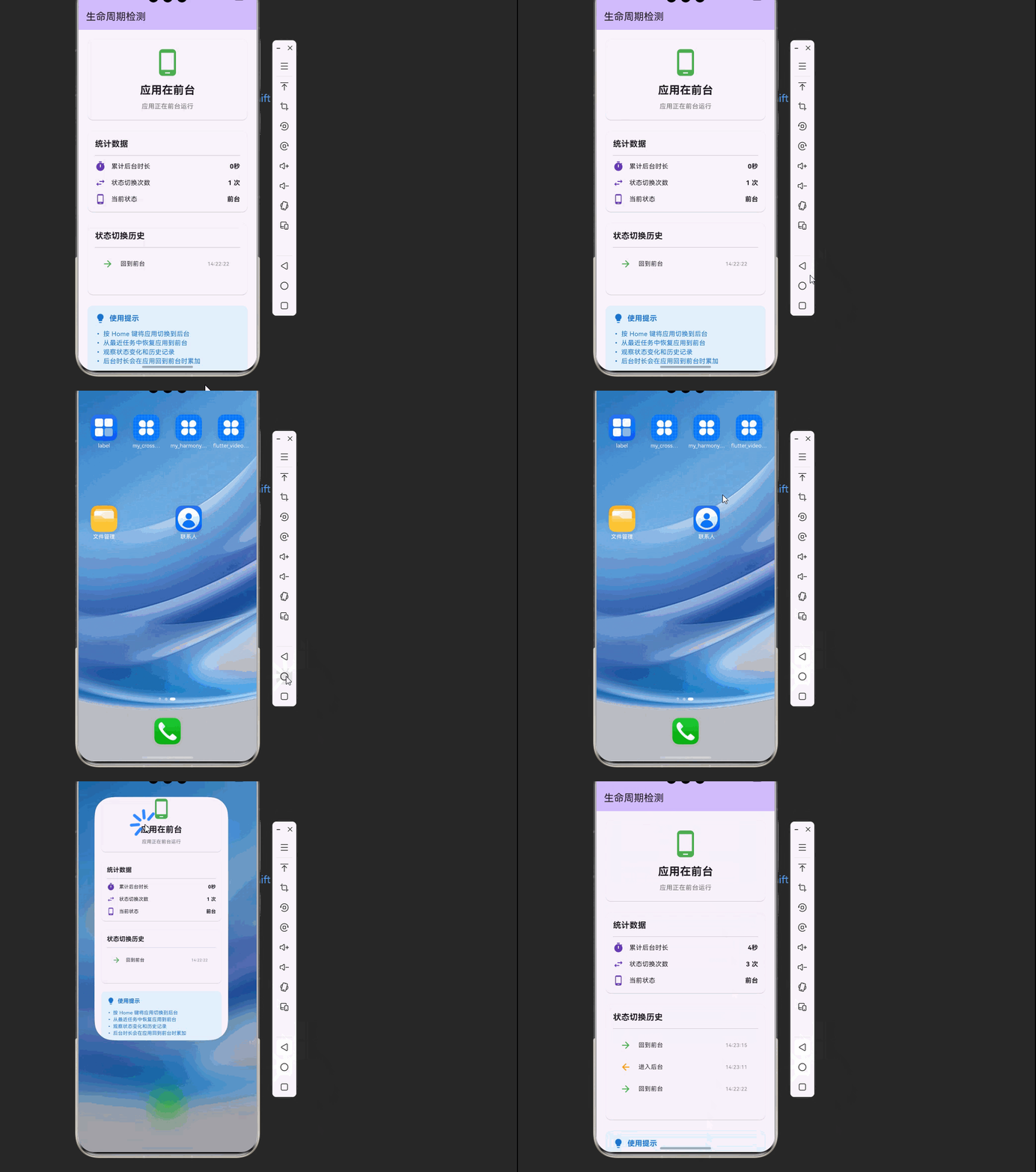
在移动应用开发中,监听应用的前后台切换状态是一个非常重要的能力。当应用进入后台时,我们可能需要暂停视频播放、停止定位服务、保存用户数据;当应用回到前台时,需要刷新数据、恢复播放、检查更新。本文将构建一个完整的生命周期检测应用,展示如何在不同场景下利用生命周期状态进行资源管理。🔄 前后台状态监听:实时检测应用是否处于后台,通过事件流接收状态变化通知。这是最核心的功能,所有其他功能都建立在这个基础上
欢迎加入开源鸿蒙跨平台社区:https://openharmonycrossplatform.csdn.net
🎯 欢迎来到 Flutter for OpenHarmony 第三方库实战系列!本文将带你实现应用生命周期检测功能,通过
flutter_lifecycle_detector_ohos库监听应用的前后台切换状态,实现智能的资源管理和用户体验优化。
🚀 项目概述:我们要构建什么?
在移动应用开发中,监听应用的前后台切换状态是一个非常重要的能力。当应用进入后台时,我们可能需要暂停视频播放、停止定位服务、保存用户数据;当应用回到前台时,需要刷新数据、恢复播放、检查更新。本文将构建一个完整的生命周期检测应用,展示如何在不同场景下利用生命周期状态进行资源管理。
本文将构建的应用具备以下核心特性:
🔄 前后台状态监听:实时检测应用是否处于后台,通过事件流接收状态变化通知。这是最核心的功能,所有其他功能都建立在这个基础上。
⏱️ 后台计时器:记录应用在后台停留的时间,当超过一定时间后执行特定操作。这在很多应用中都有实际用途,比如银行App在后台超过一定时间后要求重新登录。
📊 状态历史记录:记录应用的前后台切换历史,帮助开发者分析用户行为和应用使用模式。
🔔 智能提醒:当应用从后台回到前台时,根据后台停留时间决定是否显示欢迎回来的提示或数据刷新提醒。
🎯 核心功能一览
| 功能模块 | 实现库 | 核心能力 |
|---|---|---|
| 🔄 状态监听 | flutter_lifecycle_detector_ohos | 前后台切换事件流 |
| ⏱️ 后台计时 | 自定义实现 | 记录后台停留时间 |
| 📊 状态历史 | 自定义实现 | 记录状态变化历史 |
| 🔔 智能提醒 | 自定义实现 | 根据后台时长决定行为 |
💡 为什么选择 flutter_lifecycle_detector_ohos?
1️⃣ 简洁的 API 设计
该库采用单例模式和 Stream 事件流的设计,使用非常简单。只需调用 FlutterLifecycleDetector().onBackgroundChange.listen() 即可监听状态变化,无需复杂的配置。
2️⃣ OpenHarmony 原生支持
该库专门针对 OpenHarmony 平台进行了适配,使用 OpenHarmony ApplicationContext 提供的能力订阅进程内 UIAbility 生命周期变化,确保在鸿蒙平台上稳定可靠。
3️⃣ 实时响应
通过 EventChannel 实现原生到 Flutter 的实时通信,当应用前后台切换时能够立即收到通知,延迟极低。
4️⃣ 广播模式
使用 StreamController.broadcast() 创建广播流,允许多个组件同时监听生命周期状态变化,非常适合复杂应用架构。
📦 第一步:环境配置
1.1 添加依赖
在开始编码之前,我们需要先配置项目的依赖。打开项目根目录下的 pubspec.yaml 文件,在 dependencies 部分添加以下内容。
dependencies:
  flutter:
    sdk: flutter

  # 应用生命周期检测(OpenHarmony 适配版本)
  flutter_lifecycle_detector_ohos:
    git:
      url: https://atomgit.com/openharmony-sig/fluttertpc_flutter_lifecycle_detector.git
      path: ohos
      ref: master
1.2 权限配置
生命周期检测不需要额外的权限配置。该库通过 OpenHarmony 的 ApplicationContext 订阅 UIAbility 生命周期变化,这是应用内部的机制,无需用户授权。
1.3 执行依赖安装
配置完成后,在项目根目录执行以下命令来下载并安装所有依赖包。
flutter pub get
📱 第二步:生命周期检测详解
2.1 生命周期状态说明
在移动应用中,应用有两种基本状态:
| 状态 | 说明 | 典型操作 |
|---|---|---|
| 前台 | 应用界面可见,用户正在与应用交互 | 恢复播放、刷新数据、启动定位 |
| 后台 | 应用被最小化或用户切换到其他应用 | 暂停播放、停止定位、保存数据 |
2.2 核心 API 介绍
FlutterLifecycleDetector 类
该类采用单例模式,确保全局只有一个实例在监听生命周期变化。
class FlutterLifecycleDetector {
  // 单例实例
  static final _singleton = FlutterLifecycleDetector._();

  // 工厂构造函数,返回单例
  factory FlutterLifecycleDetector() {
    _lifeCycleListener();
    return _singleton;
  }

  // 私有构造函数
  FlutterLifecycleDetector._();

  // 状态变化事件流
  Stream<bool> get onBackgroundChange;

  // 关闭流
  void cancel();
}
onBackgroundChange 流
返回一个 Stream<bool> 类型的事件流,当应用状态变化时会发出新的事件:
true:应用进入后台false:应用回到前台
2.3 生命周期服务实现
下面的 LifecycleService 类封装了生命周期管理的逻辑,提供更丰富的功能。
import 'dart:async';
import 'package:flutter/material.dart';
import 'package:flutter_lifecycle_detector_ohos/flutter_lifecycle_detector_ohos.dart';

class LifecycleRecord {
  final bool isBackground;
  final DateTime timestamp;

  LifecycleRecord({
    required this.isBackground,
    required this.timestamp,
  });
}

class LifecycleService extends ChangeNotifier {
  static final LifecycleService _instance = LifecycleService._internal();
  factory LifecycleService() => _instance;
  LifecycleService._internal();

  bool _isBackground = false;
  DateTime? _backgroundStartTime;
  Duration _totalBackgroundTime = Duration.zero;
  final List<LifecycleRecord> _history = [];
  StreamSubscription<bool>? _subscription;

  bool get isBackground => _isBackground;
  Duration get totalBackgroundTime => _totalBackgroundTime;
  List<LifecycleRecord> get history => List.unmodifiable(_history);
  Duration? get currentBackgroundDuration {
    if (!_isBackground || _backgroundStartTime == null) return null;
    return DateTime.now().difference(_backgroundStartTime!);
  }

  void initialize() {
    _subscription = FlutterLifecycleDetector().onBackgroundChange.listen((isBackground) {
      _isBackground = isBackground;

      _history.add(LifecycleRecord(
        isBackground: isBackground,
        timestamp: DateTime.now(),
      ));

      if (_history.length > 100) {
        _history.removeAt(0);
      }

      if (isBackground) {
        _backgroundStartTime = DateTime.now();
        _onEnterBackground();
      } else {
        if (_backgroundStartTime != null) {
          final duration = DateTime.now().difference(_backgroundStartTime!);
          _totalBackgroundTime += duration;
        }
        _backgroundStartTime = null;
        _onEnterForeground();
      }

      notifyListeners();
    });
  }

  void _onEnterBackground() {
    debugPrint('应用进入后台');
  }

  void _onEnterForeground() {
    debugPrint('应用回到前台');
  }

  String get statusText => _isBackground ? '后台' : '前台';

  Color get statusColor => _isBackground ? Colors.orange : Colors.green;

  IconData get statusIcon => _isBackground
      ? Icons.minimize
      : Icons.phone_android;

  String get formattedBackgroundTime {
    if (_totalBackgroundTime.inSeconds == 0) return '0秒';
    if (_totalBackgroundTime.inMinutes == 0) {
      return '${_totalBackgroundTime.inSeconds}秒';
    }
    if (_totalBackgroundTime.inHours == 0) {
      return '${_totalBackgroundTime.inMinutes}分${_totalBackgroundTime.inSeconds % 60}秒';
    }
    return '${_totalBackgroundTime.inHours}时${_totalBackgroundTime.inMinutes % 60}分';
  }

  void dispose() {
    _subscription?.cancel();
  }
}
🎨 第三步:完整示例代码
下面是一个完整的生命周期检测演示应用,包含状态显示、后台计时、历史记录等功能。
import 'dart:async';
import 'package:flutter/material.dart';
import 'package:flutter_lifecycle_detector_ohos/flutter_lifecycle_detector_ohos.dart';
void main() {
WidgetsFlutterBinding.ensureInitialized();
runApp(const MyApp());
}
class MyApp extends StatelessWidget {
const MyApp({super.key});
Widget build(BuildContext context) {
return MaterialApp(
title: 'Lifecycle Detector Demo',
theme: ThemeData(
colorScheme: ColorScheme.fromSeed(seedColor: Colors.deepPurple),
useMaterial3: true,
),
home: const LifecyclePage(),
debugShowCheckedModeBanner: false,
);
}
}
class LifecyclePage extends StatefulWidget {
const LifecyclePage({super.key});
State<LifecyclePage> createState() => _LifecyclePageState();
}
class _LifecyclePageState extends State<LifecyclePage> {
final LifecycleService _service = LifecycleService();
StreamSubscription<bool>? _subscription;
bool _isBackground = false;
DateTime? _backgroundStartTime;
Duration _totalBackgroundTime = Duration.zero;
final List<LifecycleRecord> _history = [];
Timer? _updateTimer;
void initState() {
super.initState();
_initLifecycleListener();
_startUpdateTimer();
}
void _initLifecycleListener() {
_subscription = FlutterLifecycleDetector().onBackgroundChange.listen((isBackground) {
setState(() {
_isBackground = isBackground;
_history.insert(0, LifecycleRecord(
isBackground: isBackground,
timestamp: DateTime.now(),
));
if (_history.length > 20) {
_history.removeLast();
}
if (isBackground) {
_backgroundStartTime = DateTime.now();
} else {
if (_backgroundStartTime != null) {
_totalBackgroundTime += DateTime.now().difference(_backgroundStartTime!);
}
_backgroundStartTime = null;
}
});
});
}
void _startUpdateTimer() {
_updateTimer = Timer.periodic(const Duration(seconds: 1), (_) {
if (_isBackground && _backgroundStartTime != null) {
setState(() {});
}
});
}
String _formatDuration(Duration duration) {
if (duration.inSeconds == 0) return '0秒';
if (duration.inMinutes == 0) {
return '${duration.inSeconds}秒';
}
if (duration.inHours == 0) {
return '${duration.inMinutes}分${duration.inSeconds % 60}秒';
}
return '${duration.inHours}时${duration.inMinutes % 60}分${duration.inSeconds % 60}秒';
}
String _formatTime(DateTime time) {
return '${time.hour.toString().padLeft(2, '0')}:${time.minute.toString().padLeft(2, '0')}:${time.second.toString().padLeft(2, '0')}';
}
void dispose() {
_subscription?.cancel();
_updateTimer?.cancel();
super.dispose();
}
Widget build(BuildContext context) {
return Scaffold(
appBar: AppBar(
title: const Text('生命周期检测'),
backgroundColor: Theme.of(context).colorScheme.inversePrimary,
),
body: SingleChildScrollView(
padding: const EdgeInsets.all(16),
child: Column(
crossAxisAlignment: CrossAxisAlignment.stretch,
children: [
_buildStatusCard(),
const SizedBox(height: 16),
_buildStatsCard(),
const SizedBox(height: 16),
_buildHistoryCard(),
const SizedBox(height: 16),
_buildTipsCard(),
],
),
),
);
}
Widget _buildStatusCard() {
return Card(
child: Padding(
padding: const EdgeInsets.all(20),
child: Column(
children: [
Icon(
_isBackground ? Icons.minimize : Icons.phone_android,
size: 64,
color: _isBackground ? Colors.orange : Colors.green,
),
const SizedBox(height: 12),
Text(
_isBackground ? '应用在后台' : '应用在前台',
style: const TextStyle(
fontSize: 24,
fontWeight: FontWeight.bold,
),
),
const SizedBox(height: 8),
Text(
_isBackground
? '当前后台时长: ${_formatDuration(DateTime.now().difference(_backgroundStartTime ?? DateTime.now()))}'
: '应用正在前台运行',
style: TextStyle(
fontSize: 14,
color: Colors.grey[600],
),
),
],
),
),
);
}
Widget _buildStatsCard() {
return Card(
child: Padding(
padding: const EdgeInsets.all(16),
child: Column(
crossAxisAlignment: CrossAxisAlignment.start,
children: [
const Text(
'统计数据',
style: TextStyle(fontSize: 18, fontWeight: FontWeight.bold),
),
const Divider(height: 24),
_buildStatRow(
'累计后台时长',
_formatDuration(_totalBackgroundTime),
Icons.timer,
),
const SizedBox(height: 12),
_buildStatRow(
'状态切换次数',
'${_history.length} 次',
Icons.swap_horiz,
),
const SizedBox(height: 12),
_buildStatRow(
'当前状态',
_isBackground ? '后台' : '前台',
_isBackground ? Icons.minimize : Icons.phone_android,
),
],
),
),
);
}
Widget _buildStatRow(String label, String value, IconData icon) {
return Row(
children: [
Icon(icon, size: 24, color: Colors.deepPurple),
const SizedBox(width: 12),
Expanded(
child: Text(label, style: const TextStyle(fontSize: 14)),
),
Text(
value,
style: const TextStyle(fontSize: 14, fontWeight: FontWeight.bold),
),
],
);
}
Widget _buildHistoryCard() {
return Card(
child: Padding(
padding: const EdgeInsets.all(16),
child: Column(
crossAxisAlignment: CrossAxisAlignment.start,
children: [
const Text(
'状态切换历史',
style: TextStyle(fontSize: 18, fontWeight: FontWeight.bold),
),
const Divider(height: 24),
if (_history.isEmpty)
const Center(
child: Padding(
padding: EdgeInsets.all(20),
child: Text('暂无记录', style: TextStyle(color: Colors.grey)),
),
)
else
ListView.builder(
shrinkWrap: true,
physics: const NeverScrollableScrollPhysics(),
itemCount: _history.length,
itemBuilder: (context, index) {
final record = _history[index];
return ListTile(
dense: true,
leading: Icon(
record.isBackground ? Icons.arrow_back : Icons.arrow_forward,
color: record.isBackground ? Colors.orange : Colors.green,
),
title: Text(
record.isBackground ? '进入后台' : '回到前台',
),
trailing: Text(
_formatTime(record.timestamp),
style: const TextStyle(color: Colors.grey),
),
);
},
),
],
),
),
);
}
Widget _buildTipsCard() {
return Card(
color: Colors.blue.shade50,
child: Padding(
padding: const EdgeInsets.all(16),
child: Column(
crossAxisAlignment: CrossAxisAlignment.start,
children: [
Row(
children: [
Icon(Icons.lightbulb, color: Colors.blue.shade700),
const SizedBox(width: 8),
Text(
'使用提示',
style: TextStyle(
fontSize: 16,
fontWeight: FontWeight.bold,
color: Colors.blue.shade700,
),
),
],
),
const SizedBox(height: 12),
Text(
'• 按 Home 键将应用切换到后台\n'
'• 从最近任务中恢复应用到前台\n'
'• 观察状态变化和历史记录\n'
'• 后台时长会在应用回到前台时累加',
style: TextStyle(color: Colors.blue.shade700),
),
],
),
),
);
}
}
class LifecycleRecord {
final bool isBackground;
final DateTime timestamp;
LifecycleRecord({
required this.isBackground,
required this.timestamp,
});
}
class LifecycleService {
static final LifecycleService _instance = LifecycleService._internal();
factory LifecycleService() => _instance;
LifecycleService._internal();
}
❓ 第四步:常见问题与解决方案
1. 监听不到状态变化
原因:没有正确初始化监听器,或者在 Widget 销毁后没有取消订阅。
解决方案:
class _MyPageState extends State<MyPage> {
StreamSubscription<bool>? _subscription;
void initState() {
super.initState();
_subscription = FlutterLifecycleDetector().onBackgroundChange.listen((isBackground) {
// 处理状态变化
});
}
void dispose() {
_subscription?.cancel(); // 重要:取消订阅
super.dispose();
}
}
2. 多次收到相同状态
原因:多个组件同时监听,或者重复初始化。
解决方案:
// 使用单例模式管理监听
class LifecycleManager {
  static final LifecycleManager _instance = LifecycleManager._();
  factory LifecycleManager() => _instance;

  StreamSubscription<bool>? _subscription;
  bool _isInitialized = false;

  LifecycleManager._();

  void initialize() {
    if (_isInitialized) return;
    _isInitialized = true;

    _subscription = FlutterLifecycleDetector().onBackgroundChange.listen((isBackground) {
      // 处理状态变化
    });
  }
}
3. 后台时间计算不准确
原因:应用在后台时 Timer 会被暂停,无法实时更新。
解决方案:
// 记录进入后台的时间点
DateTime? _backgroundStartTime;

void _onBackgroundChange(bool isBackground) {
  if (isBackground) {
    _backgroundStartTime = DateTime.now();
  } else {
    if (_backgroundStartTime != null) {
      // 计算实际后台时长
      final duration = DateTime.now().difference(_backgroundStartTime!);
      // 使用 duration
    }
    _backgroundStartTime = null;
  }
}
4. 状态流被意外关闭
原因:调用了 cancel() 方法关闭了 StreamController。
解决方案:
// 不要手动调用 cancel(),除非确定不再需要监听
// FlutterLifecycleDetector().cancel();

// 如果需要重新监听,重新创建实例
final detector = FlutterLifecycleDetector();
detector.onBackgroundChange.listen((isBackground) {
  // 处理状态变化
});
5. 与 WidgetsBindingObserver 的区别
原因:不清楚何时使用 FlutterLifecycleDetector,何时使用 WidgetsBindingObserver。
解决方案:
// WidgetsBindingObserver:适用于 Widget 级别的生命周期
class MyWidget extends StatefulWidget {
State<MyWidget> createState() => _MyWidgetState();
}
class _MyWidgetState extends State<MyWidget> with WidgetsBindingObserver {
void initState() {
super.initState();
WidgetsBinding.instance.addObserver(this);
}
void didChangeAppLifecycleState(AppLifecycleState state) {
// Widget 级别的生命周期
if (state == AppLifecycleState.paused) {
// Widget 不可见
}
}
void dispose() {
WidgetsBinding.instance.removeObserver(this);
super.dispose();
}
}
// FlutterLifecycleDetector:适用于全局生命周期监听
// 更适合在 Service 层使用
📚 API 参考
FlutterLifecycleDetector 类
| 方法/属性 | 类型 | 说明 |
|---|---|---|
onBackgroundChange |
Stream<bool> |
状态变化事件流,true=后台,false=前台 |
cancel() |
void |
关闭 StreamController |
使用示例
// 基本用法
FlutterLifecycleDetector().onBackgroundChange.listen((isBackground) {
if (isBackground) {
print('应用进入后台');
} else {
print('应用回到前台');
}
});
// 在 StatefulWidget 中使用
class _MyState extends State<MyWidget> {
StreamSubscription<bool>? _sub;
void initState() {
super.initState();
_sub = FlutterLifecycleDetector().onBackgroundChange.listen((isBackground) {
setState(() {
// 更新 UI
});
});
}
void dispose() {
_sub?.cancel();
super.dispose();
}
}
🎉 总结
本文详细介绍了 flutter_lifecycle_detector_ohos 库在 OpenHarmony 平台上的使用方法,包括:
- 环境配置:添加依赖,无需额外权限
- API 使用:
onBackgroundChange事件流的监听和处理 - 完整示例:包含状态显示、后台计时、历史记录的完整应用
- 问题解决:常见问题的排查和解决方案
- 最佳实践:与 WidgetsBindingObserver 的对比和选择
通过生命周期检测,开发者可以实现:
- 智能的资源管理(暂停/恢复播放、定位等)
- 数据自动保存和刷新
- 安全功能(后台超时重新登录)
- 用户行为分析
flutter_lifecycle_detector_ohos 提供了简洁的 API,让开发者能够轻松实现这些功能,提升应用的用户体验和稳定性。

腾讯云面向开发者汇聚海量精品云计算使用和开发经验,营造开放的云计算技术生态圈。
更多推荐
 10
10 0
0- 0


 已为社区贡献20条内容

所有评论(0)