Python 视觉项目:OpenCV/图片选择 + PyTorch 推理,做一个“天气分类系统”(新手友好)
·
前言
做毕设最怕什么?不是论文写不出来,而是:环境配一天、代码报错三天、跑不通没思路。尤其是深度学习方向,动不动就 CUDA、torch 版本、依赖冲突,新手很容易“从入门到放弃”。
这套项目就很适合用来“救急/复现/改题目”:
- 纯 Python 开发:核心流程清晰,代码量不夸张,容易二改。
- 自带桌面 UI:不是只会命令行,能直接截图写进论文/答辩。
- 直接推理可用:仓库自带
weights/weather-best-epoch.pth,开箱即可识别。 - 数据集量大且分类明确:
all_data/下按类别分文件夹,样本规模上万级(非常适合毕设写“数据集构建与划分”)。 - 配套资料齐:项目里有“使用说明/视频链接/环境命令”,新手照着做能少踩坑。
系统演示(视觉冲击)
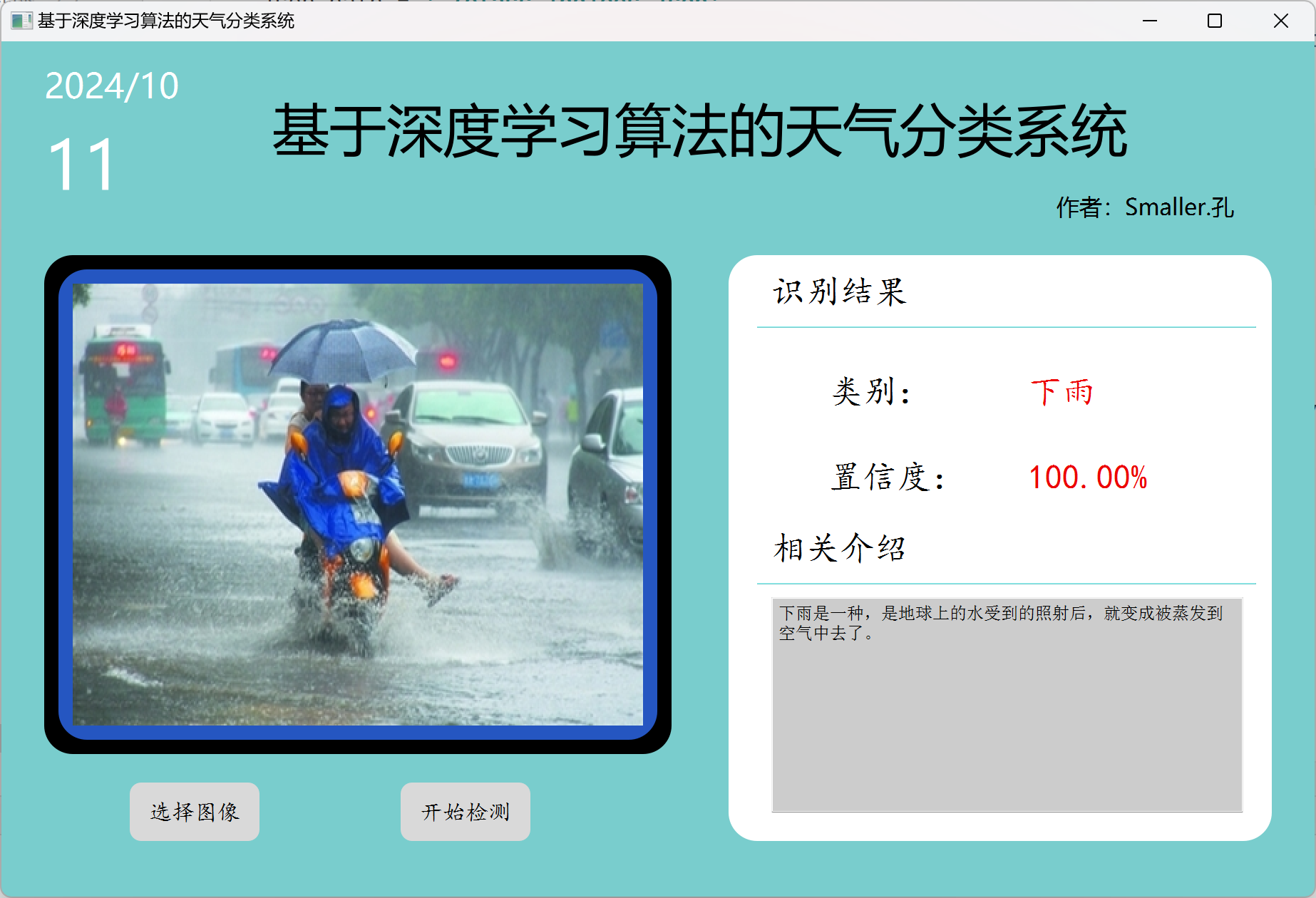
界面支持选择图片 → 一键检测 → 输出类别 + 置信度,并在右侧展示对应天气现象的文字介绍。实际体验上属于“一步到位可截图”的毕设型项目:识别结果直观、演示流畅。
核心技术栈
- Python 3.8 or 3.11(项目原始环境):兼容性好,装包更稳(仓库提供了环境命令)。
- PyTorch + torchvision:负责模型加载与推理;
transforms做预处理。 - PyQt5:桌面端 UI,适合做“可视化系统/软件”类毕设。
- Pillow (PIL):图片读取与尺寸处理。
- matplotlib / scikit-learn:用于数据分布图、混淆矩阵等可视化(论文里很加分)。
- OpenCV(可选):仓库环境命令里包含,后续扩展视频/摄像头会更方便。
项目目录结构(Tree)
mobile_netv2_weather_01/
├─ all_data/                     # 数据集(按类别分文件夹,PNG/JPG)
├─ test/                         # 测试图片(每类若干张,方便快速演示)
├─ weights/
│  └─ weather-best-epoch.pth     # 训练好权重(推理直接用)
├─ models/
│  └─ mobilenetv2.py             # 模型结构定义(MobileNetV2)
├─ ui.ui / ui.py                 # PyQt5 UI 设计与生成代码
├─ 主界面.py                     # GUI 入口:加载模型 + 选择图片 + 推理显示
├─ predict.py                    # 命令行推理脚本(给定图片路径返回结果)
├─ utils.py                      # 数据划分/绘图/训练评估等工具函数(论文素材多)
├─ my_dataset.py                 # 自定义 Dataset(读取图片 + label)
├─ class_indices.json            # 类别映射(由数据集生成/或已提供)
├─ confusion_matrix.py/.png      # 混淆矩阵生成脚本与示例图
├─ dataset.png                   # 类别分布图(论文常用)
├─ 环境配置命令.txt              # 一键配环境的命令(非常友好)
└─ requirements.txt              # 我已补齐依赖清单(更方便 pip 一键安装)
核心代码展示#### 1)GUI:加载权重 + 绑定按钮(项目可运行的关键)
class MainWindow(QtWidgets.QMainWindow, Ui_MainWindow):
    def __init__(self, parent=None):
        super(MainWindow, self).__init__(parent)
        self.setupUi(self)

        # 日期更新(用于界面展示)
        today = str(datetime.datetime.now().date())
        self.label_12.setText(today.split('-')[0] + '/' + today.split('-')[1])
        self.label_13.setText(today.split('-')[2])

        # label 置空(避免初始显示脏数据)
        self.label_res.setText('')
        self.label_pro.setText('')

        # 设备选择:优先 GPU,没有就自动切 CPU
        os.environ['KMP_DUPLICATE_LIB_OK'] = 'TRUE'
        self.device = torch.device("cuda:0" if torch.cuda.is_available() else "cpu")

        # 读取类别映射(数字 -> 中文类别名)
        json_path = './class_indices.json'
        assert os.path.exists(json_path), "file: '{}' dose not exist.".format(json_path)
        json_file = open(json_path, "r")
        self.class_indict = json.load(json_file)

        # 创建模型并加载权重(只展示“如何加载”,不涉及训练细节)
        self.model = create_model().to(self.device)
        model_weight_path = "weights/weather-best-epoch.pth"
        self.model.load_state_dict(torch.load(model_weight_path, map_location=self.device))
        self.model.eval()

        # 按钮绑定:选择图片 / 开始检测
        self.pushButton_pic.clicked.connect(self.select_img)
        self.pushButton_begin.clicked.connect(self.img_detect)
2)推理入口:标准化预处理 + softmax 输出置信度
def img_detect(self):
    img_size = 224
    data_transform = transforms.Compose(
        [transforms.Resize(int(img_size * 1.143)),
         transforms.CenterCrop(img_size),
         transforms.ToTensor(),
         transforms.Normalize([0.485, 0.456, 0.406], [0.229, 0.224, 0.225])])

    # load image
    assert os.path.exists(self.img_path), "file: '{}' dose not exist.".format(self.img_path)
    img = Image.open(self.img_path)

    # [C, H, W] -> 增加 batch 维度变成 [1, C, H, W]
    img = data_transform(img)
    img = torch.unsqueeze(img, dim=0)

    # 推理阶段必须 no_grad(省显存/更快)
    with torch.no_grad():
        output = torch.squeeze(self.model(img.to(self.device))).cpu()
        predict = torch.softmax(output, dim=0)

    # 取最大概率对应的类别名与置信度
    res = self.class_indict[str(list(predict.numpy()).index(max(predict.numpy())))]
    num = "%.2f" % (max(predict.numpy()) * 100) + "%"

    # 更新 UI:类别、置信度、文字介绍
    self.label_res.setText(res)
    self.label_pro.setText(num)
    self.textEdit.setText(data_inf[res])
3)数据集工具:自动生成 class_indices.json(论文/复现实用)
def read_split_data(root: str, val_rate: float = 0.2):
    random.seed(0)  # 保证随机结果可复现
    assert os.path.exists(root), "dataset root: {} does not exist.".format(root)

    # 一个文件夹就是一个类别(非常规范的数据组织方式)
    flower_class = [cla for cla in os.listdir(root) if os.path.isdir(os.path.join(root, cla))]
    flower_class.sort()

    # 类别名 -> 数字索引
    class_indices = dict((k, v) for v, k in enumerate(flower_class))

    # 同时写出反向映射(数字 -> 类别名),推理阶段直接读取
    json_str = json.dumps(dict((val, key) for key, val in class_indices.items()), indent=4)
    with open('class_indices.json', 'w') as json_file:
        json_file.write(json_str)
如何使用 / 运行步骤(3 步跑通)
- 步骤 1:安装依赖
pip install -r requirements.txt
备注:仓库也提供了
环境配置命令.txt(包含 PyQt5、torchvision、opencv 等安装命令),更适合完全新手照抄。
- 步骤 2:运行程序(GUI)
python 主界面.py
- 步骤 3:点击按钮使用
- 选择图像:导入本地
png/jpg - 开始检测:自动输出类别 + 置信度,并显示相关介绍文本
获取源码方式
由于篇幅限制,文中只展示了可复现/可运行的框架代码。如果你需要完整源码、训练好的模型权重、以及配套的万字报告与运行演示资料,请点击下方链接获取。
项目获取链接:https://my.feishu.cn/wiki/Ktl2wcVXUiaiAGkozR2c7N2WnJc?from=from_copylink

腾讯云面向开发者汇聚海量精品云计算使用和开发经验,营造开放的云计算技术生态圈。
更多推荐
 3
3 0
0- 0


 已为社区贡献15条内容

所有评论(0)