Flutter for OpenHarmony 实战:数独游戏完整开发指南
本文介绍了使用Flutter for OpenHarmony开发数独游戏的完整流程。主要内容包括:数独游戏规则与功能规划、数据模型设计、回溯算法生成数独谜题、难度分级实现等关键技术。通过Flutter框架实现了数独生成、冲突检测、提示系统等核心功能,并详细讲解了回溯算法在数独生成中的应用。该项目展示了Flutter在逻辑类游戏开发中的优势,为开发者提供了完整的跨平台游戏开发参考。
·
欢迎加入开源鸿蒙跨平台社区:开源鸿蒙跨平台开发者社区
Flutter for OpenHarmony 实战:数独游戏完整开发指南
摘要
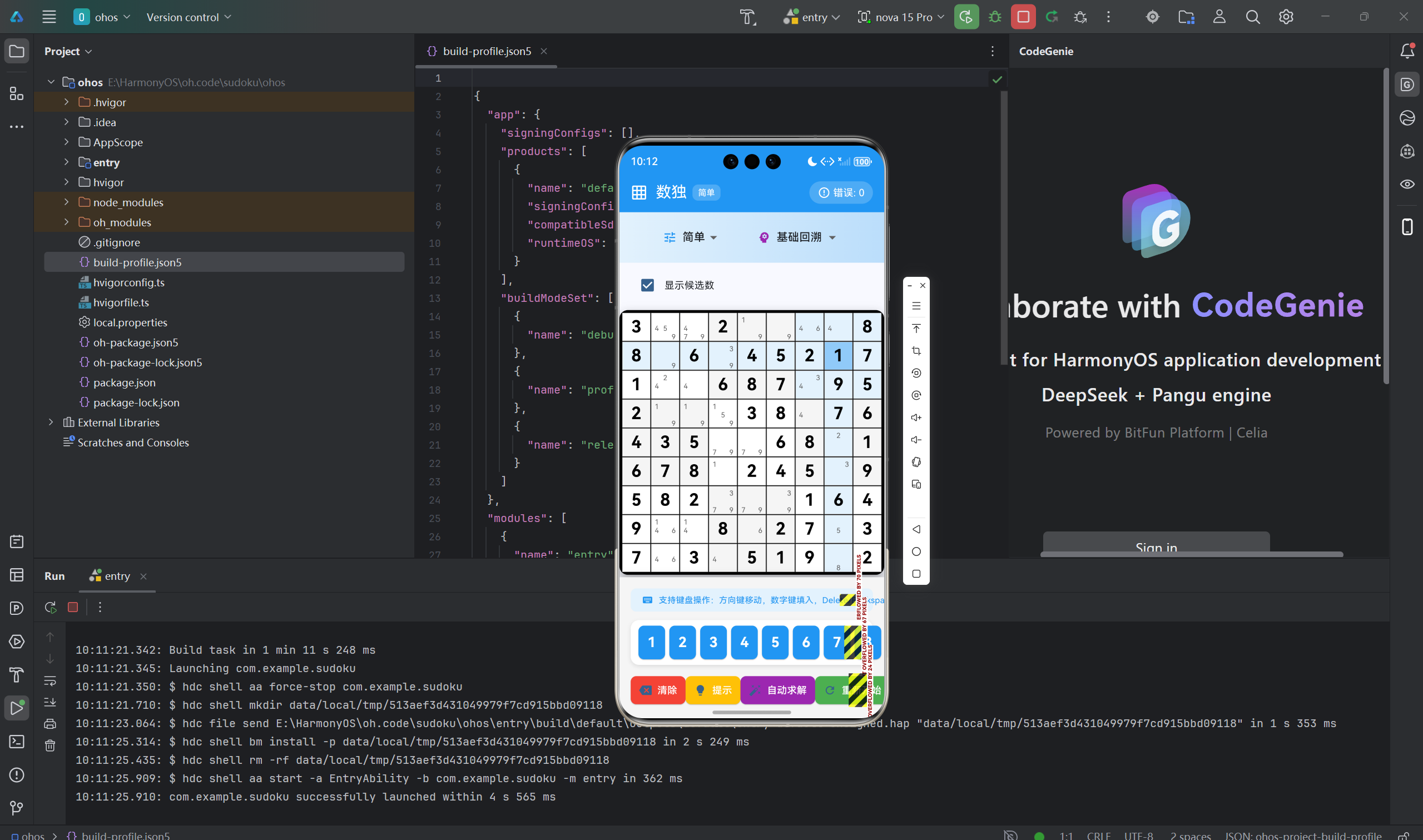
数独(Sudoku)是一种经典的逻辑推理游戏,目标是在9×9的网格中填入数字1-9,使得每行、每列和每个3×3宫格内的数字都不重复。本文将详细介绍如何使用Flutter for OpenHarmony框架开发一款功能完整的数独游戏。文章涵盖了回溯算法生成谜题、难度设计、冲突检测、提示系统等核心技术点。通过本文学习,读者将掌握Flutter在逻辑类游戏开发中的完整流程,了解回溯算法在游戏生成中的应用。
一、项目背景与功能概述
1.1 数独游戏介绍
数独起源于18世纪的瑞士,现已成为全球流行的益智游戏:
- 目标:在9×9网格中填入1-9的数字
- 规则:
- 每行必须包含1-9的所有数字,不重复
- 每列必须包含1-9的所有数字,不重复
- 每个3×3宫格必须包含1-9的所有数字,不重复
1.2 应用功能规划
| 功能模块 | 具体功能 |
|---|---|
| 难度选择 | 简单、中等、困难、专家 |
| 谜题生成 | 回溯算法生成唯一解 |
| 数字输入 | 点击选择 + 数字键盘输入 |
| 冲突检测 | 实时检测填入错误 |
| 高亮显示 | 选中格子、相关行列、宫格高亮 |
| 提示系统 | 自动填入正确数字 |
| 胜负判断 | 完成且正确则胜利 |
| 错误计数 | 统计填入错误次数 |
1.3 难度设置
| 难度 | 移除数字数 | 空白率 |
|---|---|---|
| 简单 | 30 | 37.0% |
| 中等 | 40 | 49.4% |
| 困难 | 50 | 61.7% |
| 专家 | 55 | 67.9% |
二、数据模型设计
2.1 游戏状态
enum CellState {
  empty,      // 空白
  filled,     // 已填
  fixed,      // 固定(初始给定)
  error,      // 错误
  selected,   // 选中
}
2.2 难度枚举
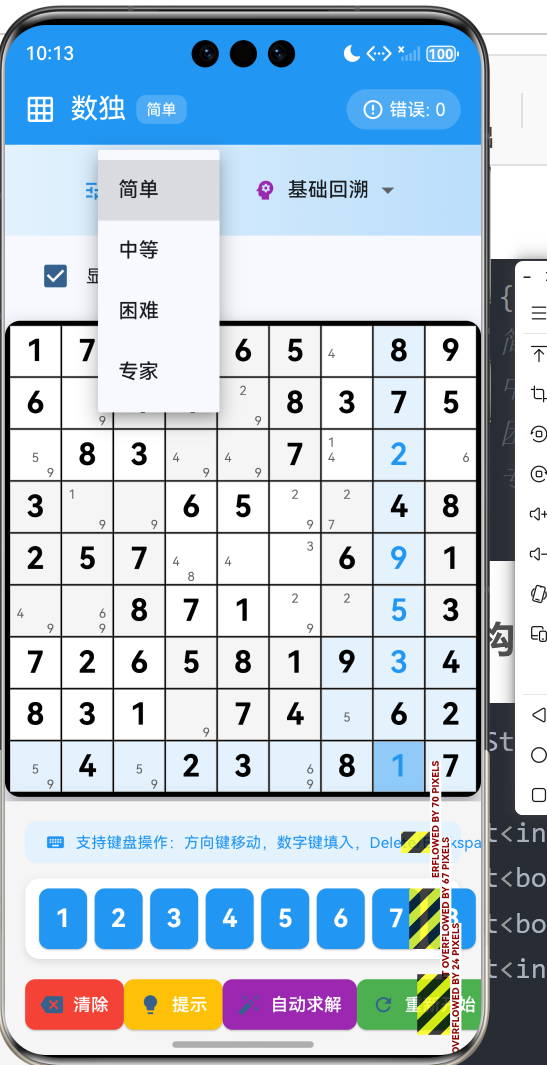
enum Difficulty {
  easy,      // 简单 - 移除30个数字
  medium,    // 中等 - 移除40个数字
  hard,      // 困难 - 移除50个数字
  expert,    // 专家 - 移除55个数字
}
2.3 游戏数据结构
class _GamePageState extends State<GamePage> {
  // 9×9游戏板
  late List<List<int>> _board;        // 当前游戏状态
  late List<List<bool>> _fixed;       // 固定格子标记
  late List<List<bool>> _error;       // 错误标记
  late List<List<int>> _solution;     // 完整解决方案

  // 游戏状态
  int _selectedRow = -1;
  int _selectedCol = -1;
  Difficulty _difficulty = Difficulty.easy;
  bool _gameWon = false;
  int _errorCount = 0;
  final Random _random = Random();
}
三、数独生成算法
3.1 回溯算法生成完整数独
// 生成完整的数独
void _generateSudoku() {
  // 先填充对角线上的三个3x3宫格
  for (int i = 0; i < 9; i += 3) {
    _fillBox(i, i);
  }

  // 求解填充剩余格子
  _solveSudoku(_board);
}

// 填充3x3宫格
void _fillBox(int row, int col) {
  final nums = [1, 2, 3, 4, 5, 6, 7, 8, 9];
  nums.shuffle(_random);

  int idx = 0;
  for (int i = 0; i < 3; i++) {
    for (int j = 0; j < 3; j++) {
      _board[row + i][col + j] = nums[idx++];
    }
  }
}
关键技巧:先填充对角线上的三个3×3宫格,因为它们相互独立,不会产生冲突。
3.2 回溯求解算法
// 求解数独
bool _solveSudoku(List<List<int>> board) {
  for (int row = 0; row < 9; row++) {
    for (int col = 0; col < 9; col++) {
      if (board[row][col] == 0) {
        for (int num = 1; num <= 9; num++) {
          if (_isValid(board, row, col, num)) {
            board[row][col] = num;

            if (_solveSudoku(board)) {
              return true;
            }

            board[row][col] = 0; // 回溯
          }
        }
        return false;
      }
    }
  }
  return true;
}
算法流程:
- 找到第一个空白格
- 尝试填入1-9
- 检查是否有效
- 递归求解下一个
- 如果无解则回溯
时间复杂度:O(9^m),其中m是空白格数量
3.3 有效性检查
// 检查数字是否有效
bool _isValid(List<List<int>> board, int row, int col, int num) {
  // 检查行
  for (int c = 0; c < 9; c++) {
    if (board[row][c] == num) return false;
  }

  // 检查列
  for (int r = 0; r < 9; r++) {
    if (board[r][col] == num) return false;
  }

  // 检查3x3宫格
  final boxRow = (row ~/ 3) * 3;
  final boxCol = (col ~/ 3) * 3;
  for (int r = 0; r < 3; r++) {
    for (int c = 0; c < 3; c++) {
      if (board[boxRow + r][boxCol + c] == num) return false;
    }
  }

  return true;
}
四、谜题生成与难度设计
4.1 移除数字创建谜题
// 移除数字创建谜题
void _removeNumbers() {
  int removeCount;
  switch (_difficulty) {
    case Difficulty.easy:
      removeCount = 30;
      break;
    case Difficulty.medium:
      removeCount = 40;
      break;
    case Difficulty.hard:
      removeCount = 50;
      break;
    case Difficulty.expert:
      removeCount = 55;
      break;
  }

  final positions = <Point>[];
  for (int r = 0; r < 9; r++) {
    for (int c = 0; c < 9; c++) {
      positions.add(Point(r, c));
    }
  }
  positions.shuffle(_random);

  for (int i = 0; i < removeCount && i < positions.length; i++) {
    final pos = positions[i];
    _board[pos.x.toInt()][pos.y.toInt()] = 0;
  }

  // 标记固定格子
  for (int r = 0; r < 9; r++) {
    for (int c = 0; c < 9; c++) {
      if (_board[r][c] != 0) {
        _fixed[r][c] = true;
      }
    }
  }
}
4.2 保证唯一解
更高级的实现应该检查谜题是否有唯一解:
bool _hasUniqueSolution() {
  final solutions = <List<List<int>>>[];
  _findAllSolutions(_board, solutions, 2);
  return solutions.length == 1;
}

void _findAllSolutions(List<List<int>> board,
                       List<List<List<int>>> solutions,
                       int maxSolutions) {
  if (solutions.length >= maxSolutions) return;

  for (int row = 0; row < 9; row++) {
    for (int col = 0; col < 9; col++) {
      if (board[row][col] == 0) {
        for (int num = 1; num <= 9; num++) {
          if (_isValid(board, row, col, num)) {
            board[row][col] = num;
            _findAllSolutions(board, solutions, maxSolutions);
            board[row][col] = 0;
          }
        }
        return;
      }
    }
  }

  // 深拷贝解决方案
  final solution = List.generate(9, (r) =>
    List.generate(9, (c) => board[r][c])
  );
  solutions.add(solution);
}
五、UI界面实现
5.1 9×9网格构建
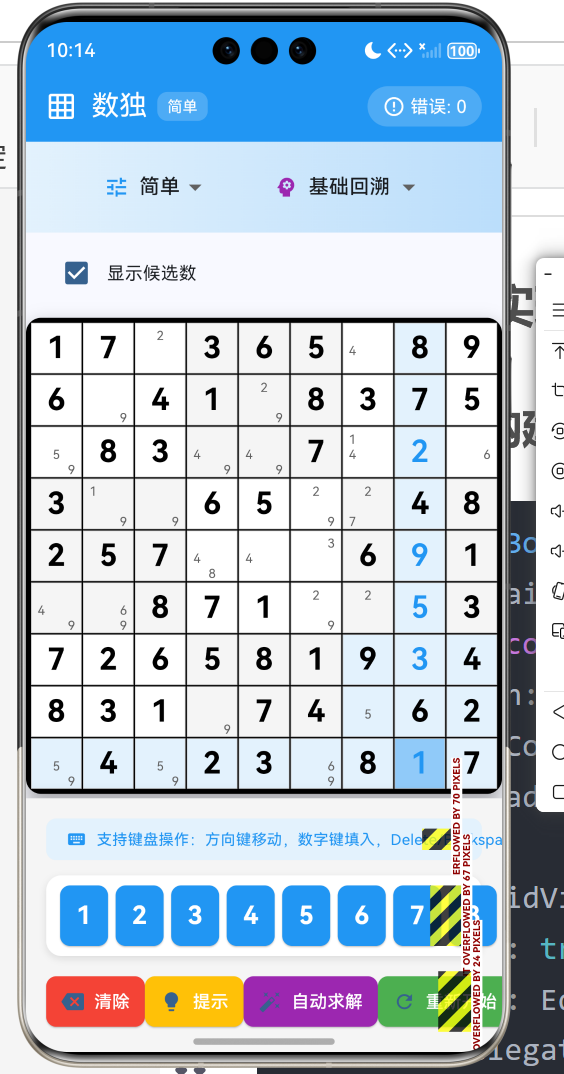
Widget _buildBoard() {
  return Container(
    padding: const EdgeInsets.all(4),
    decoration: BoxDecoration(
      color: Colors.black,
      borderRadius: BorderRadius.circular(8),
    ),
    child: GridView.builder(
      primary: true,
      padding: EdgeInsets.zero,
      gridDelegate: const SliverGridDelegateWithFixedCrossAxisCount(
        crossAxisCount: 9,
        crossAxisSpacing: 1,
        mainAxisSpacing: 1,
        childAspectRatio: 1.0,
      ),
      itemCount: 81,
      itemBuilder: (context, index) {
        final row = index ~/ 9;
        final col = index % 9;
        return _buildCell(row, col);
      },
    ),
  );
}
5.2 单元格UI与高亮
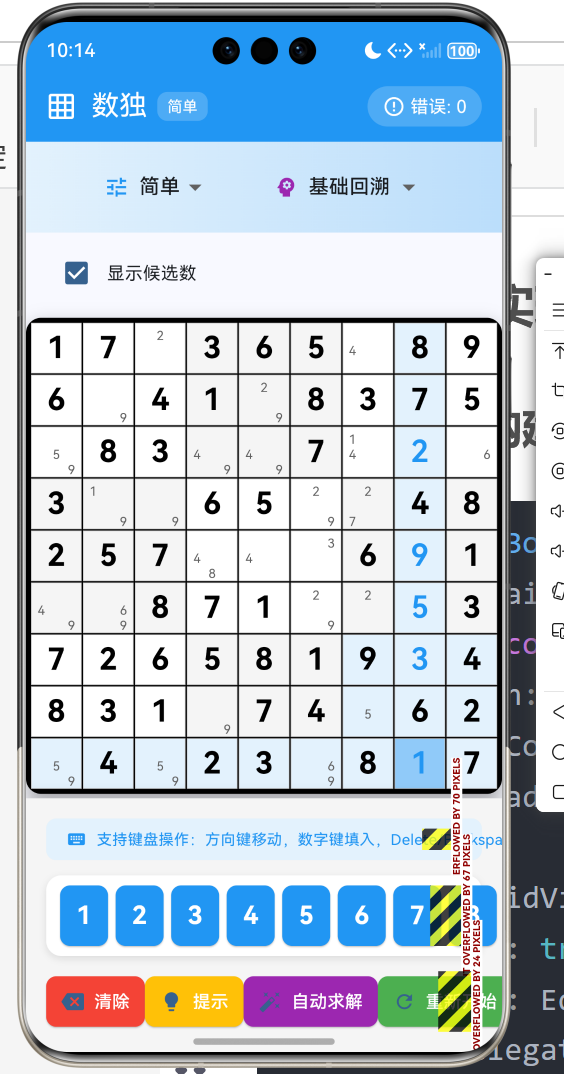
Widget _buildCell(int row, int col) {
  final value = _board[row][col];
  final isFixed = _fixed[row][col];
  final isError = _error[row][col];
  final isSelected = _selectedRow == row && _selectedCol == col;

  // 计算背景色
  Color backgroundColor = Colors.white;

  // 3x3宫格交替颜色
  final boxRow = row ~/ 3;
  final boxCol = col ~/ 3;
  if ((boxRow + boxCol) % 2 == 1) {
    backgroundColor = Colors.grey.shade100;
  }

  // 相关行列高亮
  if (_selectedRow != -1 && _selectedCol != -1) {
    if (row == _selectedRow || col == _selectedCol) {
      backgroundColor = Colors.blue.shade50;
    }
    final selectedBoxRow = _selectedRow ~/ 3;
    final selectedBoxCol = _selectedCol ~/ 3;
    if (boxRow == selectedBoxRow && boxCol == selectedBoxCol) {
      backgroundColor = Colors.blue.shade50;
    }
  }

  // 选中高亮
  if (isSelected) {
    backgroundColor = Colors.blue.shade200;
  }

  // 错误标记
  if (isError) {
    backgroundColor = Colors.red.shade200;
  }

  return GestureDetector(
    onTap: () => _selectCell(row, col),
    child: Container(
      decoration: BoxDecoration(
        color: backgroundColor,
        border: Border.all(
          color: Colors.grey.shade300,
          width: 1,
        ),
      ),
      child: Center(
        child: Text(
          value == 0 ? '' : '$value',
          style: TextStyle(
            fontSize: 20,
            fontWeight: isFixed ? FontWeight.bold : FontWeight.normal,
            color: isFixed ? Colors.black : Colors.blue,
          ),
        ),
      ),
    ),
  );
}
5.3 数字输入键盘
Widget _buildNumberInput() {
  return Row(
    mainAxisAlignment: MainAxisAlignment.center,
    children: List.generate(9, (index) {
      final num = index + 1;
      return Padding(
        padding: const EdgeInsets.symmetric(horizontal: 2),
        child: SizedBox(
          width: 40,
          height: 50,
          child: ElevatedButton(
            onPressed: () => _fillNumber(num),
            style: ElevatedButton.styleFrom(
              padding: EdgeInsets.zero,
              backgroundColor: Colors.blue,
              foregroundColor: Colors.white,
            ),
            child: Text(
              '$num',
              style: const TextStyle(fontSize: 20),
            ),
          ),
        ),
      );
    }),
  );
}
六、游戏逻辑实现
6.1 选择格子
void _selectCell(int row, int col) {
  if (_gameWon) return;

  setState(() {
    _selectedRow = row;
    _selectedCol = col;
  });
}
6.2 填入数字与冲突检测
void _fillNumber(int num) {
  if (_gameWon) return;
  if (_selectedRow == -1 || _selectedCol == -1) return;
  if (_fixed[_selectedRow][_selectedCol]) return;

  setState(() {
    _board[_selectedRow][_selectedCol] = num;
    _error[_selectedRow][_selectedCol] = false;

    // 检查是否有冲突
    if (num != 0 && !_isPlacementValid(_selectedRow, _selectedCol, num)) {
      _error[_selectedRow][_selectedCol] = true;
      _errorCount++;
    }

    // 检查是否胜利
    _checkWin();
  });
}

// 检查填入是否有效(不包括当前格子)
bool _isPlacementValid(int row, int col, int num) {
  // 检查行
  for (int c = 0; c < 9; c++) {
    if (c != col && _board[row][c] == num) return false;
  }

  // 检查列
  for (int r = 0; r < 9; r++) {
    if (r != row && _board[r][col] == num) return false;
  }

  // 检查3x3宫格
  final boxRow = (row ~/ 3) * 3;
  final boxCol = (col ~/ 3) * 3;
  for (int r = 0; r < 3; r++) {
    for (int c = 0; c < 3; c++) {
      final curR = boxRow + r;
      final curC = boxCol + c;
      if ((curR != row || curC != col) && _board[curR][curC] == num) {
        return false;
      }
    }
  }

  return true;
}
6.3 提示系统
void _getHint() {
  if (_gameWon) return;
  if (_selectedRow == -1 || _selectedCol == -1) return;
  if (_fixed[_selectedRow][_selectedCol]) return;
  if (_board[_selectedRow][_selectedCol] != 0) return;

  setState(() {
    _board[_selectedRow][_selectedCol] = _solution[_selectedRow][_selectedCol];
    _checkWin();
  });
}
6.4 胜利判断
void _checkWin() {
  bool complete = true;
  bool correct = true;

  for (int r = 0; r < 9; r++) {
    for (int c = 0; c < 9; c++) {
      if (_board[r][c] == 0) {
        complete = false;
        break;
      }
      if (_board[r][c] != _solution[r][c]) {
        correct = false;
      }
    }
  }

  if (complete && correct && _errorCount == 0) {
    _gameWon = true;
    _showWinDialog();
  }
}
七、总结
本文详细介绍了使用Flutter for OpenHarmony开发数独游戏的完整过程,涵盖了以下核心技术点:
- 数据模型:游戏状态、难度枚举、数据结构
- 数独生成:回溯算法、宫格填充、有效性检查
- 谜题设计:移除数字、难度分级
- UI实现:网格构建、高亮显示、数字键盘
- 交互设计:选择格子、填入数字、冲突检测
- 辅助功能:提示系统、错误计数、胜利判断
这个项目展示了Flutter在逻辑类游戏开发中的完整流程,特别是回溯算法在谜题生成中的应用。
欢迎加入开源鸿蒙跨平台社区: 开源鸿蒙跨平台开发者社区

腾讯云面向开发者汇聚海量精品云计算使用和开发经验,营造开放的云计算技术生态圈。
更多推荐
 24
24 0
0- 0


 已为社区贡献7条内容

所有评论(0)