Flutter 框架跨平台鸿蒙开发 - 家庭时间胶囊应用
摘要: 家庭时间胶囊是一款跨平台应用,基于Flutter框架开发,支持鸿蒙OS和Web平台。该应用以温馨的紫色为主色调,提供四大功能模块:胶囊制作、成员管理、内容记录和开启倒计时。用户可创建不同类型的时间胶囊(如生日祝福、成长记录等),添加文字、图片或语音内容,并设定未来开启时间。应用通过状态管理、自定义动画和Material Design 3规范实现交互体验,支持家庭成员分级权限管理(创建者、成
欢迎加入开源鸿蒙跨平台社区:
https://openharmonycrossplatform.csdn.net
一、项目概述
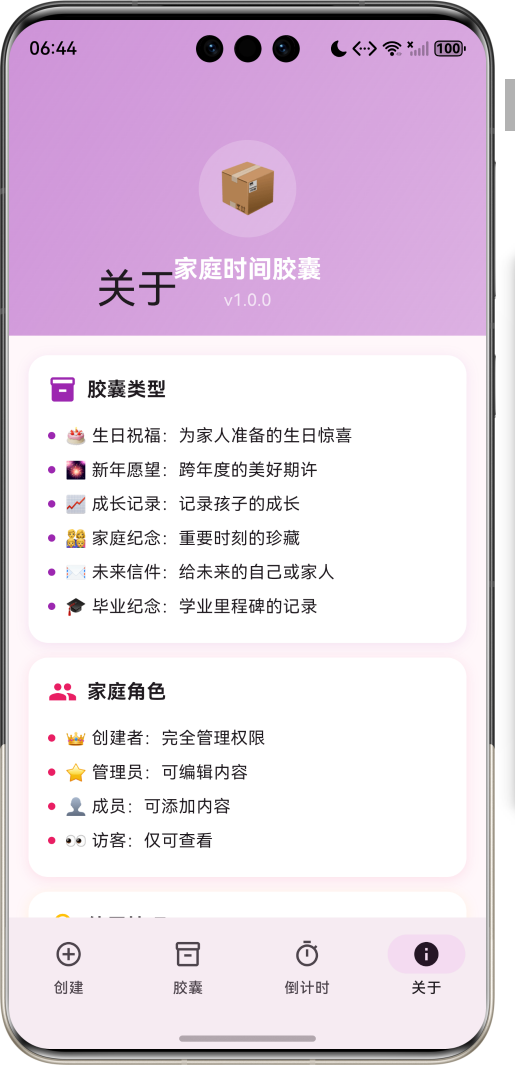
运行效果图
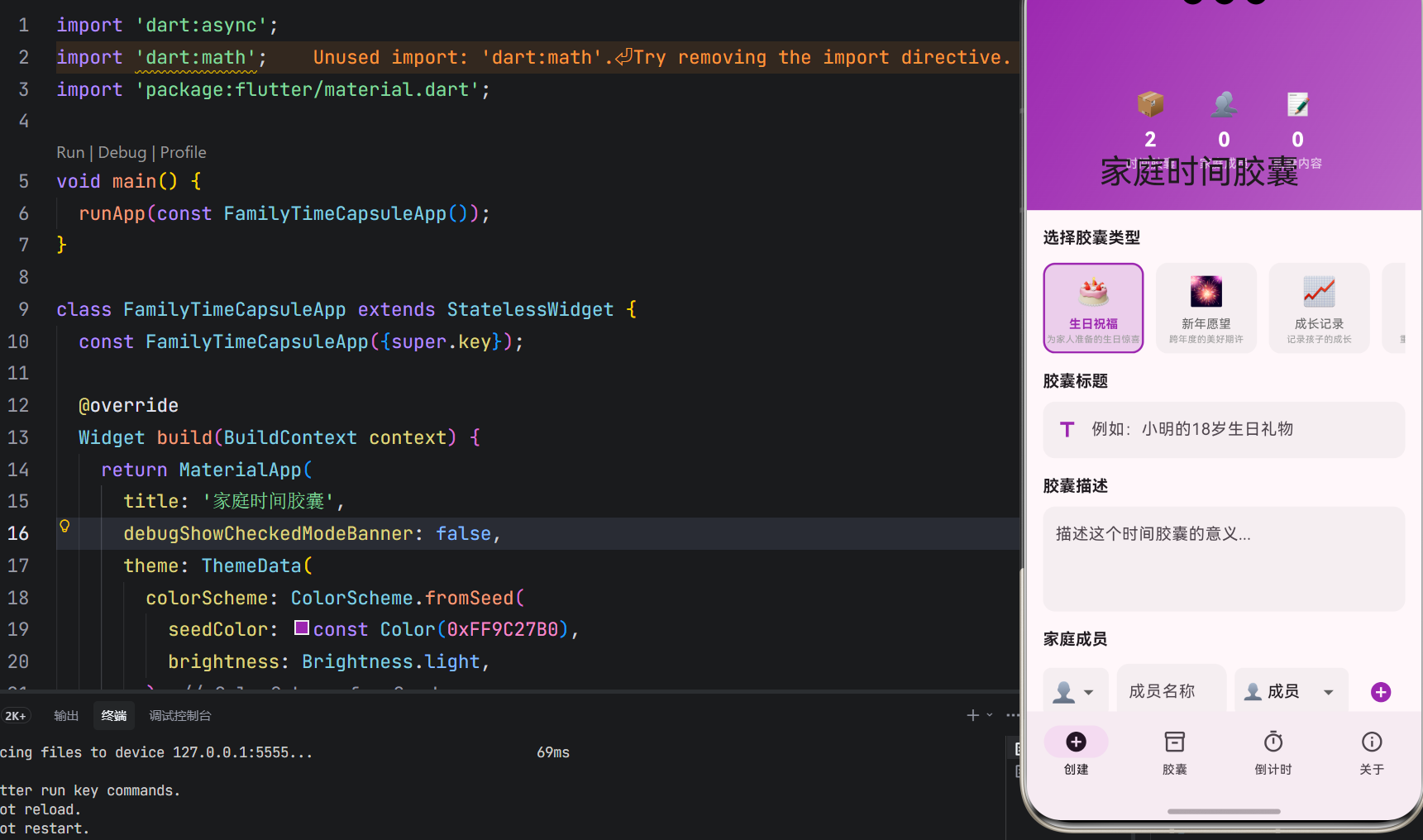
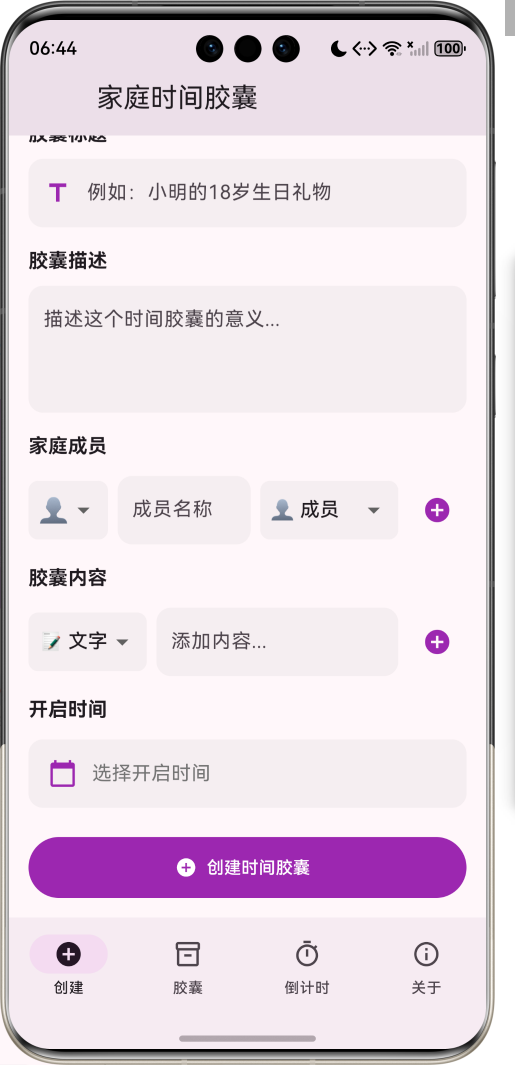
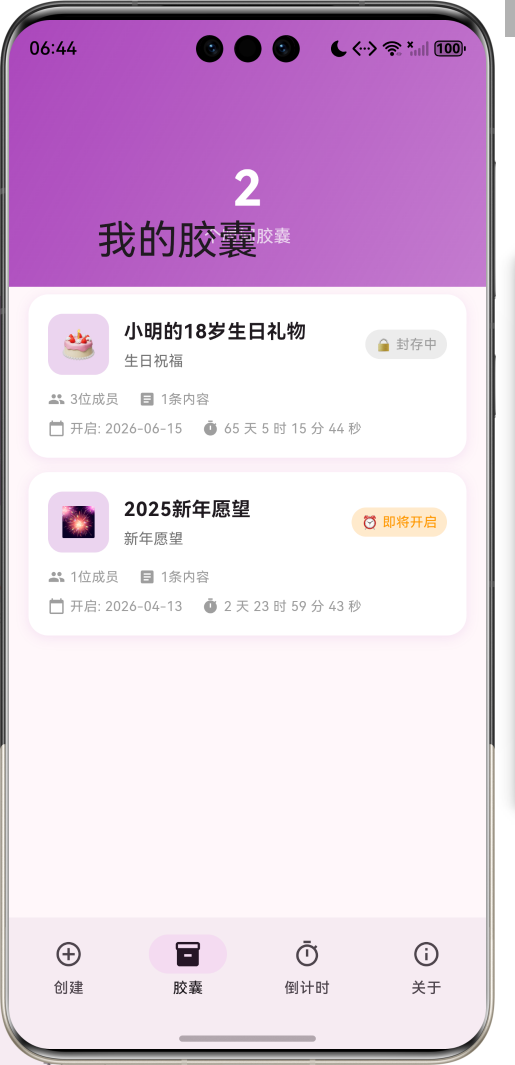
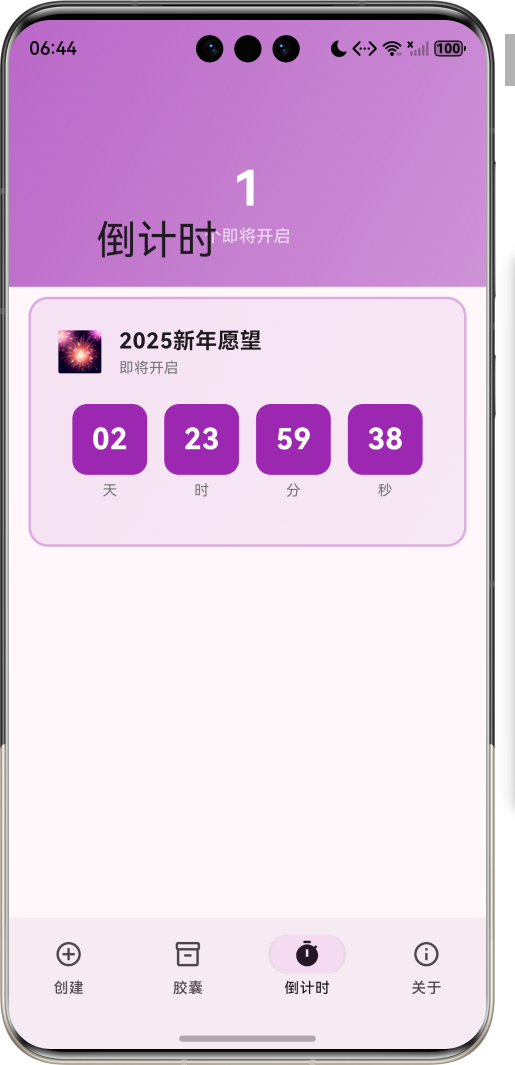
1.1 应用简介
家庭时间胶囊是一款温馨的生活创意应用,让全家人共同制作时间胶囊,记录当下的生活点滴、美好瞬间和真挚祝福,约定在未来某个时刻开启。通过时间胶囊,家庭成员可以跨越时空对话,见证生活的变化与成长,珍藏那些转瞬即逝的美好时光。
应用以温暖的紫色为主色调,象征时光的神秘与珍贵。涵盖胶囊制作、胶囊管理、开启倒计时、家庭相册四大模块。用户可以创建时间胶囊、添加家庭成员、记录生活内容、设定开启时间,让爱与记忆穿越时光,在未来绽放。
1.2 核心功能
| 功能模块 | 功能描述 | 实现方式 |
|---|---|---|
| 胶囊制作 | 创建时间胶囊 | 表单组件 |
| 成员管理 | 添加家庭成员 | 列表管理 |
| 内容记录 | 文字、图片、语音 | 多媒体支持 |
| 开启时间 | 设定开启日期 | 日期选择器 |
| 倒计时 | 显示剩余时间 | 定时器 |
| 胶囊开启 | 到期自动提醒 | 通知提醒 |
1.3 胶囊类型定义
| 序号 | 类型名称 | Emoji | 描述 |
|---|---|---|---|
| 1 | 生日祝福 | 🎂 | 为家人准备的生日惊喜 |
| 2 | 新年愿望 | 🎆 | 跨年度的美好期许 |
| 3 | 成长记录 | 📈 | 记录孩子的成长 |
| 4 | 家庭纪念 | 👨👩👧👦 | 重要时刻的珍藏 |
| 5 | 未来信件 | ✉️ | 给未来的自己或家人 |
| 6 | 毕业纪念 | 🎓 | 学业里程碑的记录 |
1.4 胶囊状态定义
| 序号 | 状态名称 | Emoji | 数值 | 描述 |
|---|---|---|---|---|
| 1 | 封存中 | 🔒 | 0 | 等待开启时间 |
| 2 | 即将开启 | ⏰ | 1 | 距开启不到7天 |
| 3 | 可以开启 | 🔓 | 2 | 已到开启时间 |
| 4 | 已开启 | 📖 | 3 | 胶囊已打开 |
1.5 家庭角色定义
| 序号 | 角色名称 | Emoji | 权限级别 | 描述 |
|---|---|---|---|---|
| 1 | 创建者 | 👑 | 3 | 完全管理权限 |
| 2 | 管理员 | ⭐ | 2 | 可编辑内容 |
| 3 | 成员 | 👤 | 1 | 可添加内容 |
| 4 | 访客 | 👀 | 0 | 仅可查看 |
1.6 内容类型定义
| 序号 | 类型名称 | Emoji | 描述 |
|---|---|---|---|
| 1 | 文字 | 📝 | 文字记录和祝福 |
| 2 | 图片 | 📷 | 照片和图片 |
| 3 | 语音 | 🎤 | 语音留言 |
| 4 | 视频 | 🎥 | 视频片段 |
| 5 | 文件 | 📎 | 其他文件 |
1.7 技术栈
| 技术领域 | 技术选型 | 版本要求 |
|---|---|---|
| 开发框架 | Flutter | >= 3.0.0 |
| 编程语言 | Dart | >= 2.17.0 |
| 设计规范 | Material Design 3 | - |
| 动画效果 | AnimationController | - |
| 自定义绘制 | CustomPainter | - |
| 状态管理 | StatefulWidget | - |
| 目标平台 | 鸿蒙OS / Web | API 21+ |
1.8 项目结构
lib/
└── main_family_time_capsule.dart
    ├── FamilyTimeCapsuleApp        # 应用入口
    ├── CapsuleType                 # 胶囊类型枚举
    ├── CapsuleStatus               # 胶囊状态枚举
    ├── FamilyRole                  # 家庭角色枚举
    ├── ContentType                 # 内容类型枚举
    ├── TimeCapsule                 # 时间胶囊模型
    ├── FamilyMember                # 家庭成员模型
    ├── CapsuleContent              # 胶囊内容模型
    ├── FamilyTimeCapsuleHomePage   # 主页面(底部导航)
    ├── _buildCreatePage            # 创建页面
    ├── _buildCapsulesPage          # 胶囊页面
    ├── _buildCountdownPage         # 倒计时页面
    ├── _buildProfilePage           # 关于页面
    ├── CapsulePainter              # 胶囊绘制器
    └── CountdownPainter            # 倒计时绘制器
二、系统架构
2.1 整体架构图
2.2 类图设计
2.3 页面导航流程
2.4 胶囊创建流程
三、核心模块设计
3.1 数据模型设计
3.1.1 胶囊类型枚举 (CapsuleType)
enum CapsuleType {
birthday(label: '生日祝福', emoji: '🎂', description: '为家人准备的生日惊喜'),
newYear(label: '新年愿望', emoji: '🎆', description: '跨年度的美好期许'),
growth(label: '成长记录', emoji: '📈', description: '记录孩子的成长'),
family(label: '家庭纪念', emoji: '👨👩👧👦', description: '重要时刻的珍藏'),
futureLetter(label: '未来信件', emoji: '✉️', description: '给未来的自己或家人'),
graduation(label: '毕业纪念', emoji: '🎓', description: '学业里程碑的记录');
final String label;
final String emoji;
final String description;
}
3.1.2 胶囊状态枚举 (CapsuleStatus)
enum CapsuleStatus {
  sealed(label: '封存中', emoji: '🔒', value: 0),
  openingSoon(label: '即将开启', emoji: '⏰', value: 1),
  canOpen(label: '可以开启', emoji: '🔓', value: 2),
  opened(label: '已开启', emoji: '📖', value: 3);

  final String label;
  final String emoji;
  final int value;
}
3.1.3 时间胶囊模型 (TimeCapsule)
class TimeCapsule {
  final String id;                      // 胶囊ID
  final String title;                   // 胶囊标题
  final CapsuleType type;               // 胶囊类型
  CapsuleStatus status;                 // 胶囊状态
  final List<FamilyMember> members;     // 家庭成员
  final List<CapsuleContent> contents;  // 胶囊内容
  final DateTime createTime;            // 创建时间
  final DateTime openTime;              // 开启时间
  final String description;             // 胶囊描述
  bool isOpened;                        // 是否已开启
  DateTime? actualOpenTime;             // 实际开启时间
}
3.1.4 家庭成员模型 (FamilyMember)
class FamilyMember {
  final String id;              // 成员ID
  final String name;            // 成员姓名
  final String avatar;          // 头像
  final FamilyRole role;        // 家庭角色
  final DateTime joinTime;      // 加入时间
}
3.1.5 胶囊内容模型 (CapsuleContent)
class CapsuleContent {
  final String id;              // 内容ID
  final ContentType type;       // 内容类型
  final String content;         // 内容数据
  final String authorId;        // 作者ID
  final DateTime createTime;    // 创建时间
  final String description;     // 内容描述
}
3.1.6 胶囊类型分布
3.2 页面结构设计
3.2.1 主页面布局
3.2.2 创建页结构
3.2.3 胶囊页结构
3.2.4 倒计时页结构
3.3 胶囊状态更新逻辑
3.4 胶囊开启逻辑
四、UI设计规范
4.1 配色方案
应用以温暖的紫色为主色调,象征时光的神秘与珍贵:
| 颜色类型 | 色值 | 用途 |
|---|---|---|
| 主色 | #9C27B0 (Purple) | 导航、主题元素 |
| 辅助色 | #AB47BC | 胶囊页面 |
| 第三色 | #BA68C8 | 倒计时页面 |
| 强调色 | #CE93D8 | 创建页面 |
| 背景色 | #FAFAFA | 页面背景 |
| 卡片背景 | #FFFFFF | 胶囊卡片 |
4.2 胶囊类型色彩映射
| 胶囊类型 | 色值 | 视觉效果 |
|---|---|---|
| 生日祝福 | #FF6B9D | 温馨粉色 |
| 新年愿望 | #FFB74D | 金色喜庆 |
| 成长记录 | #66BB6A | 生机绿色 |
| 家庭纪念 | #42A5F5 | 温暖蓝色 |
| 未来信件 | #AB47BC | 神秘紫色 |
| 毕业纪念 | #26C6DA | 清新青色 |
4.3 字体规范
| 元素 | 字号 | 字重 | 颜色 |
|---|---|---|---|
| 页面标题 | 24px | Bold | 主色 |
| 胶囊标题 | 18px | Bold | #000000 |
| 成员名称 | 16px | Medium | 主色 |
| 内容描述 | 14px | Regular | #424242 |
| 倒计时数字 | 48px | Bold | 主色 |
4.4 组件规范
4.4.1 胶囊类型选择卡片
┌─────────────────────────────────────┐
│ 选择胶囊类型 │
│ │
│ ┌──────┐ ┌──────┐ ┌──────┐ │
│ │ 🎂 │ │ 🎆 │ │ 📈 │ │
│ │生日 │ │新年 │ │成长 │ │
│ │祝福 │ │愿望 │ │记录 │ │
│ └──────┘ └──────┘ └──────┘ │
│ │
│ ┌──────┐ ┌──────┐ ┌──────┐ │
│ │👨👩👧👦│ │ ✉️ │ │ 🎓 │ │
│ │家庭 │ │未来 │ │毕业 │ │
│ │纪念 │ │信件 │ │纪念 │ │
│ └──────┘ └──────┘ └──────┘ │
└─────────────────────────────────────┘
4.4.2 家庭成员管理
┌─────────────────────────────────────┐
│  家庭成员                            │
│                                     │
│  👑 爸爸 (创建者)                    │
│  ⭐ 妈妈 (管理员)                    │
│  👤 小明 (成员)                      │
│  👤 小红 (成员)                      │
│                                     │
│  [+ 添加成员]                        │
└─────────────────────────────────────┘
4.4.3 胶囊内容卡片
┌─────────────────────────────────────┐
│  📝 文字内容                         │
│  ─────────────────────────────────  │
│  亲爱的未来的我们:                   │
│  希望你们看到这封信的时候,           │
│  一切都变得更好了...                  │
│                                     │
│  ─────────────────────────────────  │
│  作者: 爸爸                          │
│  时间: 2024-01-01                   │
└─────────────────────────────────────┘
4.4.4 倒计时展示区域
┌─────────────────────────────────────┐
│  距离开启还有                         │
│                                     │
│     365  天  12  时  30  分  45  秒  │
│                                     │
│  📅 开启时间: 2025-01-01 00:00       │
│                                     │
│  [🔔 设置提醒]                       │
└─────────────────────────────────────┘
4.4.5 胶囊卡片展示
┌─────────────────────────────────────┐
│ 🎂 生日祝福 │
│ ───────────────────────────────── │
│ 小明的18岁生日礼物 │
│ │
│ 👨👩👧👦 4位成员参与 │
│ 📝 8条内容 │
│ │
│ ───────────────────────────────── │
│ 🔒 封存中 │
│ ⏰ 剩余 365 天 │
│ 📅 2025-01-01 开启 │
└─────────────────────────────────────┘
五、核心功能实现
5.1 倒计时绘制实现
class CountdownPainter extends CustomPainter {
final int days;
final int hours;
final int minutes;
final int seconds;
final CapsuleType capsuleType;
void paint(Canvas canvas, Size size) {
final center = Offset(size.width / 2, size.height / 2);
_drawBackgroundCircle(canvas, size, center);
_drawProgressArc(canvas, size, center);
_drawCountdownNumbers(canvas, size, center);
_drawCapsuleIcon(canvas, size, center);
}
void _drawBackgroundCircle(Canvas canvas, Size size, Offset center) {
final bgPaint = Paint()
..color = Colors.grey.withValues(alpha: 0.1)
..style = PaintingStyle.stroke
..strokeWidth = 8.0;
canvas.drawCircle(center, size.width * 0.35, bgPaint);
}
void _drawProgressArc(Canvas canvas, Size size, Offset center) {
final progress = (days * 24 * 60 + hours * 60 + minutes) /
(365 * 24 * 60);
final progressPaint = Paint()
..color = _getTypeColor(capsuleType)
..style = PaintingStyle.stroke
..strokeWidth = 8.0
..strokeCap = StrokeCap.round;
canvas.drawArc(
Rect.fromCircle(center: center, radius: size.width * 0.35),
-pi / 2,
2 * pi * (1 - progress),
false,
progressPaint,
);
}
Color _getTypeColor(CapsuleType type) {
switch (type) {
case CapsuleType.birthday:
return const Color(0xFFFF6B9D);
case CapsuleType.newYear:
return const Color(0xFFFFB74D);
case CapsuleType.growth:
return const Color(0xFF66BB6A);
case CapsuleType.family:
return const Color(0xFF42A5F5);
case CapsuleType.futureLetter:
return const Color(0xFFAB47BC);
case CapsuleType.graduation:
return const Color(0xFF26C6DA);
}
}
}
5.2 胶囊状态计算实现
class CapsuleStatusCalculator {
  static CapsuleStatus calculateStatus(
    DateTime openTime,
    DateTime currentTime,
  ) {
    final difference = openTime.difference(currentTime);

    if (difference.isNegative) {
      return CapsuleStatus.canOpen;
    } else if (difference.inDays <= 7) {
      return CapsuleStatus.openingSoon;
    } else {
      return CapsuleStatus.sealed;
    }
  }

  static Duration calculateRemainingTime(
    DateTime openTime,
    DateTime currentTime,
  ) {
    final difference = openTime.difference(currentTime);
    return difference.isNegative ? Duration.zero : difference;
  }

  static String formatDuration(Duration duration) {
    final days = duration.inDays;
    final hours = duration.inHours.remainder(24);
    final minutes = duration.inMinutes.remainder(60);
    final seconds = duration.inSeconds.remainder(60);

    return '$days 天 $hours 时 $minutes 分 $seconds 秒';
  }
}
5.3 胶囊创建实现
void _createCapsule() {
  if (_titleController.text.isEmpty) {
    ScaffoldMessenger.of(context).showSnackBar(
      const SnackBar(content: Text('请输入胶囊标题')),
    );
    return;
  }

  if (_selectedOpenTime == null) {
    ScaffoldMessenger.of(context).showSnackBar(
      const SnackBar(content: Text('请选择开启时间')),
    );
    return;
  }

  if (_selectedOpenTime!.isBefore(DateTime.now())) {
    ScaffoldMessenger.of(context).showSnackBar(
      const SnackBar(content: Text('开启时间必须在未来')),
    );
    return;
  }

  final capsule = TimeCapsule(
    id: 'capsule_${DateTime.now().millisecondsSinceEpoch}',
    title: _titleController.text,
    type: _selectedCapsuleType,
    status: CapsuleStatus.sealed,
    members: List.from(_members),
    contents: List.from(_contents),
    createTime: DateTime.now(),
    openTime: _selectedOpenTime!,
    description: _descriptionController.text,
    isOpened: false,
  );

  setState(() {
    _capsules.insert(0, capsule);
    _titleController.clear();
    _descriptionController.clear();
    _members.clear();
    _contents.clear();
    _selectedOpenTime = null;
  });

  ScaffoldMessenger.of(context).showSnackBar(
    const SnackBar(
      content: Text('时间胶囊已创建'),
      backgroundColor: Color(0xFF9C27B0),
    ),
  );
}
5.4 胶囊开启实现
void _openCapsule(TimeCapsule capsule) {
  if (capsule.status != CapsuleStatus.canOpen) {
    ScaffoldMessenger.of(context).showSnackBar(
      const SnackBar(content: Text('胶囊还未到开启时间')),
    );
    return;
  }

  showDialog(
    context: context,
    builder: (context) => AlertDialog(
      title: const Text('开启时间胶囊'),
      content: Text('确定要开启 "${capsule.title}" 吗?'),
      actions: [
        TextButton(
          onPressed: () => Navigator.pop(context),
          child: const Text('取消'),
        ),
        FilledButton(
          onPressed: () {
            Navigator.pop(context);
            _showCapsuleContents(capsule);
          },
          child: const Text('开启'),
        ),
      ],
    ),
  );
}

void _showCapsuleContents(TimeCapsule capsule) {
  setState(() {
    final index = _capsules.indexWhere((c) => c.id == capsule.id);
    if (index != -1) {
      _capsules[index].isOpened = true;
      _capsules[index].status = CapsuleStatus.opened;
      _capsules[index].actualOpenTime = DateTime.now();
    }
  });

  showDialog(
    context: context,
    builder: (context) => Dialog(
      child: Container(
        padding: const EdgeInsets.all(24),
        child: Column(
          mainAxisSize: MainAxisSize.min,
          children: [
            Text(
              capsule.type.emoji,
              style: const TextStyle(fontSize: 64),
            ),
            const SizedBox(height: 16),
            Text(
              capsule.title,
              style: const TextStyle(
                fontSize: 24,
                fontWeight: FontWeight.bold,
              ),
            ),
            const SizedBox(height: 8),
            Text(
              '创建于 ${_formatDate(capsule.createTime)}',
              style: TextStyle(color: Colors.grey[600]),
            ),
            const Divider(height: 32),
            Expanded(
              child: ListView.builder(
                itemCount: capsule.contents.length,
                itemBuilder: (context, index) {
                  return _buildContentItem(capsule.contents[index]);
                },
              ),
            ),
          ],
        ),
      ),
    ),
  );
}
5.5 成员管理实现
void _addMember() {
  if (_memberNameController.text.isEmpty) {
    ScaffoldMessenger.of(context).showSnackBar(
      const SnackBar(content: Text('请输入成员名称')),
    );
    return;
  }

  final member = FamilyMember(
    id: 'member_${DateTime.now().millisecondsSinceEpoch}',
    name: _memberNameController.text,
    avatar: _selectedAvatar,
    role: _selectedRole,
    joinTime: DateTime.now(),
  );

  setState(() {
    _members.add(member);
    _memberNameController.clear();
  });

  ScaffoldMessenger.of(context).showSnackBar(
    SnackBar(content: Text('已添加成员: ${member.name}')),
  );
}

void _removeMember(String memberId) {
  setState(() {
    _members.removeWhere((member) => member.id == memberId);
  });
}
六、交互设计
6.1 胶囊创建流程
6.2 胶囊开启流程
6.3 倒计时更新流程
七、扩展功能规划
7.1 后续版本规划
7.2 功能扩展建议
7.2.1 多媒体内容支持
内容功能:
- 图片上传和预览
- 语音录制和播放
- 视频片段录制
- 文件附件添加
7.2.2 家庭共享
共享功能:
- 多设备同步
- 家庭成员邀请
- 实时协作编辑
- 内容评论互动
7.2.3 智能提醒
提醒功能:
- 开启时间提醒
- 即将开启通知
- 内容添加提醒
- 定期回顾建议
八、注意事项
8.1 开发注意事项
-
时间计算:注意时区转换和夏令时影响
-
数据持久化:胶囊数据需本地持久化存储
-
隐私保护:胶囊内容涉及隐私,需做好数据保护
-
状态同步:多成员协作需保证状态一致性
-
用户体验:开启过程需流畅自然,增强仪式感
8.2 常见问题
| 问题 | 原因 | 解决方案 |
|---|---|---|
| 倒计时不准确 | 时区问题 | 统一使用UTC时间 |
| 胶囊无法开启 | 状态未更新 | 检查状态计算逻辑 |
| 内容丢失 | 数据未保存 | 添加自动保存功能 |
| 成员重复添加 | 未做重复检查 | 添加唯一性验证 |
| 时间选择异常 | 日期范围错误 | 限制最小日期 |
8.3 使用技巧
🎁 家庭时间胶囊使用技巧 🎁
胶囊创建技巧
- 选择有意义的开启时间,如生日、纪念日
- 邀请所有家庭成员参与,增加仪式感
- 记录当下的真实感受,不要过于修饰
- 添加多样化的内容,让胶囊更丰富
内容记录建议
- 写下对未来的期许和祝福
- 记录当下的生活状态和心情
- 添加照片和视频,留住美好瞬间
- 分享重要的人生感悟和经验
开启时刻准备
- 全家人一起开启,增加仪式感
- 准备相机记录开启瞬间
- 分享彼此的感受和变化
- 讨论未来的新计划
九、运行说明
9.1 环境要求
| 环境 | 版本要求 |
|---|---|
| Flutter SDK | >= 3.0.0 |
| Dart SDK | >= 2.17.0 |
| 鸿蒙OS | API 21+ |
| Web浏览器 | Chrome 90+ |
9.2 运行命令
# 查看可用设备
flutter devices

# 运行到Web服务器
flutter run -d web-server -t lib/main_family_time_capsule.dart --web-port 8142

# 运行到鸿蒙设备
flutter run -d 127.0.0.1:5555 lib/main_family_time_capsule.dart

# 代码分析
flutter analyze lib/main_family_time_capsule.dart
十、总结
家庭时间胶囊应用通过胶囊制作、胶囊管理、开启倒计时、家庭相册四大模块,为家庭提供了一个跨越时空的对话平台。应用支持6种胶囊类型、4种胶囊状态、4种家庭角色、5种内容类型,让家庭成员共同记录当下,期待未来。
核心功能涵盖胶囊创建、成员管理、内容记录、倒计时展示四大模块。胶囊类型从生日祝福到毕业纪念,覆盖家庭生活的重要时刻;胶囊状态从封存到开启,记录时光的流转;家庭角色从创建者到访客,保障协作的有序;内容类型从文字到视频,珍藏多样的记忆。
应用采用 Material Design 3 设计规范,以温暖的紫色为主色调,象征时光的神秘与珍贵。通过本应用,希望能够帮助家庭建立跨越时空的情感连接,让爱与记忆穿越时光,在未来绽放最美的光彩。
家庭时间胶囊——让爱穿越时光

腾讯云面向开发者汇聚海量精品云计算使用和开发经验,营造开放的云计算技术生态圈。
更多推荐
 7
7 0
0- 0


 已为社区贡献19条内容

所有评论(0)