Flutter for OpenHarmony衣橱管家App实战:场合分类功能实现
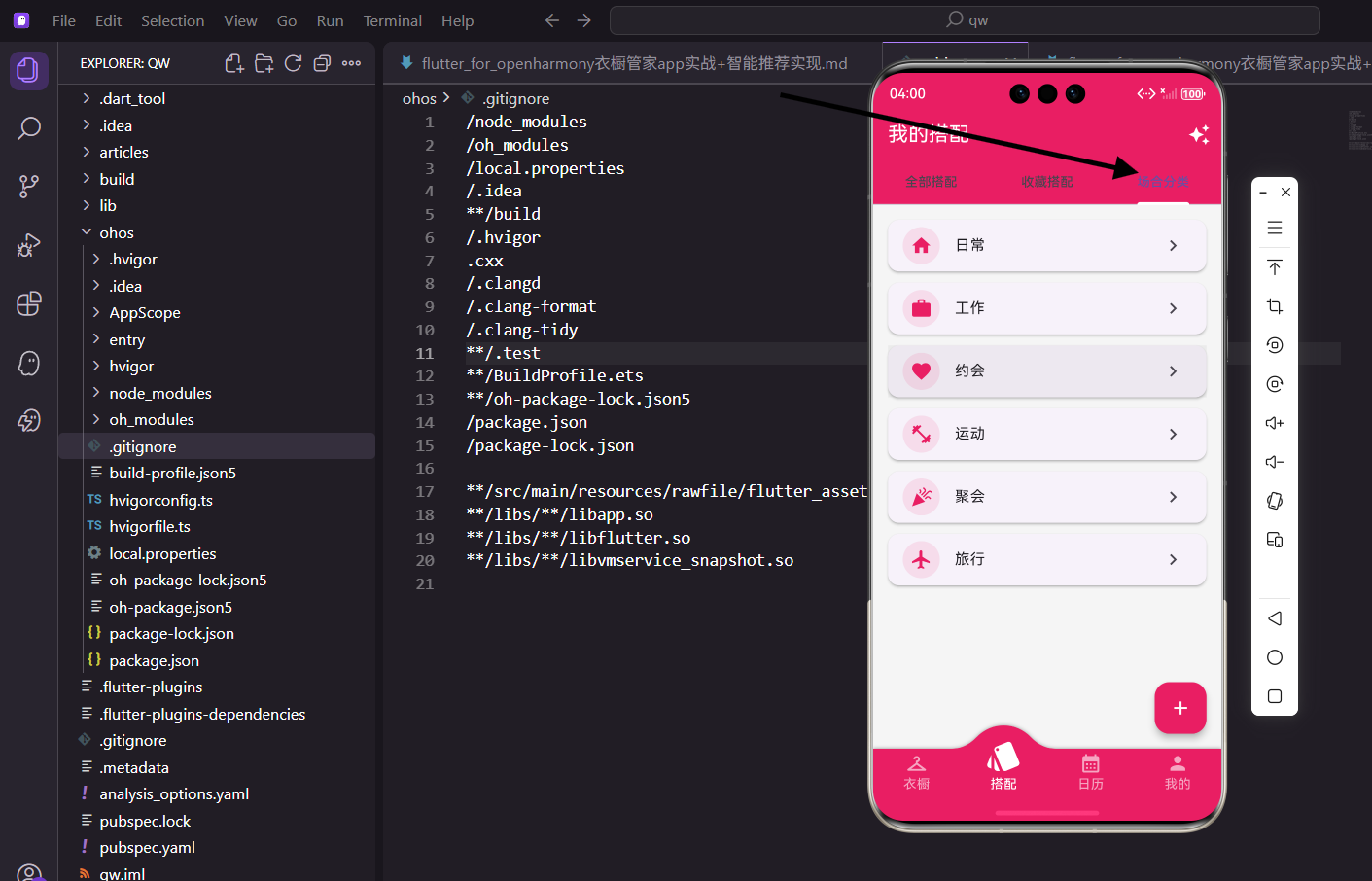
不同场合需要不同的穿搭风格,上班要正式,约会要精致,运动要舒适。今天我们来实现衣橱管家App的场合分类功能,帮助用户根据场合快速找到合适的搭配。
场合分类的意义
很多人早上出门前纠结穿什么,其实问题的关键在于没有明确今天要去什么场合。如果知道今天要开会,自然会选择正装;如果是周末逛街,就可以穿得休闲一些。
场合分类功能就是帮助用户建立这种思维方式,把搭配和场合关联起来,让选择变得更简单。
页面整体结构
场合分类页面接收一个场合参数,展示该场合下的所有搭配。
import 'package:flutter/material.dart';
import 'package:provider/provider.dart';
import 'package:flutter_screenutil/flutter_screenutil.dart';
import '../../providers/wardrobe_provider.dart';
import '../../models/clothing_item.dart';
import 'outfit_detail_screen.dart';
class OccasionScreen extends StatelessWidget {
final String occasion;
const OccasionScreen({super.key, required this.occasion});
Widget build(BuildContext context) {
return Scaffold(
appBar: AppBar(title: Text('$occasion搭配')),
body: Consumer<WardrobeProvider>(
builder: (context, provider, child) {
final outfits = provider.outfits.where((o) => o.occasion == occasion).toList();
// 后续处理
},
),
);
}
}
页面通过构造函数接收occasion参数,AppBar标题动态显示"XX搭配"。Consumer监听Provider变化,where方法过滤出指定场合的搭配。
这种设计让一个页面可以复用于所有场合,只需要传入不同的occasion参数即可。
空状态处理
当某个场合还没有搭配时,需要显示友好的提示并引导用户创建。
if (outfits.isEmpty) {
  return Center(
    child: Column(
      mainAxisAlignment: MainAxisAlignment.center,
      children: [
        Icon(_getOccasionIcon(occasion), size: 64.sp, color: Colors.grey),
        SizedBox(height: 16.h),
        Text('暂无$occasion搭配', style: TextStyle(fontSize: 16.sp, color: Colors.grey)),
        SizedBox(height: 8.h),
        Text('创建搭配时选择"$occasion"场合', style: TextStyle(fontSize: 14.sp, color: Colors.grey)),
      ],
    ),
  );
}
空状态图标使用场合对应的图标,与页面主题呼应。文案中包含场合名称,让用户明确当前在看哪个场合。
副文案引导用户如何添加该场合的搭配,降低用户的学习成本。
场合图标映射
不同场合使用不同的图标,让用户更容易识别。
IconData _getOccasionIcon(String occasion) {
  switch (occasion) {
    case '日常': return Icons.home;
    case '工作': return Icons.work;
    case '约会': return Icons.favorite;
    case '运动': return Icons.fitness_center;
    case '聚会': return Icons.celebration;
    case '旅行': return Icons.flight;
    default: return Icons.style;
  }
}
日常用家的图标,工作用公文包图标,约会用爱心图标,运动用健身图标,聚会用庆祝图标,旅行用飞机图标。
这些图标选择都符合用户的直觉认知,看到图标就能联想到对应的场合。default分支返回通用的风格图标。
搭配列表展示
搭配使用卡片列表展示,每个卡片显示搭配名称、包含的衣物和穿着次数。
return ListView.builder(
  padding: EdgeInsets.all(16.w),
  itemCount: outfits.length,
  itemBuilder: (context, index) {
    final outfit = outfits[index];
    final clothes = outfit.clothingIds
        .map((id) => provider.clothes.firstWhere(
              (c) => c.id == id,
              orElse: () => ClothingItem(id: '', name: '', category: '', color: '灰色', season: '', purchaseDate: DateTime.now()),
            ))
        .where((c) => c.id.isNotEmpty)
        .toList();

    return Card(
      margin: EdgeInsets.only(bottom: 12.h),
      child: InkWell(
        onTap: () => Navigator.push(context, MaterialPageRoute(builder: (_) => OutfitDetailScreen(outfit: outfit))),
        child: Padding(
          padding: EdgeInsets.all(12.w),
          child: Column(
            crossAxisAlignment: CrossAxisAlignment.start,
            children: [
              _buildOutfitHeader(outfit),
              SizedBox(height: 8.h),
              _buildClothesPreview(clothes),
              SizedBox(height: 8.h),
              _buildOutfitFooter(outfit),
            ],
          ),
        ),
      ),
    );
  },
);
clothingIds是搭配中包含的衣物ID列表,通过map和firstWhere获取对应的衣物对象。orElse处理衣物被删除的情况,返回一个空对象。
where过滤掉空对象,只保留有效的衣物。InkWell包裹卡片内容,点击跳转到搭配详情页。
搭配头部信息
头部显示搭配名称和收藏状态。
Widget _buildOutfitHeader(Outfit outfit) {
  return Row(
    children: [
      Expanded(
        child: Text(outfit.name, style: TextStyle(fontSize: 16.sp, fontWeight: FontWeight.bold)),
      ),
      if (outfit.isFavorite) const Icon(Icons.favorite, color: Colors.red, size: 20),
    ],
  );
}
Row布局让名称和收藏图标分列两端。Expanded让名称占据剩余空间,名称过长时会自动省略。
只有收藏的搭配才显示红色爱心图标,未收藏的不显示任何内容,保持界面简洁。
衣物预览区
预览区横向展示搭配中包含的衣物,每件衣物显示为一个小方块。
Widget _buildClothesPreview(List<ClothingItem> clothes) {
  return SizedBox(
    height: 60.h,
    child: ListView.builder(
      scrollDirection: Axis.horizontal,
      itemCount: clothes.length,
      itemBuilder: (context, i) {
        final item = clothes[i];
        return Container(
          width: 60.w,
          margin: EdgeInsets.only(right: 8.w),
          decoration: BoxDecoration(
            color: ClothingItem.getColorFromName(item.color).withOpacity(0.3),
            borderRadius: BorderRadius.circular(8.r),
          ),
          child: Center(child: Icon(Icons.checkroom, color: ClothingItem.getColorFromName(item.color))),
        );
      },
    ),
  );
}
横向ListView展示衣物,每个衣物是一个60x60的方块。背景色使用衣物颜色的30%透明度,图标使用原色。
scrollDirection设为horizontal实现横向滚动,当衣物较多时用户可以左右滑动查看。
搭配底部信息
底部显示穿着次数和季节信息。
Widget _buildOutfitFooter(Outfit outfit) {
  return Text(
    '穿过${outfit.wearCount}次 · ${outfit.season}',
    style: TextStyle(fontSize: 12.sp, color: Colors.grey),
  );
}
穿着次数帮助用户了解这套搭配的使用频率,季节信息提示这套搭配适合什么季节穿。
使用灰色小字显示,作为辅助信息不抢主体内容的风头。中间用点号分隔,视觉上更清晰。
场合选择入口
在搭配Tab页面,用户可以通过场合入口进入不同场合的搭配列表。
Widget _buildOccasionGrid() {
  final occasions = ['日常', '工作', '约会', '运动', '聚会', '旅行'];

  return GridView.builder(
    shrinkWrap: true,
    physics: const NeverScrollableScrollPhysics(),
    gridDelegate: SliverGridDelegateWithFixedCrossAxisCount(
      crossAxisCount: 3,
      crossAxisSpacing: 12.w,
      mainAxisSpacing: 12.h,
    ),
    itemCount: occasions.length,
    itemBuilder: (context, index) {
      final occasion = occasions[index];
      return _buildOccasionItem(context, occasion);
    },
  );
}

Widget _buildOccasionItem(BuildContext context, String occasion) {
  return InkWell(
    onTap: () => Navigator.push(
      context,
      MaterialPageRoute(builder: (_) => OccasionScreen(occasion: occasion)),
    ),
    child: Container(
      decoration: BoxDecoration(
        color: const Color(0xFFE91E63).withOpacity(0.1),
        borderRadius: BorderRadius.circular(12.r),
      ),
      child: Column(
        mainAxisAlignment: MainAxisAlignment.center,
        children: [
          Icon(_getOccasionIcon(occasion), color: const Color(0xFFE91E63), size: 32.sp),
          SizedBox(height: 8.h),
          Text(occasion, style: TextStyle(fontSize: 14.sp)),
        ],
      ),
    ),
  );
}
六个场合使用3列网格布局,每个场合是一个可点击的卡片。shrinkWrap和NeverScrollableScrollPhysics让网格嵌入到其他滚动视图中。
每个场合卡片包含图标和名称,点击跳转到对应的场合分类页面。
场合统计信息
在场合入口旁边显示该场合的搭配数量。
Widget _buildOccasionItem(BuildContext context, String occasion, int count) {
  return InkWell(
    onTap: () => Navigator.push(
      context,
      MaterialPageRoute(builder: (_) => OccasionScreen(occasion: occasion)),
    ),
    child: Container(
      decoration: BoxDecoration(
        color: const Color(0xFFE91E63).withOpacity(0.1),
        borderRadius: BorderRadius.circular(12.r),
      ),
      child: Stack(
        children: [
          Center(
            child: Column(
              mainAxisAlignment: MainAxisAlignment.center,
              children: [
                Icon(_getOccasionIcon(occasion), color: const Color(0xFFE91E63), size: 32.sp),
                SizedBox(height: 8.h),
                Text(occasion, style: TextStyle(fontSize: 14.sp)),
              ],
            ),
          ),
          if (count > 0)
            Positioned(
              top: 8.h,
              right: 8.w,
              child: Container(
                padding: EdgeInsets.symmetric(horizontal: 6.w, vertical: 2.h),
                decoration: BoxDecoration(
                  color: const Color(0xFFE91E63),
                  borderRadius: BorderRadius.circular(10.r),
                ),
                child: Text('$count', style: TextStyle(color: Colors.white, fontSize: 10.sp)),
              ),
            ),
        ],
      ),
    ),
  );
}
使用Stack在右上角叠加数量徽章,只有数量大于0时才显示。徽章使用品牌色背景,白色文字,圆角设计。
这种设计让用户一眼就能看出哪些场合有搭配,哪些还是空的。
排序功能
用户可以按不同方式排序搭配列表。
class _OccasionScreenState extends State<OccasionScreen> {
  String _sortBy = 'wearCount';

  List<Outfit> _sortOutfits(List<Outfit> outfits) {
    switch (_sortBy) {
      case 'wearCount':
        return List.from(outfits)..sort((a, b) => b.wearCount.compareTo(a.wearCount));
      case 'name':
        return List.from(outfits)..sort((a, b) => a.name.compareTo(b.name));
      case 'favorite':
        return List.from(outfits)..sort((a, b) => (b.isFavorite ? 1 : 0).compareTo(a.isFavorite ? 1 : 0));
      default:
        return outfits;
    }
  }

  Widget _buildSortButton() {
    return PopupMenuButton<String>(
      icon: const Icon(Icons.sort),
      onSelected: (value) => setState(() => _sortBy = value),
      itemBuilder: (context) => [
        const PopupMenuItem(value: 'wearCount', child: Text('按穿着次数')),
        const PopupMenuItem(value: 'name', child: Text('按名称')),
        const PopupMenuItem(value: 'favorite', child: Text('收藏优先')),
      ],
    );
  }
}
默认按穿着次数降序排列,最常穿的搭配显示在最前面。用户可以切换为按名称排序或收藏优先。
PopupMenuButton提供下拉菜单,选择后更新_sortBy状态触发重新排序。
筛选功能
用户可以按季节筛选搭配。
class _OccasionScreenState extends State<OccasionScreen> {
  String? _seasonFilter;

  List<Outfit> _filterOutfits(List<Outfit> outfits) {
    if (_seasonFilter == null) return outfits;
    return outfits.where((o) => o.season == _seasonFilter).toList();
  }

  Widget _buildSeasonFilter() {
    final seasons = ['春季', '夏季', '秋季', '冬季', '四季'];

    return SingleChildScrollView(
      scrollDirection: Axis.horizontal,
      padding: EdgeInsets.symmetric(horizontal: 16.w, vertical: 8.h),
      child: Row(
        children: [
          FilterChip(
            label: const Text('全部'),
            selected: _seasonFilter == null,
            onSelected: (selected) => setState(() => _seasonFilter = null),
          ),
          SizedBox(width: 8.w),
          ...seasons.map((season) => Padding(
            padding: EdgeInsets.only(right: 8.w),
            child: FilterChip(
              label: Text(season),
              selected: _seasonFilter == season,
              onSelected: (selected) => setState(() => _seasonFilter = selected ? season : null),
            ),
          )),
        ],
      ),
    );
  }
}
季节筛选使用FilterChip横向排列,"全部"选项清除筛选条件。选中状态通过_seasonFilter变量控制。
横向滚动布局适应多个筛选选项,不会挤压空间。筛选和排序可以组合使用。
快速创建搭配
在场合页面提供快速创建该场合搭配的入口。
Widget _buildFloatingButton(BuildContext context) {
  return FloatingActionButton.extended(
    onPressed: () {
      Navigator.push(
        context,
        MaterialPageRoute(
          builder: (_) => CreateOutfitScreen(preselectedOccasion: widget.occasion),
        ),
      );
    },
    icon: const Icon(Icons.add),
    label: Text('创建${widget.occasion}搭配'),
    backgroundColor: const Color(0xFFE91E63),
  );
}
FloatingActionButton.extended显示图标和文字,比普通FAB更明确。preselectedOccasion参数让创建页面预选当前场合。
按钮文字包含场合名称,让用户明确点击后会创建什么类型的搭配。
搭配推荐
根据场合和当前季节推荐合适的搭配。
Widget _buildRecommendation(List<Outfit> outfits) {
  final currentSeason = _getCurrentSeason();
  final recommended = outfits.where((o) =>
    o.season == currentSeason || o.season == '四季'
  ).toList();

  if (recommended.isEmpty) return const SizedBox.shrink();

  return Column(
    crossAxisAlignment: CrossAxisAlignment.start,
    children: [
      Padding(
        padding: EdgeInsets.all(16.w),
        child: Text('当季推荐', style: TextStyle(fontSize: 16.sp, fontWeight: FontWeight.bold)),
      ),
      SizedBox(
        height: 120.h,
        child: ListView.builder(
          scrollDirection: Axis.horizontal,
          padding: EdgeInsets.symmetric(horizontal: 16.w),
          itemCount: recommended.length,
          itemBuilder: (context, index) => _buildRecommendCard(recommended[index]),
        ),
      ),
    ],
  );
}

String _getCurrentSeason() {
  final month = DateTime.now().month;
  if (month >= 3 && month <= 5) return '春季';
  if (month >= 6 && month <= 8) return '夏季';
  if (month >= 9 && month <= 11) return '秋季';
  return '冬季';
}
根据当前月份判断季节,筛选出当季或四季通用的搭配作为推荐。推荐区域使用横向滚动列表展示。
如果没有符合条件的搭配,返回SizedBox.shrink()不占用空间。
完整代码整合
把所有功能整合在一起,形成完整的场合分类页面。
import 'package:flutter/material.dart';
import 'package:provider/provider.dart';
import 'package:flutter_screenutil/flutter_screenutil.dart';
import '../../providers/wardrobe_provider.dart';
import '../../models/clothing_item.dart';
import 'outfit_detail_screen.dart';
class OccasionScreen extends StatelessWidget {
final String occasion;
const OccasionScreen({super.key, required this.occasion});
Widget build(BuildContext context) {
return Scaffold(
appBar: AppBar(title: Text('$occasion搭配')),
body: Consumer<WardrobeProvider>(
builder: (context, provider, child) {
final outfits = provider.outfits.where((o) => o.occasion == occasion).toList();
if (outfits.isEmpty) {
return _buildEmptyState();
}
return ListView.builder(
padding: EdgeInsets.all(16.w),
itemCount: outfits.length,
itemBuilder: (context, index) {
final outfit = outfits[index];
final clothes = _getOutfitClothes(outfit, provider);
return _buildOutfitCard(context, outfit, clothes);
},
);
},
),
);
}
Widget _buildEmptyState() {
return Center(
child: Column(
mainAxisAlignment: MainAxisAlignment.center,
children: [
Icon(_getOccasionIcon(occasion), size: 64.sp, color: Colors.grey),
SizedBox(height: 16.h),
Text('暂无$occasion搭配', style: TextStyle(fontSize: 16.sp, color: Colors.grey)),
SizedBox(height: 8.h),
Text('创建搭配时选择"$occasion"场合', style: TextStyle(fontSize: 14.sp, color: Colors.grey)),
],
),
);
}
List<ClothingItem> _getOutfitClothes(dynamic outfit, WardrobeProvider provider) {
return outfit.clothingIds
.map((id) => provider.clothes.firstWhere(
(c) => c.id == id,
orElse: () => ClothingItem(id: '', name: '', category: '', color: '灰色', season: '', purchaseDate: DateTime.now()),
))
.where((c) => c.id.isNotEmpty)
.toList();
}
Widget _buildOutfitCard(BuildContext context, dynamic outfit, List<ClothingItem> clothes) {
return Card(
margin: EdgeInsets.only(bottom: 12.h),
child: InkWell(
onTap: () => Navigator.push(context, MaterialPageRoute(builder: (_) => OutfitDetailScreen(outfit: outfit))),
child: Padding(
padding: EdgeInsets.all(12.w),
child: Column(
crossAxisAlignment: CrossAxisAlignment.start,
children: [
Row(
children: [
Expanded(child: Text(outfit.name, style: TextStyle(fontSize: 16.sp, fontWeight: FontWeight.bold))),
if (outfit.isFavorite) const Icon(Icons.favorite, color: Colors.red, size: 20),
],
),
SizedBox(height: 8.h),
SizedBox(
height: 60.h,
child: ListView.builder(
scrollDirection: Axis.horizontal,
itemCount: clothes.length,
itemBuilder: (context, i) {
final item = clothes[i];
return Container(
width: 60.w,
margin: EdgeInsets.only(right: 8.w),
decoration: BoxDecoration(
color: ClothingItem.getColorFromName(item.color).withOpacity(0.3),
borderRadius: BorderRadius.circular(8.r),
),
child: Center(child: Icon(Icons.checkroom, color: ClothingItem.getColorFromName(item.color))),
);
},
),
),
SizedBox(height: 8.h),
Text('穿过${outfit.wearCount}次 · ${outfit.season}', style: TextStyle(fontSize: 12.sp, color: Colors.grey)),
],
),
),
),
);
}
IconData _getOccasionIcon(String occasion) {
switch (occasion) {
case '日常': return Icons.home;
case '工作': return Icons.work;
case '约会': return Icons.favorite;
case '运动': return Icons.fitness_center;
case '聚会': return Icons.celebration;
case '旅行': return Icons.flight;
default: return Icons.style;
}
}
}
代码结构清晰,主build方法处理整体逻辑,各个UI模块拆分到独立方法中。_getOutfitClothes处理衣物数据获取,_buildOutfitCard处理卡片渲染。
这种设计让代码易于维护和扩展,如果需要添加新功能,只需要在相应位置添加代码即可。
写在最后
场合分类功能帮助用户建立场合与穿搭的关联,让选择衣服变得更有目的性。通过清晰的分类和直观的展示,用户可以快速找到适合当前场合的搭配。
穿搭不仅是选择衣服,更是一种生活态度的表达。希望这个功能能帮助用户在每个场合都能穿出自信。
欢迎加入开源鸿蒙跨平台社区:https://openharmonycrossplatform.csdn.net

腾讯云面向开发者汇聚海量精品云计算使用和开发经验,营造开放的云计算技术生态圈。
更多推荐
 9
9 0
0- 0


 已为社区贡献22条内容

所有评论(0)