Flutter for OpenHarmony 商城App实战 - 订单详情实现
·
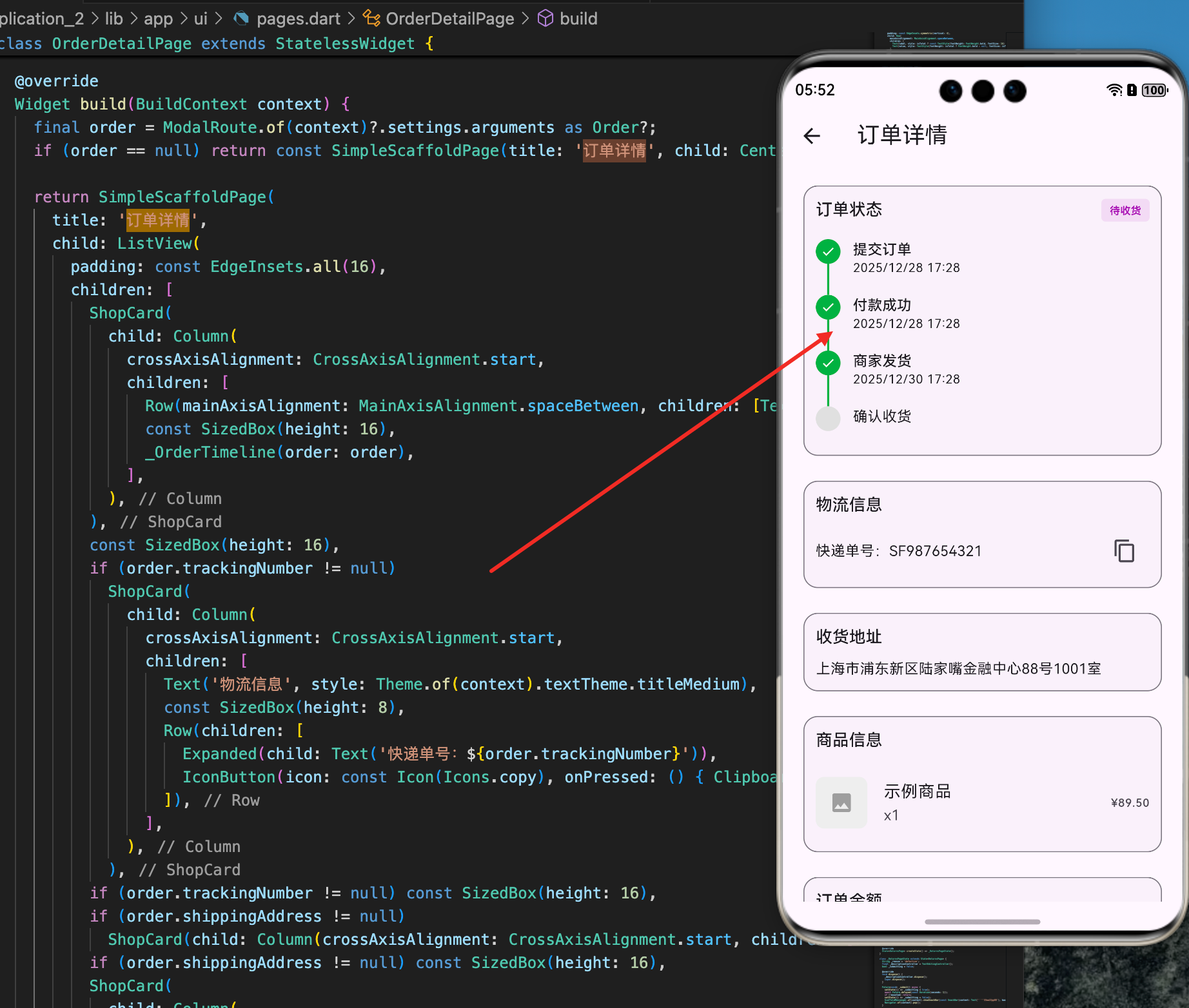
订单详情页是用户查看订单完整信息的重要页面。用户在这里可以查看订单的所有商品、收货地址、物流信息、订单状态时间线等详细信息,并可以进行售后操作。一个好的订单详情实现需要清晰的信息展示、完整的物流追踪和便捷的操作方式。本文将详细讲解如何在 Flutter for OpenHarmony 项目中实现一个功能完整的订单详情页面,包括订单信息展示、物流追踪、状态时间线和售后操作等功能。
应用状态作用域
应用状态需要在整个应用中共享。AppStateScope 是一个 InheritedNotifier,用于在应用中传递全局状态。
class AppStateScope extends InheritedNotifier<AppState> {
  const AppStateScope({
    super.key,
    required AppState state,    // 应用状态实例
    required super.child,       // 子组件
  }) : super(notifier: state);

  // 获取应用状态(必须存在)
  static AppState of(BuildContext context) {
    // 查找最近的AppStateScope
    final scope = context.dependOnInheritedWidgetOfExactType<AppStateScope>();

    // 如果没有找到,抛出错误
    if (scope == null) {
      throw FlutterError(
        'AppStateScope.of() called without AppStateScope in tree.'
      );
    }

    return scope.notifier!;
  }

  // 获取应用状态(可能不存在)
  static AppState? maybeOf(BuildContext context) {
    // 查找最近的AppStateScope
    final scope = context.dependOnInheritedWidgetOfExactType<AppStateScope>();

    // 返回notifier或null
    return scope?.notifier;
  }
}
这个应用状态作用域展示了如何在应用中共享全局状态:
InheritedNotifier 的优势:
- 继承自
InheritedNotifier<AppState>,自动处理状态通知 - 子组件可以通过
AppStateScope.of(context)获取应用状态 - 当应用状态改变时,所有依赖的组件自动重建
两种获取方式:
of()方法:必须存在AppStateScope,否则抛出错误maybeOf()方法:如果不存在AppStateScope,返回 null
错误处理:
- 提供有意义的错误信息
- 帮助开发者快速定位问题
订单详情页面
订单详情页展示订单的完整信息。
class OrderDetailPage extends StatelessWidget {
const OrderDetailPage({
super.key,
required this.orderId, // 订单ID
});
final String orderId;
Widget build(BuildContext context) {
// 获取应用状态
final appState = AppStateScope.of(context);
return Scaffold(
appBar: AppBar(
title: const Text('订单详情'),
actions: [
// 复制订单号按钮
IconButton(
icon: const Icon(Icons.copy),
onPressed: () {
// 复制订单号到剪贴板
Clipboard.setData(ClipboardData(text: orderId));
ScaffoldMessenger.of(context).showSnackBar(
const SnackBar(content: Text('订单号已复制')),
);
},
),
],
),
body: AnimatedBuilder(
animation: appState,
builder: (context, _) {
// 查找订单
final order = appState.orders.firstWhere(
(o) => o.id == orderId,
orElse: () => null,
);
if (order == null) {
return const Center(child: Text('订单不存在'));
}
return ListView(
padding: const EdgeInsets.all(12),
children: [
// 订单状态卡片
_buildStatusCard(order),
const SizedBox(height: 12),
// 物流信息卡片
if (order.trackingNumber != null)
_buildLogisticsCard(order),
const SizedBox(height: 12),
// 收货地址卡片
if (order.shippingAddress != null)
_buildAddressCard(order),
const SizedBox(height: 12),
// 商品信息卡片
_buildItemsCard(order),
const SizedBox(height: 12),
// 价格信息卡片
_buildPriceCard(order),
const SizedBox(height: 12),
// 操作按钮
_buildActionButtons(order),
],
);
},
),
);
}
// 构建订单状态卡片
Widget _buildStatusCard(Order order) {
return Card(
child: Padding(
padding: const EdgeInsets.all(16),
child: Column(
crossAxisAlignment: CrossAxisAlignment.start,
children: [
Text(
'订单状态',
style: Theme.of(context).textTheme.titleMedium,
),
const SizedBox(height: 12),
Row(
children: [
Icon(
_getStatusIcon(order.status),
color: _getStatusColor(order.status),
size: 32,
),
const SizedBox(width: 12),
Expanded(
child: Column(
crossAxisAlignment: CrossAxisAlignment.start,
children: [
Text(
order.statusText,
style: Theme.of(context).textTheme.titleSmall,
),
Text(
_getStatusDescription(order),
style: Theme.of(context).textTheme.bodySmall,
),
],
),
),
],
),
],
),
),
);
}
// 构建物流信息卡片
Widget _buildLogisticsCard(Order order) {
return Card(
child: Padding(
padding: const EdgeInsets.all(16),
child: Column(
crossAxisAlignment: CrossAxisAlignment.start,
children: [
Text(
'物流信息',
style: Theme.of(context).textTheme.titleMedium,
),
const SizedBox(height: 12),
Row(
children: [
const Icon(Icons.local_shipping),
const SizedBox(width: 12),
Expanded(
child: Column(
crossAxisAlignment: CrossAxisAlignment.start,
children: [
Text('快递单号:${order.trackingNumber}'),
const SizedBox(height: 4),
Text(
'点击查看物流详情',
style: TextStyle(
color: Theme.of(context).primaryColor,
),
),
],
),
),
],
),
],
),
),
);
}
// 构建收货地址卡片
Widget _buildAddressCard(Order order) {
return Card(
child: Padding(
padding: const EdgeInsets.all(16),
child: Column(
crossAxisAlignment: CrossAxisAlignment.start,
children: [
Text(
'收货地址',
style: Theme.of(context).textTheme.titleMedium,
),
const SizedBox(height: 12),
Row(
children: [
const Icon(Icons.location_on),
const SizedBox(width: 12),
Expanded(
child: Text(order.shippingAddress ?? ''),
),
],
),
],
),
),
);
}
// 构建商品信息卡片
Widget _buildItemsCard(Order order) {
return Card(
child: Padding(
padding: const EdgeInsets.all(16),
child: Column(
crossAxisAlignment: CrossAxisAlignment.start,
children: [
Text(
'商品信息',
style: Theme.of(context).textTheme.titleMedium,
),
const SizedBox(height: 12),
...order.items.map((item) {
return Padding(
padding: const EdgeInsets.only(bottom: 12),
child: Row(
children: [
// 商品图片
ClipRRect(
borderRadius: BorderRadius.circular(4),
child: Image.network(
item.product.imageUrl,
width: 60,
height: 60,
fit: BoxFit.contain,
errorBuilder: (_, __, ___) =>
const SizedBox(width: 60, height: 60),
),
),
const SizedBox(width: 12),
// 商品信息
Expanded(
child: Column(
crossAxisAlignment: CrossAxisAlignment.start,
children: [
Text(
item.product.title,
maxLines: 2,
overflow: TextOverflow.ellipsis,
),
const SizedBox(height: 4),
Text(
'¥${item.priceUsd.toStringAsFixed(2)} x${item.quantity}',
style: Theme.of(context).textTheme.bodySmall,
),
],
),
),
],
),
);
}).toList(),
],
),
),
);
}
// 构建价格信息卡片
Widget _buildPriceCard(Order order) {
return Card(
child: Padding(
padding: const EdgeInsets.all(16),
child: Column(
children: [
Row(
mainAxisAlignment: MainAxisAlignment.spaceBetween,
children: [
const Text('商品小计'),
Text('¥${order.totalUsd.toStringAsFixed(2)}'),
],
),
const SizedBox(height: 8),
Row(
mainAxisAlignment: MainAxisAlignment.spaceBetween,
children: [
const Text('运费'),
const Text('¥0.00'),
],
),
const Divider(),
Row(
mainAxisAlignment: MainAxisAlignment.spaceBetween,
children: [
const Text(
'合计',
style: TextStyle(fontWeight: FontWeight.bold),
),
Text(
'¥${order.totalUsd.toStringAsFixed(2)}',
style: const TextStyle(
fontWeight: FontWeight.bold,
fontSize: 16,
color: Colors.red,
),
),
],
),
],
),
),
);
}
// 构建操作按钮
Widget _buildActionButtons(Order order) {
return Row(
children: [
Expanded(
child: OutlinedButton(
onPressed: () {
// 联系客服
},
child: const Text('联系客服'),
),
),
const SizedBox(width: 12),
if (order.status == OrderStatus.delivered)
Expanded(
child: ElevatedButton(
onPressed: () {
// 申请退货
},
child: const Text('申请退货'),
),
),
],
);
}
// 获取订单状态对应的图标
IconData _getStatusIcon(OrderStatus status) {
switch (status) {
case OrderStatus.pending:
return Icons.schedule;
case OrderStatus.paid:
return Icons.payment;
case OrderStatus.shipped:
return Icons.local_shipping;
case OrderStatus.delivered:
return Icons.check_circle;
default:
return Icons.info;
}
}
// 获取订单状态对应的颜色
Color _getStatusColor(OrderStatus status) {
switch (status) {
case OrderStatus.pending:
return Colors.orange;
case OrderStatus.paid:
return Colors.blue;
case OrderStatus.shipped:
return Colors.purple;
case OrderStatus.delivered:
return Colors.green;
default:
return Colors.grey;
}
}
// 获取订单状态的描述
String _getStatusDescription(Order order) {
switch (order.status) {
case OrderStatus.pending:
return '等待支付';
case OrderStatus.paid:
return '已支付,等待发货';
case OrderStatus.shipped:
return '已发货,${order.trackingNumber ?? ''}';
case OrderStatus.delivered:
return '已收货';
default:
return '';
}
}
}
这个订单详情页展示了如何展示完整的订单信息:
页面结构:
- 订单状态卡片:显示当前订单状态
- 物流信息卡片:显示快递单号和物流信息
- 收货地址卡片:显示收货地址
- 商品信息卡片:显示订单中的所有商品
- 价格信息卡片:显示价格明细
- 操作按钮:提供售后操作
信息展示:
- 使用图标和颜色表示订单状态
- 清晰的价格明细展示
- 商品信息包含图片、标题、价格和数量
用户交互:
- 复制订单号功能
- 联系客服按钮
- 申请退货按钮(仅在已收货时显示)
订单状态时间线
订单状态时间线展示订单的完整流程。
// 订单状态时间线
class OrderTimeline extends StatelessWidget {
const OrderTimeline({required this.order});
final Order order;
Widget build(BuildContext context) {
return Column(
children: [
// 待付款
_buildTimelineItem(
title: '待付款',
time: order.createdAt,
isCompleted: order.status.index >= OrderStatus.pending.index,
isActive: order.status == OrderStatus.pending,
),
// 已支付
_buildTimelineItem(
title: '已支付',
time: order.paidAt,
isCompleted: order.status.index >= OrderStatus.paid.index,
isActive: order.status == OrderStatus.paid,
),
// 已发货
_buildTimelineItem(
title: '已发货',
time: order.shippedAt,
isCompleted: order.status.index >= OrderStatus.shipped.index,
isActive: order.status == OrderStatus.shipped,
),
// 已收货
_buildTimelineItem(
title: '已收货',
time: order.deliveredAt,
isCompleted: order.status.index >= OrderStatus.delivered.index,
isActive: order.status == OrderStatus.delivered,
),
],
);
}
Widget _buildTimelineItem({
required String title,
required DateTime? time,
required bool isCompleted,
required bool isActive,
}) {
return Row(
children: [
// 时间线圆点
Container(
width: 24,
height: 24,
decoration: BoxDecoration(
shape: BoxShape.circle,
color: isCompleted ? Colors.green : Colors.grey,
border: isActive ? Border.all(color: Colors.blue, width: 2) : null,
),
child: isCompleted
? const Icon(Icons.check, size: 16, color: Colors.white)
: null,
),
const SizedBox(width: 12),
// 时间线内容
Expanded(
child: Column(
crossAxisAlignment: CrossAxisAlignment.start,
children: [
Text(title),
if (time != null)
Text(
_formatTime(time),
style: Theme.of(context).textTheme.bodySmall,
),
],
),
),
],
);
}
String _formatTime(DateTime time) {
return '${time.year}-${time.month.toString().padLeft(2, '0')}-${time.day.toString().padLeft(2, '0')} '
'${time.hour.toString().padLeft(2, '0')}:${time.minute.toString().padLeft(2, '0')}';
}
}
这个订单状态时间线展示了订单的完整流程:
时间线设计:
- 显示订单的各个关键时间点
- 已完成的步骤显示绿色
- 当前步骤显示蓝色边框
- 未完成的步骤显示灰色
时间显示:
- 显示每个步骤的完成时间
- 格式化时间为易读的格式
售后操作
订单详情页需要支持售后操作。
// 售后操作
class AfterSalesOperation {
  // 申请退货
  static Future<bool> requestReturn(
    String orderId,
    String reason,
    String description,
  ) async {
    try {
      // 调用API申请退货
      await Future.delayed(const Duration(seconds: 1));
      return true;
    } catch (e) {
      return false;
    }
  }

  // 申请退款
  static Future<bool> requestRefund(
    String orderId,
    String reason,
  ) async {
    try {
      // 调用API申请退款
      await Future.delayed(const Duration(seconds: 1));
      return true;
    } catch (e) {
      return false;
    }
  }

  // 确认收货
  static Future<bool> confirmReceipt(String orderId) async {
    try {
      // 调用API确认收货
      await Future.delayed(const Duration(seconds: 1));
      return true;
    } catch (e) {
      return false;
    }
  }

  // 查看物流
  static Future<List<LogisticsEvent>> getLogistics(String trackingNumber) async {
    try {
      // 调用API获取物流信息
      await Future.delayed(const Duration(seconds: 1));
      return [];
    } catch (e) {
      return [];
    }
  }
}

// 物流事件
class LogisticsEvent {
  const LogisticsEvent({
    required this.time,
    required this.status,
    required this.location,
  });

  final DateTime time;
  final String status;
  final String location;
}
这个售后操作展示了如何处理售后请求:
售后操作类型:
- 申请退货:用户可以申请退货
- 申请退款:用户可以申请退款
- 确认收货:用户可以确认收货
- 查看物流:用户可以查看详细物流信息
异步处理:
- 所有操作都是异步的
- 需要调用后端API
- 返回操作结果
总结
订单详情的实现涉及多个重要的技术点。首先是应用状态作用域的设计,在应用中共享全局状态。其次是订单详情页面的实现,清晰地展示订单的完整信息。再次是订单状态时间线的设计,展示订单的完整流程。最后是售后操作的实现,提供便捷的售后服务。
这种设计确保了订单详情的功能完整性和用户体验的流畅性。用户可以轻松查看订单详情、追踪物流、进行售后操作,整个流程自然而直观。
欢迎加入开源鸿蒙跨平台社区:https://openharmonycrossplatform.csdn.net

腾讯云面向开发者汇聚海量精品云计算使用和开发经验,营造开放的云计算技术生态圈。
更多推荐
 17
17 0
0- 0


 已为社区贡献18条内容

所有评论(0)