uniapp中的人员轨迹绘制图
摘要:本文实现了一个人员轨迹可视化系统,主要功能包括:1)通过Canvas绘制人员移动轨迹,区分已走(蓝色实线)、未走(灰色虚线)和当前点(绿色高亮);2)支持轨迹播放/暂停/重置功能,显示进度条和当前位置信息;3)动态显示人员移动图标和当前坐标信息,自动调整文字显示防止超出Canvas范围;4)采用折叠面板展示人员列表,包含工号、在岗时长等基本信息;5)响应式设计适配不同屏幕尺寸。系统通过经纬度
·
根据功能要求和数据内容,主要是在点击播放的时候可以有进度条控制及轨迹详情和当前的轨迹线路,并可暂停和继续播放,可重置轨迹内容。
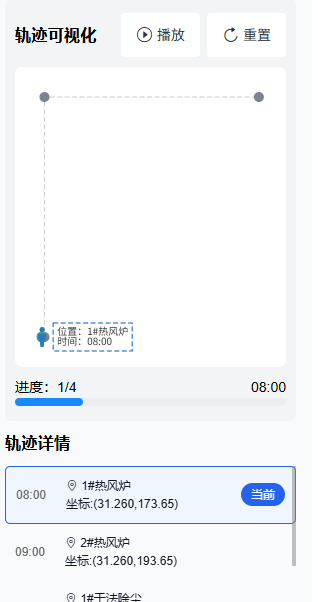
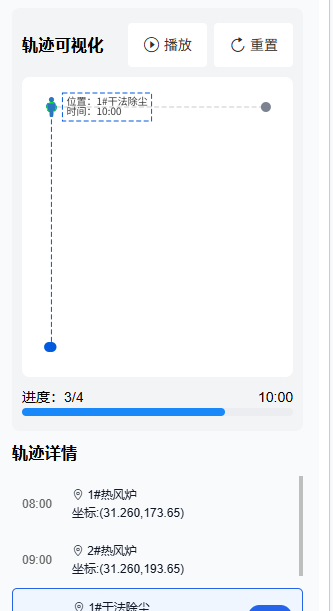
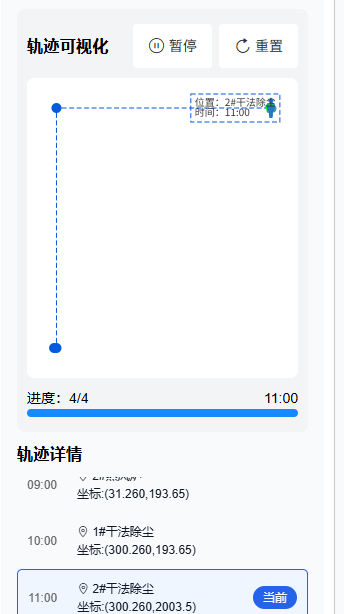
在此基础上还添加了轨迹未走时的颜色和当前颜色,已经走过的颜色区分,并伴有图片的移动和当前位置的信息展示内容,及信息内容不得超过当前canvas盒子宽高的判断。
代码内容(主要保留了人员轨迹内容)
<template>
	<view class="box">
		<view class="box-content">

			<view class="card-box">
				<h2 style="margin: 50rpx 0;">人员轨迹列表</h2>
				<van-collapse v-model="activeName" accordion @change="onCollapseChange">
					<view class="information-box" v-for="(item,index) in personList" :key="index">
						<van-collapse-item :name="index">
							<template #title>
								<view class="information">
									<view style="display: flex;align-items: center;">
										<view class="icon-avator">
											<van-icon name="contact" />
										</view>
										<view class="">
											<h3 style="color: #000;">{{item.name}}</h3>
											<view class="">
												工号:{{item.cardNo}}
											</view>
										</view>
									</view>
									<view class="point-time">
										<view class="point">
											{{item.trackList.length}}个轨迹点
										</view>
										<view class="">
											在岗时长:{{item.timeLong}}
										</view>
									</view>
								</view>
							</template>
							<view class="" v-if="activeName === index">
								<view class="information-content">
									<view class="trajectory-box">
										<h3 style="color: #000;">
											轨迹可视化
										</h3>
										<view style="display: flex;align-items: center;">
											<van-button @click="handleStart(item,index)" type="default"
												:icon="isIcon[index]? 'pause-circle-o' :'play-circle-o'"
												style="margin-right: 15rpx;">{{isIcon[index]?'暂停':'播放'}}</van-button>
											<van-button @click="handleReset(item,index)" type="default"
												icon="replay">重置</van-button>
										</view>
									</view>
									<view class="trajectory-card">
										<canvas :id="`trajectoryCanvas_${index}`"
											:canvas-id="`trajectoryCanvas_${index}`"
											style="width: 100%; height: 100%;"></canvas>
									</view>
									<view class="">
										<view class="progress-box">
											<view class="">
												进度:{{playStatus[index]?.currentStep || 1}}/{{item.trackList.length}}
											</view>
											<view class="">
												{{item.trackList[playStatus[index]?.currentStep - 1]?.time || item.trackList[0].time}}
											</view>
										</view>
										<van-progress
											:percentage="playStatus[index]?.currentPercent || getPercentage(item.trackList.length)"
											stroke-width="8" pivot-text="" />
									</view>
								</view>
								<h3 style="color: #000;margin: 20rpx 0;">轨迹详情</h3>
								<view class="trajectory-list">
									<view class="trajectory-list-item" v-for="(val,idx) in item.trackList" :key="idx"
										:class="{'is-Active':playStatus[index]?.currentStep ? (playStatus[index].currentStep - 1 === idx) : (0 === idx)}">
										<view style="display: flex;align-items: center;">
											<view style="color: #666;">
												{{val.time}}
											</view>
											<view style="margin-left: 40rpx;">
												<view class="">
													<van-icon name="location-o" /> {{val.location}}
												</view>
												<view class="">
													坐标:({{val.latitude}},{{val.longitude}})
												</view>
											</view>
										</view>
										<view class="current"
											v-if="playStatus[index]?.currentStep ? (playStatus[index].currentStep - 1 === idx) : (0 === idx)">
											当前
										</view>
									</view>
								</view>
							</view>
						</van-collapse-item>
					</view>
				</van-collapse>
				<view style="text-align: center;color: #666;" v-if="personList.length == 0">
					暂无人员列表数据
				</view>
			</view>
		</view>
	</view>
</template>
<script>
	import {
		showToast
	} from 'vant';
	export default {
		data() {
			return {
				personImagePath: '/static/xiaoren.png',
				personImageInfo: null,
				// 文字样式配置(可自定义)
				textStyle: {
					fontSize: 10, // 字体大小(px)
					lineHeight: 10, // 行高
					color: '#333333', // 文字颜色
					bgColor: 'transparent', // 背景色(半透明白色)
					padding: 4 // 文字背景内边距
				},
				isIcon: {},
				playStatus: [],
				isTrajectoryIndex: 0,
				activeName: '',
				result: '',
				showCalendar: false,
				isActive: 0,
				isPress: false,
				personList: [{
						name: '张三',
						cardNo: 'SG001',
						timeLong: '9小时45分钟',
						trackList: [{
								location: '1#热风炉',
								longitude: '173.65',
								latitude: '31.260',
								time: '08:00'

							},
							{
								location: '2#热风炉',
								longitude: '193.65',
								latitude: '31.260',
								time: '09:00'

							},
							{
								location: '1#干法除尘',
								longitude: '193.65',
								latitude: '300.260',
								time: '10:00'

							},
							{
								location: '2#干法除尘',
								longitude: '2003.5',
								latitude: '300.260',
								time: '11:00'

							},
						]
					},
					{
						name: '李四',
						cardNo: 'SG002',
						timeLong: '3小时45分钟',
						trackList: [{
								location: '1#热风炉',
								longitude: '183.65',
								latitude: '31.260',
								time: '08:00'

							},
							{
								location: '2#热风炉',
								longitude: '133.65',
								latitude: '36.260',
								time: '09:00'

							},
							{
								location: '1#干法除尘',
								longitude: '193.65',
								latitude: '30.260',
								time: '10:00'

							},
						]
					},

				],
				formRef: null,
				areaSize: {
					width: 0,
					height: 0
				},
				centerPoint: {
					x: 0,
					y: 0
				},
				displaySize: {
					width: 0,
					height: 0
				},
				// 新增:存储Canvas容器实际尺寸
				canvasContainerSize: {},
				// 存储每个Canvas的上下文和轨迹点
				canvasState: [],
			}
		},
		onLoad() {
			// 先加载小人图片,避免绘制时空白
			this.loadPersonImage();
		},
		mounted() {
			this.initSize();
			this.personList.forEach((_, index) => {
				this.$set(this.canvasState, index, {
					ctx: null, // Canvas上下文
					trajectoryPoints: [] // 该人员的轨迹点
				});
				this.$set(this.playStatus, index, {
					timer: null,
					currentStep: 1,
					currentPercent: 0,
					totalStep: this.personList[index].trackList.length
				});
			});
		},
		methods: {
			loadPersonImage() {
				uni.getImageInfo({
					src: this.personImagePath,
					success: (res) => {
						this.personImageInfo = {
							path: res.path,
							width: res.width,
							height: res.height,
							// 缩放图片尺寸(避免过大,可自定义)
							drawWidth: 20,
							drawHeight: 20
						};
					},
					fail: (err) => {
						console.error('小人图片加载失败:', err);
					}
				});
			},
            //点击折叠面板绘制出所在的轨迹线
			onCollapseChange(index) {
				this.$nextTick(() => {
					setTimeout(async () => {
						await this.getCanvasContainerRealSize(index);
						this.initTrajectoryPoints(index); // 生成该人员的轨迹点
						this.drawTrajectory(index); // 绘制该人员的轨迹
					}, 200);
				});
			},
            //所需要的宽高
			initSize() {
				const systemInfo = uni.getSystemInfoSync();
				this.areaSize = {
					width: systemInfo.windowWidth,
					height: systemInfo.windowHeight
				};
				this.centerPoint = {
					x: this.areaSize.width / 2,
					y: this.areaSize.height / 2
				};
				const pxPerRpx = systemInfo.windowWidth / 750;
				this.displaySize = {
					width: this.areaSize.width,
					height: 600 * pxPerRpx
				};
				this.$forceUpdate();
			},
			// 精准获取Canvas容器实际像素尺寸
			getCanvasContainerRealSize(index) {
				return new Promise((resolve) => {
					const query = uni.createSelectorQuery().in(this);
					query.select(`#trajectoryCanvas_${index}`)
						.boundingClientRect(rect => {
							if (rect) {
								// 存储实际尺寸(优先级最高)
								this.canvasContainerSize[index] = {
									width: rect.width,
									height: rect.height
								};
							} else {
								// 兜底:用预计算的尺寸
								this.canvasContainerSize[index] = this.displaySize;
							}
							resolve();
						}).exec();
				});
			},
			// 生成指定人员的轨迹点(适配经纬度)
			initTrajectoryPoints(index) {
				const person = this.personList[index];
				const trackList = person.trackList;
				if (!trackList.length) return [];

				// 1. 获取最终使用的Canvas尺寸(实际尺寸 > 预计算尺寸)
				const canvasSize = this.canvasContainerSize[index] || this.displaySize;
				const canvasWidth = canvasSize.width;
				const canvasHeight = canvasSize.height;

				// 1. 提取经纬度极值(归一化用)
				const lngList = trackList.map(item => Number(item.longitude)).filter(v => !isNaN(v));
				const latList = trackList.map(item => Number(item.latitude)).filter(v => !isNaN(v));
				const maxLng = Math.max(...lngList);
				const minLng = Math.min(...lngList);
				const maxLat = Math.max(...latList);
				const minLat = Math.min(...latList);

				const lngRange = maxLng - minLng || 1;
				const latRange = maxLat - minLat || 1;

				// 2. 归一化:经纬度转Canvas坐标(适配你的displaySize)
				const paddingRatio = 0.1;
				const paddingX = canvasWidth * paddingRatio;
				const paddingY = canvasHeight * paddingRatio;
				const usableWidth = canvasWidth - 2 * paddingX;
				const usableHeight = canvasHeight - 2 * paddingY;

				const trajectoryPoints = trackList.map(point => {
					const lng = Number(point.longitude);
					const lat = Number(point.latitude);
					// 经度→X轴
					let lngNormalized = (lng - minLng) / lngRange;
					let latNormalized = (maxLat - lat) / latRange;

					// 强制限制在 0~1 之间(防止极端值)
					lngNormalized = Math.max(0, Math.min(1, lngNormalized));
					latNormalized = Math.max(0, Math.min(1, latNormalized));

					// 映射到Canvas坐标(带边距)
					const x = paddingX + lngNormalized * usableWidth;
					const y = paddingY + latNormalized * usableHeight;
					return {
						x,
						y,
						...point
					};
				});

				// 存储该人员的轨迹点
				this.$set(this.canvasState[index], 'trajectoryPoints', trajectoryPoints);
				return trajectoryPoints;
			},
			// 绘制指定索引的Canvas轨迹(核心:获取带索引的Canvas ID)
			drawTrajectory(index) {
				// 1. 获取Canvas实际尺寸
				const canvasSize = this.canvasContainerSize[index] || this.displaySize;
				const canvasWidth = canvasSize.width;
				const canvasHeight = canvasSize.height;

				// 2. 拼接Canvas ID
				const canvasId = `trajectoryCanvas_${index}`;
				const ctx = uni.createCanvasContext(canvasId, this);
				this.$set(this.canvasState[index], 'ctx', ctx);

				// 3. 清空画布(用实际尺寸)
				ctx.clearRect(0, 0, canvasWidth, canvasHeight);

				// 4. 获取轨迹点
				const trajectoryPoints = this.canvasState[index].trajectoryPoints;
				if (!trajectoryPoints.length) return;

				// 获取播放进度
				const playStatus = this.playStatus[index] || {
					currentStep: 1
				};
				const currentStep = playStatus.currentStep;
				const totalStep = trajectoryPoints.length;
				const currentPoint = trajectoryPoints[currentStep - 1];
				const currentInfo = currentPoint; // 当前点的完整信息(location/time等)


				// 5. 绘制轨迹线
				ctx.beginPath();
				trajectoryPoints.forEach((point, idx) => {
					if (idx === 0) {
						ctx.moveTo(point.x, point.y);
					} else {
						ctx.lineTo(point.x, point.y);
					}
				});
				ctx.setLineDash([10, 5]); // 未走轨迹为虚线
				ctx.setStrokeStyle("#CCCCCC"); // 浅灰色
				ctx.setLineWidth(1);
				ctx.stroke();
				ctx.setLineDash([]); // 重置虚线

				// 2. 绘制已走轨迹(实线)
				if (currentStep > 1) {
					ctx.beginPath();
					trajectoryPoints.slice(0, currentStep).forEach((point, idx) => {
						if (idx === 0) {
							ctx.moveTo(point.x, point.y);
						} else {
							ctx.lineTo(point.x, point.y);
						}
					});
					ctx.setLineDash([10, 5]);
					ctx.setStrokeStyle("#025ADD"); // 蓝色实线
					ctx.setLineWidth(1);
					ctx.stroke();
				}

				// 6. 绘制标记点
				trajectoryPoints.forEach((point, idx) => {
					ctx.beginPath();
					ctx.arc(point.x, point.y, 5, 0, 2 * Math.PI);
					// 当前点高亮(绿色),其他点灰色
					if (idx === currentStep - 1) {
						ctx.setFillStyle("#00FF00");
						// 绘制当前点外框
						ctx.setStrokeStyle("#025ADD");
						ctx.setLineWidth(1);
						ctx.stroke();
					} else if (idx < currentStep - 1) {
						ctx.setFillStyle("#025ADD");
					} else {
						ctx.setFillStyle("#7C828F");
					}
					ctx.fill();
				});
				// 4. 绘制小人图片(核心:跟随当前点)
				if (this.personImageInfo && currentPoint) {
					const {
						drawWidth,
						drawHeight,
						path
					} = this.personImageInfo;
					// 计算图片绘制坐标(中心对齐当前点)
					const imgX = currentPoint.x - drawWidth / 2; // 向左偏移半宽
					const imgY = currentPoint.y - drawHeight / 2; // 向上偏移半高
					// 绘制图片
					ctx.drawImage(
						path, // 图片路径
						imgX, // 绘制起始X坐标
						imgY, // 绘制起始Y坐标
						drawWidth, // 绘制宽度
						drawHeight // 绘制高度
					);
					// 5. 绘制当前点信息文字(核心:小人右侧显示)
					this.drawPointInfo(ctx, currentInfo, imgX + drawWidth + 5, imgY, canvasWidth, canvasHeight);
				}
				// 7. 旧版Canvas必须draw()
				ctx.draw();
			},
			// 新增:绘制点位信息文字(封装为独立方法)
			drawPointInfo(ctx, info, startX, startY, canvasWidth, canvasHeight) {
				const {
					fontSize,
					lineHeight,
					color,
					bgColor,
					padding
				} = this.textStyle;
				const MAX_TEXT_LENGTH = 10; // 单行最大字符数(进一步缩短)
				const MIN_FONT_SIZE = 8; // 最小可读字体大小(px)
				const KEY_INFO_ONLY = true; // 仅显示关键信息(位置+时间),减少行数

				// 2. 仅保留关键信息(减少行数,降低高度溢出风险)
				const formatText = (text) => text.length > MAX_TEXT_LENGTH ? text.substring(0, MAX_TEXT_LENGTH) + '...' :
					text;
				const coreTextLines = KEY_INFO_ONLY ?
					[
						`位置:${formatText(info.location || '未知')}`,
						`时间:${formatText(info.time || '未知')}`
					] :
					[
						`位置:${formatText(info.location || '未知')}`,
						`时间:${formatText(info.time || '未知')}`,
						`经纬度:${formatText(info.longitude || '')}/${formatText(info.latitude || '')}` // 合并经纬度,减少行数
					];

				// 3. 初始化字体大小,逐步缩小直到适配Canvas宽度
				let adaptFontSize = fontSize;
				let textLines = [...coreTextLines];
				let maxTextWidth = 0;

				// 循环缩小字体,直到文字宽度≤Canvas可用宽度 或 达到最小字体
				do {
					ctx.setFontSize(adaptFontSize);
					maxTextWidth = textLines.reduce((max, line) => {
						const width = ctx.measureText(line).width;
						return Math.max(max, width);
					}, 0);
					// Canvas可用宽度:总宽度 - 左右各20px(预留边距)
					const canvasUsableWidth = canvasWidth - 40;
					if (maxTextWidth <= canvasUsableWidth || adaptFontSize <= MIN_FONT_SIZE) break;
					adaptFontSize -= 1;
				} while (true);
				ctx.setFontSize(adaptFontSize);

				// 4. 计算背景框尺寸(基于缩小后的字体)
				const bgWidth = Math.min(maxTextWidth + 2 * padding, canvasWidth - 40); // 不超Canvas宽度
				const bgHeight = Math.min(textLines.length * lineHeight + 2 * padding, canvasHeight - 40); // 不超Canvas高度

				// 5. 边界检测:调整背景框位置,确保在Canvas内
				let bgX = startX - padding;
				let bgY = startY - padding;

				// 超出右侧 → 调整到小人左侧
				if (bgX + bgWidth > canvasWidth) {
					bgX = startX - bgWidth + padding - 10; // 10px是小人与文字的间距
				}
				// 超出左侧 → 强制贴Canvas左边界
				if (bgX < 0) {
					bgX = 20; // 左预留20px
				}
				// 超出下侧 → 调整到小人上方
				if (bgY + bgHeight > canvasHeight) {
					bgY = startY - bgHeight + padding - 10;
				}
				// 超出上侧 → 强制贴Canvas上边界
				if (bgY < 0) {
					bgY = 20; // 上预留20px
				}

				// 3. 绘制背景框(不变)
				ctx.setLineDash([10, 5]);
				ctx.setFillStyle(bgColor);
				ctx.fillRect(bgX, bgY, bgWidth, bgHeight);
				ctx.setStrokeStyle("#025ADD");
				ctx.setLineWidth(1);
				ctx.strokeRect(bgX, bgY, bgWidth, bgHeight);
				const textTotalHeight = textLines.length * lineHeight;
				const bgContentHeight = bgHeight - 2 * padding;
				const verticalOffset = Math.max(0, (bgContentHeight - textTotalHeight) / 2); // 避免负数
				const textStartY = bgY + padding + verticalOffset;
				// 2. 绘制文字内容
				// ctx.setFontSize(fontSize);
				ctx.setFillStyle(color);
				textLines.forEach((line, idx) => {
					if (textStartY + idx * lineHeight > bgY + bgHeight - padding) return;
					const y = startY + idx * lineHeight + 2 * padding;
					ctx.fillText(line, bgX + padding, y);
					// ctx.fillText(line, bgX + padding, textStartY + idx * lineHeight);
				});
			},

			getPercentage(number) {
				return 100 / number
			},
			//播放与暂停
			handleStart(item, index) {
				const trackCount = item.trackList.length;
				const percentPerStep = 100 / trackCount;
				// 初始化当前项的播放状态
				if (!this.playStatus[index]) {
					this.$set(this.playStatus, index, {
						timer: null, // 定时器
						currentStep: 1, // 当前播放到第几步
						currentPercent: percentPerStep, // 当前进度百分比
						totalStep: trackCount // 总步数
					});
				}
				const status = this.playStatus[index];
				if (this.isIcon[index]) {
					//暂停逻辑
					this.$set(this.isIcon, index, false);
					if (status.timer) {
						clearInterval(status.timer);
						status.timer = null;

					} else {
						if (this.playStatus[index]?.timer) {
							clearInterval(this.playStatus[index].timer);
						}
						// this.$set(this.isIcon, index, false);
						this.$set(this.playStatus, index, {
							timer: null,
							currentStep: 1,
							currentPercent: percentPerStep,
							totalStep: trackCount
						});
					}
					// 暂停后重绘当前进度
					this.drawTrajectory(index);
				} else {
					//播放逻辑
					this.$set(this.isIcon, index, true);
					status.timer = setInterval(() => {
						status.currentStep++;
						status.currentPercent = status.currentStep * percentPerStep;
						this.$set(this.playStatus, index, status);
						this.drawTrajectory(index);
						if (status.currentStep >= trackCount) {
							clearInterval(status.timer);
							// this.$set(this.isIcon, index, false);
							status.timer = null;
						}
					}, 1000)
				}

			},
			//重置
			handleReset(item, index) {
				if (this.playStatus[index]?.timer) {
					clearInterval(this.playStatus[index].timer);
				}
				this.$set(this.isIcon, index, false);
				this.$set(this.playStatus, index, {
					timer: null,
					currentStep: 1,
					currentPercent: 100 / (this.personList[index]?.trackList.length || 0),
					totalStep: this.personList[index]?.trackList.length || 0
				});
				this.drawTrajectory(index);
			}

		}
	}
</script>
<style scoped>
	.box {
		background-color: #F9FAFB;
		min-height: 100vh;
	}

	.box-content {
		margin: 0rpx 30rpx 0rpx;
		padding-bottom: 30rpx;
		padding-top: 130rpx;
	}

	.card-box {
		margin-bottom: 20rpx;
		border: 1px solid #ccc;
		border-radius: 15rpx;
		padding: 20rpx;
		box-shadow: 0rpx 0rpx 5rpx 1rpx #eee;
		font-size: 24rpx;
		background-color: #fff;
	}


	::v-deep .van-cell {
		padding: 10rpx 20rpx;
		border: 1px solid #ccc;
		border-radius: 10rpx;
	}

	.information-box {
		margin-bottom: 20rpx;
		border-radius: 15rpx;
	}

	.information {
		display: flex;
		align-items: center;
		justify-content: space-between;
		padding: 20rpx;
		font-size: 26rpx;
		color: #666;
	}

	::v-deep .van-cell--clickable {
		display: flex;
		align-items: center;
	}

	:v-deep .van-collapse {
		position: inherit;
	}

	::v-deep .van-collapse-item .van-cell {
		background: #F9FAFB;
		border: none;
	}

	::v-deep .van-collapse-item__content {
		background: #F9FAFB;
	}

	.icon-avator {
		width: 80rpx;
		height: 80rpx;
		background-color: #DBEAFE;
		border-radius: 50%;
		line-height: 80rpx;
		text-align: center;
		color: #2563EB;
		font-size: 30rpx;
		margin-right: 20rpx;
	}

	::v-deep .van-icon-arrow:before {
		content: none;
	}

	.point-time {
		display: flex;
		flex-direction: column;
		align-items: flex-end;
		font-size: 24rpx;
	}

	.point {
		width: fit-content;
		padding: 1rpx 15rpx;
		border: 1px solid #ccc;
		border-radius: 30rpx;
		color: #000;
	}

	.information-content {
		background-color: #F3F4F6;
		padding: 30rpx 20rpx;
		border-radius: 15rpx;
	}

	.trajectory-box {
		display: flex;
		align-items: center;
		justify-content: space-between;
	}

	.trajectory-card {
		margin: 20rpx 0;
		width: 100%;
		height: 600rpx;
		border-radius: 15rpx;
		background-color: #fff;

	}

	.progress-box {
		display: flex;
		justify-content: space-between;
		align-items: center;
		color: #000;
	}

	.trajectory-list {
		height: 300rpx;
		overflow-y: auto;
	}

	.trajectory-list-item {
		display: flex;
		align-items: center;
		justify-content: space-between;
		color: #111827;
		font-size: 24rpx;
		padding: 20rpx;
	}

	.current {
		color: #fff;
		padding: 5rpx 20rpx;
		border-radius: 30rpx;
		background-color: #2563EB;
	}

	.is-Active {
		background-color: #EFF6FF;
		border: 1px solid #2563EB;
		border-radius: 10rpx;
	}

	::v-deep .van-button {
		border: none;
	}
</style>
20260312_164714

腾讯云面向开发者汇聚海量精品云计算使用和开发经验,营造开放的云计算技术生态圈。
更多推荐
 5
5 0
0- 0


 已为社区贡献1条内容

所有评论(0)