运维自动化工具—Ansible
工作流程。
运维自动化工具—Ansible
Ansible 是一款开源的自动化运维工具,核心是通过无代理(Agentless)方式,用简单的 YAML 语法(Playbook)批量管理服务器、部署应用、配置系统,实现运维工作的自动化、标准化。
工作流程
1 用户基于命令或者playbook方式,向ansible的控制端发起用户请求
2 ansible根据用户请求目标,到控制端的主机列表中验证目标是否存在
3 若目标主机存在,然后基于连接插件与被控端处于连接状态
4 根据用户请求指令,结合相应的功能模块,指定目标主机执行相应的功能
5 目标主机执行完毕后,会将相应的状态结果返回给控制端。
6 控制端在处理过程中,还会通过插件工具实现日志、邮件等辅助功能
软件安装
环境提示
通用环境需求
 ansible的服务端和客户端基于ssh协议进行通信,所以必须提前准备ssh环境
控制端专用需求
 控制端支持类unix系统,不支持Windows系统
 需要python支持,提前准备python2.7+或者python3.5+的环境
被控端专用需求
 一般功能无需部署python环境,如果涉及到Python业务的话,必须配置相应的Python环境
 - 被控端Python版本小于2.4,需要安装python-simplejson
 - 被控端如开启SELinux需要安装libselinux-python
 - windows 只能做为被控制端
学习环境
系统环境:Ubuntu 24.04
学习环境:一主二从
| 序号 | 主机IP | 主机名 | 操作系统 | 备注 |
|---|---|---|---|---|
| 1 | 10.0.0.129 | ubuntu24-129.ansible.com | ubuntu24 | 控制端、被控端1 |
| 2 | 10.0.0.133 | ubuntu24-133.ansible.com | ubuntu24 | 被控端1 |
主机名定制
ubuntu24-129 主机
hostnamectl set-hostname ubuntu24-129
exec /bin/bash
ubuntu24-133 主机
hostnamectl set-hostname ubuntu24-133
exec /bin/bash
本地主机名解析 -所有主机一样
编写 /etc/hosts 文件
root@ubuntu24-129:~# vim /etc/hosts
10.0.0.129 ubuntu24-129.ansible.com ubuntu24-129
10.0.0.133 ubuntu24-133.ansible.com ubuntu24-133
软件源环境 仅ubuntu系统需要调整
rm -rf /etc/apt/sources.list.d/*
cat > /etc/apt/sources.list <<-eof
deb https://mirrors.aliyun.com/ubuntu/ noble main restricted universe multiverse
deb https://mirrors.aliyun.com/ubuntu/ noble-security main restricted universe multiverse
deb https://mirrors.aliyun.com/ubuntu/ noble-updates main restricted universe multiverse
deb https://mirrors.aliyun.com/ubuntu/ noble-backports main restricted universe multiverse
eof
apt update
ubuntu安装ansible
安装软件
更新软件源
root@ubuntu24-129:~# apt update
root@ubuntu24-13:~# apt install -y software-properties-common
安装ansible的专用软件源
root@ubuntu24-129:~# add-apt-repository --yes --update ppa:ansible/ansible
安装ansible软件
root@ubuntu24-129:~# apt install -y ansible
检查安装的软件包
root@ubuntu24-129:~# dpkg -l ansible
rocky安装ansible
安装软件
安装依赖软件源
[root@rocky10-12 ~]# yum install epel-release
安装ansible软件
[root@rocky10-12 ~]# yum install ansible
检测软件安装包效果
[root@rocky10-12 ~]# rpm -q ansible
ansible-7.7.0-1.el9.noarch
主机清单认证
ubuntu24-13主机做ssh的免密认证
方式一
root@ubuntu24-13:~# ssh-keygen
root@ubuntu24-13:~# ssh-copy-id root@localhost
root@ubuntu24-13:~# ssh-copy-id root@10.0.0.13
方式二
root@ubuntu24-13:~# ssh-keygen
root@ubuntu24-13:~# ssh-copy-id qwe@localhost
root@ubuntu24-13:~# ssh-copy-id qwe@10.0.0.129
root@ubuntu24-129:~# ansible 10.0.0.129 -a "ls /root"
[WARNING]: Platform linux on host 10.0.0.129 is using the discovered Python
interpreter at /usr/bin/python3.12, but future
installation of another Python interpreter could change the meaning of that
path. See https://docs.ansible.com/ansiblecore/2.17/reference_appendices/interpreter_discovery.html for more information.
10.0.0.129 | CHANGED | rc=0 >>
ansible.cfg
snap
认证
通过参数再次实践
root@ubuntu24-13:~# ansible 10.0.0.129 -a "ls /root" -k
SSH password: # 这次需要显式输入ssh密码进行认证,123456
10.0.0.13 | CHANGED | rc=0 >>
ansible.cfg
snap
主机认证实践
主机认证
鉴于命令行ansible采用-k参数的繁琐,主机列表采用ansible_ssh_pass属性容易造成安全隐患,所以安全的方式还是采用跨主机免密码的方式来认证最好。
root@ubuntu24-129:~# tail -n3 /etc/ansible/hosts
10.0.0.129 ansible_python_interpreter=/usr/bin/python3.12
[ansible_server]
10.0.0.129 ansible_python_interpreter=/usr/bin/python3.12
跨主机免密码认证
生成秘钥对
ssh-keygen -t rsa
传递秘钥文件
ssh-copy-id qwe@10.0.0.129
做过跨主机免密码认证,之后,再来ansible命令测试
root@ubuntu24-129:~# ansible 10.0.0.129 -m ping
10.0.0.129 | SUCCESS => {
    "changed": false,
    "ping": "pong"
}
root@ubuntu24-129:~# ansible ansible_server -m ping
10.0.0.129 | SUCCESS => {
    "changed": false,
    "ping": "pong"
}
目标主机匹配
主机清单文件
将之前的主机清单,清理完毕后,将三台主机分布加入到不同的主机组中
root@ubuntu24-129:~# vim /etc/ansible/hosts
10.0.0.129
[web]
10.0.0.129
10.0.0.133
[mysql]
10.0.0.129
10.0.0.133
跨主机免密码认证
  for i in 129 133
    do
      ssh-copy-id -i ~/.ssh/id_rsa.pub qwe@10.0.0.$i
    done
管理端主机执行如下测试命令,检测所有主机的连通效果
root@ubuntu24-129:~# ansible all -m ping
10.0.0.129 | SUCCESS => {
    "changed": false,
    "ping": "pong"
}
10.0.0.133 | SUCCESS => {
    "changed": false,
    "ping": "pong"
}
模块
日常命令操作模块
所谓的日常模块,其实指的就是指挥远程目标主机执行相关命令的模块,主要有以下三个:
command、shell、scripts模块
command模块
ansible的默认模块叫command
对于默认模块来说,我们不需要-m来指定模块,可以对目标主机使用"-a"传入一个命令参数,来执行查看本机上的信息,命令格式如下:
 ansible <目标主机> -a 模块参数
查看当前主机的网卡信息
root@ubuntu24-129:~# apt install net-tools -y # 否则没有ifconfig命令
root@ubuntu24-129:~# ansible localhost -a "ifconfig ens33"
localhost | CHANGED | rc=0 >>
ens33: flags=4163<UP,BROADCAST,RUNNING,MULTICAST>  mtu 1500
        inet 10.0.0.129  netmask 255.255.255.0  broadcast 10.0.0.255
        inet6 fe80::250:56ff:fe3b:d0e3  prefixlen 64  scopeid 0x20<link>
        ether 00:50:56:3b:d0:e3  txqueuelen 1000  (以太网)
        RX packets 25350  bytes 30686713 (30.6 MB)
        RX errors 0  dropped 0  overruns 0  frame 0
        TX packets 11682  bytes 1511401 (1.5 MB)
        TX errors 0  dropped 0 overruns 0  carrier 0  collisions 0
实践
chdir:切换到指定目录,再执行后序命令
root@ubuntu24-13:~# ansible 10.0.0.133 -a "chdir=/tmp mkdir cmd_test"
10.0.0.133 | CHANGED | rc=0 >>
root@ubuntu24-13:~# ansible 10.0.0.133 -a "chdir=/tmp/cmd_test touch 815.txt"
10.0.0.133 | CHANGED | rc=0 >>
root@ubuntu24-13:~# ansible 10.0.0.133 -a "chdir=/tmp/cmd_test ls"
10.0.0.133 | CHANGED | rc=0 >>
815.txt
查看
root@ubuntu24-13:~# ansible 10.0.0.133 -a 'ls -l /tmp/cmd_test'
10.0.0.133 | CHANGED | rc=0 >>
总用量 0
-rw-r--r--. 1 root root 0 12月  7 14:22 815.txt
ping模块
ansible还有一个专门测试主机存活的模块叫ping
ansible 可以通过 ping模块来探测目标主机的存活性,格式如下:
 ansible localhost -m ping
root@ubuntu24-13:~# ansible localhost -m ping
localhost | SUCCESS => {
    "changed": false,
    "ping": "pong"
}
ansible-doc命令
ansible-doc命令是专门用来查看ansible的模块帮助信息的,我们可以通过-h参数来查看他的帮助信息
-l 选项,查看所有的模块
shell模块
shell:command对于某些特殊的符号命令执行效果不好,专用的shell模块可以满足要求
实践
获取cpu的核心数
root@ubuntu24-13:~# ansible 10.0.0.133 -m shell -a 'cat /proc/cpuinfo | grep
"model name" | wc -l'
10.0.0.133 | CHANGED | rc=0 >>
2
scripts模块
scripts:批量的系统命令可以写成一个脚本文件,然后基于scripts的方式来运行,类似scp+shell的功能。
系统管理模块
hostname模块
该模块可以获取主机名相关的信息
格式
ansible <目标主机> -m hostname -a 'name=主机名'
实践
设定主机名为ansible-node2
root@ubuntu24-13:~# ansible 10.0.0.133 -m hostname -a "name=ansible-node2"
10.0.0.133 | CHANGED => {
    "ansible_facts": {
        "ansible_domain": "ansible.com",
        "ansible_fqdn": "ubuntu24-133.ansible.com",
        "ansible_hostname": "ansible-node2",
        "ansible_nodename": "ansible-node2"
    },
    "changed": true,
    "name": "ansible-node2"
}
user模块
命名格式
ansible <目标主机> -m user -a '属性1=值1 属性2=值2 ... 属性n=值n'
实践
创建一个定制的系统用户webapp,属组是root和bin,uid为10086,禁止登陆,家目录在/tmp/webapp
root@ubuntu24-13:~# ansible 10.0.0.133 -m user -a "name=webapp system=yes
groups=root,bin uid=10086 comment='webapp' shell=/sbin/nologin home=/tmp/webapp
state=present"
10.0.0.133 | CHANGED => {
    "changed": true,
    "comment": "webapp",
    "create_home": true,
    "group": 984,
    "groups": "root,bin",
    "home": "/tmp/webapp",
    "name": "webapp",
    "shell": "/sbin/nologin",
    "state": "present",
    "stderr": "useradd warning: webapp's uid 10086 is greater than SYS_UID_MAX
999\n",
    "stderr_lines": [
        "useradd warning: webapp's uid 10086 is greater than SYS_UID_MAX 999"
    ],
    "system": true,
    "uid": 10086
}
检查效果
root@ubuntu24-13:~# ansible 10.0.0.133 -a "id webapp"
10.0.0.133 | CHANGED | rc=0 >>
uid=10086(webapp) gid=984(webapp) 组=984(webapp),0(root),2(bin)
root@ubuntu24-13:~# ansible 10.0.0.133 -a "getent passwd webapp"
10.0.0.133 | CHANGED | rc=0 >>
webapp:x:10086:984:webapp:/tmp/webapp:/sbin/nologin
创建一个携带ssh认证的用户
root@ubuntu24-13:~# ansible 10.0.0.133 -m user -a "name=webapp1 home=/tmp/webapp1 generate_ssh_key=yes ssh_key_bits=2048 ssh_key_file=.ssh/id_rsa"
10.0.0.133 | CHANGED => {
    "changed": true,
    "comment": "",
    "create_home": true,
    "group": 10087,
    "home": "/tmp/webapp1",
    "name": "webapp1",
    "shell": "/bin/sh",
     "ssh_fingerprint": "2048 SHA256:VxIIyFslSqA+O66GLlL05z9PYYkaUPBW86WFu4puLUA
ansible-generated on ansible-node2 (RSA)",
    "ssh_key_file": "/tmp/webapp1/.ssh/id_rsa",
    "ssh_public_key": "ssh-rsa
AAAAB3NzaC1yc2EAAAADAQABAAABAQCrCThep/JEn8zobk/KRTmiBUpzPduo8jlTGumAZzkoQu4fbJjh
L1LQbJzeKo6k7jxj/iz+BUpRvTvaAya8lMyNieLOexUgFK1tmvIA+VkzWO/82DiwYsq2czvE0fZ4HEoz
YjrMRS0ZUQo2pTd9KuhoqPISh1Hg39Wwry80C93Ex1/WeEHPVj48LfG/aZSNKrQLRZjivsTklDd6glyT
bNAKVI8rsBXlFTRK7juVtaRZt1Wmn1O3kDWW8P6MwsAu6i2qctg2B6GX/3mO7usV7GjqeKBqoQ7hMi2K
BiNb1OBPf/rdjCMdawEvJ8DtvPHD9Tu+dbZMNSkjr+E4gxRTdNcP ansible-generated on
ansible-node2",
    "state": "present",
    "system": false,
    "uid": 10087
}
验证效果
root@ubuntu24-13:~# ansible 10.0.0.133 -a "getent passwd webapp1"
10.0.0.133 | CHANGED | rc=0 >>
webapp1:x:10087:10087::/tmp/webapp1:/bin/sh
root@ubuntu24-13:~# ansible 10.0.0.133 -a "ls /tmp/webapp1/.ssh"
10.0.0.133 | CHANGED | rc=0 >>
id_rsa
id_rsa.pub
删除用户
root@ubuntu24-13:~# ansible 10.0.0.133 -m user -a "name=webapp state=absent
remove=yes"
10.0.0.133 | CHANGED => {
    "changed": true,
    "force": false,
    "name": "webapp",
    "remove": true,
    "state": "absent",
    "stderr": "userdel:webapp 信件池 (/var/mail/webapp) 未找到\n",
    "stderr_lines": [
        "userdel:webapp 信件池 (/var/mail/webapp) 未找到"
    ]
}
root@ubuntu24-13:~# ansible 10.0.0.133 -a "getent passwd webapp"
10.0.0.133 | FAILED | rc=2 >>
non-zero return code
group模块
命令格式
ansible <目标主机> -m group -a '属性1=值1 属性2=值2 ... 属性n=值n'
实践
创建一个用户组
root@ubuntu24-13:~# ansible 10.0.0.133 -m group -a "name=webap system=yes
gid=10088"
10.0.0.133 | CHANGED => {
    "changed": true,
    "gid": 10088,
    "name": "webap",
    "state": "present",
    "system": true
}
验证信息
root@ubuntu24-13:~# ansible 10.0.0.133 -a "getent group webap"
10.0.0.133 | CHANGED | rc=0 >>
webap:x:10088:
删除一个用户组
root@ubuntu24-13:~# ansible 10.0.0.133 -m group -a "name=webap state=absent"
10.0.0.133 | CHANGED => {
    "changed": true,
    "name": "webap",
    "state": "absent"
}
检查信息
root@ubuntu24-13:~# ansible 10.0.0.133 -a "getent group webap"
10.0.0.133 | FAILED | rc=2 >>
non-zero return code
cron模块
格式
ansible <目标主机> -m cron -a '属性1=值1 属性2=值2 ... 属性n=值n'
定制计划任务:在指定节点上定义一个计划任务,每隔1分钟到主控端更新一次时间
root@ubuntu24-129:~# ansible 10.0.0.133 -m cron -a 'name="custom job" minute=*/1 hour=* day=* month=* weekday=* job="/usr/sbin/ntpdate time1.aliyun.com"'
10.0.0.133 | CHANGED => {
    "changed": true,
    "envs": [],
    "jobs": [
        "custom job"
    ]
}
查看效果
查看效果
root@ubuntu24-13:~# ansible 10.0.0.16 -a 'crontab -l'
10.0.0.16 | CHANGED | rc=0 >>
#Ansible: custom job
*/1 * * * * /usr/sbin/ntpdate time1.aliyun.com
setup模块
setup 主要是用来收集目标主机的属性信息的。
格式
ansible <目标主机> -m setup -a '属性1=值1 属性2=值2 ... 属性n=值n
获取主机目标所有属性
root@ubuntu24-129:~# ansible 10.0.0.133 -m setup
10.0.0.133 | SUCCESS => {
    "ansible_facts": {
        "ansible_all_ipv4_addresses": [
            "10.0.0.16"
        ],
 ...
sysctl模块
sysctl 模块用来修改远程主机上的内核参数
修改内核参数,并写文件
root@ubuntu24-129:~# ansible 10.0.0.133 -m sysctl -a 'name=net.ipv4.ip_forward
value=1'
10.0.0.133 | CHANGED => {
    "changed": true
}
检查效果
root@ubuntu24-129:~# ansible 10.0.0.133 -a 'sysctl -a | grep "ip_forward ="'
10.0.0.133 | CHANGED | rc=0 >>
net.ipv4.ip_forward = 1
从文件中删除
从文件中,清理刚才添加的属性
root@ubuntu24-13:~# ansible 10.0.0.133 -m sysctl -a 'name=net.ipv4.ip_forward
state=absent'
10.0.0.133 | CHANGED => {
    "changed": true
}
文件管理模块
copy模块
copy模块主要涉及到文件的拷贝动作
格式
ansible <目标主机> -m copy -a '属性1=值1 属性2=值2 ... 属性n=值n'
注意:
 src源文件路径和dest目标文件的路径,最好格式一致
拷贝文件操作
root@ubuntu24-129:~# echo nihao > /tmp/script.sh
root@ubuntu24-129:~# ansible 10.0.0.133 -m copy -a "src=/tmp/script.sh
dest=/tmp/tpircs.sh"
10.0.0.133 | CHANGED => {
    "changed": true,
    "checksum": "8af88d48ec099be3a1329b936c88e6518f04c731",
    "dest": "/tmp/tpircs.sh",
    "gid": 0,
    "group": "root",
    "md5sum": "0a34a9366d438e6ac5ae3480d024c4ef",
    "mode": "0644",
    "owner": "root",
    "size": 6,
    "src": "/root/.ansible/tmp/ansible-tmp-1733556368.2482681-4163-
23372337104544/.source.sh",
    "state": "file",
    "uid": 0
}
检查效果
检查效果
root@ubuntu24-129:~# ansible 10.0.0.133 -a "ls /tmp/tpircs.sh -l" -o
10.0.0.133 | CHANGED | rc=0 | (stdout) -rw-r--r-- 1 root root 6  1月 12 00:08
/tmp/tpircs.sh
fetch模块
该模块的作用于copy的作用正好相反,它是从远程主机拉取文件到本地目录
格式
fetch模块在ansible使用的时候,标准的写法是:
ansible <目标主机> -m fetch -a '属性1=值1 属性2=值2 ... 属性n=值n'
单文件拉取
root@ubuntu24-129:~# rm -rf /tmp/*
root@ubuntu24-129:~# ansible 10.0.0.133 -m fetch -a "src=/tmp/tpircs.sh dest=/tmp"
10.0.0.133 | CHANGED => {
    "changed": true,
    "checksum": "8dcb191fe46af8d3b2f4fa1fcbfb6fc3e297984d",
    "dest": "/tmp/10.0.0.16/tmp/tpircs.sh",
    "md5sum": "4a215afda9311e91b32b0f99cdced81a",
    "remote_checksum": "8dcb191fe46af8d3b2f4fa1fcbfb6fc3e297984d",
    "remote_md5sum": null
}
检查效果
root@ubuntu24-129:~# apt install tree -y
root@ubuntu24-129:~# tree /tmp/
/tmp/
└── 10.0.0.133
    └── tmp
        └── tpircs.sh
3 directories, 1 file
多文件
最好通过压缩包的方式,来实现多文件的传输
root@ubuntu24-129:~# ansible 10.0.0.133 -m shell -a "tar zcf /tmp/log.tar.gz
/var/log/*.log"
10.0.0.133 | CHANGED | rc=0 >>
tar: 从成员名中删除开头的“/”
tar: 从硬连接目标中删除开头的“/”
root@ubuntu24-129:~# ansible 10.0.0.133 -m fetch -a "src=/tmp/log.tar.gz
dest=/tmp"
10.0.0.133 | CHANGED => {
    "changed": true,
    "checksum": "cc3ccfeece585acbe2405451be238b96e4a93f1e",
    "dest": "/tmp/10.0.0.16/tmp/log.tar.gz",
    "md5sum": "1689ab279807ff1916f885058641a050",
    "remote_checksum": "cc3ccfeece585acbe2405451be238b96e4a93f1e",
    "remote_md5sum": null
}
file模块
file模块,用于管理远程主机的文件,操作远程文件的各种动作
格式
ansible <目标主机> -m file -a '属性1=值1 属性2=值2 ... 属性n=值n'

注意:
 在创建相关文件的话,如果涉及到父目录,必须确保父目录存在,否则会失败
创建文件
root@ubuntu24-13:~# ansible 10.0.0.133 -m file -a "path=/file/ state=directory"
10.0.0.133 | CHANGED => {
    "changed": true,
    "gid": 0,
    "group": "root",
    "mode": "0755",
    "owner": "root",
    "path": "/file/",
    "size": 4096,
    "state": "directory",
    "uid": 0
}
root@ubuntu24-13:~# ansible 10.0.0.16 -m file -a "path=/file/file.txt
state=touch"
10.0.0.16 | CHANGED => {
    "changed": true,
    "dest": "/file/file.txt",
    "gid": 0,
    "group": "root",
    "mode": "0644",
    "owner": "root",
    "size": 0,
    "state": "file",
    "uid": 0
}
root@ubuntu24-129:~# ansible 10.0.0.133 -m file -a "src=/etc/fstab
dest=/file/file.link state=link"
10.0.0.133 | CHANGED => {
    "changed": true,
    "dest": "/file/file.link",
    "gid": 0,
    "group": "root",
    "mode": "0777",
    "owner": "root",
    "size": 10,
    "src": "/etc/fstab",
    "state": "link",
    "uid": 0
}
检查结果
检查效果
root@ubuntu24-13:~# ansible 10.0.0.133 -a "ls /file -l"
10.0.0.133 | CHANGED | rc=0 >>
总计 0
lrwxrwxrwx 1 root root 10  1月 12 00:17 file.link -> /etc/fstab
-rw-r--r-- 1 root root  0  1月 12 00:17 file.tx
lineinfile模块
一般在ansible当中去修改某个文件的单行进行替换的时候需要使用lineinfile模块
格式
lineinfile模块在ansible使用的时候,标准的写法是:
 ansible <目标主机> -m lineinfile -a '属性1=值1 ... 属性n=值n'
准备文件
root@ubuntu24-129:~# ansible 10.0.0.133 -m copy -a "content='server {\n listen
8080;\n}' dest=/tmp/nginx_test.conf"
10.0.0.133 | CHANGED => {
    "changed": true,
    "checksum": "f697aa7742b164c46a09dd8681740ab590472e9e",
    "dest": "/tmp/nginx_test.conf",
    "gid": 0,
    "group": "root",
    "md5sum": "8d13f2a0aa1a28193041b653c59f078a",
    "mode": "0644",
    "owner": "root",
    "size": 25,
    "src": "/root/.ansible/tmp/ansible-tmp-1733557844.6238441-4933-
240968784729886/.source.conf",
    "state": "file",
    "uid": 0
}
检测效果
root@ubuntu24-129:~# ansible 10.0.0.133 -m shell -a "cat /tmp/nginx_test.conf"
10.0.0.133 | CHANGED | rc=0 >>
server {
  listen 8080;
}
将指定的文件内容进行"行替换"
root@ubuntu24-129:~# ansible 10.0.0.133 -m lineinfile -a
"path=/tmp/nginx_test.conf regexp='listen' line=' listen 80'"
10.0.0.133 | CHANGED => {
    "backup": "",
    "changed": true,
    "msg": "line replaced"
}
apt模块
yum模块和apt模块分别用于 centos|redhat 和 ubuntu|debian 系统下的软件安装
更新索引源
root@ubuntu24-129:~# ansible 10.0.0.133 -m apt -a "update_cache=yes"
10.0.0.133 | CHANGED => {
    "cache_update_time": 1733560813,
    "cache_updated": true,
    "changed": true
}
清空缓存
root@ubuntu24-129:~# ansible 10.0.0.133 -m apt -a "autoclean=yes"
10.0.0.133 | SUCCESS => {
    "changed": false,
    "stderr": "",
    "stderr_lines": [],
    "stdout": "Reading package lists...\nBuilding dependency tree...\nReading
state information...\n",
    "stdout_lines": [
        "Reading package lists...",
        "Building dependency tree...",
        "Reading state information..."
    ]
}
安装软件
安装三个软件
root@ubuntu24-129:~# ansible 10.0.0.133 -m apt -a "name=nginx,mariadbserver,redis-server state=present"
10.0.0.133 | CHANGED => {
    "cache_update_time": 1733559692,
    "cache_updated": false,
    "changed": true,
    "stderr": "",
    "stderr_lines": [],
    ...
检查效果
root@ubuntu24-13:~# ansible 10.0.0.133 -m shell -a 'apt list --installed | egrep
"nginx|redis-server"'
10.0.0.133 | CHANGED | rc=0 >>
nginx-common/noble-updates,noble-security,now 1.24.0-2ubuntu7.1 all [已安装,自动]
nginx/noble-updates,noble-security,now 1.24.0-2ubuntu7.1 amd64 [已安装]
redis-server/noble,now 5:7.0.15-1build2 amd64 [已安装]
WARNING: apt does not have a stable CLI interface. Use with caution in scripts.
卸载软件
卸载软件
root@ubuntu24-13:~# ansible 10.0.0.133 -m apt -a 'name=mariadb-server,redisserver state=absent'
10.0.0.133 | CHANGED => {
    "changed": true,
    "stderr": "",
    "stderr_lines": [],
    ...
检查效果
root@ubuntu24-13:~# ansible 10.0.0.133 -a 'apt list --installed | egrep
"redis|mariadb-server"'
10.0.0.133 | CHANGED | rc=0 >>
mariadb-server-core/noble-updates,noble-security,now 1:10.11.8-0ubuntu0.24.04.1
amd64 [已安装,可自动卸载]
redis-tools/noble,now 5:7.0.15-1build2 amd64 [已安装,可自动卸载]
WARNING: apt does not have a stable CLI interface. Use with caution in scripts.
apt_repository模块
这个模块,主要用于配置远程客户端主机上的软件源信息的。
添加源信息, 如果指定的软件源是无法访问的,那么就导致无法更新软件源了
root@ubuntu24-13:~# ansible 10.0.0.133 -m apt_repository -a 'repo="deb http://dl.google.com/linux/chrome/deb/ stable main" filename="chrome" update_cache=no'
10.0.0.133 | CHANGED => {
    "changed": true,
    "repo": "deb http://dl.google.com/linux/chrome/deb/ stable main",
    "sources_added": [
        "/etc/apt/sources.list.d/chrome.list"
    ],
    "sources_removed": [],
    "state": "present"
}
检查效果
root@ubuntu24-13:~# ansible 10.0.0.133 -a "ls /etc/apt/sources.list.d"
10.0.0.133 | CHANGED | rc=0 >>
chrome.list
ubuntu.sources
ubuntu.sources.curtin.orig
删除软件源
root@ubuntu24-13:~# ansible 10.0.0.133 -m apt_repository -a 'repo="deb http://dl.google.com/linux/chrome/deb/ stable main" filename="chrome"
state=absent'
10.0.0.133 | CHANGED => {
    "changed": true,
    "repo": "deb http://dl.google.com/linux/chrome/deb/ stable main",
    "sources_added": [],
    "sources_removed": [
        "/etc/apt/sources.list.d/chrome.list"
    ],
    "state": "absent"
}
检测效果
root@ubuntu24-13:~# ansible 10.0.0.133 -a "ls /etc/apt/sources.list.d"
10.0.0.133 | CHANGED | rc=0 >>
ubuntu.sources
ubuntu.sources.curtin.orig
apt_repository模块2
添加源文件
定制源文件内容 01-apt_add_repo.yml
root@ubuntu24-13:~# cat 01-apt_add_repo.yml
- hosts: 10.0.0.133
  tasks:
  - name: tuna-repository
    apt_repository:
      repo: deb https://mirrors.tuna.tsinghua.edu.cn/ubuntu/ noble main restricted universe multiverse
      state: present
添加源信息
root@ubuntu24-13:~# ansible-playbook 01-apt_add_repo.yml
检查效果
检测效果
root@ubuntu24-13:~# ansible 10.0.0.133 -a "ls /etc/apt/sources.list.d"
10.0.0.133 | CHANGED | rc=0 >>
mirrors_tuna_tsinghua_edu_cn_ubuntu.list
ubuntu.sources
ubuntu.sources.curtin.orig
更新源信息
更新源信息
root@ubuntu24-13:~# ansible 10.0.0.133 -m apt -a "update_cache=yes"
10.0.0.133 | CHANGED => {
    "cache_update_time": 1733562046,
    "cache_updated": true,
    "changed": true
}
删除源文件
定制源文件内容 02-apt_del_repo.yml
root@ansible-master:~# cat 02-apt_del_repo.yml
- hosts: 10.0.0.133
  tasks:
  - name: tuna-repository
    apt_repository:
      repo: deb https://mirrors.tuna.tsinghua.edu.cn/ubuntu/ noble main
restricted universe multiverse
      filename: mirrors_tuna_tsinghua_edu_cn_ubuntu
      state: absent
删除源信息
root@ubuntu24-13:~# ansible-playbook 02-apt_del_repo.yml
检测效果
root@ubuntu24-13:~# ansible 10.0.0.133 -a "ls /etc/apt/sources.list.d"
10.0.0.133 | CHANGED | rc=0 >>
ubuntu.sources
ubuntu.sources.curtin.orig
更新软件源信息
root@ubuntu24-13:~# ansible 10.0.0.133 -m apt -a "update_cache=yes"
10.0.0.133 | CHANGED => {
    "cache_update_time": 1733562244,
    "cache_updated": true,
    "changed": true
}
yum模块
yum|apt模块在ansible使用的时候,标准的写法是:
 ansible <目标主机> -m yum|apt -a '属性1=值1 ... 属性n=值n'
列出指定软件包,相当于 yum list --showduplicates nginx
root@ubuntu24-13:~# ansible 10.0.0.130 -m yum -a 'list=nginx'
10.0.0.130 | SUCCESS => {
    "ansible_facts": {
        "pkg_mgr": "dnf"
    },
    "changed": false,
    "msg": "",
    "results": [
        {
            "arch": "x86_64",
            "envra": "2:nginx-1.20.1-20.el9.0.1.x86_64",
            "epoch": "2",
            "name": "nginx",
            "nevra": "2:nginx-1.20.1-20.el9.0.1.x86_64",
            "release": "20.el9.0.1",
            "repo": "appstream",
              "version": "1.20.1",
            "yumstate": "available"
        }
    ]
}
列出所有 repo
root@ubuntu24-13:~# ansible 10.0.0.130 -m yum -a 'list=repos'
10.0.0.130 | SUCCESS => {
    "ansible_facts": {
        "pkg_mgr": "dnf"
    },
    "changed": false,
    "msg": "",
    "results": [
        {
            "repoid": "epel",
            "state": "enabled"
        },
        {
            "repoid": "epel-cisco-openh264",
            "state": "enabled"
        },
        {
            "repoid": "baseos",
            "state": "enabled"
        },
        {
            "repoid": "appstream",
            "state": "enabled"
        },
        {
            "repoid": "extras",
            "state": "enabled"
        }
    ]
}
Rocky系统安装nginx软件
root@ubuntu24-13:~# ansible 10.0.0.12 -m yum -a "name=nginx state=present"
10.0.0.12 | CHANGED => {
    "ansible_facts": {
        "pkg_mgr": "dnf"
    },
    "changed": true,
    "msg": "",
    "rc": 0,
    "results": [
        "Installed: rocky-logos-httpd-90.15-2.el9.noarch",
        "Installed: nginx-core-2:1.20.1-20.el9.0.1.x86_64",
        "Installed: nginx-filesystem-2:1.20.1-20.el9.0.1.noarch",
        "Installed: nginx-2:1.20.1-20.el9.0.1.x86_64"
          ]
}
查看安装软件
root@ubuntu24-13:~# ansible 10.0.0.12 -a 'yum list --installed | grep nginx'
10.0.0.12 | CHANGED | rc=0 >>
nginx.x86_64                           2:1.20.1-20.el9.0.1            @appstream
nginx-core.x86_64                      2:1.20.1-20.el9.0.1            @appstream
nginx-filesystem.noarch                2:1.20.1-20.el9.0.1            @appstream
Rocky系统卸载nginx软件[autoremove=yes 的作用是自动清理依赖包,包括配置文件]
root@ubuntu24-13:~# ansible 10.0.0.130 -m yum -a "name=nginx state=absent
autoremove=yes"
10.0.0.130 | CHANGED => {
    "ansible_facts": {
        "pkg_mgr": "dnf"
    },
    "changed": true,
    "msg": "",
    "rc": 0,
    "results": [
        "Removed: nginx-2:1.20.1-20.el9.0.1.x86_64"
    ]
}
检查效果,仅仅删除了nginx软件,依赖的软件没有全部移除
root@ubuntu24-13:~# ansible 10.0.0.130 -a 'yum list --installed | grep nginx'
10.0.0.130 | CHANGED | rc=0 >>
nginx-core.x86_64                      2:1.20.1-20.el9.0.1            @appstream
nginx-filesystem.noarch                2:1.20.1-20.el9.0.1            @appstream
yum_repository模块
此模块用来对远程主机上的 yum 仓库配置进行管理
添加yum源
root@ubuntu24-13:~# ansible 10.0.0.130 -m yum_repository -a 'name=nginx description=nginx-desc
baseurl="http://nginx.org/packages/centos/$releasever/$basearch/" gpgcheck=1
enabled=1 gpgkey=https://nginx.org/keys/nginx_signing.key'
10.0.0.130 | CHANGED => {
    "changed": true,
    "repo": "nginx",
    "state": "present"
}
检查效果
检查效果
root@ubuntu24-13:~# ansible 10.0.0.130 -a "ls /etc/yum.repos.d/ngi*"
10.0.0.130 | CHANGED | rc=0 >>
/etc/yum.repos.d/nginx.repo
更新软件源
root@ubuntu24-13:~# ansible 10.0.0.130 -a "yum makecache"
10.0.0.130 | CHANGED | rc=0 >>
Extra Packages for Enterprise Linux 9 - x86_64  9.6 kB/s | 4.7 kB     00:00
Extra Packages for Enterprise Linux 9 openh264  865  B/s | 993  B     00:01
nginx-desc                                      9.8 kB/s | 2.9 kB     00:00
Rocky Linux 9 - BaseOS                          3.0 kB/s | 4.1 kB     00:01
Rocky Linux 9 - AppStream                       4.5 kB/s | 4.5 kB     00:01
Rocky Linux 9 - Extras                          3.3 kB/s | 2.9 kB     00:00
元数据缓存已建立。
删除yum源
root@ubuntu24-13:~# ansible 10.0.0.130 -m yum_repository -a 'name=nginx state=absent'
10.0.0.130 | CHANGED => {
    "changed": true,
    "repo": "nginx",
    "state": "absent"
}
检查效果
root@ubuntu24-13:~# ansible 10.0.0.130 -a "ls /etc/yum.repos.d/ngi*"
10.0.0.130 | FAILED | rc=2 >>
ls: 无法访问 '/etc/yum.repos.d/ngi*': 没有那个文件或目录non-zero return code
更新软件源
root@ubuntu24-13:~# ansible 10.0.0.130 -a "yum makecache"
10.0.0.130 | CHANGED | rc=0 >>
Extra Packages for Enterprise Linux 9 - x86_64  9.6 kB/s | 4.7 kB     00:00
Extra Packages for Enterprise Linux 9 openh264  865  B/s | 993  B     00:01
Rocky Linux 9 - BaseOS                          3.0 kB/s | 4.1 kB     00:01
Rocky Linux 9 - AppStream                       4.5 kB/s | 4.5 kB     00:01
Rocky Linux 9 - Extras                          3.3 kB/s | 2.9 kB     00:00
元数据缓存已建立。
service模块
service模块的作用就是操作应用服务的
格式
service模块在ansible使用的时候,标准的写法是:
ansible <目标主机> -m service -a '属性1=值1 ... 属性n=值n'
查看安装的软件
root@ubuntu24-13:~# ansible 10.0.0.133 -m apt -a "name=nginx state=present"
root@ubuntu24-13:~# ansible 10.0.0.133 -m shell -a "apt list --installed | grep nginx-common"
10.0.0.133 | CHANGED | rc=0 >>
nginx-common/noble-updates,noble-security,now 1.24.0-2ubuntu7.1 all [已安装,自动]
WARNING: apt does not have a stable CLI interface. Use with caution in scripts.
开机自启动
root@ubuntu24-13:~# ansible 10.0.0.133 -m service -a 'name=nginx enabled=yes'
10.0.0.133 | SUCCESS => {
    "changed": false,
    "enabled": true,
    "name": "nginx",
    "status": {
 ...
检查效果
root@ubuntu24-13:~# ansible 10.0.0.133 -a "systemctl is-enabled nginx" -o
10.0.0.16 | CHANGED | rc=0 | (stdout) enabled
启动服务
root@ubuntu24-13:~# ansible 10.0.0.133 -m service -a 'name=nginx state=started'
10.0.0.133 | SUCCESS => {
    "changed": false,
    "name": "nginx",
    "state": "started",
检查效果
root@ubuntu24-13:~# ansible 10.0.0.133 -m shell -a 'netstat -tnulp | grep nginx'
10.0.0.133 | CHANGED | rc=0 >>
tcp        0      0 0.0.0.0:80     0.0.0.0:*   LISTEN      12336/nginx: master
tcp6       0      0 :::80          :::*        LISTEN      12336/nginx: master
重启服务
获取配置文件
root@ubuntu24-13:~# ansible 10.0.0.133 -m fetch -a "src=/etc/nginx/sitesavailable/default dest=./"
10.0.0.133 | CHANGED => {
    "changed": true,
    "checksum": "e042f85b2efaf32b539247298d66d9bd5a40068f",
    "dest": "/root/10.0.0.16/etc/nginx/sites-available/default",
    "md5sum": "f1f26aef86f90a484f3a2f46ccc46ff6",
    "remote_checksum": "e042f85b2efaf32b539247298d66d9bd5a40068f",
    "remote_md5sum": null
}
关闭服务
root@ubuntu24-13:~# ansible 10.0.0.133 -m service -a 'name=nginx state=stopped'
10.0.0.133 | CHANGED => {
    "changed": true,
    "name": "nginx",
    "state": "stopped",
    ...

检查效果
root@ubuntu24-13:~# ansible 10.0.0.133 -m shell -a 'netstat -tnlulp | grep nginx'
10.0.0.133 | FAILED | rc=1 >>
non-zero return code
Playbook
playbook 其实就是一个自动化执行ansible命令的方式罢了。
关键点
playbook 是由一个一个的任务组合而成
playbook 中的任务都是基于ansible的模块命令演变过来的
playbook 的专用执行命令是 ansible-playbook
工作流程
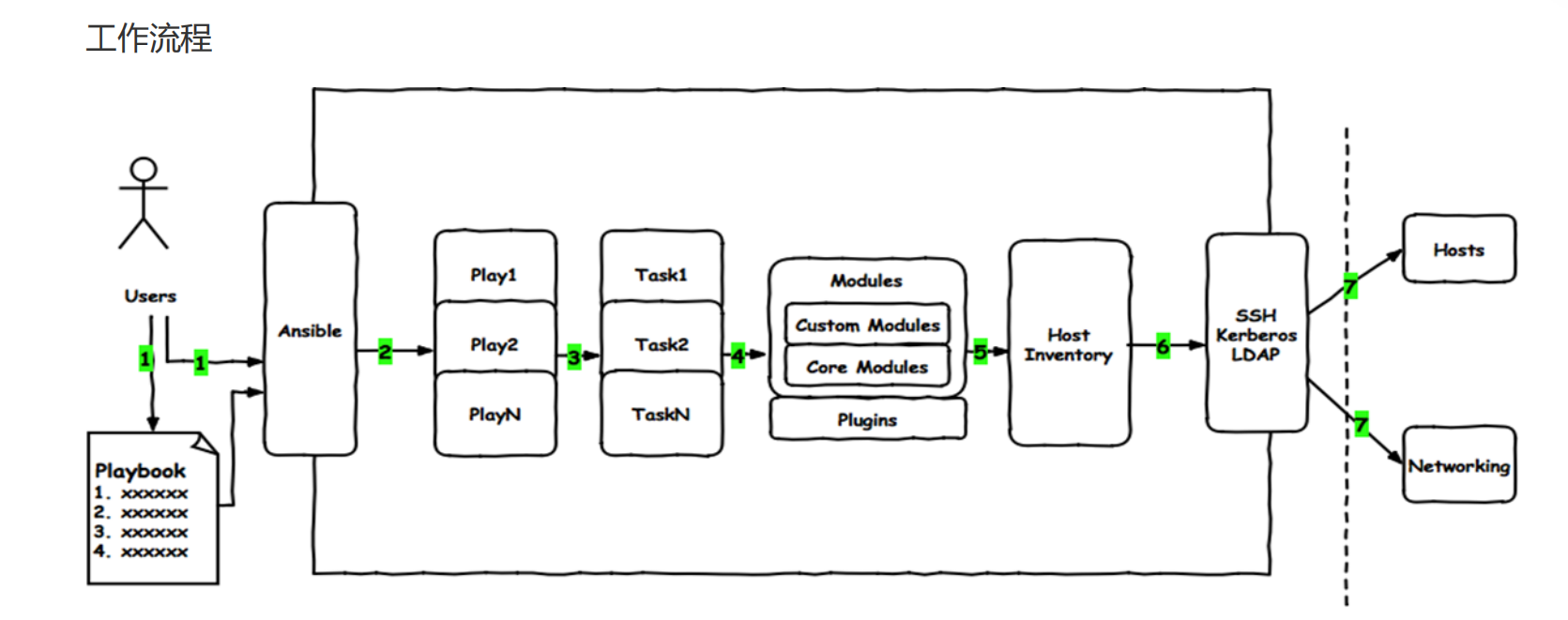
注意:
 ansible在执行playbook的时候,执行效果具有幂等性(即一个命令执行多次与执行一次效果一样)
YAML特点
YAML由于是一种特殊的描述性语言,所以它
 可读性较好、表达能力强、扩展性好,易于实现
YAML整合了多种语言的优势,所以它
 具有通用数据类型、执行方式好、与脚本语言的交互性好
文件示例
YAML 文件示例
---
- hosts: 10.0.0.133
  remote_user: root
  tasks:
  - name: hello world
    command: wall "hello world"
    tags:
      - hello world
实践
需求分析
 编写一个yaml格式的playbook,实现安装httpd服务的效果并且保证服务处于开机自启动,然后启动服务。
文件定制
编写文件 01-ubuntu-install-httpd.yaml
- hosts: 10.0.0.129
  remote_user: root
  tasks:
    - name: install package
      apt: name=apache2 state=present
    - name: start service
      service: name=apache2 state=started enabled=yes
语法检查
ansible-playbook 01-ubuntu-install-httpd.yaml --syntax-check
文件执行
ansible-playbook 01-ubuntu-install-httpd.yaml
检查效果
ansible 10.0.0.13 -m shell -a "netstat -tnulp | egrep 'Proto|apache' "
实践对比
更新配置文件
root@ubuntu24-13:~# cp 01-ubuntu-install-httpd.yaml 01-ubuntu-install-httpdupdate.yaml
root@ubuntu24-13:~# vim 01-ubuntu-install-httpd-update.yaml
root@ubuntu24-13:~# cat 01-ubuntu-install-httpd-update.yaml
- name: ubuntu 安装httpd服务
  hosts: 10.0.0.129
  remote_user: root
  gather_facts: no
  tasks:
    - name: install package
      apt: name=apache2 state=present
    - name: start service
      service: name=apache2 state=started enabled=yes
执行文件
ansible-playbook 01-ubuntu-install-httpd-update.yaml
卸载环境
修改文件内容
root@ubuntu24-129:~# cat 02-ubuntu-uninstall-httpd.yaml
- hosts: 10.0.0.129
  remote_user: root
  tasks:
    - name: install package
      apt: name=apache2 state=absent purge=true autoremove=yes

执行脚本文件
root@ubuntu24-129:~# ansible-playbook 02-ubuntu-uninstall-httpd.yaml
检查效果
root@ubuntu24-129:~# ansible 10.0.0.129 -m shell -a "netstat -tnulp | egrep 'Proto|apache' "
常见组件
一个playbook 中由多个组件组成,其中所用到的常见组件类型如下:
 Hosts   执行的远程主机列表
 Tasks   任务集,由多个task的元素组成的列表实现,每个task是一个字典
 Variables 内置变量或自定义变量在playbook中调用
 Templates  模板,可替换模板文件中的变量并实现一些简单逻辑的文件
 Handlers  和 notify 结合使用,由特定条件触发的操作,满足条件方才执行,否则不执行
 tags 标签  指定某条任务执行,用于选择运行playbook中的部分代码。ansible具有幂等性,因此会
自动跳过没有变化的部分,即便如此,有些代码为测试其确实没有发生变化的时间依然会非常地长。此时,如果确信其没有变化,就可以通过tags跳过此些代码片断
一个完整的代码块功能需最少元素需包括 name 和 task,一个name只能包括一个task
hosts属性
playbook的作用就是自动化的批量执行各种ansible命令来实现特定功能的,而这些ansible指令最终
都是要到某个或某些目标主机上执行的,所以playbook文件中必须指定某些特定的ansible指令的操作地方-即目标主机。
 playbook中专门用于指定目标主机的属性叫hosts,而且这个里面定义的目标主机必须在ansible的主机列表的配置清单中。
属性样式
由于hosts的配置目的与ansible的主机列表文件目的一致,所以他们的编写方法也一样,主要有这么几种表
示样式:
单个主机:
    -hosts: 192.168.8.14
    -hosts: master.ansible.com
多个主机
    -hosts: 192.168.8.*
    -hosts: *.ansible.com
特定主机
    -hosts: web:mysql
    -hosts: web:&mysql
    -hosts: web:!mysql
实践
需求分析
基于现有的nginx配置文件,定制部署nginx软件,将我们的知识进行整合
定制要求:
 启动用户:nginx-test,uid是82,系统用户,不能登录
 启动端口82
 web项目根目录/data/webserver/html
 默认首页:index.html
 首页内容:"welcome to ansible"
需求分析
    0 准备nginx配置文件
    1 指定目标主机执行playbook
    2 创建定制用户任务
    3 创建web项目根目录
    4 定制默认首页任务
    5 安装软件的任务
    6 拷贝配置文件的任务
    7 再实现启动服务的任务
准备工作
重新修改ansible的主机清单文件
定制主机清单文件
root@ubuntu24-13:~# grep -A2 web] /etc/ansible/hosts
[web]
10.0.0.16
10.0.0.19
设定跨主机免密码认证
root@ubuntu24-13:~# ssh-copy-id root@10.0.0.19
10.0.0.19主机关闭防火墙服务
root@ubuntu24-19:~# systemctl disable ufw
Synchronizing state of ufw.service with SysV service script with
/usr/lib/systemd/systemd-sysv-install.
Executing: /usr/lib/systemd/systemd-sysv-install disable ufw
root@ubuntu24-19:~# systemctl stop ufw
1 保证目标主机没有安装nginx
root@ubuntu24-13:~# ansible web -m shell -a "apt purge nginx nginx-common -y" # 或手工移除
root@ubuntu24-13:~# ansible web -m shell -a "apt list --installed | grep nginx"
10.0.0.16 | FAILED | rc=1 >>
WARNING: apt does not have a stable CLI interface. Use with caution in
scripts.non-zero return code
10.0.0.19 | FAILED | rc=1 >>
WARNING: apt does not have a stable CLI interface. Use with caution in
scripts.non-zero return code
2 保证目标主机没有占用uid的用户
root@ubuntu24-13:~# ansible web -m shell -a "getent passwd | grep 82"
10.0.0.19 | FAILED | rc=1 >>
non-zero return code
10.0.0.16 | FAILED | rc=1 >>
non-zero return code
3 制作一个nginx.conf
root@ubuntu24-13:~# apt install nginx -y
root@ubuntu24-13:~# systemctl stop nginx
root@ubuntu24-13:~# mkdir /data/ansible/nginx -p
root@ubuntu24-13:~# cd /data/ansible/nginx/
root@ubuntu24-13:nginx# grep -Ev '#|^$' /etc/nginx/nginx.conf > nginx.conf
并且进行定制修改,修改内容如下
root@ubuntu24-13:nginx# sed -i 's#www-data#nginx-test#' nginx.conf
root@ubuntu24-13:nginx# cat > nginx-define.conf <<- eof
server {
  listen 10086;
  root         /data/webserver/html;
  location / {
  }
}
eof
编写playbook
编写nginx的playbook文件 01-playbook-nginx.yml
- hosts: web
  remote_user: root
  tasks:
    - name: create new user
      user: name=nginx-test system=yes uid=82 shell=/sbin/nologin
    - name: create web root
      file: name=/data/webserver/html owner=nginx-test state=directory
       - name: touch web index
      shell: echo '<h1>welcome to ansible</h1>' >
/data/webserver/html/index.html
    - name: install package
      apt: name=nginx state=present
    - name: copy config
      copy: src=nginx.conf dest=/etc/nginx/nginx.conf
    - name: copy subconfig
      copy: src=nginx-define.conf dest=/etc/nginx/conf.d
    - name: start service
      service: name=nginx state=started enabled=yes
检查效果
检查语法
root@ubuntu24-13:nginx# ansible-playbook 01-playbook-nginx.yml --syntax-checkplaybook: 01-playbook-nginx.yml
模拟执行
root@ubuntu24-13:nginx# ansible-playbook 01-playbook-nginx.yml -C
注意:该步骤执行即使存在一两个异常,也不影响后续的正常安装
执行文件
root@ubuntu24-13:nginx# ansible-playbook 01-playbook-nginx.yml
测试结果
检查用户
root@ubuntu24-13:nginx# ansible web -m shell -a "getent passwd | grep 82"
10.0.0.19 | CHANGED | rc=0 >>
nginx-test:x:82:82::/home/nginx-test:/sbin/nologin
10.0.0.16 | CHANGED | rc=0 >>
nginx-test:x:82:82::/home/nginx-test:/sbin/nologin
清除环境
ansible web -m service -a "name=nginx state=stopped"
ansible web -m apt -a "name=nginx,nginx-common state=absent"
ansible web -m file -a "path=/data/webserver state=absent"
ansible web -m user -a "name=nginx-test state=absent"

腾讯云面向开发者汇聚海量精品云计算使用和开发经验,营造开放的云计算技术生态圈。
更多推荐
 5
5 0
0- 0


 已为社区贡献1条内容

所有评论(0)