YOLO26 接入实时视频
·

1. 创建环境
conda create --name yolo_new python=3.10
2. 安装 yolo
pip install -U ultralytics
3. 编写获取视频代码
1. 环境:MacOS + iphone 摄像头
2. 导入相应的头文件
import cv2
from ultralytics import solutions
2. 获取摄像头
def open_iphone_camera_with_cv():
    """
    主函数:找到并打开iPhone摄像头
    """
    print("正在检测iPhone摄像头...\n")

        # for i in range(5):
    cap = cv2.VideoCapture(0)
    if cap.isOpened():
        print("打开默认摄像头 (索引0)")

        while True:
            ret, frame = cap.read()
            if ret:
                frame_corrected = cv2.flip(frame, 1)

                cv2.imshow(f'Camera {0} - 按q退出', frame_corrected)

            if cv2.waitKey(1) & 0xFF == ord('q'):
                break

        cv2.destroyAllWindows()
        cap.release()
        print("摄像头已关闭")
    else:
        print("无法打开摄像头,请检查连接。")

# 运行
if __name__ == "__main__":
    # 方法1:自动检测并打开iPhone摄像头
    open_iphone_camera_with_cv()
3. 设置视频长和宽
cap.set(cv2.CAP_PROP_FRAME_WIDTH, 2048)
cap.set(cv2.CAP_PROP_FRAME_HEIGHT, 2048)
4. 设置yolo 代码
region_points = [(20, 400), (1080, 400), (1080, 360), (20, 360)]
        # w, h, fps = (int(cap.get(x)) for x in (cv2.CAP_PROP_FRAME_WIDTH, cv2.CAP_PROP_FRAME_HEIGHT, cv2.CAP_PROP_FPS))
        # video_writer = cv2.VideoWriter("object_counting_output.avi", cv2.VideoWriter_fourcc(*"mp4v"), fps, (w, h))
        counter = solutions.ObjectCounter(
            show=True,  # display the output
            region=region_points,  # pass region points
            model="yolo26s.pt",  # model="yolo26n-obb.pt" for object counting with OBB model.
            # classes=[0, 2],  # count specific classes, e.g., person and car with the COCO pretrained model.
            # tracker="botsort.yaml",  # choose trackers, e.g., "bytetrack.yaml"
        )
会自动下载模型,region_points 为识别的可视野的大小
5. 处理视频中的一帧图像
results = counter(frame_corrected)
6. 完整代码
import cv2
from ultralytics import solutions


def open_iphone_camera_with_cv():
    """
    主函数:找到并打开iPhone摄像头
    """
    print("正在检测iPhone摄像头...\n")

        # for i in range(5):
    cap = cv2.VideoCapture(0)
    if cap.isOpened():
        print("打开默认摄像头 (索引0)")
        cap.set(cv2.CAP_PROP_FRAME_WIDTH, 2048)
        cap.set(cv2.CAP_PROP_FRAME_HEIGHT, 2048)
        region_points = [(20, 400), (1080, 400), (1080, 360), (20, 360)]
        # w, h, fps = (int(cap.get(x)) for x in (cv2.CAP_PROP_FRAME_WIDTH, cv2.CAP_PROP_FRAME_HEIGHT, cv2.CAP_PROP_FPS))
        # video_writer = cv2.VideoWriter("object_counting_output.avi", cv2.VideoWriter_fourcc(*"mp4v"), fps, (w, h))
        counter = solutions.ObjectCounter(
            show=True,  # display the output
            region=region_points,  # pass region points
            model="yolo26s.pt",  # model="yolo26n-obb.pt" for object counting with OBB model.
            # classes=[0, 2],  # count specific classes, e.g., person and car with the COCO pretrained model.
            # tracker="botsort.yaml",  # choose trackers, e.g., "bytetrack.yaml"
        )

        while True:
            ret, frame = cap.read()
            if ret:
                frame_corrected = cv2.flip(frame, 1)

                results = counter(frame_corrected)

                cv2.imshow(f'Camera {0} - 按q退出', results.plot_im)

            if cv2.waitKey(1) & 0xFF == ord('q'):
                break

        cv2.destroyAllWindows()
        cap.release()
        print("摄像头已关闭")
    else:
        print("无法打开摄像头,请检查连接。")


# 运行
if __name__ == "__main__":
    # 方法1:自动检测并打开iPhone摄像头
    open_iphone_camera_with_cv()
4. 总结
1. yolo 26 安装方便
2. 占用cpu更低
3. 不同模型识别速度不同,模型越大识别越慢
yolo26n.pt 最小(5.5M),识别最快, 在 50ms左右
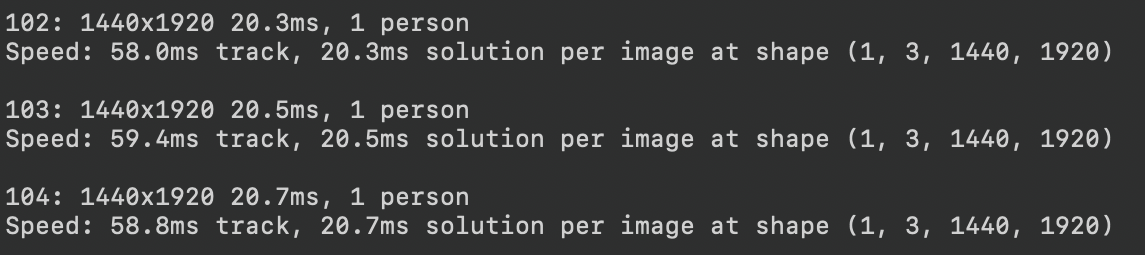
yolo26s.pt 20.4M, 在75ms左右
yolo26m.pt 44.3M, 在120ms左右
yolo26l.pt 53.2M,在150ms左右
yolo26x.pt 118.7M,在170ms左右


腾讯云面向开发者汇聚海量精品云计算使用和开发经验,营造开放的云计算技术生态圈。
更多推荐
 0
0 0
0- 0


 已为社区贡献2条内容

所有评论(0)