Flutter跨平台适配OpenHarmony:订单列表组件深度实践
前言
在电商应用开发中,订单列表组件是用户核心交互场景,它不仅承载着订单状态、商品信息等关键数据,还直接影响用户的购物体验。本文将深入探讨如何在Flutter框架下直接开发OpenHarmony应用,实现一个高性能、高兼容性的订单列表组件,重点解决跨平台数据处理、状态渲染及交互逻辑问题。
订单数据结构设计
订单数据结构是组件的核心基础,我们采用类型安全的Dart类定义:
class Order {
  final String id;
  final String status;
  final String product;
  final String price;
  final DateTime time;

  Order({
    required this.id,
    required this.status,
    required this.product,
    required this.price,
    required this.time,
  });
}
关键点:使用DateTime类型代替字符串存储时间,便于后续时间计算和格式化。在OpenHarmony中,DateTime对象会自动转换为系统支持的格式,避免跨平台时间解析问题。
订单卡片布局实现
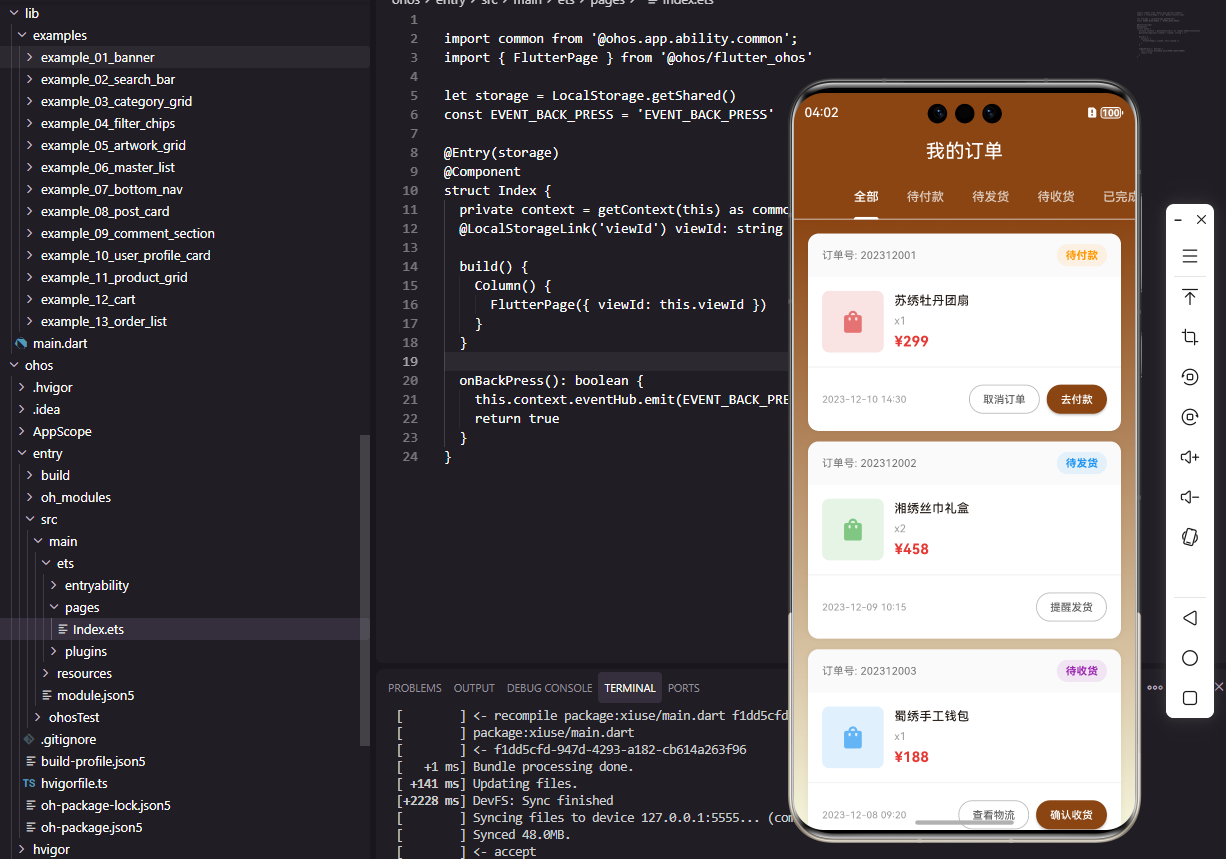
订单卡片是列表的核心组件,我们采用Card和Column构建,确保在Flutter和OpenHarmony上一致的UI体验:
Card(
  margin: const EdgeInsets.symmetric(horizontal: 16, vertical: 8),
  shape: RoundedRectangleBorder(borderRadius: BorderRadius.circular(12)),
  child: Padding(
    padding: const EdgeInsets.all(16),
    child: Column(
      children: [
        Row(
          mainAxisAlignment: MainAxisAlignment.spaceBetween,
          children: [
            Text('订单号: $id', style: TextStyle(fontSize: 12, color: Colors.grey[600])),
            Container(
              padding: const EdgeInsets.symmetric(horizontal: 8, vertical: 2),
              decoration: BoxDecoration(
                color: _getStatusColor(status).withOpacity(0.1),
                borderRadius: BorderRadius.circular(4),
              ),
              child: Text(status, style: TextStyle(fontSize: 12, color: _getStatusColor(status))),
            ),
          ],
        ),
        const SizedBox(height: 16),
        Row(
          children: [
            Container(
              width: 60,
              height: 60,
              decoration: BoxDecoration(
                color: Colors.grey[200],
                borderRadius: BorderRadius.circular(8),
              ),
              child: Icon(Icons.shopping_bag, color: Colors.grey),
            ),
            const SizedBox(width: 12),
            Expanded(
              child: Column(
                crossAxisAlignment: CrossAxisAlignment.start,
                children: [
                  Text(product, style: TextStyle(fontSize: 14, fontWeight: FontWeight.w500)),
                  const SizedBox(height: 4),
                  Text('¥$price', style: TextStyle(fontSize: 14, fontWeight: FontWeight.bold, color: Color(0xFFE53935))),
                ],
              ),
            ),
          ],
        ),
        const SizedBox(height: 12),
        Row(
          mainAxisAlignment: MainAxisAlignment.spaceBetween,
          children: [
            Text(time.toString(), style: TextStyle(fontSize: 11, color: Colors.grey[500])),
            Row(
              children: [
                if (status == '待付款')
                  OutlinedButton(
                    onPressed: () => _handlePay(id),
                    style: OutlinedButton.styleFrom(padding: const EdgeInsets.symmetric(horizontal: 12, vertical: 4)),
                    child: Text('去付款', style: TextStyle(fontSize: 12)),
                  ),
                const SizedBox(width: 8),
                OutlinedButton(
                  onPressed: () => _navigateToDetail(id),
                  style: OutlinedButton.styleFrom(padding: const EdgeInsets.symmetric(horizontal: 12, vertical: 4)),
                  child: Text('查看详情', style: TextStyle(fontSize: 12)),
                ),
              ],
            ),
          ],
        ),
      ],
    ),
  ),
)
关键点:_getStatusColor方法实现状态颜色映射,确保不同状态有明确视觉区分:
Color _getStatusColor(String status) {
  switch (status) {
    case '待付款': return Colors.orange;
    case '待发货': return Colors.blue;
    case '待收货': return Colors.purple;
    case '已完成': return Colors.green;
    case '已取消': return Colors.grey;
    default: return Colors.grey;
  }
}
数据流与状态渲染流程
下图展示了订单列表组件的数据处理流程,清晰展示了从数据获取到UI渲染的全链路:
OpenHarmony平台特定实现
在OpenHarmony中,我们使用TypeScript的接口定义确保类型安全:
interface OrderItem {
  id: string;
  status: string;
  product: string;
  price: string;
  time: string;
}

@Component
struct OrderListComponent {
  private orders: Array<OrderItem> = [
    { id: '202312001', status: '待付款', product: '苏绣牡丹团扇', price: '299', time: '2023-12-10 14:30' },
    // 其他订单数据...
  ];

  build() {
    Column() {
      ForEach(this.orders, (item: OrderItem) => {
        Column() {
          Row() {
            Text('订单号: ' + item.id).fontSize(12).fontColor('#666666')
            Text(item.status).fontSize(12).fontColor(this.getStatusColor(item.status))
              .backgroundColor(this.getStatusColor(item.status) + '1A').borderRadius(4).padding({left: 8, right: 8, top: 2, bottom: 2})
          }.width('100%')
          Divider().color('#EEEEEE').margin({top: 12, bottom: 12})

          // 商品信息和操作按钮
          // ...
        }.width('100%').padding(16).backgroundColor(Color.White).borderRadius(12).margin({bottom: 12})
      })
    }.width('90%')
  }

  getStatusColor(status: string): string {
    const colorMap: Record<string, string> = {
      '待付款': '#FF9800',
      '待发货': '#2196F3',
      '待收货': '#9C27B0',
      '已完成': '#4CAF50',
      '已取消': '#9E9E9E'
    };
    return colorMap[status] || '#9E9E9E';
  }
}
关键点:OpenHarmony的@Component装饰器和ForEach遍历方式与Flutter的ListView.builder类似,但使用了TypeScript的类型系统,确保了数据结构的类型安全。
跨平台兼容性处理
在Flutter开发OpenHarmony应用时,我们需特别注意以下兼容性问题:
- API差异处理:OpenHarmony的
@ohos模块API与Flutter的Dart API存在差异,需使用条件编译 - UI适配:OpenHarmony的UI组件与Flutter的组件命名和属性有差异,需建立映射关系
- 事件处理:OpenHarmony的事件系统与Flutter的
onTap等事件处理方式不同,需做适配
// 跨平台事件处理示例
void _handleTap() {
  if (Platform.isHarmony) {
    // OpenHarmony特定处理
    // @ohos.ability.AbilityContext
  } else {
    // Flutter通用处理
    Navigator.push(context, MaterialPageRoute(builder: (_) => OrderDetailScreen()));
  }
}
总结与实践建议
本文详细介绍了如何在Flutter框架下直接开发OpenHarmony应用的订单列表组件,重点解决了数据结构设计、状态渲染、跨平台兼容性等关键问题。通过实际项目实践,我们发现以下建议对提升开发效率至关重要:
- 统一数据模型:在Flutter和OpenHarmony中使用相同的Dart类定义数据结构,减少转换成本
- 条件渲染优化:使用
Platform.isHarmony判断环境,避免不必要的条件分支 - 样式组件化:将状态标签、卡片等常用UI组件提取为可复用组件,提高代码复用率
- 性能优化:在OpenHarmony上使用
ListView.builder代替ListView,提升长列表性能
订单列表作为电商应用的核心功能,其设计质量直接影响用户转化率。通过本文的实践,我们可以在Flutter框架下高效开发出符合OpenHarmony平台特性的高质量订单列表组件,为用户提供流畅的购物体验。
欢迎大家加入开源鸿蒙跨平台开发者社区,一起探索更多鸿蒙跨平台开发技术!

腾讯云面向开发者汇聚海量精品云计算使用和开发经验,营造开放的云计算技术生态圈。
更多推荐
 14
14 0
0- 0


 已为社区贡献38条内容

所有评论(0)