Flutter框架跨平台鸿蒙开发——贪吃蛇游戏的实现
本文详细介绍了如何开发一款具有鸿蒙OS风格的贪吃蛇游戏。文章采用MVC架构设计,分离游戏逻辑、UI展示和数据模型,包含游戏初始化、蛇移动逻辑、碰撞检测、食物生成和手势控制等核心功能实现。同时通过鸿蒙OS色彩系统和主题配置,实现了风格适配。游戏支持三种状态(进行中、暂停、结束)转换,并提供流畅的动画效果和交互体验。
前言
本文将直接介绍如何开发一款具有鸿蒙OS风格的贪吃蛇游戏,详细解析游戏的设计思路、核心功能实现和鸿蒙风格适配等内容。
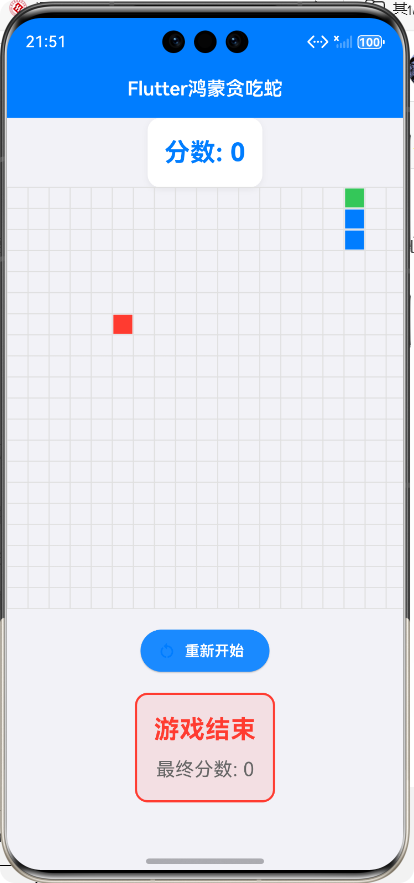
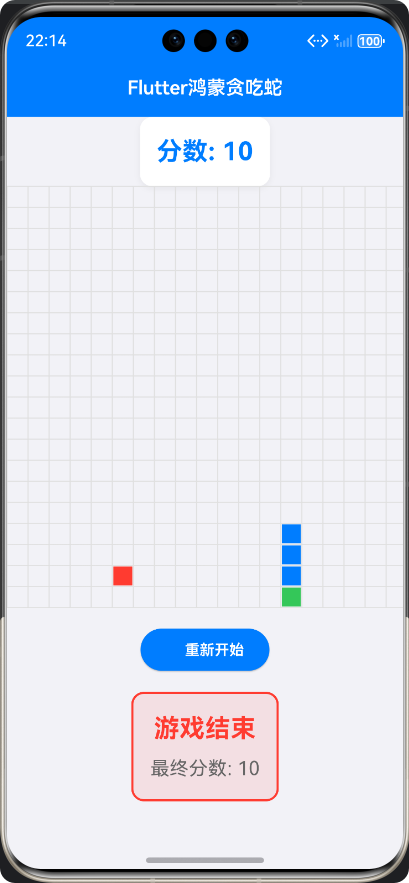
一、游戏设计思路
1.1 游戏规则
贪吃蛇游戏是一款经典的休闲游戏,其核心规则如下:
- 玩家通过控制蛇的移动方向,让蛇吃到食物
- 蛇每吃到一个食物,身体长度增加一节,分数增加
- 蛇的移动速度会随着分数的增加而逐渐加快
- 当蛇头撞到墙壁或自身身体时,游戏结束
1.2 游戏架构设计
本游戏采用了MVC架构设计,将游戏逻辑、UI展示和数据模型分离,便于后续的维护和扩展:
┌─────────────────┐     ┌─────────────────┐     ┌─────────────────┐
│    UI层 (View)    │     │  控制层 (Controller) │   │  数据层 (Model)  │
├─────────────────┤     ├─────────────────┤     ├─────────────────┤
│ - SnakeGame      │     │ - _SnakeGameState│   │ - GameState     │
│ - _GamePainter   │     │ - 游戏逻辑控制    │   │ - Direction     │
│ - 界面布局        │     │ - 手势处理        │   │ - 蛇身数据       │
│ - 分数显示        │     │ - 碰撞检测        │   │ - 食物数据       │
└─────────────────┘     └─────────────────┘     └─────────────────┘
1.3 游戏状态管理
游戏主要包含三种状态:
- 游戏进行中(playing)
- 游戏暂停(paused)
- 游戏结束(gameOver)
状态转换流程图如下:
二、核心功能实现
2.1 游戏初始化
游戏初始化主要完成以下工作:
- 设置初始游戏状态为playing
- 初始化蛇的初始位置和长度
- 生成第一个食物
- 初始化分数和速度
- 启动游戏动画控制器
/// 初始化游戏
void _initializeGame() {
  setState(() {
    _gameState = GameState.playing;
    _direction = Direction.right;
    _snake = [
      Offset(_gridSize / 2, _gridSize / 2),
      Offset(_gridSize / 2 - 1, _gridSize / 2),
      Offset(_gridSize / 2 - 2, _gridSize / 2),
    ];
    _generateFood();
    _score = 0;
    _speed = _initialSpeed;
  });
  _controller.duration = Duration(milliseconds: _speed);
  _controller.repeat();
}
2.2 蛇的移动逻辑
蛇的移动是游戏的核心逻辑,主要通过AnimationController实现定时移动:
- 计算新的蛇头位置
- 检查碰撞(墙壁和自身)
- 添加新的蛇头
- 检查是否吃到食物
- 如果吃到食物,生成新的食物并加速;否则,移除蛇尾
/// 移动蛇
void _moveSnake() {
  if (_gameState != GameState.playing) return;

  setState(() {
    // 计算新的头部位置
    final head = _snake.first;
    Offset newHead;
    switch (_direction) {
      case Direction.up:
        newHead = Offset(head.dx, head.dy - 1);
        break;
      case Direction.down:
        newHead = Offset(head.dx, head.dy + 1);
        break;
      case Direction.left:
        newHead = Offset(head.dx - 1, head.dy);
        break;
      case Direction.right:
        newHead = Offset(head.dx + 1, head.dy);
        break;
    }

    // 检查碰撞
    if (_checkCollision(newHead)) {
      _gameState = GameState.gameOver;
      _controller.stop();
      return;
    }

    // 添加新头部
    _snake.insert(0, newHead);

    // 检查是否吃了食物
    if (newHead == _food) {
      _score += 10;
      _generateFood();
      // 加速
      _speed = _speed > 50 ? _speed - 10 : _speed;
      _controller.duration = Duration(milliseconds: _speed);
    } else {
      // 移除尾部
      _snake.removeLast();
    }
  });
}
2.3 碰撞检测
碰撞检测是确保游戏正常运行的重要逻辑,主要检测两种碰撞情况:
- 蛇头撞到墙壁
- 蛇头撞到自身身体
/// 检查碰撞
bool _checkCollision(Offset newHead) {
  // 检查墙壁碰撞
  if (newHead.dx < 0 ||
      newHead.dx >= _gridSize ||
      newHead.dy < 0 ||
      newHead.dy >= _gridSize) {
    return true;
  }

  // 检查自身碰撞
  if (_snake.contains(newHead)) {
    return true;
  }

  return false;
}
2.4 食物生成
食物生成逻辑需要确保食物不会出现在蛇的身体上:
/// 生成食物
void _generateFood() {
  final random = Random();
  Offset newFood;
  do {
    newFood = Offset(
      random.nextInt(_gridSize).toDouble(),
      random.nextInt(_gridSize).toDouble(),
    );
  } while (_snake.contains(newFood));
  setState(() {
    _food = newFood;
  });
}
2.5 手势控制
游戏支持通过手势滑动来控制蛇的移动方向:
// 游戏区域
GestureDetector(
  onVerticalDragUpdate: (details) {
    if (details.delta.dy > 0) {
      _handleDirectionChange(Direction.down);
    } else if (details.delta.dy < 0) {
      _handleDirectionChange(Direction.up);
    }
  },
  onHorizontalDragUpdate: (details) {
    if (details.delta.dx > 0) {
      _handleDirectionChange(Direction.right);
    } else if (details.delta.dx < 0) {
      _handleDirectionChange(Direction.left);
    }
  },
  // ...
)
三、鸿蒙风格适配
3.1 主题配置
采用鸿蒙OS的核心色彩系统,包括主色调、辅助色、背景色等:
// 鸿蒙风格主题配置 - 严格遵循鸿蒙OS设计规范
final harmonyTheme = ThemeData(
  // 鸿蒙OS核心色彩系统
  colorScheme: ColorScheme.fromSeed(
    seedColor: const Color(0xFF007DFF), // 鸿蒙蓝 - 主色调
    primary: const Color(0xFF007DFF),
    secondary: const Color(0xFF34C759), // 鸿蒙绿 - 辅助色
    surface: const Color(0xFFF2F2F7), // 鸿蒙背景色
    error: const Color(0xFFFF3B30), // 错误色
    onPrimary: Colors.white,
    onSecondary: Colors.white,
    onSurface: const Color(0xFF000000),
    onError: Colors.white,
  ),
  useMaterial3: true,
  // 鸿蒙风格文本主题 - 严格遵循鸿蒙字体规范
  textTheme: const TextTheme(
    headlineLarge: TextStyle(fontSize: 32, fontWeight: FontWeight.bold),
    headlineMedium: TextStyle(fontSize: 24, fontWeight: FontWeight.bold),
    headlineSmall: TextStyle(fontSize: 20, fontWeight: FontWeight.bold),
    titleLarge: TextStyle(fontSize: 18, fontWeight: FontWeight.w600),
    titleMedium: TextStyle(fontSize: 16, fontWeight: FontWeight.w500),
    titleSmall: TextStyle(fontSize: 14, fontWeight: FontWeight.w500),
    bodyLarge: TextStyle(fontSize: 16, fontWeight: FontWeight.normal),
    bodyMedium: TextStyle(fontSize: 14, fontWeight: FontWeight.normal),
    bodySmall: TextStyle(fontSize: 12, fontWeight: FontWeight.normal),
    labelLarge: TextStyle(fontSize: 14, fontWeight: FontWeight.w600),
    labelMedium: TextStyle(fontSize: 12, fontWeight: FontWeight.w500),
    labelSmall: TextStyle(fontSize: 11, fontWeight: FontWeight.w500),
  ),
  // 鸿蒙风格AppBar - 无阴影,居中标题
  appBarTheme: const AppBarTheme(
    backgroundColor: Color(0xFF007DFF),
    foregroundColor: Colors.white,
    elevation: 0,
    centerTitle: true,
  ),
  // 鸿蒙风格Scaffold背景色
  scaffoldBackgroundColor: Color(0xFFF2F2F7),
);
3.2 UI组件适配
使用鸿蒙OS风格的UI组件,包括按钮、卡片、文本等:
// 分数显示
Widget _buildScoreDisplay() {
  return Container(
    padding: const EdgeInsets.all(16.0),
    decoration: BoxDecoration(
      color: Colors.white,
      borderRadius: BorderRadius.circular(12.0),
      boxShadow: [
        BoxShadow(
          color: Colors.black.withOpacity(0.05),
          blurRadius: 4,
          offset: const Offset(0, 2),
        ),
      ],
    ),
    child: Text(
      '分数: $_score',
      style: const TextStyle(
        fontSize: 24.0,
        fontWeight: FontWeight.bold,
        color: Color(0xFF007DFF),
      ),
    ),
  );
}
四、游戏核心代码解析
4.1 自定义绘制
使用CustomPainter实现游戏的自定义绘制,包括网格、蛇身和食物:
/// 游戏绘制器
class _GamePainter extends CustomPainter {
final List<Offset> snake;
final Offset food;
final int gridSize;
final double cellSize;
_GamePainter({
required this.snake,
required this.food,
required this.gridSize,
required this.cellSize,
});
void paint(Canvas canvas, Size size) {
// 绘制网格
_drawGrid(canvas, size);
// 绘制蛇
_drawSnake(canvas);
// 绘制食物
_drawFood(canvas);
}
/// 绘制网格
void _drawGrid(Canvas canvas, Size size) {
final paint = Paint()
..color = const Color(0xFFE0E0E0)
..strokeWidth = 1.0;
// 绘制垂直线
for (int i = 0; i <= gridSize; i++) {
canvas.drawLine(
Offset(i * cellSize, 0),
Offset(i * cellSize, size.height),
paint,
);
}
// 绘制水平线
for (int i = 0; i <= gridSize; i++) {
canvas.drawLine(
Offset(0, i * cellSize),
Offset(size.width, i * cellSize),
paint,
);
}
}
/// 绘制蛇
void _drawSnake(Canvas canvas) {
final headPaint = Paint()..color = const Color(0xFF34C759); // 蛇头颜色(鸿蒙绿)
final bodyPaint = Paint()..color = const Color(0xFF007DFF); // 蛇身颜色(鸿蒙蓝)
for (int i = 0; i < snake.length; i++) {
final cell = snake[i];
final rect = Rect.fromLTWH(
cell.dx * cellSize + 1,
cell.dy * cellSize + 1,
cellSize - 2,
cellSize - 2,
);
canvas.drawRect(rect, i == 0 ? headPaint : bodyPaint);
}
}
/// 绘制食物
void _drawFood(Canvas canvas) {
final paint = Paint()..color = const Color(0xFFFF3B30); // 食物颜色(错误色)
final rect = Rect.fromLTWH(
food.dx * cellSize + 1,
food.dy * cellSize + 1,
cellSize - 2,
cellSize - 2,
);
canvas.drawRect(rect, paint);
}
bool shouldRepaint(_GamePainter oldDelegate) {
return snake != oldDelegate.snake || food != oldDelegate.food;
}
}
4.2 游戏主界面
游戏主界面包含分数显示、游戏区域和控制按钮:
Widget build(BuildContext context) {
return Scaffold(
appBar: AppBar(
title: const Text('Flutter鸿蒙贪吃蛇'),
),
body: SafeArea(
child: Column(
children: [
// 分数显示
_buildScoreDisplay(),
// 游戏区域
GestureDetector(
onVerticalDragUpdate: (details) {
if (details.delta.dy > 0) {
_handleDirectionChange(Direction.down);
} else if (details.delta.dy < 0) {
_handleDirectionChange(Direction.up);
}
},
onHorizontalDragUpdate: (details) {
if (details.delta.dx > 0) {
_handleDirectionChange(Direction.right);
} else if (details.delta.dx < 0) {
_handleDirectionChange(Direction.left);
}
},
child: SizedBox(
width: _gridSize * _cellSize,
height: _gridSize * _cellSize,
child: CustomPaint(
painter: _GamePainter(
snake: _snake,
food: _food,
gridSize: _gridSize,
cellSize: _cellSize,
),
),
),
),
// 游戏控制
_buildGameControls(),
// 游戏结束提示
if (_gameState == GameState.gameOver) _buildGameOver(),
],
),
),
);
}
五、游戏演示
5.1 游戏运行效果
游戏运行时,玩家可以通过手势滑动来控制蛇的移动方向,蛇会自动向前移动。当蛇吃到食物时,身体会变长,分数会增加,并且移动速度会逐渐加快。当蛇头撞到墙壁或自身身体时,游戏结束,显示最终分数。
六、总结
使用Flutter开发鸿蒙OS应用具有很多优势,不仅可以提高开发效率,还可以保证应用的高性能和高保真。希望本文能够对想要学习Flutter鸿蒙应用开发的开发者有所帮助,也欢迎大家提出宝贵的意见和建议。
欢迎加入开源鸿蒙跨平台社区:https://openharmonycrossplatform.csdn.net

腾讯云面向开发者汇聚海量精品云计算使用和开发经验,营造开放的云计算技术生态圈。
更多推荐
 25
25 0
0- 0


 已为社区贡献17条内容

所有评论(0)