Flutter 框架跨平台鸿蒙开发 - 课程表应用
运行效果图课程表是一款专注于学生课程管理的移动应用,为用户提供清晰、便捷的课程安排查看体验。在校园生活中,课程表是学生日常学习的重要工具。本应用帮助用户管理每周课程安排,支持周视图展示、今日课程提醒、课程详情查看等功能,让学习生活更加有序。应用支持周课程表视图,以网格形式直观展示每周七天的课程安排。今日课程页面突出显示当天课程,并标识当前进行中的课程。课程列表按星期分组展示所有课程,便于快速查找。
课程表应用
欢迎加入开源鸿蒙跨平台社区:
https://openharmonycrossplatform.csdn.net
一、项目概述
运行效果图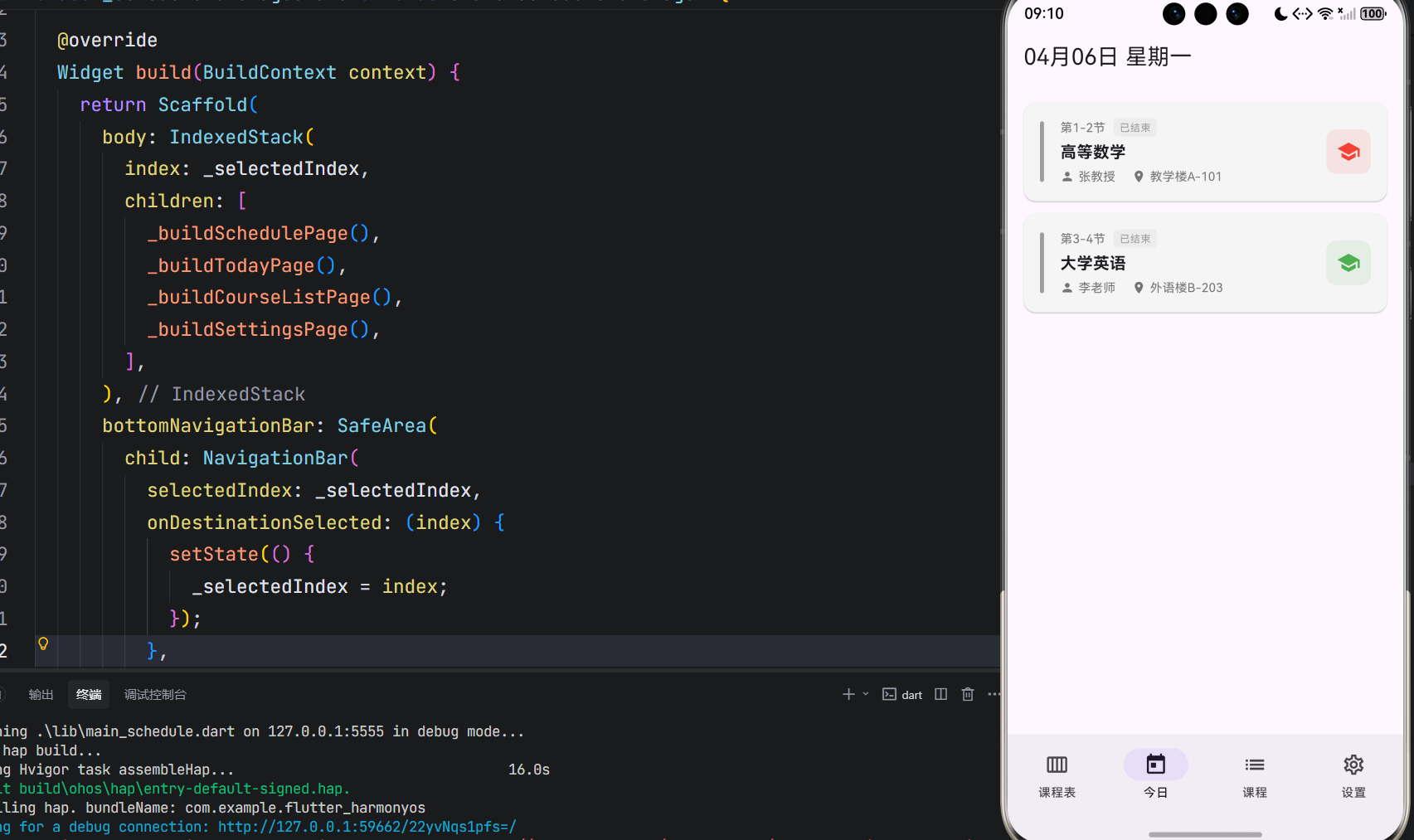
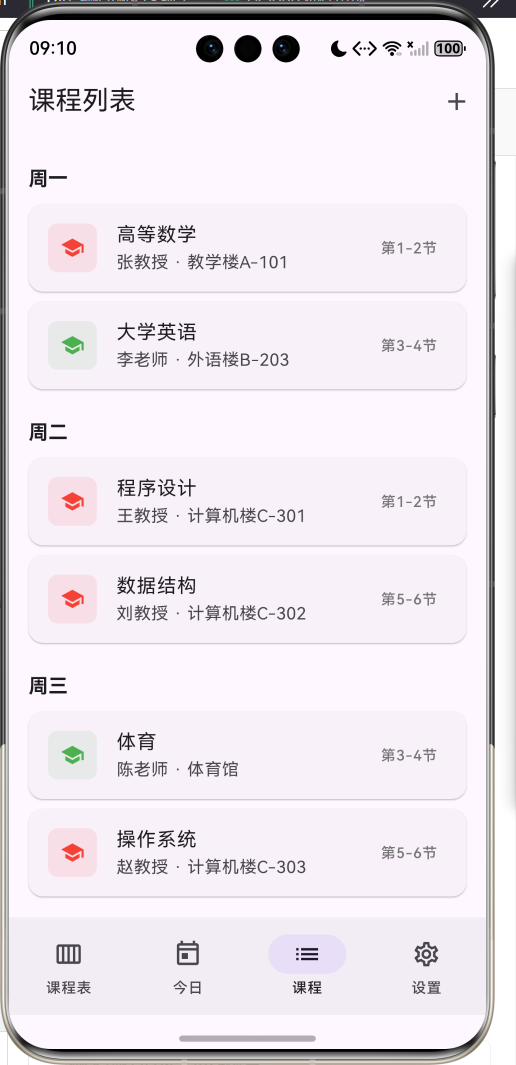
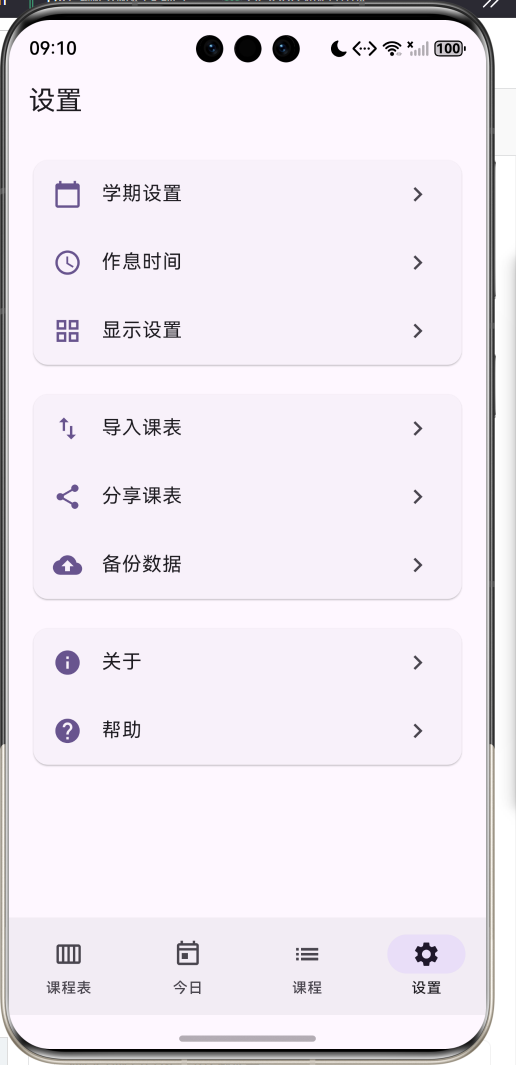
1.1 应用简介
课程表是一款专注于学生课程管理的移动应用,为用户提供清晰、便捷的课程安排查看体验。在校园生活中,课程表是学生日常学习的重要工具。本应用帮助用户管理每周课程安排,支持周视图展示、今日课程提醒、课程详情查看等功能,让学习生活更加有序。
应用支持周课程表视图,以网格形式直观展示每周七天的课程安排。今日课程页面突出显示当天课程,并标识当前进行中的课程。课程列表按星期分组展示所有课程,便于快速查找。课程详情页展示完整的课程信息,包括教师、地点、时间、类型等。
1.2 核心功能
| 功能模块 | 功能描述 | 实现方式 |
|---|---|---|
| 周课程表 | 网格视图展示一周课程 | Stack + Positioned |
| 今日课程 | 当天课程列表与状态 | ListView + 时间判断 |
| 课程列表 | 按星期分组展示 | ListView + 分组 |
| 课程详情 | 完整课程信息展示 | ModalBottomSheet |
| 添加课程 | 新增课程信息 | 表单弹窗 |
| 周次切换 | 切换不同周次课表 | 状态管理 |
1.3 课程属性
| 属性 | 类型 | 说明 |
|---|---|---|
| 课程ID | String | 唯一标识 |
| 课程名称 | String | 课程名称 |
| 授课教师 | String | 教师姓名 |
| 上课地点 | String | 教室位置 |
| 星期 | WeekDay | 周一至周日 |
| 开始节次 | int | 开始上课节次 |
| 结束节次 | int | 结束上课节次 |
| 开始周次 | int | 课程开始周 |
| 结束周次 | int | 课程结束周 |
| 课程类型 | CourseType | 必修/选修等 |
| 备注 | String? | 其他说明 |
1.4 星期枚举
| 枚举值 | 标签 | 数值 |
|---|---|---|
| monday | 周一 | 1 |
| tuesday | 周二 | 2 |
| wednesday | 周三 | 3 |
| thursday | 周四 | 4 |
| friday | 周五 | 5 |
| saturday | 周六 | 6 |
| sunday | 周日 | 7 |
1.5 课程类型
| 类型 | 颜色 | 说明 |
|---|---|---|
| 必修 | 红色 | 专业必修课程 |
| 选修 | 蓝色 | 专业选修课程 |
| 公共课 | 绿色 | 公共基础课程 |
| 实践课 | 橙色 | 实践教学课程 |
| 实验课 | 紫色 | 实验教学课程 |
1.6 技术栈
| 技术领域 | 技术选型 | 版本要求 |
|---|---|---|
| 开发框架 | Flutter | >= 3.0.0 |
| 编程语言 | Dart | >= 2.17.0 |
| 设计规范 | Material Design 3 | - |
| 状态管理 | setState | - |
| 日期处理 | intl | ^0.19.0 |
| 目标平台 | 鸿蒙OS | API 21+ |
1.7 项目结构
lib/
└── main_schedule.dart
    ├── ScheduleApp              # 应用入口
    ├── WeekDay                  # 星期枚举
    ├── CourseType               # 课程类型枚举
    ├── Course                   # 课程数据模型
    └── ScheduleHomePage         # 主页面
        ├── _buildSchedulePage()     # 周课程表页
        ├── _buildTodayPage()        # 今日课程页
        ├── _buildCourseListPage()   # 课程列表页
        ├── _buildSettingsPage()     # 设置页面
        ├── _buildScheduleGrid()     # 课程表网格
        └── _showCourseDetail()      # 课程详情弹窗
二、系统架构
2.1 整体架构图
2.2 类图设计
2.3 数据流程图
2.4 课程表渲染流程
三、核心模块设计
3.1 数据模型设计
3.1.1 星期枚举 (WeekDay)
enum WeekDay {
  monday('周一', 1),
  tuesday('周二', 2),
  wednesday('周三', 3),
  thursday('周四', 4),
  friday('周五', 5),
  saturday('周六', 6),
  sunday('周日', 7);

  final String label;
  final int value;
  const WeekDay(this.label, this.value);
}
3.1.2 课程类型枚举 (CourseType)
enum CourseType {
  required('必修', Colors.red),
  elective('选修', Colors.blue),
  public('公共课', Colors.green),
  practice('实践课', Colors.orange),
  experiment('实验课', Colors.purple);

  final String label;
  final Color color;
  const CourseType(this.label, this.color);
}
3.1.3 课程模型 (Course)
class Course {
  final String id;              // 唯一标识
  final String name;            // 课程名称
  final String teacher;         // 授课教师
  final String location;        // 上课地点
  final WeekDay weekDay;        // 星期
  final int startSection;       // 开始节次
  final int endSection;         // 结束节次
  final int startWeek;          // 开始周次
  final int endWeek;            // 结束周次
  final CourseType type;        // 课程类型
  final String? note;           // 备注

  int get sectionCount => endSection - startSection + 1;
  Color get courseColor => type.color;
}
3.2 课程表网格布局
3.2.1 布局计算
3.2.2 位置计算实现
List<Widget> _buildCourseBlocks() {
  final cellWidth = (MediaQuery.of(context).size.width - 50) / 7 * 1.8;
  final cellHeight = 60.0;

  return _courses.map((course) {
    // 计算左边位置:星期值 * 单元格宽度
    final left = (course.weekDay.value - 1) * cellWidth;
    // 计算顶部位置:(开始节次-1) * 单元格高度
    final top = (course.startSection - 1) * cellHeight;
    // 计算宽度:单元格宽度 - 间距
    final width = cellWidth - 4;
    // 计算高度:节数 * 单元格高度 - 间距
    final height = course.sectionCount * cellHeight - 4;

    return Positioned(
      left: left + 2,
      top: top + 2,
      width: width,
      height: height,
      child: _buildCourseBlock(course),
    );
  }).toList();
}
3.3 当前节次判断
3.3.1 判断逻辑
3.3.2 实现代码
int _getCurrentSection() {
  final now = DateTime.now();
  final hour = now.hour;
  final minute = now.minute;

  // 各节次时间表 [开始时, 开始分, 结束时, 结束分]
  final sectionTimes = [
    [8, 0, 8, 45],   // 第1节
    [8, 55, 9, 40],  // 第2节
    [10, 0, 10, 45], // 第3节
    // ...
  ];

  for (int i = 0; i < sectionTimes.length; i++) {
    final startTime = sectionTimes[i][0] * 60 + sectionTimes[i][1];
    final endTime = sectionTimes[i][2] * 60 + sectionTimes[i][3];
    final currentTime = hour * 60 + minute;

    if (currentTime >= startTime && currentTime <= endTime) {
      return i + 1;
    }
  }
  return 0;
}
3.4 页面结构设计
3.4.1 主页面布局
3.5 状态管理
3.5.1 核心状态变量
class _ScheduleHomePageState extends State<ScheduleHomePage> {
  int _selectedIndex = 0;               // 当前Tab索引
  int _currentWeek = 1;                 // 当前周次
  final List<Course> _courses = [];     // 课程列表
  final int _totalWeeks = 16;           // 总周数
  final int _sectionsPerDay = 12;       // 每天节数
}
四、UI设计规范
4.1 配色方案
应用采用深紫色主题风格,体现学术与智慧:
| 颜色类型 | 色值 | 用途 |
|---|---|---|
| 主色 | DeepPurple | AppBar、强调、按钮 |
| 必修 | Red | 必修课程标识 |
| 选修 | Blue | 选修课程标识 |
| 公共课 | Green | 公共课程标识 |
| 实践课 | Orange | 实践课程标识 |
| 实验课 | Purple | 实验课程标识 |
4.2 课程类型颜色映射
| 类型 | 颜色 | 说明 |
|---|---|---|
| 必修 | 红色 | 专业核心课程 |
| 选修 | 蓝色 | 专业选修课程 |
| 公共课 | 绿色 | 通识教育课程 |
| 实践课 | 橙色 | 实践类课程 |
| 实验课 | 紫色 | 实验类课程 |
4.3 组件规范
4.3.1 周课程表网格
┌─────────────────────────────────────────────────────────────┐
│    │ 周一 │ 周二 │ 周三 │ 周四 │ 周五 │ 周六 │ 周日 │
├─────────────────────────────────────────────────────────────┤
│  1 │ ┌──┐ │      │      │ ┌──┐ │ ┌──┐ │      │      │
│  2 │ │高│ │      │      │ │计│ │ │数│ │      │      │
│  3 │ │等│ │ ┌──┐ │ ┌──┐ │ │算│ │ │据│ │ ┌──┐ │      │
│  4 │ │数│ │ │英│ │ │体│ │ │机│ │ │库│ │ │软│ │      │
│  5 │ │学│ │ │语│ │ │育│ │ │网│ │ │原│ │ │件│ │      │
│  6 │ └──┘ │ └──┘ │ └──┘ │ └──┘ │ └──┘ │ └──┘ │      │
│  7 │      │ ┌──┐ │ ┌──┐ │      │      │      │      │
│  8 │      │ │数│ │ │操│ │      │      │      │      │
│  9 │      │ │据│ │ │作│ │      │      │      │      │
│ 10 │      │ │结│ │ │系│ │      │      │      │      │
│ 11 │      │ │构│ │ │统│ │      │      │      │      │
│ 12 │      │ └──┘ │ └──┘ │      │      │      │      │
└─────────────────────────────────────────────────────────────┘
4.3.2 今日课程卡片
┌─────────────────────────────────────────────────────────────┐
│  ┃  第1-2节  [进行中]                                       │
│  ┃  高等数学                                                │
│  ┃  👤 张教授  📍 教学楼A-101                    🎓         │
└─────────────────────────────────────────────────────────────┘
4.3.3 课程详情弹窗
┌─────────────────────────────────────────────────────────────┐
│  高等数学                                              ✕    │
├─────────────────────────────────────────────────────────────┤
│  ┌────────────────────────────────────────────────────┐    │
│  │  🎓  [必修]                                         │    │
│  │      张教授                                         │    │
│  ├────────────────────────────────────────────────────┤    │
│  │  📅 周一    ⏰ 第1-2节    📍 教学楼A-101           │    │
│  └────────────────────────────────────────────────────┘    │
├─────────────────────────────────────────────────────────────┤
│  课程详情                                                   │
│  上课周次    第1-16周                                       │
│  上课节数    2节                                            │
├─────────────────────────────────────────────────────────────┤
│  [编辑]                          [删除]                     │
└─────────────────────────────────────────────────────────────┘
4.4 交互设计
4.4.1 操作方式
| 操作 | 手势 | 效果 |
|---|---|---|
| 查看课程详情 | 点击课程块 | 弹出详情面板 |
| 切换周次 | 点击左右箭头 | 切换上/下周 |
| 添加课程 | 点击+按钮 | 弹出添加表单 |
| 编辑课程 | 点击编辑按钮 | 弹出编辑表单 |
| 删除课程 | 点击删除按钮 | 确认后删除 |
五、核心功能实现
5.1 主页面构建
Widget build(BuildContext context) {
return Scaffold(
body: IndexedStack(
index: _selectedIndex,
children: [
_buildSchedulePage(),
_buildTodayPage(),
_buildCourseListPage(),
_buildSettingsPage(),
],
),
bottomNavigationBar: NavigationBar(
selectedIndex: _selectedIndex,
onDestinationSelected: (index) {
setState(() {
_selectedIndex = index;
});
},
destinations: const [
NavigationDestination(icon: Icon(Icons.calendar_view_week_outlined), label: '课程表'),
NavigationDestination(icon: Icon(Icons.today_outlined), label: '今日'),
NavigationDestination(icon: Icon(Icons.list_outlined), label: '课程'),
NavigationDestination(icon: Icon(Icons.settings_outlined), label: '设置'),
],
),
);
}
5.2 课程表网格
Widget _buildScheduleGrid() {
  return Stack(
    children: [
      _buildGridBackground(),
      ..._buildCourseBlocks(),
    ],
  );
}

List<Widget> _buildCourseBlocks() {
  final cellWidth = (MediaQuery.of(context).size.width - 50) / 7 * 1.8;
  final cellHeight = 60.0;

  return _courses.map((course) {
    final left = (course.weekDay.value - 1) * cellWidth;
    final top = (course.startSection - 1) * cellHeight;
    final width = cellWidth - 4;
    final height = course.sectionCount * cellHeight - 4;

    return Positioned(
      left: left + 2,
      top: top + 2,
      width: width,
      height: height,
      child: _buildCourseBlock(course),
    );
  }).toList();
}
5.3 课程块渲染
Widget _buildCourseBlock(Course course) {
  return GestureDetector(
    onTap: () => _showCourseDetail(course),
    child: Container(
      padding: const EdgeInsets.all(6),
      decoration: BoxDecoration(
        color: course.courseColor.withValues(alpha: 0.15),
        borderRadius: BorderRadius.circular(6),
        border: Border.all(color: course.courseColor, width: 2),
      ),
      child: Column(
        crossAxisAlignment: CrossAxisAlignment.start,
        children: [
          Text(course.name, style: TextStyle(fontSize: 11, fontWeight: FontWeight.bold, color: course.courseColor)),
          if (course.sectionCount > 1)
            Text(course.location, style: TextStyle(fontSize: 9, color: course.courseColor.withValues(alpha: 0.8))),
        ],
      ),
    ),
  );
}
5.4 今日课程状态判断
Widget _buildTodayCourseCard(Course course, int index) {
  final currentSection = _getCurrentSection();
  final isCurrentCourse = currentSection >= course.startSection && currentSection <= course.endSection;
  final isPast = currentSection > course.endSection;

  return Card(
    color: isPast ? Colors.grey[100] : null,
    child: Row(
      children: [
        Container(
          width: 4,
          height: 60,
          decoration: BoxDecoration(
            color: isPast ? Colors.grey : course.courseColor,
            borderRadius: BorderRadius.circular(2),
          ),
        ),
        // ...课程信息
        if (isCurrentCourse)
          Container(child: Text('进行中')),
        if (isPast)
          Container(child: Text('已结束')),
      ],
    ),
  );
}
5.5 课程详情弹窗
void _showCourseDetail(Course course) {
  showModalBottomSheet(
    context: context,
    isScrollControlled: true,
    builder: (context) => DraggableScrollableSheet(
      initialChildSize: 0.6,
      maxChildSize: 0.9,
      minChildSize: 0.5,
      expand: false,
      builder: (context, scrollController) => Container(
        padding: const EdgeInsets.all(20),
        child: ListView(
          controller: scrollController,
          children: [
            _buildCourseInfoCard(course),
            _buildCourseDetails(course),
            Row(
              children: [
                OutlinedButton.icon(onPressed: () => _showEditCourseDialog(course), icon: Icon(Icons.edit), label: Text('编辑')),
                FilledButton.icon(onPressed: () => _deleteCourse(course), icon: Icon(Icons.delete), label: Text('删除')),
              ],
            ),
          ],
        ),
      ),
    ),
  );
}
六、课程管理知识拓展
6.1 高校课程体系
6.2 学分与学时关系
| 学分 | 理论学时 | 实验学时 | 说明 |
|---|---|---|---|
| 1学分 | 16学时 | - | 理论课程 |
| 1学分 | - | 32学时 | 实验课程 |
| 1学分 | 12学时 | 8学时 | 理论+实验 |
6.3 课程时间安排
6.4 课程冲突检测
| 冲突类型 | 检测条件 | 处理方式 |
|---|---|---|
| 时间冲突 | 同一时间段多门课程 | 提示用户选择 |
| 地点冲突 | 同一教室同时段 | 自动检测提示 |
| 周次冲突 | 课程周次不重叠 | 不视为冲突 |
七、扩展功能规划
7.1 后续版本规划
7.2 功能扩展建议
7.2.1 课程提醒
| 功能 | 说明 |
|---|---|
| 上课提醒 | 提前N分钟提醒 |
| 作业提醒 | 作业截止日期提醒 |
| 考试提醒 | 考试时间提醒 |
7.2.2 课表导入
| 功能 | 说明 |
|---|---|
| 教务系统导入 | 对接学校教务系统 |
| 图片识别导入 | OCR识别课表图片 |
| Excel导入 | 导入Excel课表 |
7.2.3 成绩管理
| 功能 | 说明 |
|---|---|
| 成绩录入 | 录入各科成绩 |
| GPA计算 | 自动计算绩点 |
| 成绩分析 | 成绩趋势分析 |
八、注意事项
8.1 开发注意事项
-
颜色处理:使用
withValues(alpha:)替代已废弃的withOpacity() -
日期格式化:使用intl包的DateFormat进行日期格式化
-
网格布局:使用Stack + Positioned实现课程块定位
-
状态同步:课程增删改后需要setState刷新界面
-
周次判断:需要考虑课程的有效周次范围
8.2 用户体验优化
📚 用户体验建议 📚
- 课程表视图清晰直观
- 今日课程突出显示
- 课程状态实时更新
- 操作流程简单便捷
8.3 常见问题
| 问题 | 原因 | 解决方案 |
|---|---|---|
| 课程块位置错误 | 单元格尺寸计算错误 | 检查计算公式 |
| 课程重叠显示 | 未检测冲突 | 添加冲突检测 |
| 当前节次不准确 | 时间表配置错误 | 校对时间表 |
| 周次切换不刷新 | setState未调用 | 检查状态更新 |
九、运行说明
9.1 环境要求
| 环境 | 版本要求 |
|---|---|
| Flutter SDK | >= 3.0.0 |
| Dart SDK | >= 2.17.0 |
| intl包 | ^0.19.0 |
| 鸿蒙OS | API 21+ |
9.2 运行命令
# 查看可用设备
flutter devices

# 运行到鸿蒙设备
flutter run -d 127.0.0.1:5555 lib/main_schedule.dart

# 运行到Windows
flutter run -d windows -t lib/main_schedule.dart

# 代码分析
flutter analyze lib/main_schedule.dart
十、总结
课程表应用通过完善的功能设计,帮助学生高效管理课程安排。应用支持周课程表视图,以网格形式直观展示每周七天的课程安排,课程块按类型着色,便于快速识别。周次切换功能支持查看不同周次的课程安排。
今日课程页面突出显示当天课程,通过时间判断标识当前进行中的课程和已结束的课程,让学生对当天的学习安排一目了然。课程列表按星期分组展示所有课程,便于快速查找特定课程。
课程详情页展示完整的课程信息,包括教师、地点、时间、类型等,支持编辑和删除操作。添加课程功能通过表单弹窗收集课程信息,支持选择星期、节次、类型等属性。
界面设计采用深紫色主题风格,体现学术与智慧。课程块通过类型颜色区分不同课程类型,网格背景提供清晰的时间参考。应用采用Material Design 3设计规范,遵循Flutter最佳实践,代码结构清晰,易于维护和扩展。
规划学习,高效生活!

腾讯云面向开发者汇聚海量精品云计算使用和开发经验,营造开放的云计算技术生态圈。
更多推荐
 7
7 0
0- 0


 已为社区贡献20条内容

所有评论(0)