温湿度变送器(485型)通过华云物联的串口服务器接入案例 RtuOverTcp
使用的是 泥人温湿度变送器(485型)
串口服务器文档:
https://webapi.huayuniot.com/static/upload/file/20241121/1732175025768002.pdf
串口服务器后台:192.168.10.8
admin
admin
一、调整本机静态ip 设为同一网段
串口服务器默认为 192.168.10.x 网段,网关为192.168.10.1。需按下图将电脑改为同网段才能连接到串口服务器。DNS: 114.114.114.114
这里串口服务器是接到路由器上了,电脑这里连上路由器WIFI,配置静态ip时配置WLAN的网络连接即可。
若电脑接的是有线网口,就需要配置以太网的静态ip。
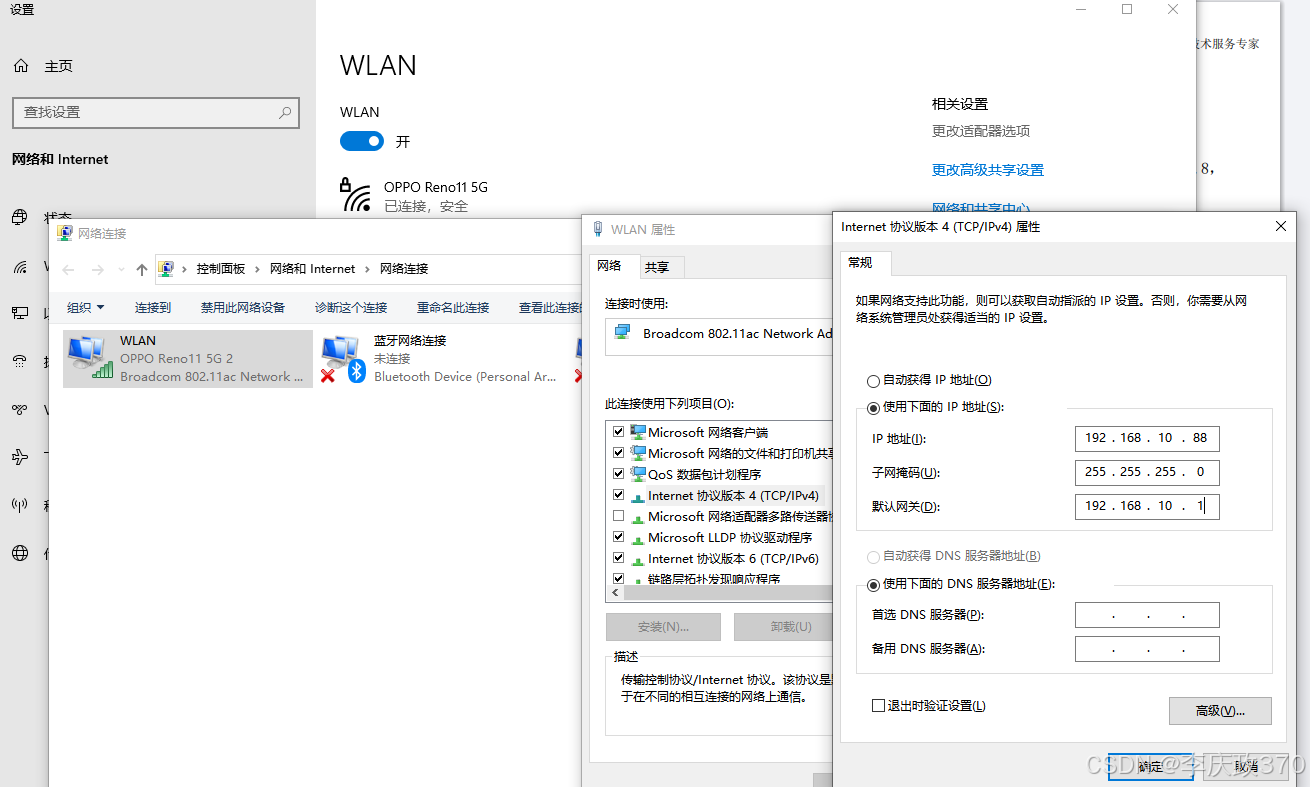
能ping通即可。
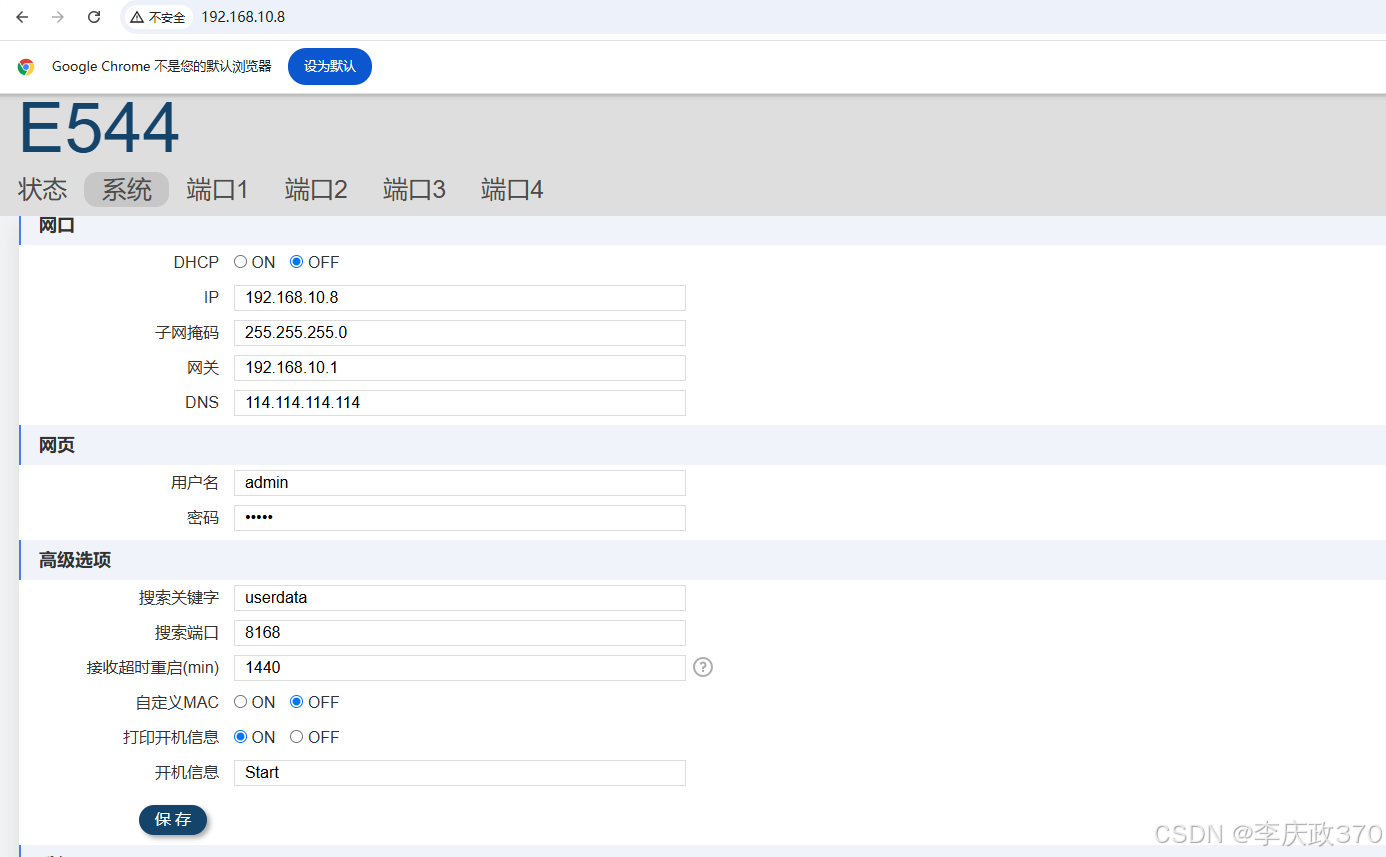
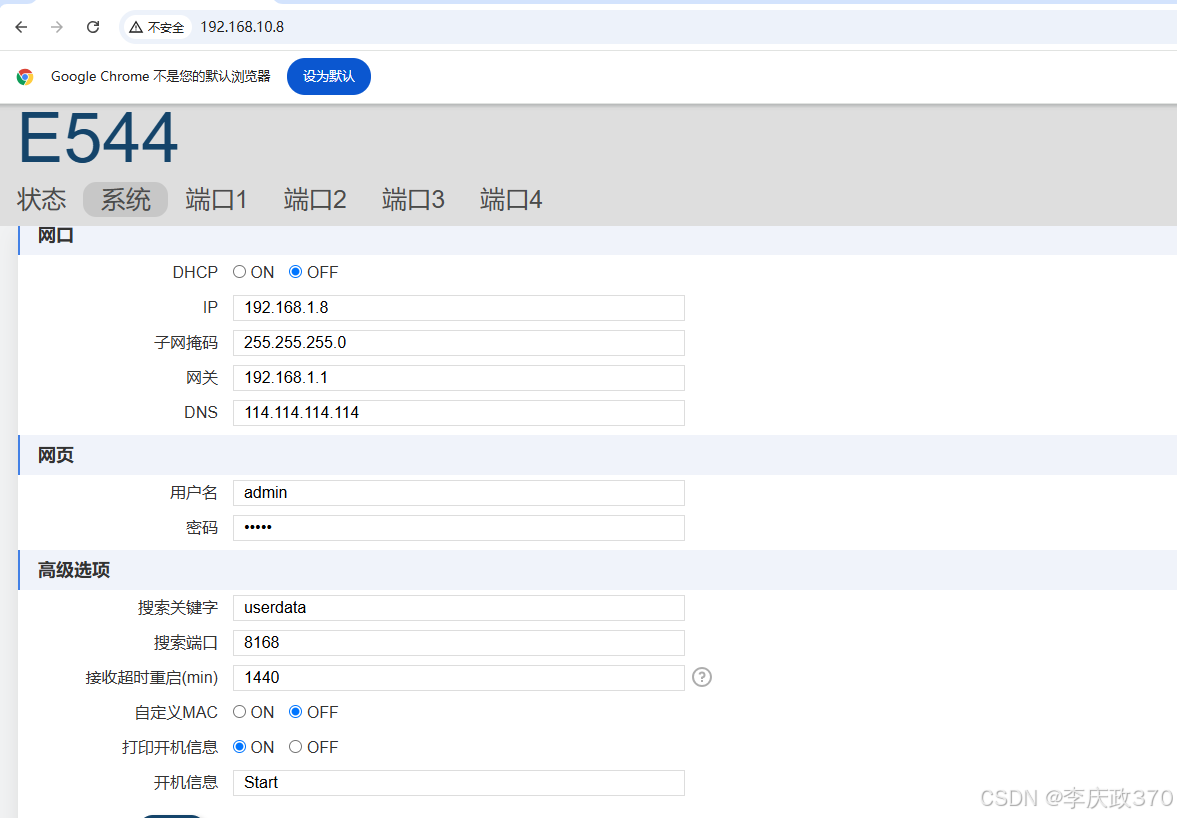
也可登录管理后台,将串口服务器静态ip改一下,改成需要的网段即可,如下所示:改为到192.168.1.x网段。
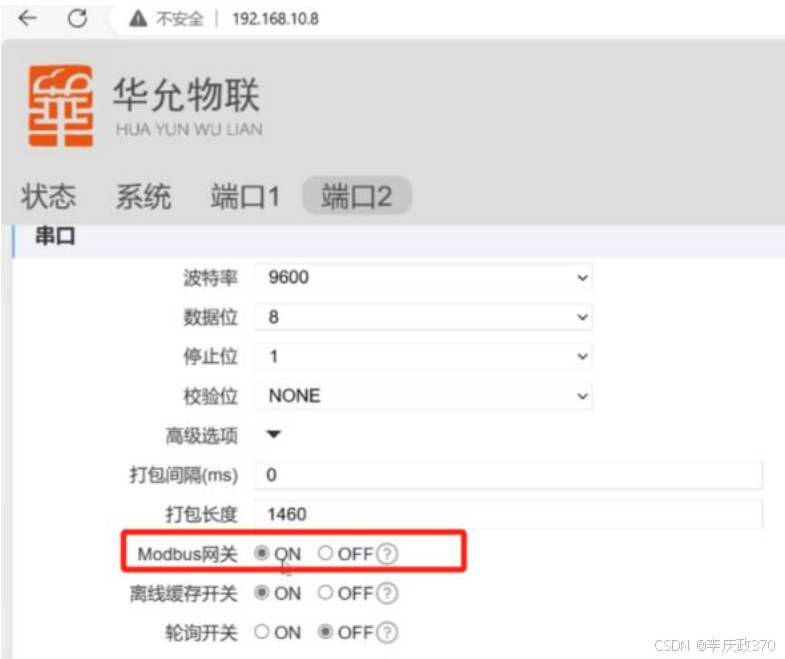
注意:如果需要使用Modbus TCP协议读取的话,需要开启串口服务器设备上端口1 处高级选项的modbus 网关功能【协议转换:modbus rtu/ascii/tcp双向转换】
二、客户端工具 对接点位测试。 接入平台
需要注意:
(1)Modbus RTU和Modbus TCP 报文的规范不一样。
(2)RTU经过dtu服务器转为tcp信号后,虽然支持tcp但是本质还是Modbus RTU,我们发送的报文必须是RTU规范的报文数据。
(3-1)只有出厂就支持Modbus TCP协议的设备,才能用Modbus TCP对接,发送Modbus TCP规范的报文数据。
(3-2)rtu设备如果需要使用Modbus TCP协议读取的话,需要开启串口服务器设备上端口1 处高级选项的modbus 网关功能【协议转换:modbus rtu/ascii/tcp双向转换】
1个字节=2个16进制字符
1.场景为 RS485温湿度传感器(Modbus RTU),通过串口服务器(192.168.1.8),将485信号 转为tcp信号, 然后平台就可通过tcp向串口服务器取数据。
以TCP传输向串口服务器(192.168.1.8)发送RTU规范的报文(16进制):0x01, 0x03, 0x00 0x00, 0x00 0x02, 0xC4, 0x0B
即以TCP传输 发送Modbus RTU规范的报文数据 到串口服务器(192.168.1.8)。
注意: 温湿度 传感器 是 在地址 0 位置,放了俩个short类型(2个寄存器)的数据,一个湿度2字节、一个温度2字节。共4字节。
数据在保持寄存器中。保持寄存器:1个寄存器占2字节。
可以一次读俩个寄存器: 0x01, 0x03, 0x00 0x00, 0x00 0x02, 0xC4, 0x0B 直接 从地址0读取 4字节数据,然后 每次读2个字节的short解析(目前物联平台不支持,float占2个寄存器4字节)
也可以分俩次各读1个寄存器:0x01, 0x03, 0x00 0x00, 0x00 0x01, 0x84, 0x0A(起始0,读1个寄存器:2字节湿度) 0x01, 0x03, 0x00 0x01, 0x00 0x01, 0xD5, 0xCA(起始1,读1个寄存器:2字节温度)
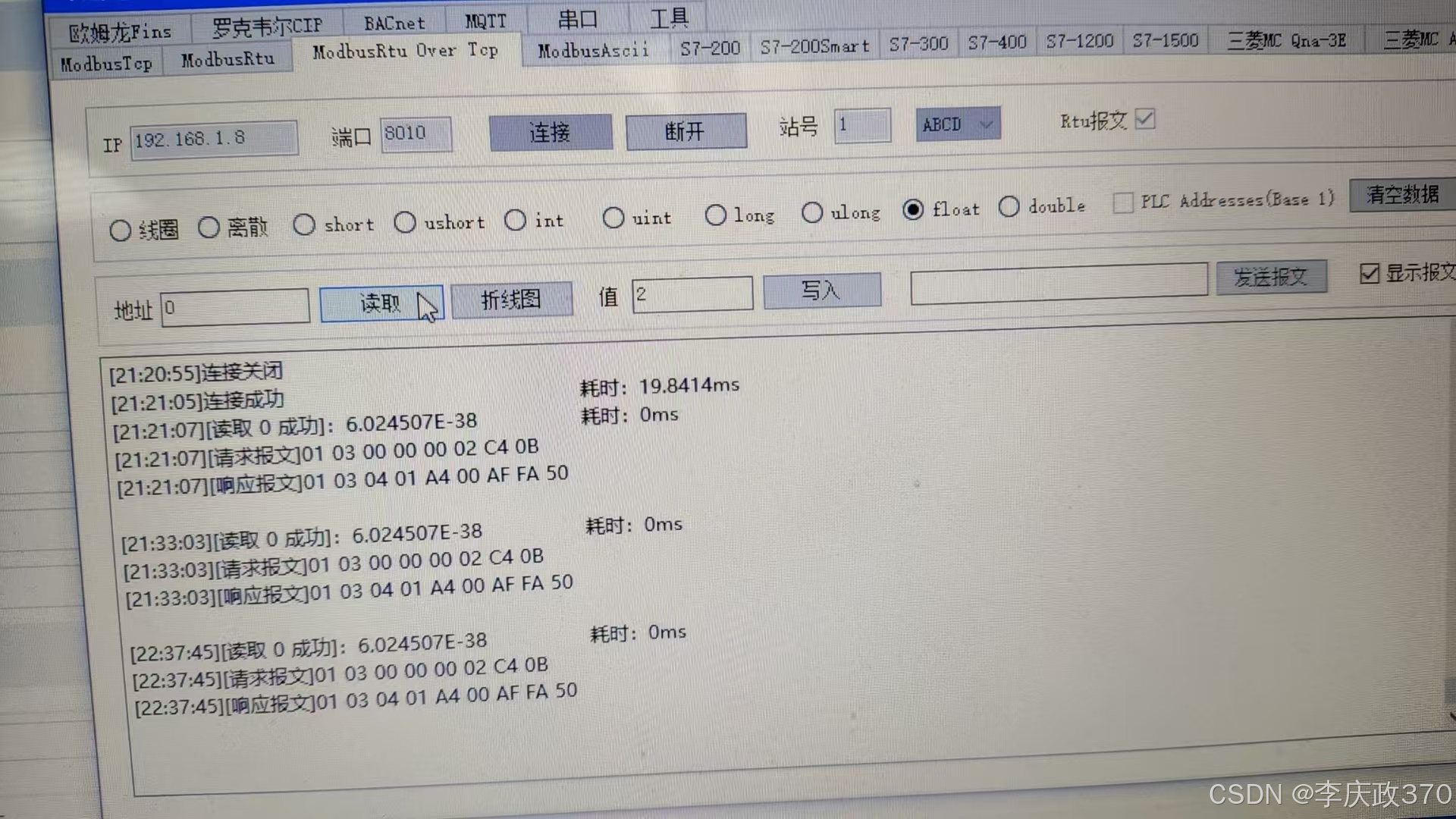
(1)IoTClient.exe 工具中需要使用 ModbusRtu Over TCP形式,发送读取报文:
(2)Java中实现 tcp发送RTU规范报文数据:
class ModbusTCPClient {
    public static void main(String[] args) {
        // 创建一个Timer实例
        Timer timer = new Timer();
        timer.scheduleAtFixedRate(new TimerTask() {
            @Override
            public void run() {
                System.out.println("周期性任务执行了!当前时间:" + System.currentTimeMillis());
                reqProtocol();
            }
        }, 1000, 1000); // 1秒后开始,每隔1秒执行一次
    }

    public static void reqProtocol() {
        // Modbus请求参数
        String ipAddress = "192.168.1.8";
        int port = 8010;
        byte[] request = new byte[]{0x01, 0x03, 0x00, 0x00, 0x00, 0x02, (byte) 0xC4, 0x0B};
        try (Socket socket = new Socket()) {
            // 连接到目标地址和端口
            socket.connect(new InetSocketAddress(ipAddress, port), 5000);
            // 获取输入输出流
            DataOutputStream dos = new DataOutputStream(socket.getOutputStream());
            DataInputStream dis = new DataInputStream(socket.getInputStream());
            // 发送Modbus请求
            dos.write(request);
            // 接收响应
            byte[] response = new byte[256]; // 假设响应长度不超过256字节
            int bytesRead = dis.read(response);
            // 打印响应数据
            parseString(response);
        } catch (IOException e) {
            e.printStackTrace();
        }
    }

    public static void parseString(byte[] data) {
        // hexData = "01 03 04 03 70 01 47 BA 0E";
        // 将十六进制字符串转换为字节数组
        // byte[] data = hexStringToByteArray(hexData);
        // 提取数据区
        // 数据区从第3个字节开始,长度为4个字节(根据协议)
        byte[] dataArea = new byte[4];
        System.arraycopy(data, 3, dataArea, 0, 4);//把 data 数组中从索引 3 开始的连续 4 个字节,拷贝到 dataArea 数组中索引 0 开始的位置

        // 解析数据区
        // 假设数据区的格式为:湿度(2字节)、温度(2字节)
        // 注意:Modbus协议中数据通常是大端字节序(高字节在前)
        ByteBuffer buffer = ByteBuffer.wrap(dataArea);
        buffer.order(ByteOrder.LITTLE_ENDIAN); // 设置字节序为大端

        // 读取湿度和温度值
        short humidityRaw = buffer.getShort(); // 读取2字节湿度值
        short temperatureRaw = buffer.getShort(); // 读取2字节温度值

        // 转换为实际数值
        float humidityValue = humidityRaw / 10.0f; // 湿度值为原始值除以10
        float temperatureValue = temperatureRaw / 10.0f; // 温度值为原始值除以10

        // 输出结果
        System.out.println("湿度: " + humidityValue + " %");
        System.out.println("温度: " + temperatureValue + " ℃");
    }

    // 将十六进制字符串转换为字节数组
    public static byte[] hexStringToByteArray(String s) {
        s = s.replace(" ", ""); // 去掉空格
        int len = s.length();
        byte[] data = new byte[len / 2];
        for (int i = 0; i < len; i += 2) {
            data[i / 2] = (byte) ((Character.digit(s.charAt(i), 16) << 4)
                    + Character.digit(s.charAt(i + 1), 16));
        }
        return data;
    }
}
腾讯云面向开发者汇聚海量精品云计算使用和开发经验,营造开放的云计算技术生态圈。
更多推荐
 13
13 0
0- 0


 已为社区贡献13条内容

所有评论(0)