Winform 自定义一款控件:工业中有产品选择功能的载具
·
效果:
如有十个孔位的载具
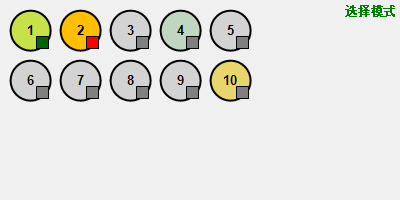
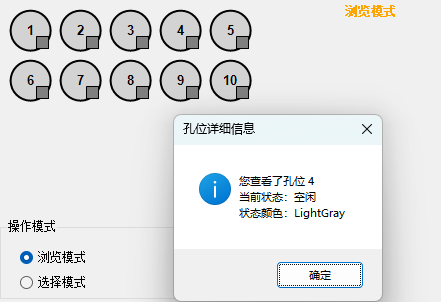
实现的功能有:
可以多选产品孔位
孔位右下角有矩形块表示状态
可以切换为浏览模式,该模式下一般用于定位,比如把当前孔位移动到相机下观察
实现思路:
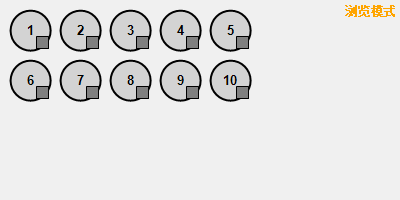
首先定义一个用户控件,然后在这个控件上画出这些想要的元素,每个孔位由以下部分组成:

椭圆边框、实心椭圆(上图中淡青色部分)、数字编号、右下角矩形块
-----------------------------------
画图工具类使用Graphics,该类的对象可由三种方法创建:
1.利用控件或窗体的Paint事件的PaintEventArgs
//窗体的Paint事件响应方法:

private void Form1_Paint(object sender, PaintEventArgs e)

{

    Graphics g = e.Graphics;

}

//直接重载控件或者窗体的OnPaint方法:

protected override void OnPaint(PaintEventArgs e)

{

    base.OnPaint(e);

    Graphics g = e.Graphics;

}
适用场景:为控件创建绘制代码。
2.调用某控件或窗体的CreateGraphics方法以获取对Graphics对象的引用,该对象表示控件或窗体的绘图图面。
private void button1_Click(object sender, EventArgs e)

{

    Graphics g = this.CreateGraphics();

    g.Dispose();

}
适用场景:在已经存在的窗体或控件上绘图
3.由从Image继承的任何对象创建Graphics对象
适用场景:需要更改已经存在的图像
private void button1_Click(object sender, EventArgs e)

{

    Image img = Image.FromFile(@"images\pic.jpg");

    Graphics g=Graphics.FromImage(img);

}
以上内容源自:https://blog.csdn.net/weixin_34929072/article/details/113377895
这里选择第一种方法获取Graphics对象。
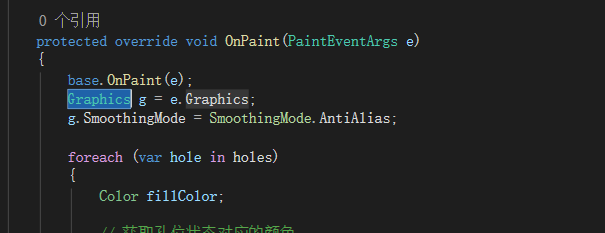
然后使用GDI技术绘制所需元素:
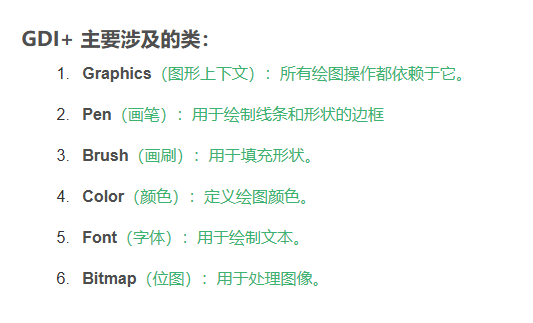
 using (SolidBrush brush = new SolidBrush(fillColor))
 using (Pen pen = new Pen(Color.Black, 2))
 {
     g.FillEllipse(brush, hole.Position.X, hole.Position.Y, holeSize, holeSize);
     g.DrawEllipse(pen, hole.Position.X, hole.Position.Y, holeSize, holeSize);

     // 绘制孔位编号
     string text = (hole.Index + 1).ToString();
     using (Font font = new Font("Arial", 10, FontStyle.Bold))
     using (StringFormat sf = new StringFormat())
     {
         sf.Alignment = StringAlignment.Center;
         sf.LineAlignment = StringAlignment.Center;
         RectangleF rect = new RectangleF(hole.Position.X, hole.Position.Y, holeSize, holeSize);

         // 根据背景色选择文字颜色
         Brush textBrush = IsDarkColor(fillColor) ? Brushes.White : Brushes.Black;
         g.DrawString(text, font, textBrush, rect, sf);
     }
 }
完整代码:
主窗体类:
public partial class Form1 : Form
{
    private CarrierControl carrierControl;
    private Label lblStatus;
    private Button btnClearSelection;
    private Button btnSelectFirst;
    private RadioButton rdbBrowseMode;
    private RadioButton rdbSelectMode;
    private GroupBox grpMode;
    private ListBox lstLog;
    private Button btnClearLog;
    private Timer simulationTimer;

    // 状态控制控件
    private GroupBox grpStatusControl;
    private NumericUpDown nudHoleIndex;
    private ComboBox cboStatusSelect;
    private Button btnSetStatus;
    private Button btnResetAllStatus;
    private Button btnStartSimulation;
    private Button btnStopSimulation;
    private Label lblStatusInfo;
    private DataGridView dgvStatusView;

    public Form1()
    {
        InitializeComponent();
        this.Text = "载具孔位模拟器 - 支持状态颜色";
        this.Size = new System.Drawing.Size(800, 750);
        this.StartPosition = FormStartPosition.CenterScreen;
        InitializeCustomControls();
        InitializeSimulationTimer();
    }


    private void InitializeCustomControls()
    {
        // 创建载具控件
        carrierControl = new CarrierControl();
        carrierControl.Location = new System.Drawing.Point(50, 50);
        carrierControl.Size = new System.Drawing.Size(400, 200);
        carrierControl.HoleSelected += CarrierControl_HoleSelected;
        carrierControl.HoleClicked += CarrierControl_HoleClicked;
        carrierControl.HoleStatusChanged += CarrierControl_HoleStatusChanged;
        carrierControl.SelectedHolesChanged += CarrierControl_SelectedHolesChanged;
        carrierControl.ModeChanged += CarrierControl_ModeChanged;

        // 模式选择组
        grpMode = new GroupBox();
        grpMode.Text = "操作模式";
        grpMode.Location = new System.Drawing.Point(50, 270);
        grpMode.Size = new System.Drawing.Size(200, 80);

        rdbBrowseMode = new RadioButton();
        rdbBrowseMode.Text = "浏览模式";
        rdbBrowseMode.Location = new System.Drawing.Point(20, 25);
        rdbBrowseMode.Size = new System.Drawing.Size(100, 25);
        rdbBrowseMode.CheckedChanged += Mode_CheckedChanged;

        rdbSelectMode = new RadioButton();
        rdbSelectMode.Text = "选择模式";
        rdbSelectMode.Location = new System.Drawing.Point(20, 50);
        rdbSelectMode.Size = new System.Drawing.Size(100, 25);
        rdbSelectMode.Checked = true;

        grpMode.Controls.Add(rdbBrowseMode);
        grpMode.Controls.Add(rdbSelectMode);

        // 状态控制组
        grpStatusControl = new GroupBox();
        grpStatusControl.Text = "孔位状态控制";
        grpStatusControl.Location = new System.Drawing.Point(50, 360);
        grpStatusControl.Size = new System.Drawing.Size(700, 150);

        // 孔位选择
        Label lblHoleIndex = new Label();
        lblHoleIndex.Text = "孔位编号(1-10):";
        lblHoleIndex.Location = new System.Drawing.Point(20, 30);
        lblHoleIndex.Size = new System.Drawing.Size(100, 25);

        nudHoleIndex = new NumericUpDown();
        nudHoleIndex.Location = new System.Drawing.Point(130, 28);
        nudHoleIndex.Size = new System.Drawing.Size(60, 25);
        nudHoleIndex.Minimum = 1;
        nudHoleIndex.Maximum = 10;
        nudHoleIndex.Value = 1;

        //// 状态选择
        //Label lblStatus = new Label();
        //lblStatus.Text = "状态:";
        //lblStatus.Location = new System.Drawing.Point(20, 65);
        //lblStatus.Size = new System.Drawing.Size(60, 25);

        cboStatusSelect = new ComboBox();
        cboStatusSelect.Location = new System.Drawing.Point(80, 62);
        cboStatusSelect.Size = new System.Drawing.Size(120, 25);
        cboStatusSelect.DropDownStyle = ComboBoxStyle.DropDownList;
        cboStatusSelect.Items.AddRange(new object[] {
            "空闲", "加工中", "已完成", "故障", "等待中", "自定义1", "自定义2"
        });
        cboStatusSelect.SelectedIndex = 0;

        // 按钮
        btnSetStatus = new Button();
        btnSetStatus.Text = "设置状态";
        btnSetStatus.Location = new System.Drawing.Point(220, 28);
        btnSetStatus.Size = new System.Drawing.Size(100, 30);
        btnSetStatus.Click += BtnSetStatus_Click;

        btnResetAllStatus = new Button();
        btnResetAllStatus.Text = "重置所有状态";
        btnResetAllStatus.Location = new System.Drawing.Point(220, 65);
        btnResetAllStatus.Size = new System.Drawing.Size(100, 30);
        btnResetAllStatus.Click += BtnResetAllStatus_Click;

        btnStartSimulation = new Button();
        btnStartSimulation.Text = "开始模拟";
        btnStartSimulation.Location = new System.Drawing.Point(340, 28);
        btnStartSimulation.Size = new System.Drawing.Size(100, 30);
        btnStartSimulation.BackColor = Color.LightGreen;
        btnStartSimulation.Click += BtnStartSimulation_Click;

        btnStopSimulation = new Button();
        btnStopSimulation.Text = "停止模拟";
        btnStopSimulation.Location = new System.Drawing.Point(340, 65);
        btnStopSimulation.Size = new System.Drawing.Size(100, 30);
        btnStopSimulation.BackColor = Color.LightCoral;
        btnStopSimulation.Enabled = false;
        btnStopSimulation.Click += BtnStopSimulation_Click;

        lblStatusInfo = new Label();
        lblStatusInfo.Text = "状态统计: 空闲0 加工中0 已完成0 故障0";
        lblStatusInfo.Location = new System.Drawing.Point(460, 45);
        lblStatusInfo.Size = new System.Drawing.Size(230, 40);
        lblStatusInfo.Font = new Font("微软雅黑", 9, FontStyle.Bold);

        grpStatusControl.Controls.Add(lblHoleIndex);
        grpStatusControl.Controls.Add(nudHoleIndex);
        grpStatusControl.Controls.Add(lblStatus);
        grpStatusControl.Controls.Add(cboStatusSelect);
        grpStatusControl.Controls.Add(btnSetStatus);
        grpStatusControl.Controls.Add(btnResetAllStatus);
        grpStatusControl.Controls.Add(btnStartSimulation);
        grpStatusControl.Controls.Add(btnStopSimulation);
        grpStatusControl.Controls.Add(lblStatusInfo);

        // 状态视图
        Label lblStatusView = new Label();
        lblStatusView.Text = "孔位状态一览表:";
        lblStatusView.Location = new System.Drawing.Point(50, 520);
        lblStatusView.Size = new System.Drawing.Size(120, 20);

        dgvStatusView = new DataGridView();
        dgvStatusView.Location = new System.Drawing.Point(50, 545);
        dgvStatusView.Size = new System.Drawing.Size(700, 80);
        dgvStatusView.AllowUserToAddRows = false;
        dgvStatusView.AllowUserToDeleteRows = false;
        dgvStatusView.ReadOnly = true;
        dgvStatusView.RowHeadersVisible = false;
        dgvStatusView.ColumnCount = 10;
        for (int i = 0; i < 10; i++)
        {
            dgvStatusView.Columns[i].Name = $"孔位{i + 1}";
            dgvStatusView.Columns[i].Width = 60;
        }
        dgvStatusView.Rows.Add();
        UpdateStatusView();

        // 状态标签
        lblStatus = new Label();
        lblStatus.Location = new System.Drawing.Point(50, 635);
        lblStatus.Size = new System.Drawing.Size(700, 30);
        lblStatus.Text = "状态:当前为选择模式";

        // 操作按钮
        btnClearSelection = new Button();
        btnClearSelection.Text = "清除所有选择";
        btnClearSelection.Location = new System.Drawing.Point(50, 675);
        btnClearSelection.Size = new System.Drawing.Size(120, 30);
        btnClearSelection.Click += BtnClearSelection_Click;

        btnSelectFirst = new Button();
        btnSelectFirst.Text = "选择第一个孔位";
        btnSelectFirst.Location = new System.Drawing.Point(180, 675);
        btnSelectFirst.Size = new System.Drawing.Size(120, 30);
        btnSelectFirst.Click += BtnSelectFirst_Click;

        // 日志列表框
        Label lblLog = new Label();
        lblLog.Text = "操作日志:";
        lblLog.Location = new System.Drawing.Point(50, 715);
        lblLog.Size = new System.Drawing.Size(100, 20);

        lstLog = new ListBox();
        lstLog.Location = new System.Drawing.Point(50, 735);
        lstLog.Size = new System.Drawing.Size(700, 80);
        lstLog.Font = new Font("Consolas", 9);

        btnClearLog = new Button();
        btnClearLog.Text = "清除日志";
        btnClearLog.Location = new System.Drawing.Point(670, 715);
        btnClearLog.Size = new System.Drawing.Size(80, 25);
        btnClearLog.Click += BtnClearLog_Click;

        // 添加控件到窗体
        this.Controls.Add(carrierControl);
        this.Controls.Add(grpMode);
        this.Controls.Add(grpStatusControl);
        this.Controls.Add(lblStatusView);
        this.Controls.Add(dgvStatusView);
        this.Controls.Add(lblStatus);
        this.Controls.Add(btnClearSelection);
        this.Controls.Add(btnSelectFirst);
        this.Controls.Add(lblLog);
        this.Controls.Add(lstLog);
        this.Controls.Add(btnClearLog);
    }

    private void InitializeSimulationTimer()
    {
        simulationTimer = new Timer();
        simulationTimer.Interval = 2000; // 每2秒更新一次
        simulationTimer.Tick += SimulationTimer_Tick;
    }

    private void SimulationTimer_Tick(object sender, EventArgs e)
    {
        // 模拟加工过程:随机改变一些孔位的状态
        Random rand = new Random();
        int holeToChange = rand.Next(0, 10);

        HoleStatus currentStatus = carrierControl.GetHoleStatus(holeToChange);
        HoleStatus newStatus;

        // 简单的状态机模拟
        switch (currentStatus)
        {
            case HoleStatus.Idle:
                newStatus = HoleStatus.Processing;
                break;
            case HoleStatus.Processing:
                newStatus = HoleStatus.Completed;
                break;
            case HoleStatus.Completed:
                newStatus = HoleStatus.Idle;
                break;
            case HoleStatus.Error:
                newStatus = HoleStatus.Idle;
                break;
            default:
                newStatus = HoleStatus.Idle;
                break;
        }

        carrierControl.SetHoleStatus(holeToChange, newStatus);
        AddLog($"模拟器自动将孔位 {holeToChange + 1} 状态改为 {GetStatusName(newStatus)}");
    }

    private void UpdateStatusView()
    {
        var allStatuses = carrierControl.GetAllHoleStatuses();
        for (int i = 0; i < 10; i++)
        {
            string statusText = GetStatusShortName(allStatuses[i]);
            dgvStatusView.Rows[0].Cells[i].Value = statusText;

            // 设置单元格颜色
            Color statusColor = carrierControl.GetStatusColor(allStatuses[i]);
            dgvStatusView.Rows[0].Cells[i].Style.BackColor = statusColor;
            dgvStatusView.Rows[0].Cells[i].Style.ForeColor =
                statusColor.GetBrightness() < 0.5 ? Color.White : Color.Black;
        }

        // 更新统计信息
        var processingHoles = carrierControl.GetHolesByStatus(HoleStatus.Processing);
        var completedHoles = carrierControl.GetHolesByStatus(HoleStatus.Completed);
        var errorHoles = carrierControl.GetHolesByStatus(HoleStatus.Error);
        var idleHoles = carrierControl.GetHolesByStatus(HoleStatus.Idle);

        lblStatusInfo.Text = $"状态统计: 空闲{idleHoles.Count} 加工中{processingHoles.Count} " +
                            $"已完成{completedHoles.Count} 故障{errorHoles.Count}";
    }

    private string GetStatusName(HoleStatus status)
    {
        switch (status)
        {
            case HoleStatus.Idle: return "空闲";
            case HoleStatus.Processing: return "加工中";
            case HoleStatus.Completed: return "已完成";
            case HoleStatus.Error: return "故障";
            case HoleStatus.Waiting: return "等待中";
            case HoleStatus.Custom1: return "自定义1";
            case HoleStatus.Custom2: return "自定义2";
            default: return "未知";
        }
    }

    private string GetStatusShortName(HoleStatus status)
    {
        switch (status)
        {
            case HoleStatus.Idle: return "空闲";
            case HoleStatus.Processing: return "加工";
            case HoleStatus.Completed: return "完成";
            case HoleStatus.Error: return "故障";
            case HoleStatus.Waiting: return "等待";
            case HoleStatus.Custom1: return "自定1";
            case HoleStatus.Custom2: return "自定2";
            default: return "未知";
        }
    }

    private HoleStatus GetStatusFromCombo(string statusName)
    {
        switch (statusName)
        {
            case "空闲": return HoleStatus.Idle;
            case "加工中": return HoleStatus.Processing;
            case "已完成": return HoleStatus.Completed;
            case "故障": return HoleStatus.Error;
            case "等待中": return HoleStatus.Waiting;
            case "自定义1": return HoleStatus.Custom1;
            case "自定义2": return HoleStatus.Custom2;
            default: return HoleStatus.Idle;
        }
    }

    private void BtnSetStatus_Click(object sender, EventArgs e)
    {
        int holeIndex = (int)nudHoleIndex.Value - 1;
        HoleStatus newStatus = GetStatusFromCombo(cboStatusSelect.SelectedItem.ToString());
        carrierControl.SetHoleStatus(holeIndex, newStatus);
        AddLog($"手动设置孔位 {holeIndex + 1} 状态为 {cboStatusSelect.SelectedItem}");
        UpdateStatusView();
    }

    private void BtnResetAllStatus_Click(object sender, EventArgs e)
    {
        carrierControl.ResetAllStatuses();
        AddLog("重置所有孔位状态为空闲");
        UpdateStatusView();
    }

    private void BtnStartSimulation_Click(object sender, EventArgs e)
    {
        simulationTimer.Start();
        btnStartSimulation.Enabled = false;
        btnStopSimulation.Enabled = true;
        AddLog("开始自动模拟加工过程");
    }

    private void BtnStopSimulation_Click(object sender, EventArgs e)
    {
        simulationTimer.Stop();
        btnStartSimulation.Enabled = true;
        btnStopSimulation.Enabled = false;
        AddLog("停止自动模拟");
    }

    private void Mode_CheckedChanged(object sender, EventArgs e)
    {
        if (rdbBrowseMode.Checked)
            carrierControl.SetMode(ControlMode.Browse);
        else if (rdbSelectMode.Checked)
            carrierControl.SetMode(ControlMode.Select);
    }

    private void CarrierControl_HoleSelected(object sender, HoleSelectedEventArgs e)
    {
        AddLog($"选择模式 - 选中了孔位 {e.SelectedHoleIndex + 1}");
        UpdateStatus($"选中了孔位 {e.SelectedHoleIndex + 1}");
    }

    private void CarrierControl_HoleClicked(object sender, HoleClickedEventArgs e)
    {
        string statusName = GetStatusName(e.Status);
        AddLog($"浏览模式 - 查看了孔位 {e.ClickedHoleIndex + 1},当前状态:{statusName}");
        UpdateStatus($"查看了孔位 {e.ClickedHoleIndex + 1},状态:{statusName}");

        MessageBox.Show($"您查看了孔位 {e.ClickedHoleIndex + 1}\n" +
                       $"当前状态:{statusName}\n" +
                       $"状态颜色:{carrierControl.GetStatusColor(e.Status).Name}",
            "孔位详细信息", MessageBoxButtons.OK, MessageBoxIcon.Information);
    }

    private void CarrierControl_HoleStatusChanged(object sender, HoleStatusChangedEventArgs e)
    {
        string oldStatusName = GetStatusName(e.OldStatus);
        string newStatusName = GetStatusName(e.NewStatus);
        AddLog($"孔位 {e.HoleIndex + 1} 状态改变: {oldStatusName} -> {newStatusName}");
        UpdateStatusView();
    }

    private void CarrierControl_SelectedHolesChanged(object sender, EventArgs e)
    {
        var selectedHoles = carrierControl.GetSelectedHoles();
        if (selectedHoles.Count == 0)
        {
            UpdateStatus("未选中任何孔位");
        }
        else
        {
            string holes = string.Join(", ", selectedHoles.ConvertAll(i => (i + 1).ToString()));
            UpdateStatus($"当前选中孔位: {holes}");
        }
    }

    private void CarrierControl_ModeChanged(object sender, ModeChangedEventArgs e)
    {
        string modeText = e.CurrentMode == ControlMode.Browse ? "浏览模式" : "选择模式";
        AddLog($"模式切换为:{modeText}");
        UpdateStatus($"当前为{modeText}");

        rdbBrowseMode.Checked = (e.CurrentMode == ControlMode.Browse);
        rdbSelectMode.Checked = (e.CurrentMode == ControlMode.Select);

        bool isSelectMode = (e.CurrentMode == ControlMode.Select);
        btnClearSelection.Enabled = isSelectMode;
        btnSelectFirst.Enabled = isSelectMode;
    }

    private void BtnClearSelection_Click(object sender, EventArgs e)
    {
        if (carrierControl.GetCurrentMode() == ControlMode.Select)
        {
            carrierControl.ClearSelections();
            AddLog("清除所有选择");
            UpdateStatus("已清除所有选择");
        }
        else
        {
            MessageBox.Show("当前为浏览模式,无法进行选择操作", "提示",
                MessageBoxButtons.OK, MessageBoxIcon.Information);
        }
    }

    private void BtnSelectFirst_Click(object sender, EventArgs e)
    {
        if (carrierControl.GetCurrentMode() == ControlMode.Select)
        {
            carrierControl.SelectHoleByIndex(0);
            AddLog("通过代码选择了第一个孔位");
        }
        else
        {
            MessageBox.Show("当前为浏览模式,无法进行选择操作", "提示",
                MessageBoxButtons.OK, MessageBoxIcon.Information);
        }
    }

    private void BtnClearLog_Click(object sender, EventArgs e)
    {
        lstLog.Items.Clear();
    }

    private void AddLog(string message)
    {
        string timestamp = DateTime.Now.ToString("HH:mm:ss");
        lstLog.Items.Insert(0, $"[{timestamp}] {message}");

        while (lstLog.Items.Count > 100)
        {
            lstLog.Items.RemoveAt(lstLog.Items.Count - 1);
        }
    }

    private void UpdateStatus(string message)
    {
        string mode = carrierControl.GetCurrentMode() == ControlMode.Browse ? "浏览模式" : "选择模式";
        lblStatus.Text = $"状态:[{mode}] {message}";
    }
}
自定义载具控件:
namespace MyCarrierControl
{
public enum ControlMode
{
Browse, // 浏览模式:只能查看,不能选择
Select // 选择模式:可以单选/多选
}
// 孔位状态枚举
public enum HoleStatus
{
Idle, // 空闲 - 灰色
Processing, // 加工中 - 橙色
Completed, // 已完成 - 绿色
Error, // 故障 - 红色
Waiting, // 等待中 - 黄色
Custom1, // 自定义状态1 - 紫色
Custom2 // 自定义状态2 - 青色
}
public partial class CarrierControl : UserControl
{
private List<Hole> holes = new List<Hole>();
private List<int> selectedHoles = new List<int>();
private bool isMultiSelect = false;
private int holeSize = 40;
private int columns = 5;
private int rows = 2;
private Color hoverColor = Color.LightBlue;
private int hoverIndex = -1;
private ControlMode currentMode = ControlMode.Select;
// 状态颜色映射
private Dictionary<HoleStatus, Color> statusColors = new Dictionary<HoleStatus, Color>();
// 事件
public event EventHandler<HoleSelectedEventArgs> HoleSelected;
public event EventHandler<HoleClickedEventArgs> HoleClicked;
public event EventHandler<HoleStatusChangedEventArgs> HoleStatusChanged;
public event EventHandler SelectedHolesChanged;
public event EventHandler<ModeChangedEventArgs> ModeChanged;
public CarrierControl()
{
InitializeComponent();
this.AutoScaleMode = System.Windows.Forms.AutoScaleMode.Font;
this.MouseMove += CarrierControl_MouseMove;
this.MouseLeave += CarrierControl_MouseLeave;
this.MouseClick += CarrierControl_MouseClick;
InitializeDefaultStatusColors();
InitializeHoles();
this.SetStyle(ControlStyles.AllPaintingInWmPaint |
ControlStyles.UserPaint |
ControlStyles.DoubleBuffer |
ControlStyles.ResizeRedraw, true);
this.Size = new Size(300, 150);
}
private void InitializeDefaultStatusColors()
{
// 初始化默认状态颜色
statusColors[HoleStatus.Idle] = Color.LightGray;
statusColors[HoleStatus.Processing] = Color.Orange;
statusColors[HoleStatus.Completed] = Color.LightGreen;
statusColors[HoleStatus.Error] = Color.Red;
statusColors[HoleStatus.Waiting] = Color.Yellow;
statusColors[HoleStatus.Custom1] = Color.Purple;
statusColors[HoleStatus.Custom2] = Color.Cyan;
}
private void InitializeHoles()
{
holes.Clear();
for (int i = 0; i < 10; i++)
{
holes.Add(new Hole
{
Index = i,
Position = GetHolePosition(i),
IsSelected = false,
Status = HoleStatus.Idle // 初始状态为空闲
});
}
}
private Point GetHolePosition(int index)
{
int col = index % columns;
int row = index / columns;
int spacing = 10;
int x = spacing + col * (holeSize + spacing);
int y = spacing + row * (holeSize + spacing);
return new Point(x, y);
}
protected override void OnPaint(PaintEventArgs e)
{
base.OnPaint(e);
Graphics g = e.Graphics;
g.SmoothingMode = SmoothingMode.AntiAlias;
foreach (var hole in holes)
{
Color fillColor;
// 获取孔位状态对应的颜色
if (statusColors.ContainsKey(hole.Status))
fillColor = statusColors[hole.Status];
else
fillColor = Color.LightGray;
// 如果是选择模式且被选中,添加半透明高亮
if (currentMode == ControlMode.Select && hole.IsSelected)
{
fillColor = BlendColor(fillColor, Color.Gold, 0.5);
}
// 悬停效果
if (hoverIndex == hole.Index)
{
fillColor = BlendColor(fillColor, hoverColor, 0.7);
}
using (SolidBrush brush = new SolidBrush(fillColor))
using (Pen pen = new Pen(Color.Black, 2))
{
g.FillEllipse(brush, hole.Position.X, hole.Position.Y, holeSize, holeSize);
g.DrawEllipse(pen, hole.Position.X, hole.Position.Y, holeSize, holeSize);
// 绘制孔位编号
string text = (hole.Index + 1).ToString();
using (Font font = new Font("Arial", 10, FontStyle.Bold))
using (StringFormat sf = new StringFormat())
{
sf.Alignment = StringAlignment.Center;
sf.LineAlignment = StringAlignment.Center;
RectangleF rect = new RectangleF(hole.Position.X, hole.Position.Y, holeSize, holeSize);
// 根据背景色选择文字颜色
Brush textBrush = IsDarkColor(fillColor) ? Brushes.White : Brushes.Black;
g.DrawString(text, font, textBrush, rect, sf);
}
}
// 绘制状态图标(可选)
DrawStatusIcon(g, hole);
}
// 绘制模式指示器
DrawModeIndicator(g);
}
private void DrawStatusIcon(Graphics g, Hole hole)
{
// 在孔位右下角绘制小图标表示状态
int iconSize = 12;
int x = hole.Position.X + holeSize - iconSize - 2;
int y = hole.Position.Y + holeSize - iconSize - 2;
Color iconColor = GetStatusIconColor(hole.Status);
using (SolidBrush brush = new SolidBrush(iconColor))
{
g.FillRectangle(brush, x, y, iconSize, iconSize);
g.DrawRectangle(Pens.Black, x, y, iconSize, iconSize);
}
}
private Color GetStatusIconColor(HoleStatus status)
{
switch (status)
{
case HoleStatus.Idle: return Color.Gray;
case HoleStatus.Processing: return Color.Red;
case HoleStatus.Completed: return Color.DarkGreen;
case HoleStatus.Error: return Color.Maroon;
case HoleStatus.Waiting: return Color.DarkOrange;
default: return Color.Black;
}
}
private Color BlendColor(Color baseColor, Color blendColor, double opacity)
{
int r = (int)(baseColor.R * (1 - opacity) + blendColor.R * opacity);
int g = (int)(baseColor.G * (1 - opacity) + blendColor.G * opacity);
int b = (int)(baseColor.B * (1 - opacity) + blendColor.B * opacity);
return Color.FromArgb(r, g, b);
}
private bool IsDarkColor(Color color)
{
double brightness = (color.R * 0.299 + color.G * 0.587 + color.B * 0.114);
return brightness < 128;
}
private void DrawModeIndicator(Graphics g)
{
string modeText = currentMode == ControlMode.Browse ? "浏览模式" : "选择模式";
Color modeColor = currentMode == ControlMode.Browse ? Color.Orange : Color.Green;
using (Font font = new Font("Arial", 8, FontStyle.Bold))
using (SolidBrush brush = new SolidBrush(modeColor))
{
SizeF textSize = g.MeasureString(modeText, font);
float x = this.Width - textSize.Width - 5;
float y = 5;
g.DrawString(modeText, font, brush, x, y);
}
}
private void CarrierControl_MouseMove(object sender, MouseEventArgs e)
{
int newHover = GetHoleAtPosition(e.Location);
if (newHover != hoverIndex)
{
hoverIndex = newHover;
Invalidate();
}
}
private void CarrierControl_MouseLeave(object sender, EventArgs e)
{
hoverIndex = -1;
Invalidate();
}
private void CarrierControl_MouseClick(object sender, MouseEventArgs e)
{
int clickedIndex = GetHoleAtPosition(e.Location);
if (clickedIndex >= 0)
{
if (currentMode == ControlMode.Browse)
{
// 浏览模式:触发查看事件,显示孔位详细信息
OnHoleClicked(new HoleClickedEventArgs(clickedIndex, holes[clickedIndex].Status));
}
else
{
// 选择模式:原有的选择逻辑
isMultiSelect = ModifierKeys.HasFlag(Keys.Control);
if (isMultiSelect)
{
ToggleHoleSelection(clickedIndex);
}
else
{
ClearAllSelections();
SelectHole(clickedIndex);
}
Invalidate();
OnSelectedHolesChanged();
OnHoleSelected(new HoleSelectedEventArgs(clickedIndex, selectedHoles.ToList()));
}
}
}
private int GetHoleAtPosition(Point point)
{
for (int i = 0; i < holes.Count; i++)
{
Rectangle rect = new Rectangle(holes[i].Position.X, holes[i].Position.Y, holeSize, holeSize);
if (rect.Contains(point))
return i;
}
return -1;
}
private void ToggleHoleSelection(int index)
{
holes[index].IsSelected = !holes[index].IsSelected;
if (holes[index].IsSelected)
{
if (!selectedHoles.Contains(index))
selectedHoles.Add(index);
}
else
{
selectedHoles.Remove(index);
}
}
private void SelectHole(int index)
{
holes[index].IsSelected = true;
if (!selectedHoles.Contains(index))
selectedHoles.Add(index);
}
private void ClearAllSelections()
{
foreach (var hole in holes)
{
hole.IsSelected = false;
}
selectedHoles.Clear();
}
// ========== 孔位状态管理方法 ==========
/// <summary>
/// 设置单个孔位的状态
/// </summary>
/// <param name="holeIndex">孔位索引(0-9)</param>
/// <param name="status">要设置的状态</param>
public void SetHoleStatus(int holeIndex, HoleStatus status)
{
if (holeIndex >= 0 && holeIndex < holes.Count)
{
HoleStatus oldStatus = holes[holeIndex].Status;
holes[holeIndex].Status = status;
Invalidate();
OnHoleStatusChanged(new HoleStatusChangedEventArgs(holeIndex, oldStatus, status));
}
}
/// <summary>
/// 批量设置多个孔位的状态
/// </summary>
/// <param name="statusMapping">孔位索引和状态的映射字典</param>
public void SetHoleStatuses(Dictionary<int, HoleStatus> statusMapping)
{
foreach (var kvp in statusMapping)
{
if (kvp.Key >= 0 && kvp.Key < holes.Count)
{
HoleStatus oldStatus = holes[kvp.Key].Status;
holes[kvp.Key].Status = kvp.Value;
OnHoleStatusChanged(new HoleStatusChangedEventArgs(kvp.Key, oldStatus, kvp.Value));
}
}
Invalidate();
}
/// <summary>
/// 获取指定孔位的当前状态
/// </summary>
/// <param name="holeIndex">孔位索引</param>
/// <returns>孔位的状态</returns>
public HoleStatus GetHoleStatus(int holeIndex)
{
if (holeIndex >= 0 && holeIndex < holes.Count)
return holes[holeIndex].Status;
return HoleStatus.Idle;
}
/// <summary>
/// 获取所有孔位的状态
/// </summary>
/// <returns>所有孔位的状态字典</returns>
public Dictionary<int, HoleStatus> GetAllHoleStatuses()
{
Dictionary<int, HoleStatus> statuses = new Dictionary<int, HoleStatus>();
for (int i = 0; i < holes.Count; i++)
{
statuses[i] = holes[i].Status;
}
return statuses;
}
/// <summary>
/// 设置状态对应的颜色
/// </summary>
/// <param name="status">状态类型</param>
/// <param name="color">要设置的颜色</param>
public void SetStatusColor(HoleStatus status, Color color)
{
if (statusColors.ContainsKey(status))
statusColors[status] = color;
else
statusColors.Add(status, color);
Invalidate();
}
/// <summary>
/// 获取状态对应的颜色
/// </summary>
/// <param name="status">状态类型</param>
/// <returns>状态的颜色</returns>
public Color GetStatusColor(HoleStatus status)
{
if (statusColors.ContainsKey(status))
return statusColors[status];
return Color.LightGray;
}
/// <summary>
/// 重置所有孔位的状态为空闲
/// </summary>
public void ResetAllStatuses()
{
for (int i = 0; i < holes.Count; i++)
{
HoleStatus oldStatus = holes[i].Status;
holes[i].Status = HoleStatus.Idle;
OnHoleStatusChanged(new HoleStatusChangedEventArgs(i, oldStatus, HoleStatus.Idle));
}
Invalidate();
}
/// <summary>
/// 获取指定状态的孔位索引列表
/// </summary>
/// <param name="status">要查找的状态</param>
/// <returns>符合状态的孔位索引列表</returns>
public List<int> GetHolesByStatus(HoleStatus status)
{
List<int> result = new List<int>();
for (int i = 0; i < holes.Count; i++)
{
if (holes[i].Status == status)
result.Add(i);
}
return result;
}
// 其他公共方法
public void SetMode(ControlMode mode)
{
if (currentMode != mode)
{
currentMode = mode;
if (mode == ControlMode.Browse)
{
ClearAllSelections();
OnSelectedHolesChanged();
}
Invalidate();
OnModeChanged(new ModeChangedEventArgs(currentMode));
}
}
public ControlMode GetCurrentMode()
{
return currentMode;
}
public void SelectHoleByIndex(int index)
{
if (currentMode == ControlMode.Select && index >= 0 && index < holes.Count)
{
ClearAllSelections();
SelectHole(index);
Invalidate();
OnSelectedHolesChanged();
}
}
public void SelectHolesByIndices(List<int> indices)
{
if (currentMode == ControlMode.Select)
{
ClearAllSelections();
foreach (int index in indices)
{
if (index >= 0 && index < holes.Count)
{
SelectHole(index);
}
}
Invalidate();
OnSelectedHolesChanged();
}
}
public void ClearSelections()
{
if (currentMode == ControlMode.Select)
{
ClearAllSelections();
Invalidate();
OnSelectedHolesChanged();
}
}
public List<int> GetSelectedHoles()
{
return new List<int>(selectedHoles);
}
public bool IsHoleSelected(int index)
{
return currentMode == ControlMode.Select &&
index >= 0 && index < holes.Count &&
holes[index].IsSelected;
}
// 属性
public int HoleSize
{
get { return holeSize; }
set
{
holeSize = value;
InitializeHoles();
Invalidate();
}
}
public Color HoverColor
{
get { return hoverColor; }
set
{
hoverColor = value;
Invalidate();
}
}
// 事件触发方法
protected virtual void OnHoleSelected(HoleSelectedEventArgs e)
{
HoleSelected?.Invoke(this, e);
}
protected virtual void OnHoleClicked(HoleClickedEventArgs e)
{
HoleClicked?.Invoke(this, e);
}
protected virtual void OnHoleStatusChanged(HoleStatusChangedEventArgs e)
{
HoleStatusChanged?.Invoke(this, e);
}
protected virtual void OnSelectedHolesChanged()
{
SelectedHolesChanged?.Invoke(this, EventArgs.Empty);
}
protected virtual void OnModeChanged(ModeChangedEventArgs e)
{
ModeChanged?.Invoke(this, e);
}
}
// 数据类
public class Hole
{
public int Index { get; set; }
public Point Position { get; set; }
public bool IsSelected { get; set; }
public HoleStatus Status { get; set; }
}
// 事件参数类
public class HoleSelectedEventArgs : EventArgs
{
public int SelectedHoleIndex { get; private set; }
public List<int> AllSelectedHoles { get; private set; }
public HoleSelectedEventArgs(int selectedHoleIndex, List<int> allSelectedHoles)
{
SelectedHoleIndex = selectedHoleIndex;
AllSelectedHoles = allSelectedHoles;
}
}
public class HoleClickedEventArgs : EventArgs
{
public int ClickedHoleIndex { get; private set; }
public HoleStatus Status { get; private set; }
public HoleClickedEventArgs(int clickedHoleIndex, HoleStatus status)
{
ClickedHoleIndex = clickedHoleIndex;
Status = status;
}
}
public class HoleStatusChangedEventArgs : EventArgs
{
public int HoleIndex { get; private set; }
public HoleStatus OldStatus { get; private set; }
public HoleStatus NewStatus { get; private set; }
public HoleStatusChangedEventArgs(int holeIndex, HoleStatus oldStatus, HoleStatus newStatus)
{
HoleIndex = holeIndex;
OldStatus = oldStatus;
NewStatus = newStatus;
}
}
public class ModeChangedEventArgs : EventArgs
{
public ControlMode CurrentMode { get; private set; }
public ModeChangedEventArgs(ControlMode mode)
{
CurrentMode = mode;
}
}
}
牢骚:
不知道各位的公司对代码技术怎么看的,我们这里全都封起来了,dll还要加壳,这种被提防的感觉很不自在。

腾讯云面向开发者汇聚海量精品云计算使用和开发经验,营造开放的云计算技术生态圈。
更多推荐
 7
7 0
0- 0


 已为社区贡献2条内容

所有评论(0)