Flutter for OpenHarmony第三方库实战:智能定位服务集成 —— geolocator + geocoding
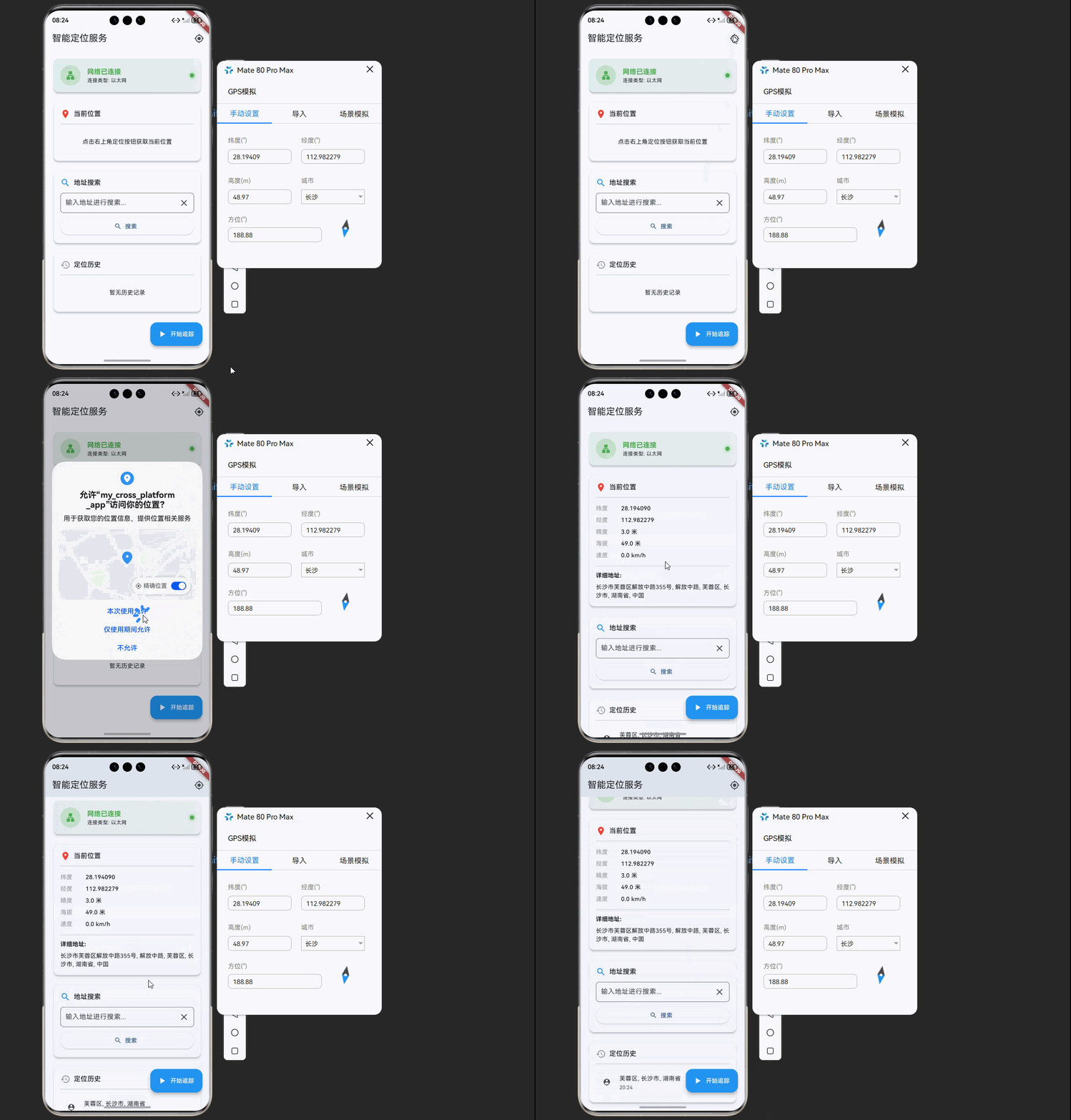
想象一下这样的场景:用户打开你的应用,自动获取当前位置并显示详细地址,同时根据网络状态智能调整定位策略,在离线时使用缓存数据。这个流程涵盖了现代定位应用的核心体验。fill:#333;important;important;fill:none;color:#333;color:#333;important;fill:none;fill:#333;height:1em;是否网络状态检测网络可用?请求
·
欢迎加入开源鸿蒙跨平台社区:https://openharmonycrossplatform.csdn.net
🚀 项目概述:我们要构建什么?
想象一下这样的场景:用户打开你的应用,自动获取当前位置并显示详细地址,同时根据网络状态智能调整定位策略,在离线时使用缓存数据。这个流程涵盖了现代定位应用的核心体验。
🎯 核心功能一览
| 功能模块 | 实现库 | 核心能力 |
|---|---|---|
| 📍 GPS定位 | geolocator | 高精度定位、实时位置追踪 |
| 🗺️ 地理编码 | geocoding | 地址与坐标相互转换 |
| 📡 网络状态监控 | connectivity_plus | 实时网络状态检测与监听 |
💡 为什么选择这三个库?
1️⃣ geolocator - 企业级定位解决方案
- 跨平台支持,API 统一
- 支持前台和后台定位
- 提供位置变化流式监听
- 内置权限管理功能
- 提供丰富的位置信息(经纬度、海拔、速度、方向等)
2️⃣ geocoding - 地理编码利器
- 地址转坐标(地理编码)
- 坐标转地址(逆地理编码)
- 支持多语言地址返回
- 提供详细地址组件
3️⃣ connectivity_plus - 网络感知必备
- 实时监听网络状态变化
- 支持多种网络类型检测
- 跨平台支持,API 简洁
- 低性能消耗
📦 第一步:环境配置
1.1 添加依赖
打开 pubspec.yaml,添加三个库的依赖:
dependencies:
  flutter:
    sdk: flutter

  # GPS定位
  geolocator:
    git:
      url: "https://atomgit.com/openharmony-sig/fluttertpc_geolocator.git"
      ref: "br_geolocator_v13.0.0_ohos"

  # 地理编码
  geocoding:
    git:
      url: "https://atomgit.com/openharmony-sig/fluttertpc_geocoding.git"
      ref: "br_geocoding_v3.0.0_ohos"

  # 网络状态检测
  connectivity_plus:
    git:
      url: "https://atomgit.com/openharmony-sig/flutter_plus_plugins.git"
      path: "packages/connectivity_plus/connectivity_plus"
1.2 权限配置
在 OpenHarmony 平台上,需要配置定位和网络相关权限:
📄 ohos/entry/src/main/module.json5:
{
  "module": {
    "requestPermissions": [
      {
        "name": "ohos.permission.INTERNET",
        "reason": "$string:internet_reason",
        "usedScene": {
          "abilities": ["EntryAbility"],
          "when": "inuse"
        }
      },
      {
        "name": "ohos.permission.GET_NETWORK_INFO",
        "reason": "$string:network_info_reason",
        "usedScene": {
          "abilities": ["EntryAbility"],
          "when": "inuse"
        }
      },
      {
        "name": "ohos.permission.LOCATION",
        "reason": "$string:location_reason",
        "usedScene": {
          "abilities": ["EntryAbility"],
          "when": "inuse"
        }
      },
      {
        "name": "ohos.permission.APPROXIMATELY_LOCATION",
        "reason": "$string:location_reason",
        "usedScene": {
          "abilities": ["EntryAbility"],
          "when": "inuse"
        }
      }
    ]
  }
}
📄 ohos/entry/src/main/resources/base/element/string.json:
{
  "string": [
    {
      "name": "internet_reason",
      "value": "应用需要访问网络以获取地理编码数据"
    },
    {
      "name": "network_info_reason",
      "value": "应用需要检测网络状态以优化定位策略"
    },
    {
      "name": "location_reason",
      "value": "应用需要获取您的位置以提供定位服务"
    }
  ]
}
1.3 执行依赖安装
flutter pub get
📡 第二步:网络状态监控模块
2.1 网络状态服务封装
import 'dart:async';
import 'package:connectivity_plus/connectivity_plus.dart';
import 'package:flutter/foundation.dart';
enum NetworkStatus {
online,
offline,
unknown,
}
class NetworkService extends ChangeNotifier {
final Connectivity _connectivity = Connectivity();
StreamSubscription<ConnectivityResult>? _subscription;
NetworkStatus _status = NetworkStatus.unknown;
ConnectivityResult _connectionType = ConnectivityResult.none;
NetworkStatus get status => _status;
ConnectivityResult get connectionType => _connectionType;
bool get isOnline => _status == NetworkStatus.online;
void startMonitoring() {
_checkInitialStatus();
_subscription = _connectivity.onConnectivityChanged.listen(_handleConnectivityChange);
}
void stopMonitoring() {
_subscription?.cancel();
_subscription = null;
}
Future<void> _checkInitialStatus() async {
try {
final result = await _connectivity.checkConnectivity();
_updateStatus(result);
} catch (e) {
debugPrint('检查网络状态失败: $e');
}
}
void _handleConnectivityChange(ConnectivityResult result) {
_updateStatus(result);
}
void _updateStatus(ConnectivityResult result) {
_connectionType = result;
_status = _determineStatus(result);
notifyListeners();
}
NetworkStatus _determineStatus(ConnectivityResult result) {
switch (result) {
case ConnectivityResult.wifi:
case ConnectivityResult.mobile:
case ConnectivityResult.ethernet:
return NetworkStatus.online;
case ConnectivityResult.none:
return NetworkStatus.offline;
default:
return NetworkStatus.unknown;
}
}
String get statusText {
switch (_status) {
case NetworkStatus.online: return '网络已连接';
case NetworkStatus.offline: return '网络已断开';
case NetworkStatus.unknown: return '网络状态未知';
}
}
String get connectionTypeText {
switch (_connectionType) {
case ConnectivityResult.wifi: return 'WiFi';
case ConnectivityResult.mobile: return '移动网络';
case ConnectivityResult.ethernet: return '以太网';
default: return '无连接';
}
}
IconData get connectionIcon {
switch (_connectionType) {
case ConnectivityResult.wifi: return Icons.wifi;
case ConnectivityResult.mobile: return Icons.signal_cellular_4_bar;
case ConnectivityResult.ethernet: return Icons.lan;
default: return Icons.signal_wifi_off;
}
}
Color get statusColor {
switch (_status) {
case NetworkStatus.online: return Colors.green;
case NetworkStatus.offline: return Colors.red;
case NetworkStatus.unknown: return Colors.orange;
}
}
void dispose() {
stopMonitoring();
super.dispose();
}
}
📍 第三步:定位服务模块
3.1 定位服务封装
import 'dart:async';
import 'package:flutter/foundation.dart';
import 'package:geolocator/geolocator.dart';
class LocationData {
final double latitude;
final double longitude;
final double? altitude;
final double? accuracy;
final double? speed;
final double? heading;
final DateTime timestamp;
LocationData({
required this.latitude,
required this.longitude,
this.altitude,
this.accuracy,
this.speed,
this.heading,
required this.timestamp,
});
factory LocationData.fromPosition(Position position) {
return LocationData(
latitude: position.latitude,
longitude: position.longitude,
altitude: position.altitude,
accuracy: position.accuracy,
speed: position.speed,
heading: position.heading,
timestamp: position.timestamp ?? DateTime.now(),
);
}
}
class LocationService extends ChangeNotifier {
StreamSubscription<Position>? _subscription;
LocationData? _currentLocation;
bool _isTracking = false;
bool _permissionGranted = false;
String? _errorMessage;
LocationData? get currentLocation => _currentLocation;
bool get isTracking => _isTracking;
bool get permissionGranted => _permissionGranted;
String? get errorMessage => _errorMessage;
Future<bool> checkPermission() async {
try {
final permission = await Geolocator.checkPermission();
_permissionGranted = permission == LocationPermission.whileInUse ||
permission == LocationPermission.always;
notifyListeners();
return _permissionGranted;
} catch (e) {
debugPrint('检查权限失败: $e');
return false;
}
}
Future<bool> requestPermission() async {
try {
final permission = await Geolocator.requestPermission();
_permissionGranted = permission == LocationPermission.whileInUse ||
permission == LocationPermission.always;
if (!_permissionGranted) {
_errorMessage = '定位权限被拒绝';
}
notifyListeners();
return _permissionGranted;
} catch (e) {
_errorMessage = '请求权限失败: $e';
notifyListeners();
return false;
}
}
Future<bool> enableService() async {
try {
final enabled = await Geolocator.isLocationServiceEnabled();
if (!enabled) {
_errorMessage = '请启用定位服务';
notifyListeners();
return false;
}
return true;
} catch (e) {
debugPrint('检查定位服务失败: $e');
return false;
}
}
Future<LocationData?> getCurrentLocation() async {
try {
_errorMessage = null;
final serviceEnabled = await enableService();
if (!serviceEnabled) return null;
final hasPermission = await checkPermission();
if (!hasPermission) {
final granted = await requestPermission();
if (!granted) return null;
}
final position = await Geolocator.getCurrentPosition(
desiredAccuracy: LocationAccuracy.high,
);
_currentLocation = LocationData.fromPosition(position);
notifyListeners();
return _currentLocation;
} catch (e) {
_errorMessage = '获取位置失败: $e';
notifyListeners();
return null;
}
}
void startTracking({int distanceFilter = 10}) {
if (_isTracking) return;
final locationSettings = LocationSettings(
accuracy: LocationAccuracy.high,
distanceFilter: distanceFilter,
);
_subscription = Geolocator.getPositionStream(
locationSettings: locationSettings,
).listen((position) {
_currentLocation = LocationData.fromPosition(position);
notifyListeners();
});
_isTracking = true;
notifyListeners();
}
void stopTracking() {
_subscription?.cancel();
_subscription = null;
_isTracking = false;
notifyListeners();
}
void dispose() {
stopTracking();
super.dispose();
}
}
🗺️ 第四步:地理编码模块
4.1 地理编码服务封装
import 'package:flutter/foundation.dart';
import 'package:geocoding/geocoding.dart';

class AddressInfo {
  final String name;
  final String? street;
  final String? locality;
  final String? subLocality;
  final String? administrativeArea;
  final String? postalCode;
  final String country;
  final double latitude;
  final double longitude;

  AddressInfo({
    required this.name,
    this.street,
    this.locality,
    this.subLocality,
    this.administrativeArea,
    this.postalCode,
    required this.country,
    required this.latitude,
    required this.longitude,
  });

  String get fullAddress {
    final parts = <String>[
      name,
      if (street != null) street!,
      if (subLocality != null) subLocality!,
      if (locality != null) locality!,
      if (administrativeArea != null) administrativeArea!,
      if (postalCode != null) postalCode!,
      country,
    ];
    return parts.where((p) => p.isNotEmpty).join(', ');
  }

  String get shortAddress {
    final parts = <String>[
      if (subLocality != null) subLocality!,
      if (locality != null) locality!,
      if (administrativeArea != null) administrativeArea!,
    ];
    return parts.isEmpty ? country : parts.join(', ');
  }
}

class GeocodingService extends ChangeNotifier {
  String? _errorMessage;
  bool _isLoading = false;

  String? get errorMessage => _errorMessage;
  bool get isLoading => _isLoading;

  Future<AddressInfo?> getAddressFromCoordinates(double latitude, double longitude) async {
    try {
      _isLoading = true;
      _errorMessage = null;
      notifyListeners();

      final placemarks = await placemarkFromCoordinates(latitude, longitude);

      if (placemarks.isEmpty) {
        _errorMessage = '未找到地址信息';
        _isLoading = false;
        notifyListeners();
        return null;
      }

      final placemark = placemarks.first;
      final address = AddressInfo(
        name: placemark.name ?? '',
        street: placemark.street,
        locality: placemark.locality,
        subLocality: placemark.subLocality,
        administrativeArea: placemark.administrativeArea,
        postalCode: placemark.postalCode,
        country: placemark.country ?? '',
        latitude: latitude,
        longitude: longitude,
      );

      _isLoading = false;
      notifyListeners();
      return address;
    } catch (e) {
      _errorMessage = '地理编码失败: $e';
      _isLoading = false;
      notifyListeners();
      return null;
    }
  }

  Future<List<AddressInfo>> searchAddress(String query) async {
    try {
      _isLoading = true;
      _errorMessage = null;
      notifyListeners();

      final locations = await locationFromAddress(query);

      final addresses = <AddressInfo>[];
      for (final location in locations) {
        final placemarks = await placemarkFromCoordinates(
          location.latitude,
          location.longitude,
        );

        if (placemarks.isNotEmpty) {
          final placemark = placemarks.first;
          addresses.add(AddressInfo(
            name: placemark.name ?? query,
            street: placemark.street,
            locality: placemark.locality,
            subLocality: placemark.subLocality,
            administrativeArea: placemark.administrativeArea,
            postalCode: placemark.postalCode,
            country: placemark.country ?? '',
            latitude: location.latitude,
            longitude: location.longitude,
          ));
        }
      }

      _isLoading = false;
      notifyListeners();
      return addresses;
    } catch (e) {
      _errorMessage = '地址搜索失败: $e';
      _isLoading = false;
      notifyListeners();
      return [];
    }
  }
}
🔧 第五步:完整实战应用
5.1 主页面布局
import 'package:flutter/material.dart';
import 'package:connectivity_plus/connectivity_plus.dart';
import 'package:geolocator/geolocator.dart';
import 'package:geocoding/geocoding.dart';
void main() {
runApp(const MyApp());
}
class MyApp extends StatelessWidget {
const MyApp({super.key});
Widget build(BuildContext context) {
return MaterialApp(
title: '智能定位服务',
theme: ThemeData(
colorScheme: ColorScheme.fromSeed(seedColor: Colors.blue),
useMaterial3: true,
),
home: const LocationDashboardPage(),
);
}
}
class LocationDashboardPage extends StatefulWidget {
const LocationDashboardPage({super.key});
State<LocationDashboardPage> createState() => _LocationDashboardPageState();
}
class _LocationDashboardPageState extends State<LocationDashboardPage> {
final NetworkService _networkService = NetworkService();
final LocationService _locationService = LocationService();
final GeocodingService _geocodingService = GeocodingService();
AddressInfo? _currentAddress;
List<AddressInfo> _searchResults = [];
final TextEditingController _searchController = TextEditingController();
final List<LocationHistory> _history = [];
void initState() {
super.initState();
_networkService.addListener(_onNetworkChanged);
_locationService.addListener(_onLocationChanged);
_networkService.startMonitoring();
}
void _onNetworkChanged() => setState(() {});
void _onLocationChanged() {
if (_locationService.currentLocation != null && _networkService.isOnline) {
_fetchAddress(_locationService.currentLocation!);
}
setState(() {});
}
Future<void> _fetchAddress(LocationData location) async {
final address = await _geocodingService.getAddressFromCoordinates(
location.latitude,
location.longitude,
);
if (address != null) {
setState(() {
_currentAddress = address;
_history.insert(0, LocationHistory(
address: address,
timestamp: DateTime.now(),
));
if (_history.length > 20) _history.removeLast();
});
}
}
Future<void> _getCurrentLocation() async {
if (!_networkService.isOnline) {
_showSnackBar('网络不可用,请检查网络连接');
return;
}
final location = await _locationService.getCurrentLocation();
if (location == null) {
_showSnackBar(_locationService.errorMessage ?? '获取位置失败');
}
}
Future<void> _searchAddress(String query) async {
if (query.isEmpty) return;
if (!_networkService.isOnline) {
_showSnackBar('网络不可用,无法搜索地址');
return;
}
final results = await _geocodingService.searchAddress(query);
setState(() {
_searchResults = results;
});
}
void _showSnackBar(String message) {
ScaffoldMessenger.of(context).showSnackBar(
SnackBar(content: Text(message), behavior: SnackBarBehavior.floating),
);
}
void dispose() {
_networkService.removeListener(_onNetworkChanged);
_locationService.removeListener(_onLocationChanged);
_networkService.dispose();
_locationService.dispose();
_searchController.dispose();
super.dispose();
}
Widget build(BuildContext context) {
return Scaffold(
appBar: AppBar(
title: const Text('智能定位服务'),
elevation: 0,
actions: [
IconButton(
icon: const Icon(Icons.my_location),
onPressed: _getCurrentLocation,
tooltip: '获取当前位置',
),
],
),
body: ListView(
padding: const EdgeInsets.all(16),
children: [
_buildNetworkStatusCard(),
const SizedBox(height: 16),
_buildLocationCard(),
const SizedBox(height: 16),
_buildSearchCard(),
if (_searchResults.isNotEmpty) ...[
const SizedBox(height: 16),
_buildSearchResults(),
],
const SizedBox(height: 16),
_buildHistoryCard(),
],
),
floatingActionButton: FloatingActionButton.extended(
onPressed: _locationService.isTracking
? _locationService.stopTracking
: () => _locationService.startTracking(),
icon: Icon(_locationService.isTracking ? Icons.pause : Icons.play_arrow),
label: Text(_locationService.isTracking ? '停止追踪' : '开始追踪'),
backgroundColor: _locationService.isTracking ? Colors.red : Colors.blue,
foregroundColor: Colors.white,
),
);
}
Widget _buildNetworkStatusCard() {
return Card(
elevation: 4,
child: Container(
padding: const EdgeInsets.all(16),
decoration: BoxDecoration(
borderRadius: BorderRadius.circular(12),
gradient: LinearGradient(
colors: [
_networkService.statusColor.withOpacity(0.1),
_networkService.statusColor.withOpacity(0.05),
],
),
),
child: Row(
children: [
Container(
width: 48,
height: 48,
decoration: BoxDecoration(
color: _networkService.statusColor.withOpacity(0.2),
shape: BoxShape.circle,
),
child: Icon(
_networkService.connectionIcon,
color: _networkService.statusColor,
),
),
const SizedBox(width: 16),
Expanded(
child: Column(
crossAxisAlignment: CrossAxisAlignment.start,
children: [
Text(
_networkService.statusText,
style: Theme.of(context).textTheme.titleMedium?.copyWith(
fontWeight: FontWeight.bold,
color: _networkService.statusColor,
),
),
Text(
'连接类型: ${_networkService.connectionTypeText}',
style: Theme.of(context).textTheme.bodySmall,
),
],
),
),
Container(
width: 10,
height: 10,
decoration: BoxDecoration(
color: _networkService.statusColor,
shape: BoxShape.circle,
boxShadow: [
BoxShadow(
color: _networkService.statusColor.withOpacity(0.5),
blurRadius: 6,
spreadRadius: 2,
),
],
),
),
],
),
),
);
}
Widget _buildLocationCard() {
final location = _locationService.currentLocation;
return Card(
elevation: 4,
child: Padding(
padding: const EdgeInsets.all(16),
child: Column(
crossAxisAlignment: CrossAxisAlignment.start,
children: [
Row(
children: [
const Icon(Icons.location_on, color: Colors.red),
const SizedBox(width: 8),
Text('当前位置', style: Theme.of(context).textTheme.titleMedium),
const Spacer(),
if (_locationService.isTracking)
Container(
padding: const EdgeInsets.symmetric(horizontal: 8, vertical: 4),
decoration: BoxDecoration(
color: Colors.green.withOpacity(0.2),
borderRadius: BorderRadius.circular(12),
),
child: const Row(
mainAxisSize: MainAxisSize.min,
children: [
SizedBox(
width: 8,
height: 8,
child: CircularProgressIndicator(strokeWidth: 2),
),
SizedBox(width: 4),
Text('追踪中', style: TextStyle(fontSize: 12, color: Colors.green)),
],
),
),
],
),
const Divider(height: 24),
if (location == null)
const Center(
child: Padding(
padding: EdgeInsets.all(20),
child: Text('点击右上角定位按钮获取当前位置'),
),
)
else ...[
_buildInfoRow('纬度', location.latitude.toStringAsFixed(6)),
_buildInfoRow('经度', location.longitude.toStringAsFixed(6)),
if (location.accuracy != null)
_buildInfoRow('精度', '${location.accuracy!.toStringAsFixed(1)} 米'),
if (location.altitude != null)
_buildInfoRow('海拔', '${location.altitude!.toStringAsFixed(1)} 米'),
if (location.speed != null)
_buildInfoRow('速度', '${(location.speed! * 3.6).toStringAsFixed(1)} km/h'),
const Divider(height: 24),
if (_geocodingService.isLoading)
const Center(child: CircularProgressIndicator())
else if (_currentAddress != null) ...[
const Text('详细地址:', style: TextStyle(fontWeight: FontWeight.bold)),
const SizedBox(height: 8),
Text(_currentAddress!.fullAddress),
],
],
],
),
),
);
}
Widget _buildInfoRow(String label, String value) {
return Padding(
padding: const EdgeInsets.symmetric(vertical: 4),
child: Row(
children: [
SizedBox(width: 60, child: Text(label, style: const TextStyle(color: Colors.grey))),
Text(value, style: const TextStyle(fontWeight: FontWeight.w500)),
],
),
);
}
Widget _buildSearchCard() {
return Card(
elevation: 4,
child: Padding(
padding: const EdgeInsets.all(16),
child: Column(
crossAxisAlignment: CrossAxisAlignment.start,
children: [
Row(
children: [
const Icon(Icons.search, color: Colors.blue),
const SizedBox(width: 8),
Text('地址搜索', style: Theme.of(context).textTheme.titleMedium),
],
),
const SizedBox(height: 12),
TextField(
controller: _searchController,
decoration: InputDecoration(
hintText: '输入地址进行搜索...',
suffixIcon: IconButton(
icon: const Icon(Icons.clear),
onPressed: () {
_searchController.clear();
setState(() => _searchResults = []);
},
),
border: OutlineInputBorder(borderRadius: BorderRadius.circular(8)),
contentPadding: const EdgeInsets.symmetric(horizontal: 12, vertical: 12),
),
onSubmitted: _searchAddress,
),
const SizedBox(height: 8),
SizedBox(
width: double.infinity,
child: ElevatedButton.icon(
onPressed: () => _searchAddress(_searchController.text),
icon: const Icon(Icons.search),
label: const Text('搜索'),
),
),
],
),
),
);
}
Widget _buildSearchResults() {
return Card(
elevation: 4,
child: Padding(
padding: const EdgeInsets.all(16),
child: Column(
crossAxisAlignment: CrossAxisAlignment.start,
children: [
Text('搜索结果 (${_searchResults.length})', style: Theme.of(context).textTheme.titleMedium),
const Divider(height: 24),
...(_searchResults.map((address) => ListTile(
leading: const Icon(Icons.place, color: Colors.red),
title: Text(address.name),
subtitle: Text(address.shortAddress, style: const TextStyle(fontSize: 12)),
onTap: () => _showAddressDetail(address),
))),
],
),
),
);
}
Widget _buildHistoryCard() {
return Card(
elevation: 4,
child: Padding(
padding: const EdgeInsets.all(16),
child: Column(
crossAxisAlignment: CrossAxisAlignment.start,
children: [
Row(
children: [
const Icon(Icons.history, color: Colors.grey),
const SizedBox(width: 8),
Text('定位历史', style: Theme.of(context).textTheme.titleMedium),
],
),
const Divider(height: 24),
if (_history.isEmpty)
const Center(child: Padding(padding: EdgeInsets.all(20), child: Text('暂无历史记录')))
else
Column(
children: _history.take(10).map((h) => ListTile(
dense: true,
leading: const Icon(Icons.location_history, size: 20),
title: Text(h.address.shortAddress, style: const TextStyle(fontSize: 14)),
subtitle: Text(
'${h.timestamp.hour}:${h.timestamp.minute.toString().padLeft(2, '0')}',
style: const TextStyle(fontSize: 12),
),
onTap: () => _showAddressDetail(h.address),
)).toList(),
),
],
),
),
);
}
void _showAddressDetail(AddressInfo address) {
showModalBottomSheet(
context: context,
builder: (context) => Container(
padding: const EdgeInsets.all(20),
child: Column(
mainAxisSize: MainAxisSize.min,
crossAxisAlignment: CrossAxisAlignment.start,
children: [
Row(
children: [
const Icon(Icons.place, color: Colors.red, size: 28),
const SizedBox(width: 12),
Expanded(
child: Text(
address.name,
style: const TextStyle(fontSize: 18, fontWeight: FontWeight.bold),
),
),
],
),
const SizedBox(height: 16),
Text('完整地址:', style: TextStyle(color: Colors.grey[600])),
const SizedBox(height: 4),
Text(address.fullAddress),
const SizedBox(height: 16),
Text('坐标:', style: TextStyle(color: Colors.grey[600])),
const SizedBox(height: 4),
Text('${address.latitude.toStringAsFixed(6)}, ${address.longitude.toStringAsFixed(6)}'),
const SizedBox(height: 20),
Row(
children: [
Expanded(
child: ElevatedButton.icon(
onPressed: () => Navigator.pop(context),
icon: const Icon(Icons.close),
label: const Text('关闭'),
),
),
],
),
],
),
),
);
}
}
class LocationHistory {
final AddressInfo address;
final DateTime timestamp;
LocationHistory({required this.address, required this.timestamp});
}
📊 第六步:功能优化与扩展
6.1 智能定位策略
根据网络状态自动调整定位策略:
class SmartLocationStrategy {
  final NetworkService networkService;
  final LocationService locationService;

  SmartLocationStrategy({
    required this.networkService,
    required this.locationService,
  });

  Future<LocationData?> getLocation() async {
    if (networkService.isOnline) {
      return await locationService.getCurrentLocation();
    } else {
      return locationService.currentLocation;
    }
  }

  LocationSettings getLocationSettings() {
    int distanceFilter = 10;

    switch (networkService.connectionType) {
      case ConnectivityResult.wifi:
        distanceFilter = 5;
        break;
      case ConnectivityResult.mobile:
        distanceFilter = 10;
        break;
      default:
        distanceFilter = 20;
    }

    return LocationSettings(
      accuracy: LocationAccuracy.high,
      distanceFilter: distanceFilter,
    );
  }
}
6.2 位置缓存管理
class LocationCache {
  static const int maxCacheSize = 50;
  final List<CachedLocation> _cache = [];

  void add(LocationData location, AddressInfo? address) {
    _cache.insert(0, CachedLocation(
      location: location,
      address: address,
      timestamp: DateTime.now(),
    ));

    if (_cache.length > maxCacheSize) {
      _cache.removeLast();
    }
  }

  CachedLocation? getLatest() {
    return _cache.isNotEmpty ? _cache.first : null;
  }

  List<CachedLocation> getHistory() => List.unmodifiable(_cache);
}

class CachedLocation {
  final LocationData location;
  final AddressInfo? address;
  final DateTime timestamp;

  CachedLocation({
    required this.location,
    this.address,
    required this.timestamp,
  });
}
6.3 距离计算工具
class LocationUtils {
  static double calculateDistance(
    double startLat,
    double startLng,
    double endLat,
    double endLng,
  ) {
    return Geolocator.distanceBetween(startLat, startLng, endLat, endLng);
  }

  static double calculateBearing(
    double startLat,
    double startLng,
    double endLat,
    double endLng,
  ) {
    return Geolocator.bearingBetween(startLat, startLng, endLat, endLng);
  }

  static String formatDistance(double meters) {
    if (meters < 1000) {
      return '${meters.toStringAsFixed(0)} 米';
    } else {
      return '${(meters / 1000).toStringAsFixed(2)} 公里';
    }
  }
}
🎯 第七步:最佳实践与注意事项
7.1 权限处理最佳实践
Future<bool> handleLocationPermission(BuildContext context) async {
  final serviceEnabled = await Geolocator.isLocationServiceEnabled();
  if (!serviceEnabled) {
    if (context.mounted) {
      ScaffoldMessenger.of(context).showSnackBar(
        const SnackBar(content: Text('请启用定位服务')),
      );
    }
    return false;
  }

  var permission = await Geolocator.checkPermission();
  if (permission == LocationPermission.denied) {
    permission = await Geolocator.requestPermission();
    if (permission == LocationPermission.denied) {
      if (context.mounted) {
        ScaffoldMessenger.of(context).showSnackBar(
          const SnackBar(content: Text('定位权限被拒绝')),
        );
      }
      return false;
    }
  }

  if (permission == LocationPermission.deniedForever) {
    if (context.mounted) {
      ScaffoldMessenger.of(context).showSnackBar(
        const SnackBar(content: Text('定位权限被永久拒绝,请在设置中开启')),
      );
    }
    return false;
  }

  return true;
}
7.2 性能优化建议
| 场景 | 建议 |
|---|---|
| 后台定位 | 使用适当的 distanceFilter(≥10米) |
| 电量优化 | 在不需要时停止追踪 |
| 网络优化 | 离线时使用缓存数据 |
| 内存优化 | 限制历史记录数量 |
| 精度选择 | 根据场景选择合适的精度级别 |
7.3 精度级别选择
LocationAccuracy getAccuracyForScenario(String scenario) {
  switch (scenario) {
    case 'navigation':
      return LocationAccuracy.bestForNavigation;
    case 'tracking':
      return LocationAccuracy.high;
    case 'general':
      return LocationAccuracy.medium;
    case 'battery_saving':
      return LocationAccuracy.low;
    default:
      return LocationAccuracy.medium;
  }
}
📝 总结
本文通过组合 geolocator、geocoding 和 connectivity_plus 三个库,构建了一个完整的智能定位服务应用。核心要点:
- 网络状态感知:根据网络状态智能调整定位策略
- 权限管理:正确处理定位权限的请求和拒绝
- 地理编码:实现坐标与地址的双向转换
- 实时追踪:支持持续位置变化监听
- 缓存机制:离线时使用缓存数据提升体验
这些技术的组合应用,可以满足大多数定位相关应用的需求。
🔗 相关资源

腾讯云面向开发者汇聚海量精品云计算使用和开发经验,营造开放的云计算技术生态圈。
更多推荐
 3
3 0
0- 0


 已为社区贡献35条内容

所有评论(0)