Flutter for OpenHarmony垃圾分类指南App实战:我的收藏实现
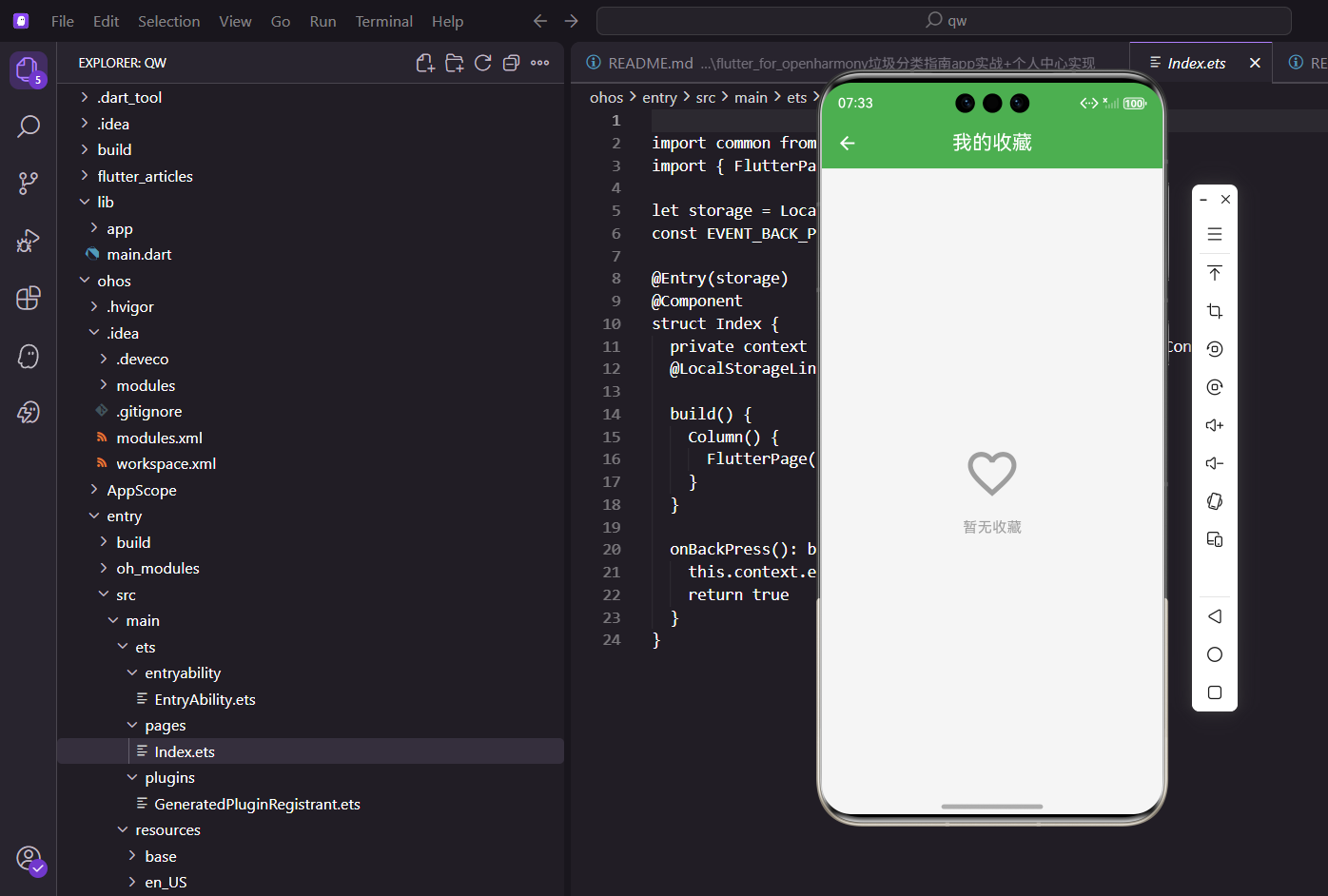
用户在浏览物品详情时可以收藏感兴趣的物品,收藏后就能在"我的收藏"页面快速找到。这个功能看起来简单,但涉及到列表渲染、空状态处理、数据联动等多个知识点。
页面结构
收藏页面的核心是一个列表,展示用户收藏的所有物品:
class FavoritesPage extends StatelessWidget {
const FavoritesPage({super.key});
Widget build(BuildContext context) {
final controller = Get.find<ProfileController>();
return Scaffold(
appBar: AppBar(title: const Text('我的收藏')),
body: Obx(() {
用Obx包裹整个body,这样收藏列表变化时UI会自动更新。比如用户在这个页面删除了某个收藏,列表会立即刷新。
空状态处理
如果用户还没有收藏任何物品,要显示一个友好的空状态提示:
        if (controller.favorites.isEmpty) {
          return Center(
            child: Column(
              mainAxisAlignment: MainAxisAlignment.center,
              children: [
                Icon(Icons.favorite_border, size: 64.sp, color: Colors.grey),
                SizedBox(height: 16.h),
                Text('暂无收藏', style: TextStyle(fontSize: 16.sp, color: Colors.grey)),
              ],
            ),
          );
        }
设计原则:空状态不要只显示一片空白,那样用户会以为页面加载出问题了。用图标加文字的方式告诉用户"这里还没有内容",同时暗示用户可以去收藏一些物品。
空心爱心图标(Icons.favorite_border)和收藏功能呼应,用户一看就知道这是收藏相关的页面。
收藏列表渲染
有收藏内容时,用ListView.builder渲染列表:
        return ListView.builder(
          padding: EdgeInsets.all(16.w),
          itemCount: controller.favorites.length,
          itemBuilder: (context, index) {
            final item = controller.favorites[index];
            return Card(
              margin: EdgeInsets.only(bottom: 8.h),
              child: ListTile(
                leading: Text(item.icon, style: TextStyle(fontSize: 28.sp)),
                title: Text(item.name),
                subtitle: Text(item.typeName),
每个收藏项用Card包裹,里面是ListTile。ListTile自带leading、title、subtitle、trailing的布局,用起来很方便。
- leading:物品的emoji图标
- title:物品名称
- subtitle:垃圾分类类型
删除收藏功能
每个收藏项右边有个删除按钮:
                trailing: IconButton(
                  icon: const Icon(Icons.delete_outline, color: Colors.red),
                  onPressed: () => controller.toggleFavorite(item),
                ),
                onTap: () => Get.toNamed(Routes.itemDetail, arguments: item),
              ),
            );
          },
        );
      }),
    );
  }
}
删除按钮用红色,符合"危险操作"的视觉惯例。点击后调用toggleFavorite方法,因为这个物品已经在收藏列表里了,再次toggle就是取消收藏。
交互细节:点击整个列表项会跳转到物品详情页,点击删除按钮会取消收藏。这两个操作互不干扰,因为
IconButton会拦截点击事件。
数据联动
收藏功能涉及到多个页面的数据联动:
1. 物品详情页
用户点击收藏按钮,物品被添加到收藏列表。
2. 我的收藏页
展示所有收藏的物品,可以删除。
3. 个人中心页
可能会显示收藏数量。
这些页面都依赖同一个数据源:ProfileController.favorites。因为用了GetX的响应式变量,任何一个页面修改了收藏列表,其他页面都会自动更新。
控制器里的收藏逻辑
// ProfileController中的相关代码
final favorites = <GarbageItem>[].obs;

bool isFavorite(String id) {
  return favorites.any((item) => item.id == id);
}

void toggleFavorite(GarbageItem item) {
  if (isFavorite(item.id)) {
    favorites.removeWhere((i) => i.id == item.id);
  } else {
    favorites.add(item);
  }
  // 持久化存储
  _saveFavorites();
}
isFavorite方法检查某个物品是否已收藏,用于详情页显示收藏按钮的状态。toggleFavorite方法切换收藏状态,已收藏就取消,未收藏就添加。
持久化存储
收藏数据需要持久化,不然用户下次打开App收藏就没了:
void _saveFavorites() {
  final data = favorites.map((item) => item.toJson()).toList();
  storage.write('favorites', data);
}

void _loadFavorites() {
  final data = storage.read('favorites');
  if (data != null) {
    favorites.value = (data as List).map((json) => GarbageItem.fromJson(json)).toList();
  }
}
保存时把对象列表转成JSON,读取时再转回来。这样即使App关闭了,收藏数据也不会丢失。
可以优化的地方
1. 批量删除
长按进入编辑模式,可以选择多个物品一起删除。
2. 排序功能
按收藏时间、物品名称、分类类型排序。
3. 搜索功能
收藏多了之后,可以搜索特定物品。
4. 分组显示
按垃圾分类类型分组,比如"可回收物"一组、"有害垃圾"一组。
收藏功能是提升用户粘性的好方法,让用户觉得这个App是"自己的",有自己的数据在里面。
欢迎加入开源鸿蒙跨平台社区:https://openharmonycrossplatform.csdn.net
完整代码示例
把上面的内容整合起来,完整的我的收藏页面代码:
class FavoritesPage extends StatelessWidget {
const FavoritesPage({super.key});
Widget build(BuildContext context) {
final controller = Get.find<ProfileController>();
return Scaffold(
appBar: AppBar(
title: const Text('我的收藏'),
actions: [
Obx(() => controller.favorites.isNotEmpty
? TextButton(
onPressed: () => _showClearDialog(controller),
child: const Text('清空', style: TextStyle(color: Colors.white)),
)
: const SizedBox()),
],
),
body: Obx(() {
if (controller.favorites.isEmpty) {
return _buildEmptyState();
}
return ListView.builder(
padding: EdgeInsets.all(16.w),
itemCount: controller.favorites.length,
itemBuilder: (context, index) {
final item = controller.favorites[index];
return _buildFavoriteCard(item, controller);
},
);
}),
);
}
Widget _buildEmptyState() {
return Center(
child: Column(
mainAxisAlignment: MainAxisAlignment.center,
children: [
Icon(Icons.favorite_border, size: 80.sp, color: Colors.grey.shade300),
SizedBox(height: 16.h),
Text('暂无收藏', style: TextStyle(fontSize: 18.sp, color: Colors.grey)),
SizedBox(height: 24.h),
ElevatedButton.icon(
onPressed: () => Get.toNamed(Routes.search),
icon: const Icon(Icons.search),
label: const Text('去搜索'),
),
],
),
);
}
}
批量操作功能
添加批量删除功能:
class FavoritesController extends GetxController {
  final isEditMode = false.obs;
  final selectedItems = <String>{}.obs;

  void toggleEditMode() {
    isEditMode.value = !isEditMode.value;
    if (!isEditMode.value) {
      selectedItems.clear();
    }
  }

  void toggleSelection(String id) {
    if (selectedItems.contains(id)) {
      selectedItems.remove(id);
    } else {
      selectedItems.add(id);
    }
  }

  void deleteSelected(ProfileController profileController) {
    for (var id in selectedItems) {
      final item = profileController.favorites.firstWhere((i) => i.id == id);
      profileController.toggleFavorite(item);
    }
    selectedItems.clear();
    isEditMode.value = false;
  }
}
排序功能
按不同方式排序收藏列表:
enum SortType { time, name, category }

Widget _buildSortButton() {
  return PopupMenuButton<SortType>(
    icon: const Icon(Icons.sort),
    onSelected: (type) => sortType.value = type,
    itemBuilder: (context) => [
      const PopupMenuItem(value: SortType.time, child: Text('按时间')),
      const PopupMenuItem(value: SortType.name, child: Text('按名称')),
      const PopupMenuItem(value: SortType.category, child: Text('按分类')),
    ],
  );
}
分组显示
按垃圾分类类型分组显示:
Widget _buildGroupedList(ProfileController controller) {
  final grouped = <GarbageType, List<GarbageItem>>{};
  for (var item in controller.favorites) {
    grouped.putIfAbsent(item.type, () => []).add(item);
  }

  return ListView(
    children: grouped.entries.map((entry) {
      return Column(
        crossAxisAlignment: CrossAxisAlignment.start,
        children: [
          Padding(
            padding: EdgeInsets.all(16.w),
            child: Text(
              _getTypeName(entry.key),
              style: TextStyle(
                fontSize: 16.sp,
                fontWeight: FontWeight.bold,
                color: _getTypeColor(entry.key),
              ),
            ),
          ),
          ...entry.value.map((item) => _buildFavoriteCard(item, controller)),
        ],
      );
    }).toList(),
  );
}

String _getTypeName(GarbageType type) {
  switch (type) {
    case GarbageType.recyclable: return '可回收物';
    case GarbageType.hazardous: return '有害垃圾';
    case GarbageType.kitchen: return '厨余垃圾';
    case GarbageType.other: return '其他垃圾';
  }
}
收藏功能是提升用户粘性的好方法,让用户觉得这个App是自己的。
搜索功能实现
当收藏物品较多时,搜索功能变得很重要:
class FavoritesPage extends StatefulWidget {
const FavoritesPage({super.key});
State<FavoritesPage> createState() => _FavoritesPageState();
}
class _FavoritesPageState extends State<FavoritesPage> {
String _searchQuery = '';
Widget build(BuildContext context) {
final controller = Get.find<ProfileController>();
return Scaffold(
appBar: AppBar(
title: const Text('我的收藏'),
actions: [
IconButton(
icon: const Icon(Icons.search),
onPressed: () => _showSearchDialog(),
),
],
),
body: Obx(() {
var favorites = controller.favorites;
// 应用搜索过滤
if (_searchQuery.isNotEmpty) {
favorites = favorites.where((item) =>
item.name.toLowerCase().contains(_searchQuery.toLowerCase())
).toList();
}
if (favorites.isEmpty) {
return _buildEmptyState();
}
return ListView.builder(
padding: EdgeInsets.all(16.w),
itemCount: favorites.length,
itemBuilder: (context, index) {
final item = favorites[index];
return _buildFavoriteCard(item, controller);
},
);
}),
);
}
void _showSearchDialog() {
showDialog(
context: context,
builder: (context) => AlertDialog(
title: const Text('搜索收藏'),
content: TextField(
autofocus: true,
decoration: const InputDecoration(
hintText: '输入物品名称',
prefixIcon: Icon(Icons.search),
),
onChanged: (value) {
setState(() => _searchQuery = value);
},
),
actions: [
TextButton(
onPressed: () {
setState(() => _searchQuery = '');
Navigator.pop(context);
},
child: const Text('清除'),
),
TextButton(
onPressed: () => Navigator.pop(context),
child: const Text('确定'),
),
],
),
);
}
}
搜索功能支持模糊匹配物品名称,实时过滤收藏列表。用户输入关键词后,列表只显示匹配的物品。清除按钮可以快速重置搜索条件。
收藏统计信息
在页面顶部显示收藏统计:
Widget _buildStatistics(ProfileController controller) {
  final typeCount = <GarbageType, int>{};
  for (var item in controller.favorites) {
    typeCount[item.type] = (typeCount[item.type] ?? 0) + 1;
  }

  return Card(
    margin: EdgeInsets.all(16.w),
    child: Padding(
      padding: EdgeInsets.all(16.w),
      child: Column(
        crossAxisAlignment: CrossAxisAlignment.start,
        children: [
          Text('收藏统计', style: TextStyle(fontSize: 16.sp, fontWeight: FontWeight.bold)),
          SizedBox(height: 12.h),
          Row(
            mainAxisAlignment: MainAxisAlignment.spaceAround,
            children: [
              _buildStatItem('总计', controller.favorites.length, Colors.blue),
              _buildStatItem('可回收', typeCount[GarbageType.recyclable] ?? 0, Colors.green),
              _buildStatItem('有害', typeCount[GarbageType.hazardous] ?? 0, Colors.red),
              _buildStatItem('厨余', typeCount[GarbageType.kitchen] ?? 0, Colors.orange),
            ],
          ),
        ],
      ),
    ),
  );
}

Widget _buildStatItem(String label, int count, Color color) {
  return Column(
    children: [
      Text(
        count.toString(),
        style: TextStyle(
          fontSize: 24.sp,
          fontWeight: FontWeight.bold,
          color: color,
        ),
      ),
      SizedBox(height: 4.h),
      Text(label, style: TextStyle(fontSize: 12.sp, color: Colors.grey)),
    ],
  );
}
统计卡片显示总收藏数和各分类的数量,让用户对收藏内容有整体认识。使用不同颜色区分各分类,视觉上清晰明了。
收藏导出功能
支持将收藏列表导出为文本:
Future<void> exportFavorites(ProfileController controller) async {
  final buffer = StringBuffer();
  buffer.writeln('我的垃圾分类收藏');
  buffer.writeln('导出时间: ${DateTime.now().toString().substring(0, 19)}');
  buffer.writeln('总计: ${controller.favorites.length}项');
  buffer.writeln('');

  final grouped = <GarbageType, List<GarbageItem>>{};
  for (var item in controller.favorites) {
    grouped.putIfAbsent(item.type, () => []).add(item);
  }

  for (var entry in grouped.entries) {
    buffer.writeln('【${_getTypeName(entry.key)}】');
    for (var item in entry.value) {
      buffer.writeln('  ${item.icon} ${item.name}');
    }
    buffer.writeln('');
  }

  final text = buffer.toString();

  // 使用share插件分享文本
  await Share.share(text, subject: '我的垃圾分类收藏');
}
导出功能将收藏列表格式化为文本,按分类分组显示。用户可以通过分享功能发送给朋友或保存到其他应用。这个功能让收藏数据更有价值,可以在应用外使用。
收藏提醒功能
定期提醒用户回顾收藏:
class FavoriteReminderService {
  static void scheduleReminder() {
    // 每周提醒用户查看收藏
    Timer.periodic(const Duration(days: 7), (timer) {
      final controller = Get.find<ProfileController>();
      if (controller.favorites.isNotEmpty) {
        _showReminderNotification(controller.favorites.length);
      }
    });
  }

  static void _showReminderNotification(int count) {
    // 显示本地通知
    LocalNotification.show(
      title: '垃圾分类提醒',
      body: '您收藏了$count个物品,记得定期复习哦!',
      payload: 'favorites',
    );
  }
}
定期提醒让收藏的内容不会被遗忘。很多用户收藏了物品但从不回看,提醒功能鼓励用户定期复习。可以设置提醒频率,如每周、每月等。
收藏同步功能
如果应用支持账号系统,可以实现收藏同步:
class FavoriteSyncService {
  static Future<void> uploadFavorites(List<GarbageItem> favorites) async {
    try {
      final data = favorites.map((item) => item.toJson()).toList();
      await api.post('/favorites/sync', data: {'favorites': data});
    } catch (e) {
      print('上传收藏失败: $e');
    }
  }

  static Future<List<GarbageItem>> downloadFavorites() async {
    try {
      final response = await api.get('/favorites/sync');
      final data = response.data['favorites'] as List;
      return data.map((json) => GarbageItem.fromJson(json)).toList();
    } catch (e) {
      print('下载收藏失败: $e');
      return [];
    }
  }

  static Future<void> syncFavorites(ProfileController controller) async {
    // 上传本地收藏
    await uploadFavorites(controller.favorites);

    // 下载云端收藏
    final cloudFavorites = await downloadFavorites();

    // 合并收藏(去重)
    final merged = <String, GarbageItem>{};
    for (var item in controller.favorites) {
      merged[item.id] = item;
    }
    for (var item in cloudFavorites) {
      merged[item.id] = item;
    }

    controller.favorites.value = merged.values.toList();
    controller._saveFavorites();
  }
}
同步功能让用户可以在多个设备间共享收藏。上传本地收藏到服务器,下载云端收藏到本地,然后合并去重。这样用户换设备时不会丢失收藏数据。
收藏分享功能
用户可以分享单个收藏物品:
void shareFavoriteItem(GarbageItem item) {
  final text = '''
${item.icon} ${item.name}
分类: ${item.typeName}
投放要求: ${item.tips ?? '暂无'}

来自垃圾分类指南App
''';

  Share.share(text, subject: '垃圾分类知识分享');
}
分享功能让用户可以将有用的分类知识分享给朋友。分享内容包含物品名称、分类和投放要求,格式清晰易读。这种口碑传播比广告更有说服力。
收藏笔记功能
为收藏物品添加个人笔记:
class FavoriteNote {
  final String itemId;
  final String content;
  final DateTime createTime;

  FavoriteNote({
    required this.itemId,
    required this.content,
    DateTime? createTime,
  }) : createTime = createTime ?? DateTime.now();
}

class ProfileController extends GetxController {
  final favoriteNotes = <String, FavoriteNote>{}.obs;

  void addNote(String itemId, String content) {
    favoriteNotes[itemId] = FavoriteNote(
      itemId: itemId,
      content: content,
    );
    _saveNotes();
  }

  String? getNote(String itemId) {
    return favoriteNotes[itemId]?.content;
  }
}

void _showAddNoteDialog(GarbageItem item, ProfileController controller) {
  final textController = TextEditingController(
    text: controller.getNote(item.id),
  );

  showDialog(
    context: context,
    builder: (context) => AlertDialog(
      title: const Text('添加笔记'),
      content: TextField(
        controller: textController,
        maxLines: 5,
        decoration: const InputDecoration(
          hintText: '记录你的想法...',
          border: OutlineInputBorder(),
        ),
      ),
      actions: [
        TextButton(
          onPressed: () => Navigator.pop(context),
          child: const Text('取消'),
        ),
        ElevatedButton(
          onPressed: () {
            controller.addNote(item.id, textController.text);
            Navigator.pop(context);
            Get.snackbar('成功', '笔记已保存');
          },
          child: const Text('保存'),
        ),
      ],
    ),
  );
}
笔记功能让用户可以记录个人想法、使用心得或注意事项。笔记与收藏物品关联,查看物品时可以看到自己的笔记。这让收藏不只是简单的书签,而是个人知识库的一部分。
收藏标签系统
为收藏添加自定义标签:
class ProfileController extends GetxController {
  final favoriteTags = <String, List<String>>{}.obs;

  void addTag(String itemId, String tag) {
    if (!favoriteTags.containsKey(itemId)) {
      favoriteTags[itemId] = [];
    }
    if (!favoriteTags[itemId]!.contains(tag)) {
      favoriteTags[itemId]!.add(tag);
      _saveTags();
    }
  }

  void removeTag(String itemId, String tag) {
    favoriteTags[itemId]?.remove(tag);
    _saveTags();
  }

  List<GarbageItem> getItemsByTag(String tag) {
    final itemIds = favoriteTags.entries
        .where((entry) => entry.value.contains(tag))
        .map((entry) => entry.key)
        .toList();

    return favorites.where((item) => itemIds.contains(item.id)).toList();
  }
}
标签系统提供了另一种组织方式,一个物品可以有多个标签。用户可以按标签筛选收藏,快速找到相关内容。常用标签如"常用"、“易错”、"重要"等。
总结与技术要点
我的收藏功能通过合理的数据结构和交互设计,帮助用户管理感兴趣的垃圾分类知识。从基础的列表展示到高级的搜索、分组、统计、同步等功能,我们构建了一个完整的收藏系统。
核心技术点包括:GetX响应式状态管理实现数据联动,本地存储保证数据持久化,分组和排序提升查找效率,搜索和标签提供多维度筛选,统计和可视化让用户了解收藏概况。
收藏功能是提升用户粘性的重要手段,让用户觉得应用是自己的,有自己的数据在里面。通过不断优化和扩展收藏功能,我们可以创建一个真正有价值的个人知识库。
欢迎加入开源鸿蒙跨平台社区:https://openharmonycrossplatform.csdn.net

腾讯云面向开发者汇聚海量精品云计算使用和开发经验,营造开放的云计算技术生态圈。
更多推荐
 21
21 0
0- 0


 已为社区贡献17条内容

所有评论(0)