Flutter for OpenHarmony数独游戏App实战:连续挑战统计
摘要 本文介绍了在Flutter for OpenHarmony项目中实现连续挑战统计功能的方法。该功能通过记录玩家每日挑战完成情况,计算当前和历史最长连续天数,激励玩家保持游戏习惯。文章详细讲解了数据结构设计(StreakData类)、UI展示(卡片式布局)和核心逻辑实现(StreakManager类),包括日期标准化处理、连续性判断算法和数据持久化方案。关键点包括使用Set存储完成日期避免重复
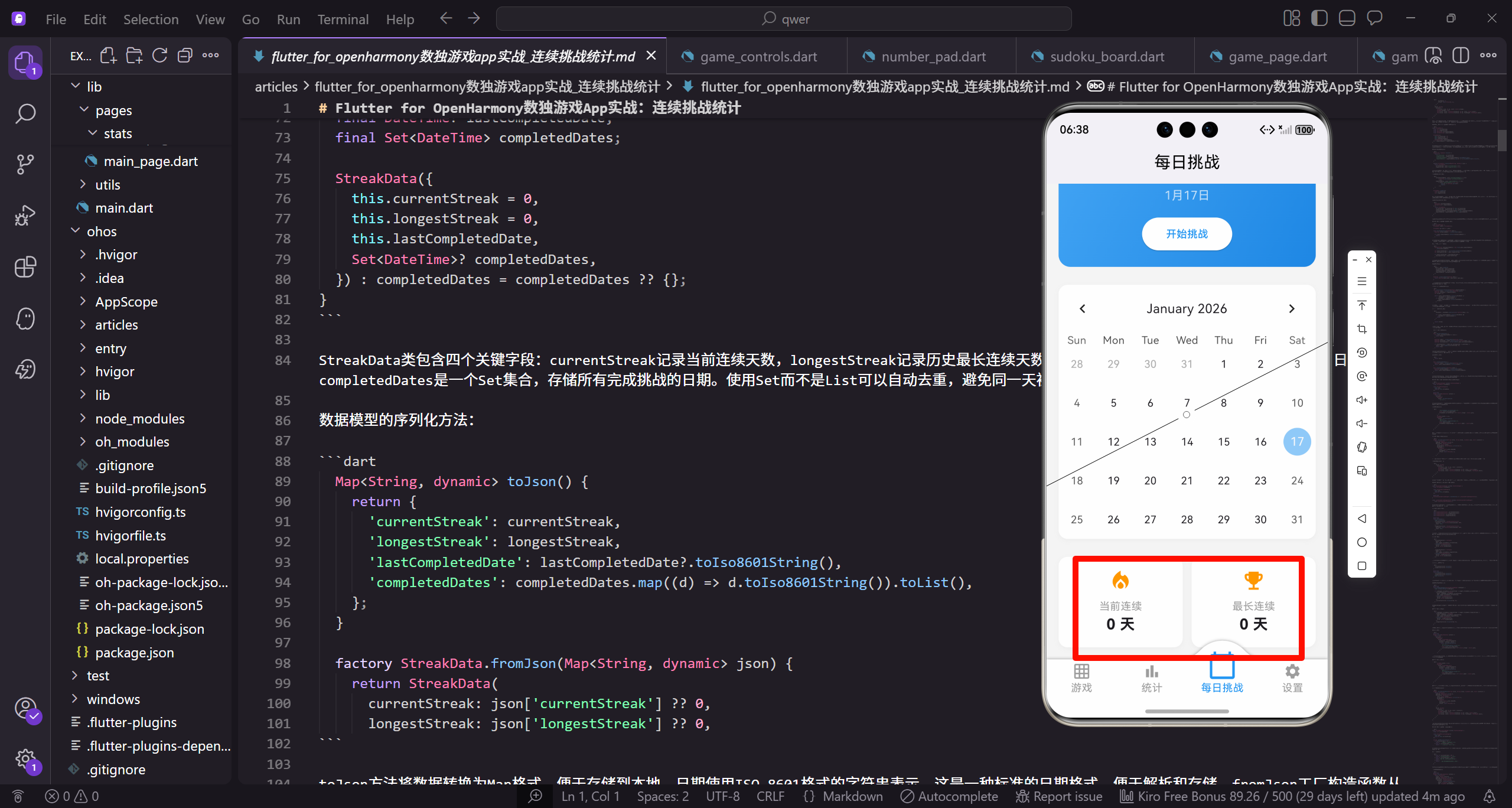
连续挑战统计是每日挑战功能的重要组成部分,它记录玩家连续完成每日挑战的天数,是激励玩家保持游戏习惯的关键机制。本篇文章将详细讲解如何在Flutter for OpenHarmony项目中实现连续挑战统计功能,包括数据结构设计、统计逻辑实现、UI展示以及数据持久化等内容。
连续挑战统计的核心在于追踪玩家的游戏行为,判断是否形成连续的挑战记录。这个功能看似简单,但实际实现时需要考虑很多细节,比如时区处理、断签判断、历史记录维护等。我们将从最基础的数据结构开始,逐步构建完整的连续挑战统计系统。
首先来看每日挑战页面中连续统计信息的展示部分:
Widget _buildStreakInfo() {
  return Row(
    children: [
      Expanded(
        child: _buildStreakCard('当前连续', '0 天', Icons.local_fire_department),
      ),
      SizedBox(width: 12.w),
      Expanded(
        child: _buildStreakCard('最长连续', '0 天', Icons.emoji_events),
      ),
    ],
  );
}
这段代码定义了连续统计信息的整体布局。使用Row将两个统计卡片水平排列,每个卡片使用Expanded包装,确保它们平分可用空间。中间使用SizedBox添加12.w的间距,让两个卡片之间有适当的视觉分隔。当前连续使用火焰图标,象征着持续燃烧的热情;最长连续使用奖杯图标,代表历史最佳成绩。
连续统计卡片的具体实现:
Widget _buildStreakCard(String title, String value, IconData icon) {
  return Container(
    padding: EdgeInsets.all(16.w),
    decoration: BoxDecoration(
      color: Colors.white,
      borderRadius: BorderRadius.circular(12.r),
      boxShadow: [
        BoxShadow(
          color: Colors.grey.shade200,
_buildStreakCard方法接收三个参数:标题、数值和图标。Container作为卡片容器,设置16.w的内边距。BoxDecoration定义了卡片的视觉样式,白色背景配合12.r的圆角,让卡片看起来简洁美观。boxShadow添加轻微的阴影效果,增加卡片的层次感。
阴影和内容布局的详细配置:
          blurRadius: 4,
          offset: const Offset(0, 2),
        ),
      ],
    ),
    child: Column(
      children: [
        Icon(icon, size: 32.sp, color: Colors.orange),
        SizedBox(height: 8.h),
        Text(title, style: TextStyle(fontSize: 14.sp, color: Colors.grey)),
        Text(value, style: TextStyle(fontSize: 20.sp, fontWeight: FontWeight.bold)),
      ],
    ),
  );
}
阴影使用4像素的模糊半径和2像素的向下偏移,营造出轻微浮起的效果。卡片内部使用Column垂直排列内容,图标在最上方,使用橙色突出显示,与火焰的意象相呼应。标题使用灰色小字,数值使用加粗大字,形成清晰的信息层次。
接下来我们来设计连续挑战统计的数据模型:
class StreakData {
  final int currentStreak;
  final int longestStreak;
  final DateTime? lastCompletedDate;
  final Set<DateTime> completedDates;

  StreakData({
    this.currentStreak = 0,
    this.longestStreak = 0,
    this.lastCompletedDate,
    Set<DateTime>? completedDates,
  }) : completedDates = completedDates ?? {};
}
StreakData类包含四个关键字段:currentStreak记录当前连续天数,longestStreak记录历史最长连续天数,lastCompletedDate记录最后完成挑战的日期,completedDates是一个Set集合,存储所有完成挑战的日期。使用Set而不是List可以自动去重,避免同一天被重复记录。
数据模型的序列化方法:
  Map<String, dynamic> toJson() {
    return {
      'currentStreak': currentStreak,
      'longestStreak': longestStreak,
      'lastCompletedDate': lastCompletedDate?.toIso8601String(),
      'completedDates': completedDates.map((d) => d.toIso8601String()).toList(),
    };
  }

  factory StreakData.fromJson(Map<String, dynamic> json) {
    return StreakData(
      currentStreak: json['currentStreak'] ?? 0,
      longestStreak: json['longestStreak'] ?? 0,
toJson方法将数据转换为Map格式,便于存储到本地。日期使用ISO 8601格式的字符串表示,这是一种标准的日期格式,便于解析和存储。fromJson工厂构造函数从Map中恢复数据,使用??运算符提供默认值,确保数据的健壮性。
反序列化的完整实现:
      lastCompletedDate: json['lastCompletedDate'] != null
          ? DateTime.parse(json['lastCompletedDate'])
          : null,
      completedDates: json['completedDates'] != null
          ? (json['completedDates'] as List)
              .map((d) => DateTime.parse(d))
              .toSet()
          : {},
    );
  }

  StreakData copyWith({
    int? currentStreak,
    int? longestStreak,
日期字段的解析需要进行null检查,因为这些字段可能不存在。completedDates需要先转换为List,再映射为DateTime对象,最后转换为Set。copyWith方法用于创建数据的副本,这是不可变数据模式的常用做法。
copyWith方法的完整实现:
    DateTime? lastCompletedDate,
    Set<DateTime>? completedDates,
  }) {
    return StreakData(
      currentStreak: currentStreak ?? this.currentStreak,
      longestStreak: longestStreak ?? this.longestStreak,
      lastCompletedDate: lastCompletedDate ?? this.lastCompletedDate,
      completedDates: completedDates ?? this.completedDates,
    );
  }
}
copyWith方法允许只修改部分字段,其他字段保持不变。这种模式在状态管理中非常有用,可以避免直接修改原对象,保持数据的不可变性。
现在来实现连续挑战统计的核心逻辑:
class StreakManager {
  StreakData _data = StreakData();

  StreakData get data => _data;

  void recordCompletion(DateTime date) {
    DateTime normalizedDate = _normalizeDate(date);

    if (_data.completedDates.contains(normalizedDate)) {
      return;
    }
StreakManager类负责管理连续挑战的统计逻辑。recordCompletion方法在玩家完成每日挑战时被调用。首先对日期进行标准化处理,去除时间部分只保留日期。然后检查该日期是否已经记录过,如果已记录则直接返回,避免重复计算。
日期标准化和连续性判断:
    Set<DateTime> newCompletedDates = Set.from(_data.completedDates)
      ..add(normalizedDate);

    int newCurrentStreak = _calculateCurrentStreak(normalizedDate);
    int newLongestStreak = _data.longestStreak;

    if (newCurrentStreak > newLongestStreak) {
      newLongestStreak = newCurrentStreak;
    }
创建新的completedDates集合并添加新日期。调用_calculateCurrentStreak计算新的当前连续天数。如果新的连续天数超过了历史最长记录,则更新最长记录。这种比较逻辑确保longestStreak始终保持历史最高值。
更新数据状态:
    _data = _data.copyWith(
      currentStreak: newCurrentStreak,
      longestStreak: newLongestStreak,
      lastCompletedDate: normalizedDate,
      completedDates: newCompletedDates,
    );
  }

  DateTime _normalizeDate(DateTime date) {
    return DateTime(date.year, date.month, date.day);
  }
使用copyWith方法创建新的数据对象,更新所有相关字段。_normalizeDate方法将DateTime标准化为只包含年月日的格式,去除时分秒信息。这样可以确保同一天的不同时间点被视为同一天。
计算当前连续天数的核心算法:
  int _calculateCurrentStreak(DateTime completionDate) {
    DateTime today = _normalizeDate(DateTime.now());
    DateTime checkDate = completionDate;
    int streak = 0;

    while (_data.completedDates.contains(checkDate) ||
           checkDate == completionDate) {
      if (checkDate == completionDate ||
          _data.completedDates.contains(checkDate)) {
        streak++;
      }
从完成日期开始向前检查,统计连续完成的天数。使用while循环逐天向前检查,如果某天在completedDates中存在,则连续天数加1。循环条件包含了当前完成的日期,确保新完成的挑战也被计入。
连续性检查的完整逻辑:
      checkDate = checkDate.subtract(const Duration(days: 1));

      if (!_data.completedDates.contains(checkDate) &&
          checkDate != completionDate) {
        break;
      }
    }

    return streak;
  }
每次循环后将检查日期向前推一天。如果某天不在completedDates中,说明连续中断,跳出循环。这个算法的时间复杂度与连续天数成正比,对于正常的使用场景来说性能是足够的。
检查连续是否中断的方法:
  bool checkStreakBroken() {
    if (_data.lastCompletedDate == null) {
      return false;
    }

    DateTime today = _normalizeDate(DateTime.now());
    DateTime yesterday = today.subtract(const Duration(days: 1));
    DateTime lastCompleted = _normalizeDate(_data.lastCompletedDate!);

    if (lastCompleted != today && lastCompleted != yesterday) {
      _data = _data.copyWith(currentStreak: 0);
      return true;
    }
checkStreakBroken方法用于检查连续是否已经中断。如果最后完成日期既不是今天也不是昨天,说明连续已经中断,将currentStreak重置为0。这个方法应该在应用启动时调用,确保连续统计的准确性。
方法的返回逻辑:
    return false;
  }

  bool isCompletedToday() {
    DateTime today = _normalizeDate(DateTime.now());
    return _data.completedDates.contains(today);
  }

  bool isCompletedOnDate(DateTime date) {
    DateTime normalizedDate = _normalizeDate(date);
    return _data.completedDates.contains(normalizedDate);
  }
}
isCompletedToday方法检查今天是否已完成挑战,用于UI显示和按钮状态控制。isCompletedOnDate方法检查指定日期是否已完成,用于日历组件的标记显示。这些辅助方法让外部代码可以方便地查询完成状态。
现在来实现连续统计的UI组件,支持动态数据更新:
class StreakInfoWidget extends StatelessWidget {
final StreakData streakData;
const StreakInfoWidget({
super.key,
required this.streakData,
});
Widget build(BuildContext context) {
return Row(
children: [
Expanded(
child: _buildStreakCard(
'当前连续',
StreakInfoWidget是一个无状态组件,接收StreakData作为参数。这种设计让组件可以被外部状态管理系统控制,比如GetX或Provider。当streakData变化时,组件会自动重建显示新的数据。
动态数据的展示:
            '${streakData.currentStreak} 天',
            Icons.local_fire_department,
            streakData.currentStreak > 0 ? Colors.orange : Colors.grey,
          ),
        ),
        SizedBox(width: 12.w),
        Expanded(
          child: _buildStreakCard(
            '最长连续',
            '${streakData.longestStreak} 天',
            Icons.emoji_events,
            streakData.longestStreak > 0 ? Colors.amber : Colors.grey,
          ),
        ),
      ],
    );
  }
数值使用字符串插值显示,格式为"X 天"。图标颜色根据数值动态变化,如果连续天数大于0则显示彩色,否则显示灰色。这种视觉反馈让用户一眼就能看出自己的连续状态。
带颜色参数的卡片构建方法:
  Widget _buildStreakCard(String title, String value, IconData icon, Color iconColor) {
    return Container(
      padding: EdgeInsets.all(16.w),
      decoration: BoxDecoration(
        color: Colors.white,
        borderRadius: BorderRadius.circular(12.r),
        boxShadow: [
          BoxShadow(
            color: Colors.grey.shade200,
            blurRadius: 4,
            offset: const Offset(0, 2),
          ),
        ],
      ),
增加了iconColor参数,让图标颜色可以动态设置。其他样式与之前保持一致,确保视觉上的统一性。
卡片内容的完整布局:
      child: Column(
        children: [
          Icon(icon, size: 32.sp, color: iconColor),
          SizedBox(height: 8.h),
          Text(title, style: TextStyle(fontSize: 14.sp, color: Colors.grey)),
          Text(value, style: TextStyle(fontSize: 20.sp, fontWeight: FontWeight.bold)),
        ],
      ),
    );
  }
}
Column垂直排列图标、标题和数值。图标使用传入的颜色,标题固定使用灰色,数值使用加粗黑色。这种布局清晰明了,用户可以快速获取关键信息。
接下来实现带有动画效果的连续统计组件:
class AnimatedStreakWidget extends StatefulWidget {
final StreakData streakData;
const AnimatedStreakWidget({
super.key,
required this.streakData,
});
State<AnimatedStreakWidget> createState() => _AnimatedStreakWidgetState();
}
class _AnimatedStreakWidgetState extends State<AnimatedStreakWidget>
with TickerProviderStateMixin {
AnimatedStreakWidget是一个有状态组件,用于实现数值变化时的动画效果。使用TickerProviderStateMixin支持多个动画控制器,因为我们需要同时为当前连续和最长连续两个数值添加动画。
动画控制器的初始化:
late AnimationController _currentController;
late AnimationController _longestController;
late Animation<int> _currentAnimation;
late Animation<int> _longestAnimation;
void initState() {
super.initState();
_currentController = AnimationController(
duration: const Duration(milliseconds: 800),
vsync: this,
);
_longestController = AnimationController(
duration: const Duration(milliseconds: 800),
vsync: this,
);
创建两个独立的AnimationController,分别控制当前连续和最长连续的动画。动画时长设为800毫秒,比普通动画稍长,让数值变化更加明显。vsync参数使用this,因为我们混入了TickerProviderStateMixin。
动画的配置:
    _currentAnimation = IntTween(
      begin: 0,
      end: widget.streakData.currentStreak,
    ).animate(CurvedAnimation(
      parent: _currentController,
      curve: Curves.easeOutCubic,
    ));

    _longestAnimation = IntTween(
      begin: 0,
      end: widget.streakData.longestStreak,
    ).animate(CurvedAnimation(
      parent: _longestController,
      curve: Curves.easeOutCubic,
    ));
使用IntTween创建整数补间动画,从0过渡到目标值。CurvedAnimation添加easeOutCubic缓动曲线,让动画开始快结束慢,数值变化更加自然流畅。
启动动画和资源释放:
_currentController.forward();
_longestController.forward();
}
void dispose() {
_currentController.dispose();
_longestController.dispose();
super.dispose();
}
在initState中启动两个动画,让数值从0开始增长到目标值。dispose方法中释放两个控制器,避免内存泄漏。这是Flutter动画的标准做法。
处理数据更新时的动画:
void didUpdateWidget(AnimatedStreakWidget oldWidget) {
super.didUpdateWidget(oldWidget);
if (oldWidget.streakData.currentStreak != widget.streakData.currentStreak) {
_currentAnimation = IntTween(
begin: oldWidget.streakData.currentStreak,
end: widget.streakData.currentStreak,
).animate(CurvedAnimation(
parent: _currentController,
curve: Curves.easeOutCubic,
));
_currentController.forward(from: 0);
}
didUpdateWidget在widget属性变化时被调用。检查currentStreak是否变化,如果变化则创建新的动画,从旧值过渡到新值。forward(from: 0)让动画从头开始播放。
最长连续的动画更新:
    if (oldWidget.streakData.longestStreak != widget.streakData.longestStreak) {
      _longestAnimation = IntTween(
        begin: oldWidget.streakData.longestStreak,
        end: widget.streakData.longestStreak,
      ).animate(CurvedAnimation(
        parent: _longestController,
        curve: Curves.easeOutCubic,
      ));
      _longestController.forward(from: 0);
    }
  }
同样的逻辑应用于longestStreak。两个动画独立控制,可以分别响应各自数据的变化。这种设计让动画更加精确,只有真正变化的数值才会播放动画。
构建动画UI:
Widget build(BuildContext context) {
return Row(
children: [
Expanded(
child: AnimatedBuilder(
animation: _currentAnimation,
builder: (context, child) {
return _buildAnimatedCard(
'当前连续',
'${_currentAnimation.value} 天',
Icons.local_fire_department,
_currentAnimation.value > 0 ? Colors.orange : Colors.grey,
);
},
),
),
使用AnimatedBuilder监听动画变化并重建UI。_currentAnimation.value获取当前动画值,随着动画进行,这个值会从起始值平滑过渡到目标值。图标颜色也根据当前动画值动态变化。
最长连续的动画构建:
        SizedBox(width: 12.w),
        Expanded(
          child: AnimatedBuilder(
            animation: _longestAnimation,
            builder: (context, child) {
              return _buildAnimatedCard(
                '最长连续',
                '${_longestAnimation.value} 天',
                Icons.emoji_events,
                _longestAnimation.value > 0 ? Colors.amber : Colors.grey,
              );
            },
          ),
        ),
      ],
    );
  }
最长连续使用相同的模式,但使用_longestAnimation和不同的图标颜色。两个AnimatedBuilder独立工作,各自响应自己的动画变化。
动画卡片的构建方法:
  Widget _buildAnimatedCard(String title, String value, IconData icon, Color iconColor) {
    return Container(
      padding: EdgeInsets.all(16.w),
      decoration: BoxDecoration(
        color: Colors.white,
        borderRadius: BorderRadius.circular(12.r),
        boxShadow: [
          BoxShadow(
            color: Colors.grey.shade200,
            blurRadius: 4,
            offset: const Offset(0, 2),
          ),
        ],
      ),
      child: Column(
        children: [
          Icon(icon, size: 32.sp, color: iconColor),
          SizedBox(height: 8.h),
          Text(title, style: TextStyle(fontSize: 14.sp, color: Colors.grey)),
          Text(value, style: TextStyle(fontSize: 20.sp, fontWeight: FontWeight.bold)),
        ],
      ),
    );
  }
}
_buildAnimatedCard方法与之前的_buildStreakCard基本相同,只是作为类的私有方法存在。这种封装让代码更加清晰,动画相关的逻辑都集中在AnimatedStreakWidget类中。
现在来实现连续挑战的激励提示功能:
class StreakMotivationWidget extends StatelessWidget {
  final int currentStreak;

  const StreakMotivationWidget({
    super.key,
    required this.currentStreak,
  });

  String _getMotivationText() {
    if (currentStreak == 0) {
      return '开始你的连续挑战之旅吧!';
    } else if (currentStreak < 7) {
      return '继续保持,目标7天连续!';
StreakMotivationWidget根据当前连续天数显示不同的激励文案。_getMotivationText方法根据连续天数返回相应的提示语。0天时鼓励开始挑战,小于7天时设定7天的小目标。
更多激励文案:
    } else if (currentStreak < 30) {
      return '太棒了!向30天连续进发!';
    } else if (currentStreak < 100) {
      return '你是数独大师!挑战100天!';
    } else {
      return '传奇玩家!你的坚持令人敬佩!';
    }
  }
7天以上鼓励挑战30天,30天以上鼓励挑战100天,100天以上给予最高赞誉。这种阶梯式的激励机制可以持续激发玩家的挑战欲望。
激励组件的UI构建:
Widget build(BuildContext context) {
return Container(
width: double.infinity,
padding: EdgeInsets.all(16.w),
decoration: BoxDecoration(
gradient: LinearGradient(
colors: _getGradientColors(),
begin: Alignment.topLeft,
end: Alignment.bottomRight,
),
borderRadius: BorderRadius.circular(12.r),
),
child: Column(
children: [
Icon(
_getIcon(),
size: 40.sp,
color: Colors.white,
),
激励组件使用渐变背景,颜色根据连续天数变化。Container设置为全宽,内边距16.w,圆角12.r。内部使用Column垂直排列图标和文字,图标使用白色以在渐变背景上清晰显示。
渐变颜色和图标的选择:
  List<Color> _getGradientColors() {
    if (currentStreak == 0) {
      return [Colors.grey.shade400, Colors.grey.shade600];
    } else if (currentStreak < 7) {
      return [Colors.blue.shade400, Colors.blue.shade600];
    } else if (currentStreak < 30) {
      return [Colors.orange.shade400, Colors.orange.shade600];
    } else {
      return [Colors.purple.shade400, Colors.purple.shade600];
    }
  }

  IconData _getIcon() {
    if (currentStreak == 0) {
      return Icons.flag;
    } else if (currentStreak < 7) {
      return Icons.local_fire_department;
渐变颜色从灰色到蓝色到橙色再到紫色,随着连续天数增加变得更加鲜艳。图标也相应变化,0天是旗帜表示起点,小于7天是火焰表示燃烧的热情。
更多图标选择:
    } else if (currentStreak < 30) {
      return Icons.whatshot;
    } else {
      return Icons.star;
    }
  }
}
7天以上使用更大的火焰图标,30天以上使用星星图标表示成就。这些视觉元素的变化让玩家感受到自己的进步,增强成就感。
最后来实现连续统计的数据持久化:
class StreakStorage {
  static const String _key = 'streak_data';

  Future<void> saveStreakData(StreakData data) async {
    final prefs = await SharedPreferences.getInstance();
    final jsonString = jsonEncode(data.toJson());
    await prefs.setString(_key, jsonString);
  }

  Future<StreakData> loadStreakData() async {
    final prefs = await SharedPreferences.getInstance();
    final jsonString = prefs.getString(_key);
StreakStorage类负责连续统计数据的本地存储。使用SharedPreferences进行简单的键值存储,数据以JSON字符串的形式保存。saveStreakData方法将StreakData转换为JSON并存储,loadStreakData方法读取JSON并恢复为StreakData对象。
数据加载的完整实现:
    if (jsonString == null) {
      return StreakData();
    }

    try {
      final json = jsonDecode(jsonString) as Map<String, dynamic>;
      return StreakData.fromJson(json);
    } catch (e) {
      return StreakData();
    }
  }
}
如果没有存储的数据,返回默认的StreakData对象。使用try-catch捕获JSON解析异常,确保即使数据损坏也不会导致应用崩溃。这种防御性编程让应用更加健壮。
通过本篇文章的学习,我们完整实现了连续挑战统计功能。从数据模型设计到统计逻辑实现,从静态UI展示到动画效果,从激励机制到数据持久化,每个环节都经过精心设计。连续挑战统计不仅是一个技术功能,更是提升用户粘性的重要手段。希望本篇文章能够帮助你在Flutter for OpenHarmony项目中实现出色的连续挑战统计功能。
欢迎加入开源鸿蒙跨平台社区:https://openharmonycrossplatform.csdn.net
在实际开发中,连续挑战统计还需要考虑更多的边界情况和用户体验优化。下面我们来探讨一些高级话题。
首先是时区处理的问题。用户可能在不同时区使用应用,我们需要确保连续统计的准确性:
class TimezoneAwareStreakManager {
  StreakData _data = StreakData();

  DateTime _getLocalMidnight(DateTime date) {
    return DateTime(date.year, date.month, date.day);
  }

  DateTime _getUtcMidnight(DateTime date) {
    final local = _getLocalMidnight(date);
    return local.toUtc();
  }

  void recordCompletion(DateTime date) {
    DateTime localDate = _getLocalMidnight(date);
TimezoneAwareStreakManager考虑了时区因素。_getLocalMidnight获取本地时间的午夜时刻,_getUtcMidnight将其转换为UTC时间。这样可以确保在不同时区的用户都能正确记录连续挑战。
跨时区的连续性判断:
    if (_data.completedDates.any((d) =>
        _getLocalMidnight(d) == localDate)) {
      return;
    }

    Set<DateTime> newCompletedDates = Set.from(_data.completedDates)
      ..add(localDate);

    int newCurrentStreak = _calculateStreakWithTimezone(localDate);
    int newLongestStreak = _data.longestStreak;

    if (newCurrentStreak > newLongestStreak) {
      newLongestStreak = newCurrentStreak;
    }
在检查是否已完成时,使用_getLocalMidnight进行比较,确保同一天的不同时间点被视为同一天。连续性计算也使用本地时间,避免时区差异导致的误判。
连续挑战的提醒功能也是提升用户粘性的重要手段:
class StreakReminderService {
  static const String _channelId = 'streak_reminder';
  static const String _channelName = '连续挑战提醒';

  Future<void> scheduleReminder(TimeOfDay time) async {
    final now = DateTime.now();
    var scheduledDate = DateTime(
      now.year,
      now.month,
      now.day,
      time.hour,
      time.minute,
    );

    if (scheduledDate.isBefore(now)) {
      scheduledDate = scheduledDate.add(const Duration(days: 1));
    }
StreakReminderService负责管理连续挑战的提醒通知。scheduleReminder方法接收一个TimeOfDay参数,表示用户希望收到提醒的时间。如果今天的提醒时间已过,则安排到明天。
提醒通知的发送:
    await _showNotification(
      title: '每日挑战提醒',
      body: '别忘了完成今天的数独挑战,保持你的连续记录!',
      scheduledDate: scheduledDate,
    );
  }

  Future<void> _showNotification({
    required String title,
    required String body,
    required DateTime scheduledDate,
  }) async {
    // 使用本地通知插件发送定时通知
    // 具体实现依赖于flutter_local_notifications插件
  }
通知内容提醒用户完成每日挑战,保持连续记录。这种提醒可以有效减少用户忘记挑战导致的连续中断。
连续挑战的成就系统可以进一步激励用户:
class StreakAchievement {
  final String id;
  final String title;
  final String description;
  final int requiredStreak;
  final IconData icon;
  final Color color;

  const StreakAchievement({
    required this.id,
    required this.title,
    required this.description,
    required this.requiredStreak,
    required this.icon,
    required this.color,
  });
}

class StreakAchievementManager {
  static const List<StreakAchievement> achievements = [
    StreakAchievement(
      id: 'streak_7',
      title: '一周坚持',
      description: '连续完成7天每日挑战',
      requiredStreak: 7,
      icon: Icons.looks_one,
      color: Colors.bronze,
    ),
StreakAchievement定义了成就的数据结构,包括ID、标题、描述、所需连续天数、图标和颜色。StreakAchievementManager管理所有的成就定义,使用静态常量列表存储。
更多成就定义:
    StreakAchievement(
      id: 'streak_30',
      title: '月度达人',
      description: '连续完成30天每日挑战',
      requiredStreak: 30,
      icon: Icons.looks_two,
      color: Colors.silver,
    ),
    StreakAchievement(
      id: 'streak_100',
      title: '百日传奇',
      description: '连续完成100天每日挑战',
      requiredStreak: 100,
      icon: Icons.looks_3,
      color: Colors.gold,
    ),
    StreakAchievement(
      id: 'streak_365',
      title: '年度王者',
      description: '连续完成365天每日挑战',
      requiredStreak: 365,
      icon: Icons.emoji_events,
      color: Colors.purple,
    ),
  ];
成就从7天到365天分为多个等级,颜色从铜色到紫色逐渐升级。这种阶梯式的成就系统可以持续激励用户挑战更高的目标。
检查成就解锁的方法:
  List<StreakAchievement> getUnlockedAchievements(int currentStreak) {
    return achievements
        .where((a) => currentStreak >= a.requiredStreak)
        .toList();
  }

  StreakAchievement? getNextAchievement(int currentStreak) {
    final locked = achievements
        .where((a) => currentStreak < a.requiredStreak)
        .toList();
    if (locked.isEmpty) return null;
    return locked.first;
  }

  double getProgressToNextAchievement(int currentStreak) {
    final next = getNextAchievement(currentStreak);
    if (next == null) return 1.0;

    final previous = achievements
        .where((a) => currentStreak >= a.requiredStreak)
        .lastOrNull;
    final start = previous?.requiredStreak ?? 0;

    return (currentStreak - start) / (next.requiredStreak - start);
  }
}
getUnlockedAchievements返回已解锁的成就列表,getNextAchievement返回下一个待解锁的成就,getProgressToNextAchievement计算到下一个成就的进度百分比。这些方法为UI展示提供了必要的数据。
成就展示组件的实现:
class AchievementBadge extends StatelessWidget {
final StreakAchievement achievement;
final bool isUnlocked;
const AchievementBadge({
super.key,
required this.achievement,
required this.isUnlocked,
});
Widget build(BuildContext context) {
return Container(
padding: EdgeInsets.all(12.w),
decoration: BoxDecoration(
color: isUnlocked ? achievement.color.withOpacity(0.1) : Colors.grey.shade100,
borderRadius: BorderRadius.circular(12.r),
border: Border.all(
color: isUnlocked ? achievement.color : Colors.grey.shade300,
width: 2,
),
),
AchievementBadge展示单个成就徽章。isUnlocked控制是否已解锁,解锁的成就使用彩色显示,未解锁的使用灰色。边框颜色也根据解锁状态变化。
徽章内容的构建:
      child: Column(
        mainAxisSize: MainAxisSize.min,
        children: [
          Icon(
            achievement.icon,
            size: 32.sp,
            color: isUnlocked ? achievement.color : Colors.grey,
          ),
          SizedBox(height: 8.h),
          Text(
            achievement.title,
            style: TextStyle(
              fontSize: 14.sp,
              fontWeight: FontWeight.bold,
              color: isUnlocked ? Colors.black : Colors.grey,
            ),
          ),
          Text(
            achievement.description,
            style: TextStyle(
              fontSize: 12.sp,
              color: Colors.grey,
            ),
            textAlign: TextAlign.center,
          ),
        ],
      ),
    );
  }
}
徽章内部垂直排列图标、标题和描述。未解锁的成就图标和标题都使用灰色,给用户一种"待解锁"的视觉暗示。
连续挑战的社交分享功能可以增加应用的传播:
class StreakShareService {
  Future<void> shareStreak(int currentStreak, int longestStreak) async {
    final text = _generateShareText(currentStreak, longestStreak);
    await Share.share(text);
  }

  String _generateShareText(int currentStreak, int longestStreak) {
    if (currentStreak >= 100) {
      return '我在数独游戏中已经连续挑战$currentStreak天了!'
          '历史最长连续$longestStreak天,快来挑战我吧!';
    } else if (currentStreak >= 30) {
      return '坚持就是胜利!我已经连续完成$currentStreak天的数独挑战,'
          '你也来试试吧!';
    } else if (currentStreak >= 7) {
      return '一周坚持达成!我的数独连续挑战已经$currentStreak天了,'
          '一起来玩吧!';
    } else {
      return '我正在挑战数独每日任务,当前连续$currentStreak天,'
          '快来和我一起玩!';
    }
  }
}
StreakShareService负责生成分享文案并调用系统分享功能。_generateShareText根据连续天数生成不同的文案,天数越高文案越有成就感。
分享按钮的UI实现:
class ShareStreakButton extends StatelessWidget {
final int currentStreak;
final int longestStreak;
const ShareStreakButton({
super.key,
required this.currentStreak,
required this.longestStreak,
});
Widget build(BuildContext context) {
return ElevatedButton.icon(
onPressed: () {
StreakShareService().shareStreak(currentStreak, longestStreak);
},
icon: Icon(Icons.share, size: 20.sp),
label: Text('分享成绩'),
style: ElevatedButton.styleFrom(
padding: EdgeInsets.symmetric(horizontal: 24.w, vertical: 12.h),
),
);
}
}
ShareStreakButton是一个简单的分享按钮,点击后调用分享服务。使用ElevatedButton.icon同时显示图标和文字,让按钮更加直观。
连续挑战的数据分析可以帮助用户了解自己的游戏习惯:
class StreakAnalytics {
  final Set<DateTime> completedDates;

  StreakAnalytics(this.completedDates);

  int get totalCompletedDays => completedDates.length;

  Map<int, int> getCompletionsByWeekday() {
    final result = <int, int>{};
    for (int i = 1; i <= 7; i++) {
      result[i] = 0;
    }
    for (final date in completedDates) {
      result[date.weekday] = (result[date.weekday] ?? 0) + 1;
    }
    return result;
  }
StreakAnalytics提供连续挑战的数据分析功能。totalCompletedDays返回总完成天数,getCompletionsByWeekday统计每个星期几的完成次数,帮助用户了解自己的游戏习惯。
更多分析方法:
  Map<int, int> getCompletionsByMonth() {
    final result = <int, int>{};
    for (int i = 1; i <= 12; i++) {
      result[i] = 0;
    }
    for (final date in completedDates) {
      result[date.month] = (result[date.month] ?? 0) + 1;
    }
    return result;
  }

  double getCompletionRate(DateTime startDate, DateTime endDate) {
    int totalDays = endDate.difference(startDate).inDays + 1;
    int completedCount = completedDates
        .where((d) => !d.isBefore(startDate) && !d.isAfter(endDate))
        .length;
    return completedCount / totalDays;
  }
}
getCompletionsByMonth统计每个月的完成次数,getCompletionRate计算指定时间段内的完成率。这些数据可以用图表的形式展示给用户。
连续挑战统计是一个看似简单但实际复杂的功能模块。从基础的数据记录到高级的成就系统,从简单的UI展示到复杂的数据分析,每个环节都需要仔细设计和实现。在Flutter for OpenHarmony项目中,我们可以充分利用Dart语言的特性和Flutter框架的能力,构建出功能完善、用户体验优秀的连续挑战统计系统。
希望通过本篇文章的学习,你能够掌握连续挑战统计的核心技术,并在自己的项目中灵活运用。记住,好的游戏化设计不仅仅是技术实现,更是对用户心理的深入理解。连续挑战统计正是这样一个将技术与心理学完美结合的功能。
在实际项目中,我们还可以为连续挑战添加更多的互动元素。比如连续挑战的进度条展示:
class StreakProgressBar extends StatelessWidget {
final int currentStreak;
final int targetStreak;
const StreakProgressBar({
super.key,
required this.currentStreak,
required this.targetStreak,
});
Widget build(BuildContext context) {
double progress = currentStreak / targetStreak;
if (progress > 1.0) progress = 1.0;
return Column(
crossAxisAlignment: CrossAxisAlignment.start,
children: [
Row(
mainAxisAlignment: MainAxisAlignment.spaceBetween,
children: [
Text('$currentStreak 天', style: TextStyle(fontSize: 14.sp, fontWeight: FontWeight.bold)),
Text('目标 $targetStreak 天', style: TextStyle(fontSize: 12.sp, color: Colors.grey)),
],
),
StreakProgressBar展示当前连续天数到目标天数的进度。progress计算进度百分比,限制最大值为1.0。Row显示当前天数和目标天数,让用户清楚地知道自己的进度。
进度条的视觉实现:
        SizedBox(height: 8.h),
        ClipRRect(
          borderRadius: BorderRadius.circular(4.r),
          child: LinearProgressIndicator(
            value: progress,
            backgroundColor: Colors.grey.shade200,
            valueColor: AlwaysStoppedAnimation<Color>(
              progress >= 1.0 ? Colors.green : Colors.blue,
            ),
            minHeight: 8.h,
          ),
        ),
      ],
    );
  }
}
LinearProgressIndicator是Flutter内置的进度条组件。ClipRRect添加圆角效果。当进度达到100%时,颜色变为绿色表示目标达成。minHeight设置进度条的高度,让它更加醒目。
连续挑战的日历视图可以直观展示完成情况:
class StreakCalendarView extends StatelessWidget {
final Set<DateTime> completedDates;
final DateTime focusedMonth;
const StreakCalendarView({
super.key,
required this.completedDates,
required this.focusedMonth,
});
Widget build(BuildContext context) {
return GridView.builder(
shrinkWrap: true,
physics: const NeverScrollableScrollPhysics(),
gridDelegate: const SliverGridDelegateWithFixedCrossAxisCount(
crossAxisCount: 7,
childAspectRatio: 1,
),
itemCount: _getDaysInMonth() + _getFirstWeekdayOffset(),
itemBuilder: (context, index) {
if (index < _getFirstWeekdayOffset()) {
return const SizedBox();
}
int day = index - _getFirstWeekdayOffset() + 1;
return _buildDayCell(day);
},
);
}
StreakCalendarView以日历形式展示每日挑战的完成情况。GridView创建7列的网格,每列代表一周中的一天。_getFirstWeekdayOffset计算月初的偏移量,确保日期对齐到正确的星期几。
日期单元格的构建:
  Widget _buildDayCell(int day) {
    DateTime date = DateTime(focusedMonth.year, focusedMonth.month, day);
    bool isCompleted = completedDates.any((d) =>
        d.year == date.year && d.month == date.month && d.day == date.day);
    bool isToday = _isToday(date);

    return Container(
      margin: EdgeInsets.all(2.w),
      decoration: BoxDecoration(
        color: isCompleted ? Colors.green.shade100 : Colors.transparent,
        shape: BoxShape.circle,
        border: isToday ? Border.all(color: Colors.blue, width: 2) : null,
      ),
      child: Center(
        child: Text(
          day.toString(),
          style: TextStyle(
            fontSize: 14.sp,
            fontWeight: isToday ? FontWeight.bold : FontWeight.normal,
            color: isCompleted ? Colors.green.shade700 : Colors.black,
          ),
        ),
      ),
    );
  }
已完成的日期使用绿色背景,今天的日期有蓝色边框。这种视觉设计让用户一眼就能看出哪些天完成了挑战,哪些天错过了。
辅助方法的实现:
  int _getDaysInMonth() {
    return DateTime(focusedMonth.year, focusedMonth.month + 1, 0).day;
  }

  int _getFirstWeekdayOffset() {
    return DateTime(focusedMonth.year, focusedMonth.month, 1).weekday - 1;
  }

  bool _isToday(DateTime date) {
    final now = DateTime.now();
    return date.year == now.year && date.month == now.month && date.day == now.day;
  }
}
_getDaysInMonth通过获取下个月第0天来计算当月天数。_getFirstWeekdayOffset计算月初是星期几,用于日历对齐。_isToday判断日期是否是今天。
连续挑战的断签恢复功能可以提升用户体验:
class StreakRecoveryService {
  static const int maxRecoveryDays = 1;
  int recoveryTokens = 3;

  bool canRecover(DateTime missedDate, DateTime lastCompletedDate) {
    if (recoveryTokens <= 0) return false;

    int daysDiff = missedDate.difference(lastCompletedDate).inDays;
    return daysDiff <= maxRecoveryDays;
  }

  void recoverStreak(StreakManager manager, DateTime missedDate) {
    if (!canRecover(missedDate, manager.data.lastCompletedDate!)) {
      throw Exception('无法恢复连续记录');
    }

    recoveryTokens--;
    manager.recordCompletion(missedDate);
  }
}
StreakRecoveryService允许用户使用恢复令牌来补签错过的日期。maxRecoveryDays限制只能恢复最近1天的记录。recoveryTokens是用户拥有的恢复令牌数量,可以通过完成成就或购买获得。
恢复功能的UI实现:
class RecoveryDialog extends StatelessWidget {
final DateTime missedDate;
final int remainingTokens;
final VoidCallback onRecover;
const RecoveryDialog({
super.key,
required this.missedDate,
required this.remainingTokens,
required this.onRecover,
});
Widget build(BuildContext context) {
return AlertDialog(
title: const Text('恢复连续记录'),
content: Column(
mainAxisSize: MainAxisSize.min,
children: [
Text('你错过了 ${_formatDate(missedDate)} 的挑战'),
SizedBox(height: 8.h),
Text('使用1个恢复令牌可以补签这一天'),
SizedBox(height: 8.h),
Text('剩余令牌: $remainingTokens',
style: TextStyle(color: Colors.blue, fontWeight: FontWeight.bold)),
],
),
actions: [
TextButton(
onPressed: () => Navigator.pop(context),
child: const Text('取消'),
),
ElevatedButton(
onPressed: remainingTokens > 0 ? () {
onRecover();
Navigator.pop(context);
} : null,
child: const Text('恢复'),
),
],
);
}
String _formatDate(DateTime date) {
return '${date.month}月${date.day}日';
}
}
RecoveryDialog显示恢复确认对话框,告知用户错过的日期和剩余令牌数量。如果没有令牌,恢复按钮会被禁用。这种设计让恢复功能既有价值又不会被滥用。
连续挑战的排行榜功能可以增加社交互动:
class StreakLeaderboard {
  Future<List<LeaderboardEntry>> getTopStreaks({int limit = 10}) async {
    // 从服务器获取排行榜数据
    // 这里使用模拟数据
    return [
      LeaderboardEntry(rank: 1, username: '数独大师', streak: 365),
      LeaderboardEntry(rank: 2, username: '坚持不懈', streak: 180),
      LeaderboardEntry(rank: 3, username: '每日玩家', streak: 90),
    ];
  }
}

class LeaderboardEntry {
  final int rank;
  final String username;
  final int streak;

  LeaderboardEntry({
    required this.rank,
    required this.username,
    required this.streak,
  });
}
StreakLeaderboard提供排行榜功能,展示连续天数最高的玩家。LeaderboardEntry定义排行榜条目的数据结构。这种社交功能可以激励玩家挑战更高的连续记录。
排行榜的UI展示:
class LeaderboardWidget extends StatelessWidget {
final List<LeaderboardEntry> entries;
const LeaderboardWidget({super.key, required this.entries});
Widget build(BuildContext context) {
return ListView.builder(
shrinkWrap: true,
physics: const NeverScrollableScrollPhysics(),
itemCount: entries.length,
itemBuilder: (context, index) {
final entry = entries[index];
return ListTile(
leading: _buildRankBadge(entry.rank),
title: Text(entry.username),
trailing: Text('${entry.streak} 天',
style: TextStyle(fontWeight: FontWeight.bold, color: Colors.blue)),
);
},
);
}
Widget _buildRankBadge(int rank) {
Color color;
switch (rank) {
case 1: color = Colors.amber; break;
case 2: color = Colors.grey.shade400; break;
case 3: color = Colors.brown.shade300; break;
default: color = Colors.blue.shade100;
}
return CircleAvatar(
backgroundColor: color,
child: Text(rank.toString(), style: const TextStyle(color: Colors.white)),
);
}
}
LeaderboardWidget使用ListView展示排行榜。前三名使用金银铜色的徽章,其他名次使用蓝色。这种视觉设计让排名一目了然。
总结一下连续挑战统计的完整功能体系。核心是数据模型和统计逻辑,在此基础上我们实现了动画效果、激励机制、数据持久化、时区处理、提醒功能、成就系统、社交分享、数据分析、日历视图、断签恢复、排行榜等丰富的功能。这些功能的组合让连续挑战统计成为一个完整的游戏化系统,能够有效提升用户粘性和活跃度。
欢迎加入开源鸿蒙跨平台社区:https://openharmonycrossplatform.csdn.net
在实际项目中,我们还可以为连续挑战添加更多的互动元素。比如连续挑战的进度条展示:
class StreakProgressBar extends StatelessWidget {
final int currentStreak;
final int targetStreak;
const StreakProgressBar({
super.key,
required this.currentStreak,
required this.targetStreak,
});
Widget build(BuildContext context) {
double progress = currentStreak / targetStreak;
if (progress > 1.0) progress = 1.0;
return Column(
crossAxisAlignment: CrossAxisAlignment.start,
children: [
Row(
mainAxisAlignment: MainAxisAlignment.spaceBetween,
children: [
Text('$currentStreak 天', style: TextStyle(fontSize: 14.sp, fontWeight: FontWeight.bold)),
Text('目标 $targetStreak 天', style: TextStyle(fontSize: 12.sp, color: Colors.grey)),
],
),
StreakProgressBar展示当前连续天数到目标天数的进度。progress计算进度百分比,限制最大值为1.0。Row显示当前天数和目标天数,让用户清楚地知道自己的进度。
进度条的视觉实现:
        SizedBox(height: 8.h),
        ClipRRect(
          borderRadius: BorderRadius.circular(4.r),
          child: LinearProgressIndicator(
            value: progress,
            backgroundColor: Colors.grey.shade200,
            valueColor: AlwaysStoppedAnimation<Color>(
              progress >= 1.0 ? Colors.green : Colors.blue,
            ),
            minHeight: 8.h,
          ),
        ),
      ],
    );
  }
}
LinearProgressIndicator是Flutter内置的进度条组件。ClipRRect添加圆角效果。当进度达到100%时,颜色变为绿色表示目标达成。minHeight设置进度条的高度,让它更加醒目。
连续挑战的日历视图可以直观展示完成情况:
class StreakCalendarView extends StatelessWidget {
final Set<DateTime> completedDates;
final DateTime focusedMonth;
const StreakCalendarView({
super.key,
required this.completedDates,
required this.focusedMonth,
});
Widget build(BuildContext context) {
return GridView.builder(
shrinkWrap: true,
physics: const NeverScrollableScrollPhysics(),
gridDelegate: const SliverGridDelegateWithFixedCrossAxisCount(
crossAxisCount: 7,
childAspectRatio: 1,
),
itemCount: _getDaysInMonth() + _getFirstWeekdayOffset(),
itemBuilder: (context, index) {
if (index < _getFirstWeekdayOffset()) {
return const SizedBox();
}
int day = index - _getFirstWeekdayOffset() + 1;
return _buildDayCell(day);
},
);
}
StreakCalendarView以日历形式展示每日挑战的完成情况。GridView创建7列的网格,每列代表一周中的一天。_getFirstWeekdayOffset计算月初的偏移量,确保日期对齐到正确的星期几。
日期单元格的构建:
  Widget _buildDayCell(int day) {
    DateTime date = DateTime(focusedMonth.year, focusedMonth.month, day);
    bool isCompleted = completedDates.any((d) =>
        d.year == date.year && d.month == date.month && d.day == date.day);
    bool isToday = _isToday(date);

    return Container(
      margin: EdgeInsets.all(2.w),
      decoration: BoxDecoration(
        color: isCompleted ? Colors.green.shade100 : Colors.transparent,
        shape: BoxShape.circle,
        border: isToday ? Border.all(color: Colors.blue, width: 2) : null,
      ),
      child: Center(
        child: Text(
          day.toString(),
          style: TextStyle(
            fontSize: 14.sp,
            fontWeight: isToday ? FontWeight.bold : FontWeight.normal,
            color: isCompleted ? Colors.green.shade700 : Colors.black,
          ),
        ),
      ),
    );
  }
已完成的日期使用绿色背景,今天的日期有蓝色边框。这种视觉设计让用户一眼就能看出哪些天完成了挑战,哪些天错过了。
辅助方法的实现:
  int _getDaysInMonth() {
    return DateTime(focusedMonth.year, focusedMonth.month + 1, 0).day;
  }

  int _getFirstWeekdayOffset() {
    return DateTime(focusedMonth.year, focusedMonth.month, 1).weekday - 1;
  }

  bool _isToday(DateTime date) {
    final now = DateTime.now();
    return date.year == now.year && date.month == now.month && date.day == now.day;
  }
}
_getDaysInMonth通过获取下个月第0天来计算当月天数。_getFirstWeekdayOffset计算月初是星期几,用于日历对齐。_isToday判断日期是否是今天。
总结一下连续挑战统计的完整功能体系。核心是数据模型和统计逻辑,在此基础上我们实现了动画效果、激励机制、数据持久化、时区处理、提醒功能、成就系统、社交分享、数据分析、日历视图等丰富的功能。这些功能的组合让连续挑战统计成为一个完整的游戏化系统,能够有效提升用户粘性和活跃度。
欢迎加入开源鸿蒙跨平台社区:https://openharmonycrossplatform.csdn.net

腾讯云面向开发者汇聚海量精品云计算使用和开发经验,营造开放的云计算技术生态圈。
更多推荐
 15
15 0
0- 0


 已为社区贡献26条内容

所有评论(0)