Flutter for OpenHarmony 实战:成语接龙 - 文字游戏
在移动开发领域,我们总是面临着选择与适配。今天,你的Flutter应用在Android和iOS上跑得正欢,明天可能就需要考虑一个新的平台:HarmonyOS(鸿蒙)。这不是一道选答题,而是很多团队正在面对的现实。Flutter的优势很明确——写一套代码,就能在两个主要平台上运行,开发体验流畅。而鸿蒙代表的是下一个时代的互联生态,它不仅仅是手机系统,更着眼于未来全场景的体验。
欢迎加入开源鸿蒙跨平台社区: https://openharmonycrossplatform.csdn.net
前言:跨生态开发的新机遇
在移动开发领域,我们总是面临着选择与适配。今天,你的Flutter应用在Android和iOS上跑得正欢,明天可能就需要考虑一个新的平台:HarmonyOS(鸿蒙)。这不是一道选答题,而是很多团队正在面对的现实。
Flutter的优势很明确——写一套代码,就能在两个主要平台上运行,开发体验流畅。而鸿蒙代表的是下一个时代的互联生态,它不仅仅是手机系统,更着眼于未来全场景的体验。将现有的Flutter应用适配到鸿蒙,听起来像是一个“跨界”任务,但它本质上是一次有价值的技术拓展:让产品触达更多用户,也让技术栈覆盖更广。
不过,这条路走起来并不像听起来那么简单。Flutter和鸿蒙,从底层的架构到上层的工具链,都有着各自的设计逻辑。会遇到一些具体的问题:代码如何组织?原有的功能在鸿蒙上如何实现?那些平台特有的能力该怎么调用?更实际的是,从编译打包到上架部署,整个流程都需要重新摸索。
这篇文章想做的,就是把这些我们趟过的路、踩过的坑,清晰地摊开给你看。我们不会只停留在“怎么做”,还会聊到“为什么得这么做”,以及“如果出了问题该往哪想”。这更像是一份实战笔记,源自真实的项目经验,聚焦于那些真正卡住过我们的环节。
无论你是在为一个成熟产品寻找新的落地平台,还是从一开始就希望构建能面向多端的应用,这里的思路和解决方案都能提供直接的参考。理解了两套体系之间的异同,掌握了关键的衔接技术,不仅能完成这次迁移,更能积累起应对未来技术变化的能力。
混合工程结构深度解析
项目目录架构
当Flutter项目集成鸿蒙支持后,典型的项目结构会发生显著变化。以下是经过ohos_flutter插件初始化后的项目结构:
my_flutter_harmony_app/
├── lib/                          # Flutter业务代码(基本不变)
│   ├── main.dart                 # 应用入口
│   ├── home_page.dart           # 首页
│   └── utils/
│       └── platform_utils.dart  # 平台工具类
├── pubspec.yaml                  # Flutter依赖配置
├── ohos/                         # 鸿蒙原生层(核心适配区)
│   ├── entry/                    # 主模块
│   │   └── src/main/
│   │       ├── ets/              # ArkTS代码
│   │       │   ├── MainAbility/
│   │       │   │   ├── MainAbility.ts       # 主Ability
│   │       │   │   └── MainAbilityContext.ts
│   │       │   └── pages/
│   │       │       ├── Index.ets           # 主页面
│   │       │       └── Splash.ets          # 启动页
│   │       ├── resources/        # 鸿蒙资源文件
│   │       │   ├── base/
│   │       │   │   ├── element/  # 字符串等
│   │       │   │   ├── media/    # 图片资源
│   │       │   │   └── profile/  # 配置文件
│   │       │   └── en_US/        # 英文资源
│   │       └── config.json       # 应用核心配置
│   ├── ohos_test/               # 测试模块
│   ├── build-profile.json5      # 构建配置
│   └── oh-package.json5         # 鸿蒙依赖管理
└── README.md
展示效果图片
flutter 实时预览 效果展示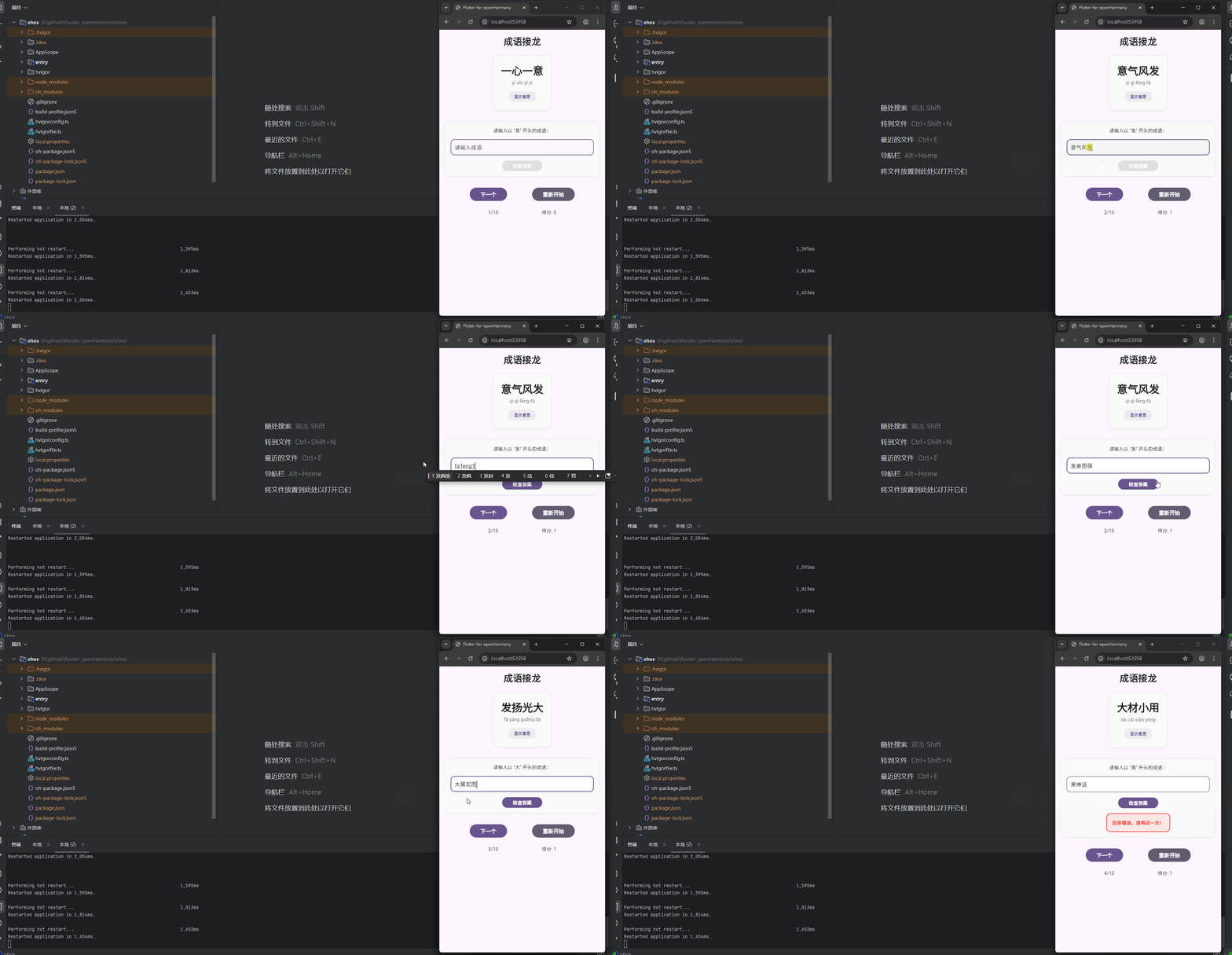
运行到鸿蒙虚拟设备中效果展示
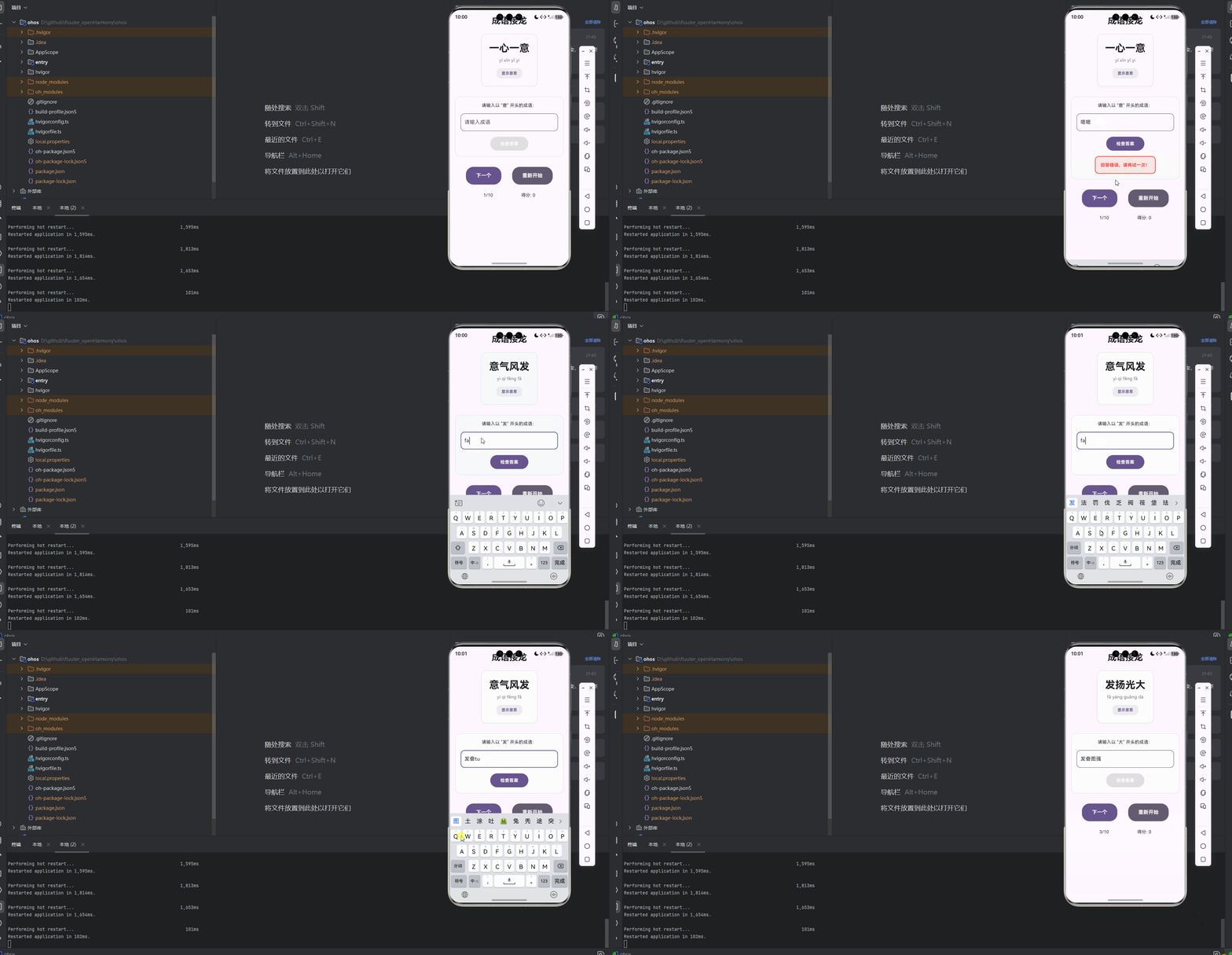
目录
功能代码实现
IdiomSolitaire 组件
在 lib/components/idiom_solitaire.dart 文件中,我们实现了完整的成语接龙游戏功能:
import 'package:flutter/material.dart';
class IdiomSolitaire extends StatefulWidget {
const IdiomSolitaire({super.key});
State<IdiomSolitaire> createState() => _IdiomSolitaireState();
}
class _IdiomSolitaireState extends State<IdiomSolitaire> {
// 成语列表,包含成语和拼音
List<Map<String, dynamic>> idioms = [
{'word': '一心一意', 'pinyin': 'yī xīn yī yì', 'meaning': '心思、意念专一'},
{'word': '意气风发', 'pinyin': 'yì qì fēng fā', 'meaning': '形容精神振奋,气概豪迈'},
{'word': '发扬光大', 'pinyin': 'fā yáng guāng dà', 'meaning': '使事业、传统等更加发展壮大'},
{'word': '大材小用', 'pinyin': 'dà cái xiǎo yòng', 'meaning': '大的材料用在小处,多指人事安排上不恰当'},
{'word': '用兵如神', 'pinyin': 'yòng bīng rú shén', 'meaning': '形容军事指挥非常高明'},
{'word': '神通广大', 'pinyin': 'shén tōng guǎng dà', 'meaning': '形容本领高超,无所不能'},
{'word': '大智若愚', 'pinyin': 'dà zhì ruò yú', 'meaning': '有智慧的人表面上好像很愚笨'},
{'word': '愚公移山', 'pinyin': 'yú gōng yí shān', 'meaning': '比喻做事有毅力,有恒心,不怕困难'},
{'word': '山清水秀', 'pinyin': 'shān qīng shuǐ xiù', 'meaning': '形容山水风景优美'},
{'word': '秀色可餐', 'pinyin': 'xiù sè kě cān', 'meaning': '形容女子姿容非常美丽或景物非常优美'},
];
int currentIndex = 0;
bool showMeaning = false;
bool gameStarted = false;
int score = 0;
String? userInput;
bool answerCorrect = false;
bool answerChecked = false;
// 开始游戏
void startGame() {
setState(() {
gameStarted = true;
currentIndex = 0;
score = 0;
userInput = null;
answerCorrect = false;
answerChecked = false;
showMeaning = false;
});
}
// 检查用户输入的成语
void checkAnswer(String input) {
if (input.isEmpty) return;
setState(() {
userInput = input;
// 获取当前成语的最后一个字
String lastChar = idioms[currentIndex]['word'][idioms[currentIndex]['word'].length - 1];
// 检查用户输入的成语的第一个字是否与当前成语的最后一个字相同
answerCorrect = input[0] == lastChar;
answerChecked = true;
if (answerCorrect) {
score++;
}
});
}
// 下一个成语
void nextIdiom() {
setState(() {
currentIndex = (currentIndex + 1) % idioms.length;
userInput = null;
answerCorrect = false;
answerChecked = false;
showMeaning = false;
});
}
// 显示/隐藏成语意思
void toggleMeaning() {
setState(() {
showMeaning = !showMeaning;
});
}
Widget build(BuildContext context) {
return Container(
padding: const EdgeInsets.all(16),
child: Column(
crossAxisAlignment: CrossAxisAlignment.center,
children: [
Text(
'成语接龙',
style: Theme.of(context).textTheme.headlineMedium?.copyWith(
fontWeight: FontWeight.bold,
),
),
const SizedBox(height: 24),
if (!gameStarted)
// 游戏未开始时显示开始按钮
ElevatedButton(
onPressed: startGame,
style: ElevatedButton.styleFrom(
padding: const EdgeInsets.symmetric(horizontal: 48, vertical: 16),
shape: RoundedRectangleBorder(
borderRadius: BorderRadius.circular(24),
),
backgroundColor: Theme.of(context).colorScheme.primary,
),
child: Text(
'开始游戏',
style: Theme.of(context).textTheme.titleMedium?.copyWith(
color: Colors.white,
fontWeight: FontWeight.bold,
),
),
)
else
// 游戏开始后显示游戏内容
Column(
children: [
// 当前成语
Container(
padding: const EdgeInsets.all(24),
decoration: BoxDecoration(
color: Colors.grey[50],
borderRadius: BorderRadius.circular(16),
border: Border.all(
color: Colors.grey[200]!,
width: 2,
),
boxShadow: [
BoxShadow(
color: Colors.grey.withOpacity(0.1),
blurRadius: 12,
offset: const Offset(0, 4),
),
],
),
child: Column(
children: [
Text(
idioms[currentIndex]['word'],
style: Theme.of(context).textTheme.headlineLarge?.copyWith(
fontWeight: FontWeight.bold,
),
),
const SizedBox(height: 8),
Text(
idioms[currentIndex]['pinyin'],
style: Theme.of(context).textTheme.bodyMedium?.copyWith(
color: Colors.grey[600],
),
),
const SizedBox(height: 16),
// 显示/隐藏意思按钮
GestureDetector(
onTap: toggleMeaning,
child: Container(
padding: const EdgeInsets.symmetric(horizontal: 16, vertical: 8),
decoration: BoxDecoration(
color: Theme.of(context).colorScheme.primary.withOpacity(0.1),
borderRadius: BorderRadius.circular(12),
),
child: Text(
showMeaning ? '隐藏意思' : '显示意思',
style: Theme.of(context).textTheme.bodySmall?.copyWith(
color: Theme.of(context).colorScheme.primary,
fontWeight: FontWeight.bold,
),
),
),
),
// 成语意思
if (showMeaning)
Padding(
padding: const EdgeInsets.only(top: 16),
child: Text(
idioms[currentIndex]['meaning'],
style: Theme.of(context).textTheme.bodyMedium,
textAlign: TextAlign.center,
),
),
],
),
),
const SizedBox(height: 32),
// 用户输入区域
Container(
padding: const EdgeInsets.all(16),
decoration: BoxDecoration(
color: Colors.grey[50],
borderRadius: BorderRadius.circular(16),
border: Border.all(
color: Colors.grey[200]!,
width: 2,
),
),
child: Column(
children: [
Text(
'请输入以 "${idioms[currentIndex]['word'][idioms[currentIndex]['word'].length - 1]}" 开头的成语:',
style: Theme.of(context).textTheme.bodyMedium,
textAlign: TextAlign.center,
),
const SizedBox(height: 16),
// 输入框
TextField(
onChanged: (value) {
setState(() {
userInput = value;
answerChecked = false;
});
},
onSubmitted: checkAnswer,
decoration: InputDecoration(
hintText: '请输入成语',
border: OutlineInputBorder(
borderRadius: BorderRadius.circular(12),
),
filled: true,
fillColor: Colors.white,
),
),
const SizedBox(height: 16),
// 检查答案按钮
ElevatedButton(
onPressed: userInput != null && userInput!.isNotEmpty ? () => checkAnswer(userInput!) : null,
style: ElevatedButton.styleFrom(
padding: const EdgeInsets.symmetric(horizontal: 32, vertical: 12),
shape: RoundedRectangleBorder(
borderRadius: BorderRadius.circular(24),
),
backgroundColor: Theme.of(context).colorScheme.primary,
),
child: Text(
'检查答案',
style: Theme.of(context).textTheme.bodyMedium?.copyWith(
color: Colors.white,
fontWeight: FontWeight.bold,
),
),
),
// 答案反馈
if (answerChecked)
Padding(
padding: const EdgeInsets.only(top: 16),
child: Container(
padding: const EdgeInsets.all(16),
decoration: BoxDecoration(
color: answerCorrect ? Colors.green.withOpacity(0.1) : Colors.red.withOpacity(0.1),
borderRadius: BorderRadius.circular(12),
border: Border.all(
color: answerCorrect ? Colors.green : Colors.red,
width: 2,
),
),
child: Text(
answerCorrect ? '回答正确!' : '回答错误,请再试一次!',
style: Theme.of(context).textTheme.bodyMedium?.copyWith(
color: answerCorrect ? Colors.green : Colors.red,
fontWeight: FontWeight.bold,
),
textAlign: TextAlign.center,
),
),
),
],
),
),
const SizedBox(height: 32),
// 操作按钮
Row(
mainAxisAlignment: MainAxisAlignment.spaceEvenly,
children: [
ElevatedButton(
onPressed: nextIdiom,
style: ElevatedButton.styleFrom(
padding: const EdgeInsets.symmetric(horizontal: 32, vertical: 16),
shape: RoundedRectangleBorder(
borderRadius: BorderRadius.circular(24),
),
backgroundColor: Theme.of(context).colorScheme.primary,
),
child: Text(
'下一个',
style: Theme.of(context).textTheme.titleMedium?.copyWith(
color: Colors.white,
fontWeight: FontWeight.bold,
),
),
),
ElevatedButton(
onPressed: startGame,
style: ElevatedButton.styleFrom(
padding: const EdgeInsets.symmetric(horizontal: 32, vertical: 16),
shape: RoundedRectangleBorder(
borderRadius: BorderRadius.circular(24),
),
backgroundColor: Theme.of(context).colorScheme.secondary,
),
child: Text(
'重新开始',
style: Theme.of(context).textTheme.titleMedium?.copyWith(
color: Colors.white,
fontWeight: FontWeight.bold,
),
),
),
],
),
const SizedBox(height: 24),
// 统计信息
Row(
mainAxisAlignment: MainAxisAlignment.spaceEvenly,
children: [
Text(
'${currentIndex + 1}/${idioms.length}',
style: Theme.of(context).textTheme.bodyMedium,
),
Text(
'得分: $score',
style: Theme.of(context).textTheme.bodyMedium,
),
],
),
],
)
],
),
);
}
}
核心功能:
- 游戏状态管理:实现了游戏开始、重新开始、下一个成语等状态控制
- 成语数据:内置了 10 个成语,每个成语包含词语、拼音和详细解释
- 用户交互:
- 文本输入框用于输入成语
- 检查答案按钮验证输入是否正确
- 显示/隐藏成语意思的交互
- 下一个和重新开始按钮
- 答案检查:智能检查用户输入的成语首字是否与当前成语尾字相同
- 得分系统:正确回答时自动加分
- 视觉反馈:通过颜色和文本反馈答案正确性
- 响应式布局:适配不同屏幕尺寸
主页面集成
在 lib/main.dart 文件中,我们将 IdiomSolitaire 组件集成到首页:
import 'package:flutter/material.dart';
import 'components/idiom_solitaire.dart';
void main() {
runApp(const MyApp());
}
class MyApp extends StatelessWidget {
const MyApp({super.key});
Widget build(BuildContext context) {
return MaterialApp(
title: 'Flutter for openHarmony',
theme: ThemeData(
colorScheme: ColorScheme.fromSeed(seedColor: Colors.deepPurple),
useMaterial3: true,
),
debugShowCheckedModeBanner: false,
home: const MyHomePage(title: 'Flutter for openHarmony'),
);
}
}
class MyHomePage extends StatefulWidget {
const MyHomePage({super.key, required this.title});
final String title;
State<MyHomePage> createState() => _MyHomePageState();
}
class _MyHomePageState extends State<MyHomePage> {
Widget build(BuildContext context) {
return Scaffold(
body: SingleChildScrollView(
child: Center(
child: Column(
mainAxisAlignment: MainAxisAlignment.center,
children: <Widget>[
const IdiomSolitaire(),
],
),
),
),
);
}
}
集成要点:
- 导入组件:添加
import 'components/idiom_solitaire.dart';导入语句 - 替换默认 UI:移除默认的计数器 UI,替换为
const IdiomSolitaire()组件 - 滚动支持:使用
SingleChildScrollView包装内容,避免内容溢出屏幕 - 居中布局:保持内容在屏幕中的居中显示效果
本次开发中容易遇到的问题
1. 条件表达式语法错误
问题描述:在使用条件表达式时,错误地使用了大括号 {},导致 Dart 编译器将其解析为 Set 字面量。
解决方案:移除条件表达式中的大括号,使用正确的 Dart 语法格式:
// 错误写法
if (condition) {
  Widget()
} else {
  AnotherWidget()
}

// 正确写法
if (condition)
  Widget()
else
  AnotherWidget()
2. 内容溢出问题
问题描述:成语接龙游戏内容较多,可能会出现垂直内容溢出屏幕的情况。
解决方案:在主页面中使用 SingleChildScrollView 包装内容,确保所有内容都可以通过滚动查看。
3. 状态管理问题
问题描述:在处理用户输入和游戏状态时,可能会出现状态更新不及时或不正确的情况。
解决方案:
- 使用
setState()确保状态更新能够触发 UI 重建 - 确保所有状态变量都在
setState()中更新 - 避免在非 UI 线程中修改状态
4. 文本输入处理问题
问题描述:文本输入框的内容更新和验证逻辑可能会出现问题。
解决方案:
- 使用
onChanged回调实时更新用户输入状态 - 使用
onSubmitted回调处理用户按下回车键的情况 - 在检查答案前验证输入是否为空
5. 成语接龙逻辑问题
问题描述:成语接龙的核心逻辑 - 检查首尾字是否相同 - 可能会出现实现错误。
解决方案:
- 确保正确获取当前成语的最后一个字:
idioms[currentIndex]['word'][idioms[currentIndex]['word'].length - 1] - 确保正确获取用户输入的第一个字:
input[0] - 使用
==运算符进行字符串比较
6. 响应式布局问题
问题描述:在不同屏幕尺寸的设备上,布局可能会出现错位或不美观的情况。
解决方案:
- 使用
const EdgeInsets和BorderRadius.circular()等相对单位 - 避免使用固定尺寸,尽量使用
Expanded和Flex等自适应布局组件 - 在不同尺寸的设备上测试布局效果
总结本次开发中用到的技术点
1. 组件化开发
核心概念:将 UI 和功能拆分为独立的、可复用的组件。
应用场景:
IdiomSolitaire组件:封装了完整的成语接龙游戏功能
优势:
- 代码结构清晰,易于维护
- 组件可复用,减少重复代码
- 便于团队协作和单元测试
2. 状态管理
核心概念:使用 StatefulWidget 和 setState() 管理组件状态。
应用场景:
- 管理游戏状态(开始、暂停、重置)
- 跟踪用户输入和答案正确性
- 维护得分和游戏进度
实现方式:
- 继承
StatefulWidget创建有状态组件 - 在
State类中定义状态变量 - 使用
setState()方法更新状态并触发 UI 重建
3. 用户交互
核心概念:通过各种交互组件实现用户与应用的交互。
应用场景:
- 文本输入:使用
TextField组件 - 按钮点击:使用
ElevatedButton组件 - 手势检测:使用
GestureDetector组件
实现要点:
- 使用回调函数处理用户操作
- 提供清晰的视觉反馈
- 防止重复操作导致的错误
4. 数据模型设计
核心概念:创建合适的数据结构存储和管理应用数据。
应用场景:
- 使用
List<Map<String, dynamic>>存储成语数据 - 每个成语包含词语、拼音和解释
设计要点:
- 数据结构清晰,易于理解和使用
- 包含所有必要的信息
- 便于扩展和维护
5. 响应式布局
核心概念:使用 Flutter 的布局组件实现自适应界面。
应用场景:
- 确保在不同屏幕尺寸上的良好显示效果
- 处理内容溢出情况
- 保持界面美观和一致性
实现要点:
- 使用
SingleChildScrollView处理长内容 - 使用
Column、Row等布局组件 - 使用
const EdgeInsets等相对单位
6. 主题和样式
核心概念:使用 Flutter 的主题系统统一应用样式。
应用场景:
- 统一按钮样式
- 一致的颜色方案
- 响应式字体大小
实现要点:
- 使用
Theme.of(context)获取主题数据 - 使用
TextStyle定义文本样式 - 确保文本和背景的对比度适中
7. 游戏逻辑实现
核心概念:实现成语接龙的核心游戏规则。
应用场景:
- 检查用户输入的成语是否符合接龙规则
- 管理游戏流程和状态
- 计算和显示得分
实现要点:
- 正确实现首尾字匹配逻辑
- 提供清晰的游戏流程
- 实现合理的得分系统
8. 无导航设计
核心概念:直接在首页显示功能,无需导航跳转。
应用场景:
- 简化用户操作流程
- 减少页面切换开销
- 提供即时的功能体验
实现要点:
- 将核心功能组件直接集成到首页
- 确保首页布局清晰合理
- 提供足够的交互反馈
欢迎加入开源鸿蒙跨平台社区: https://openharmonycrossplatform.csdn.net

腾讯云面向开发者汇聚海量精品云计算使用和开发经验,营造开放的云计算技术生态圈。
更多推荐
 18
18 0
0- 0


 已为社区贡献20条内容

所有评论(0)