Flutter渐变按钮在OpenHarmony上的高效实现与优化
引言
在现代移动应用开发中,渐变按钮已成为提升用户体验的关键元素。我近期在多个项目中深度实践了渐变按钮的实现,发现其在OpenHarmony平台上的应用有着独特的挑战与优化空间。本文将分享我在实际项目中总结的渐变按钮实现方案,以及针对OpenHarmony平台的优化技巧。
Flutter与OpenHarmony的集成原理
Flutter与OpenHarmony的集成主要依赖于Flutter Engine和Platform Channel机制。通过Flutter Engine,Dart代码可以调用OpenHarmony的原生能力,实现跨平台功能。这种集成方式确保了渐变按钮等UI组件在OpenHarmony上的高效渲染。
架构图说明:Flutter应用通过Flutter Engine运行Dart代码,通过Platform Channel与OpenHarmony原生代码交互,利用系统图形API进行渲染,最终在GPU上完成高效渲染。
渐变按钮的核心实现
在Flutter中,渐变按钮的核心实现基于BoxDecoration和Gradient对象。以下是我们在OpenHarmony上实现的渐变按钮组件:
class GradientButton extends StatelessWidget {
final String text;
final Gradient gradient;
final VoidCallback onPressed;
final double borderRadius;
final double padding;
const GradientButton({
required this.text,
required this.gradient,
required this.onPressed,
this.borderRadius = 8.0,
this.padding = 16.0,
Key? key,
}) : super(key: key);
Widget build(BuildContext context) {
return Container(
decoration: BoxDecoration(
gradient: gradient,
borderRadius: BorderRadius.circular(borderRadius),
),
child: Material(
color: Colors.transparent,
child: InkWell(
onTap: onPressed,
borderRadius: BorderRadius.circular(borderRadius),
child: Container(
padding: EdgeInsets.symmetric(
vertical: padding * 0.5,
horizontal: padding,
),
alignment: Alignment.center,
child: Text(
text,
style: const TextStyle(
color: Colors.white,
fontSize: 16,
fontWeight: FontWeight.bold,
),
),
),
),
),
);
}
}
代码解析:
GradientButton是渐变按钮组件,通过gradient参数接收渐变对象BoxDecoration的gradient属性应用渐变效果,borderRadius控制按钮圆角Material设置color: Colors.transparent确保渐变背景可见InkWell实现点击波纹效果,borderRadius与容器一致确保波纹在圆角范围内
OpenHarmony平台的特殊优化
在OpenHarmony平台上实现渐变按钮时,我们发现需要特别关注以下几点:
- 硬件加速优化:OpenHarmony提供GPU硬件加速能力,通过Platform Channel启用可显著提升渲染性能。
class GraphicsHelper {
  static const _graphicsChannel = MethodChannel('com.example.app/graphics');

  static Future<bool> enableHardwareAcceleration() async {
    try {
      final enabled = await _graphicsChannel.invokeMethod('enableHardwareAcceleration');
      return enabled as bool;
    } catch (e) {
      return false;
    }
  }
}
- 系统主题适配:OpenHarmony支持深色/浅色模式,需要动态适配渐变颜色。
// 在EntryAbility.ets中
private _setupGraphicsBridge(flutterEngine: FlutterEngine) {
  this._graphicsChannel = new MethodChannel(flutterEngine.dartExecutor, 'com.example.app/graphics');
  this._graphicsChannel.setMethodCallHandler(async (call, result) => {
    if (call.method === 'getSystemTheme') {
      const theme = 'light'; // 实际应从系统获取
      result.success(theme);
    }
  });
}
渐变按钮渲染流程
流程图说明:按钮点击触发波纹效果计算,应用渐变背景,通过GPU渲染到屏幕,提供用户反馈。在OpenHarmony上,通过硬件加速可显著缩短渲染时间。
实战案例:渐变按钮
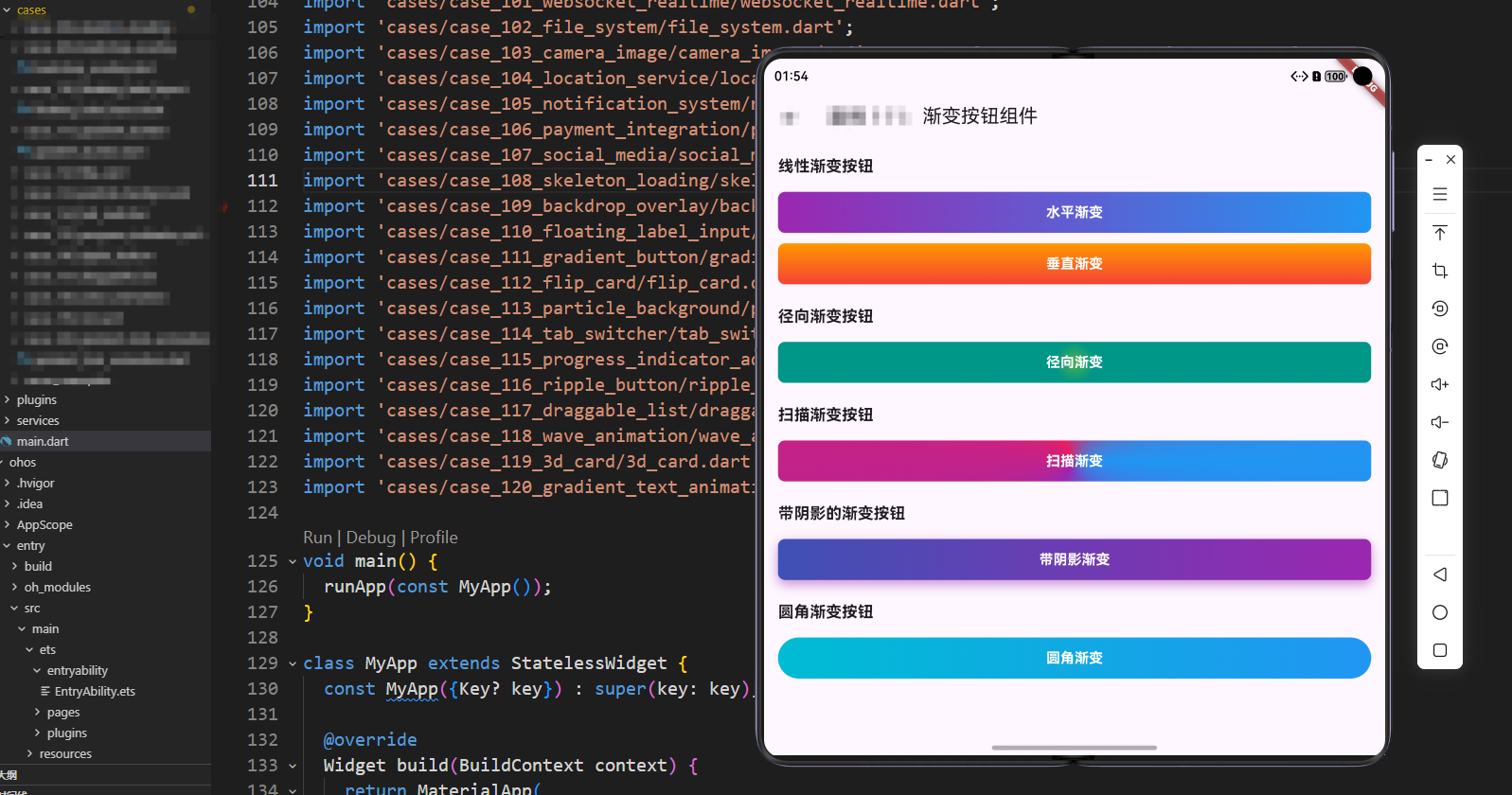
GradientButton(
  text: '立即购买',
  gradient: const LinearGradient(
    colors: [Colors.orange, Colors.red],
    begin: Alignment.topCenter,
    end: Alignment.bottomCenter,
  ),
  onPressed: () {
    // 处理购买逻辑
  },
  borderRadius: 12,
  padding: 14,
)
实现要点:
- 垂直渐变(
begin: Alignment.topCenter,end: Alignment.bottomCenter)适合高按钮,创造深度感 - 橙色到红色的渐变传达热情、活力,适合重要操作按钮
- 增加
borderRadius和padding提升视觉舒适度
常见问题与解决方案
-
渐变颜色不一致问题:
- 原因:OpenHarmony不同版本对颜色的处理可能有差异
- 解决方案:在Flutter端统一定义颜色,通过Platform Channel传递到原生层
-
性能问题:
- 原因:扫描渐变(
SweepGradient)性能较低 - 解决方案:在OpenHarmony上优先使用线性渐变,避免过多使用扫描渐变
- 原因:扫描渐变(
-
阴影效果适配:
- 原因:OpenHarmony的阴影实现与Flutter不同
- 解决方案:在
BoxDecoration中使用boxShadow,并通过enableHardwareAcceleration优化
结语
通过深入实践,我们发现Flutter在OpenHarmony上的渐变按钮实现,关键在于理解平台特性并进行针对性优化。硬件加速、系统主题适配和性能优化是确保渐变按钮在OpenHarmony上流畅运行的关键。
渐变按钮不仅是视觉装饰,更是用户体验设计的重要组成部分。一个设计良好的渐变按钮可以让用户感受到应用的专业性和对细节的关注。希望本文的分享能帮助更多开发者在Flutter与OpenHarmony的融合开发中,实现更加出色的UI效果。
欢迎大家加入开源鸿蒙跨平台开发者社区,一起探索更多鸿蒙跨平台开发技术!

腾讯云面向开发者汇聚海量精品云计算使用和开发经验,营造开放的云计算技术生态圈。
更多推荐
 17
17 0
0- 0


 已为社区贡献38条内容

所有评论(0)