Flutter for OpenHarmony三国杀攻略App实战 - 进阶技巧实现
前言
掌握基础规则只是三国杀入门的第一步。要成为真正的高手,需要深入学习各种进阶技巧。本文将实现一个全面的进阶技巧系统,涵盖距离计算、手牌管理、身份判断、心理博弈等高级策略,帮助玩家提升游戏水平。
进阶技巧体系设计
进阶技巧可以分为技术层面和心理层面两大类。技术层面包括距离计算、手牌管理等可量化的技能,心理层面则涉及身份判断、心理博弈等需要经验积累的能力。
// lib/models/advanced_tip_model.dart
class AdvancedTipModel {
  final String id;
  final String title;
  final String description;
  final String category;
  final int difficulty;
  final List<String> keyPoints;
  final List<String> commonMistakes;
  final String practiceMethod;
  final int estimatedLearningTime;

  const AdvancedTipModel({
    required this.id,
    required this.title,
    required this.description,
    required this.category,
    required this.difficulty,
    required this.keyPoints,
    required this.commonMistakes,
    required this.practiceMethod,
    required this.estimatedLearningTime,
  });

  factory AdvancedTipModel.fromJson(Map<String, dynamic> json) {
    return AdvancedTipModel(
      id: json['id'] ?? '',
      title: json['title'] ?? '',
      description: json['description'] ?? '',
      category: json['category'] ?? '',
      difficulty: json['difficulty'] ?? 1,
      keyPoints: List<String>.from(json['keyPoints'] ?? []),
      commonMistakes: List<String>.from(json['commonMistakes'] ?? []),
      practiceMethod: json['practiceMethod'] ?? '',
      estimatedLearningTime: json['estimatedLearningTime'] ?? 0,
    );
  }
}
这个模型包含了进阶技巧的所有基本信息。difficulty 字段表示学习难度,keyPoints 列出了关键要点,commonMistakes 列举了常见错误。这种结构化的设计让技巧内容更加系统化和易于维护。
距离计算技巧
距离计算是三国杀中最重要的技术技巧之一。准确的距离计算能够帮助玩家最大化攻击范围,同时最小化被攻击风险。
// lib/utils/distance_calculator.dart
class DistanceCalculator {
  static int calculateDistance({
    required int currentPosition,
    required int targetPosition,
    required int totalPlayers,
    required bool hasOffensiveHorse,
    required bool hasDefensiveHorse,
    required int weaponRange,
  }) {
    // 计算基础距离
    int baseDistance = (targetPosition - currentPosition).abs();

    // 处理环形座位
    if (baseDistance > totalPlayers / 2) {
      baseDistance = totalPlayers - baseDistance;
    }

    // 应用坐骑效果
    if (hasOffensiveHorse) baseDistance -= 1;
    if (hasDefensiveHorse) baseDistance += 1;

    // 应用武器范围
    int finalDistance = baseDistance - weaponRange;

    return finalDistance.clamp(1, totalPlayers);
  }

  static bool canAttack({
    required int distance,
    required int attackRange,
  }) {
    return distance <= attackRange;
  }

  static List<int> getAttackablePositions({
    required int currentPosition,
    required int totalPlayers,
    required int attackRange,
    required bool hasOffensiveHorse,
    required bool hasDefensiveHorse,
    required int weaponRange,
  }) {
    List<int> attackable = [];

    for (int i = 1; i <= totalPlayers; i++) {
      if (i == currentPosition) continue;

      int distance = calculateDistance(
        currentPosition: currentPosition,
        targetPosition: i,
        totalPlayers: totalPlayers,
        hasOffensiveHorse: hasOffensiveHorse,
        hasDefensiveHorse: hasDefensiveHorse,
        weaponRange: weaponRange,
      );

      if (canAttack(distance: distance, attackRange: attackRange)) {
        attackable.add(i);
      }
    }

    return attackable;
  }
}
距离计算器提供了完整的距离计算逻辑。calculateDistance 方法考虑了坐骑、武器等多个因素,getAttackablePositions 方法可以快速找出所有可以攻击的目标。这些工具函数可以直接用于游戏中的实时计算。
手牌管理系统
// lib/models/hand_card_model.dart
class HandCardAnalyzer {
  static Map<String, int> categorizeCards(List<String> cards) {
    Map<String, int> categories = {
      '攻击牌': 0,
      '防御牌': 0,
      '功能牌': 0,
      '装备牌': 0,
    };

    for (String card in cards) {
      if (['杀', '决斗', '万箭齐发', '南蛮入侵'].contains(card)) {
        categories['攻击牌'] = categories['攻击牌']! + 1;
      } else if (['闪', '无懈可击'].contains(card)) {
        categories['防御牌'] = categories['防御牌']! + 1;
      } else if (['桃', '酒', '顺手牵羊', '过河拆桥'].contains(card)) {
        categories['功能牌'] = categories['功能牌']! + 1;
      } else {
        categories['装备牌'] = categories['装备牌']! + 1;
      }
    }

    return categories;
  }

  static String getHandAnalysisAdvice(Map<String, int> categories) {
    int total = categories.values.fold(0, (a, b) => a + b);
    int attackCards = categories['攻击牌'] ?? 0;
    int defenseCards = categories['防御牌'] ?? 0;

    double attackRatio = attackCards / total;
    double defenseRatio = defenseCards / total;

    if (attackRatio > 0.6) {
      return '手牌过于激进,建议保留更多防御牌';
    } else if (defenseRatio > 0.5) {
      return '手牌过于保守,可以适度使用攻击牌';
    } else {
      return '手牌结构均衡,保持当前策略';
    }
  }
}
手牌分析工具能够自动分类和评估手牌结构。通过计算不同类型卡牌的比例,系统可以给出具体的优化建议。这帮助玩家了解当前的攻防能力,做出更好的决策。
身份判断指南
// lib/models/identity_judgment_model.dart
class IdentityJudgmentGuide {
  static Map<String, List<String>> getLoyalistIndicators() {
    return {
      '行为特征': [
        '优先保护主公,即使代价很大',
        '主动攻击明显的反贼',
        '为主公承担伤害和负面效果',
        '配合主公的行动,不会单独行动',
      ],
      '出牌习惯': [
        '保留防御牌用于保护主公',
        '优先使用攻击牌消灭反贼',
        '在关键时刻暴露身份',
      ],
      '目标选择': [
        '优先攻击表现可疑的玩家',
        '避免攻击表现忠诚的玩家',
        '集中火力消灭明确的反贼',
      ],
    };
  }

  static Map<String, List<String>> getRebelIndicators() {
    return {
      '行为特征': [
        '避免直接攻击主公',
        '试探其他玩家身份',
        '保存实力等待时机',
        '互相配合攻击',
      ],
      '出牌习惯': [
        '保留关键卡牌用于关键时刻',
        '避免过早暴露实力',
        '在关键时刻集火主公',
      ],
      '目标选择': [
        '优先攻击忠臣',
        '避免互相伤害',
        '关键时刻集中火力',
      ],
    };
  }

  static Map<String, List<String>> getInnerTraitorIndicators() {
    return {
      '行为特征': [
        '行为模式多变,难以预测',
        '帮助弱势一方',
        '避免过早暴露身份',
        '收集关键卡牌',
      ],
      '出牌习惯': [
        '出牌选择不一致',
        '有时帮助主公,有时帮助反贼',
        '等待最佳时机',
      ],
      '目标选择': [
        '目标选择不稳定',
        '根据局势灵活调整',
        '最后时刻击杀主公',
      ],
    };
  }
}
身份判断指南提供了系统化的判断标准。通过行为特征、出牌习惯和目标选择三个维度,玩家可以更准确地推断其他玩家的身份。这种多维度的分析方法提高了判断的准确性。
时机把握系统
// lib/models/timing_model.dart
class CardTimingEvaluator {
  static Map<String, dynamic> evaluateKillTiming({
    required bool isInDanger,
    required bool canKillTarget,
    required bool targetHasDefense,
    required int handCardCount,
  }) {
    return {
      'urgency': isInDanger ? 8 : 5,
      'effectiveness': canKillTarget ? 9 : 6,
      'risk': targetHasDefense ? 7 : 3,
      'recommendation': _getKillRecommendation(
        isInDanger, canKillTarget, targetHasDefense, handCardCount
      ),
    };
  }

  static Map<String, dynamic> evaluatePeachTiming({
    required int currentHealth,
    required int maxHealth,
    required int handCardCount,
  }) {
    return {
      'urgency': currentHealth <= 1 ? 10 : 2,
      'effectiveness': currentHealth <= 1 ? 10 : 5,
      'risk': 1,
      'recommendation': _getPeachRecommendation(currentHealth, maxHealth),
    };
  }

  static String _getKillRecommendation(
    bool isInDanger, bool canKillTarget, bool targetHasDefense, int handCardCount
  ) {
    if (canKillTarget && !targetHasDefense) {
      return '立即使用,这是最佳时机';
    } else if (isInDanger && canKillTarget) {
      return '可以使用,但要注意防御';
    } else if (handCardCount > 5) {
      return '可以保留,等待更好的时机';
    } else {
      return '不建议使用,风险太大';
    }
  }

  static String _getPeachRecommendation(int currentHealth, int maxHealth) {
    if (currentHealth <= 1) {
      return '必须立即使用,否则会死亡';
    } else if (currentHealth <= maxHealth / 2) {
      return '建议使用,恢复生命值';
    } else {
      return '可以保留,等待更需要的时候';
    }
  }
}
时机评估系统通过量化分析帮助玩家做出更好的决策。紧急程度、有效性和风险程度三个维度的评估,配合具体的建议,让玩家能够更科学地选择出牌时机。
心理博弈策略
心理博弈是三国杀的高级技巧,涉及信息隐藏、虚假信号和心理压力等多个方面。掌握心理战术能够在实力相当的对局中获得决定性优势。
// lib/models/psychological_tactics.dart
class PsychologicalTactic {
  final String name;
  final String description;
  final String usage;
  final int effectiveness;
  final int difficulty;
  final String example;
  final List<String> precautions;

  const PsychologicalTactic({
    required this.name,
    required this.description,
    required this.usage,
    required this.effectiveness,
    required this.difficulty,
    required this.example,
    required this.precautions,
  });
}

class PsychologicalTacticsLibrary {
  static List<PsychologicalTactic> getTactics() {
    return [
      PsychologicalTactic(
        name: '虚张声势',
        description: '故意展示某些卡牌,让对手误判你的实力',
        usage: '在手牌充足时适度展示,在手牌不足时隐藏',
        effectiveness: 7,
        difficulty: 6,
        example: '故意让对手看到你有闪,但实际上只有一张',
        precautions: [
          '不要过度表演,容易被识破',
          '要与实际手牌相符',
          '在关键时刻才使用',
        ],
      ),
      PsychologicalTactic(
        name: '欲擒故纵',
        description: '故意不攻击某个目标,让其他人误以为你们是队友',
        usage: '在身份不明时使用,制造混乱',
        effectiveness: 8,
        difficulty: 8,
        example: '内奸故意不攻击主公,让忠臣误以为是队友',
        precautions: [
          '时机很重要,太早或太晚都会失效',
          '要有充分的理由支撑',
          '一旦被识破会很危险',
        ],
      ),
      PsychologicalTactic(
        name: '声东击西',
        description: '表面攻击一个目标,实际目的是另一个',
        usage: '转移注意力,掩盖真实意图',
        effectiveness: 6,
        difficulty: 7,
        example: '攻击A玩家,实际是为了消耗B玩家的防御牌',
        precautions: [
          '要有合理的表面理由',
          '不要过于明显',
          '要考虑其他玩家的反应',
        ],
      ),
    ];
  }
}
心理战术库提供了系统化的心理技巧。每个战术都包含描述、使用方法、有效性评级和具体示例。precautions 字段列出了使用时需要注意的事项,帮助玩家避免常见的错误。
进阶技巧屏幕实现
// lib/screens/advanced_tips_screen.dart
class AdvancedTipsScreen extends StatelessWidget {
const AdvancedTipsScreen({Key? key}) : super(key: key);
Widget build(BuildContext context) {
return Scaffold(
appBar: AppBar(
title: const Text('进阶技巧'),
backgroundColor: Colors.red[700],
foregroundColor: Colors.white,
elevation: 0,
),
body: SingleChildScrollView(
child: Column(
children: [
_buildHeader(),
_buildTipsSection(),
_buildPracticeSection(),
],
),
),
);
}
Widget _buildHeader() {
return Container(
padding: EdgeInsets.all(16.w),
color: Colors.red[700],
child: Column(
crossAxisAlignment: CrossAxisAlignment.start,
children: [
Text(
'进阶技巧学习',
style: TextStyle(
color: Colors.white,
fontSize: 20.sp,
fontWeight: FontWeight.bold,
),
),
SizedBox(height: 4.h),
Text(
'从技术到心理,全面提升游戏水平',
style: TextStyle(
color: Colors.white70,
fontSize: 13.sp,
),
),
],
),
);
}
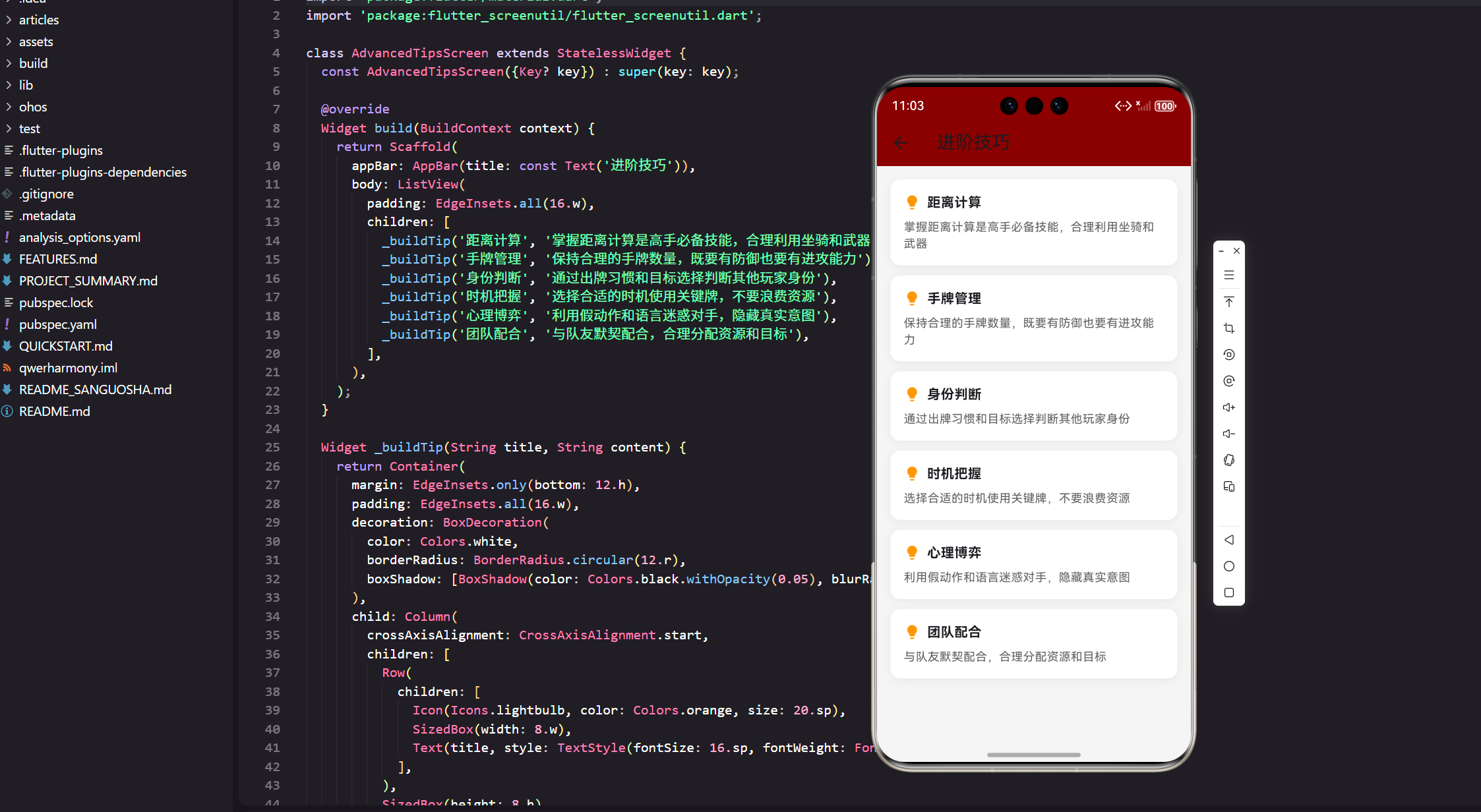
主屏幕使用红色头部与应用主题保持一致,提供了清晰的视觉层次。SingleChildScrollView 确保内容过多时可以滚动。
技巧卡片组件
  Widget _buildTipsSection() {
    return Padding(
      padding: EdgeInsets.all(16.w),
      child: Column(
        children: [
          _buildTipCard(
            '距离计算',
            '掌握距离计算是高手必备技能,合理利用坐骑和武器',
            Colors.blue,
            Icons.straighten,
          ),
          _buildTipCard(
            '手牌管理',
            '保持合理的手牌数量,既要有防御也要有进攻能力',
            Colors.green,
            Icons.inventory_2,
          ),
          _buildTipCard(
            '身份判断',
            '通过出牌习惯和目标选择判断其他玩家身份',
            Colors.orange,
            Icons.person_search,
          ),
          _buildTipCard(
            '时机把握',
            '选择合适的时机使用关键牌,不要浪费资源',
            Colors.purple,
            Icons.schedule,
          ),
          _buildTipCard(
            '心理博弈',
            '利用假动作和语言迷惑对手,隐藏真实意图',
            Colors.red,
            Icons.psychology,
          ),
        ],
      ),
    );
  }

  Widget _buildTipCard(String title, String content, Color color, IconData icon) {
    return Container(
      margin: EdgeInsets.only(bottom: 12.h),
      padding: EdgeInsets.all(16.w),
      decoration: BoxDecoration(
        color: Colors.white,
        borderRadius: BorderRadius.circular(12.r),
        boxShadow: [
          BoxShadow(
            color: Colors.black.withOpacity(0.05),
            blurRadius: 8,
            offset: const Offset(0, 2),
          ),
        ],
      ),
      child: Column(
        crossAxisAlignment: CrossAxisAlignment.start,
        children: [
          Row(
            children: [
              Container(
                padding: EdgeInsets.all(8.w),
                decoration: BoxDecoration(
                  color: color.withOpacity(0.1),
                  borderRadius: BorderRadius.circular(8.r),
                ),
                child: Icon(icon, color: color, size: 20.sp),
              ),
              SizedBox(width: 12.w),
              Expanded(
                child: Text(
                  title,
                  style: TextStyle(
                    fontSize: 16.sp,
                    fontWeight: FontWeight.bold,
                  ),
                ),
              ),
            ],
          ),
          SizedBox(height: 8.h),
          Text(
            content,
            style: TextStyle(
              fontSize: 14.sp,
              color: Colors.grey.shade700,
              height: 1.5,
            ),
          ),
        ],
      ),
    );
  }
技巧卡片采用了简洁优雅的设计。每个卡片都有对应的图标和颜色,让用户能够快速识别不同的技巧类别。白色背景确保内容的可读性,轻微的阴影增加了层次感。
实践指南区域
  Widget _buildPracticeSection() {
    return Container(
      margin: EdgeInsets.all(16.w),
      padding: EdgeInsets.all(16.w),
      decoration: BoxDecoration(
        color: Colors.amber.withOpacity(0.05),
        borderRadius: BorderRadius.circular(12.r),
        border: Border.all(color: Colors.amber.withOpacity(0.2)),
      ),
      child: Column(
        crossAxisAlignment: CrossAxisAlignment.start,
        children: [
          Row(
            children: [
              Icon(Icons.lightbulb, color: Colors.amber, size: 20.sp),
              SizedBox(width: 8.w),
              Text(
                '实践建议',
                style: TextStyle(
                  fontSize: 16.sp,
                  fontWeight: FontWeight.bold,
                ),
              ),
            ],
          ),
          SizedBox(height: 12.h),
          _buildPracticeTip('观察对手', '在每局游戏中重点观察一个对手的出牌习惯'),
          _buildPracticeTip('记录数据', '记录不同身份的特征行为,建立自己的判断库'),
          _buildPracticeTip('模拟练习', '在脑海中模拟各种情况,提前做好准备'),
          _buildPracticeTip('复盘分析', '每局游戏后分析自己的决策,找出改进空间'),
        ],
      ),
    );
  }

  Widget _buildPracticeTip(String title, String description) {
    return Padding(
      padding: EdgeInsets.only(bottom: 8.h),
      child: Column(
        crossAxisAlignment: CrossAxisAlignment.start,
        children: [
          Text(
            title,
            style: TextStyle(
              fontSize: 13.sp,
              fontWeight: FontWeight.bold,
              color: Colors.amber[700],
            ),
          ),
          SizedBox(height: 2.h),
          Text(
            description,
            style: TextStyle(
              fontSize: 12.sp,
              color: Colors.grey.shade600,
            ),
          ),
        ],
      ),
    );
  }
}
实践建议区域提供了高级的学习建议。这些建议不仅适用于特定技巧,而是通用的学习方法。琥珀色的设计让这个区域与其他内容区分开来。
技能进度跟踪
// lib/services/skill_progress_service.dart
class SkillProgressService {
  static const String _progressKey = 'skill_progress';
  static Map<String, SkillProgress> _skillProgress = {};

  static Future<void> initProgress() async {
    final prefs = await SharedPreferences.getInstance();
    final progressData = prefs.getString(_progressKey);

    if (progressData != null) {
      final Map<String, dynamic> decoded = json.decode(progressData);
      decoded.forEach((key, value) {
        _skillProgress[key] = SkillProgress.fromJson(value);
      });
    }
  }

  static Future<void> updateSkillProgress(String skillName, int points) async {
    if (!_skillProgress.containsKey(skillName)) {
      _skillProgress[skillName] = SkillProgress(skillName: skillName);
    }

    _skillProgress[skillName]!.addPoints(points);
    await _saveProgress();
  }

  static Future<void> _saveProgress() async {
    final prefs = await SharedPreferences.getInstance();
    final progressData = json.encode(
      _skillProgress.map((key, value) => MapEntry(key, value.toJson()))
    );
    await prefs.setString(_progressKey, progressData);
  }

  static SkillProgress? getSkillProgress(String skillName) {
    return _skillProgress[skillName];
  }

  static List<SkillProgress> getAllSkillProgress() {
    return _skillProgress.values.toList();
  }
}

class SkillProgress {
  final String skillName;
  int totalPoints = 0;
  int level = 1;
  DateTime lastUpdated = DateTime.now();

  SkillProgress({required this.skillName});

  void addPoints(int points) {
    totalPoints += points;
    level = (totalPoints ~/ 100) + 1;
    lastUpdated = DateTime.now();
  }

  double getProgress() {
    return (totalPoints % 100) / 100.0;
  }

  Map<String, dynamic> toJson() {
    return {
      'skillName': skillName,
      'totalPoints': totalPoints,
      'level': level,
      'lastUpdated': lastUpdated.toIso8601String(),
    };
  }

  factory SkillProgress.fromJson(Map<String, dynamic> json) {
    final progress = SkillProgress(skillName: json['skillName']);
    progress.totalPoints = json['totalPoints'] ?? 0;
    progress.level = json['level'] ?? 1;
    progress.lastUpdated = DateTime.parse(json['lastUpdated'] ?? DateTime.now().toIso8601String());
    return progress;
  }
}
技能进度跟踪让用户可以量化自己的学习成果。通过积分系统,玩家可以看到自己在各项技能上的进度。不同的等级表示不同的熟练程度,给用户明确的成长反馈。
技巧测试系统
// lib/widgets/skill_test_widget.dart
class SkillTestQuestion {
final String id;
final String question;
final List<String> options;
final int correctIndex;
final String explanation;
const SkillTestQuestion({
required this.id,
required this.question,
required this.options,
required this.correctIndex,
required this.explanation,
});
}
class SkillTestWidget extends StatefulWidget {
final String skillName;
final List<SkillTestQuestion> questions;
final Function(int) onComplete;
const SkillTestWidget({
Key? key,
required this.skillName,
required this.questions,
required this.onComplete,
}) : super(key: key);
State<SkillTestWidget> createState() => _SkillTestWidgetState();
}
class _SkillTestWidgetState extends State<SkillTestWidget> {
int _currentQuestion = 0;
int _score = 0;
bool _answered = false;
int? _selectedIndex;
void _answerQuestion(int selectedIndex) {
setState(() {
_answered = true;
_selectedIndex = selectedIndex;
if (selectedIndex == widget.questions[_currentQuestion].correctIndex) {
_score++;
}
});
}
void _nextQuestion() {
if (_currentQuestion < widget.questions.length - 1) {
setState(() {
_currentQuestion++;
_answered = false;
_selectedIndex = null;
});
} else {
widget.onComplete(_score);
}
}
Widget build(BuildContext context) {
final question = widget.questions[_currentQuestion];
final progress = (_currentQuestion + 1) / widget.questions.length;
return Container(
padding: EdgeInsets.all(16.w),
decoration: BoxDecoration(
color: Colors.blue.withOpacity(0.05),
borderRadius: BorderRadius.circular(12.r),
),
child: Column(
crossAxisAlignment: CrossAxisAlignment.start,
children: [
Row(
mainAxisAlignment: MainAxisAlignment.spaceBetween,
children: [
Text(
'${widget.skillName}测试',
style: TextStyle(fontSize: 16.sp, fontWeight: FontWeight.bold),
),
Text(
'${_currentQuestion + 1}/${widget.questions.length}',
style: TextStyle(fontSize: 14.sp, color: Colors.grey.shade600),
),
],
),
SizedBox(height: 8.h),
ClipRRect(
borderRadius: BorderRadius.circular(4.r),
child: LinearProgressIndicator(
value: progress,
backgroundColor: Colors.grey.shade300,
valueColor: AlwaysStoppedAnimation<Color>(Colors.blue),
minHeight: 4.h,
),
),
SizedBox(height: 16.h),
Text(
question.question,
style: TextStyle(fontSize: 14.sp, fontWeight: FontWeight.bold),
),
SizedBox(height: 12.h),
...question.options.asMap().entries.map((entry) {
final index = entry.key;
final option = entry.value;
final isSelected = _selectedIndex == index;
final isCorrect = index == question.correctIndex;
return GestureDetector(
onTap: _answered ? null : () => _answerQuestion(index),
child: Container(
margin: EdgeInsets.only(bottom: 8.h),
padding: EdgeInsets.all(12.w),
decoration: BoxDecoration(
color: _answered
? (isCorrect ? Colors.green.withOpacity(0.1) :
(isSelected ? Colors.red.withOpacity(0.1) : Colors.white))
: (isSelected ? Colors.blue.withOpacity(0.1) : Colors.white),
borderRadius: BorderRadius.circular(8.r),
border: Border.all(
color: _answered
? (isCorrect ? Colors.green :
(isSelected ? Colors.red : Colors.grey.shade300))
: (isSelected ? Colors.blue : Colors.grey.shade300),
),
),
child: Text(option, style: TextStyle(fontSize: 13.sp)),
),
);
}),
if (_answered) ...[
SizedBox(height: 12.h),
Container(
padding: EdgeInsets.all(8.w),
decoration: BoxDecoration(
color: Colors.grey.shade100,
borderRadius: BorderRadius.circular(6.r),
),
child: Text(
'解释:${question.explanation}',
style: TextStyle(fontSize: 11.sp, fontStyle: FontStyle.italic),
),
),
SizedBox(height: 12.h),
SizedBox(
width: double.infinity,
child: ElevatedButton(
onPressed: _nextQuestion,
style: ElevatedButton.styleFrom(
backgroundColor: Colors.blue,
foregroundColor: Colors.white,
),
child: Text(_currentQuestion < widget.questions.length - 1 ? '下一题' : '完成'),
),
),
],
],
),
);
}
}
技巧测试系统提供了互动式的学习验证。通过问答的形式检验玩家对技巧的理解程度。答题后显示解释,帮助玩家加深理解。这种gamification的设计让学习过程更加有趣和有效。
总结
通过本文的实现,我们构建了一个全面的进阶技巧学习系统。这个系统不仅提供了丰富的技巧内容,还包含了交互式学习、技能测试、进度跟踪等现代化的学习功能。
核心功能亮点:
- 五大类进阶技巧的系统性讲解
- 实用的距离计算工具
- 手牌分析和优化建议
- 结构化的身份判断指南
- 量化的时机评估系统
- 心理战术库和实战示例
- 技能测试和进度跟踪功能
- 实践指南和学习建议
这个进阶技巧系统为玩家提供了从技术到心理的全方位提升工具,帮助他们在三国杀的道路上不断进步。
欢迎加入开源鸿蒙跨平台社区:https://openharmonycrossplatform.csdn.net

腾讯云面向开发者汇聚海量精品云计算使用和开发经验,营造开放的云计算技术生态圈。
更多推荐
 18
18 0
0- 0


 已为社区贡献20条内容

所有评论(0)