Flutter for OpenHarmony三国杀攻略App实战 - 排行榜功能实现
前言
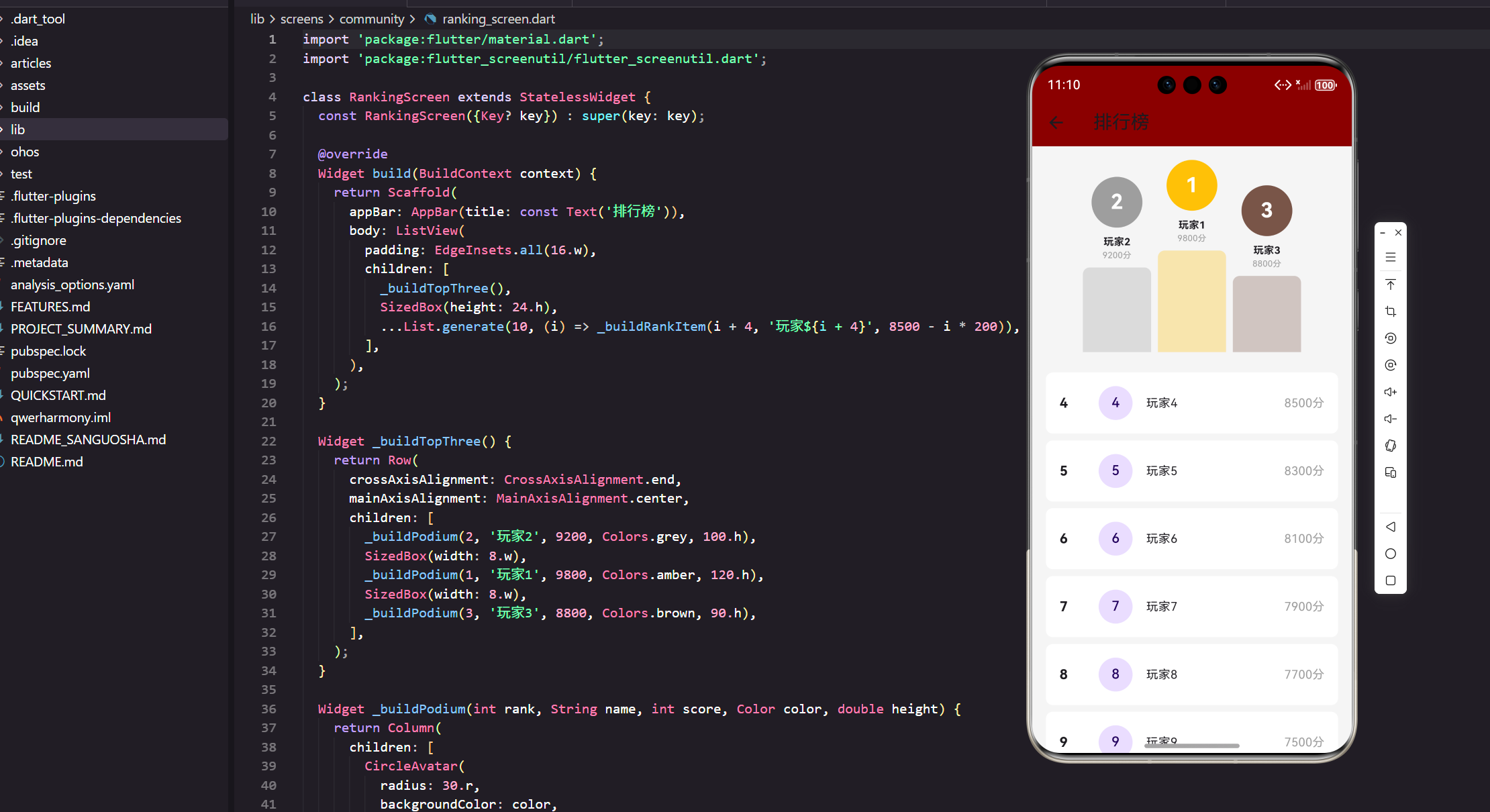
排行榜是游戏社区中激发用户竞争意识和参与热情的重要功能。本文将基于真实项目代码,详细实现一个视觉效果出色的排行榜系统,包括领奖台设计、排名列表、用户信息展示等核心功能。
功能设计分析
排行榜核心要素
我们的排行榜系统需要包含以下关键功能:
- 领奖台展示:突出显示前三名玩家
- 完整排名:展示所有玩家的排名信息
- 积分系统:显示玩家的具体得分
- 视觉层次:通过设计区分不同排名
- 用户头像:个性化的用户标识
- 响应式布局:适配不同屏幕尺寸
页面结构实现
基础框架搭建
import 'package:flutter/material.dart';
import 'package:flutter_screenutil/flutter_screenutil.dart';

class RankingScreen extends StatelessWidget {
  const RankingScreen({Key? key}) : super(key: key);
使用 StatelessWidget 实现排行榜页面,因为排行榜数据相对稳定,不需要频繁的状态变化。引入 flutter_screenutil 确保在不同设备上的完美显示效果。const 构造函数 提供了性能优化。
主体布局结构
Widget build(BuildContext context) {
return Scaffold(
appBar: AppBar(title: const Text('排行榜')),
body: ListView(
padding: EdgeInsets.all(16.w),
children: [
_buildTopThree(),
SizedBox(height: 24.h),
...List.generate(10, (i) => _buildRankItem(i + 4, '玩家${i + 4}', 8500 - i * 200)),
],
),
);
}
页面采用 ListView 作为主容器,首先展示前三名的领奖台,然后是其他排名的列表。使用 List.generate 动态生成排名数据,模拟真实的排行榜场景。SizedBox 在领奖台和列表间提供适当的间距分隔。
领奖台设计实现
前三名布局
Widget _buildTopThree() {
  return Row(
    crossAxisAlignment: CrossAxisAlignment.end,
    mainAxisAlignment: MainAxisAlignment.center,
    children: [
      _buildPodium(2, '玩家2', 9200, Colors.grey, 100.h),
      SizedBox(width: 8.w),
      _buildPodium(1, '玩家1', 9800, Colors.amber, 120.h),
      SizedBox(width: 8.w),
      _buildPodium(3, '玩家3', 8800, Colors.brown, 90.h),
    ],
  );
}
领奖台采用 Row 水平布局,crossAxisAlignment.end 让三个领奖台底部对齐,形成高低错落的视觉效果。中间的冠军位置最高(120.h),亚军次之(100.h),季军最低(90.h)。这种设计符合传统领奖台的视觉习惯。
单个领奖台实现
Widget _buildPodium(int rank, String name, int score, Color color, double height) {
  return Column(
    children: [
      CircleAvatar(
        radius: 30.r,
        backgroundColor: color,
        child: Text(
          '$rank',
          style: TextStyle(
            fontSize: 24.sp,
            fontWeight: FontWeight.bold,
            color: Colors.white
          )
        ),
      ),
      SizedBox(height: 8.h),
      Text(
        name,
        style: TextStyle(fontSize: 12.sp, fontWeight: FontWeight.bold)
      ),
      Text(
        '$score分',
        style: TextStyle(fontSize: 10.sp, color: Colors.grey)
      ),
每个领奖台使用 Column 垂直布局,顶部是圆形头像显示排名数字。CircleAvatar 使用不同颜色区分排名:金色代表冠军,灰色代表亚军,棕色代表季军。用户名使用粗体显示,积分用灰色小字显示,形成清晰的信息层次。
领奖台底座设计
SizedBox(height: 8.h),
Container(
  width: 80.w,
  height: height,
  decoration: BoxDecoration(
    color: color.withOpacity(0.3),
    borderRadius: BorderRadius.vertical(top: Radius.circular(8.r)),
  ),
),
领奖台底座使用 Container 实现,宽度固定为 80.w,高度根据排名动态调整。color.withOpacity(0.3) 创建半透明效果,与头像颜色保持一致但更加柔和。BorderRadius.vertical 只对顶部添加圆角,模拟真实领奖台的造型。
排名列表实现
列表项结构
Widget _buildRankItem(int rank, String name, int score) {
  return Container(
    margin: EdgeInsets.only(bottom: 8.h),
    padding: EdgeInsets.all(16.w),
    decoration: BoxDecoration(
      color: Colors.white,
      borderRadius: BorderRadius.circular(8.r),
    ),
排名列表项使用 白色卡片 设计,与背景形成对比。margin 在项目间提供间距,padding 确保内容有足够的内边距。圆角设计让整体界面更加现代化和友好。
排名信息布局
child: Row(
  children: [
    SizedBox(
      width: 30.w,
      child: Text(
        '$rank',
        style: TextStyle(fontSize: 16.sp, fontWeight: FontWeight.bold)
      ),
    ),
    SizedBox(width: 16.w),
    CircleAvatar(radius: 20.r, child: Text(name[2])),
    SizedBox(width: 16.w),
    Expanded(child: Text(name, style: TextStyle(fontSize: 14.sp))),
    Text('$score分', style: TextStyle(fontSize: 14.sp, color: Colors.grey)),
  ],
),
排名信息采用 左右布局:左侧是排名数字,中间是头像和用户名,右侧是积分。使用 SizedBox(width: 30.w) 为排名数字预留固定宽度,确保对齐效果。Expanded 让用户名占用剩余空间,积分右对齐显示。
头像系统设计
圆形头像实现
CircleAvatar(
  radius: 30.r,
  backgroundColor: color,
  child: Text(
    '$rank',
    style: TextStyle(
      fontSize: 24.sp,
      fontWeight: FontWeight.bold,
      color: Colors.white
    )
  ),
),
领奖台头像使用 CircleAvatar 组件,半径设置为 30.r 确保足够的显示空间。背景色根据排名动态变化,白色文字确保在任何背景色上都有良好的可读性。FontWeight.bold 让排名数字更加突出。
列表头像设计
CircleAvatar(radius: 20.r, child: Text(name[2])),
列表中的头像相对较小(20.r),显示用户名的最后一个字符作为简单的个人标识。这种设计在没有真实头像时提供了个性化的视觉元素。
颜色系统设计
排名颜色方案
_buildPodium(1, '玩家1', 9800, Colors.amber, 120.h),    // 金色 - 冠军
_buildPodium(2, '玩家2', 9200, Colors.grey, 100.h),     // 灰色 - 亚军
_buildPodium(3, '玩家3', 8800, Colors.brown, 90.h),     // 棕色 - 季军
颜色选择遵循传统的 奖牌色彩体系:金色代表第一名,银灰色代表第二名,铜棕色代表第三名。这种配色方案用户一看就能理解,符合普遍的认知习惯。
透明度处理
color: color.withOpacity(0.3),
领奖台底座使用 30%透明度 的颜色,既保持了与头像的色彩关联,又不会过于抢眼。这种处理方式让视觉重点仍然集中在头像和用户信息上。
数据展示优化
积分格式化
Text('$score分', style: TextStyle(fontSize: 10.sp, color: Colors.grey)),
Text('$score分', style: TextStyle(fontSize: 14.sp, color: Colors.grey)),
积分显示使用 灰色文字,表明这是辅助信息。领奖台使用较小字号(10.sp),列表中使用标准字号(14.sp),根据显示空间调整字体大小。
排名数字处理
SizedBox(
  width: 30.w,
  child: Text(
    '$rank',
    style: TextStyle(fontSize: 16.sp, fontWeight: FontWeight.bold)
  ),
),
排名数字使用 固定宽度容器,确保所有排名数字都能对齐显示。粗体字让排名更加醒目,16.sp 的字号在列表中有良好的可读性。
布局响应式设计
屏幕适配策略
padding: EdgeInsets.all(16.w),
margin: EdgeInsets.only(bottom: 8.h),
radius: 30.r,
fontSize: 24.sp,
width: 80.w,
height: height,
使用 flutter_screenutil 的适配单位确保在不同屏幕上的一致性。所有尺寸都使用相对单位,能够根据屏幕密度自动调整。这种适配方案在手机、平板等不同设备上都能提供良好的显示效果。
性能优化实现
列表生成优化
...List.generate(10, (i) => _buildRankItem(i + 4, '玩家${i + 4}', 8500 - i * 200)),
使用 List.generate 动态生成列表项,避免手动创建大量重复代码。这种方式既简洁又高效,便于后续扩展为真实数据源。
组件复用设计
Widget _buildPodium(int rank, String name, int score, Color color, double height) {
  // 可复用的领奖台组件
}

Widget _buildRankItem(int rank, String name, int score) {
  // 可复用的排名项组件
}
将领奖台和排名项封装为独立的方法,提高了代码的 可复用性和可维护性。这种设计让代码结构更加清晰,便于后续功能扩展。
交互功能扩展
点击事件处理
// 可扩展的点击功能
Widget _buildRankItem(int rank, String name, int score) {
  return GestureDetector(
    onTap: () {
      // 查看用户详情
      Navigator.push(context, MaterialPageRoute(
        builder: (context) => UserProfileScreen(userName: name)
      ));
    },
    child: Container(
      // 排名项内容
    ),
  );
}
通过添加 GestureDetector 可以实现点击查看用户详情的功能。这种扩展方式不会影响现有的布局和样式,保持了代码的整洁性。
刷新功能实现
// 下拉刷新功能
RefreshIndicator(
  onRefresh: () async {
    // 刷新排行榜数据
    await Future.delayed(Duration(seconds: 2));
    setState(() {
      // 更新数据
    });
  },
  child: ListView(
    // 列表内容
  ),
),
使用 RefreshIndicator 包装 ListView 可以实现下拉刷新功能,让用户能够获取最新的排行榜数据。
数据模型设计
排行榜数据结构
class RankingUser {
  final String id;
  final String name;
  final String avatar;
  final int score;
  final int rank;
  final int gamesPlayed;
  final double winRate;

  RankingUser({
    required this.id,
    required this.name,
    required this.avatar,
    required this.score,
    required this.rank,
    required this.gamesPlayed,
    required this.winRate,
  });

  factory RankingUser.fromJson(Map<String, dynamic> json) {
    return RankingUser(
      id: json['id'],
      name: json['name'],
      avatar: json['avatar'],
      score: json['score'],
      rank: json['rank'],
      gamesPlayed: json['gamesPlayed'],
      winRate: json['winRate'].toDouble(),
    );
  }
}
完整的数据模型包含了用户的所有排行榜相关信息,支持从 JSON 数据创建对象,便于与后端 API 集成。
动画效果增强
入场动画实现
// 添加渐入动画
AnimatedOpacity(
  opacity: 1.0,
  duration: Duration(milliseconds: 500),
  child: _buildPodium(rank, name, score, color, height),
),

// 添加滑入动画
SlideTransition(
  position: Tween<Offset>(
    begin: Offset(1.0, 0.0),
    end: Offset.zero,
  ).animate(CurvedAnimation(
    parent: animationController,
    curve: Curves.easeInOut,
  )),
  child: _buildRankItem(rank, name, score),
),
通过添加 动画效果 可以让排行榜的显示更加生动有趣,提升用户体验。渐入和滑入动画让内容出现更加自然。
总结
通过本文的实现,我们构建了一个视觉效果出色的排行榜系统。这个系统不仅提供了清晰的排名展示,还通过领奖台设计、颜色系统、响应式布局等多个方面的优化,为用户提供了优秀的视觉体验。
核心技术要点:
- 使用 Row 和 Column 实现复杂的领奖台布局
- 通过 CircleAvatar 创建个性化的用户头像
- 采用颜色系统区分不同的排名等级
- 运用 flutter_screenutil 实现完美的屏幕适配
- 通过组件封装提高代码的可复用性
这个排行榜系统有效激发了用户的竞争意识,提升了应用的用户粘性和活跃度。在下一篇文章中,我们将实现活动中心功能,为用户提供更多的参与机会。
欢迎加入开源鸿蒙跨平台社区:https://openharmonycrossplatform.csdn.net

腾讯云面向开发者汇聚海量精品云计算使用和开发经验,营造开放的云计算技术生态圈。
更多推荐
 13
13 0
0- 0


 已为社区贡献20条内容

所有评论(0)