Flutter 框架跨平台鸿蒙开发 - 陌生人晚安应用
运行效果图"陌生人晚安"是一款温暖治愈的社交应用,核心理念是每天随机匹配一个陌生人互道晚安。在这个快节奏的社会中,人们常常感到孤独,这款应用通过简单的晚安问候,让陌生人之间建立短暂而温暖的连接。应用以紫色为主色调,传递宁静、神秘、温暖的夜间氛围。用户每天可以随机匹配一个陌生人,查看对方的昵称、地区、个性签名等信息,然后向对方发送晚安问候。这种匿名、简单、纯粹的互动方式,让用户在繁忙的生活中感受到来
·
陌生人晚安应用
欢迎加入开源鸿蒙跨平台社区:
https://openharmonycrossplatform.csdn.net
一、项目概述
运行效果图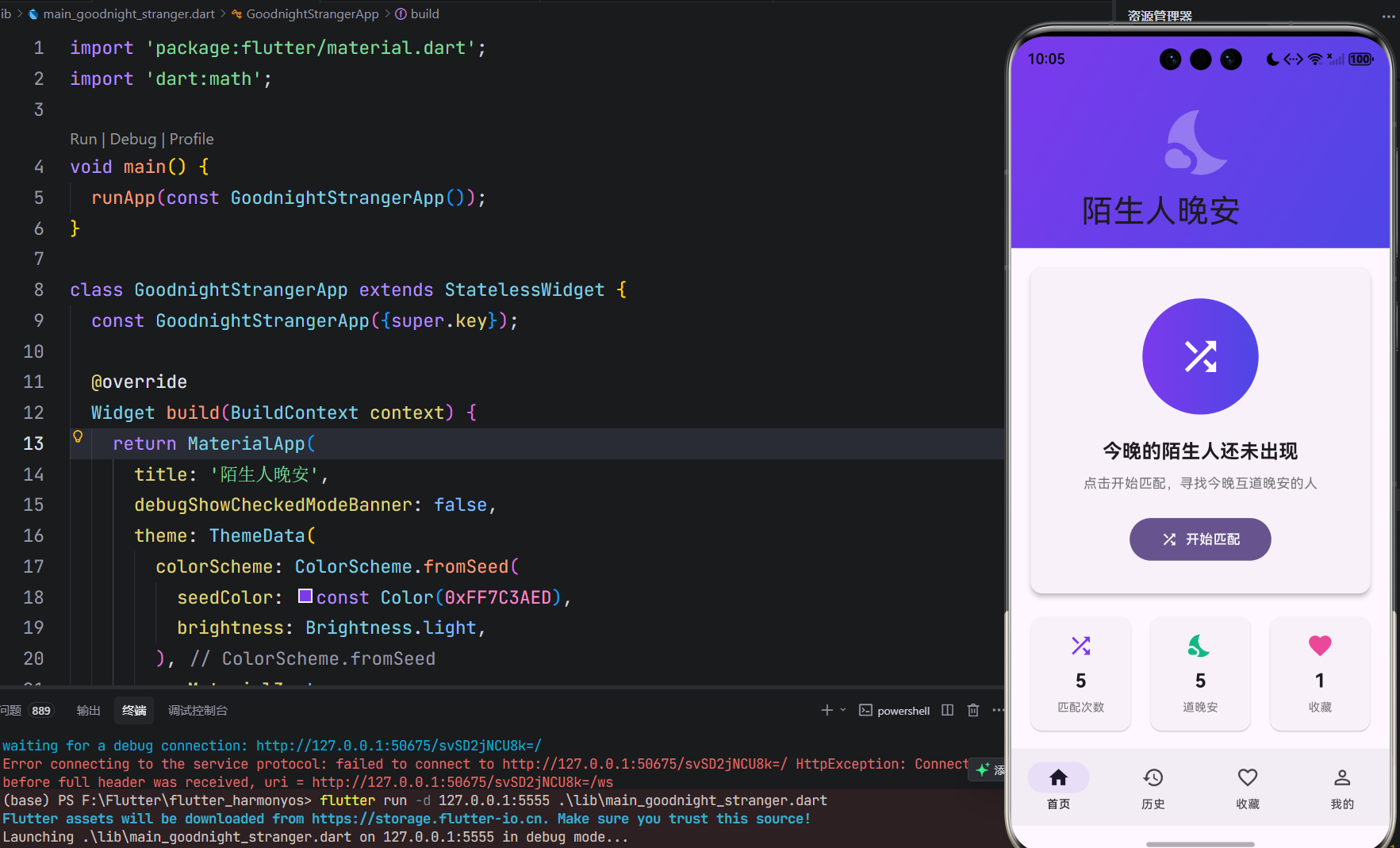
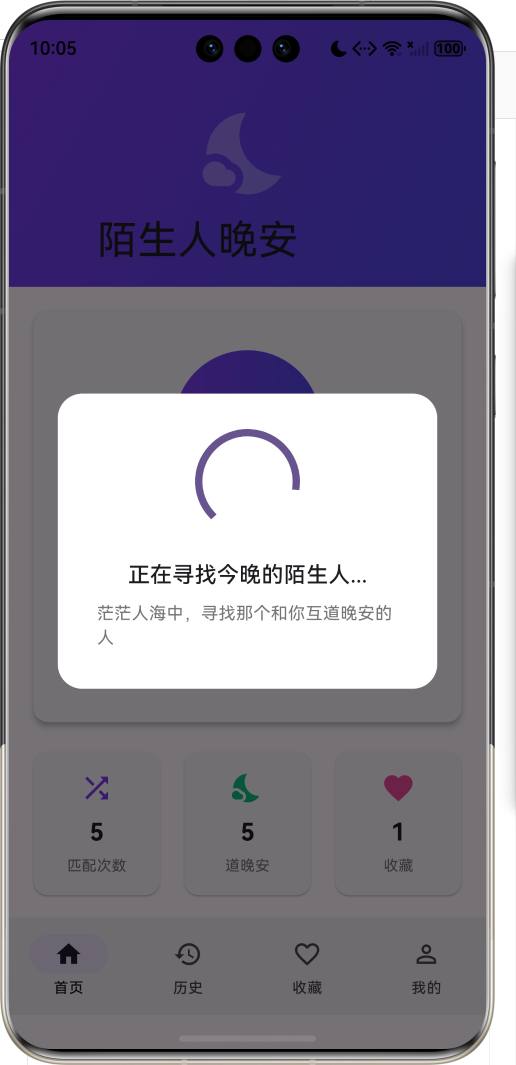
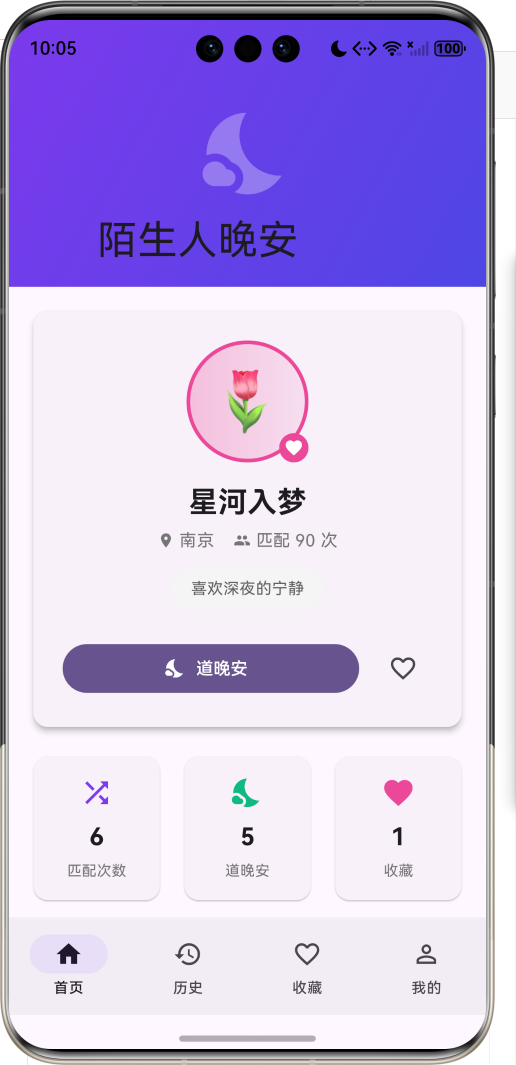
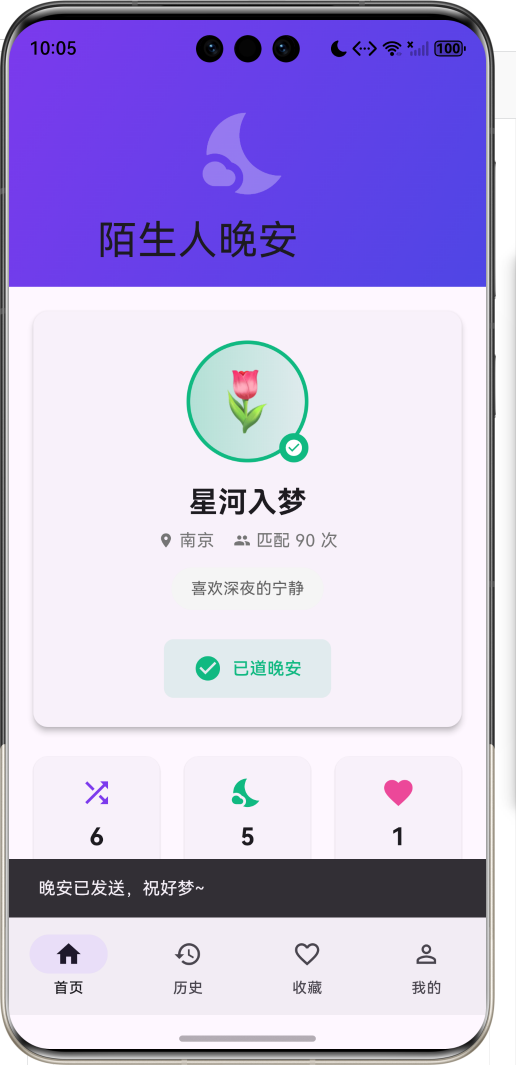
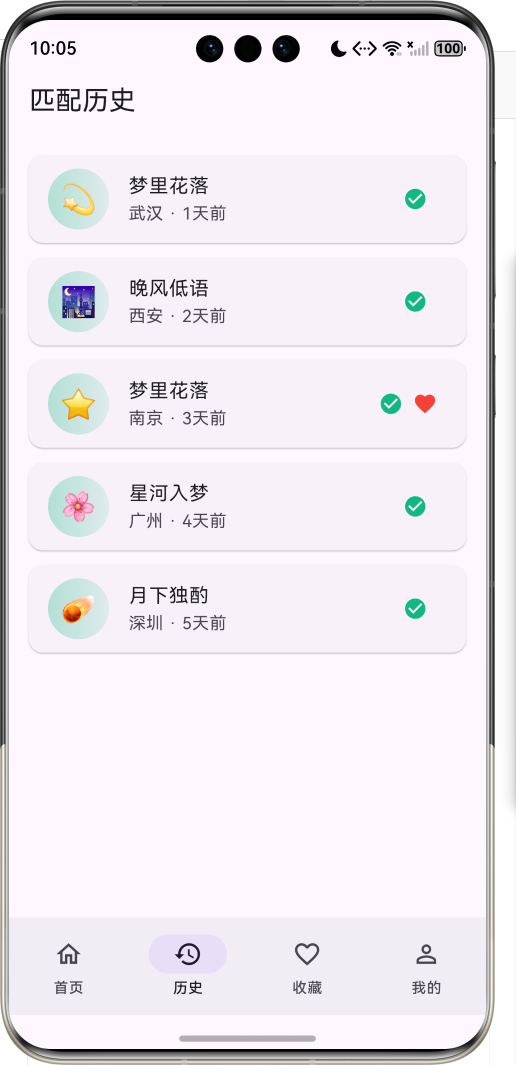
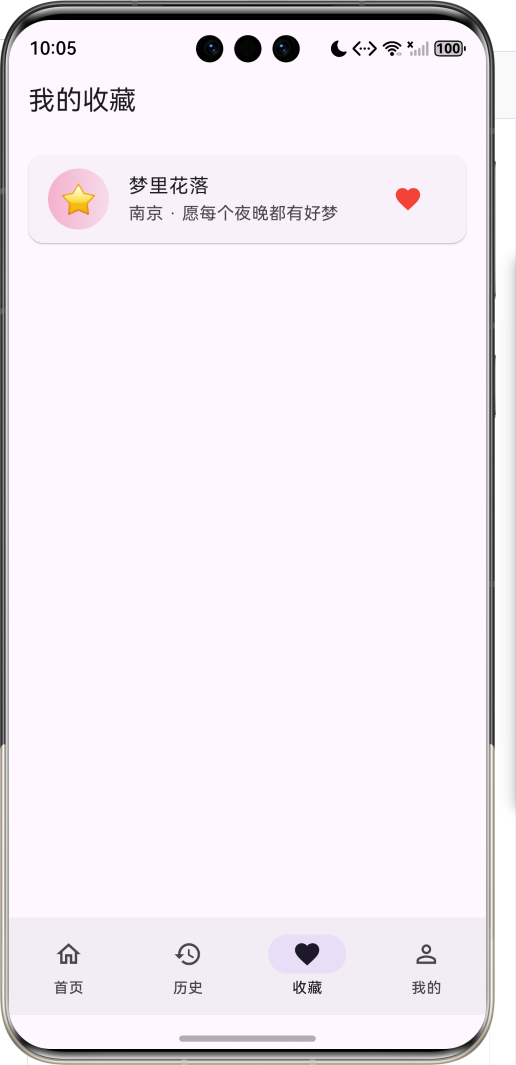
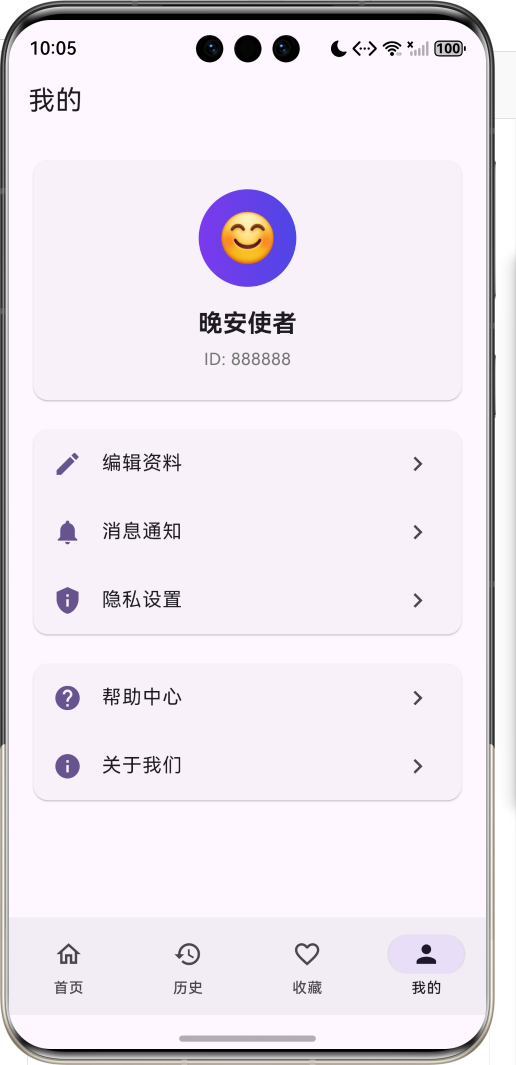
1.1 应用简介
"陌生人晚安"是一款温暖治愈的社交应用,核心理念是每天随机匹配一个陌生人互道晚安。在这个快节奏的社会中,人们常常感到孤独,这款应用通过简单的晚安问候,让陌生人之间建立短暂而温暖的连接。
应用以紫色为主色调,传递宁静、神秘、温暖的夜间氛围。用户每天可以随机匹配一个陌生人,查看对方的昵称、地区、个性签名等信息,然后向对方发送晚安问候。这种匿名、简单、纯粹的互动方式,让用户在繁忙的生活中感受到来自陌生人的温暖。
1.2 核心功能
| 功能模块 | 功能描述 | 实现方式 |
|---|---|---|
| 随机匹配 | 每天随机匹配一个陌生人 | Random + 模拟数据 |
| 道晚安 | 向匹配的陌生人发送晚安 | 按钮点击 + 状态更新 |
| 匹配历史 | 查看过往匹配记录 | ListView 列表展示 |
| 收藏功能 | 收藏喜欢的陌生人 | 心形按钮 + 列表管理 |
| 个人中心 | 查看统计和设置 | 卡片式布局 |
| 晚安语录 | 每日推送温暖语录 | 数组循环展示 |
1.3 匹配状态
| 序号 | 状态名称 | 图标 | 颜色 | 说明 |
|---|---|---|---|---|
| 1 | 等待匹配 | hourglass_empty | 橙色 #F59E0B | 正在寻找匹配对象 |
| 2 | 已匹配 | favorite | 粉色 #EC4899 | 匹配成功,可以道晚安 |
| 3 | 已道晚安 | check_circle | 绿色 #10B981 | 已发送晚安问候 |
| 4 | 收到晚安 | nights_stay | 紫色 #6366F1 | 收到对方的晚安 |
1.4 技术栈
| 技术领域 | 技术选型 | 版本要求 |
|---|---|---|
| 开发框架 | Flutter | >= 3.0.0 |
| 编程语言 | Dart | >= 2.17.0 |
| 设计规范 | Material Design 3 | - |
| 状态管理 | setState | - |
| 随机数据 | dart:math | - |
| 目标平台 | 鸿蒙OS / Android / iOS | API 21+ |
1.5 项目结构
lib/
└── main_goodnight_stranger.dart
    ├── GoodnightStrangerApp    # 应用入口
    ├── MatchStatus             # 匹配状态枚举
    ├── MessageType             # 消息类型枚举
    ├── Stranger                # 陌生人模型
    ├── GoodnightMessage        # 晚安消息模型
    ├── MatchRecord             # 匹配记录模型
    ├── GoodnightHomePage       # 主页面(底部导航)
    ├── MatchingDialog          # 匹配中弹窗
    ├── _buildHomePage          # 首页
    ├── _buildHistoryPage       # 历史页面
    ├── _buildFavoritesPage     # 收藏页面
    └── _buildProfilePage       # 个人中心
二、系统架构
2.1 整体架构图
2.2 类图设计
2.3 页面导航流程
2.4 匹配流程图
三、核心模块设计
3.1 数据模型设计
3.1.1 匹配状态枚举 (MatchStatus)
enum MatchStatus {
  waiting('等待匹配', Icons.hourglass_empty, Color(0xFFF59E0B)),
  matched('已匹配', Icons.favorite, Color(0xFFEC4899)),
  saidGoodnight('已道晚安', Icons.check_circle, Color(0xFF10B981)),
  received('收到晚安', Icons.nights_stay, Color(0xFF6366F1));

  final String label;
  final IconData icon;
  final Color color;
  const MatchStatus(this.label, this.icon, this.color);
}
3.1.2 陌生人模型 (Stranger)
class Stranger {
  final String id;
  final String nickname;
  final String avatar;
  final String region;
  final String bio;
  final int matchCount;
  final DateTime? lastActive;

  Stranger({
    required this.id,
    required this.nickname,
    required this.avatar,
    required this.region,
    required this.bio,
    this.matchCount = 0,
    this.lastActive,
  });
}
3.1.3 晚安消息模型 (GoodnightMessage)
class GoodnightMessage {
  final String id;
  final String senderId;
  final String receiverId;
  final String content;
  final MessageType type;
  final DateTime sentAt;
  final bool isRead;

  GoodnightMessage({
    required this.id,
    required this.senderId,
    required this.receiverId,
    required this.content,
    this.type = MessageType.text,
    required this.sentAt,
    this.isRead = false,
  });
}
3.1.4 匹配记录模型 (MatchRecord)
class MatchRecord {
  final String id;
  final Stranger stranger;
  final DateTime matchedAt;
  final MatchStatus status;
  final List<GoodnightMessage> messages;
  final bool isFavorite;

  MatchRecord({
    required this.id,
    required this.stranger,
    required this.matchedAt,
    this.status = MatchStatus.waiting,
    this.messages = const [],
    this.isFavorite = false,
  });
}
3.2 页面结构设计
3.2.1 主页面布局
3.2.2 首页结构
3.2.3 匹配历史页结构
3.3 匹配功能设计
四、UI设计规范
4.1 配色方案
应用采用紫色为主色调,传递宁静、神秘、温暖的夜间氛围:
| 颜色类型 | 色值 | 用途 |
|---|---|---|
| 主色 | #7C3AED (Purple) | 导航、强调元素 |
| 辅色 | #4F46E5 (Indigo) | 渐变背景 |
| 等待匹配 | #F59E0B (Amber) | 等待匹配状态 |
| 已匹配 | #EC4899 (Pink) | 匹配成功状态 |
| 已道晚安 | #10B981 (Emerald) | 完成状态 |
| 语录背景 | #F3E8FF (Light Purple) | 晚安语录卡片 |
4.2 字体规范
| 元素 | 字号 | 字重 | 颜色 |
|---|---|---|---|
| 应用标题 | 20px | Bold | #FFFFFF |
| 陌生人昵称 | 24px | Bold | #000000 |
| 地区信息 | 14px | Regular | #666666 |
| 个性签名 | 13px | Regular | #666666 |
| 统计数据 | 20px | Bold | #000000 |
| 语录标题 | 14px | Bold | #581C87 |
| 语录内容 | 13px | Regular | #6B21A8 |
4.3 组件规范
4.3.1 陌生人卡片
┌─────────────────────────────────────────┐
│                                         │
│         ┌─────────────┐                │
│         │   😊        │  状态角标      │
│         │  (头像)     │                │
│         └─────────────┘                │
│                                         │
│           月光漫步者                    │
│      📍 北京  ·  匹配 88 次            │
│                                         │
│    ┌─────────────────────────────┐     │
│    │   愿每个夜晚都有好梦        │     │
│    └─────────────────────────────┘     │
│                                         │
│    [    道晚安    ]  [♡]              │
│                                         │
└─────────────────────────────────────────┘
4.3.2 匹配按钮
┌─────────────────────────────────────────┐
│                                         │
│              ┌─────────┐               │
│              │  🔄     │               │
│              └─────────┘               │
│                                         │
│         今晚的陌生人还未出现            │
│    点击开始匹配,寻找今晚互道晚安的人   │
│                                         │
│         [    开始匹配    ]              │
│                                         │
└─────────────────────────────────────────┘
4.3.3 统计数据卡片
┌──────────┐  ┌──────────┐  ┌──────────┐
│    🔄    │  │   🌙     │  │    ♡     │
│    6     │  │    5     │  │    3     │
│  匹配次数 │  │  道晚安  │  │   收藏   │
└──────────┘  └──────────┘  └──────────┘
五、核心功能实现
5.1 随机匹配功能
void _startMatching() {
  setState(() => _todayMatch = null);

  final currentContext = context;

  // 显示匹配中弹窗
  showDialog(
    context: currentContext,
    barrierDismissible: false,
    builder: (context) => const MatchingDialog(),
  );

  // 2秒后完成匹配
  Future.delayed(const Duration(seconds: 2), () {
    if (currentContext.mounted) Navigator.pop(currentContext);

    final random = Random();
    final stranger = Stranger(
      id: 'stranger_${DateTime.now().millisecondsSinceEpoch}',
      nickname: _nicknames[random.nextInt(_nicknames.length)],
      avatar: _avatars[random.nextInt(_avatars.length)],
      region: _regions[random.nextInt(_regions.length)],
      bio: _bios[random.nextInt(_bios.length)],
      matchCount: random.nextInt(100) + 1,
      lastActive: DateTime.now(),
    );

    setState(() {
      _todayMatch = MatchRecord(
        id: 'match_${DateTime.now().millisecondsSinceEpoch}',
        stranger: stranger,
        matchedAt: DateTime.now(),
        status: MatchStatus.matched,
      );
    });
  });
}
5.2 发送晚安功能
void _sendGoodnight() {
  if (_todayMatch == null) return;

  final message = GoodnightMessage(
    id: 'msg_${DateTime.now().millisecondsSinceEpoch}',
    senderId: 'me',
    receiverId: _todayMatch!.stranger.id,
    content: '晚安,陌生人~',
    sentAt: DateTime.now(),
  );

  setState(() {
    _todayMatch = MatchRecord(
      id: _todayMatch!.id,
      stranger: _todayMatch!.stranger,
      matchedAt: _todayMatch!.matchedAt,
      status: MatchStatus.saidGoodnight,
      messages: [..._todayMatch!.messages, message],
      isFavorite: _todayMatch!.isFavorite,
    );
  });

  ScaffoldMessenger.of(context).showSnackBar(
    const SnackBar(content: Text('晚安已发送,祝好梦~')),
  );
}
5.3 收藏功能
void _toggleFavorite() {
  if (_todayMatch == null) return;

  setState(() {
    final isFav = !_todayMatch!.isFavorite;
    _todayMatch = MatchRecord(
      id: _todayMatch!.id,
      stranger: _todayMatch!.stranger,
      matchedAt: _todayMatch!.matchedAt,
      status: _todayMatch!.status,
      messages: _todayMatch!.messages,
      isFavorite: isFav,
    );

    if (isFav) {
      _favorites.add(_todayMatch!.stranger);
    } else {
      _favorites.removeWhere((s) => s.id == _todayMatch!.stranger.id);
    }
  });
}
5.4 匹配中弹窗
class MatchingDialog extends StatelessWidget {
const MatchingDialog({super.key});
Widget build(BuildContext context) {
return Dialog(
backgroundColor: Colors.transparent,
child: Container(
padding: const EdgeInsets.all(32),
decoration: BoxDecoration(
color: Colors.white,
borderRadius: BorderRadius.circular(20),
),
child: Column(
mainAxisSize: MainAxisSize.min,
children: [
const SizedBox(
width: 80, height: 80,
child: CircularProgressIndicator(strokeWidth: 6),
),
const SizedBox(height: 24),
const Text('正在寻找今晚的陌生人...',
style: TextStyle(fontSize: 18, fontWeight: FontWeight.w500)),
const SizedBox(height: 8),
Text('茫茫人海中,寻找那个和你互道晚安的人',
style: TextStyle(fontSize: 14, color: Colors.grey[600])),
],
),
),
);
}
}
六、状态管理流程
6.1 匹配状态流转
6.2 收藏状态流转
七、扩展功能规划
7.1 后续版本规划
7.2 功能扩展建议
7.2.1 语音晚安
- 支持录制语音晚安消息
- 语音播放功能
- 语音消息列表
7.2.2 双向匹配
- 双方同时在线时才能匹配
- 实时匹配状态显示
- 匹配成功后即时互动
7.2.3 匿名聊天
- 匹配成功后可以短暂聊天
- 限时聊天窗口(5分钟)
- 聊天内容不保存
八、注意事项
8.1 开发注意事项
- 异步操作:使用
context.mounted检查避免 async gaps 问题 - 状态更新:修改状态后需要调用
setState刷新UI - 数据验证:确保陌生人数据完整后再显示
- 空状态处理:列表为空时显示友好的空状态提示
8.2 常见问题
| 问题 | 原因 | 解决方案 |
|---|---|---|
| 匹配弹窗不关闭 | context 失效 | 使用 mounted 检查 |
| 收藏状态不同步 | 状态未更新 | 检查 setState 调用 |
| 历史记录不显示 | 数据为空 | 添加空状态处理 |
| 统计数据错误 | 计算逻辑错误 | 检查过滤条件 |
8.3 使用提示
🌙 晚安小贴士 🌙
每晚22:00-24:00是匹配高峰期
保持真诚,用温暖的话语打动对方
尊重每一位陌生人,传递正能量
九、运行说明
9.1 环境要求
| 环境 | 版本要求 |
|---|---|
| Flutter SDK | >= 3.0.0 |
| Dart SDK | >= 2.17.0 |
| 鸿蒙OS | API 21+ |
9.2 运行命令
# 查看可用设备
flutter devices

# 运行到Web服务器
flutter run -d web-server -t lib/main_goodnight_stranger.dart --web-port 8098

# 运行到鸿蒙设备
flutter run -d 127.0.0.1:5555 lib/main_goodnight_stranger.dart

# 运行到Windows
flutter run -d windows -t lib/main_goodnight_stranger.dart

# 代码分析
flutter analyze lib/main_goodnight_stranger.dart
十、总结
"陌生人晚安"应用通过创新的随机匹配机制,让陌生人之间建立温暖的连接。应用采用 Flutter + Material Design 3 技术栈,具有简洁美观的界面和流畅的交互体验。核心功能包括随机匹配、道晚安、匹配历史和收藏功能,通过简单的互动传递温暖。
技术亮点
- 创新的社交理念:匿名、简单、纯粹的晚安问候
- 精美的UI设计:紫色主题传递夜间温暖氛围
- 流畅的匹配体验:匹配动画 + 随机数据生成
- 完整的状态管理:四种匹配状态清晰展示
- 贴心的用户体验:每日语录 + 统计数据
核心代码文件
- [main_goodnight_stranger.dart](file:///f:/Flutter/flutter_harmonyos/lib/main_goodnight_stranger.dart) - 完整应用代码
用一句晚安,温暖彼此的心

腾讯云面向开发者汇聚海量精品云计算使用和开发经验,营造开放的云计算技术生态圈。
更多推荐
 10
10 0
0- 0


 已为社区贡献16条内容

所有评论(0)