Flutter 框架跨平台鸿蒙开发 - 时间压缩器应用
摘要: 时间压缩器是一款基于心流理论的专注计时应用,通过科学的专注模式设计,帮助用户在深度专注状态下实现时间感知压缩。应用包含专注计时、统计分析、历史记录和设置中心四大模块,提供四种专注模式(深度/中度/轻度/快速)及八种环境音效选择。采用Flutter框架开发,支持鸿蒙OS/Web平台,通过计时管理、状态管理和统计计算实现高效专注体验,让1小时专注感觉像10分钟。
欢迎加入开源鸿蒙跨平台社区:
https://openharmonycrossplatform.csdn.net
一、项目概述
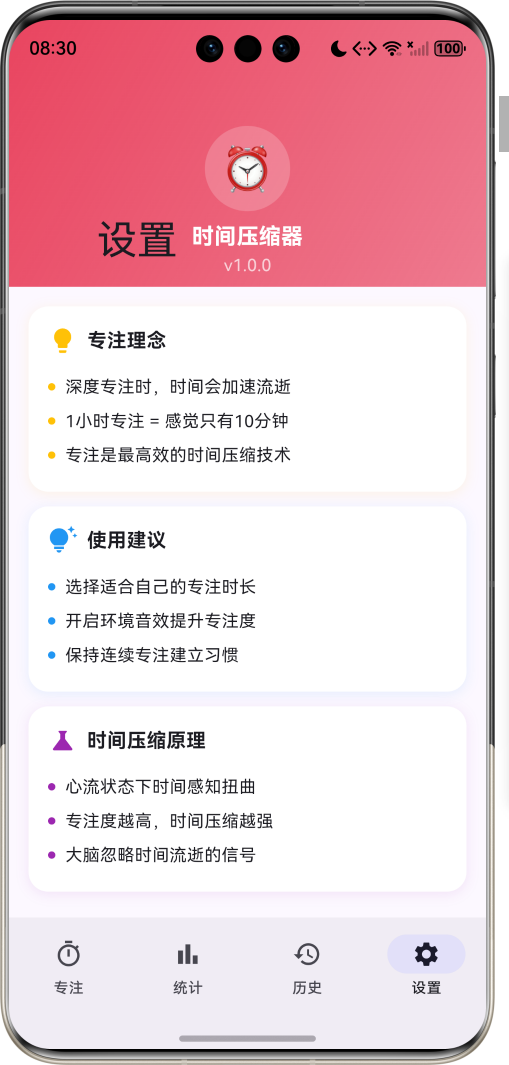
运行效果图
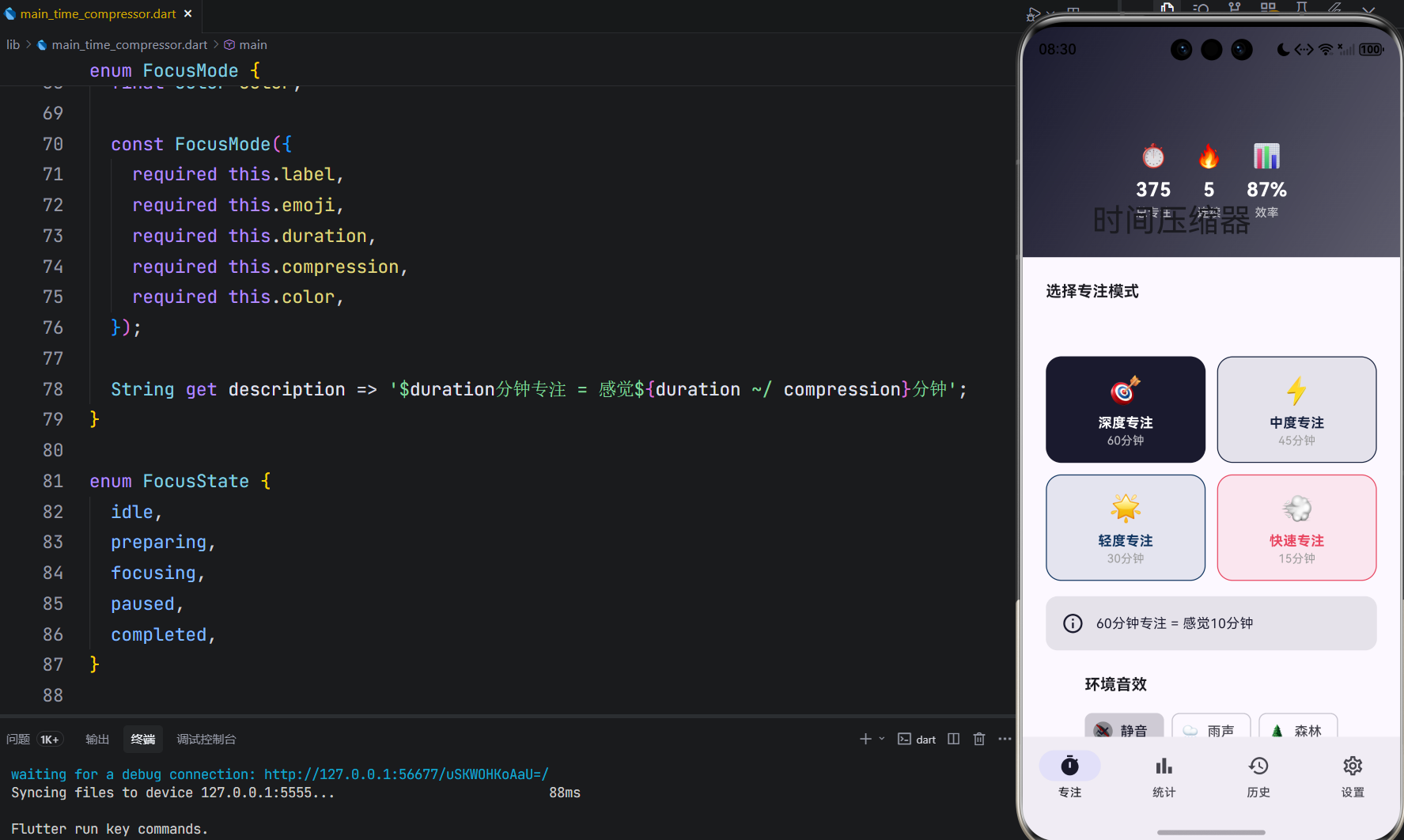
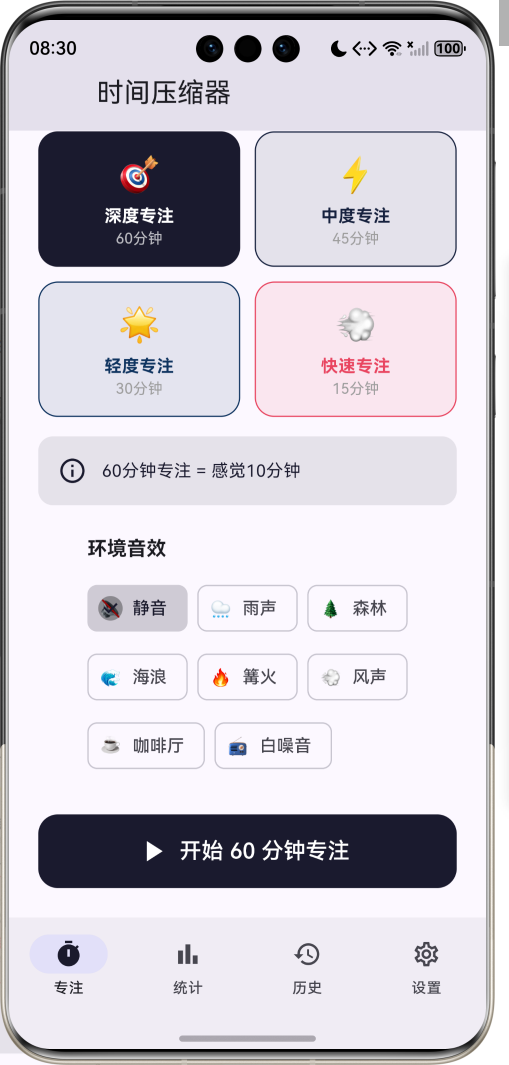
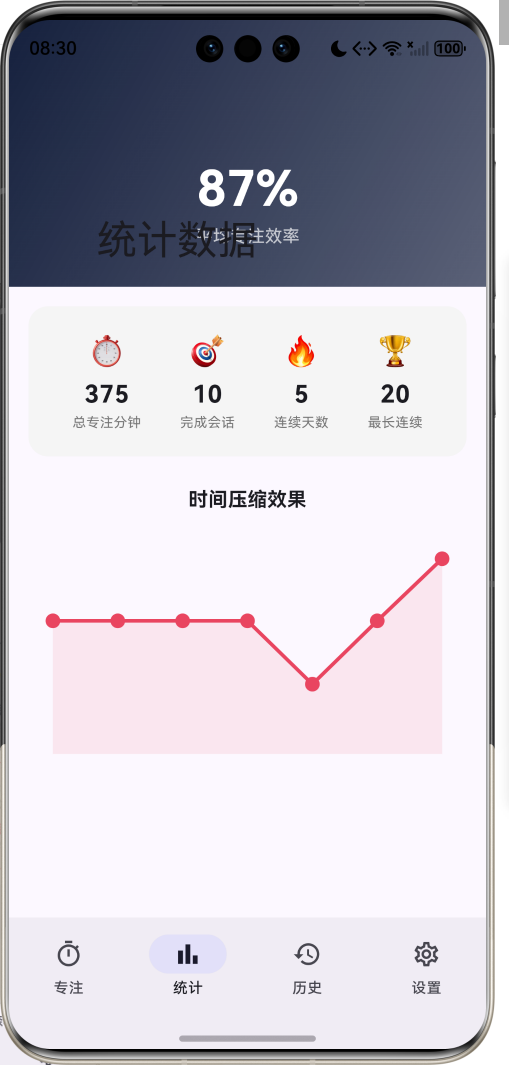
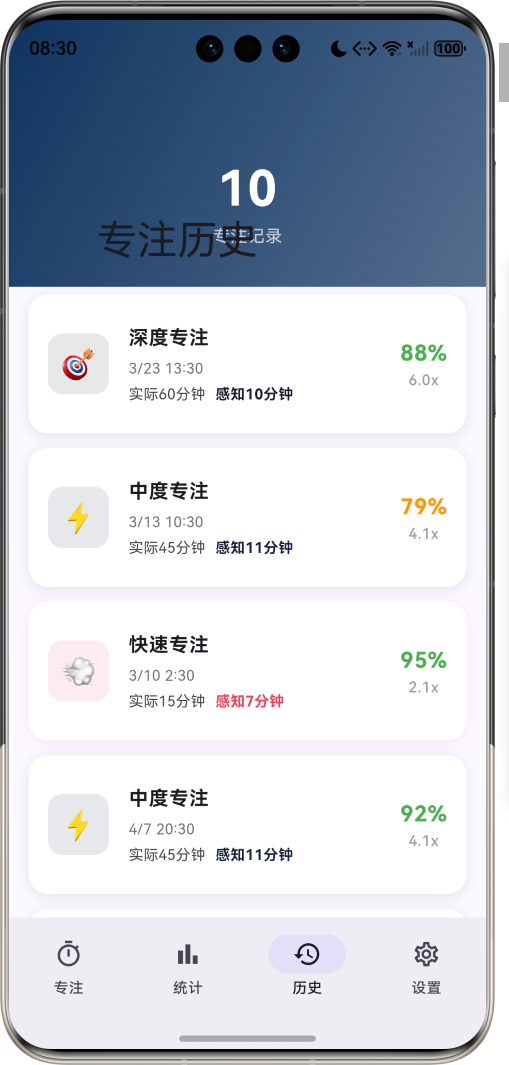
1.1 应用简介
时间压缩器是一款基于心流理论的专注计时应用。它利用心理学中的时间感知扭曲现象,帮助用户在深度专注状态下,让1小时感觉像10分钟一样短暂。通过科学的专注模式设计,用户可以体验到"时间压缩"的神奇效果,大幅提升专注效率。
应用以深邃的夜空蓝为主色调,象征专注时的沉浸状态。涵盖专注计时、统计分析、历史记录、设置中心四大模块。用户可以选择不同的专注模式,配合环境音效,进入深度专注状态,实现时间感知的压缩。
1.2 核心功能
| 功能模块 | 功能描述 | 实现方式 |
|---|---|---|
| 专注计时 | 多模式专注计时 | Timer + Animation |
| 时间压缩 | 感知时间与实际时间对比 | 计算算法 |
| 环境音效 | 专注时播放背景音 | 音频播放 |
| 统计分析 | 专注数据可视化 | CustomPainter |
| 历史记录 | 查看过往专注会话 | 列表管理 |
| 连续打卡 | 激励持续专注 | 状态追踪 |
1.3 专注模式定义
| 序号 | 模式名称 | Emoji | 时长 | 压缩比 | 颜色 | 描述 |
|---|---|---|---|---|---|---|
| 1 | 深度专注 | 🎯 | 60分钟 | 6x | #1A1A2E | 1小时感觉像10分钟 |
| 2 | 中度专注 | ⚡ | 45分钟 | 4x | #16213E | 45分钟感觉像11分钟 |
| 3 | 轻度专注 | 🌟 | 30分钟 | 3x | #0F3460 | 30分钟感觉像10分钟 |
| 4 | 快速专注 | 💨 | 15分钟 | 2x | #E94560 | 15分钟感觉像7分钟 |
1.4 环境音效分类
| 序号 | 音效名称 | Emoji | 图标 | 适用场景 |
|---|---|---|---|---|
| 1 | 静音 | 🔇 | volume_off | 安静环境 |
| 2 | 雨声 | 🌧️ | water_drop | 放松专注 |
| 3 | 森林 | 🌲 | forest | 自然沉浸 |
| 4 | 海浪 | 🌊 | waves | 深度放松 |
| 5 | 篝火 | 🔥 | local_fire_department | 温暖氛围 |
| 6 | 风声 | 💨 | air | 轻柔背景 |
| 7 | 咖啡厅 | ☕ | coffee | 社交氛围 |
| 8 | 白噪音 | 📻 | radio | 屏蔽干扰 |
1.5 专注状态定义
| 序号 | 状态名称 | 描述 |
|---|---|---|
| 1 | 空闲 | 未开始专注 |
| 2 | 准备中 | 即将开始专注 |
| 3 | 专注中 | 正在计时 |
| 4 | 已暂停 | 暂停计时 |
| 5 | 已完成 | 专注结束 |
1.6 技术栈
| 技术领域 | 技术选型 | 版本要求 |
|---|---|---|
| 开发框架 | Flutter | >= 3.0.0 |
| 编程语言 | Dart | >= 2.17.0 |
| 设计规范 | Material Design 3 | - |
| 动画控制 | AnimationController | - |
| 图表绘制 | CustomPainter | - |
| 状态管理 | setState | - |
| 触觉反馈 | HapticFeedback | - |
| 目标平台 | 鸿蒙OS / Web | API 21+ |
1.7 项目结构
lib/
└── main_time_compressor.dart
    ├── TimeCompressorApp           # 应用入口
    ├── FocusMode                   # 专注模式枚举
    ├── FocusState                  # 专注状态枚举
    ├── AmbientSound                # 环境音效枚举
    ├── FocusSession                # 专注会话模型
    ├── TimeCompressorHomePage      # 主页面(底部导航)
    ├── _buildFocusPage             # 专注计时页面
    ├── _buildStatsPage             # 统计分析页面
    ├── _buildHistoryPage           # 历史记录页面
    ├── _buildSettingsPage          # 设置中心页面
    ├── ProgressRingPainter         # 进度环绘制器
    └── CompressionChartPainter     # 压缩效果图表绘制器
二、系统架构
2.1 整体架构图
2.2 类图设计
2.3 页面导航流程
2.4 专注会话流程
三、核心模块设计
3.1 数据模型设计
3.1.1 专注模式枚举 (FocusMode)
enum FocusMode {
  deepFocus(label: '深度专注', emoji: '🎯', duration: 60, compression: 6, color: Color(0xFF1A1A2E)),
  moderateFocus(label: '中度专注', emoji: '⚡', duration: 45, compression: 4, color: Color(0xFF16213E)),
  lightFocus(label: '轻度专注', emoji: '🌟', duration: 30, compression: 3, color: Color(0xFF0F3460)),
  quickFocus(label: '快速专注', emoji: '💨', duration: 15, compression: 2, color: Color(0xFFE94560));

  final String label;
  final String emoji;
  final int duration;       // 实际时长(分钟)
  final int compression;    // 压缩倍数
  final Color color;

  String get description => '$duration分钟专注 = 感觉${duration ~/ compression}分钟';
}
3.1.2 环境音效枚举 (AmbientSound)
enum AmbientSound {
  silence(label: '静音', emoji: '🔇', icon: Icons.volume_off),
  rain(label: '雨声', emoji: '🌧️', icon: Icons.water_drop),
  forest(label: '森林', emoji: '🌲', icon: Icons.forest),
  ocean(label: '海浪', emoji: '🌊', icon: Icons.waves),
  fire(label: '篝火', emoji: '🔥', icon: Icons.local_fire_department),
  wind(label: '风声', emoji: '💨', icon: Icons.air),
  cafe(label: '咖啡厅', emoji: '☕', icon: Icons.coffee),
  whiteNoise(label: '白噪音', emoji: '📻', icon: Icons.radio);

  final String label;
  final String emoji;
  final IconData icon;
}
3.1.3 专注会话模型 (FocusSession)
class FocusSession {
  final String id;
  final FocusMode mode;
  final DateTime startTime;
  final DateTime endTime;
  final int actualDuration;      // 实际时长(分钟)
  final int perceivedDuration;   // 感知时长(分钟)
  final double focusScore;       // 专注评分 0-1
  final int interruptions;       // 中断次数
  final AmbientSound ambientSound;
  final String? note;

  double get compressionRatio => actualDuration / perceivedDuration;
}
3.1.4 时间压缩效果分布
3.2 页面结构设计
3.2.1 主页面布局
3.2.2 专注计时页结构
3.2.3 专注计时界面结构
3.2.4 统计分析页结构
3.3 时间压缩算法
3.4 专注状态流转
四、UI设计规范
4.1 配色方案
应用以深邃的夜空蓝为主色调,象征专注时的沉浸状态:
| 颜色类型 | 色值 | 用途 |
|---|---|---|
| 主色 | #1A1A2E (Dark Blue) | 深度专注模式 |
| 辅助色 | #16213E (Navy) | 中度专注模式 |
| 第三色 | #0F3460 (Deep Blue) | 轻度专注模式 |
| 强调色 | #E94560 (Red Pink) | 快速专注模式 |
| 背景色 | #ECEFF1 | 页面背景 |
| 卡片背景 | #FFFFFF | 会话卡片 |
4.2 模式配色
| 专注模式 | 色值 | 视觉效果 |
|---|---|---|
| 深度专注 | #1A1A2E | 深邃神秘 |
| 中度专注 | #16213E | 沉稳专注 |
| 轻度专注 | #0F3460 | 清新平静 |
| 快速专注 | #E94560 | 活力激发 |
4.3 字体规范
| 元素 | 字号 | 字重 | 颜色 |
|---|---|---|---|
| 页面标题 | 24px | Bold | 主色 |
| 计时数字 | 48px | Bold | 白色 |
| 模式名称 | 14px | Bold | 模式色 |
| 统计数字 | 20px | Bold | 黑色 |
| 标签文字 | 12px | Regular | 灰色 |
4.4 组件规范
4.4.1 模式选择卡片
┌─────────────────────────────────────┐
│              🎯                      │
│           深度专注                   │
│           60分钟                     │
└─────────────────────────────────────┘
4.4.2 专注计时器
┌─────────────────────────────────────────────────────┐
│                                                     │
│                    ╭─────────╮                      │
│                   ╱           ╲                     │
│                  │     🎯     │                     │
│                  │   45:30    │                     │
│                  │  深度专注  │                     │
│                   ╲           ╱                     │
│                    ╰─────────╯                      │
│                                                     │
└─────────────────────────────────────────────────────┘
4.4.3 感知信息卡片
┌─────────────────────────────────────────────────────┐
│                                                     │
│   ⏰ 实际时间          │        🧠 感知时间         │
│       15:30           │           02:35             │
│                                                     │
│           时间压缩率: 6x                            │
│                                                     │
└─────────────────────────────────────────────────────┘
4.4.4 会话卡片
┌──────────────────────────────────────────────────────┐
│  ┌────┐                              ┌──────────┐   │
│  │ 🎯 │  深度专注                    │   85%    │   │
│  │    │  12/15 14:30                │   6.0x   │   │
│  └────┘  实际60分钟 感知10分钟       └──────────┘   │
└──────────────────────────────────────────────────────┘
五、核心功能实现
5.1 计时器实现
void _startFocusSession() {
  setState(() {
    _focusState = FocusState.focusing;
    _remainingSeconds = _selectedMode.duration * 60;
    _perceivedSeconds = 0;
    _focusProgress = 0.0;
  });

  _focusTimer = Timer.periodic(const Duration(seconds: 1), (timer) {
    setState(() {
      _remainingSeconds--;
      _focusProgress = 1 - (_remainingSeconds / (_selectedMode.duration * 60));
      _perceivedSeconds = (_focusProgress * _selectedMode.duration * 60 /
                           _selectedMode.compression).round();
    });

    if (_remainingSeconds <= 0) {
      _completeFocusSession();
    }
  });
}
5.2 时间压缩计算
// 感知时间 = 实际时间 / 压缩比
int get perceivedDuration => actualDuration ~/ compression;

// 压缩率 = 实际时间 / 感知时间
double get compressionRatio => actualDuration / perceivedDuration;
5.3 完成会话实现
void _completeFocusSession() {
  _focusTimer?.cancel();

  final session = FocusSession(
    id: 'session_${DateTime.now().millisecondsSinceEpoch}',
    mode: _selectedMode,
    startTime: DateTime.now().subtract(Duration(minutes: _selectedMode.duration)),
    endTime: DateTime.now(),
    actualDuration: _selectedMode.duration,
    perceivedDuration: _selectedMode.duration ~/ _selectedMode.compression,
    focusScore: 0.85 + Random().nextDouble() * 0.15,
    ambientSound: _selectedSound,
  );

  setState(() {
    _focusState = FocusState.completed;
    _sessions.insert(0, session);
    _totalFocusMinutes += _selectedMode.duration;
    _totalSessions++;
    _currentStreak++;
  });
}
5.4 进度环绘制
class ProgressRingPainter extends CustomPainter {
final double progress;
final Color color;
void paint(Canvas canvas, Size size) {
final center = Offset(size.width / 2, size.height / 2);
final radius = size.width / 2 - 10;
// 背景环
canvas.drawCircle(center, radius, backgroundPaint);
// 进度环
final sweepAngle = 2 * pi * progress;
canvas.drawArc(
Rect.fromCircle(center: center, radius: radius),
-pi / 2,
sweepAngle,
false,
progressPaint,
);
}
}
5.5 压缩效果图表
class CompressionChartPainter extends CustomPainter {
final List<FocusSession> sessions;
void paint(Canvas canvas, Size size) {
final recentSessions = sessions.take(7).toList().reversed.toList();
final maxRatio = recentSessions.map((s) => s.compressionRatio).reduce(max);
final path = Path();
final stepX = (size.width - 40) / (recentSessions.length - 1);
for (var i = 0; i < recentSessions.length; i++) {
final x = 20 + i * stepX;
final y = size.height - 20 -
(recentSessions[i].compressionRatio / maxRatio) * (size.height - 40);
if (i == 0) {
path.moveTo(x, y);
} else {
path.lineTo(x, y);
}
}
canvas.drawPath(path, paint);
}
}
六、交互设计
6.1 专注开始流程
6.2 专注控制流程
6.3 触觉反馈设计
七、扩展功能规划
7.1 后续版本规划
7.2 功能扩展建议
7.2.1 环境音效播放
音频功能:
- 集成音频播放器
- 支持自定义音效
- 音量调节
- 混音播放
7.2.2 自定义专注时长
个性化功能:
- 自定义专注时长
- 自定义压缩比
- 保存个人偏好
- 快速启动模板
7.2.3 番茄钟模式
番茄工作法:
- 25分钟专注 + 5分钟休息
- 自动循环
- 长休息提醒
- 统计分析
八、注意事项
8.1 开发注意事项
-
计时器管理:专注计时器需要在 dispose 时正确取消,避免内存泄漏
-
状态同步:专注状态变化时需要同步更新界面和动画
-
触觉反馈:关键操作添加触觉反馈,提升用户体验
-
动画控制:专注时的脉冲动画需要正确启动和停止
-
数据持久化:专注会话数据需要本地存储
8.2 常见问题
| 问题 | 原因 | 解决方案 |
|---|---|---|
| 计时不准确 | Timer 精度问题 | 使用 Stopwatch 校准 |
| 动画卡顿 | 帧率过低 | 优化动画性能 |
| 状态混乱 | 状态切换逻辑错误 | 检查状态流转 |
| 进度环不更新 | shouldRepaint 返回错误 | 正确实现判断逻辑 |
| 震动不生效 | 权限未获取 | 添加震动权限 |
8.3 设计理念
⏰ 时间压缩器理念 ⏰
在深度专注的状态下,
时间会以不同的速度流逝。
心理学研究表明,
当我们全神贯注时,
大脑会忽略时间流逝的信号。
1小时的深度专注,
可能感觉只有10分钟。
这不是魔法,
而是心流的力量。
专注,是最好的时间压缩技术
九、运行说明
9.1 环境要求
| 环境 | 版本要求 |
|---|---|
| Flutter SDK | >= 3.0.0 |
| Dart SDK | >= 2.17.0 |
| 鸿蒙OS | API 21+ |
9.2 运行命令
# 查看可用设备
flutter devices

# 运行到Web服务器
flutter run -d web-server -t lib/main_time_compressor.dart --web-port 8130

# 运行到鸿蒙设备
flutter run -d 127.0.0.1:5555 lib/main_time_compressor.dart

# 运行到Windows
flutter run -d windows -t lib/main_time_compressor.dart

# 代码分析
flutter analyze lib/main_time_compressor.dart
十、总结
时间压缩器应用通过专注计时、时间压缩、统计分析、历史记录四大模块,为用户提供了一个独特的专注体验平台。应用基于心流理论,利用时间感知扭曲现象,帮助用户在深度专注状态下体验"时间压缩"的神奇效果。
核心功能涵盖多模式专注计时、双时间显示、压缩效果统计、触觉反馈四大模块。专注计时系统支持四种不同时长和压缩比的模式;双时间显示让用户直观感受时间压缩效果;统计分析提供压缩率图表和效率数据;触觉反馈增强操作体验。
应用采用 Material Design 3 设计规范,以深邃的夜空蓝为主色调,象征专注时的沉浸状态。通过本应用,希望能够帮助用户提升专注效率,体验时间压缩的神奇效果。

腾讯云面向开发者汇聚海量精品云计算使用和开发经验,营造开放的云计算技术生态圈。
更多推荐
 8
8 0
0- 0


 已为社区贡献30条内容

所有评论(0)