Flutter三方库适配OpenHarmony【flutter_libphonenumber】——CountryManager 国家列表管理与缓存机制
本文深入解析了Flutter三方库flutter_libphonenumber中的CountryManager单例管理类,该组件作为数据中枢负责缓存和管理国家电话代码数据。文章从架构定位、源码实现、设计模式三个方面展开分析:首先介绍其作为init()与同步API桥梁的核心角色;随后逐行解读约30行精简源码,重点剖析工厂单例模式的三个关键要素(工厂构造、私有构造、静态实例);最后详细讲解loadCo
前言
欢迎来到 Flutter三方库适配OpenHarmony 系列文章!本系列围绕 flutter_libphonenumber 这个 电话号码处理库 的鸿蒙平台适配,进行全面深入的技术分享。
欢迎加入开源鸿蒙跨平台社区:https://openharmonycrossplatform.csdn.net
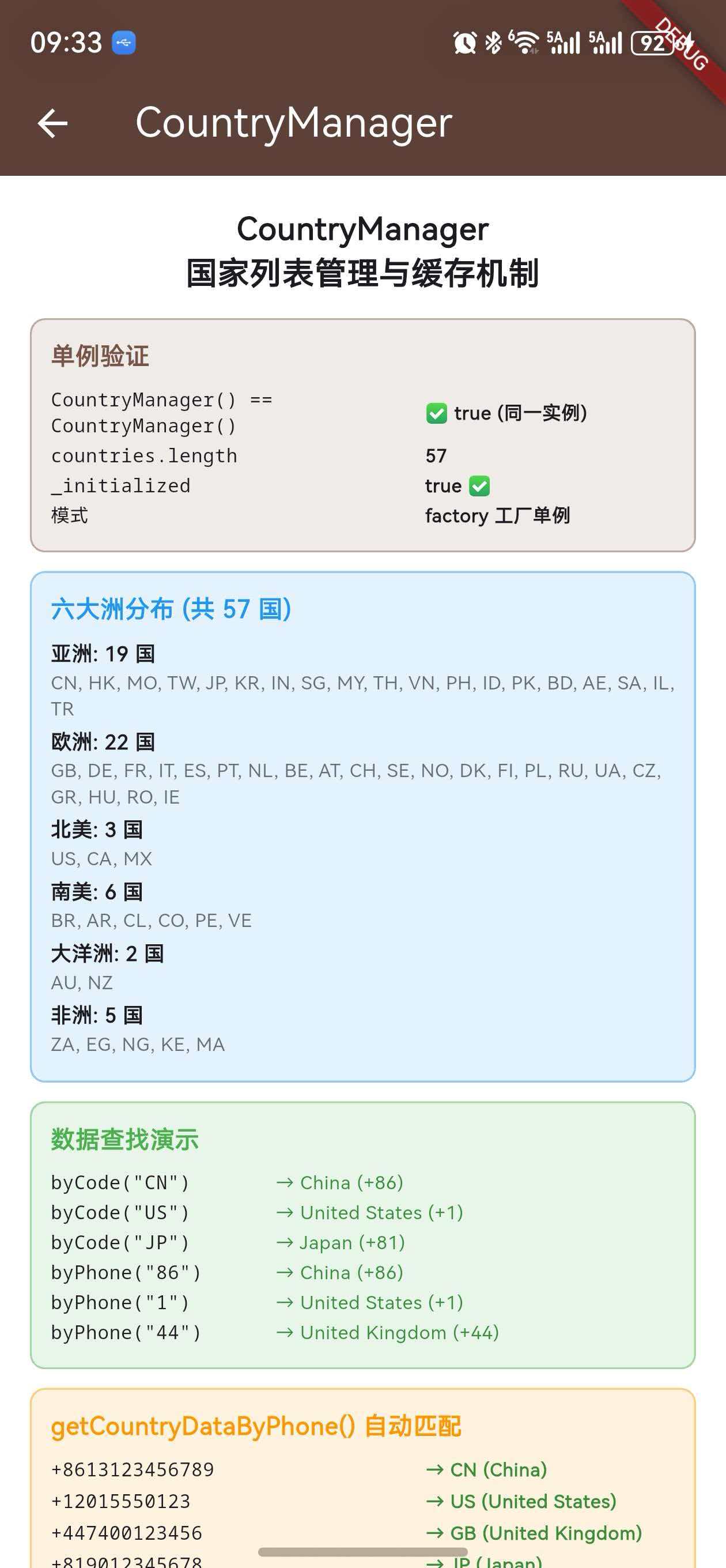
上一篇我们详细解析了 CountryWithPhoneCode 数据模型的 11 个字段和核心方法。本篇将深入分析 CountryManager 这个 单例管理类,它负责缓存和管理 init() 加载的所有国家数据,是同步格式化、国家选择器、号码匹配等功能的 数据中枢。
CountryManager虽然代码量不大,但它的设计模式(工厂单例)、防重复机制、数据访问方式都值得深入理解。掌握它的工作原理,你就能灵活地在应用中使用国家数据。
一、CountryManager 的定位
1.1 在架构中的角色
CountryManager 是 init() 和同步 API 之间的 桥梁:
init()
  │
  └── getAllSupportedRegions() → ArkTS 侧获取 57 国数据
        │
        └── CountryManager().loadCountries()  ← 数据存入单例
              │
              └── _countries 列表
                    │
                    ├── formatNumberSync()     ← 读取 _countries
                    ├── LibPhonenumberTextFormatter ← 读取 _countries
                    ├── getCountryDataByPhone() ← 遍历 _countries
                    └── 应用层 UI(国家选择器)  ← 读取 _countries
1.2 核心职责
| 职责 | 说明 |
|---|---|
| 数据缓存 | 将 init() 加载的国家数据缓存在内存中 |
| 单例访问 | 全局唯一实例,任何地方都能通过 CountryManager() 访问 |
| 防重复加载 | _initialized 标志确保数据只加载一次 |
| 数据提供 | 通过 countries getter 对外提供国家列表 |
二、完整源码分析
2.1 源码全文
CountryManager 的完整源码非常精简,只有约 30 行:
import 'package:flutter_libphonenumber_platform_interface/src/types/country_with_phone_code.dart';

/// Manages countries by code and name
class CountryManager {
  factory CountryManager() => _instance;
  CountryManager._internal();
  static final CountryManager _instance = CountryManager._internal();

  var _countries = <CountryWithPhoneCode>[];
  var _initialized = false;

  /// List of all supported countries on the device with phone code metadata
  List<CountryWithPhoneCode> get countries => _countries;

  Future<void> loadCountries({
    required final Map<String, CountryWithPhoneCode> phoneCodesMap,
    final Map<String, CountryWithPhoneCode> overrides = const {},
  }) async {
    if (_initialized) {
      return;
    }

    try {
      /// Apply any overrides to masks / country data
      overrides.forEach((final key, final value) {
        phoneCodesMap[key] = value;
      });

      /// Save list of the countries
      _countries = phoneCodesMap.values.toList();

      _initialized = true;
    } catch (err) {
      _countries = overrides.values.toList();
    }
  }
}
2.2 逐行解析
让我们逐行分析每个设计决策:
class CountryManager {
  // ① 工厂构造函数:每次 CountryManager() 返回同一个实例
  factory CountryManager() => _instance;

  // ② 私有命名构造函数:防止外部通过 new 创建新实例
  CountryManager._internal();

  // ③ 静态常量:全局唯一的实例,在类加载时创建
  static final CountryManager _instance = CountryManager._internal();

  // ④ 国家列表:初始为空列表
  var _countries = <CountryWithPhoneCode>[];

  // ⑤ 初始化标志:防止重复加载
  var _initialized = false;

  // ⑥ 公开 getter:只读访问国家列表
  List<CountryWithPhoneCode> get countries => _countries;
}
三、工厂单例模式详解
3.1 Dart 工厂单例的三要素
Dart 中实现单例模式需要三个要素:
| 要素 | 代码 | 作用 |
|---|---|---|
| 工厂构造函数 | factory CountryManager() => _instance |
拦截 CountryManager() 调用,返回已有实例 |
| 私有构造函数 | CountryManager._internal() |
阻止外部创建新实例 |
| 静态实例 | static final _instance = CountryManager._internal() |
存储全局唯一实例 |
3.2 工厂构造函数的工作原理
factory CountryManager() => _instance;
factory 关键字告诉 Dart:这个构造函数 不一定创建新实例。当代码中写 CountryManager() 时:
- Dart 不会分配新内存
- 不会调用初始化列表
- 直接执行函数体
=> _instance,返回已有实例
// 以下三个变量指向同一个对象
final a = CountryManager();
final b = CountryManager();
final c = CountryManager();
assert(identical(a, b));  // true
assert(identical(b, c));  // true
3.3 为什么用 factory 而不是 static getter
另一种常见的单例写法是使用 static getter:
// 方式 B:static getter(不推荐)
class CountryManager {
  CountryManager._internal();
  static final _instance = CountryManager._internal();
  static CountryManager get instance => _instance;
}
// 使用:CountryManager.instance.countries
flutter_libphonenumber 选择了 factory 方式的原因:
| 对比项 | factory 方式 | static getter 方式 |
|---|---|---|
| 调用语法 | CountryManager() |
CountryManager.instance |
| 代码简洁度 | 更简洁自然 | 需要 .instance |
| 与构造函数一致 | ✅ 看起来像普通构造 | ❌ 明显是单例 |
| 库内使用 | 多处使用,简洁更重要 | - |
设计选择:
factory方式让CountryManager()的调用看起来像普通构造函数,代码更简洁。在库内部多处使用时,这种简洁性的优势更加明显。
3.4 实例创建时机
static final CountryManager _instance = CountryManager._internal();
static final 意味着 _instance 在 类首次被引用时 创建(Dart 的懒加载机制),且只创建一次。之后无论调用多少次 CountryManager(),都返回这同一个实例。
四、loadCountries() 加载机制
4.1 方法签名
Future<void> loadCountries({
  required final Map<String, CountryWithPhoneCode> phoneCodesMap,
  final Map<String, CountryWithPhoneCode> overrides = const {},
}) async
| 参数 | 类型 | 必填 | 说明 |
|---|---|---|---|
phoneCodesMap |
Map<String, CountryWithPhoneCode> |
✅ | 原生侧返回的全量国家数据 |
overrides |
Map<String, CountryWithPhoneCode> |
❌ | 用户自定义覆盖数据 |
4.2 执行流程
loadCountries() 调用
    │
    ├── 检查 _initialized
    │   ├── true  → 直接 return(防重复)
    │   └── false → 继续执行
    │
    ├── try {
    │   ├── 遍历 overrides,覆盖 phoneCodesMap 中的对应项
    │   ├── _countries = phoneCodesMap.values.toList()
    │   └── _initialized = true
    │   }
    │
    └── catch (err) {
        └── _countries = overrides.values.toList()(兜底)
        }
4.3 防重复加载机制
if (_initialized) {
  return;
}
这个检查确保 loadCountries() 只执行一次。即使开发者多次调用 init(),数据也不会被重复加载或覆盖:
await init();  // 第一次:加载 57 国数据,_initialized = true
await init();  // 第二次:_initialized 为 true,直接 return
await init();  // 第三次:同上,直接 return
注意:这也意味着
overrides只在 第一次init()时生效。如果第一次调用init()没有传overrides,后续再传也不会生效。
4.4 overrides 覆盖逻辑
overrides.forEach((final key, final value) {
  phoneCodesMap[key] = value;
});
overrides 的覆盖是 直接替换 Map 中的值:
- 如果 key 已存在(如
'CN')→ 替换为 overrides 中的值 - 如果 key 不存在(如
'LK')→ 新增到 Map 中
// 示例:覆盖中国数据 + 新增斯里兰卡
await init(overrides: {
  'CN': customChinaData,   // 替换已有的 CN
  'LK': sriLankaData,      // 新增 LK
});
// 结果:_countries 包含 57 - 1(被替换) + 1(新增) = 57 个
// 但如果 LK 是新增的,则为 58 个
4.5 错误兜底机制
catch (err) {
  _countries = overrides.values.toList();
}
如果加载过程中出现任何异常,_countries 会被设置为 overrides 的值。这意味着:
| 场景 | overrides | 兜底结果 |
|---|---|---|
| 正常加载失败,有 overrides | {'CN': ..., 'US': ...} |
2 个国家 |
| 正常加载失败,无 overrides | const {} |
空列表 |
设计意图:即使原生侧数据加载完全失败,如果开发者提供了
overrides,应用仍然可以使用这些自定义数据进行基本的格式化操作。
五、countries getter 的数据访问
5.1 getter 定义
List<CountryWithPhoneCode> get countries => _countries;
这是一个简单的 getter,直接返回内部的 _countries 列表引用。
5.2 返回的是引用而非副本
final list1 = CountryManager().countries;
final list2 = CountryManager().countries;
assert(identical(list1, list2));  // true — 同一个列表对象
注意:
countries返回的是列表的 直接引用,不是副本。这意味着对返回列表的修改(如排序)会影响原始数据。
5.3 排序操作的注意事项
在国家选择器中,通常需要按名称排序显示:
// ❌ 错误方式:直接排序会修改原始列表
CountryManager().countries.sort((a, b) =>
    (a.countryName ?? '').compareTo(b.countryName ?? ''));

// ✅ 正确方式:创建副本后排序
final sortedCountries = List<CountryWithPhoneCode>.from(
    CountryManager().countries)
  ..sort((a, b) =>
      (a.countryName ?? '').compareTo(b.countryName ?? ''));
example 工程中的国家选择器就使用了正确的方式:
final sortedCountries =
    List<CountryWithPhoneCode>.from(CountryManager().countries)
      ..sort((a, b) =>
          (a.countryName ?? '').compareTo(b.countryName ?? ''));
最佳实践:永远不要直接对
CountryManager().countries调用sort(),应该先用List.from()创建副本。
六、数据访问模式
6.1 获取所有国家
final allCountries = CountryManager().countries;
print('Total: ${allCountries.length}');  // 57
6.2 按国家代码查找
final china = CountryManager().countries
    .firstWhere((c) => c.countryCode == 'CN');
6.3 按电话区号查找
final us = CountryManager().countries
    .firstWhere((c) => c.phoneCode == '1');
6.4 按国家名称模糊搜索
final results = CountryManager().countries
    .where((c) => (c.countryName ?? '')
        .toLowerCase()
        .contains('china'))
    .toList();
6.5 按洲分组
const asiaCodes = ['CN', 'JP', 'KR', 'IN', 'SG', ...];
final asiaCountries = CountryManager().countries
    .where((c) => asiaCodes.contains(c.countryCode))
    .toList();
6.6 通过 getCountryDataByPhone() 自动匹配
// 这个方法定义在 CountryWithPhoneCode 中,但内部访问 CountryManager
final country = CountryWithPhoneCode.getCountryDataByPhone('+8613123456789');
print(country?.countryCode);  // CN
七、单例模式的线程安全性
7.1 Dart 的单线程模型
Dart 使用 单线程事件循环 模型(类似 JavaScript),不存在多线程并发问题:
Dart 事件循环
    │
    ├── 微任务队列(Microtask Queue)
    │   └── Future.then、scheduleMicrotask 等
    │
    └── 事件队列(Event Queue)
        └── I/O、Timer、MethodChannel 回调等
7.2 为什么不需要锁
在 Java/Kotlin 中,单例模式需要 synchronized 或 volatile 来保证线程安全。但在 Dart 中:
- 单线程执行 — 同一时刻只有一个代码片段在执行
static final保证唯一 — Dart 运行时确保static final只初始化一次_initialized检查是原子的 — 不会被其他线程中断
// 在 Dart 中,这段代码是安全的,不需要锁
if (_initialized) {
  return;  // 不会有另一个线程同时执行到这里
}
_countries = phoneCodesMap.values.toList();
_initialized = true;
7.3 async 方法的注意事项
虽然 loadCountries() 是 async 方法,但它内部没有 await 操作,实际上是 同步执行 的:
Future<void> loadCountries({...}) async {
  if (_initialized) return;        // 同步
  overrides.forEach((k, v) {...}); // 同步
  _countries = ...;                // 同步
  _initialized = true;             // 同步
}
为什么声明为 async:虽然当前实现是同步的,但声明为
async保留了未来添加异步操作的灵活性(如从本地存储加载缓存数据)。
八、与 init() 的协作关系
8.1 调用链路
// FlutterLibphonenumberOhos.init()
Future<void> init({
Map<String, CountryWithPhoneCode> overrides = const {},
}) async {
return CountryManager().loadCountries(
phoneCodesMap: await getAllSupportedRegions(), // ① 获取数据
overrides: overrides, // ② 传入覆盖
);
}
8.2 时序关系
时间线 ──────────────────────────────────────────→

App 调用 init()
    │
    ├── getAllSupportedRegions()
    │   ├── MethodChannel 发送请求
    │   ├── ArkTS 侧构建 57 国数据
    │   └── 数据返回 Dart 侧
    │       (此时 CountryManager._initialized = false)
    │
    ├── CountryManager().loadCountries()
    │   ├── _initialized = false → 继续执行
    │   ├── 应用 overrides
    │   ├── _countries = 57 国数据
    │   └── _initialized = true
    │
    └── init() 完成
        (此时 CountryManager().countries 可用)
8.3 init() 前后的状态变化
| 属性 | init() 前 | init() 后 |
|---|---|---|
_initialized |
false |
true |
_countries.length |
0 |
57 |
countries |
[] |
[CN, US, GB, ...] |
formatNumberSync() |
返回原始输入 | 正确格式化 |
九、CountryManager 在 example 工程中的使用
9.1 初始化检查
Future<void> _initPlugin() async {
  await _plugin.init();
  print('countries count: ${CountryManager().countries.length}');
  setState(() => _isInitialized = true);
}
9.2 国家选择器
Future<void> _showCountryPicker() async {
  if (CountryManager().countries.isEmpty) return;

  // 创建副本并排序
  final sortedCountries =
      List<CountryWithPhoneCode>.from(CountryManager().countries)
        ..sort((a, b) =>
            (a.countryName ?? '').compareTo(b.countryName ?? ''));

  // 导航到选择页面
  final res = await Navigator.push<CountryWithPhoneCode>(
    context,
    MaterialPageRoute(
      builder: (_) => _CountryPickerPage(countries: sortedCountries),
    ),
  );
}
9.3 Placeholder 更新
void updatePlaceholderHint() {
  // 直接使用 _currentSelectedCountry(来自 CountryManager 的数据)
  if (_globalPhoneType == PhoneNumberType.mobile) {
    newPlaceholder = _globalPhoneFormat == PhoneNumberFormat.international
        ? _currentSelectedCountry.exampleNumberMobileInternational
        : _currentSelectedCountry.exampleNumberMobileNational;
  }
}
十、与其他组件的交互
10.1 formatNumberSync() 如何使用 CountryManager
String formatNumberSync(String number, {
  CountryWithPhoneCode? country,
  ...
}) {
  // 如果没有指定国家,通过号码自动匹配
  final guessedCountry =
      country ?? CountryWithPhoneCode.getCountryDataByPhone(number);
  // getCountryDataByPhone 内部遍历 CountryManager().countries
}
10.2 LibPhonenumberTextFormatter 如何使用
class LibPhonenumberTextFormatter extends TextInputFormatter {
  LibPhonenumberTextFormatter({
    required this.country,  // CountryWithPhoneCode 实例
    // ...
  });

  // country 对象来自 CountryManager().countries
  // 内部通过 country.getPhoneMask() 获取 Mask
}
10.3 getCountryDataByPhone() 的内部实现
static CountryWithPhoneCode? getCountryDataByPhone(String phone, ...) {
  // 直接访问 CountryManager 单例
  final countries = CountryManager().countries;
  final retCountry = countries.firstWhere(
    (data) => _toNumericString(data.phoneCode) == _toNumericString(phoneCode),
  );
  return retCountry;
}
十一、设计模式分析
11.1 单例模式(Singleton)
CountryManager 使用了经典的 工厂单例模式:
| 特征 | 实现 |
|---|---|
| 全局唯一 | static final _instance |
| 延迟创建 | Dart static final 自动延迟初始化 |
| 防止外部创建 | CountryManager._internal() 私有构造 |
| 简洁访问 | factory CountryManager() 工厂构造 |
11.2 缓存模式(Cache)
CountryManager 同时也是一个 内存缓存:
| 特征 | 实现 |
|---|---|
| 一次加载 | _initialized 标志防重复 |
| 内存存储 | _countries 列表 |
| 快速访问 | countries getter 直接返回引用 |
| 无过期机制 | 数据在应用生命周期内不变 |
11.3 为什么没有过期/刷新机制
国家电话数据是 相对静态 的:
- 国际电话区号很少变化
- 号码格式规则变化频率极低
- 应用运行期间不需要更新
- 数据来源是编译时确定的(ArkTS 侧硬编码)
因此,CountryManager 不需要缓存过期、刷新、LRU 等复杂机制。
十二、潜在的改进方向
12.1 添加按代码查找的 Map 索引
当前按 countryCode 查找需要遍历列表:
// 当前:O(n) 线性查找
countries.firstWhere((c) => c.countryCode == 'CN');
可以添加 Map 索引实现 O(1) 查找:
// 改进:O(1) 哈希查找
class CountryManager {
  var _countriesByCode = <String, CountryWithPhoneCode>{};

  CountryWithPhoneCode? getByCode(String code) => _countriesByCode[code];
}
12.2 添加重新初始化能力
当前 _initialized 一旦为 true 就无法重置:
// 可能的改进:添加 reset 方法
void reset() {
  _countries = [];
  _initialized = false;
}
12.3 添加不可变列表保护
当前 countries 返回可变列表引用:
// 可能的改进:返回不可变视图
List<CountryWithPhoneCode> get countries =>
    List.unmodifiable(_countries);
注意:以上改进方向仅供参考,当前的实现对于
flutter_libphonenumber的使用场景已经足够。过度设计反而会增加复杂度。
总结
本文深入分析了 CountryManager 的单例模式实现和缓存机制。关键要点回顾:
CountryManager使用 Dart 工厂单例模式(factory + 私有构造 + static final),全局唯一实例loadCountries()通过_initialized标志实现 防重复加载,数据只加载一次overrides参数支持 覆盖已有国家 和 新增国家,但只在首次init()时生效countriesgetter 返回列表的 直接引用,排序时必须先创建副本- Dart 的单线程模型保证了单例的 线程安全性,无需额外的锁机制
CountryManager是init()和同步 API 之间的 数据中枢,所有同步格式化操作都依赖它缓存的数据
下一篇我们将进入原生层实现部分,深入分析 MethodChannel 通信机制——Dart 与 ArkTS 之间的桥梁。
如果这篇文章对你有帮助,欢迎点赞👍、收藏⭐、关注🔔,你的支持是我持续创作的动力!
相关资源:
- OpenHarmony 适配仓库:gitcode.com/oh-flutter/flutter_libphonenumber
- 开源鸿蒙跨平台社区:openharmonycrossplatform.csdn.net
- Dart 工厂构造函数文档:dart.dev - Factory constructors
- Dart 单例模式最佳实践:dart.dev - Singleton pattern
- Dart 事件循环机制:dart.dev - Asynchronous programming
- Flutter 联合插件官方文档:docs.flutter.dev - Federated plugins
- Flutter MethodChannel 文档:docs.flutter.dev - Platform channels
- Google libphonenumber:github.com/google/libphonenumber
- Flutter-OHOS 项目:gitee.com/openharmony-sig/flutter_flutter
- plugin_platform_interface:pub.dev/packages/plugin_platform_interface

腾讯云面向开发者汇聚海量精品云计算使用和开发经验,营造开放的云计算技术生态圈。
更多推荐
 29
29 0
0- 0


 已为社区贡献11条内容

所有评论(0)