基于此芯P1 NPU 实战ROS2功能包指南
·
ROS2安装和工作空间创建
1、ROS2安装
wget http://fishros.com/install -O fishros && . fishros
2、工作空间创建
mkdir -p ros2_workspace/src
cd ros2_workspace
colcon build
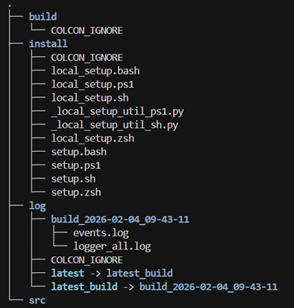
src下面用于放ros2功能包
USB摄像头数据封装ROS2话题
1、创建功能包
ros2 pkg create usb_camera_pkg --build-type ament_python --dependencies rclpy sensor_msgs cv_bridge

cd usb_camera_pkg/usb_camera_pkg

touch usb_camera_node.py
2、编写usb_camera_node.py
#!/usr/bin/env python3
import rclpy
from rclpy.node import Node
from sensor_msgs.msg import Image
from cv_bridge import CvBridge
import cv2

class MinimalUSBCameraNode(Node):
    def __init__(self):
        super().__init__('usb_camera')

        # 创建图像发布者
        self.publisher = self.create_publisher(Image, 'image_raw', 10)

        # 初始化OpenCV摄像头
        self.cap = cv2.VideoCapture(0)  # 0表示默认摄像头

        if not self.cap.isOpened():
            self.get_logger().error('无法打开摄像头')
            return

        # 设置分辨率
        self.cap.set(cv2.CAP_PROP_FRAME_WIDTH, 640)
        self.cap.set(cv2.CAP_PROP_FRAME_HEIGHT, 480)

        # 初始化CvBridge
        self.bridge = CvBridge()

        # 创建定时器(30 FPS)
        self.timer = self.create_timer(0.033, self.publish_frame)

        self.get_logger().info('USB摄像头节点已启动')

    def publish_frame(self):
        ret, frame = self.cap.read()
        if ret:
            # 转换BGR到RGB(ROS使用RGB格式)
            rgb_frame = cv2.cvtColor(frame, cv2.COLOR_BGR2RGB)

            # 转换为ROS图像消息
            msg = self.bridge.cv2_to_imgmsg(rgb_frame, encoding='rgb8')
            msg.header.stamp = self.get_clock().now().to_msg()
            msg.header.frame_id = 'camera_frame'

            # 发布消息
            self.publisher.publish(msg)

    def __del__(self):
        if hasattr(self, 'cap'):
            self.cap.release()

def main(args=None):
    rclpy.init(args=args)
    node = MinimalUSBCameraNode()
    rclpy.spin(node)
    node.destroy_node()
    rclpy.shutdown()

if __name__ == '__main__':
    main()
3、修改setup.py文件
from setuptools import find_packages, setup
import os
from glob import glob
package_name = 'usb_camera_pkg'

setup(
    name=package_name,
    version='0.0.0',
    packages=find_packages(exclude=['test']),
    data_files=[
        ('share/ament_index/resource_index/packages',
            ['resource/' + package_name]),
        ('share/' + package_name, ['package.xml']),
        (os.path.join('share', package_name, 'launch'), glob('launch/*.launch.py')),
    ],
    install_requires=['setuptools'],
    zip_safe=True,
    maintainer='cix',
    maintainer_email='cix@todo.todo',
    description='TODO: Package description',
    license='TODO: License declaration',
    # tests_require=['pytest'],
    entry_points={
        'console_scripts': [
            'usb_camera_node = usb_camera_pkg.usb_camera_node:main',
        ],
    },
)
4、编写launch文件
cd ..
mkdir launch
cd launch
touch usb_camera.launch.py
launch内容如下:
from launch import LaunchDescription
from launch_ros.actions import Node

def generate_launch_description():
    return LaunchDescription([
        Node(
            package='usb_camera_pkg',
            executable='usb_camera_node',
            name='usb_camera_node',
            parameters=[
                {'camera_id': 0},
                {'width': 640},
                {'height': 480},
                {'fps': 30},
                {'encoding': 'rgb8'},
            ],
            output='screen'
        )
    ])
5、编译功能包和执行功能包
进入工作空间ros2_workspace,执行指令:
colcon build
执行launch文件
source install/setup.bash

ros2 launch usb_camera_pkg usb_camera.launch.py
6、查看话题数据
ros2 topic list
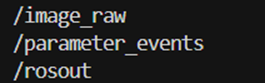
/image_raw即封装好的摄像头数据
实现姿态检测功能包
1、CIX P1 NPU的UMD和KMD安装
按照CIX NPU开发手册安装即可
2、创建功能包
ros2 pkg create npu_demo --build-type ament_python --dependencies rclpy sensor_msgs cv_bridge
在npu_demo下创建pose.py,并编写代码
import rclpy
from rclpy.node import Node
from sensor_msgs.msg import Image
from cv_bridge import CvBridge
import cv2
import numpy as np
import torch
from NOE_Engine import EngineInfer

def preprocess_yolov8seg(
    image_raw,
    ndtype : np.dtype,
    model_height : int = 640,
    model_width : int = 640):
    img = image_raw
    # original image shape
    shape = img.shape[:2]
    new_shape = (model_height, model_width)
    r = min(new_shape[0] / shape[0], new_shape[1] / shape[1])
    ratio = r, r
    new_unpad = int(round(shape[1] * r)), int(round(shape[0] * r))
    # wh padding
    pad_w, pad_h = (new_shape[1] - new_unpad[0]) / 2, (
        new_shape[0] - new_unpad[1]
    ) / 2
    # resize
    if shape[::-1] != new_unpad:
        img = cv2.resize(img, new_unpad, interpolation=cv2.INTER_LINEAR)
    top, bottom = int(round(pad_h - 0.1)), int(round(pad_h + 0.1))
    left, right = int(round(pad_w - 0.1)), int(round(pad_w + 0.1))
    img = cv2.copyMakeBorder(
        img, top, bottom, left, right, cv2.BORDER_CONSTANT, value=(114, 114, 114)
    )
    # Transforms: HWC to CHW -> BGR to RGB -> div(255) -> contiguous -> add axis(optional)
    img = (
        np.ascontiguousarray(np.einsum("HWC->CHW", img)[::-1], dtype=ndtype)
        / 255.0
    )
    img_process = img[None] if len(img.shape) == 3 else img
    return img_process, ratio, (pad_w, pad_h)

def xywh2xyxy(x):
    y = x.clone() if isinstance(x, torch.Tensor) else np.copy(x)
    y[..., 0] = x[..., 0] - x[..., 2] / 2  # top left x
    y[..., 1] = x[..., 1] - x[..., 3] / 2  # top left y
    y[..., 2] = x[..., 0] + x[..., 2] / 2  # bottom right x
    y[..., 3] = x[..., 1] + x[..., 3] / 2  # bottom right y
    return y

def scale_boxes_kpts(boxes : np.ndarray,ratio : tuple,shape : tuple, pad_w : int, pad_h : int):
    gain = ratio[0]
    pad = (pad_w, pad_h)
    boxes[:, 0] -= pad[0]
    boxes[:, 1] -= pad[1]
    boxes[:, :4] /= gain
    num_kpts = boxes.shape[1] // 3
    for kid in range(2,num_kpts+1):
        boxes[:, kid * 3-1] = (boxes[:, kid * 3-1] - pad[0]) / gain
        boxes[:, kid * 3 ]  = (boxes[:, kid * 3 ] -  pad[1]) / gain
    top_left_x = boxes[:, 0].clip(0, shape[1])
    top_left_y = boxes[:, 1].clip(0, shape[0])
    bottom_right_x = (boxes[:, 0] + boxes[:, 2]).clip(0, shape[1])
    bottom_right_y = (boxes[:, 1] + boxes[:, 3]).clip(0, shape[0])
    boxes[:, 0] = top_left_x
    boxes[:, 1] = top_left_y
    boxes[:, 2] = bottom_right_x
    boxes[:, 3] = bottom_right_y
    return boxes

def nms_keypoints(dets : np.ndarray, iou_thresh : float):
    x1 = dets[:, 0]
    y1 = dets[:, 1]
    x2 = dets[:, 2]
    y2 = dets[:, 3]
    scores = dets[:, 4]
    areas = (x2 - x1 + 1) * (y2 - y1 + 1)
    order = scores.argsort()[::-1]
    keep = []
    while order.size > 0:
        i = order[0]
        keep.append(i)
        xx1 = np.maximum(x1[i], x1[order[1:]])
        yy1 = np.maximum(y1[i], y1[order[1:]])
        xx2 = np.minimum(x2[i], x2[order[1:]])
        yy2 = np.minimum(y2[i], y2[order[1:]])
        w = np.maximum(0.0, xx2 - xx1 + 1)
        h = np.maximum(0.0, yy2 - yy1 + 1)
        inter = w * h
        ovr = inter / (areas[i] + areas[order[1:]] - inter)
        inds = np.where(ovr <= iou_thresh)[0]
        order = order[inds + 1]
    output = []
    for i in keep:
        output.append(dets[i].tolist())
    return np.array(output)

def draw_yolov8_keypoints(im : np.ndarray, kpts : np.ndarray, steps : int=3):
    palette = np.array([[255, 128, 0], [255, 153, 51], [255, 178, 102],
                    [230, 230, 0], [255, 153, 255], [153, 204, 255],
                    [255, 102, 255], [255, 51, 255], [102, 178, 255],
                    [51, 153, 255], [255, 153, 153], [255, 102, 102],
                    [255, 51, 51], [153, 255, 153], [102, 255, 102],
                    [51, 255, 51], [0, 255, 0], [0, 0, 255], [255, 0, 0],
                    [255, 255, 255]])
    skeleton = [[16, 14], [14, 12], [17, 15], [15, 13], [12, 13], [6, 12],
                [7, 13], [6, 7], [6, 8], [7, 9], [8, 10], [9, 11], [2, 3],
                [1, 2], [1, 3], [2, 4], [3, 5], [4, 6], [5, 7]]
    pose_limb_color = palette[[9, 9, 9, 9, 7, 7, 7, 0, 0, 0, 0, 0, 16, 16, 16, 16, 16, 16, 16]]
    pose_kpt_color = palette[[16, 16, 16, 16, 16, 0, 0, 0, 0, 0, 0, 9, 9, 9, 9, 9, 9]]
    num_kpts = len(kpts) // steps
    if num_kpts == 0:
        return im
    for kid in range(num_kpts):
        r, g, b = pose_kpt_color[kid]
        x_coord, y_coord = kpts[steps * kid], kpts[steps * kid + 1]
        conf = kpts[steps * kid + 2]
        if conf > 0.5:
            cv2.circle(im, (int(x_coord), int(y_coord)), 10, (int(r), int(g), int(b)), -1)
    for sk_id, sk in enumerate(skeleton):
        r, g, b = pose_limb_color[sk_id]
        pos1 = (int(kpts[(sk[0]-1)*steps]), int(kpts[(sk[0]-1)*steps+1]))
        pos2 = (int(kpts[(sk[1]-1)*steps]), int(kpts[(sk[1]-1)*steps+1]))
        conf1 = kpts[(sk[0]-1)*steps+2]
        conf2 = kpts[(sk[1]-1)*steps+2]
        if conf1 >0.5 and conf2 >0.5:
            cv2.line(im, pos1, pos2, (int(r), int(g), int(b)), thickness=2)

class pose_estimate(Node):
    def __init__(self):
        super().__init__('pose_node')

        # 订阅camera/image_raw话题
        self.subscription = self.create_subscription(
            Image,
            'image_raw',
            self.listener_callback,
            10)
        self.model = EngineInfer("/home/cix/ ros2_workspace /src/npu_demo/npu_demo/yolov8s-pose.cix")

        self.publisher_ = self.create_publisher(Image, 'npu_demo/image_pose', 10)
        self.bridge = CvBridge()

    def listener_callback(self, msg):
        try:
            image = self.bridge.imgmsg_to_cv2(msg, desired_encoding='bgr8')
            res_image = image

            input_data, ratio, (pad_w, pad_h) = preprocess_yolov8seg(image, np.single)
            pred = self.model.forward([input_data])[0]
            pred = np.reshape(pred, (1, 56, 8400))
            pred = pred[0]
            pred = np.transpose(pred, (1, 0))
            pred = pred[pred[:, 4] > 0.7]
            if len(pred) == 0:
                res_image = image
            else:
                bboxs = xywh2xyxy(pred)
                bboxs = nms_keypoints(bboxs,0.6)
                bboxs = np.array(bboxs)
                bboxs[:, 2] = bboxs[:, 2] - bboxs[:, 0]
                bboxs[:, 3] = bboxs[:, 3] - bboxs[:, 1]
                bboxs = scale_boxes_kpts(bboxs,ratio, image.shape, pad_w, pad_h)
                for box in bboxs:
                    det_bbox, det_scores, kpts = box[0:4], box[4], box[5:]
                    cv2.rectangle(image, (int(det_bbox[0]), int(det_bbox[1])), (int(det_bbox[2]), int(det_bbox[3])),
                                        (0, 0, 255), 2)
                    if int(det_bbox[1]) < 30 :
                        cv2.putText(image, "conf:{:.2f}".format(det_scores), (int(det_bbox[0]) + 5, int(det_bbox[1]) +25),
                                cv2.FONT_HERSHEY_DUPLEX, 0.8, (0, 0, 255), 1)
                    else:
                        cv2.putText(image, "conf:{:.2f}".format(det_scores), (int(det_bbox[0]) + 5, int(det_bbox[1]) - 5),
                                    cv2.FONT_HERSHEY_DUPLEX, 0.8, (0, 0, 255), 1)
                    draw_yolov8_keypoints(image, kpts)
                    res_image = image
            ros_image = self.bridge.cv2_to_imgmsg(res_image, encoding="bgr8")

            self.publisher_.publish(ros_image)
        except Exception as e:
            self.get_logger().error(f'Error processing image: {e}')

def main(args=None):
    rclpy.init(args=args)

    pose_node = pose_estimate()

    rclpy.spin(pose_node)
    pose_node.model.clean()

    pose_node.destroy_node()
    rclpy.shutdown()

if __name__ == '__main__':
    main()
这里需要注意:订阅的图像话题和封装的USB摄像头话题保持一致,和.cix需要替换成实际机器上的绝对路径,模型的前后处理从modelhub里面copy过来即可。
修改这个功能包的setup.py
from setuptools import find_packages, setup
package_name = 'npu_demo'
setup(
    name=package_name,
    version='0.0.0',
    packages=find_packages(exclude=['test']),
    data_files=[
        ('share/ament_index/resource_index/packages',
            ['resource/' + package_name]),
        ('share/' + package_name, ['package.xml']),
    ],
    install_requires=['setuptools'],
    zip_safe=True,
    maintainer='cix',
    maintainer_email='cix@todo.todo',
    description='TODO: Package description',
    license='TODO: License declaration',
    # tests_require=['pytest'],
    entry_points={
        'console_scripts': [
            'pose_node = npu_demo.pose:main', #姿态检测节点
        ],
    },
)
3、编译和执行功能包
编译功能包,执行:
colcon build
运行姿态检测节点
source install/setup.bash
ros2 run npu_demo pose_node
查看节点
ros2 topic list
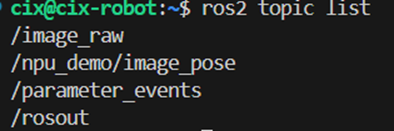
其中/npu_demo/image_pose为姿态检测的结果。

腾讯云面向开发者汇聚海量精品云计算使用和开发经验,营造开放的云计算技术生态圈。
更多推荐
 0
0 0
0- 0


 已为社区贡献2条内容

所有评论(0)