开源鸿蒙跨平台Flutter开发:视力保护应用开发文档
摘要: 视力保护应用是一款基于Flutter开发的健康管理工具,专注于预防近视和保护眼睛健康。核心功能包括定时休息提醒(支持20/30/45/60分钟间隔)、6种眼保健操指导(如眨眼运动、眼球转动等)、用眼数据统计和健康指数评估。采用Material Design 3设计规范,技术栈包含Dart语言和状态管理机制。系统架构分为表现层(主页面导航)、业务层(计时/眼操/统计管理)和数据层(模型枚举)
欢迎加入开源鸿蒙跨平台社区:
https://openharmonycrossplatform.csdn.net
一、项目概述
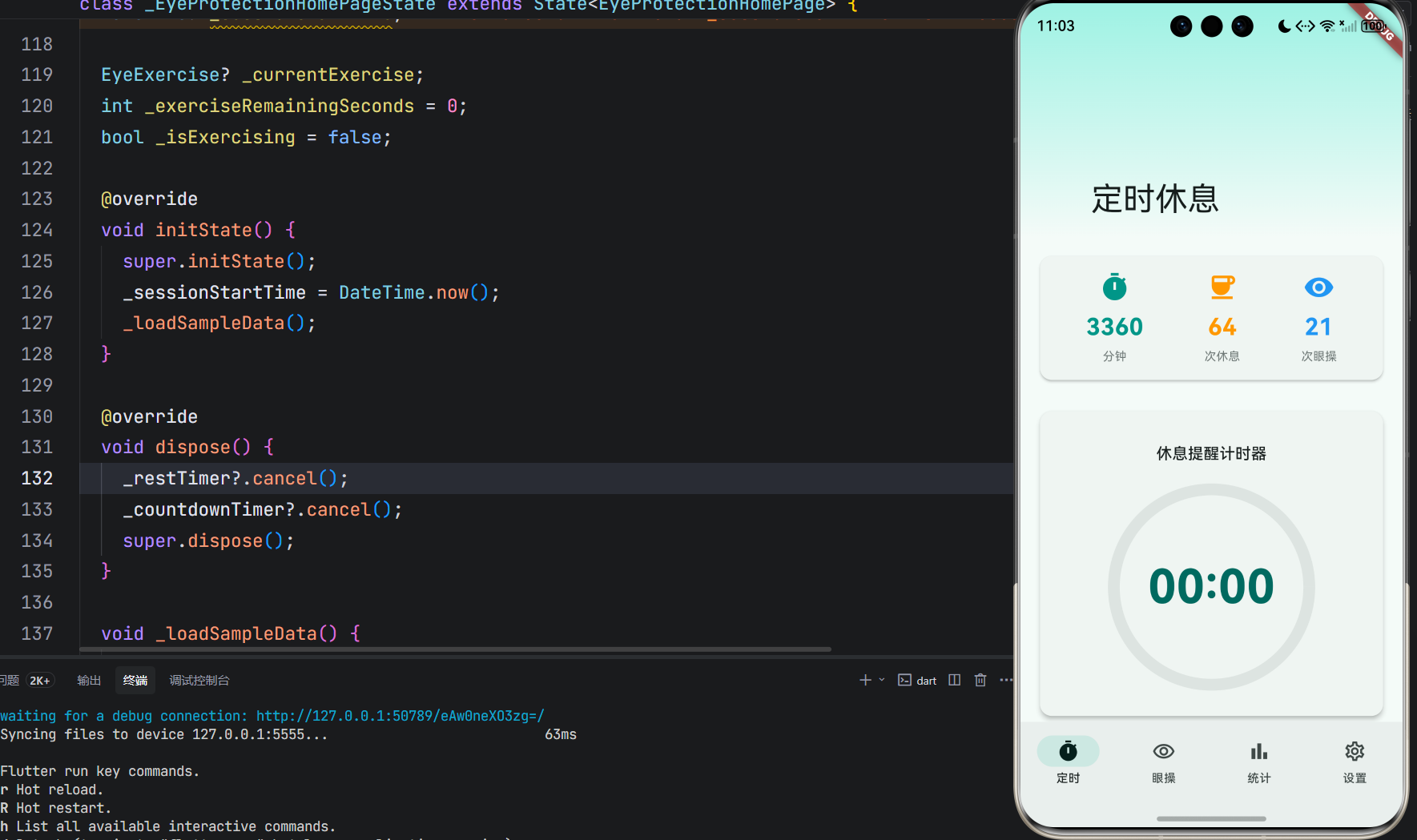
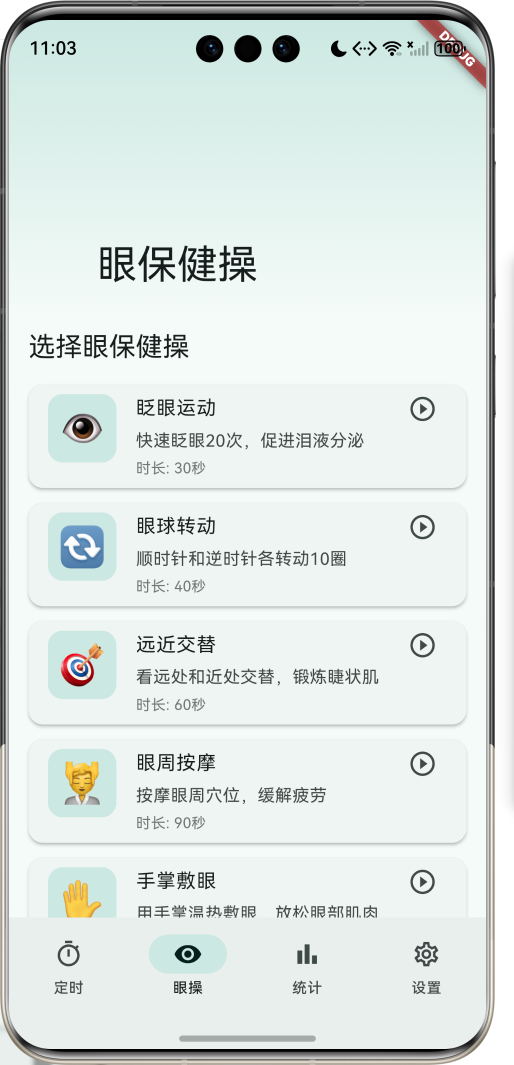
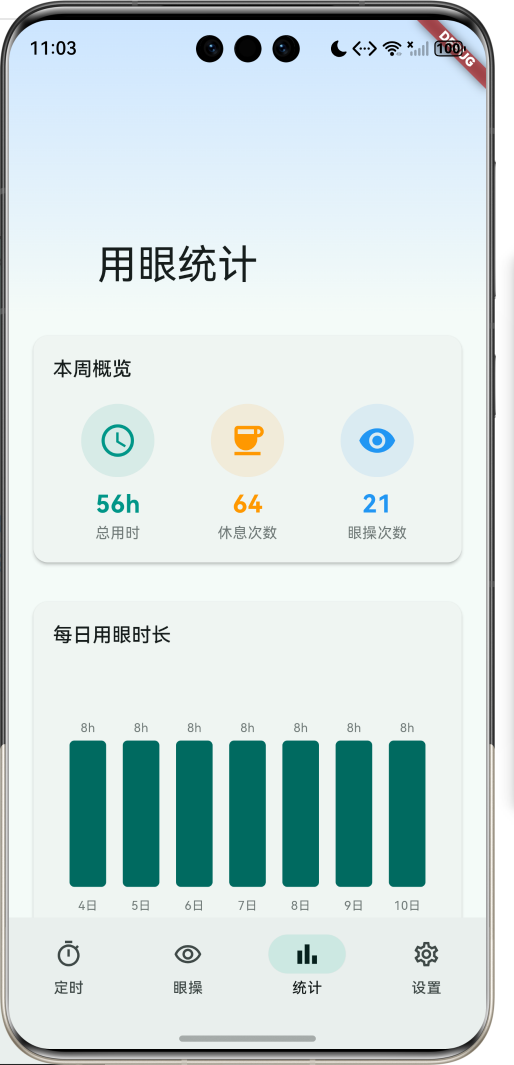
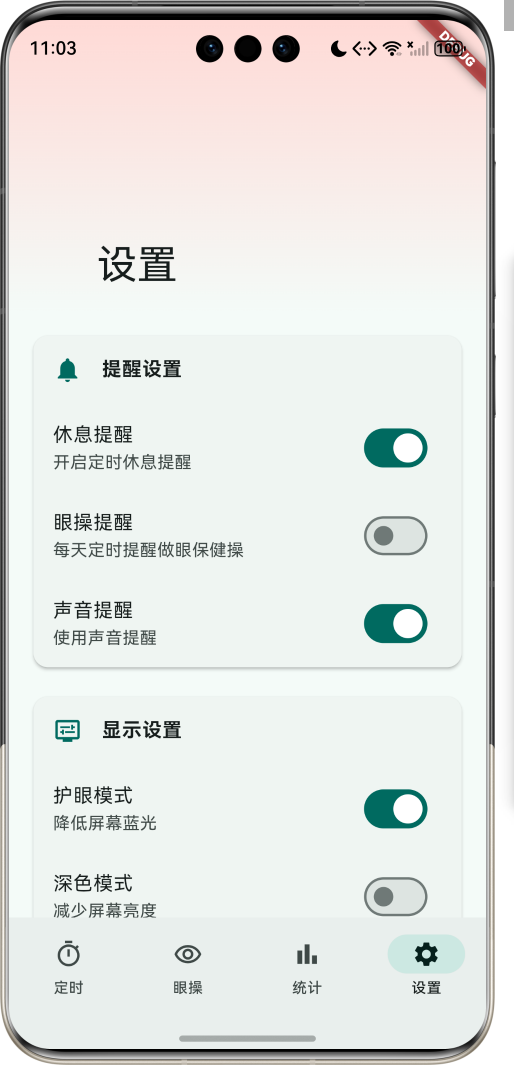
运行效果图
1.1 应用简介
视力保护是一款专注于眼睛健康管理的应用,通过定时休息提醒、眼保健操指导、用眼时间统计等功能,帮助用户养成良好的用眼习惯,预防近视,保护视力。应用以清新的青色为主色调,象征健康与生机。
应用涵盖定时休息、眼保健操、用眼统计、设置管理四大模块。用户可以设置休息间隔,定时提醒休息眼睛;选择多种眼保健操进行眼部锻炼;查看用眼统计数据,了解自己的用眼习惯;通过健康指数评估眼睛健康状况。
1.2 核心功能
| 功能模块 | 功能描述 | 实现方式 |
|---|---|---|
| 定时休息 | 4种休息间隔选择 | 计时器 |
| 眼保健操 | 6种眼部锻炼动作 | 倒计时器 |
| 用眼统计 | 每日/每周用眼数据 | 数据统计 |
| 健康指数 | 护眼健康评分 | 算法计算 |
| 提醒设置 | 休息/眼操提醒开关 | 开关控制 |
| 护眼模式 | 降低屏幕蓝光 | 设置选项 |
1.3 休息间隔定义
| 序号 | 间隔名称 | Emoji | 时长 | 描述 |
|---|---|---|---|---|
| 1 | 20分钟 | ⏰ | 20分钟 | 推荐间隔 |
| 2 | 30分钟 | ⏱️ | 30分钟 | 标准间隔 |
| 3 | 45分钟 | ⏲️ | 45分钟 | 较长间隔 |
| 4 | 60分钟 | 🕐 | 60分钟 | 最长间隔 |
1.4 眼保健操定义
| 序号 | 动作名称 | Emoji | 时长 | 描述 |
|---|---|---|---|---|
| 1 | 眨眼运动 | 👁️ | 30秒 | 快速眨眼20次,促进泪液分泌 |
| 2 | 眼球转动 | 🔄 | 40秒 | 顺时针和逆时针各转动10圈 |
| 3 | 远近交替 | 🎯 | 60秒 | 看远处和近处交替,锻炼睫状肌 |
| 4 | 眼周按摩 | 💆 | 90秒 | 按摩眼周穴位,缓解疲劳 |
| 5 | 手掌敷眼 | ✋ | 60秒 | 用手掌温热敷眼,放松眼部肌肉 |
| 6 | 眼部伸展 | 🌟 | 45秒 | 上下左右看,拉伸眼部肌肉 |
1.5 技术栈
| 技术领域 | 技术选型 | 版本要求 |
|---|---|---|
| 开发框架 | Flutter | >= 3.0.0 |
| 编程语言 | Dart | >= 2.17.0 |
| 设计规范 | Material Design 3 | - |
| 计时器 | Timer | - |
| 状态管理 | setState | - |
| 目标平台 | 鸿蒙OS / Web | API 21+ |
1.6 项目结构
lib/
└── main_eye_protection.dart
    ├── EyeProtectionApp           # 应用入口
    ├── RestInterval               # 休息间隔枚举
    ├── EyeExercise                # 眼保健操枚举
    ├── UsageRecord                # 用眼记录模型
    ├── EyeProtectionHomePage      # 主页面(底部导航)
    ├── _buildTimerPage            # 定时页面
    ├── _buildExercisePage         # 眼操页面
    ├── _buildStatisticsPage       # 统计页面
    ├── _buildSettingsPage         # 设置页面
    ├── _startTimer                # 开始计时
    ├── _startExercise             # 开始眼操
    └── _completeExercise          # 完成眼操
二、系统架构
2.1 整体架构图
2.2 类图设计
2.3 页面导航流程
2.4 计时器工作流程
三、核心模块设计
3.1 数据模型设计
3.1.1 休息间隔枚举 (RestInterval)
enum RestInterval {
  twenty(label: '20分钟', emoji: '⏰', minutes: 20),
  thirty(label: '30分钟', emoji: '⏱️', minutes: 30),
  fortyFive(label: '45分钟', emoji: '⏲️', minutes: 45),
  sixty(label: '60分钟', emoji: '🕐', minutes: 60);

  final String label;
  final String emoji;
  final int minutes;

  const RestInterval({
    required this.label,
    required this.emoji,
    required this.minutes,
  });
}
3.1.2 眼保健操枚举 (EyeExercise)
enum EyeExercise {
  blink(label: '眨眼运动', emoji: '👁️', duration: 30, description: '快速眨眼20次,促进泪液分泌'),
  rotate(label: '眼球转动', emoji: '🔄', duration: 40, description: '顺时针和逆时针各转动10圈'),
  focus(label: '远近交替', emoji: '🎯', duration: 60, description: '看远处和近处交替,锻炼睫状肌'),
  massage(label: '眼周按摩', emoji: '💆', duration: 90, description: '按摩眼周穴位,缓解疲劳'),
  palm(label: '手掌敷眼', emoji: '✋', duration: 60, description: '用手掌温热敷眼,放松眼部肌肉'),
  stretch(label: '眼部伸展', emoji: '🌟', duration: 45, description: '上下左右看,拉伸眼部肌肉');

  final String label;
  final String emoji;
  final int duration;
  final String description;

  const EyeExercise({
    required this.label,
    required this.emoji,
    required this.duration,
    required this.description,
  });
}
3.1.3 用眼记录模型 (UsageRecord)
class UsageRecord {
  final String id;              // 记录ID
  final DateTime startTime;     // 开始时间
  final DateTime endTime;       // 结束时间
  final int restCount;          // 休息次数
  final int exerciseCount;      // 眼操次数

  UsageRecord({
    required this.id,
    required this.startTime,
    required this.endTime,
    required this.restCount,
    required this.exerciseCount,
  });

  Duration get duration => endTime.difference(startTime);
}
3.1.4 休息间隔分布
3.1.5 眼保健操使用分布
3.2 页面结构设计
3.2.1 主页面布局
3.2.2 定时页结构
3.2.3 眼操页结构
3.2.4 统计页结构
3.3 计时器逻辑
3.4 眼保健操逻辑
四、UI设计规范
4.1 配色方案
应用以清新的青色为主色调,象征健康与生机:
| 颜色类型 | 色值 | 用途 |
|---|---|---|
| 主色 | #009688 (Teal) | 导航、主题元素 |
| 辅助色 | #4DB6AC | 眼操页面 |
| 第三色 | #80CBC4 | 统计页面 |
| 强调色 | #B2DFDB | 设置页面 |
| 背景色 | #FAFAFA | 页面背景 |
| 卡片背景 | #FFFFFF | 功能卡片 |
4.2 功能模块颜色
| 模块 | 色值 | 视觉效果 |
|---|---|---|
| 定时休息 | #009688 | 青色 |
| 眼保健操 | #4DB6AC | 浅青色 |
| 用眼统计 | #26A69A | 中青色 |
| 健康指数 | #80CBC4 | 淡青色 |
4.3 字体规范
| 元素 | 字号 | 字重 | 颜色 |
|---|---|---|---|
| 页面标题 | 24px | Bold | 主色 |
| 计时数字 | 48px | Bold | 主色 |
| 眼操名称 | 16px | Bold | #000000 |
| 眼操描述 | 14px | Regular | #666666 |
| 统计数字 | 20px | Bold | 模块颜色 |
4.4 组件规范
4.4.1 计时器显示区域
┌─────────────────────────────────────┐
│  休息提醒计时器                      │
│                                     │
│         ┌──────────────┐            │
│         │              │            │
│         │    20:00     │            │
│         │  计时中...    │            │
│         │              │            │
│         └──────────────┘            │
│                                     │
└─────────────────────────────────────┘
4.4.2 休息间隔选择
┌─────────────────────────────────────┐
│  休息间隔                            │
│                                     │
│  [⏰ 20分钟] [⏱️ 30分钟]            │
│  [⏲️ 45分钟] [🕐 60分钟]            │
└─────────────────────────────────────┘
4.4.3 眼保健操卡片
┌─────────────────────────────────────┐
│  ┌──────┐  眨眼运动                  │
│  │  👁️  │  快速眨眼20次,促进泪液分泌 │
│  │      │  时长: 30秒        ▶       │
│  └──────┘                            │
└─────────────────────────────────────┘
4.4.4 健康指数显示
┌─────────────────────────────────────┐
│  护眼健康指数                        │
│                                     │
│  ┌──────┐  ✓ 定时休息               │
│  │  85  │    每天休息5.0次           │
│  │  分  │  ✓ 眼保健操               │
│  └──────┘    每天做3.5次             │
│            ✓ 用眼时长               │
│              平均每天8.0小时         │
└─────────────────────────────────────┘
4.4.5 设置开关
┌─────────────────────────────────────┐
│  提醒设置                            │
│                                     │
│  休息提醒    开启定时休息提醒    ⚪  │
│  眼操提醒    每天定时提醒做眼操  ⚫  │
│  声音提醒    使用声音提醒        ⚪  │
└─────────────────────────────────────┘
五、核心功能实现
5.1 计时器功能实现
void _startTimer() {
  setState(() {
    _remainingSeconds = _selectedInterval.minutes * 60;
    _isTimerRunning = true;
  });

  _restTimer = Timer.periodic(const Duration(seconds: 1), (timer) {
    setState(() {
      if (_remainingSeconds > 0) {
        _remainingSeconds--;
      } else {
        _showRestReminder();
        _remainingSeconds = _selectedInterval.minutes * 60;
      }
    });
  });
}

void _pauseTimer() {
  _restTimer?.cancel();
  setState(() {
    _isTimerRunning = false;
  });
}

void _resetTimer() {
  _restTimer?.cancel();
  setState(() {
    _isTimerRunning = false;
    _remainingSeconds = 0;
  });
}
5.2 休息提醒实现
void _showRestReminder() {
  _restCount++;
  ScaffoldMessenger.of(context).showSnackBar(
    SnackBar(
      content: const Text('该休息一下了!让眼睛放松放松~'),
      action: SnackBarAction(
        label: '做眼保健操',
        onPressed: () {
          setState(() {
            _currentIndex = 1;
          });
        },
      ),
      duration: const Duration(seconds: 10),
    ),
  );
}
5.3 眼保健操实现
void _startExercise(EyeExercise exercise) {
  setState(() {
    _currentExercise = exercise;
    _exerciseRemainingSeconds = exercise.duration;
    _isExercising = true;
  });

  _countdownTimer = Timer.periodic(const Duration(seconds: 1), (timer) {
    setState(() {
      if (_exerciseRemainingSeconds > 0) {
        _exerciseRemainingSeconds--;
      } else {
        _completeExercise();
        timer.cancel();
      }
    });
  });
}

void _completeExercise() {
  _exerciseCount++;
  setState(() {
    _isExercising = false;
    _currentExercise = null;
  });

  ScaffoldMessenger.of(context).showSnackBar(
    const SnackBar(content: Text('太棒了!眼保健操完成~')),
  );
}
5.4 健康指数计算
Widget _buildHealthScore() {
  final score = (_restCount * 5 + _exerciseCount * 10).clamp(0, 100);

  return Card(
    elevation: 2,
    child: Padding(
      padding: const EdgeInsets.all(16),
      child: Column(
        crossAxisAlignment: CrossAxisAlignment.start,
        children: [
          Text(
            '护眼健康指数',
            style: Theme.of(context).textTheme.titleMedium,
          ),
          const SizedBox(height: 16),
          Row(
            children: [
              Expanded(
                child: CircularProgressIndicator(
                  value: score / 100,
                  strokeWidth: 12,
                  color: score >= 80
                      ? Colors.green
                      : score >= 60
                          ? Colors.orange
                          : Colors.red,
                ),
              ),
              Expanded(
                child: Column(
                  children: [
                    _buildScoreItem('定时休息', _restCount >= 10, '每天休息${(_restCount / 7).toStringAsFixed(1)}次'),
                    _buildScoreItem('眼保健操', _exerciseCount >= 5, '每天做${(_exerciseCount / 7).toStringAsFixed(1)}次'),
                    _buildScoreItem('用眼时长', _totalUsageMinutes / 7 <= 480, '平均每天${(_totalUsageMinutes / 7 / 60).toStringAsFixed(1)}小时'),
                  ],
                ),
              ),
            ],
          ),
        ],
      ),
    ),
  );
}
5.5 每日图表实现
Widget _buildDailyChart() {
  return Card(
    elevation: 2,
    child: Padding(
      padding: const EdgeInsets.all(16),
      child: Column(
        crossAxisAlignment: CrossAxisAlignment.start,
        children: [
          Text(
            '每日用眼时长',
            style: Theme.of(context).textTheme.titleMedium,
          ),
          const SizedBox(height: 16),
          SizedBox(
            height: 200,
            child: Row(
              mainAxisAlignment: MainAxisAlignment.spaceEvenly,
              crossAxisAlignment: CrossAxisAlignment.end,
              children: _usageRecords.reversed.map((record) {
                final hours = record.duration.inHours;
                final maxHours = 10;
                final height = (hours / maxHours * 150).clamp(20.0, 150.0);
                final day = record.startTime.day;

                return Column(
                  mainAxisAlignment: MainAxisAlignment.end,
                  children: [
                    Text('${hours}h'),
                    const SizedBox(height: 4),
                    Container(
                      width: 30,
                      height: height,
                      decoration: BoxDecoration(
                        color: Theme.of(context).colorScheme.primary,
                        borderRadius: BorderRadius.circular(4),
                      ),
                    ),
                    const SizedBox(height: 8),
                    Text('$day日'),
                  ],
                );
              }).toList(),
            ),
          ),
        ],
      ),
    ),
  );
}
六、交互设计
6.1 定时休息流程
6.2 眼保健操流程
6.3 统计查看流程
七、扩展功能规划
7.1 后续版本规划
7.2 功能扩展建议
7.2.1 本地数据存储
存储功能:
- SharedPreferences存储设置
- SQLite存储用眼记录
- 数据导入导出
- 数据备份恢复
7.2.2 更多眼保健操
扩展功能:
- 增加更多眼保健操动作
- 动画指导演示
- 语音提示
- 自定义眼操组合
7.2.3 智能提醒
提醒功能:
- 根据用眼强度调整提醒频率
- 结合光线传感器
- 结合地理位置
- 睡眠时间自动暂停
八、注意事项
8.1 开发注意事项
-
计时器管理:正确处理计时器的创建和销毁
-
状态管理:及时更新UI状态,避免状态不一致
-
性能优化:避免频繁重建Widget
-
用户体验:提醒通知需友好且不打扰
-
数据持久化:确保数据安全存储
8.2 常见问题
| 问题 | 原因 | 解决方案 |
|---|---|---|
| 计时器不工作 | Timer未正确创建 | 检查Timer初始化 |
| 状态不同步 | setState位置错误 | 确保在正确位置调用 |
| 提醒不显示 | SnackBar被覆盖 | 使用ScaffoldMessenger |
| 数据丢失 | 未持久化存储 | 添加本地存储 |
| 内存泄漏 | Timer未销毁 | 在dispose中取消 |
8.3 使用技巧
👁️ 护眼小技巧 👁️
定时休息建议
- 推荐使用20分钟间隔,符合20-20-20法则
- 工作强度大时可缩短间隔
- 休息时远离屏幕,眺望远方
- 配合眼保健操效果更佳
眼保健操建议
- 眨眼运动:随时可以做,缓解干涩
- 眼球转动:适合长时间用眼后
- 远近交替:锻炼睫状肌,预防近视
- 眼周按摩:缓解疲劳,促进血液循环
健康习惯建议
- 保持正确坐姿
- 屏幕亮度适中
- 定期检查视力
- 多进行户外活动
九、运行说明
9.1 环境要求
| 环境 | 版本要求 |
|---|---|
| Flutter SDK | >= 3.0.0 |
| Dart SDK | >= 2.17.0 |
| 鸿蒙OS | API 21+ |
| Web浏览器 | Chrome 90+ |
9.2 运行命令
# 查看可用设备
flutter devices

# 运行到Web服务器
flutter run -d web-server -t lib/main_eye_protection.dart --web-port 8139

# 运行到鸿蒙设备
flutter run -d 127.0.0.1:5555 lib/main_eye_protection.dart

# 代码分析
flutter analyze lib/main_eye_protection.dart
十、总结
视力保护应用通过定时休息、眼保健操、用眼统计、设置管理四大模块,为用户提供了一个全面的眼睛健康管理平台。应用支持4种休息间隔、6种眼保健操,让用户可以根据自己的需求选择合适的护眼方式。
核心功能涵盖定时提醒、眼操指导、数据统计、健康评估四大模块。定时提醒支持20/30/45/60分钟四种间隔,符合不同用户的需求;眼保健操包含眨眼运动、眼球转动、远近交替等多种动作,帮助用户缓解眼部疲劳;数据统计提供每日用眼时长图表,让用户了解自己的用眼习惯;健康指数综合评估用户的护眼状况,提供改进建议。
应用采用 Material Design 3 设计规范,以清新的青色为主色调,象征健康与生机。通过本应用,希望能够帮助用户养成良好的用眼习惯,预防近视,保护视力健康。
视力保护——守护你的眼睛健康
项目链接
- 应用代码:
f:\Flutter\flutter_harmonyos\lib\main_eye_protection.dart - 开发文档:
f:\Flutter\flutter_harmonyos\docs\视力保护应用开发文档.md
运行效果图
(图片将在此处添加)
© 2024 视力保护应用开发团队
欢迎加入开源鸿蒙跨平台社区:
https://openharmonycrossplatform.csdn.net

腾讯云面向开发者汇聚海量精品云计算使用和开发经验,营造开放的云计算技术生态圈。
更多推荐
 7
7 0
0- 0


 已为社区贡献17条内容

所有评论(0)