Flutter for OpenHarmony数独游戏App实战:冲突检测与高亮
本文介绍了数独游戏中的冲突检测算法实现。冲突检测需要检查填入数字是否违反数独规则:同一行、列或3x3宫格内不能重复。文章详细讲解了三种检测方法:行检测、列检测和宫格检测,并提供了Dart代码实现。同时介绍了如何通过视觉提示(红色背景和文字)直观显示冲突单元格。此外,还提出了性能优化方案,使用位掩码将检测复杂度从O(27)降至O(1),以及实现冲突动画效果来增强用户体验。这些方法共同构成了一个完整的
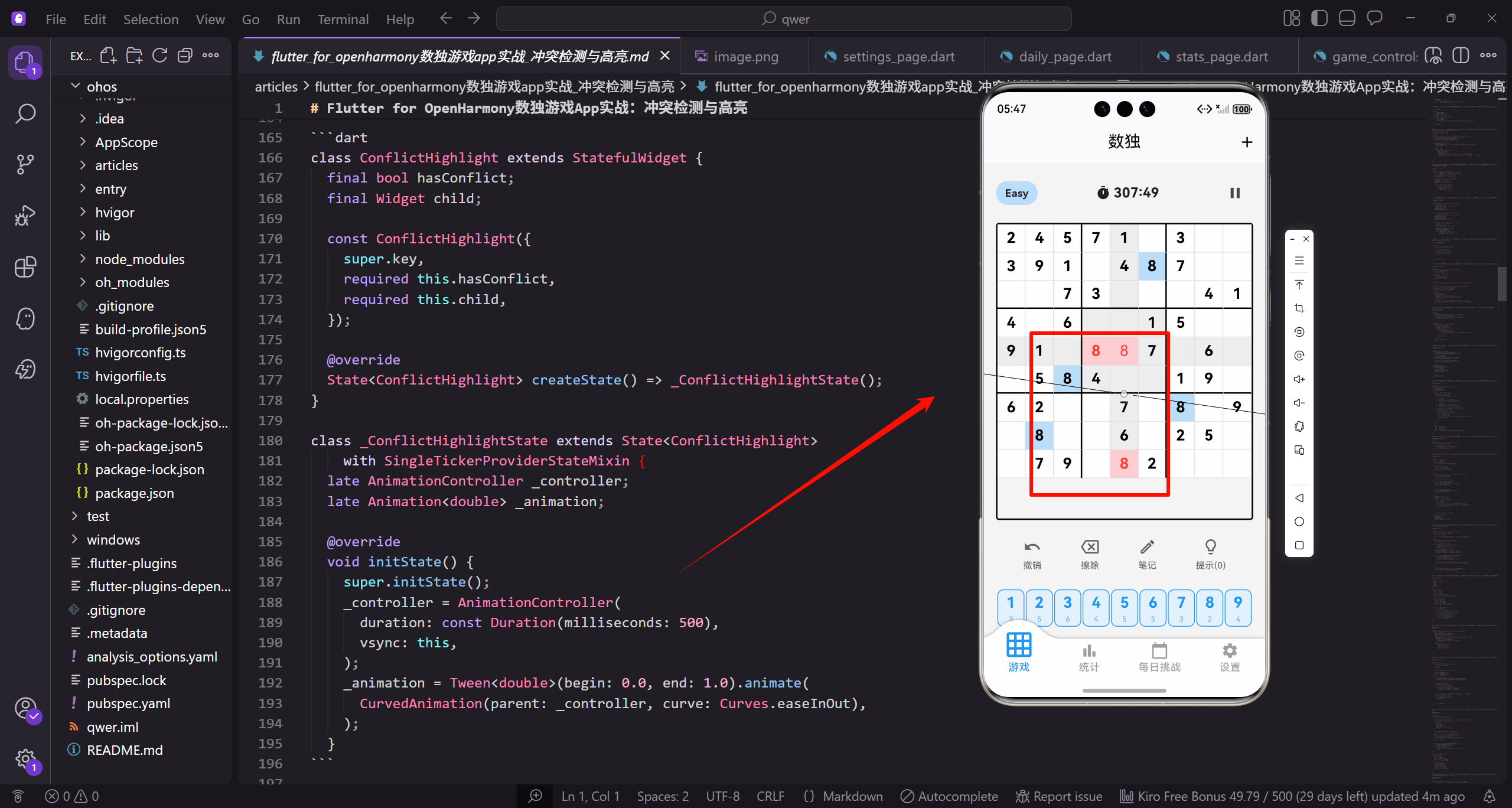
冲突检测是数独游戏的核心功能之一。当玩家填入一个数字时,如果这个数字违反了数独规则(同行、同列或同宫格已有相同数字),应该立即给出视觉提示。今天我们来详细讲解冲突检测的算法实现和高亮显示。
在设计冲突检测之前,我们需要理解数独的基本规则。每一行的数字1-9不能重复,每一列的数字1-9不能重复,每个3x3宫格内的数字1-9不能重复。冲突检测就是检查当前填入的数字是否违反了这三条规则中的任何一条。
让我们从GameController中的冲突检测方法开始。
bool hasConflict(int row, int col) {
  int value = board[row][col];
  if (value == 0) return false;

  // 检查行冲突
  for (int i = 0; i < 9; i++) {
    if (i != col && board[row][i] == value) return true;
  }
hasConflict方法检查指定位置的数字是否与其他单元格冲突。首先获取该位置的数字,如果是0(空格)则不可能有冲突,直接返回false。然后检查同一行是否有相同数字,遍历该行的所有列,排除自身位置。
检查列冲突。
  // 检查列冲突
  for (int i = 0; i < 9; i++) {
    if (i != row && board[i][col] == value) return true;
  }
用同样的方式检查同一列是否有相同数字。遍历该列的所有行,排除自身位置。如果发现相同数字,立即返回true表示存在冲突。
检查宫格冲突。
  // 检查3x3宫格冲突
  int boxRow = (row ~/ 3) * 3;
  int boxCol = (col ~/ 3) * 3;
  for (int i = 0; i < 3; i++) {
    for (int j = 0; j < 3; j++) {
      int r = boxRow + i;
      int c = boxCol + j;
      if ((r != row || c != col) && board[r][c] == value) return true;
    }
  }
  return false;
}
首先计算当前单元格所在宫格的左上角坐标。row ~/ 3得到宫格的行索引(0、1或2),乘以3得到左上角的行坐标。然后遍历该宫格内的所有9个单元格,排除自身后检查是否有相同数字。三项检查都通过才返回false。
在棋盘组件中使用冲突检测。
Widget _buildCell(GameController controller, int row, int col) {
  bool hasConflict = controller.hasConflict(row, col);
  int value = controller.board[row][col];
  bool isFixed = controller.isFixed[row][col];

  return Container(
    decoration: BoxDecoration(
      color: hasConflict ? Colors.red.shade100 : _getDefaultColor(row, col),
      // 边框设置
    ),
    child: Center(
      child: Text(
        value != 0 ? value.toString() : '',
        style: TextStyle(
          fontSize: 20.sp,
          fontWeight: isFixed ? FontWeight.bold : FontWeight.normal,
          color: hasConflict ? Colors.red : (isFixed ? Colors.black : Colors.blue),
        ),
      ),
    ),
  );
}
在构建单元格时调用hasConflict检查是否有冲突。有冲突的单元格使用浅红色背景,数字使用红色。这种醒目的颜色让玩家立即注意到错误。固定数字使用黑色粗体,玩家填入的数字使用蓝色。
优化冲突检测性能。
class OptimizedConflictChecker {
  // 使用位掩码记录每行、每列、每宫格已使用的数字
  List<int> rowMask = List.filled(9, 0);
  List<int> colMask = List.filled(9, 0);
  List<int> boxMask = List.filled(9, 0);

  void initialize(List<List<int>> board) {
    rowMask = List.filled(9, 0);
    colMask = List.filled(9, 0);
    boxMask = List.filled(9, 0);

    for (int i = 0; i < 9; i++) {
      for (int j = 0; j < 9; j++) {
        int value = board[i][j];
        if (value != 0) {
          _setNumber(i, j, value);
        }
      }
    }
  }
使用位掩码可以将冲突检测从O(27)优化到O(1)。每个掩码是一个整数,第i位为1表示数字i已被使用。initialize方法遍历棋盘,为每个非零数字设置对应的位。
位掩码的操作方法。
  void _setNumber(int row, int col, int num) {
    int bit = 1 << num;
    int boxIndex = (row ~/ 3) * 3 + col ~/ 3;
    rowMask[row] |= bit;
    colMask[col] |= bit;
    boxMask[boxIndex] |= bit;
  }

  void _clearNumber(int row, int col, int num) {
    int bit = ~(1 << num);
    int boxIndex = (row ~/ 3) * 3 + col ~/ 3;
    rowMask[row] &= bit;
    colMask[col] &= bit;
    boxMask[boxIndex] &= bit;
  }

  bool hasConflict(int row, int col, int num) {
    if (num == 0) return false;
    int bit = 1 << num;
    int boxIndex = (row ~/ 3) * 3 + col ~/ 3;

    // 先清除当前位置的数字(如果有)
    // 然后检查是否有冲突
    return (rowMask[row] & bit) != 0 ||
           (colMask[col] & bit) != 0 ||
           (boxMask[boxIndex] & bit) != 0;
  }
}
_setNumber使用位或运算设置对应位,_clearNumber使用位与运算和取反清除对应位。hasConflict只需要检查三个掩码的对应位是否为1,时间复杂度O(1)。这种优化在频繁检测冲突时效果显著。
显示所有冲突的单元格。
List<List<int>> findAllConflicts() {
  List<List<int>> conflicts = [];

  for (int i = 0; i < 9; i++) {
    for (int j = 0; j < 9; j++) {
      if (hasConflict(i, j)) {
        conflicts.add([i, j]);
      }
    }
  }

  return conflicts;
}
findAllConflicts遍历整个棋盘,返回所有有冲突的单元格位置。这个方法可以用于在游戏结束时检查是否有错误,或者在设置中提供"显示所有错误"的功能。
冲突高亮的动画效果。
class ConflictHighlight extends StatefulWidget {
final bool hasConflict;
final Widget child;
const ConflictHighlight({
super.key,
required this.hasConflict,
required this.child,
});
State<ConflictHighlight> createState() => _ConflictHighlightState();
}
class _ConflictHighlightState extends State<ConflictHighlight>
with SingleTickerProviderStateMixin {
late AnimationController _controller;
late Animation<double> _animation;
void initState() {
super.initState();
_controller = AnimationController(
duration: const Duration(milliseconds: 500),
vsync: this,
);
_animation = Tween<double>(begin: 0.0, end: 1.0).animate(
CurvedAnimation(parent: _controller, curve: Curves.easeInOut),
);
}
ConflictHighlight组件为冲突单元格添加动画效果。当hasConflict变为true时,播放一个闪烁动画,吸引玩家注意。
监听冲突状态变化。
void didUpdateWidget(ConflictHighlight oldWidget) {
super.didUpdateWidget(oldWidget);
if (widget.hasConflict && !oldWidget.hasConflict) {
_controller.forward(from: 0);
}
}
Widget build(BuildContext context) {
return AnimatedBuilder(
animation: _animation,
builder: (context, child) {
return Container(
decoration: BoxDecoration(
color: widget.hasConflict
? Colors.red.withOpacity(0.1 + _animation.value * 0.2)
: null,
),
child: child,
);
},
child: widget.child,
);
}
didUpdateWidget在widget属性变化时调用。当从无冲突变为有冲突时,播放动画。动画效果是背景色的透明度变化,从0.1到0.3,产生闪烁效果。
冲突提示的震动反馈。
void enterNumber(int number) {
  if (selectedRow < 0 || selectedCol < 0) return;
  if (isFixed[selectedRow][selectedCol]) return;

  // 检查是否会产生冲突
  int oldValue = board[selectedRow][selectedCol];
  board[selectedRow][selectedCol] = number;

  if (hasConflict(selectedRow, selectedCol)) {
    HapticFeedback.heavyImpact();
  }

  // 记录操作历史
  moveHistory.add(GameMove(
    row: selectedRow,
    col: selectedCol,
    previousValue: oldValue,
    newValue: number,
  ));

  update();
  _checkCompletion();
}
当填入的数字产生冲突时,触发重度震动反馈。这种触觉提示让玩家即使不看屏幕也能知道填入了错误的数字。HapticFeedback.heavyImpact()产生较强的震动。
冲突统计功能。
Map<String, int> getConflictStats() {
  int rowConflicts = 0;
  int colConflicts = 0;
  int boxConflicts = 0;

  for (int i = 0; i < 9; i++) {
    for (int j = 0; j < 9; j++) {
      int value = board[i][j];
      if (value == 0) continue;

      // 检查行冲突
      for (int k = j + 1; k < 9; k++) {
        if (board[i][k] == value) rowConflicts++;
      }
      // 检查列冲突
      for (int k = i + 1; k < 9; k++) {
        if (board[k][j] == value) colConflicts++;
      }
      // 检查宫格冲突(只检查后面的单元格避免重复计数)
      int boxRow = (i ~/ 3) * 3;
      int boxCol = (j ~/ 3) * 3;
      for (int bi = 0; bi < 3; bi++) {
        for (int bj = 0; bj < 3; bj++) {
          int r = boxRow + bi;
          int c = boxCol + bj;
          if ((r > i || (r == i && c > j)) && board[r][c] == value) {
            boxConflicts++;
          }
        }
      }
    }
  }

  return {
    'row': rowConflicts,
    'col': colConflicts,
    'box': boxConflicts,
    'total': rowConflicts + colConflicts + boxConflicts,
  };
}
getConflictStats统计各类型冲突的数量。为了避免重复计数,只检查当前单元格之后的单元格。这个统计可以用于显示详细的错误信息,帮助玩家定位问题。
可选的冲突检测设置。
class GameController extends GetxController {
  bool autoCheckErrors = true;

  bool shouldShowConflict(int row, int col) {
    if (!autoCheckErrors) return false;
    return hasConflict(row, col);
  }
}
autoCheckErrors设置控制是否自动显示冲突。有些玩家喜欢挑战自己,不希望系统提示错误。shouldShowConflict方法根据设置决定是否显示冲突高亮。
冲突关联显示。
class ConflictRelation {
  final int sourceRow;
  final int sourceCol;
  final List<List<int>> conflictingCells;

  ConflictRelation({
    required this.sourceRow,
    required this.sourceCol,
    required this.conflictingCells,
  });
}

ConflictRelation? findConflictRelations(int row, int col) {
  int value = board[row][col];
  if (value == 0) return null;

  List<List<int>> conflicts = [];

  // 找出所有与当前单元格冲突的单元格
  for (int i = 0; i < 9; i++) {
    if (i != col && board[row][i] == value) {
      conflicts.add([row, i]);
    }
  }

  for (int i = 0; i < 9; i++) {
    if (i != row && board[i][col] == value) {
      conflicts.add([i, col]);
    }
  }

  int boxRow = (row ~/ 3) * 3;
  int boxCol = (col ~/ 3) * 3;
  for (int i = 0; i < 3; i++) {
    for (int j = 0; j < 3; j++) {
      int r = boxRow + i;
      int c = boxCol + j;
      if ((r != row || c != col) && board[r][c] == value) {
        if (!conflicts.any((cell) => cell[0] == r && cell[1] == c)) {
          conflicts.add([r, c]);
        }
      }
    }
  }

  if (conflicts.isEmpty) return null;

  return ConflictRelation(
    sourceRow: row,
    sourceCol: col,
    conflictingCells: conflicts,
  );
}
ConflictRelation不仅标记有冲突,还记录具体是哪些单元格产生了冲突。findConflictRelations返回所有与指定单元格冲突的单元格列表。这可以用于在UI上绘制连线,清晰地显示冲突关系。
绘制冲突连线。
class ConflictLinePainter extends CustomPainter {
final ConflictRelation? relation;
final double cellSize;
ConflictLinePainter({this.relation, required this.cellSize});
void paint(Canvas canvas, Size size) {
if (relation == null) return;
Paint linePaint = Paint()
..color = Colors.red.withOpacity(0.5)
..strokeWidth = 2
..style = PaintingStyle.stroke;
Offset sourceCenter = Offset(
relation!.sourceCol * cellSize + cellSize / 2,
relation!.sourceRow * cellSize + cellSize / 2,
);
for (var cell in relation!.conflictingCells) {
Offset targetCenter = Offset(
cell[1] * cellSize + cellSize / 2,
cell[0] * cellSize + cellSize / 2,
);
canvas.drawLine(sourceCenter, targetCenter, linePaint);
}
}
bool shouldRepaint(ConflictLinePainter oldDelegate) {
return relation != oldDelegate.relation;
}
}
ConflictLinePainter使用CustomPainter绘制冲突连线。从源单元格中心到每个冲突单元格中心画一条红色半透明线。这种可视化让玩家一眼就能看出冲突的来源。
冲突类型分类。
enum ConflictType {
  row,
  column,
  box,
  multiple,
}

class DetailedConflict {
  final int row;
  final int col;
  final int value;
  final ConflictType type;
  final List<List<int>> conflictingCells;

  DetailedConflict({
    required this.row,
    required this.col,
    required this.value,
    required this.type,
    required this.conflictingCells,
  });

  String get description {
    switch (type) {
      case ConflictType.row:
        return '第${row + 1}行已有数字$value';
      case ConflictType.column:
        return '第${col + 1}列已有数字$value';
      case ConflictType.box:
        return '当前宫格已有数字$value';
      case ConflictType.multiple:
        return '多处冲突';
    }
  }
}
DetailedConflict提供更详细的冲突信息。ConflictType区分是行冲突、列冲突还是宫格冲突。description生成人类可读的冲突描述,可以显示在提示信息中。
冲突提示气泡。
Widget _buildConflictTooltip(DetailedConflict conflict) {
  return Positioned(
    left: conflict.col * cellSize,
    top: conflict.row * cellSize - 30.h,
    child: Container(
      padding: EdgeInsets.symmetric(horizontal: 8.w, vertical: 4.h),
      decoration: BoxDecoration(
        color: Colors.red.shade700,
        borderRadius: BorderRadius.circular(4.r),
      ),
      child: Text(
        conflict.description,
        style: TextStyle(
          fontSize: 10.sp,
          color: Colors.white,
        ),
      ),
    ),
  );
}
冲突提示气泡显示在冲突单元格上方,用简短的文字说明冲突原因。红色背景让提示更加醒目。这种即时反馈帮助玩家快速理解错误所在。
冲突自动修复建议。
class ConflictResolver {
  static List<int> getSuggestedValues(
    List<List<int>> board,
    int row,
    int col,
  ) {
    if (board[row][col] != 0) return [];

    Set<int> usedInRow = {};
    Set<int> usedInCol = {};
    Set<int> usedInBox = {};

    for (int i = 0; i < 9; i++) {
      if (board[row][i] != 0) usedInRow.add(board[row][i]);
      if (board[i][col] != 0) usedInCol.add(board[i][col]);
    }

    int boxRow = (row ~/ 3) * 3;
    int boxCol = (col ~/ 3) * 3;
    for (int i = 0; i < 3; i++) {
      for (int j = 0; j < 3; j++) {
        int value = board[boxRow + i][boxCol + j];
        if (value != 0) usedInBox.add(value);
      }
    }

    Set<int> allUsed = {...usedInRow, ...usedInCol, ...usedInBox};
    List<int> available = [];
    for (int i = 1; i <= 9; i++) {
      if (!allUsed.contains(i)) {
        available.add(i);
      }
    }

    return available;
  }
}
ConflictResolver分析空单元格可以填入哪些数字。通过排除行、列、宫格中已使用的数字,得到可用数字列表。这个功能可以作为高级提示,帮助玩家缩小选择范围。
冲突历史记录。
class ConflictHistory {
  List<ConflictRecord> records = [];

  void recordConflict(int row, int col, int value, ConflictType type) {
    records.add(ConflictRecord(
      row: row,
      col: col,
      value: value,
      type: type,
      timestamp: DateTime.now(),
    ));
  }

  int get totalConflicts => records.length;

  Map<ConflictType, int> get conflictsByType {
    Map<ConflictType, int> result = {};
    for (var record in records) {
      result[record.type] = (result[record.type] ?? 0) + 1;
    }
    return result;
  }

  ConflictType? get mostCommonConflictType {
    if (records.isEmpty) return null;
    var byType = conflictsByType;
    return byType.entries
        .reduce((a, b) => a.value > b.value ? a : b)
        .key;
  }
}

class ConflictRecord {
  final int row;
  final int col;
  final int value;
  final ConflictType type;
  final DateTime timestamp;

  ConflictRecord({
    required this.row,
    required this.col,
    required this.value,
    required this.type,
    required this.timestamp,
  });
}
ConflictHistory记录游戏过程中的所有冲突。conflictsByType统计各类型冲突的数量,mostCommonConflictType找出最常见的冲突类型。这些数据可以帮助玩家了解自己的弱点,比如经常忽略宫格检查。
冲突预防提示。
Widget _buildPreventionHint(int row, int col, int number) {
  bool wouldConflict = _checkWouldConflict(row, col, number);

  if (!wouldConflict) return const SizedBox();

  return Container(
    padding: EdgeInsets.all(8.w),
    margin: EdgeInsets.only(bottom: 8.h),
    decoration: BoxDecoration(
      color: Colors.orange.shade100,
      borderRadius: BorderRadius.circular(8.r),
      border: Border.all(color: Colors.orange),
    ),
    child: Row(
      children: [
        Icon(Icons.warning, color: Colors.orange, size: 20.sp),
        SizedBox(width: 8.w),
        Expanded(
          child: Text(
            '填入$number会产生冲突',
            style: TextStyle(fontSize: 12.sp, color: Colors.orange.shade800),
          ),
        ),
      ],
    ),
  );
}

bool _checkWouldConflict(int row, int col, int number) {
  // 临时填入数字检查是否会冲突
  int originalValue = board[row][col];
  board[row][col] = number;
  bool hasConflict = controller.hasConflict(row, col);
  board[row][col] = originalValue;
  return hasConflict;
}
冲突预防提示在玩家选择数字前就警告可能的冲突。_checkWouldConflict临时填入数字检查,然后恢复原值。这种预防性提示可以减少玩家的错误操作。
总结一下冲突检测与高亮的关键设计要点。首先是完整的规则检查,检查行、列、宫格三个维度的冲突。其次是即时反馈,填入数字后立即显示冲突状态。然后是视觉和触觉提示,使用红色高亮和震动反馈。接着是详细的冲突信息,告诉玩家具体是哪里冲突。还有冲突连线显示,直观展示冲突关系。最后是可配置性,让玩家可以选择是否显示冲突提示。
冲突检测是数独游戏的安全网,它帮助玩家及时发现错误,避免在错误的基础上继续填写。良好的冲突提示设计可以显著提升游戏体验,让玩家更专注于解题的乐趣。
欢迎加入开源鸿蒙跨平台社区:https://openharmonycrossplatform.csdn.net

腾讯云面向开发者汇聚海量精品云计算使用和开发经验,营造开放的云计算技术生态圈。
更多推荐
 13
13 0
0- 0


 已为社区贡献26条内容

所有评论(0)