Flutter框架跨平台鸿蒙开发——Future基础与数据加载
一、Future概述
Future是Dart中处理异步操作的核心类型,表示一个可能在未来某个时间完成的操作。在现代移动应用开发中,异步操作无处不在,比如网络请求、文件读写、数据库查询等,都需要使用Future来处理。Future提供了一种优雅的方式来管理这些耗时操作,使得开发者可以在不阻塞UI线程的情况下完成复杂的任务。
Future的工作原理基于Dart的事件循环机制。当我们调用一个返回Future的函数时,该函数会立即返回一个Future对象,而实际的操作会在后台异步执行。Future对象本身不会立即包含结果,它代表的是一个承诺——在将来的某个时刻,这个操作要么会成功完成并返回一个值,要么会失败并抛出一个错误。这种设计让开发者可以写出更加流畅和响应迅速的应用程序。
Future主要有三种状态:未完成、成功完成和错误完成。在未完成状态下,异步操作正在进行中,Future还没有任何值;在成功完成状态下,Future包含了一个结果值;在错误完成状态下,Future包含了一个错误对象。开发者可以通过then、catchError等方法来监听Future的状态变化,并在状态改变时执行相应的处理逻辑。
Future的使用非常广泛,几乎所有涉及IO操作的API都会返回Future。例如,HTTP请求库会将网络请求封装在Future中,文件操作库会将读写操作封装在Future中。这种统一的异步编程模型让开发者可以用一致的方式处理各种异步任务,大大降低了学习成本和开发复杂度。在实际开发中,合理使用Future可以让应用界面保持流畅,避免因耗时操作导致的卡顿现象。
二、Future的基本用法
使用Future最常见的方式是配合async和await关键字。async用于标记一个函数为异步函数,而await用于等待一个Future完成。这种方式让异步代码看起来像同步代码一样,大大提高了代码的可读性和可维护性。当我们使用await时,代码会暂停执行,直到Future完成,然后继续执行后续的代码。这种写法避免了传统的回调地狱问题,让代码逻辑更加清晰。
除了async/await之外,还可以使用then方法来处理Future的结果。then方法接收一个回调函数,当Future成功完成时,这个回调函数会被执行,并且接收Future的结果作为参数。then方法本身也会返回一个新的Future,这使得我们可以进行链式调用,将多个异步操作串联起来。这种方式特别适合处理有依赖关系的异步任务序列,比如先验证数据,再转换数据,最后保存数据。
错误处理是Future使用中非常重要的一环。Future提供了多种错误处理方式,最常用的是catchError方法。catchError可以捕获Future链中抛出的任何错误,并提供一个错误处理回调。此外,还可以使用try-catch语句来捕获async函数中的错误。良好的错误处理不仅可以让应用更加健壮,还能提供更好的用户体验,比如在网络失败时提示用户重试,或者在数据错误时给出友好的提示信息。
// 基础Future创建
Future<String> fetchUserData() async {
  await Future.delayed(const Duration(seconds: 1));
  return '用户数据';
}

// 使用async/await
void loadData() async {
  try {
    final data = await fetchUserData();
    print('数据: $data');
  } catch (error) {
    print('错误: $error');
  }
}

// 使用then链式调用
fetchUserData()
  .then((data) => print('数据: $data'))
  .catchError((error) => print('错误: $error'));
三、数据加载示例
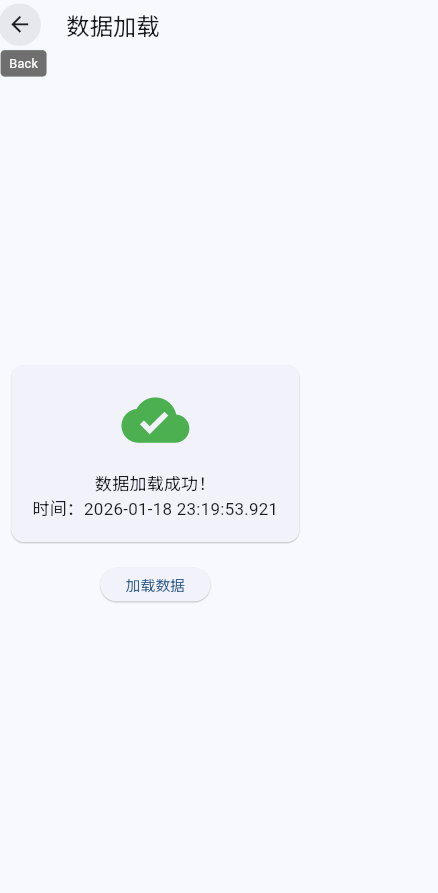
在Flutter应用中,数据加载是最常见的异步操作之一。下面是一个完整的数据加载示例,展示了如何使用Future来处理网络请求、更新UI状态以及处理各种错误情况。这个例子模拟了一个需要2秒才能完成的数据请求,并且会随机模拟网络失败的情况,让开发者可以学习如何处理真实的异步场景。
数据加载的过程通常包括几个阶段:初始化状态、发起请求、显示加载中、处理结果或错误。在每个阶段,都需要相应地更新UI,让用户知道当前应用的状态。比如,在请求开始时显示加载动画,在请求成功时显示数据,在请求失败时显示错误信息和重试按钮。这种状态管理是异步编程中的关键技能。
代码中使用了setState来更新UI状态,这是Flutter中响应式编程的核心。当数据加载成功时,我们将数据保存到_state中并通知Flutter重新构建UI;当数据加载失败时,我们将错误信息保存到_error中并显示给用户。这种模式在Flutter应用中被广泛使用,是每个Flutter开发者必须掌握的基本技能。
class DataLoadingWidget extends StatefulWidget {
const DataLoadingWidget({super.key});
State<DataLoadingWidget> createState() => _DataLoadingWidgetState();
}
class _DataLoadingWidgetState extends State<DataLoadingWidget> {
bool _isLoading = false;
String? _data;
String? _error;
Future<String> _fetchData() async {
await Future.delayed(const Duration(seconds: 2));
if (DateTime.now().second % 3 == 0) {
throw Exception('网络请求失败');
}
return '数据加载成功: ${DateTime.now()}';
}
void _loadData() {
setState(() {
_isLoading = true;
_error = null;
_data = null;
});
_fetchData().then((data) {
if (mounted) {
setState(() {
_data = data;
_isLoading = false;
});
}
}).catchError((error) {
if (mounted) {
setState(() {
_error = error.toString();
_isLoading = false;
});
}
});
}
Widget build(BuildContext context) {
return Scaffold(
body: Center(
child: Column(
mainAxisAlignment: MainAxisAlignment.center,
children: [
if (_isLoading)
const CircularProgressIndicator()
else if (_data != null)
Text(_data!)
else if (_error != null)
Column(
children: [
Text(_error!, style: const TextStyle(color: Colors.red)),
const SizedBox(height: 16),
ElevatedButton(
onPressed: _loadData,
child: const Text('重试'),
),
],
)
else
ElevatedButton(
onPressed: _loadData,
child: const Text('加载数据'),
),
],
),
),
);
}
}
四、状态管理表格
在使用Future进行数据加载时,良好的状态管理对于提供良好的用户体验至关重要。通常需要维护多种状态,包括初始状态、加载中状态、成功状态和错误状态。每种状态都应该有对应的UI表现,让用户清楚地了解当前应用的状态。初始状态通常显示一些提示信息和操作按钮;加载中状态显示加载指示器;成功状态显示数据内容;错误状态显示错误信息和重试按钮。
| 状态 | UI显示 | 操作按钮 | 代码表示 | 用户行为 |
|---|---|---|---|---|
| 初始 | 加载按钮 | 加载数据 | _isLoading=false, _data=null, _error=null | 点击加载 |
| 加载中 | 进度条 | 禁用 | _isLoading=true, _data=null, _error=null | 等待中 |
| 成功 | 数据内容 | 重新加载 | _isLoading=false, _data!=null, _error=null | 查看数据 |
| 失败 | 错误信息 | 重试 | _isLoading=false, _data=null, _error!=null | 点击重试 |
在Flutter中,我们可以使用布尔变量或者枚举类型来表示这些状态。使用布尔变量时,通常需要多个变量来表示不同的状态,比如_isLoading、_hasError等。而使用枚举类型则可以更清晰地表示状态,比如enum LoadingState { initial, loading, success, error }。选择哪种方式取决于具体的需求,一般来说,当状态比较简单时使用布尔变量,当状态比较复杂时使用枚举类型。
// 使用布尔变量管理状态
class BoolStateExample extends StatefulWidget {
State<BoolStateExample> createState() => _BoolStateExampleState();
}
class _BoolStateExampleState extends State<BoolStateExample> {
bool _isLoading = false;
bool _hasError = false;
String? _data;
void loadData() async {
setState(() {
_isLoading = true;
_hasError = false;
_data = null;
});
try {
final data = await fetchData();
if (mounted) {
setState(() {
_isLoading = false;
_data = data;
});
}
} catch (error) {
if (mounted) {
setState(() {
_isLoading = false;
_hasError = true;
});
}
}
}
}
// 使用枚举类型管理状态
enum LoadingState { initial, loading, success, error }
class EnumStateExample extends StatefulWidget {
State<EnumStateExample> createState() => _EnumStateExampleState();
}
class _EnumStateExampleState extends State<EnumStateExample> {
LoadingState _state = LoadingState.initial;
String? _data;
void loadData() async {
setState(() => _state = LoadingState.loading);
try {
final data = await fetchData();
if (mounted) {
setState(() {
_state = LoadingState.success;
_data = data;
});
}
} catch (error) {
if (mounted) {
setState(() => _state = LoadingState.error);
}
}
}
}
五、最佳实践
在使用Future进行异步编程时,有一些最佳实践可以帮助我们写出更加健壮和高效的代码。首先,始终要检查widget的mounted状态,在调用setState之前确保widget仍然在widget树中。这是因为在异步操作完成时,widget可能已经被销毁,这时候调用setState会导致错误。使用if (mounted) { setState(…); }是一个简单有效的防护措施。
其次,要为用户提供清晰的错误反馈。不要只是简单地显示一个错误提示,而应该告诉用户发生了什么以及如何解决。比如,当网络连接失败时,应该提示用户检查网络连接,并提供重试按钮。当数据加载失败时,应该告诉用户稍后重试。良好的错误反馈可以大大提升用户体验,让用户感觉到应用是可靠和友好的。
第三,要支持重试机制。网络请求可能会因为各种原因失败,比如网络不稳定、服务器暂时不可用等。在这些情况下,提供重试按钮可以让用户方便地重新发起请求,而不需要退出页面或刷新整个应用。重试按钮应该在错误状态时显示,点击后清除错误状态并重新发起请求。
第四,要合理使用setState。setState会导致widget重建,如果频繁调用或重建的widget树很大,可能会影响性能。因此,应该在真正需要更新UI时才调用setState,并且尽量减少setState影响的widget范围。对于复杂的widget树,可以考虑使用状态管理库来管理状态,避免不必要的重建。
class BestPracticesExample extends StatefulWidget {
const BestPracticesExample({super.key});
State<BestPracticesExample> createState() => _BestPracticesExampleState();
}
class _BestPracticesExampleState extends State<BestPracticesExample> {
bool _isLoading = false;
String? _data;
String? _error;
Future<void> _loadData() async {
// 最佳实践1:初始化状态
setState(() {
_isLoading = true;
_error = null;
_data = null;
});
try {
final data = await _fetchData();
// 最佳实践2:检查mounted状态
if (mounted) {
setState(() {
_data = data;
_isLoading = false;
});
}
} catch (error) {
// 最佳实践3:提供清晰的错误信息
final errorMessage = _getErrorMessage(error);
if (mounted) {
setState(() {
_error = errorMessage;
_isLoading = false;
});
}
}
}
String _getErrorMessage(dynamic error) {
if (error is SocketException) {
return '网络连接失败,请检查网络设置';
} else if (error is TimeoutException) {
return '请求超时,请稍后重试';
} else {
return '加载失败: $error';
}
}
Future<String> _fetchData() async {
await Future.delayed(const Duration(seconds: 2));
return '数据内容';
}
Widget build(BuildContext context) {
return Scaffold(
appBar: AppBar(title: const Text('最佳实践')),
body: Center(
child: _buildBody(),
),
);
}
Widget _buildBody() {
if (_isLoading) {
return const CircularProgressIndicator();
}
if (_data != null) {
return Column(
children: [
Text(_data!),
const SizedBox(height: 16),
ElevatedButton(
onPressed: _loadData,
child: const Text('重新加载'),
),
],
);
}
if (_error != null) {
return Column(
children: [
Text(_error!, style: const TextStyle(color: Colors.red)),
const SizedBox(height: 16),
// 最佳实践4:提供重试机制
ElevatedButton(
onPressed: _loadData,
child: const Text('重试'),
),
],
);
}
return ElevatedButton(
onPressed: _loadData,
child: const Text('加载数据'),
);
}
}
六、Future链式调用
Future支持链式调用,可以将多个异步操作串联起来,形成完整的数据处理流程。这种方式能够使代码更加清晰,避免回调地狱的问题。链式调用的核心思想是每个异步操作都返回一个Future,然后通过then方法将多个Future连接起来。当第一个Future完成后,它的结果会传递给下一个then的回调函数,这样就可以形成一个处理链。
链式调用在数据处理场景中特别有用。比如,我们可能需要先验证数据的格式,然后将数据转换为需要的结构,最后将数据保存到本地缓存。每个步骤都是一个异步操作,而且后一个步骤依赖前一个步骤的结果。使用链式调用,我们可以将这些步骤串联起来,形成一个清晰的数据流。如果任何一个步骤失败,整个链式调用都会中断,错误会传递到catchError中处理。
链式调用的另一个优点是可以集中处理错误。不需要在每个then中都添加错误处理逻辑,而是在链的最后添加一个catchError来统一处理所有可能的错误。这样可以减少重复代码,提高代码的可维护性。同时,catchError还可以决定是否继续执行后续的处理逻辑,或者直接返回一个默认值来替代错误。
| 链式方法 | 说明 | 参数 | 返回值 | 使用场景 |
|---|---|---|---|---|
| then | 处理成功结果 | 回调函数 | Future | 数据转换 |
| catchError | 处理错误 | 错误回调 | Future | 错误处理 |
| whenComplete | 无论成功失败都执行 | 回调函数 | Future | 清理资源 |
| timeout | 设置超时时间 | Duration | Future | 防止长时间等待 |
// 链式调用示例
Future<String> processUserInput(String input) {
  return _validateInput(input)
    .then((validInput) => _transformData(validInput))
    .then((transformed) => _saveToCache(transformed))
    .then((saved) => _sendToServer(saved))
    .catchError((error) {
      print('处理失败: $error');
      return '默认结果';
    })
    .whenComplete(() {
      print('处理完成');
    });
}

Future<String> _validateInput(String input) async {
  await Future.delayed(const Duration(milliseconds: 500));
  if (input.isEmpty) {
    throw Exception('输入不能为空');
  }
  return input.trim();
}

Future<Map<String, dynamic>> _transformData(String input) async {
  await Future.delayed(const Duration(milliseconds: 500));
  return {
    'original': input,
    'processed': input.toUpperCase(),
    'timestamp': DateTime.now().toIso8601String(),
  };
}

Future<String> _saveToCache(Map<String, dynamic> data) async {
  await Future.delayed(const Duration(milliseconds: 500));
  // 模拟保存到缓存
  return '缓存成功: ${data['original']}';
}

Future<String> _sendToServer(String cachedData) async {
  await Future.delayed(const Duration(milliseconds: 500));
  // 模拟发送到服务器
  return '发送成功: $cachedData';
}
七、Future并发处理
在实际应用中,常常需要同时执行多个独立的异步操作。Dart提供了多种并发处理Future的方式,可以显著提升应用性能。最常用的是Future.wait方法,它可以接收一个Future列表,然后并行执行这些Future,当所有Future都完成时返回结果列表。这种方式适合批量加载多个数据源,比如同时加载用户信息、用户设置和用户偏好。
Future.any是另一个有用的并发方法,它接收一个Future列表,当其中任何一个Future完成时就返回该Future的结果。这种方式适合竞争性请求,比如同时向多个服务器请求相同的数据,使用最快响应的那个。还可以实现超时机制,比如将实际请求和一个定时器Future一起传给Future.any,定时器先完成就表示请求超时。
并发处理可以大大提高应用的性能,但也有一些注意事项。首先,并发请求会增加服务器的负载,需要控制并发数量,避免同时发起太多请求。其次,错误处理更加复杂,Future.wait中任何一个Future失败都会导致整个操作失败,需要考虑如何处理部分成功的情况。此外,并发操作可能会带来竞态条件和数据一致性问题,需要仔细设计来避免这些问题。
| 并发方法 | 说明 | 完成条件 | 错误处理 | 性能提升 | 适用场景 |
|---|---|---|---|---|---|
| Future.wait | 等待所有完成 | 全部完成 | 任一失败则失败 | 最高 | 批量加载 |
| Future.any | 返回最快结果 | 任一完成 | 单个失败不影响 | 高 | 竞争性请求 |
| Future.forEach | 顺序处理每个 | 全部完成 | 遇到错误停止 | 中 | 顺序处理 |
| 并发then | 独立处理 | 各自独立 | 互不影响 | 中 | 独立任务 |
// 并发处理示例
class ConcurrentLoadingExample extends StatefulWidget {
const ConcurrentLoadingExample({super.key});
State<ConcurrentLoadingExample> createState() => _ConcurrentLoadingExampleState();
}
class _ConcurrentLoadingExampleState extends State<ConcurrentLoadingExample> {
Map<String, dynamic> _userData = {};
bool _isLoading = false;
String? _error;
Future<String> _loadUserInfo() async {
await Future.delayed(const Duration(seconds: 1));
return '用户信息';
}
Future<String> _loadUserSettings() async {
await Future.delayed(const Duration(seconds: 2));
return '用户设置';
}
Future<String> _loadUserPreferences() async {
await Future.delayed(const Duration(seconds: 1));
return '用户偏好';
}
// Future.wait示例
Future<void> _loadAllDataWithWait() async {
setState(() {
_isLoading = true;
_error = null;
});
try {
// 并发加载所有数据
final results = await Future.wait([
_loadUserInfo(),
_loadUserSettings(),
_loadUserPreferences(),
]);
if (mounted) {
setState(() {
_userData = {
'info': results[0],
'settings': results[1],
'preferences': results[2],
};
_isLoading = false;
});
}
} catch (error) {
if (mounted) {
setState(() {
_error = error.toString();
_isLoading = false;
});
}
}
}
// Future.any示例
Future<String> _getFastestResponse() async {
try {
return Future.any([
_fetchFromServerA(),
_fetchFromServerB(),
_fetchFromCache(),
]);
} catch (error) {
return '本地缓存';
}
}
Future<String> _fetchFromServerA() async {
await Future.delayed(const Duration(milliseconds: 2000));
return '服务器A响应';
}
Future<String> _fetchFromServerB() async {
await Future.delayed(const Duration(milliseconds: 1500));
return '服务器B响应';
}
Future<String> _fetchFromCache() async {
await Future.delayed(const Duration(milliseconds: 100));
return '本地缓存';
}
Widget build(BuildContext context) {
return Scaffold(
appBar: AppBar(title: const Text('并发处理')),
body: Center(
child: Column(
mainAxisAlignment: MainAxisAlignment.center,
children: [
if (_isLoading)
const CircularProgressIndicator()
else if (_error != null)
Text(_error!, style: const TextStyle(color: Colors.red))
else
..._userData.entries.map((entry) => Padding(
padding: const EdgeInsets.all(8.0),
child: Text('${entry.key}: ${entry.value}'),
)),
const SizedBox(height: 20),
ElevatedButton(
onPressed: _isLoading ? null : _loadAllDataWithWait,
child: const Text('加载所有数据'),
),
],
),
),
);
}
}
八、错误处理策略
完善的错误处理是异步编程的关键,需要考虑各种可能的异常情况,并提供友好的用户体验。错误处理不仅仅是catch到异常并打印日志,更重要的是要区分不同类型的错误,并提供相应的解决方案。比如,网络连接失败和服务器错误应该有不同的处理方式,网络错误可能需要检查网络连接,而服务器错误可能需要稍后重试。
Dart中可以通过捕获特定的异常类型来区分错误。常见的网络错误包括SocketException(无网络连接)、TimeoutException(请求超时)、HttpException(服务器错误)等。针对每种错误类型,可以提供不同的用户提示和解决方案。比如,SocketException应该提示用户检查网络连接,TimeoutException应该提示用户稍后重试,HttpException中的401错误应该提示用户重新登录。
错误处理还应该包括错误日志的记录和错误上报。当应用在用户设备上运行时,开发者无法直接看到错误信息。因此,需要将错误信息记录到日志中,或者上报到服务器,这样可以帮助开发者定位和修复问题。同时,错误日志也应该保护用户隐私,不要记录敏感信息。
除了捕获和处理错误外,还应该预防错误的发生。比如,在发起网络请求前检查网络连接,在处理数据前验证数据格式,在访问资源前检查权限等。这些预防措施可以减少错误发生的概率,提升应用的稳定性和用户体验。良好的错误处理和预防策略是构建高质量应用的重要组成部分。
| 错误类型 | 典型原因 | 异常类 | 用户提示 | 解决方案 | 重试策略 |
|---|---|---|---|---|---|
| 网络错误 | 无网络连接 | SocketException | 网络连接失败 | 检查网络后重试 | 用户手动重试 |
| 超时错误 | 响应时间过长 | TimeoutException | 请求超时 | 稍后重试 | 自动重试3次 |
| 认证错误 | Token过期 | HttpException(401) | 登录已过期 | 重新登录 | 需要用户操作 |
| 数据错误 | 数据格式错误 | FormatException | 数据异常 | 联系管理员 | 不重试 |
| 服务错误 | 服务器异常 | HttpException(500) | 服务暂不可用 | 稍后再试 | 延迟重试 |
| 未知错误 | 未捕获的异常 | Exception | 发生未知错误 | 联系客服 | 不重试 |
class AdvancedErrorHandling extends StatefulWidget {
const AdvancedErrorHandling({super.key});
State<AdvancedErrorHandling> createState() => _AdvancedErrorHandlingState();
}
class _AdvancedErrorHandlingState extends State<AdvancedErrorHandling> {
String _status = '未开始';
String? _errorMessage;
Future<T> _handleErrors<T>(Future<T> Function() operation) async {
try {
return await operation();
} on SocketException catch (_) {
throw '网络连接失败,请检查网络设置';
} on TimeoutException catch (_) {
throw '请求超时,请稍后重试';
} on FormatException catch (_) {
throw '数据格式错误,请联系管理员';
} on HttpException catch (e) {
if (e.message?.contains('401') == true) {
throw '登录已过期,请重新登录';
}
throw '服务暂不可用,请稍后再试';
} catch (error) {
throw '发生未知错误: $error';
}
}
Future<void> _loadDataWithRetry() async {
int retryCount = 0;
const maxRetries = 3;
while (retryCount < maxRetries) {
try {
setState(() {
_status = '加载中...';
_errorMessage = null;
});
final data = await _handleErrors(() => _fetchData());
if (mounted) {
setState(() {
_status = '加载成功: $data';
});
}
return;
} catch (error) {
retryCount++;
if (retryCount >= maxRetries) {
if (mounted) {
setState(() {
_status = '加载失败';
_errorMessage = error.toString();
});
}
} else {
// 延迟重试
await Future.delayed(Duration(seconds: retryCount));
}
}
}
}
Future<String> _fetchData() async {
await Future.delayed(const Duration(seconds: 1));
// 模拟不同类型的错误
final random = Random();
final errorType = random.nextInt(10);
switch (errorType) {
case 0:
throw SocketException('网络连接失败');
case 1:
throw TimeoutException('请求超时', const Duration(seconds: 5));
case 2:
throw FormatException('数据格式错误');
case 3:
throw HttpException('401 Unauthorized');
case 4:
throw HttpException('500 Server Error');
default:
return '数据加载成功';
}
}
Widget build(BuildContext context) {
return Scaffold(
appBar: AppBar(title: const Text('高级错误处理')),
body: Center(
child: Padding(
padding: const EdgeInsets.all(24.0),
child: Column(
mainAxisAlignment: MainAxisAlignment.center,
children: [
Icon(
_errorMessage == null ? Icons.check_circle : Icons.error,
size: 64,
color: _errorMessage == null ? Colors.green : Colors.red,
),
const SizedBox(height: 24),
Text(
_status,
style: const TextStyle(fontSize: 18),
textAlign: TextAlign.center,
),
if (_errorMessage != null) ...[
const SizedBox(height: 16),
Text(
_errorMessage!,
style: const TextStyle(color: Colors.red),
textAlign: TextAlign.center,
),
],
const SizedBox(height: 24),
ElevatedButton(
onPressed: _loadDataWithRetry,
child: const Text('加载数据'),
),
],
),
),
),
);
}
}
欢迎加入开源鸿蒙跨平台社区:https://openharmonycrossplatform.csdn.net

腾讯云面向开发者汇聚海量精品云计算使用和开发经验,营造开放的云计算技术生态圈。
更多推荐
 16
16 0
0- 0


 已为社区贡献20条内容

所有评论(0)