Flutter框架开发鸿蒙项目——文本对齐
·
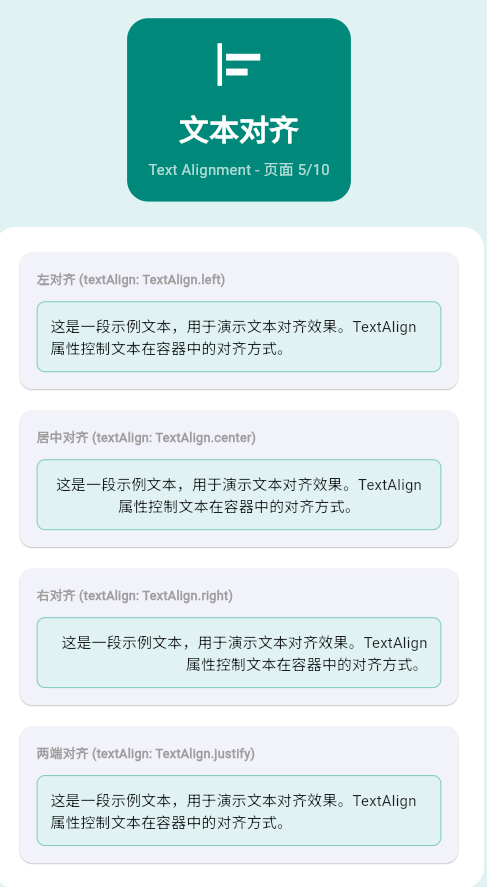
一、文本对齐基础
textAlign属性控制文本在容器中的对齐方式,是文本布局的重要属性。
TextAlign类型
| TextAlign | 说明 | LTR效果 | RTL效果 |
|---|---|---|---|
| left | 左对齐 | 从左开始 | 从左开始 |
| right | 右对齐 | 从右开始 | 从右开始 |
| center | 居中对齐 | 居中 | 居中 |
| start | 起始对齐 | 从左开始(LTR) | 从右开始(RTL) |
| end | 结束对齐 | 从右开始(LTR) | 从左开始(RTL) |
| justify | 两端对齐 | 拉伸填充 | 拉伸填充 |
二、基础对齐示例
左对齐
Container(
  width: 200,
  child: Text(
    '这是一段左对齐的文本示例',
    textAlign: TextAlign.left,
  ),
)
居中对齐
Container(
  width: 200,
  child: Text(
    '这是一段居中对齐的文本示例',
    textAlign: TextAlign.center,
  ),
)
右对齐
Container(
  width: 200,
  child: Text(
    '这是一段右对齐的文本示例',
    textAlign: TextAlign.right,
  ),
)
三、文本方向与对齐
LTR(从左到右)文本
Column(
  children: [
    Text('LTR左对齐', textDirection: TextDirection.ltr),
    Text('LTR居中', textDirection: TextDirection.ltr),
    Text('LTR右对齐', textDirection: TextDirection.ltr),
  ],
)
RTL(从右到左)文本
Column(
  children: [
    Text('RTL左对齐', textDirection: TextDirection.rtl),
    Text('RTL居中', textDirection: TextDirection.rtl),
    Text('RTL右对齐', textDirection: TextDirection.rtl),
  ],
)
start和end自适应
Column(
  children: [
    Text('LTR起始', textAlign: TextAlign.start, textDirection: TextDirection.ltr),
    Text('LTR结束', textAlign: TextAlign.end, textDirection: TextDirection.ltr),
    Text('RTL起始', textAlign: TextAlign.start, textDirection: TextDirection.rtl),
    Text('RTL结束', textAlign: TextAlign.end, textDirection: TextDirection.rtl),
  ],
)
四、多行文本对齐
居中多行文本
Container(
  width: 200,
  child: Text(
    '这是第一行文本\n这是第二行文本\n这是第三行文本',
    textAlign: TextAlign.center,
    style: TextStyle(fontSize: 16),
  ),
)
两端对齐
Container(
  width: 200,
  child: Text(
    '两端对齐会让文本在每行的左右两边都对齐,通过拉伸字符间距来实现。',
    textAlign: TextAlign.justify,
    style: TextStyle(fontSize: 16),
  ),
)
五、文本垂直对齐
使用Container垂直居中
Container(
  height: 100,
  alignment: Alignment.center,
  child: Text('垂直居中文本'),
)
使用SizedBox调整位置
Column(
  children: [
    SizedBox(height: 20),
    Text('顶部文本'),
    Expanded(child: SizedBox()),
    Text('中间文本'),
    Expanded(child: SizedBox()),
    Text('底部文本'),
    SizedBox(height: 20),
  ],
)
六、实际应用场景
标题居中对齐
Container(
  width: double.infinity,
  padding: EdgeInsets.all(16),
  color: Colors.blue.shade100,
  child: Text(
    '文章标题',
    textAlign: TextAlign.center,
    style: TextStyle(
      fontSize: 24,
      fontWeight: FontWeight.bold,
    ),
  ),
)
价格右对齐
Row(
  children: [
    Expanded(
      child: Text('商品名称'),
    ),
    Text(
      '¥99.99',
      textAlign: TextAlign.right,
      style: TextStyle(
        color: Colors.red,
        fontWeight: FontWeight.bold,
      ),
    ),
  ],
)
卡片内容布局
Card(
  child: Padding(
    padding: EdgeInsets.all(16),
    child: Column(
      crossAxisAlignment: CrossAxisAlignment.start,
      children: [
        Text(
          '卡片标题',
          style: TextStyle(
            fontSize: 20,
            fontWeight: FontWeight.bold,
          ),
        ),
        SizedBox(height: 8),
        Text(
          '这是卡片的描述内容,展示了文本对齐在实际应用中的使用。',
          textAlign: TextAlign.justify,
          style: TextStyle(fontSize: 14),
        ),
      ],
    ),
  ),
)
七、完整示例
class TextAlignmentExample extends StatelessWidget {
const TextAlignmentExample({super.key});
Widget build(BuildContext context) {
return Scaffold(
appBar: AppBar(title: Text('文本对齐')),
body: SingleChildScrollView(
padding: EdgeInsets.all(16),
child: Column(
crossAxisAlignment: CrossAxisAlignment.start,
children: [
_buildSection('基础对齐'),
_buildBasicAlignment(),
SizedBox(height: 24),
_buildSection('文本方向'),
_buildTextDirection(),
SizedBox(height: 24),
_buildSection('多行文本'),
_buildMultilineAlignment(),
SizedBox(height: 24),
_buildSection('实际应用'),
_buildRealWorldExamples(),
],
),
),
);
}
Widget _buildSection(String title) {
return Text(
title,
style: TextStyle(fontSize: 20, fontWeight: FontWeight.bold),
);
}
Widget _buildBasicAlignment() {
return Column(
children: [
_buildAlignmentBox('左对齐', TextAlign.left),
SizedBox(height: 8),
_buildAlignmentBox('居中对齐', TextAlign.center),
SizedBox(height: 8),
_buildAlignmentBox('右对齐', TextAlign.right),
],
);
}
Widget _buildAlignmentBox(String text, TextAlign align) {
return Container(
width: double.infinity,
padding: EdgeInsets.all(12),
decoration: BoxDecoration(
color: Colors.grey.shade200,
borderRadius: BorderRadius.circular(8),
),
child: Text(
text,
textAlign: align,
style: TextStyle(fontSize: 16),
),
);
}
Widget _buildTextDirection() {
return Column(
children: [
Container(
width: double.infinity,
padding: EdgeInsets.all(12),
decoration: BoxDecoration(
color: Colors.blue.shade50,
borderRadius: BorderRadius.circular(8),
),
child: Column(
crossAxisAlignment: CrossAxisAlignment.start,
children: [
Text('LTR文本', textDirection: TextDirection.ltr),
Text('RTL文本', textDirection: TextDirection.rtl),
Text('start起始', textAlign: TextAlign.start),
Text('end结束', textAlign: TextAlign.end),
],
),
),
],
);
}
Widget _buildMultilineAlignment() {
return Container(
width: double.infinity,
padding: EdgeInsets.all(12),
decoration: BoxDecoration(
color: Colors.green.shade50,
borderRadius: BorderRadius.circular(8),
),
child: Text(
'这是第一行文本\n这是第二行文本\n这是第三行文本,展示多行文本的居中对齐效果。',
textAlign: TextAlign.center,
style: TextStyle(fontSize: 14),
),
);
}
Widget _buildRealWorldExamples() {
return Column(
children: [
// 标题居中
Container(
width: double.infinity,
padding: EdgeInsets.all(16),
color: Colors.blue.shade100,
child: Text(
'文章标题',
textAlign: TextAlign.center,
style: TextStyle(
fontSize: 20,
fontWeight: FontWeight.bold,
),
),
),
SizedBox(height: 16),
// 价格右对齐
Container(
width: double.infinity,
padding: EdgeInsets.all(16),
decoration: BoxDecoration(
border: Border.all(color: Colors.grey),
borderRadius: BorderRadius.circular(8),
),
child: Row(
children: [
Expanded(child: Text('商品名称')),
Text(
'¥99.99',
style: TextStyle(
color: Colors.red,
fontWeight: FontWeight.bold,
),
),
],
),
),
],
);
}
}
八、最佳实践
| 实践 | 说明 | 效果 |
|---|---|---|
| 使用start/end | 适配RTL语言 | 国际化友好 |
| 合理设置容器宽度 | 确保对齐效果明显 | 视觉清晰 |
| 结合textDirection | 处理不同语言方向 | 全球化支持 |
| 多行文本注意 | justify效果 | 避免布局混乱 |
欢迎加入开源鸿蒙跨平台社区:https://openharmonycrossplatform.csdn.net

腾讯云面向开发者汇聚海量精品云计算使用和开发经验,营造开放的云计算技术生态圈。
更多推荐
 13
13 0
0- 0



 已为社区贡献12条内容

所有评论(0)