mysql 启动时,服务无法启动:发生系统错误1067.服务无法启动 进程意外终止
·
报错:服务无法启动
发生系统错误1067
进程意外终止
处理方式:
(1)控制面板–>查看日志事件–进入事件查看器,如下图:
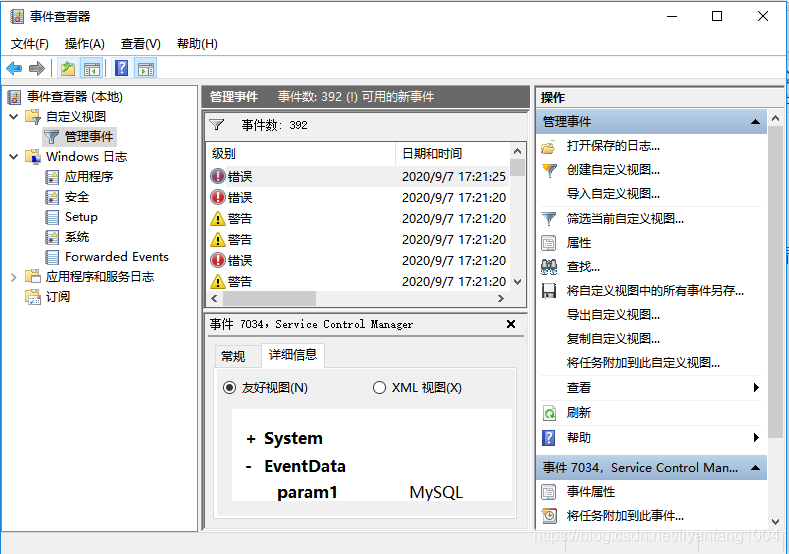
(2)点击mysql对应的错误,这里是报错7034,发现是my.ini配置文件没有放在bin文件目录下,另外要删去mysql文件下已有的default.ini配置文件。此外,还需要检查my.ini配置文件是否正确。

可做简单参考:
# For advice on how to change settings please see
# http://dev.mysql.com/doc/refman/5.6/en/server-configuration-defaults.html
# *** DO NOT EDIT THIS FILE. It's a template which will be copied to the
# *** default location during install, and will be replaced if you
# *** upgrade to a newer version of MySQL.

[mysqld]

# Remove leading # and set to the amount of RAM for the most important data
# cache in MySQL. Start at 70% of total RAM for dedicated server, else 10%.
# innodb_buffer_pool_size = 128M

# Remove leading # to turn on a very important data integrity option: logging
# changes to the binary log between backups.
# log_bin
#bind-address=0.0.0.0
port =3306
default-character-set=utf-8
# These are commonly set, remove the # and set as required.
basedir=D:\MySQL\mysql-5.7.19-winx64
datadir=D:\MySQL\mysql-5.7.19-winx64\data

# server_id = .....


# Remove leading # to set options mainly useful for reporting servers.
# The server defaults are faster for transactions and fast SELECTs.
# Adjust sizes as needed, experiment to find the optimal values.
# join_buffer_size = 128M
# sort_buffer_size = 2M
# read_rnd_buffer_size = 2M

sql_mode=NO_ENGINE_SUBSTITUTION,STRICT_TRANS_TABLES

腾讯云面向开发者汇聚海量精品云计算使用和开发经验,营造开放的云计算技术生态圈。
更多推荐
 0
0 0
0- 0


 已为社区贡献1条内容

所有评论(0)